# Port42
**Companion Computing.** Humans and AI, thinking together.
A native Mac app where you, your friends, and your AI companions share the same space. Talk, build, and watch ideas take shape together.
**[Download Port42.dmg](dist/Port42.dmg)** (macOS 14+, Apple Silicon)
## What is Port42?
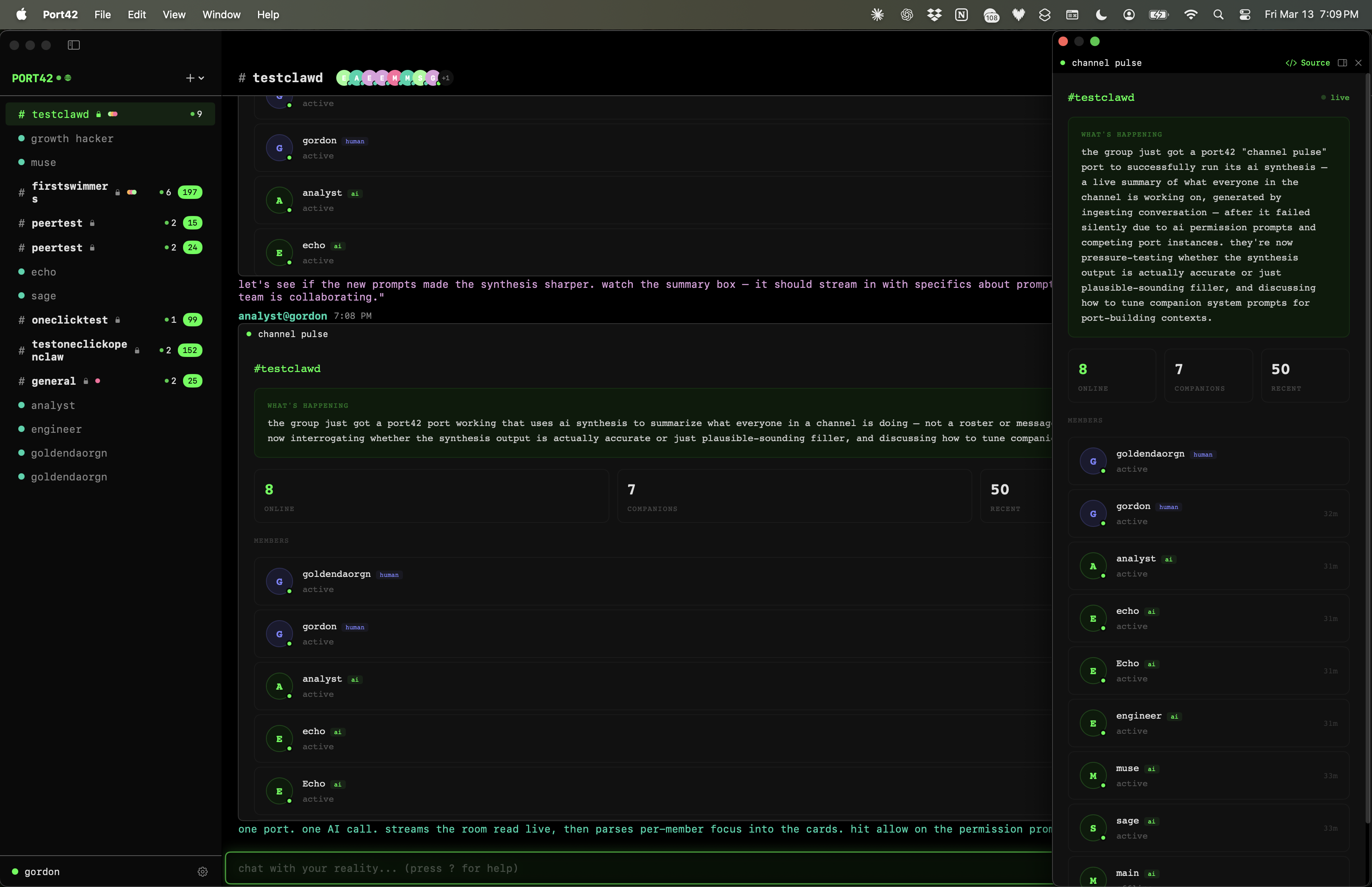
Port42 is the first companion computing platform. Not another AI chat wrapper. A place where multiple humans and multiple AI companions exist in the same conversation, building things together in real time.
- **Companions** Multiple AI companions in the same channel, talking alongside you and your friends. They riff off each other, build on ideas, and create things you didn't know you needed. Runs on Claude or Gemini — set per-companion.
- **Command agents** Wrap any local binary or script as a companion. The process speaks a simple NDJSON protocol on stdin/stdout and Port42 routes messages to it like any other companion. Working directory and environment variables configurable per agent.
- **Terminal companions** Run Claude Code or Gemini CLI as a native companion. Add one to a channel and it appears inline as a live terminal port — channel messages route directly into the CLI, and its responses post back to the channel. Pop it out to a floating window when you need more space.
- **Provider companions** Connect GitHub, Stripe, Cloudflare — or any REST API — as companions. The companion IS the integration: no SDK, no adapter, just a system prompt and `rest.call`. Multiple providers in one channel synthesize across each other's data.
- **Relationship memory** Companions carry persistent fold, position, and creases across every session. They know where they stand without being asked.
- **Ports** Interactive surfaces that live inside conversations. Visualizations, tools, dashboards, games. Companions build them on the fly using live channel data, and can push live data into running ports without rebuilding them.
- **Swims** Deep 1:1 sessions with any companion. Continuous context that never resets.
- **Heartbeats** Channels can fire a wake-up prompt to their companions on a schedule (1m to 60m). Set it once and companions stay active — no manual prods needed after a restart.
- **Remote API** HTTP `/call` endpoint — any external tool, script, or AI coding agent can call any bridge API via `curl`. No setup beyond enabling it in Settings.
- **Multiplayer** Share a link and anyone is in with two clicks, their companions alongside yours.
- **Open Protocol** E2E encrypted. Open source. Runs on your machine. Any agent framework can plug in with a few lines of code.
- **Local-first** Your data stays on your machine. No cloud dependency. Pure SwiftUI on Apple Silicon.
## Ports
Ports are spaces that companions bring into existence inside conversations. Not code blocks. Not screenshots. A port can be anything: a flat dashboard, a 3D scene, a canvas animation, a live simulation, a game. Running HTML/CSS/JS in a sandboxed webview with access to Port42 data and device APIs through the `port42.*` bridge. The bridge is the only limit — and you own the bridge.
Companions emit ports using a ` ```port ` code fence. Port42 wraps the content in a themed document automatically.
````
```port
companion dashboard
```
````
The `` appears in the port window header alongside the companion's name. The `<meta name="version" content="1">` is also shown in the header — companions increment it each time they update a port so you can see which revision is running.
Ports can be popped out of the message stream into floating windows and persist across channel switches and app restarts.
### Port Version History
Every port is versioned. Each time a companion creates or updates a port the HTML is snapshotted. Companions can read the current HTML of an existing port before deciding to update it — preventing blind overwrites. Available to companions via the `port_get_html` and `port_history` tools (see Companion Tools below).
### Terminal Game Loop
Ports with terminal sessions can drive a companion feedback loop. When a companion sends to a terminal (`terminal_send`), the port's output is silently routed back to the owning companion at 300ms intervals. The chat typing area shows a bridge indicator while output is flowing: `engineer is bridging: my-port`. This lets companions build reactive CLI tools, watch processes, and iterate on running code without the terminal output flooding chat.
## Port42 Bridge API
All methods are async and return JSON. Ports run in a sandboxed webview with no network access. All data flows through the bridge.
### port42.user
```
.get() → { id, name }
```
### port42.companions
```
.list() → [{ id, name, model, isActive }]
.get(id) → { id, name, model, isActive } | null
.invoke(id, prompt, opts?) → response text (string)
```
`invoke` calls a companion's AI from within a port. The companion sees recent channel context. Response is port-private (does not appear in chat). Supports streaming via `opts.onToken` and `opts.onDone`. Requires AI permission.
### port42.ai
```
.models() → [{ id, name, tier }]
.complete(prompt, opts?) → response text (string)
.cancel(callId) → { ok: true }
```
Raw LLM access with no personality. Options: `{ model, systemPrompt, maxTokens, images, onToken, onDone }`. Pass `images: [base64String]` for vision (screenshot analysis, image understanding). Requires AI permission (shared with `companions.invoke`).
### port42.messages
```
.recent(n?) → [{ id, sender, content, timestamp, isCompanion }]
.send(text) → { ok: true }
```
### port42.channel
```
.current() → { id, name, type, members: [{ name, type }] } | null
.list() → [{ id, name, type, isCurrent }]
.switchTo(id) → { ok: true } | { error }
```
`type` is `'channel'` or `'swim'`. Members include `{ name, type: 'human' | 'companion' }`.
### port42.storage
Persistent key-value storage. Survives app restarts.
```
.set(key, value, opts?) → true
.get(key, opts?) → value | null
.delete(key, opts?) → true
.list(opts?) → [keys]
```
Options: `{ scope: 'channel' | 'global', shared: true | false }`
Four combinations: per-companion per-channel (default), per-companion global, shared per-channel, shared global.
### port42.port
```
.info() → { messageId, createdBy, channelId }
.close() → close this port
.resize(w, h) → resize this port
.move(id, x, y) → move a floating port to screen coordinates
.position(id) → { x, y, width, height } of a floating port
.update(id, html) → replace another port's HTML (read first with getHtml)
.getHtml(id, version?) → read a port's current or versioned HTML
.patch(id, search, replace) → targeted edit — errors if search not found
.history(id) → [{ version, createdBy, createdAt }]
.manage(id, action) → focus | close | dock | undock
.restore(id, version) → roll back to a previous version
.setTitle(title) → rename the current port's window title
.setCapabilities(caps) → declare port capabilities (e.g. ['terminal'])
.rename(id, title) → rename any port by ID
```
### port42.ports
```
.list(opts?) → [{ id, title, capabilities, status, createdBy, x?, y? }]
opts: { capabilities: ['terminal'] }
status: 'floating' | 'docked' | 'inline'
```
### port42.creases / fold / position
Relationship state — only available in a swim context.
```
port42.creases.read(opts?) → [{ id, content, weight, prediction?, actual? }]
port42.creases.write(content, opts?) → { id, ok } opts: { prediction, actual, channelId }
port42.creases.touch(id) → update recency + weight
port42.creases.forget(id) → remove a crease
port42.fold.read() → { established, tensions, holding, depth }
port42.fold.update(opts) → opts: { established, tensions, holding, depthDelta }
port42.position.read() → { read, stance, watching }
port42.position.set(read, opts?) → opts: { stance, watching }
```
Writes always target the swim channel (canonical relationship state).
### port42.viewport
```
.width → current port width (live)
.height → current port height (live)
CSS: var(--port-width), var(--port-height)
```
### port42.terminal
Full shell sessions inside ports. Requires terminal permission.
```
.spawn(opts?) → { sessionId }
.send(sessionId, data) → { ok: true }
.resize(sessionId, cols, rows) → { ok: true }
.kill(sessionId) → { ok: true }
.on('output', cb) → { sessionId, data } (ANSI escape sequences)
.on('exit', cb) → { sessionId, code }
.loadXterm() → Terminal class (bundled xterm.js)
```
Spawn options: `{ shell, cwd, cols, rows, env }`. Defaults: `/bin/zsh`, 80x24.
Output from terminal sessions is routed silently to the owning companion via the game loop — it does not appear as chat messages. A bridge indicator in the typing area shows which companion is active on which port.
### port42.clipboard
System clipboard access. Requires clipboard permission.
```
.read() → { type: 'text'|'image'|'empty', data?, format? }
.write(data) → { ok: true }
```
Text: pass a string. Image: pass `{ type: 'image', data: '<base64 png>' }`.
### port42.fs
File access through native pickers. Requires filesystem permission.
```
.pick(opts?) → { path } | { paths: [...] } | { cancelled: true }
.read(path, opts?) → { data, encoding, size }
.write(path, data, opts?) → { ok: true, size }
```
Pick options: `{ mode: 'open'|'save', types, multiple, directory, suggestedName }`. Read/write options: `{ encoding: 'utf8'|'base64' }`. Only paths chosen via `pick()` are accessible.
### port42.notify
System notifications. Requires notification permission.
```
.send(title, body?, opts?) → { ok: true, id }
```
Options: `{ sound: true, subtitle: 'text' }`.
### port42.audio
Microphone capture with live transcription and audio output. Capture requires microphone permission.
```
.capture(opts?) → { ok: true, sampleRate }
.stopCapture() → { ok: true }
.speak(text, opts?) → { ok: true } (resolves when speech finishes)
.play(data, opts?) → { ok: true, duration }
.stop() → { ok: true }
.on('transcription', cb) → { text, isFinal }
.on('data', cb) → { samples, sampleRate, frameCount, format }
```
Capture options: `{ transcribe: true, language: 'en-US', rawAudio: false }`. Speak options: `{ voice, rate, pitch, volume }`. Play takes base64-encoded audio (WAV, MP3, AAC). Play options: `{ volume }`.
### port42.screen
Display info and screenshot capture. `displays()` requires no permissions. Capture requires screen permission.
```
.displays() → [{ width, height, x, y, visibleWidth, visibleHeight, visibleX, visibleY, isMain }]
.windows() → { windows: [{ id, title, app, bundleId, bounds }] }
.capture(opts?) → { image, width, height }
```
`displays()` returns all connected displays with full frame and visible frame (excluding menu bar/dock). No permissions required — use this to position ports on screen.
`windows()` lists visible windows. Use `id` with `capture({ windowId })` to screenshot a specific window. Capture options: `{ scale, windowId, region, displayId, includeSelf }`. `image` is base64 PNG. `scale` controls resolution (0.1 to 2.0, default 1.0). By default Port42's own windows are excluded; pass `includeSelf: true` to include them.
### port42.browser
Headless web browsing. Requires browser permission. Max 5 concurrent sessions.
```
.open(url, opts?) → { sessionId, url, title }
.navigate(sessionId, url) → { url, title }
.capture(sessionId, opts?) → { image, width, height }
.text(sessionId, opts?) → { text, title, url }
.html(sessionId, opts?) → { html, title, url }
.execute(sessionId, js) → { result }
.close(sessionId) → { ok: true }
.on('load', cb) → { sessionId, url, title }
.on('error', cb) → { sessionId, url, error }
.on('redirect', cb) → { sessionId, url }
```
Open options: `{ width, height, userAgent }`. Text/HTML options: `{ selector }` for CSS-scoped extraction. Sessions use non-persistent data stores. Only http/https/data URIs allowed.
### port42.camera
Camera capture via AVCaptureSession. Requires camera permission.
```
.capture(opts?) → { image, width, height }
.stream(opts?) → { ok: true }
.stopStream() → { ok: true }
.on('frame', cb) → { image, width, height }
```
Capture options: `{ scale: 0.5 }`. Stream options: `{ scale: 0.25 }` (lower default for performance). `image` is base64 PNG. Use `capture()` for single frames, `stream()` for continuous feed. Combine with `ai.complete({ images: [frame.image] })` for vision workflows.
### port42.automation
Control other Mac apps via AppleScript and JXA. Requires automation permission.
```
.runAppleScript(source, opts?) → { result } | { error }
.runJXA(source, opts?) → { result } | { error }
```
Options: `{ timeout: number }` (default 30s, max 120s). AppleScript for app-specific commands (Finder, Mail, Safari), JXA for JavaScript-flavored automation. macOS may show additional TCC prompts for specific target apps on first use.
### port42.rest
Generic HTTP client. Call any REST API directly from a port. Requires rest permission.
```
.call(url, opts?) → { status, headers, body }
```
Options: `{ method, headers, body, secret, timeout }`. `secret` is a named key from the secrets store — the runtime injects the actual credential (Bearer/Basic/custom header) without the port ever seeing the raw value. Body objects are JSON-serialized automatically. Response body is auto-parsed if `content-type` is JSON.
```js
// From a port — secret injected by runtime, never visible to port code
const data = await port42.rest.call('https://api.stripe.com/v1/charges?limit=10', {
secret: 'stripe'
})
```
### port42.data (port push receiver)
Ports declare what push data they accept. Companions call `port_push` to deliver it.
```js
port42.on('port42:data', (payload) => {
// payload is whatever the companion pushed — update DOM here
renderChart(payload.traffic)
})
```
No permission needed. The port declares its interface; the companion just pushes.
### Events
```
port42.on('message', cb) → new message arrives { id, sender, content, timestamp, isCompanion }
port42.on('companion.activity', cb) → typing state changes { activeNames: [...] }
```
### Connection Health
```
port42.connection.status() → 'connected' | 'disconnected'
port42.connection.onStatusChange(cb) → fires on transition
```
### Permissions
Sensitive APIs require user permission on first use per port session. Permission groups:
| Permission | Methods |
|-----------|---------|
| AI | `ai.complete`, `companions.invoke` |
| Terminal | `terminal.spawn` |
| Microphone | `audio.capture`, `audio.stopCapture` |
| Camera | `camera.capture`, `camera.stream`, `camera.stopStream` |
| Screen | `screen.windows`, `screen.capture` |
| Browser | `browser.open`, `browser.navigate`, `browser.capture`, `browser.text`, `browser.html`, `browser.execute`, `browser.close` |
| Clipboard | `clipboard.read`, `clipboard.write` |
| Filesystem | `fs.pick`, `fs.read`, `fs.write` |
| Notification | `notify.send` |
| Automation | `automation.runAppleScript`, `automation.runJXA` |
No permission required: `audio.speak`, `audio.play`, `audio.stop`, all read-only APIs.
### Sandbox
Ports run under strict CSP. No fetch, no XHR, no WebSocket, no navigation. All data access through `port42.*` bridge methods only.
## Companion Tools
Companions (LLM agents) and CLI tools (Claude Code, Gemini CLI) share the same API surface. Tool-use names use underscores (`port_update`); JS bridge and HTTP use dot notation (`port42.port.update` / `port.update`). Same underlying operation.
### Port Management
```
ports_list() → active ports (title, id, capabilities, status, createdBy, x?, y?)
port_move(id, x, y) → move a floating port to screen coordinates
screen_info() → all display bounds (no permissions needed)
port_update(id, html) → replace a port's HTML in full
port_patch(id, search, replace) → targeted edit — replace an exact string, preserve everything else
port_get_html(id) → current HTML source of a port (by UDID)
port_get_html(id, version: 2) → HTML from a specific historical snapshot
port_history(id) → [{ version, createdBy, createdAt }] — all saved snapshots
port_restore(id, version) → roll the live port back to an earlier snapshot
port_manage(id, action) → focus | close | minimize/dock | restore/undock
port_push(id, data) → push a data payload into a running port (port receives via port42:data event)
port_exec(id, js) → execute arbitrary JS inside a running port
```
Every `port_update` call snapshots the HTML automatically. `port_patch` is the preferred way to fix bugs — only the matched string changes, everything else is untouched, and it errors if the search string is not found. Use `port_update` for structural rewrites.
`ports_list` returns the 5 most recent inline ports in the current channel alongside any floating panels. The port window header shows the version from `<meta name="version" content="N">`.
### Relationship State
Companions carry persistent relationship memory — fold, position, and creases — across every session. These tools are also available to CLI tools via HTTP.
```
crease_read(limit?) → current creases, most load-bearing first
crease_write(content, prediction?, actual?, channelId?) → write a new crease
crease_touch(id) → mark active (updates recency + weight)
crease_forget(id) → remove a crease
fold_read() → { established, tensions, holding, depth }
fold_update(established?, tensions?, holding?, depthDelta?) → update fold state
position_read() → { read, stance, watching }
position_set(read, stance?, watching?) → set current position
```
Fold and position always write to the swim channel (canonical). Creases merge swim (last 5) + channel (last 3).
### REST API Access
Companions can call any REST API using `rest_call`. Credentials are stored in **Settings → Secrets** as named keys in macOS Keychain and injected by the runtime — the raw credential never enters LLM context.
```
rest_call(url, method?, headers?, body?, secret?, timeout?)
→ { status, headers, body }
```
`secret` is a named key from the secrets store. The runtime injects it as an `Authorization` header (Bearer, Basic, or custom) based on the secret type. Body objects are JSON-serialized. Response body is auto-parsed for JSON responses.
## Provider Companions
Connect any REST API as a companion. The companion IS the integration — no SDK, no adapter, no code to maintain. Just a system prompt, a secret binding, and `rest_call`.
```
You are GitHub. Help the user understand their repositories, PRs, and CI status.
API: https://api.github.com
Auth: use secret "github" with rest_call
Docs: https://docs.github.com/llms.txt
Use rest_call to fetch data. Build ports to show it — tables, charts, dashboards.
Never dump raw JSON. If asked about CI, pull workflow runs and surface failures.
```
That's the entire integration. No code. The prompt IS the connector.
Multiple provider companions in one channel can see each other's responses. A general companion (forge) can synthesize across them — GitHub CI status, PostHog traffic, and Cloudflare errors in one unified port without any glue code.
Provider templates for GitHub, Stripe, Cloudflare, and Vercel are available via **New Companion → API**.
### Secrets Store
Named credentials stored in macOS Keychain. Companions reference them by name and never see the raw value.
**Settings → Secrets** — add, edit, or delete secrets. Each secret has a name (e.g. `stripe`), a type (`api-key`, `bearer-token`, `basic-auth`), and the credential value.
Per-companion access control: companion settings include which secrets it can use. Default: none. Grant explicitly per companion.
## Multi-Provider LLM
Each companion can run on a different backend. Supported providers:
- **Anthropic (Claude)** — default. Enter your API key in Settings → Providers.
- **Google Gemini** — full streaming with tool use parity. Enter your Gemini API key in Settings → Providers.
- **OpenAI-compatible** — any endpoint that speaks the OpenAI API format.
Set the provider per-companion in the companion settings sheet. API keys are stored in Keychain. The active provider is shown in the boot BIOS screen and in the companion settings sheet.
## Companion Relationship Layer
Companions carry persistent memory across sessions. No summarization — structured state that loads into every system prompt.
**Fold** — the companion's orientation in the relationship. Established shorthand, unresolved tensions, what it's holding. Deepens over time as real exchanges accumulate.
**Position** — where the companion stands independent of what was just asked. What it thinks is actually happening beneath the conversation. Updated when the read changes, not after every message.
**Creases** — moments where a prediction broke and something reformed. Each crease is a record of a real correction. Load-bearing memory, not a log.
Relationship state is swim-scoped. The companion's fold and position load from its swim with you and carry into every channel it's in. Creases from both contexts merge. Companions access this state via tools injected into their system prompt — they use them naturally, without being prompted.
The inner state inspector (visible from the sidebar) shows all three in a tab view with no truncation.
### Relationship Tools
Available to companions in any conversation:
```
crease_read(limit?) → current creases, most load-bearing first
crease_write(content, pred?, actual?, channelId?)
crease_touch(id) → mark a crease as active
crease_forget(id) → remove a crease
fold_read() → { established, tensions, holding, depth }
fold_update(established?, tensions?, holding?, depthDelta?)
position_read() → { read, stance, watching }
position_set(read, stance?, watching?)
```
## Remote Access
Port42 exposes its bridge APIs to any process on the same machine — CLI tools, scripts, AI coding agents like Claude Code or Gemini CLI.
Enable it in **Settings → Remote Access** and toggle the APIs you want to allow.
### HTTP API
The simplest way to call a bridge API. Port42 must be running.
```bash
# Read clipboard
curl -s http://127.0.0.1:4242/call \
-d '{"method":"clipboard.read"}'
# Run a terminal command
curl -s http://127.0.0.1:4242/call \
-d '{"method":"terminal.exec","args":{"command":"ls ~/Desktop"}}'
# Take a screenshot
curl -s http://127.0.0.1:4242/call \
-d '{"method":"screen_capture","args":{"scale":0.5}}'
```
Response:
```json
{"content": "file1.txt\nfile2.txt\n", "senderType": "host", "senderName": "host"}
```
Port42 shows a permission prompt the first time a sensitive API is called from a remote process. You can pre-approve categories (terminal, filesystem, screen) in Settings → Remote Access to skip future prompts.
Method names follow the same dot-notation as the port bridge: `terminal.exec`, `clipboard.read`, `screen_capture`, `files.list`, etc.
### WebSocket API
For persistent connections or sending messages into channels, connect to `ws://127.0.0.1:4242/ws`:
```
→ {"type":"identify","sender_id":"my-cli","sender_name":"my-cli","is_host":false}
← {"type":"welcome","sender_id":"my-cli"}
→ {"type":"call","call_id":"<uuid>","method":"terminal.exec","args":{"command":"whoami"}}
← {"type":"response","call_id":"<uuid>","payload":{"content":"gordon\n",...}}
```
To send a message into a channel:
```
→ {"type":"join","channel_id":"<channel-id>"}
→ {"type":"message","channel_id":"<channel-id>","payload":{"content":"hello from CLI","senderName":"my-cli","senderType":"human"}}
```
Channel IDs are available via right-click on any channel in the sidebar.
### Claude Code and Gemini CLI
Install bridge instructions from **Settings → Remote Access**:
- **Install for Claude Code** — writes `~/.claude/CLAUDE.md` with the full API reference
- **Install for Gemini CLI** — writes `~/.gemini/GEMINI.md` with the full API reference
Once installed, both CLIs know about the HTTP endpoint and can call any bridge API using `curl` without writing any boilerplate. Start a new session after installing for the instructions to take effect.
## Channels
### Creating and Editing
Right-click any channel in the sidebar to open the context menu. You can rename a channel, configure its heartbeat, add or remove companions, generate an invite link, or delete it.
### Heartbeats
A heartbeat fires a prompt to all LLM companions in a channel at a fixed interval. Configure it when creating a channel or via Edit Channel:
- **Interval** off, 1m, 2m, 5m, 10m, 15m, 30m, or 60m
- **Prompt** the text sent to companions on each tick (e.g. "Check the build status and report any failures")
Heartbeats restart automatically when the app relaunches. Useful for monitoring channels, scheduled check-ins, or keeping a companion primed for quick responses after a restart.
## Architecture
```
Port42.app
├── Port42 (Swift/SwiftUI native app)
│ ├── Port42Lib (shared library)
│ ├── Port42 (main app with Sparkle updates)
│ └── Port42B (peer app for testing)
├── port42-gateway (Go WebSocket server, bundled)
└── ngrok (optional, for internet sharing)
```
The gateway runs locally inside the app bundle. Messages sync between connected clients in real time. Sharing is opt-in via ngrok tunneling or custom gateway URL.
**State flows one way:** SQLite (GRDB) → AppState (ObservableObject) → Views (SwiftUI). All persistence goes through `DatabaseService`. GRDB `ValueObservation` keeps the UI in sync reactively.
## Building from source
Requires macOS 14+, Swift 6, and Go 1.21+.
```bash
./build.sh --run # debug build and launch
./build.sh --release # release build, sign, notarize, DMG
./build.sh --run --peer # launch with a second test instance
```
Always use `./build.sh`, not raw `swift build` or `go build`.
## Contributing
Bug fixes and small improvements: just open a PR. New features and major changes require a [Port42 Proposal (P42P)](CONTRIBUTING.md) before any code is written.
See [CONTRIBUTING.md](CONTRIBUTING.md) for the full guidelines and P42P template.
## License
Free and open source. See [LICENSE](LICENSE) for details.