
Free, open-source software for e-commerce websites
composer create-project gp247/s-cart
Homepage | Demo | Documentation | FB Group


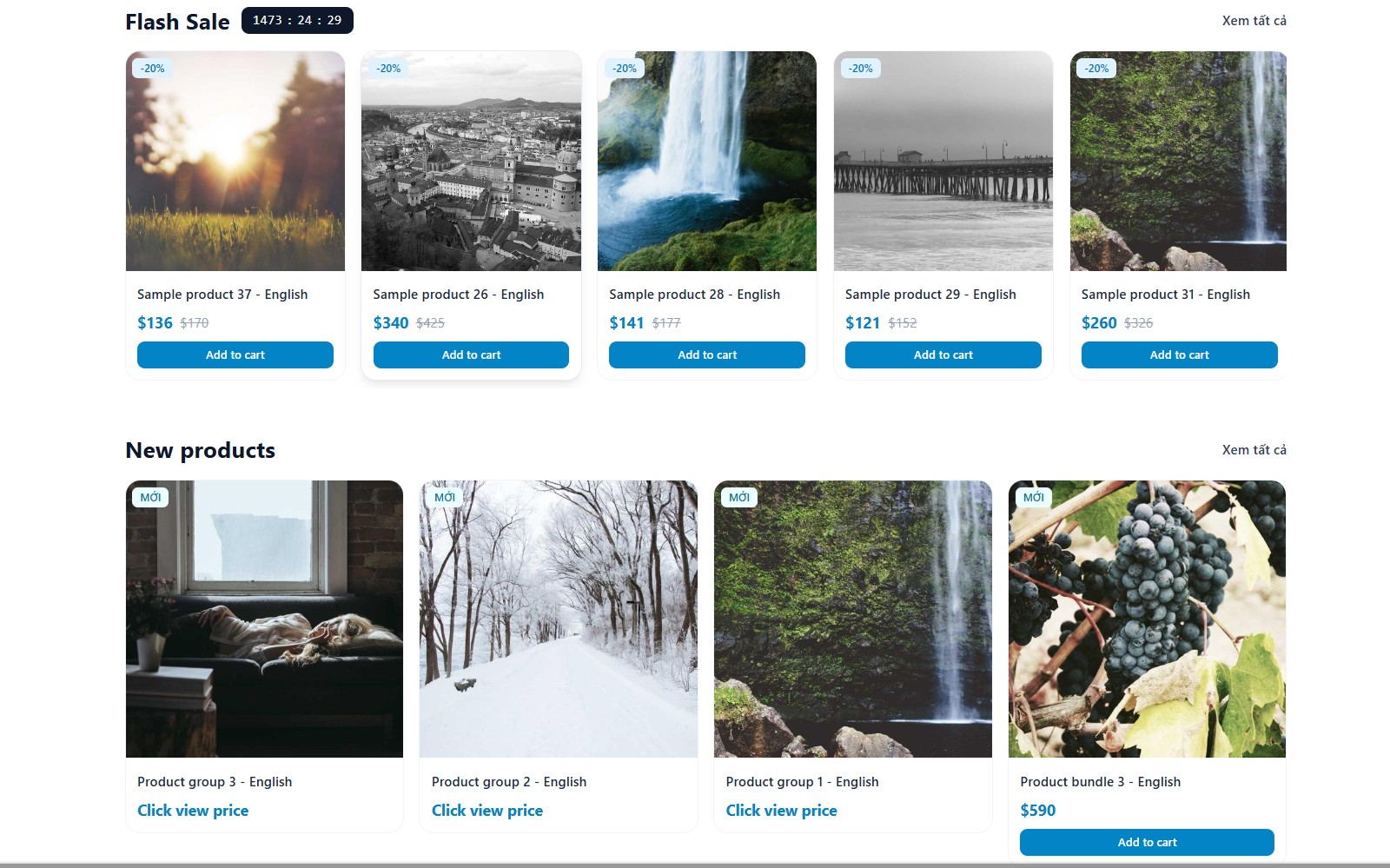
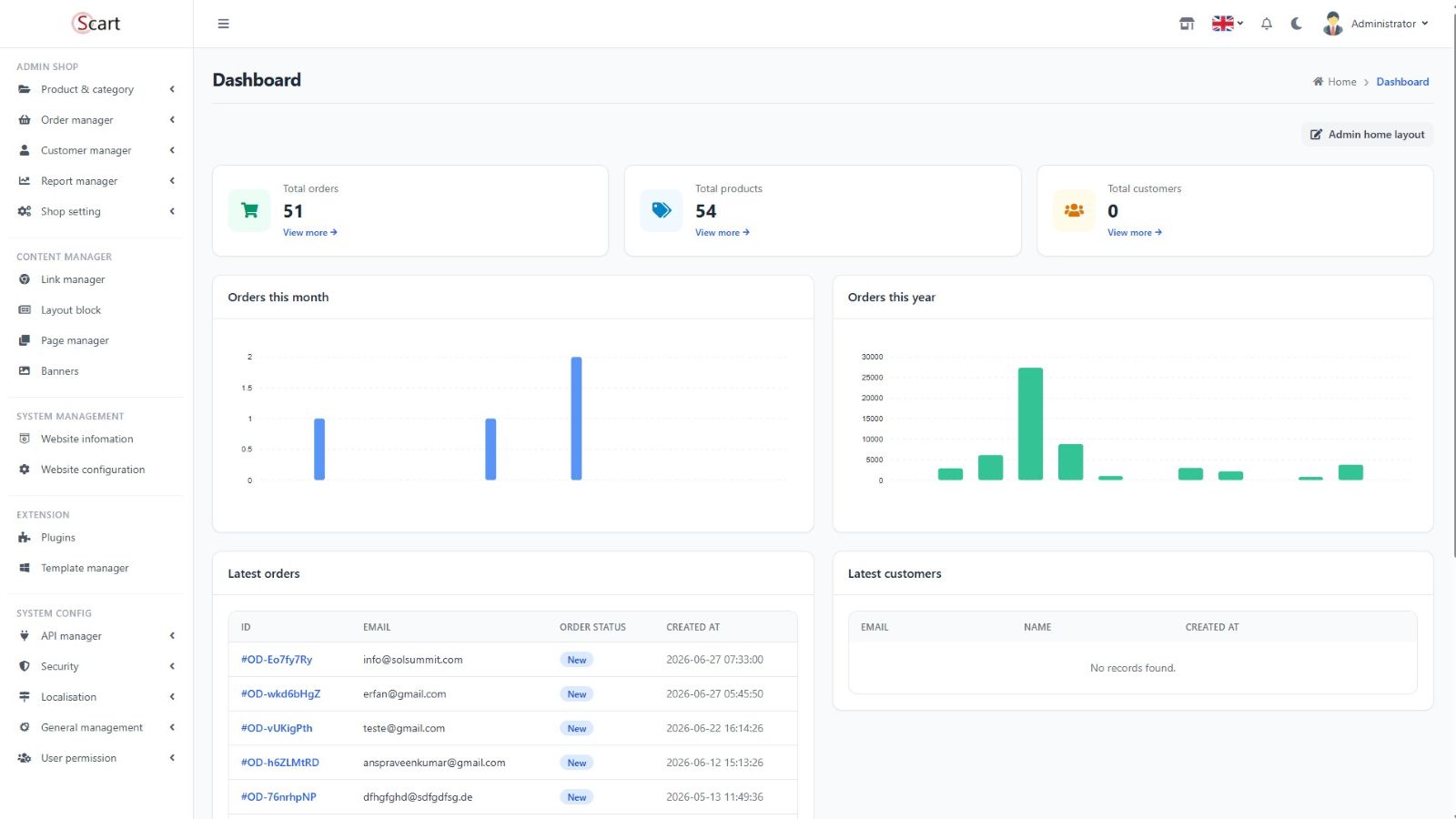 ## S-Cart features
#### Core capabilities
- Plugin packages built on the HMVC pattern
- Command-line upgrades and patches for S-Cart
- Full documentation for developers and customers
#### Professional storefront features
- **Multi-language**
- **Multi-currency**
- **Full e-commerce feature set:**
- Shopping cart management
- Order management
- Product management
- Customer management
- **CMS content management**:
- Categories
- News
- Content pages
- **Extensions**:
- Payment plugins
- Shipping methods
- Discount system
- Tax calculation
- **Professional plugins for S-Cart**:
- Multi-vendor: https://gp247.net/en/docs/s-cart/multi-vendor.html
- Multi-store: https://gp247.net/en/docs/s-cart/multi-store.html
- **Developer resources**:
- Online marketplace for plugins and templates
- Secured API support for apps and mobile integrations
#### Powerful administration
- **User management**:
- Role-based permissions (admin, manager, marketing, etc.)
- Comprehensive security with full audit logging
- Access control, authentication, and CAPTCHA
- **Business tools**:
- Product management
- Order processing
- Customer management
- Analytics and reporting
- Activity tracking
## Folder structure for a GP247-based website
Website-folder/
|
├── app
│ └── GP247
│ ├── Core(+) //Override Core controllers
│ ├── Helpers(+) //Auto-loads Helpers/*.php into the system
│ ├── Front(+) //Override GP247/Front controllers
│ ├── Shop(+) //Override GP247/Shop controllers
│ ├── Plugins(+) //Generated by `php artisan gp247:make-plugin --name=NameOfPlugin`
│ └── Templates(+) //Generated by `php artisan gp247:make-template --name=NameOfTempate`
├── public
│ └── GP247
│ ├── Core(+)
│ ├── Plugins(+)
│ └── Templates(+)
├── resources
│ └── views/vendor
│ ├── gp247-admin(+) //Core view overrides
│ ├── gp247-shop-admin(+) //Shop view overrides
│ └── gp247-front-admin(+) //Front view overrides
├── vendor
│ ├── gp247/core
│ ├── gp247/front
│ └── gp247/shop
└──...
---
# 2. Quick installation guide
## Method 1: Install with Composer (recommended)
**1. Create the project**
```bash
composer create-project gp247/s-cart
```
**2. Check your `.env` configuration**
Make sure the database settings are correct. If `APP_KEY` is not set yet,
generate it with:
```bash
php artisan key:generate
```
**3. Install S-Cart**
```bash
php artisan sc:install
```
**4. Install sample data (optional)**
```bash
php artisan sc:sample
```
## Method 2: Install with Git Clone
**1. Clone the repository**
```bash
git clone https://github.com/gp247net/s-cart.git
cd s-cart
```
**2. Create `.env` and install dependencies**
```bash
cp .env.example .env
php artisan key:generate
composer install
```
**3. Configure the database in `.env`**
```env
DB_CONNECTION=mysql
DB_HOST=127.0.0.1
DB_PORT=3306
DB_DATABASE=your_database_name
DB_USERNAME=your_username
DB_PASSWORD=your_password
```
**4. Install S-Cart**
```bash
php artisan sc:install
php artisan sc:sample # optional, sample data
```
## Method 3: Install with Docker (supported from S-Cart 2)
No need to install PHP/Composer/MySQL on your machine — Docker is all you
need. There are **two clearly separate** compose files for dev and prod —
always use the right one for the environment:
- `docker-compose.yml` — **dev** environment (your local machine)
- `docker-compose.prod.yml` — **prod** environment (your server)
**DEV setup:**
```bash
git clone https://github.com/gp247net/s-cart.git
cd s-cart
cp .env.example .env
docker compose up -d --build
docker compose exec app php artisan key:generate
docker compose exec app php artisan sc:install
docker compose exec app php artisan sc:sample # optional
```
Open the site: http://localhost:8000
**PROD setup:**
```bash
git clone https://github.com/gp247net/s-cart.git
cd s-cart
cp .env.example .env
# Configure .env for prod: APP_ENV, DB_*, WWWUSER/WWWGROUP — see DOCKER.md
docker compose -f docker-compose.prod.yml up -d --build
docker compose -f docker-compose.prod.yml exec app php artisan key:generate
docker compose -f docker-compose.prod.yml exec app php artisan sc:install
docker compose -f docker-compose.prod.yml exec app php artisan sc:sample # optional
docker compose -f docker-compose.prod.yml run --rm node # build CSS/JS assets
```
⚠️ Always include `-f docker-compose.prod.yml` on prod — forgetting it
accidentally applies the dev config (debug mode on, runs as root, installs
Xdebug...). See the Q&A in [DOCKER.md](DOCKER.md) for that failure mode in
detail.
For the full step-by-step guide and a detailed troubleshooting Q&A
covering both dev and prod, see [DOCKER.md](DOCKER.md).
## Important note on folder permissions
If you installed with Method 1 or 2 (no Docker), make sure the following
folders are writable, otherwise installation and various features won't
work correctly:
- `app/GP247`
- `public/GP247`
- `public/vendor`
- `resources/views/vendor`
- `storage`
- `vendor`
---
# 3. Q&A
### Q: How do I check the installed S-Cart version?
*(Only available when S-Cart is installed directly, not via the component-by-component method)*
```bash
php artisan sc:info
```
### Q: How do I update S-Cart?
Update each package with Composer:
```bash
composer update gp247/core
composer update gp247/front
composer update gp247/shop
```
Then run (only available when S-Cart is installed directly):
```bash
php artisan sc:update
```
### Q: How do I create a new plugin?
```bash
php artisan gp247:make-plugin --name=PluginName
```
Also generate a zip file for distribution:
```bash
php artisan gp247:make-plugin --name=PluginName --download=1
```
### Q: How do I create a new template?
```bash
php artisan gp247:make-template --name=TemplateName
```
Also generate a zip file for distribution:
```bash
php artisan gp247:make-template --name=TemplateName --download=1
```
### Q: How do I customize the upload (lfm) configuration?
```bash
php artisan vendor:publish --tag=config-lfm
```
### Q: How do I customize the admin UI?
Each package publishes its admin views into its own `views/vendor/
## S-Cart features
#### Core capabilities
- Plugin packages built on the HMVC pattern
- Command-line upgrades and patches for S-Cart
- Full documentation for developers and customers
#### Professional storefront features
- **Multi-language**
- **Multi-currency**
- **Full e-commerce feature set:**
- Shopping cart management
- Order management
- Product management
- Customer management
- **CMS content management**:
- Categories
- News
- Content pages
- **Extensions**:
- Payment plugins
- Shipping methods
- Discount system
- Tax calculation
- **Professional plugins for S-Cart**:
- Multi-vendor: https://gp247.net/en/docs/s-cart/multi-vendor.html
- Multi-store: https://gp247.net/en/docs/s-cart/multi-store.html
- **Developer resources**:
- Online marketplace for plugins and templates
- Secured API support for apps and mobile integrations
#### Powerful administration
- **User management**:
- Role-based permissions (admin, manager, marketing, etc.)
- Comprehensive security with full audit logging
- Access control, authentication, and CAPTCHA
- **Business tools**:
- Product management
- Order processing
- Customer management
- Analytics and reporting
- Activity tracking
## Folder structure for a GP247-based website
Website-folder/
|
├── app
│ └── GP247
│ ├── Core(+) //Override Core controllers
│ ├── Helpers(+) //Auto-loads Helpers/*.php into the system
│ ├── Front(+) //Override GP247/Front controllers
│ ├── Shop(+) //Override GP247/Shop controllers
│ ├── Plugins(+) //Generated by `php artisan gp247:make-plugin --name=NameOfPlugin`
│ └── Templates(+) //Generated by `php artisan gp247:make-template --name=NameOfTempate`
├── public
│ └── GP247
│ ├── Core(+)
│ ├── Plugins(+)
│ └── Templates(+)
├── resources
│ └── views/vendor
│ ├── gp247-admin(+) //Core view overrides
│ ├── gp247-shop-admin(+) //Shop view overrides
│ └── gp247-front-admin(+) //Front view overrides
├── vendor
│ ├── gp247/core
│ ├── gp247/front
│ └── gp247/shop
└──...
---
# 2. Quick installation guide
## Method 1: Install with Composer (recommended)
**1. Create the project**
```bash
composer create-project gp247/s-cart
```
**2. Check your `.env` configuration**
Make sure the database settings are correct. If `APP_KEY` is not set yet,
generate it with:
```bash
php artisan key:generate
```
**3. Install S-Cart**
```bash
php artisan sc:install
```
**4. Install sample data (optional)**
```bash
php artisan sc:sample
```
## Method 2: Install with Git Clone
**1. Clone the repository**
```bash
git clone https://github.com/gp247net/s-cart.git
cd s-cart
```
**2. Create `.env` and install dependencies**
```bash
cp .env.example .env
php artisan key:generate
composer install
```
**3. Configure the database in `.env`**
```env
DB_CONNECTION=mysql
DB_HOST=127.0.0.1
DB_PORT=3306
DB_DATABASE=your_database_name
DB_USERNAME=your_username
DB_PASSWORD=your_password
```
**4. Install S-Cart**
```bash
php artisan sc:install
php artisan sc:sample # optional, sample data
```
## Method 3: Install with Docker (supported from S-Cart 2)
No need to install PHP/Composer/MySQL on your machine — Docker is all you
need. There are **two clearly separate** compose files for dev and prod —
always use the right one for the environment:
- `docker-compose.yml` — **dev** environment (your local machine)
- `docker-compose.prod.yml` — **prod** environment (your server)
**DEV setup:**
```bash
git clone https://github.com/gp247net/s-cart.git
cd s-cart
cp .env.example .env
docker compose up -d --build
docker compose exec app php artisan key:generate
docker compose exec app php artisan sc:install
docker compose exec app php artisan sc:sample # optional
```
Open the site: http://localhost:8000
**PROD setup:**
```bash
git clone https://github.com/gp247net/s-cart.git
cd s-cart
cp .env.example .env
# Configure .env for prod: APP_ENV, DB_*, WWWUSER/WWWGROUP — see DOCKER.md
docker compose -f docker-compose.prod.yml up -d --build
docker compose -f docker-compose.prod.yml exec app php artisan key:generate
docker compose -f docker-compose.prod.yml exec app php artisan sc:install
docker compose -f docker-compose.prod.yml exec app php artisan sc:sample # optional
docker compose -f docker-compose.prod.yml run --rm node # build CSS/JS assets
```
⚠️ Always include `-f docker-compose.prod.yml` on prod — forgetting it
accidentally applies the dev config (debug mode on, runs as root, installs
Xdebug...). See the Q&A in [DOCKER.md](DOCKER.md) for that failure mode in
detail.
For the full step-by-step guide and a detailed troubleshooting Q&A
covering both dev and prod, see [DOCKER.md](DOCKER.md).
## Important note on folder permissions
If you installed with Method 1 or 2 (no Docker), make sure the following
folders are writable, otherwise installation and various features won't
work correctly:
- `app/GP247`
- `public/GP247`
- `public/vendor`
- `resources/views/vendor`
- `storage`
- `vendor`
---
# 3. Q&A
### Q: How do I check the installed S-Cart version?
*(Only available when S-Cart is installed directly, not via the component-by-component method)*
```bash
php artisan sc:info
```
### Q: How do I update S-Cart?
Update each package with Composer:
```bash
composer update gp247/core
composer update gp247/front
composer update gp247/shop
```
Then run (only available when S-Cart is installed directly):
```bash
php artisan sc:update
```
### Q: How do I create a new plugin?
```bash
php artisan gp247:make-plugin --name=PluginName
```
Also generate a zip file for distribution:
```bash
php artisan gp247:make-plugin --name=PluginName --download=1
```
### Q: How do I create a new template?
```bash
php artisan gp247:make-template --name=TemplateName
```
Also generate a zip file for distribution:
```bash
php artisan gp247:make-template --name=TemplateName --download=1
```
### Q: How do I customize the upload (lfm) configuration?
```bash
php artisan vendor:publish --tag=config-lfm
```
### Q: How do I customize the admin UI?
Each package publishes its admin views into its own `views/vendor/