> [!IMPORTANT]
> **ChronoLog v3.3.0 is now available.**
> The latest stable release, with a new archive layout: each story is archived in a directory of its own, and ChronoPlayer finds the files through ChronoGrapher's manifest instead of directory listings, so replay works on NFS and any chronicle or story name can be archived. 3.3.0 does not read archives written by earlier releases; start it on a new archive directory.
> [Releases on chronolog.dev](https://www.chronolog.dev/releases) · [Release notes](https://github.com/grc-iit/ChronoLog/releases/latest) · [All releases on GitHub](https://github.com/grc-iit/ChronoLog/releases) · [Documentation](https://www.chronolog.dev/docs)

ChronoLog
Distributed Shared Tiered Log Store
A distributed and tiered shared log storage ecosystem that uses physical time to distribute log entries while providing total log ordering.


Website
·
Documentation
·
Releases
·
Issues
## Overview
**ChronoLog** is a distributed, tiered shared log store with time-based event ordering. It uses physical time for data distribution and multiple storage tiers for elastic capacity, eliminating the need for a central sequencer while keeping ingestion and query paths independently scalable.
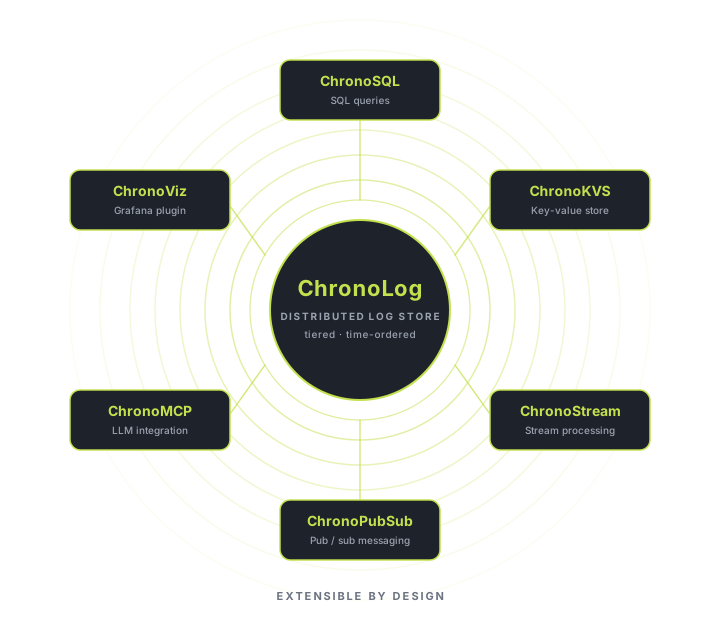
A pluggable serving layer lets custom services run directly on the log. Shipping plugins cover SQL-like queries, key-value storage, streaming, pub/sub, Grafana visualization, LDMS telemetry ingest for HPC monitoring, and an MCP server for LLM integration.
### Key Features
- **No central sequencer**: physical-time partitioning enables high-throughput parallel writes.
- **Tiered storage**: StoryChunks flow across fast and capacity tiers automatically.
- **Durable hand-off between tiers**: a ChronoKeeper keeps each chunk until ChronoGrapher confirms it archived, and replay reads the events not yet archived from the keepers.
- **Archive on a shared file system**: each story has its own archive directory, and ChronoPlayer finds new files through ChronoGrapher's manifest, so replay works on NFS.
- **Concurrent access at scale**: multi-writer, multi-reader over RDMA or TCP.
- **Pluggable serving layer**: extend the log with custom query and streaming services.
For more, visit [chronolog.dev](https://www.chronolog.dev).
## Installation
ChronoLog ships in five flavors. Pick the one that matches your environment. The full step-by-step guide for every method (including configuration, single-node and multi-node deployment) lives in the [Quick Start guide on chronolog.dev](https://www.chronolog.dev/docs/getting-started/quick-start).
Release archive (tarball): pre-built binaries, no toolchain required
Best for trying ChronoLog quickly on a Linux x86_64 host.
Download the tarball:
```bash
wget https://github.com/grc-iit/ChronoLog/releases/download/v3.3.0/chronolog-3.3.0-linux-x86_64.tar.gz
```
Extract it:
```bash
tar -xzf chronolog-3.3.0-linux-x86_64.tar.gz
```
Full guide → [Quick Start: Release Archive](https://www.chronolog.dev/docs/getting-started/quick-start)
DEB package: Debian / Ubuntu
System-wide install via `apt` for Debian, Ubuntu, and compatible distributions.
```bash
sudo apt install ./chronolog-3.3.0-linux-x86_64.deb
```
Full guide → [Quick Start: DEB Package](https://www.chronolog.dev/docs/getting-started/quick-start)
RPM package: RHEL / Fedora / Rocky / Alma
System-wide install via `dnf` (or `yum`) for RHEL-family distributions.
```bash
sudo dnf install ./chronolog-3.3.0-linux-x86_64.rpm
```
Full guide → [Quick Start: RPM Package](https://www.chronolog.dev/docs/getting-started/quick-start)
Docker: containerized, single- or multi-node
Containerized deployment with ChronoLog pre-installed.
Pull the image:
```bash
docker pull ghcr.io/grc-iit/chronolog:latest
```
Run a container:
```bash
docker run -it --rm ghcr.io/grc-iit/chronolog:latest bash
```
Full guide → [Quick Start: Docker](https://www.chronolog.dev/docs/getting-started/quick-start) · [Single-node tutorial](https://www.chronolog.dev/docs/tutorials/docker-single-node/running-chronolog) · [Multi-node tutorial](https://www.chronolog.dev/docs/tutorials/docker-multi-node/running-chronolog)
Build from source: for developers and advanced users
For modifying ChronoLog, building against a custom dependency set, or targeting a platform without pre-built packages.
Clone the repository:
```bash
git clone https://github.com/grc-iit/ChronoLog.git
```
Enter the repo:
```bash
cd ChronoLog
```
Activate the Spack environment and install dependencies:
```bash
spack env activate -p .
```
```bash
spack install -v
```
Configure, build, and install:
```bash
mkdir build && cd build
```
```bash
cmake -DCMAKE_BUILD_TYPE=Release ..
```
```bash
make all
```
```bash
make install
```
Full guide → [Quick Start: Build from Source](https://www.chronolog.dev/docs/getting-started/quick-start)
## Documentation
Full documentation lives at [chronolog.dev/docs](https://www.chronolog.dev/docs/getting-started/overview):
- [Getting Started](https://www.chronolog.dev/docs/getting-started/overview): overview, core concepts, and Quick Start install paths.
- [User Guide](https://www.chronolog.dev/docs/user-guide/overview): architecture, configuration, deployment, and the data model.
- [Tutorials](https://www.chronolog.dev/docs/tutorials/docker-single-node/running-chronolog): step-by-step walkthroughs for single- and multi-node Docker deployments.
- [Contributing](https://www.chronolog.dev/docs/contributing/development/building-for-development): build-for-development setup, code style, and contributor guidelines.
## Research Network
ChronoLog evolves alongside a network of labs and institutions whose research shapes the kinds of workloads and infrastructure our system is designed to support. [Argonne National Laboratory](https://www.anl.gov) and [Lawrence Livermore National Laboratory](https://www.llnl.gov) advance exascale computing, HPC system software, resource management, and large-scale telemetry. The [University of Chicago](https://www.uchicago.edu) leads research on distributed systems and large-scale scientific workflows for cosmology and the physical sciences. The [SCI Institute at the University of Utah](https://www.sci.utah.edu) drives scientific visualization, in-situ analysis, and large-scale data exploration for simulation and instrument science. [Ohio State University](https://www.osu.edu) is a leader in high-performance networking, MPI, and RDMA-based communication. [DePaul University](https://www.depaul.edu) works on data systems, lightweight indexing, and computational provenance. The [Institute for Food Safety and Health (IFSH)](https://www.iit.edu/ifsh) applies high-throughput data analysis, genomics, and bioinformatics to food safety and public-health challenges.







> **Interested in integrating ChronoLog into your research or systems?** We welcome conversations with labs, research groups, and engineering teams working on scalable event processing, large-scale telemetry, time-ordered storage, and related problems. Reach out via [GitHub Issues](https://github.com/grc-iit/ChronoLog/issues) or contact the [Gnosis Research Center](https://grc.iit.edu).
---

**Gnosis Research Center**
Illinois Institute of Technology
*Advancing the Future of Scalable Computing and Data-Driven Discovery*
**Connect with us:**
🌐 [Website](https://grc.iit.edu) • 🐦 [X (Twitter)](https://twitter.com/grc_iit) • 💼 [LinkedIn](https://www.linkedin.com/school/gnosis-research-center) • 📺 [YouTube](https://www.youtube.com/@grc_iit) • ✉️ [Email](mailto:grc@illinoistech.edu)
Sponsored by:

National Science Foundation (NSF CSSI-2104013)