
English | 简体中文
以视觉基元迈向物理智能的 grounding 基础模型
[📘 论文]
[🤗 HF 模型]
 [🤗 HF 演示]
[🌐 项目主页]
[💻 GitHub]
[📰 具身智能之心]
[🤗 HF 演示]
[🌐 项目主页]
[💻 GitHub]
[📰 具身智能之心]

演示视频 · 快速开始 · 文档 · 引用
## 📰 新闻
- **2026-10-14:** [GroundingPI 模型权重](https://www.modelscope.ai/models/GroundingPI/GroundingPI)已上线 ModelScope。
- **2026-10-14:** GroundingPI 获[具身智能之心报道](https://mp.weixin.qq.com/s/MWR6Rqv_3ieamBd5AJk0qw)。
- **2026-10-14:** GroundingPI 获得 [Hugging Face Daily Papers 当日第一(Top 1)](https://huggingface.co/papers/2609.39601)。
- **2026-10-04:** 发布[项目网页](https://groundingpi.github.io/)。
- **2026-10-03:** 发布源代码、推理指南和完整评测流程。
- **2026-10-01:** 在 Hugging Face 上发布 [GroundingPI 模型权重](https://huggingface.co/GroundingPI/GroundingPI)。
- **2026-09-30:** [GroundingPI 论文](https://arxiv.org/abs/2609.39601)在 arXiv 上可查阅。
## 🧭 目录
[亮点](#highlights) · [演示](#demo) · [模型](#models) · [安装](#installation) · [快速开始](#quick-start) · [vLLM 部署](#vllm-deployment) · [任务与输出格式](#tasks-and-output-format) · [方法与推理基础设施](#method-and-inference-infrastructure) · [评测](#evaluation) · [训练](#training) · [物理智能](#physical-intelligence) · [结果](#results) · [文档](#documentation) · [许可证](#license) · [引用](#citation) · [致谢](#acknowledgement)
## ✨ 亮点
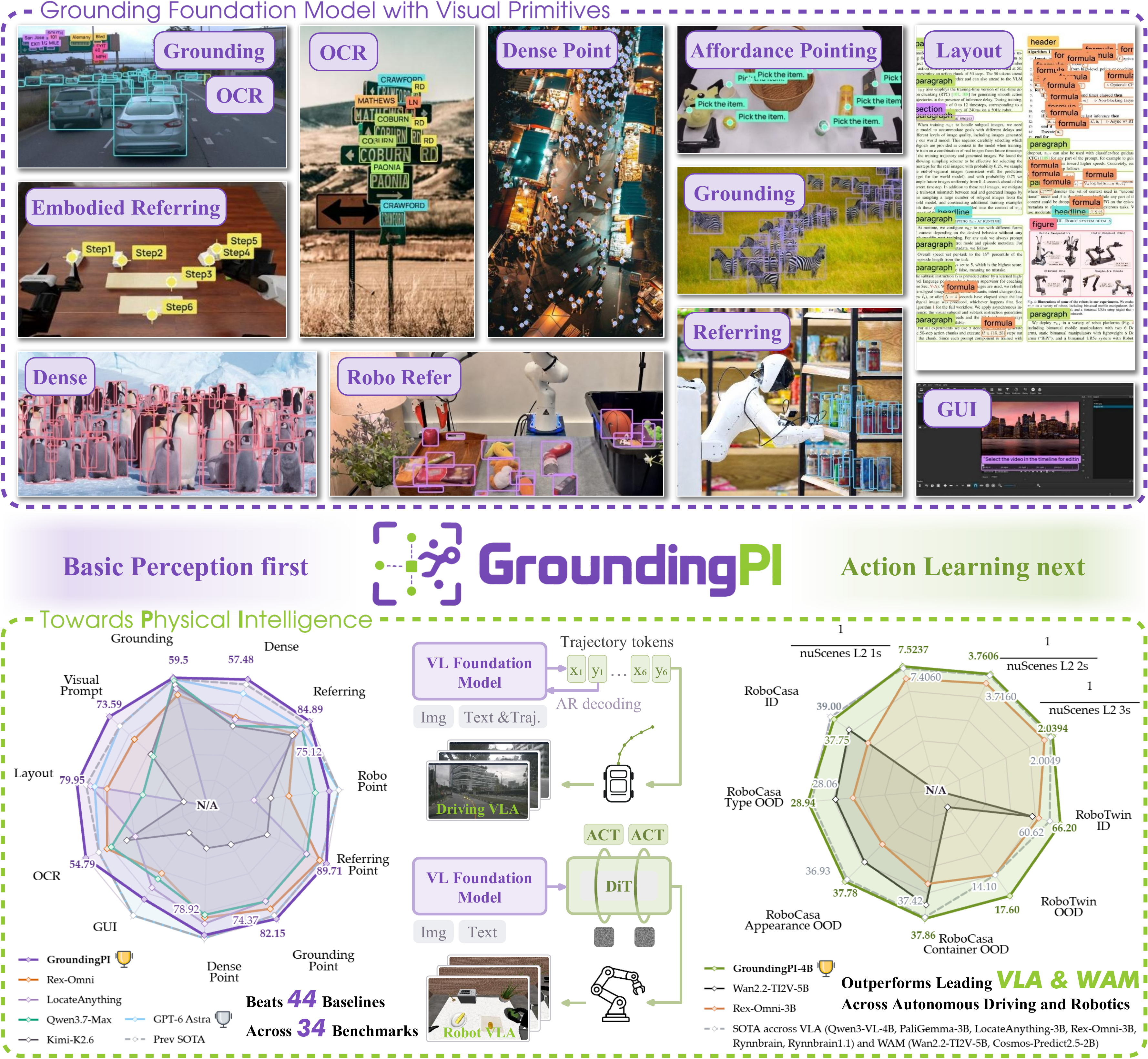
- **A strong grounding foundation model.** We introduce GroundingPI, a 4B model built on visual primitives, with a staged training recipe and state-of-the-art grounding performance.
- **Transfer toward physical intelligence.** Autonomous driving and robotic manipulation evaluations demonstrate the value of this perceptual foundation, including strong ID and OOD performance and improved action-data efficiency.
- **Insights into perceptual pretraining and future embodied paradigms.** We analyze how pretraining scale and data composition shape grounding and transfer, and discuss implications for System-1 foundation-model design and its complementary role in future embodied systems.
## 🎬 演示

[▶ 观看演示](https://huggingface.co/GroundingPI/GroundingPI/resolve/aca9bde34a146cf0510e7f8732d4766169105194/assets/demo.mp4)
## 🤗 模型
| 检查点 | 生成方式 | 下载 | 评测模式 |
|:---|:---|:---|:---|
| GroundingPI | 自回归视觉 grounding | [Hugging Face](https://huggingface.co/GroundingPI/GroundingPI) | **GAM** |
该 grounding 检查点包含视觉-语言模型、分词器、处理器和自定义模型代码。下游动作策略集成见[物理智能](#physical-intelligence)。
## 🛠️ 安装
以下服务流程面向 **Linux x86_64 与 Python 3.12**。请从**已安装 Torch 和 vLLM 0.18.x** 的兼容加速器运行时开始。服务安装会继承该运行时,并安装内置的 **Transformers 5.7.0 fork**。
```bash
git clone https://github.com/groundingpi/GroundingPI.git
cd GroundingPI
python3 -m pip install -r requirements.txt huggingface_hub
```
已有源码检出?从 `cd GroundingPI` 开始即可。后续命令均在仓库根目录执行。
`requirements.txt` 安装轻量 HTTP 客户端、可视化工具和安装所需依赖。服务、训练和评测各自使用独立环境;仅执行 `pip install -r requirements.txt` 不会安装模型运行时。客户端不加载权重,也不依赖 Torch。
**已测试的加速器:** NVIDIA **B300、B200、H200、H800** 以及 **PPU**。请为每种加速器使用匹配的运行时。安装细节见[环境说明](environments/README.md)。
## 🚀 快速开始
### 📥 下载模型并启动服务
```bash
hf download GroundingPI/GroundingPI --local-dir weights/vlm
# 在已具备 vLLM 0.18.x 的兼容 NVIDIA GPU 运行时中:
python3 run.py setup serve
python3 run.py serve
```
对于 **PPU**,请在匹配的厂商运行时镜像中将安装命令替换为 `python3 run.py setup serve --platform ppu`,然后运行 `python3 run.py serve`。安装器会记录平台信息,启动器会自动选择对应配置。
| 服务 | Base URL | 模型 ID |
|:---|:---|:---|
| GroundingPI | `http://127.0.0.1:8000/v1` | `groundingpi` |
请下载完整的模型包。vLLM 适配器使用独立的 overlay 并复用原始权重分片;切换检查点时请使用新的 overlay 输出目录,详见[推理指南](docs/INFERENCE.md)。
### 🎯 运行一次预测
保持服务运行。在第二个终端使用安装了 `requirements.txt` 的环境,将 `your_image.jpg` 替换为你的图片:
```python
from grounding_pi import GroundingPi, visualize
client = GroundingPi(
base_url="http://127.0.0.1:8000/v1",
model="groundingpi",
)
# 指代表达 grounding
result = client.predict("your_image.jpg", "the red car", task="bbox")
print(result.to_dict())
if result.valid:
visualize("your_image.jpg", result).save("prediction.png")
# 点定位
point = client.predict(
"your_image.jpg", "the center of the red car", task="point"
)
print(point.to_dict())
```
命令行示例会保存 `result.json`,输出有效时还会保存 `prediction.png`。每次运行请使用新的输出目录:
```bash
python3 examples/predict.py \
--image your_image.jpg --phrase "the red car" \
--task bbox --output outputs/car
```
客户端参数与返回值
| 接口 | 参数 |
|:---|:---|
| `GroundingPi(...)` | `base_url`、`model`、可选 `api_key`、`timeout`(默认 120 秒) |
| `predict(...)` | 图片路径(JPEG、PNG、WebP)、指代短语、`task="bbox"` 或 `"point"`、`max_tokens`(默认 4096) |
| `visualize(...)` | 图片路径与有效结果;返回 Pillow 图像 |
`result.to_dict()` 包含 `task`、`predictions`、`raw_output`、`finish_reason`、`usage`、`parse_error` 和 `valid`。解析后的预测包含标签和 **0–999** 网格上的坐标,可视化时会换算为图像像素。被截断或格式错误的响应 `valid=False`,并保留原始输出以便检查。
更多用法见[示例说明](examples/README.md)和[客户端实现](grounding_pi/client.py)。
## ⚡ vLLM 部署
GroundingPI 默认服务使用 **vLLM 的 Transformers 后端**和本仓库的模型、处理器适配器。请从 **Linux x86_64 / Python 3.12**、已安装加速器兼容的 **Torch 与 vLLM 0.18.x** 的环境开始。安装会继承该运行时并安装内置的 **Transformers 5.7.0 fork**。
对于 **NVIDIA GPU**,在仓库根目录执行:
```bash
hf download GroundingPI/GroundingPI --local-dir weights/vlm
python3 run.py setup serve --platform gpu
python3 run.py serve --config configs/release/vlm_vllm_gpu.yaml
```
对于 **PPU**,使用匹配的厂商镜像和 PPU 版 vLLM,将下载之后的两条命令替换为:
```bash
python3 run.py setup serve --platform ppu
python3 run.py serve --config configs/release/vlm_vllm_ppu.yaml
```
如果服务环境已就绪,可跳过安装步骤。安装需要一个新的环境目录;选择其他目录时,安装和启动请使用相同的 `--venv`。服务就绪后,在另一个终端检查模型列表:
```bash
curl --fail http://127.0.0.1:8000/v1/models
```
服务地址为 **`http://127.0.0.1:8000/v1`**,模型 ID 为 **`groundingpi`**。默认配置为 **BF16、eager 执行、TP=1、单活跃序列、16,384 上下文长度、0.7 加速器显存利用率**。每个请求只接受一张图片;视频未启用。适配器通过独立的服务 overlay 复用检查点权重。
自定义 `/chat/completions` 请求请设置 **`skip_special_tokens: false`** 和 **`spaces_between_special_tokens: false`**,以保留 GAM 相邻坐标词元。评测请使用 **GAM** 模式。完整的单图 API 示例、配置覆盖与运行时检查见 [vLLM 部署指南](docs/VLLM.md)。
## 🎯 任务与输出格式
模型接受一张图片和一条文本指令。便捷客户端的 `predict()` 方法会构造指代框和指代点提示。其他任务请将对应提示发送到服务兼容 OpenAI 的 `/v1/chat/completions` 接口。
| 任务 | 提示词 |
|:---|:---|
| 目标 / 稠密 grounding | `Locate all the instances that match the following categories: carperson.` |
| 指代框 | `Locate the target referred to by the following description: the red car.` |
| 目标点 | `Point to: carperson.` |
| 指代点 | `Point to the target referred to by the following description: the red car.` |
| OCR | `OCR task detect all the text in box format.` |
| 文档版面 | `Detect all document layout elements that match the following categories: titletext.` |
| GUI grounding | `Point to the UI element to click for the following instruction: open the settings menu.` |
| 视觉提示 | 以原生空间词元格式提供参考框,然后请求相似目标。 |
视觉提示示例
```text
Given reference boxes <|box_start|><100><200><500><650><|box_end|> indicating one or more objects, find all similar objects in the image and output their bounding boxes.
```
所有已发布检查点均使用 **GAM 空间词元协议**,整数坐标范围为 **0 到 999**。框为 `(x1, y1, x2, y2)`;点为 `(x, y)`。目标缺失时输出 `None`。
```text
<|object_ref_start|>car<|object_ref_end|><|box_start|><100><200><500><650><|box_end|>
<|object_ref_start|>car center<|object_ref_end|><|box_start|><300><425><|box_end|>
<|object_ref_start|>absent object<|object_ref_end|><|box_start|>None<|box_end|>
```
请使用检查点配套的分词器、处理器和对话模板。自定义 HTTP 请求应保持 `skip_special_tokens=false`、保留相邻坐标词元(不插入空格),并将图片以 base64 data URI 放在 `image_url` 内容部分中、与文本提示一并发送。
## ⚙️ 方法与推理基础设施
GroundingPI combines a MoonViT-V2 (Kimi K3) visual encoder, a learnable multimodal projector, and a Qwen3-4B language backbone.

默认服务使用 **vLLM**、**BF16**、每请求单图、**16,384 词元上下文上限**和张量并行 **1**。自定义适配器保留模型原生空间词元接口,由 vLLM 负责执行和 KV 缓存。
附带的启动器使用 **eager 执行**;本方案中**禁用 CUDA Graph**。另提供原生 Transformers 参考服务。自定义配置和参考后端用法见[推理说明](docs/INFERENCE.md)。
## 📈 评测
GroundingPI 评测套件覆盖论文报告的 **34 个基准**。[评测指南](eval/README.md)提供数据链接、路径设置、论文采用的 34 个任务选择、输入校验和完整套件执行方法。
共享评测器支持 **7 种模式**:
| 模式 | 支持的模型 |
|:---|:---|
| **`GAM`** | **GroundingPI、GroundAnything、GroundAnything-VLM** |
| `VLM` | 通用视觉-语言基线 |
| `REXOMNI` | Rex-Omni |
| `LOCATEANYTHING` | LocateAnything |
| `GROUNDINGDINO` | 通过兼容服务接入的 GroundingDINO |
| `DLM` | 使用 GAM 协议的旧版扩散检查点 |
| `RLV2` | 使用 GAM 协议的旧版 RL 检查点 |
**三个已发布检查点均使用 GAM 模式。** 先启动模型服务并配置数据路径,再运行:
```bash
python3 run.py setup eval
python3 run.py eval --config configs/eval/gam.yaml
```
内置配置是部分任务的 **8 样本 smoke 测试**。如需完整的 34 基准套件,请按[完整评测流程](eval/README.md#full-suite)操作:选择论文任务列表、使用 `limit: null`,并在新的 `run_id` 下写入结果。评测只连接已有服务,不会启动或切换解码器。
## 🏋️ 训练
训练在独立环境中运行。启动前请准备完整的模型文件、分词器、校验过的输入缓存和清单。附带的训练环境面向匹配的 **PPU 厂商镜像**。运行时与依赖见[环境说明](environments/README.md)。
### 🛠️ 配置监督微调
| 配置 | 需要设置的内容 |
|:---|:---|
| [`configs/train/vlm.yaml`](configs/train/vlm.yaml) | 模型与分词器清单路径、准备好的输入缓存、学习率、批大小、序列长度和输出目录 |
| [`configs/release/vlm_train.yaml`](configs/release/vlm_train.yaml) | 原生配置路径、环境和分布式启动设置 |
原生配方支持为语言模型、视觉编码器和投影层分别设置学习率。通过 freeze 开关选择训练哪些组件。请保持 `runtime.expected_nodes`、`expected_gpus_per_node` 和 `expected_world_size` 与启动拓扑一致。有效全局批大小 = 单卡批大小 × world size × 梯度累积步数。
```bash
python3 run.py setup train
# 启动前先检查配置生成的训练命令。
.venv-train/bin/python scripts/run.py configs/release/vlm_train.yaml --dry-run
python3 run.py train --config configs/release/vlm_train.yaml
```
默认配方使用 BF16,检查点写入 `outputs/vlm_train/`。输入缓存必须与模型分词器匹配并携带所需清单。参见[数据准备](docs/DATA_PREPARATION.md);本仓库不提供通用的 JSONL 到训练缓存转换器。
### 🔄 恢复训练
将启动 YAML 中的 `checkpoint.resume_from_checkpoint`(或原生 YAML 中的 `training.resume_from_checkpoint`)指向一个完整的训练检查点。在一处配置后,重新执行同一条启动命令即可。续训需要包含优化器、调度器和训练状态的检查点。
详细的配置与检查点流程见[训练说明](docs/TRAINING.md)。
## 🤖 物理智能
[`vla/`](vla/README.md) 目录包含基于 StarVLA 和 OpenWAM 的主干对比流程,配有独立的策略训练与评测配置:
| 集成 | 入口 |
|:---|:---|
| 动作模型主干对比 | [starVLA 集成](vla/starvla/README.md) |
| 动作模型主干对比 | [OpenWAM 集成](vla/openwam/README.md) |
Hugging Face 发布的是 grounding 视觉-语言模型。上述对比方案使用 [VLA 指南](vla/README.md)中列出的主干,需要各自的环境与策略检查点;它们不为已发布的 GroundingPI 检查点提供直接的动作策略适配器。

## 📊 结果

完整的基准定义、对比实验和下游实验见[论文及补充材料](https://arxiv.org/abs/2609.39601)。
## 📚 文档
| 指南 | 内容 |
|:---|:---|
| [环境说明](environments/README.md) | 各流程环境与平台前提 |
| [推理](docs/INFERENCE.md) | 服务、模型准备、配置与参考后端 |
| [示例](examples/README.md) | 图片预测、JSON 输出与可视化 |
| [评测](eval/README.md) | 数据集准备、论文基准套件、执行与结果 |
| [训练](docs/TRAINING.md) | 训练配方、分布式设置与检查点 |
| [数据准备](docs/DATA_PREPARATION.md) | 输入格式与本地准备要求 |
| [第三方来源](third_party/README.md) | 内置框架与来源说明 |
```text
GroundingPI/
├── run.py # 工作流启动器
├── grounding_pi/ # 轻量 HTTP 客户端与可视化
├── configs/ # 服务、训练与评测配置
├── infer/ # 模型服务
├── train/ # 训练流程
├── eval/ # 任务、提示词、请求与指标
├── models/ # 模型定义
├── examples/ # 预测示例
├── environments/ # 环境安装器
└── docs/ # 详细指南
```
使用 `python3 run.py --help` 查看命令行接口。完整模型流程在源码目录中运行;Python 包安装的是独立的 HTTP 客户端。
## 📜 许可证
本项目原创贡献以 [Apache License 2.0](https://www.apache.org/licenses/LICENSE-2.0) 提供,项目方不附加额外限制。该授权仅覆盖贡献作者所持有的权利。
第三方材料保留其适用的许可证,包括适用于 Kimi 衍生材料及衍生作品的 [Kimi K3 License](models/vlm/LICENSE)。这些上游条款持续有效。组件归属见[第三方声明](THIRD_PARTY_NOTICES.md),模型包的授权范围见[已发布模型的许可证](https://huggingface.co/GroundingPI/GroundingPI/blob/main/LICENSE)。
物理智能集成保留 [`vla/LICENSE`](vla/LICENSE) 及其[第三方声明](vla/THIRD_PARTY_NOTICES.md)中的条款。
## 📖 引用
如果本工作对你的研究有帮助,请引用:
```bibtex
@misc{yu2026groundingpigroundingfoundationmodel,
title = {{GroundingPI}: A Grounding Foundation Model towards Physical Intelligence with Visual Primitives},
author = {Qize Yu and Lianrui Fan and Boyu Chen and Jiaqi Liang and Xini Ding and Yue Chen and Zetian Song and Yuran Wang and Yi Zou and Kaixuan Wang and Tianxing Chen and Wenxuan Song and Bohan Zhou and Mingleyang Li and Siqiao Huang and Yuqi Ye and Caigao Jiang and Wei Wei and Ruihai Wu and Hang Zhang and Yixiao Ge and Shuchang Zhou and Shilong Liu and Xianming Liu and Ping Luo and Shiyu Huang},
year = {2026},
eprint = {2609.39601},
archivePrefix = {arXiv},
primaryClass = {cs.CV},
url = {https://arxiv.org/abs/2609.39601},
}
```
## 🙏 致谢
感谢 [Rex-Omni](https://github.com/IDEA-Research/Rex-Omni) 和 [LocateAnything](https://github.com/NVlabs/Eagle/blob/main/Embodied/README.md) 团队分享他们的工作和开源实现。