weave is an open-source, self-hosted work database and Airtable alternative. People use the web UI and AI agents use the built-in MCP server, REST API or CLI, on the same tables.
It replaces Airtable, Fibery, Notion databases and ClickUp with connected
tables, relations, workflows, formulas, rollups, kanban boards, forms and
markdown documents on every row. One SQLite file. Zero dependencies. No build
step. MIT.
---
## For agents
weave stores structured work (tables, records, relations, documents) in one SQLite
file, and an agent drives it over MCP, REST or the CLI.
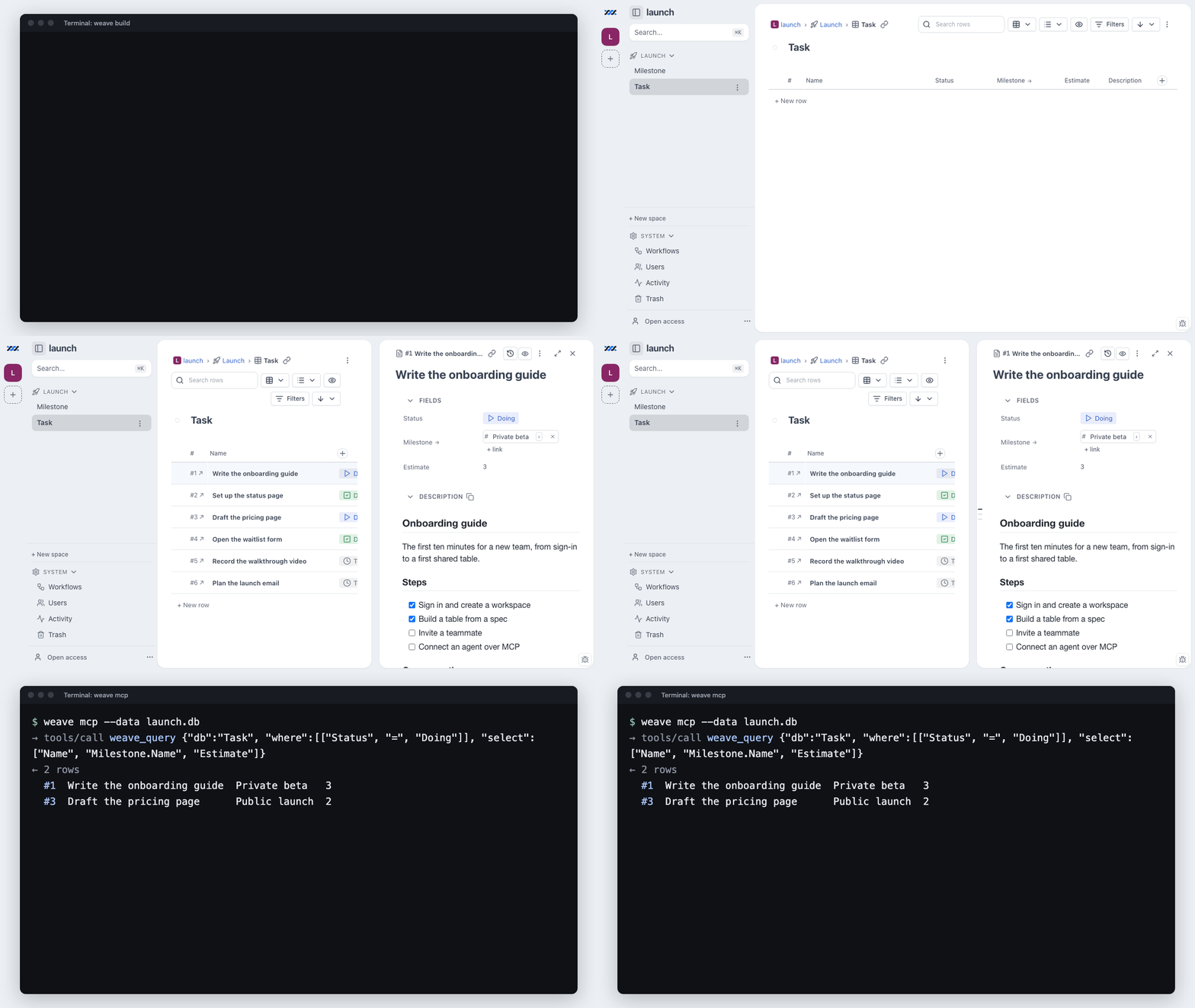
- Connect over MCP: `node bin/weave.js mcp --data `, the same as
`weave mcp --data `. In Claude Code:
`claude mcp add weave -- node /path/to/weave/bin/weave.js mcp --data /path/to/workspace.db`
- Or build from a file: `weave build --dry-run`, then again without
`--dry-run`.
- Read [AGENTS.md › Using weave](AGENTS.md#using-weave) first: the primer,
every tool by job, plans with turn budgets, and common errors with their fixes.
## What weave is
weave is a **work database you run yourself**. Spaces hold tables, tables hold
rows (the API calls them entities), and rows link to each other through
bidirectional relations, with lookups, rollups, formulas, workflow states,
automations and any number of markdown documents on each row.
It replaces the SaaS your work already lives in: Airtable bases and grids,
ClickUp tasks and boards, Fibery's connected databases with documents and
automations, and Notion databases. It runs on your laptop or your own server,
with no per-seat bill and no vendor holding the export button.
weave is built for **people and AI agents as equals**: everything the web UI can
do, the REST API, the CLI and the built-in **MCP server** can do too, on the
same engine and the same data file on your disk. A local install needs no
account and sends no telemetry.
- **One file per workspace**: a workspace is one SQLite file next to your
project, served by one Node process on a laptop or a small VPS behind your
own TLS and login (see [Self-hosting](#self-hosting)).
- **weave cloud**: the same code runs at https://weave.grunion.ai behind a
sign-in. A new account starts at `/start`, which sets up a workspace, a
template and an agent connection. `weave backup --dest weave:///`
sends a self-hosted install's sealed nightly archive there (the cloud stores
ciphertext only), and `weave workspace migrate` moves a workspace across.
- **Zero dependencies**: `git clone` and run, since storage is Node's built-in
`node:sqlite`, and the only third-party code is vendored and pinned.
- **Agent access**: an MCP server any stdio client can mount (Claude Code,
Codex CLI, Cursor, Gemini CLI), a scriptable CLI, row references such as
`Task#12` everywhere, and markdown documents addressable as plain URLs
(`/e/Task#12/doc.md`, `.html`, `.pdf`).
- **Undo**: `weave undo`, `POST /api/undo` and the `weave_undo` MCP tool reverse
any change to a row: edits, creates, deletes, links and comments.
- **Versioned documents**: every document field keeps its revisions (one
per editing session), browsable and restorable from the page, `weave
doc-revisions` / `weave doc-restore`, or the `weave_doc_revisions` /
`weave_doc_restore` MCP tools.
## Quickstart
Requires **Node ≥ 22.16** (Node 24 LTS recommended). There is nothing to build
and nothing to install from npm.
```bash
git clone https://github.com/grunion-ai/weave
cd weave
node bin/weave.js serve --port 4400 --data ./my-workspace.db
```
Or start it in a container from the same checkout:
```bash
docker compose up -d
```
Or run the image each release publishes to the GitHub Container Registry. Your
workspaces, attachments and keystore stay in the `weave-data` volume at `/data`:
```bash
docker run -d --name weave -p 127.0.0.1:4400:4400 -v weave-data:/data ghcr.io/grunion-ai/weave:latest
```
Open http://127.0.0.1:4400 and press **⌘K** to search everything. A
self-documenting **weave** docs workspace is provisioned alongside your data at
`/w/weave/`: handbook, wiki, the public issue tracker and roadmap, and a
Quality space mirroring the test suite.
If weave replaces a SaaS seat for you, star the repo so other teams can find it.
## Connect your agent
One config block, any stdio MCP client (Claude Code, Claude Desktop, Codex CLI,
Cursor, Gemini CLI, Windsurf, OpenCode):
```json
{ "mcpServers": { "weave": { "command": "node",
"args": ["/path/to/weave/bin/weave.js", "mcp", "--data", "/path/to/my-workspace.db"] } } }
```
Or add it to Claude Code in one line:
```bash
claude mcp add weave -- node /path/to/weave/bin/weave.js mcp --data /path/to/my-workspace.db
```
A hosted instance with an OpenID Connect sign-in provider takes one line too.
The first call opens the provider's sign-in in your browser:
```bash
claude mcp add --scope user --transport http weave https://weave.example.com/mcp
```
For weave cloud at `weave.grunion.ai`, this repository is also a Claude Code
plugin marketplace. In Claude Code:
```
/plugin install weave --marketplace grunion-ai/weave
```
Each workspace on an instance has its own endpoint, `/w//mcp`. Link
your account to your provider sign-in first: run `weave account link `,
which prints a one-time invite, and open that invite in a browser. Any role
connects, and `tools/list` names only the tools that role may call.
The server lists 17 tools by default: the 16 a workspace build uses,
`weave_build` among them, and `weave_call`, which runs the other 48.
`weave mcp --tools all` (or `WEAVE_MCP_TOOLS=all`) lists all 65. The 65 include
the same undo the UI has, and `weave_vocabulary`, which returns the allowed
values so an agent reads them instead of guessing. Full map:
[Agents: MCP, REST, and CLI](#agents-mcp-rest-and-cli).
## Screenshots
| Documents on every record | Relation map | Search across workspaces |
| --- | --- | --- |
| | | |
| Every entity carries markdown documents, addressable as `.md`, `.html`, and `.pdf` URLs. | The schema, drawn: each table with its row count, and relations labelled with cardinality. Automations appear on the same map. | ⌘K across every workspace, matching names, text, documents and comments, with copyable permalinks. |
Open any record and it docks beside its table, so the entity and the records around it stay in view together.
| Kanban board | Phone layout |
| --- | --- |
| | |
| A table view in board layout, one column per Status. Drag a card into another column to change its Status, with Undo. | The same table at 390 px: status and owner chips on every row, search and + at the bottom. + opens a New row sheet that stays open for the next row. |
## How weave compares
### Against the SaaS it replaces
| | **weave** | Airtable | ClickUp | Fibery |
| --- | --- | --- | --- | --- |
| License | MIT, open source | Proprietary | Proprietary | Proprietary |
| Where the data lives | A `.db` file you own | Vendor cloud | Vendor cloud | Vendor cloud |
| Pricing | Free to self-host | Per seat, per month | Per seat, per month | Per seat, per month |
| Row / record caps | Your disk | Plan-tiered | Plan-tiered | Plan-tiered |
| Agent access | MCP server, REST and CLI, against a file you own | Set by the vendor | Set by the vendor | Set by the vendor |
| Runs offline | Yes | No | No | No |
| Telemetry | None | Vendor-defined | Vendor-defined | Vendor-defined |
### Against the open-source alternatives
The open-source options in this space are all worth a look, and several are far
more mature than weave. They differ mainly in what they optimize for:
| Project | License | Install shape | Optimized for |
| --- | --- | --- | --- |
| **weave** | MIT | One Node process, one file, no dependencies | Agent access, documents on every row, running from a git checkout |
| [NocoDB](https://github.com/nocodb/nocodb) | Sustainable Use License (since v0.301.0) | Docker + external DB | Putting a smart-spreadsheet UI on an existing MySQL/Postgres |
| [Baserow](https://github.com/baserow/baserow) | MIT (core; paid tiers separate) | Docker Compose + Postgres | A full Airtable-shaped product, cloud or self-hosted |
| [Grist](https://github.com/gristlabs/grist-core) | Apache-2.0 | Docker or Node | Spreadsheet-grade formulas and data analysis |
| [Teable](https://github.com/teableio/teable) | AGPL-3.0 (core) | Docker + Postgres | Postgres-native scale with an Airtable UI |
*Licenses and packaging as of August 2026; check each project for current terms.* Pick weave if you want **connected tables plus markdown documents plus an MCP server, with no container, no database server, and no dependency tree**, and one of the others if you need permissions narrower than a workspace role or a mature plugin ecosystem (see [what weave is not](#what-weave-is-not)).
## What's inside
| Area | Details |
| --- | --- |
| Data model | Spaces → tables → entities. Field types: text, number, rating (icons you click to fill, 0 to a max), date, date range, checkbox, toggle (a switch with two named states), url, email, select, multiselect, workflow states, attachments (files with small previews; one can be the record's cover picture), avatar (a record's face on its chip, card and header), bidirectional relations, lookups, rollups (count, sum, avg, median, min, max, range, stdev, distinct, filled, empty, join, computed over a relation or over a whole table from the space's own record, which is what the grid footer draws), formulas, and any number of markdown document fields per entity. |
| Statistics | `weave stats
` (also `weave_stats` and `GET /api/tables/:ref/stats`): every column summarised (five-number summary, stdev and a histogram for numbers, ranked distributions for chips, earliest/latest/span for dates), grouped with `--by`, narrowed with `--where`, cut to one column and its rollups with `--field`. |
| Views | Every table view takes a layout: table, list or board. Board draws kanban columns or a picture gallery with small, medium or large covers and adds swimlanes from a second group level; drag a card to another column or lane to change its field, with Undo. Pick two to four cards to Compare them side by side, or drop a picture on a card to set its cover. The View pane beside the table holds filters, sort (three keys), group (five levels, with subtotals) and saved views, and `weave_query` can name a saved view. Entity pages dock beside the table or open full page, and the relation map draws the schema with its automations. Inline editing everywhere. |
| Documents | Every doc is a native URL: `.md`, `.mmd`, `.html`, `.pdf`. Mermaid diagrams, raw HTML and math render in place; `[[Table#12]]` mentions resolve to links. Whole-entity export paginates one page per document. Math is KaTeX only (`$…$` / `$$…$$`, vendored + offline); the other fence engines Vditor knows (graphviz, echarts, plantuml, mindmap, abc, flowchart) are deliberately not vendored, so those fences stay plain code blocks. |
| Automations | Triggers (created / field changed / state changed) → set field, append doc, add comment, outgoing webhook. |
| Search | Universal ⌘K across workspaces with copyable permalinks, matching names, text values, documents and comments. |
| Storage | One workspace = one `.db` file (WAL, row-level writes, crash-safe). Legacy JSON workspaces migrate automatically; `exportJSON`/`importJSON` remain the human-readable interchange. CLI, server, and MCP can run concurrently. |
| Forms | A form lets someone without write access add one row to one table, as themselves, from a page at `/f/` that takes prefilled values from its URL. Build it in the form editor or with `weave form create`, `update` and `config`; submissions arrive through the page, `weave form submit` or `weave_form_submit` over MCP. Submitting needs an observer account unless the operator sets `WEAVE_ANONYMOUS_FORMS=1`. Prefill links (`/t/



 |
 |
 |
| Every entity carries markdown documents, addressable as `.md`, `.html`, and `.pdf` URLs. | The schema, drawn: each table with its row count, and relations labelled with cardinality. Automations appear on the same map. | ⌘K across every workspace, matching names, text, documents and comments, with copyable permalinks. |
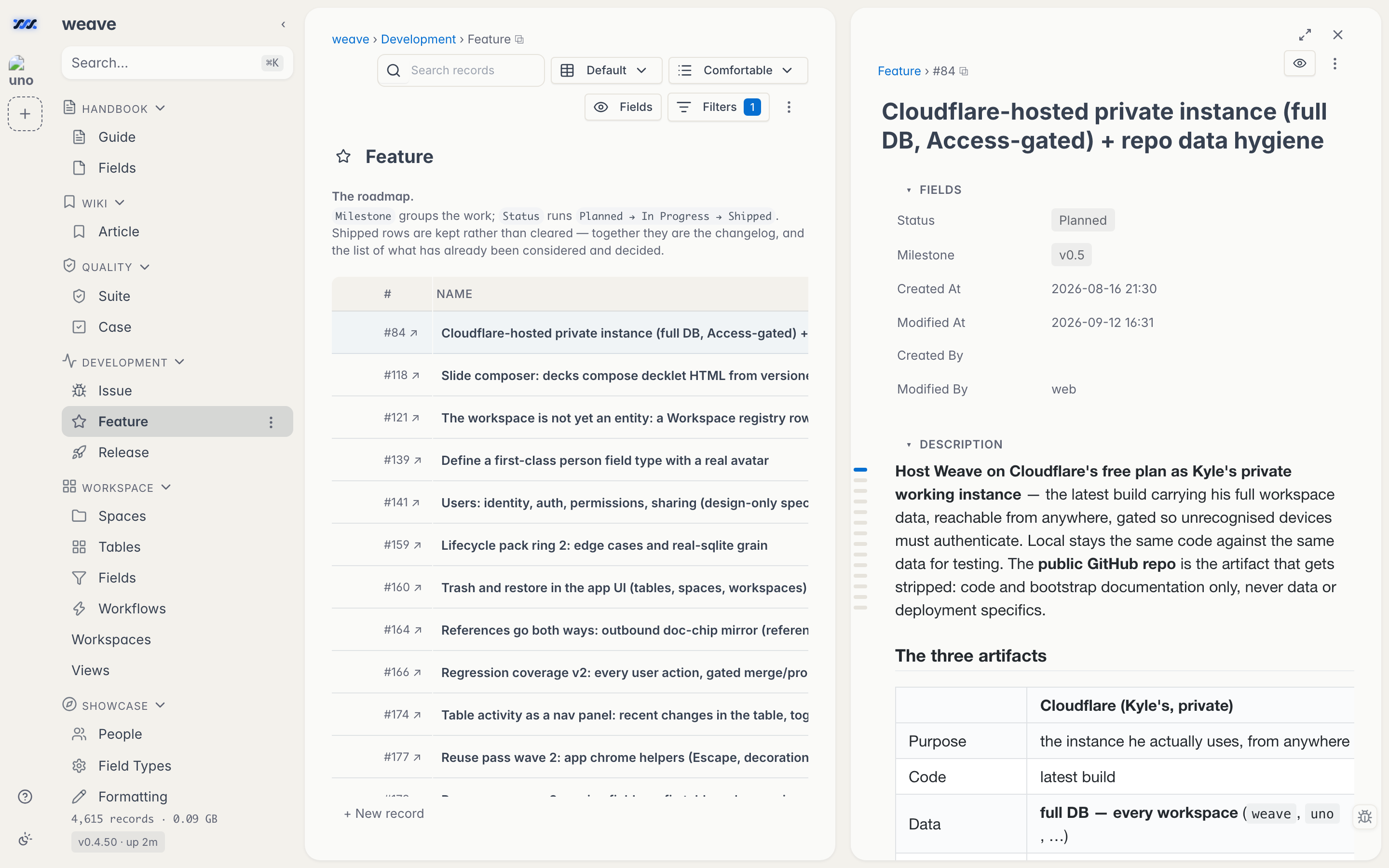 Open any record and it docks beside its table, so the entity and the records around it stay in view together.
| Kanban board | Phone layout |
| --- | --- |
|
 |
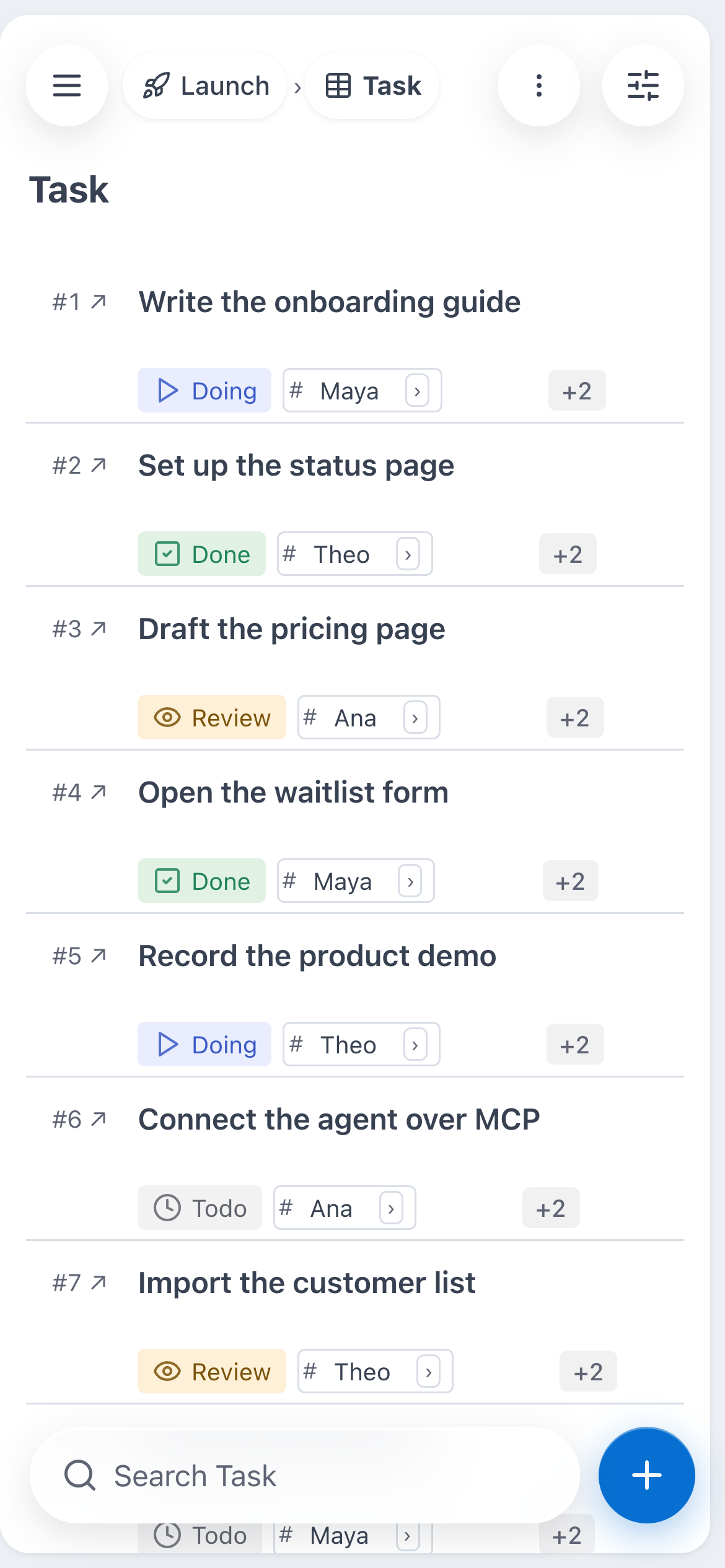 |
| A table view in board layout, one column per Status. Drag a card into another column to change its Status, with Undo. | The same table at 390 px: status and owner chips on every row, search and + at the bottom. + opens a New row sheet that stays open for the next row. |
## How weave compares
### Against the SaaS it replaces
| | **weave** | Airtable | ClickUp | Fibery |
| --- | --- | --- | --- | --- |
| License | MIT, open source | Proprietary | Proprietary | Proprietary |
| Where the data lives | A `.db` file you own | Vendor cloud | Vendor cloud | Vendor cloud |
| Pricing | Free to self-host | Per seat, per month | Per seat, per month | Per seat, per month |
| Row / record caps | Your disk | Plan-tiered | Plan-tiered | Plan-tiered |
| Agent access | MCP server, REST and CLI, against a file you own | Set by the vendor | Set by the vendor | Set by the vendor |
| Runs offline | Yes | No | No | No |
| Telemetry | None | Vendor-defined | Vendor-defined | Vendor-defined |
### Against the open-source alternatives
The open-source options in this space are all worth a look, and several are far
more mature than weave. They differ mainly in what they optimize for:
| Project | License | Install shape | Optimized for |
| --- | --- | --- | --- |
| **weave** | MIT | One Node process, one file, no dependencies | Agent access, documents on every row, running from a git checkout |
| [NocoDB](https://github.com/nocodb/nocodb) | Sustainable Use License (since v0.301.0) | Docker + external DB | Putting a smart-spreadsheet UI on an existing MySQL/Postgres |
| [Baserow](https://github.com/baserow/baserow) | MIT (core; paid tiers separate) | Docker Compose + Postgres | A full Airtable-shaped product, cloud or self-hosted |
| [Grist](https://github.com/gristlabs/grist-core) | Apache-2.0 | Docker or Node | Spreadsheet-grade formulas and data analysis |
| [Teable](https://github.com/teableio/teable) | AGPL-3.0 (core) | Docker + Postgres | Postgres-native scale with an Airtable UI |
*Licenses and packaging as of August 2026; check each project for current terms.* Pick weave if you want **connected tables plus markdown documents plus an MCP server, with no container, no database server, and no dependency tree**, and one of the others if you need permissions narrower than a workspace role or a mature plugin ecosystem (see [what weave is not](#what-weave-is-not)).
## What's inside
| Area | Details |
| --- | --- |
| Data model | Spaces → tables → entities. Field types: text, number, rating (icons you click to fill, 0 to a max), date, date range, checkbox, toggle (a switch with two named states), url, email, select, multiselect, workflow states, attachments (files with small previews; one can be the record's cover picture), avatar (a record's face on its chip, card and header), bidirectional relations, lookups, rollups (count, sum, avg, median, min, max, range, stdev, distinct, filled, empty, join, computed over a relation or over a whole table from the space's own record, which is what the grid footer draws), formulas, and any number of markdown document fields per entity. |
| Statistics | `weave stats