DeepSeek Workbench
Use DeepSeek web chat in DSH and bring history into native conversations.
DeepSeek Harness plugin
简体中文 · English




Get started · Docs · Report an issue
## Quick start
**Required environment:** DSH **0.2.2-rc.1**, Node.js **24.9.0+**.
Embedded web chat requires DSH Desktop. Persistent login, website downloads and extended platform pages need matching desktop adapters. DSH Web provides external links. Web-chat login and API-platform authorization are separate.
### 1. Install
Open **Plugins → Add plugin** in the DSH instance you use, then paste:
```text
https://github.com/gulagala001/dsh-deepseek-workbench/releases/download/v0.1.5-dsh.0.2.2-rc.1/dsh-deepseek-workbench-0.1.5-dsh.0.2.2-rc.1.tgz
```
Wait for active tasks to finish, then follow the host’s activation/restart prompt. Keep your existing profile and data. See the [installation guide](docs/install_EN.md) · [SHA256SUMS](https://github.com/gulagala001/dsh-deepseek-workbench/releases/download/v0.1.5-dsh.0.2.2-rc.1/SHA256SUMS).
### 2. Try this first
Choose **DeepSeek web chat** in the sidebar, sign in to the official chat service and open a regular conversation.
**Success looks like:** You can browse web history. “Continue in DSH” creates a native conversation; you decide when to send the next message.
## Connect web chat with native work
- **Web chat**: browse website history, send messages and use deep thinking, web search and attachments in the main view.
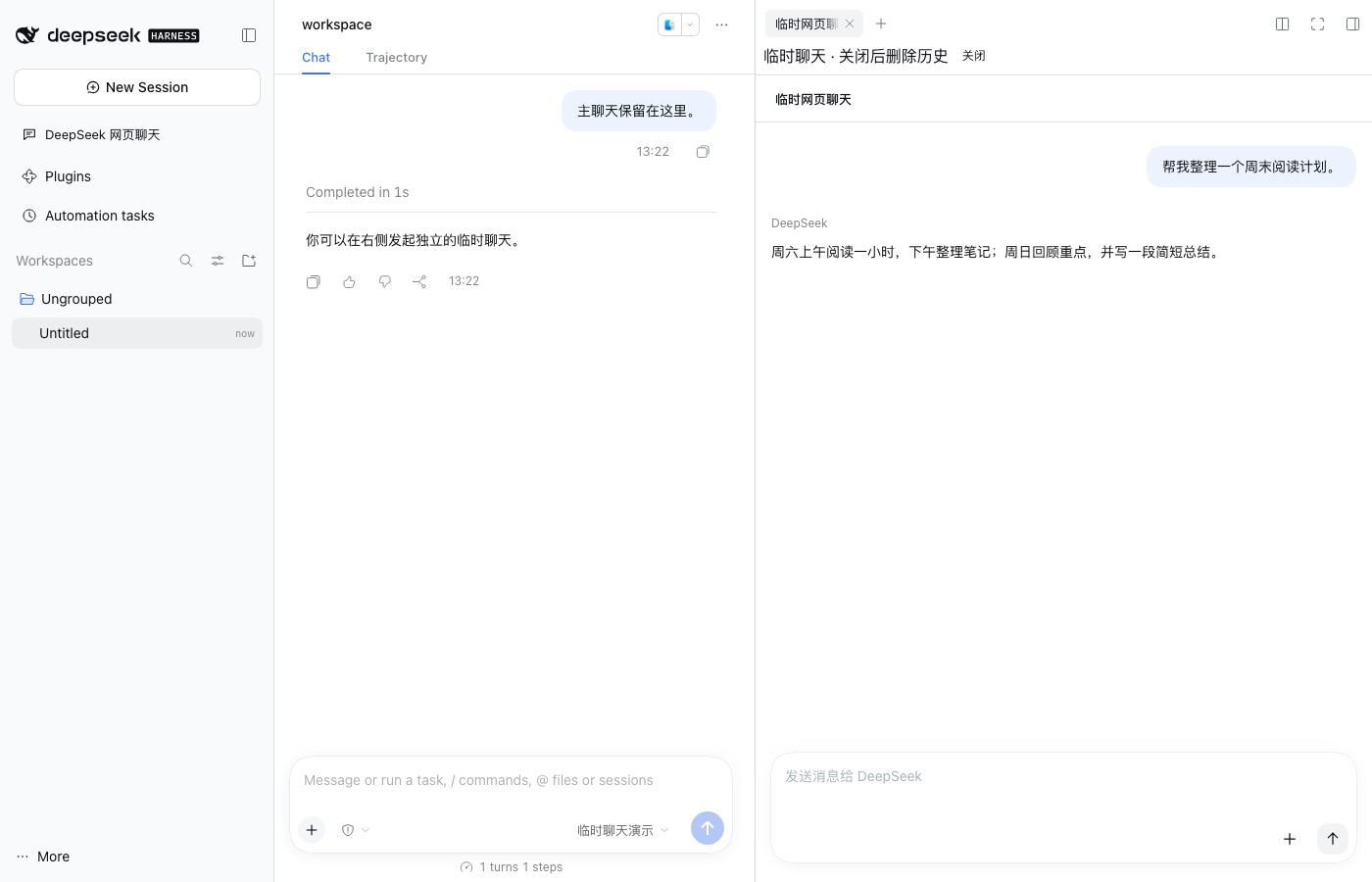
- **Temporary sidebar**: `/侧栏(网页版)` opens a separate temporary conversation alongside your main chat.
- **Continue in DSH**: migrate readable history and attachments into a native conversation using DSH models and tools.
- **API platform**: open the platform from account settings; matching host interfaces can reuse current API authorization.
Regular web chat retains website history. Temporary side chat owns a separate website conversation and waits for deletion before closing. If deletion fails, the panel remains for retry. Main and other website conversations remain independent.
## Requirements
| Scenario | Support and conditions |
| --- | --- |
| Standard rc.2 desktop embedding | Isolated pages and reading, with website chat login. |
| Persistent login, downloads and extended platform pages | Matching desktop source adapters. |
| Browser-based DSH | External website entry points. |
| History migration | Only readable content; inaccessible attachments are reported. Website instructions and tools are not replayed. |
[Desktop host requirements](docs/desktop-host_EN.md) · [Full usage](docs/usage_EN.md)
## FAQ
Why does website chat ask me to sign in again?
Website chat login and API-platform authorization are separate. Persistent login also depends on the matching desktop host’s storage capabilities. Follow the plugin’s actual capability notice.
Why does closing a temporary sidebar take time?
Closing first deletes this temporary website conversation. If cleanup fails, the panel stays open for retry; hiding a panel is not proof that the website record was deleted.
Will updating or uninstalling delete existing chats?
Close temporary panels and confirm cleanup first, then update/remove the package and restart. Migrated DSH conversations and regular website history remain with their respective services. The desktop host manages website login data.
## Development and license
```bash
pnpm install --frozen-lockfile --ignore-scripts --config.strict-dep-builds=false
pnpm build
```
Licensed under [MIT](LICENSE). See [THIRD_PARTY_NOTICES.md](THIRD_PARTY_NOTICES.md) for sources.
## Documentation and support
| I want to | Where to go |
| --- | --- |
| Install, update or remove | [Installation guide](docs/install_EN.md) |
| Learn the features and limits | [Documentation](docs/usage_EN.md) |
| Read release changes | [Releases](https://github.com/gulagala001/dsh-deepseek-workbench/releases) |
| Report a problem | [Issues](https://github.com/gulagala001/dsh-deepseek-workbench/issues) |
For a bug report, include the full DSH and plugin versions, the entry point, minimal reproduction steps, and expected versus actual behavior. Remove private data before sharing logs or screenshots.
Back to top · Versions and downloads · Feedback
[Documentation structure and contributing](docs/documentation.md)