# W1700K SDR
Turns a Gemtek W1700K Wi-Fi 7 router into a wideband software-defined receiver.
The router's MediaTek MT7996 radio captures raw 14-bit IQ at up to 320 Msps,
its Airoha AN7581 SoC streams it over 10 GbE, and a Linux host shows it as a
live spectrum and waterfall in the browser, with the receiver's controls next
to it.
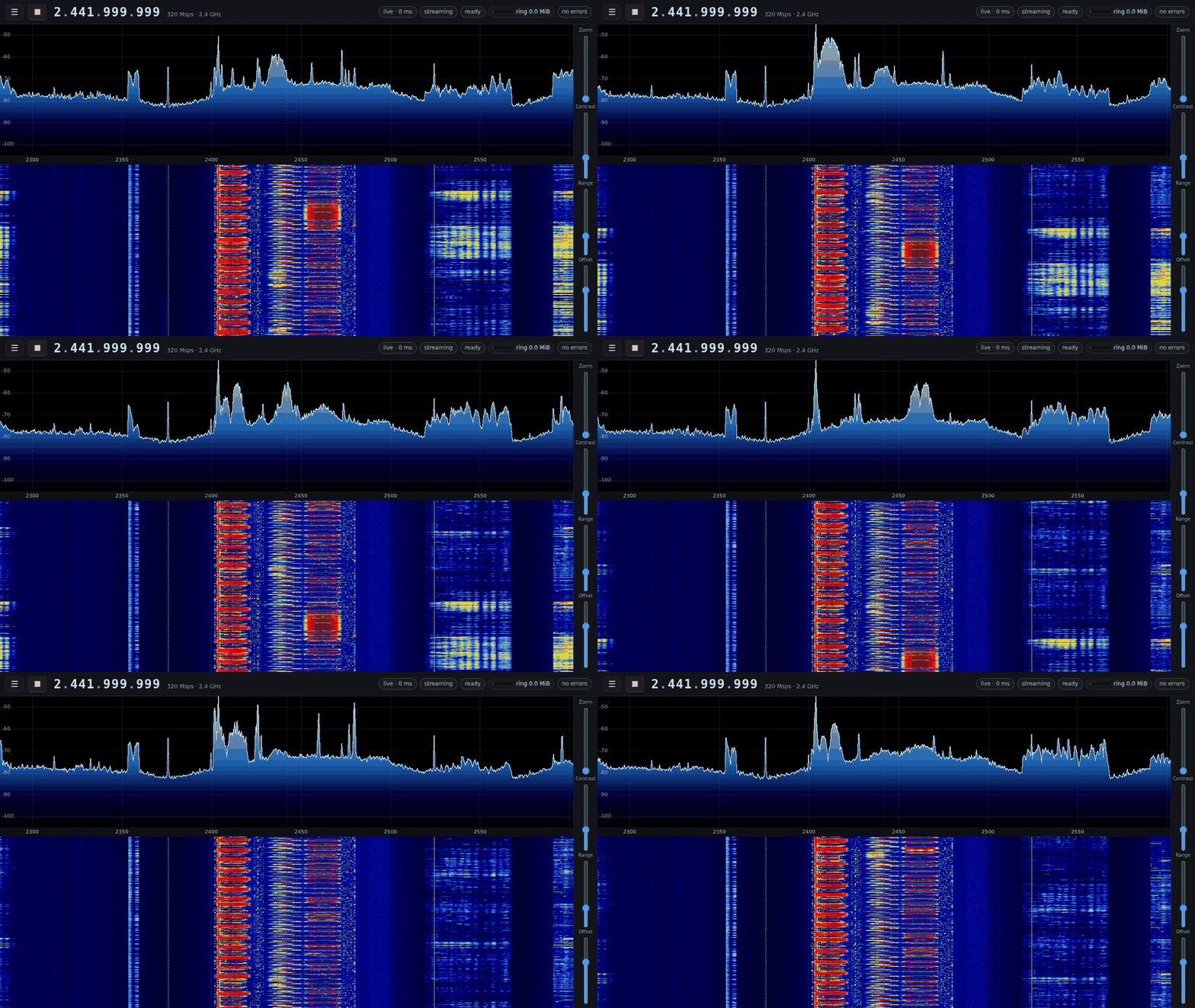
*The whole 2.4 GHz band at 320 Msps, live, with the decimation's roll-off
corrected in the stream ("flatten"): a 262,144-point FFT of every sample, 100
spectra a second (this recording runs at 50 frames a second).*
The MT7996 runs only our own firmware: a ROM patch, WM and WA built from this
repository, with no MediaTek code. It brings the radio up from a cold power-on
by itself, from MediaTek's initialisation and calibration decoded register by
register against a trace of MediaTek's own firmware, and takes its commands
(LO, sample rate, capture, stream, gain, filter) from the host. See
[docs/architecture.md](docs/architecture.md) and [docs/roadmap.md](docs/roadmap.md).
## What it does
| | |
| --- | --- |
| Sample rates | 40, 80, 160 or 320 Msps of 14-bit complex IQ on every band, independent of the LO and the filter; on band 2 also 640/2 (every other sample of 640 Msps: flat to ±155 MHz, but signals 160–320 MHz away fold in) |
| Bands | 2.4 GHz (MT7976), 5 GHz and 6 GHz (two MT7977s); switching bands is a register write inside a running stream |
| Tuning | No channels: the LO is any Hz a band's synthesizer locks at (unit A: 2.081–2.748, 4.647–7.509 and 4.707–7.576 GHz), on its grid of 2.98 Hz (2.4 GHz) or 11.9–14.3 Hz steps; retuned mid-stream (about 1 ms) |
| Front end | AGC or manual LNA/baseband gain; analog filter 20–320 MHz |
| Occupancy | `w1700k occupancy`: what is in the air around the LO, per 64th of the sample rate and per Wi-Fi channel (how strong, what share of the time), worked out on one of the radio's own DSP cores beside the running stream, which loses nothing for it |
| Transport | the radio DMAs into a 1 GiB ring in SoC DRAM; the kernel sends every 8 KiB slice as one UDP datagram, zero-copy, on the 10 GbE port; at 320 Msps half the slices are packed to 28 bits per sample pair on the radio's own cores to fit the link (lossless, automatic) |
| Slower links | the stream's packing follows the link's speed: every slice packed to 28 bits (lossless) carries 160 Msps on 5 Gbit/s, and 320 Msps fits it at 14 bits per sample pair, the radio and the SoC each requantising part; below that the SoC requantises to 16, 14, 8 or 7 bits per sample pair with a scale per slice (up to 160 Msps), and can send in datagrams small enough for a 1500-byte MTU; see the table below |
| Host | `w1700k-stream` receives the export and serves the IQ stream to every consumer on the host (shared memory, complex int16, gap-tagged), with an optional correction ("flatten") of the decimation's roll-off applied to the samples themselves; `w1700k-spectrum`: 262,144-point FFT at 100 frames/s over every sample, browser UI, live controls; `sdr-recv` records the stream; a SoapySDR module (`driver=w1700k`) gives it to GNU Radio and other SoapySDR programs |
## Links slower than 10 GbE
The stream fits whatever the unit's port negotiates (a 5 or 2.5 Gbit/s adapter, a
1 Gbit/s port); `w1700k` reads the speed at each start and picks the packing, or
takes one set by hand (`--packing`, `export.packing`). A rate nothing fits is
refused with the rate the link would need.
| Link | 14-bit, lossless | Reduced on the unit |
| --- | --- | --- |
| 10 Gbit/s | 320 Msps (half the slices packed), 160 Msps raw | |
| 5 Gbit/s | 160 Msps (every slice packed, 4.5 Gbit/s), 80 Msps raw | 320 Msps at 14 bits per sample pair (4.6 Gbit/s) |
| 2.5 Gbit/s | 80 Msps (packed), 40 Msps raw | 160 Msps at 14 bits per sample pair |
| 1 Gbit/s | | 80 Msps at 8 bits, 40 Msps at 16 bits |
- **Lossless** packings are made by the radio's own cores and leave the SoC
zero-copy: `raw` (32 bits per sample pair on the link), `half` (30) and
`full` (28, up to 160 Msps).
- **Reduced** packings (`16`, `14`, `8`, `7`: 8, 7 or 4 bits, or 11 levels, for
each of I and Q) are requantised on the SoC, every 2048 samples with a scale
of their own, and scaled back to 14-bit samples by `w1700k-stream`, so
consumers see no difference but quantisation noise about 53, 47, 28 and
25 dB below each block's peak. On a 2.4 GHz test tone the noise floor rose
0.6, 0.7, 3.1 and 5.8 dB against the lossless stream.
- **320 Msps on 5 Gbit/s** is the `split` packing, 14 bits per sample pair.
No one part of the unit can requantise a 320 Msps stream: the SoC's memory
bus carries about 1.0 GB/s of reads beside the capture (the stream is 1.28),
and the radio's two cores are busy at half of it. So the radio reduces 10 of
every 16 chunks itself, under a shift the SoC sets from the signal's level,
and the SoC reduces the 6 between. Measured on a 5 Gbit/s link in runs of
five and ten minutes: complete, none of 48 and 94 million chunks lost, with
a test tone at the same level and phase in the chunks from both. (That is
the unit and the stream service. With the spectrum server and a browser
also running on that host, an 8-core N350 behind a USB adapter, the
adapter itself missed 1 datagram in 2400. With its packets spread over the
CPUs, as `init/host/link` now does, and the host's power limit at 15 W, a
27-minute run with the spectrum page open lost 1 slice in 440,000 and a
nine-hour run overnight 1 in 3.6 million
([the measurements](tools/r8152-rtl8159/README.md)): the host, not the link.) The radio's chunks follow the level with a second's memory, so
in a band with strong bursts they are quantised for the bursts.
- **No jumbo frames?** `"export": {"piece": 1456}` in the configuration sends
every slice as datagrams a 1500-byte MTU carries (each costs 82 bytes of the
link; the unit is asked for at most 200 thousand a second: 80 Msps lossless,
160 Msps at 8 bits).
The 5 Gbit/s row and the small datagrams are measured on a unit (no slice
lost); the 2.5 and 1 Gbit/s rows follow from the same arithmetic and have not
been run on such a link. The 10 Gbit/s row was run again on a W1700K2 after its
PHY driver was repaired ([platform/README.md](platform/README.md#the-10-gbe-ports-phys)):
320 Msps left the unit at a mean of 9.66 Gbit/s for two minutes without a
transmit error, into a second W1700K as the far end, and 160 Msps raw crossed
a cable between the unit's own two ports with no receive error counted. Details: [`host/w1700k/README.md`](host/w1700k/README.md).
## The front LED
The unit's status LED tells you what the receiver is doing without a screen
(details in [docs/led.md](docs/led.md)).
| | What you see | What it means |
| --- | --- | --- |
|  | Rainbow, once round, out of the dark | Starting: booted, the LED is ours from here |
|
 | Yellow, breathing | No link on the stream port |
|
 | White, brightening from low to full | Powered and linked; radio not loaded (or loading) |
|
 | Green, steady | Ready: radio loaded and tuned, not streaming |
|
 | Cyan / blue / magenta | Streaming at 40 / 80 / 160 Msps |
|
 | The rainbow, round every six seconds | Streaming at 320 Msps |
|
 | … at a steady brightness | lossless: every sample bit for bit |
|
 | … breathing | samples reduced to fewer bits to fit the link |
|
 | … slow blink | started, but nothing is leaving the port |
|
 | Yellow, blinking | Look: the captured band's synthesizer is out of lock |
|
 | Red, blinking | Stop: the stream ended by itself |
|
 | A short lift towards white | The host just changed something |
White then steady red is the loader and the kernel before our software runs;
red that never changes means the unit did not finish booting.
The LED also answers the reset button, which sets the unit's login key
without a console ([the paperclip key](init/README.md#the-paperclip-key)):
hold it and the LED shows what letting go would do, five seconds to switch
the key off or on, ten for a new key (`init/key`), fifteen to erase it.
## Bluetooth/Zigbee radio and GPS receiver
The W1700K also carries a Silicon Labs EFR32MG21 (Bluetooth LE, Zigbee,
Thread) and an Airoha AG3352 GPS receiver. Both are off at every start-up
unless you turn them on, and nothing on the unit uses them. Turned on, each
one's serial port is handed to your host over ssh, where it is a serial
device for gpsd, pygpsclient, a Bluetooth host stack or a flasher
(details in [docs/ble-zigbee-and-gps.md](docs/ble-zigbee-and-gps.md)).
```sh
host/bin/w1700k gps on --keep # then restart the unit: the port comes with the next start
host/bin/w1700k gps check # does it talk, has it a fix (never where)
host/bin/w1700k gps pty --name ~/w1700k-gps # the receiver as a serial device, until stopped
host/bin/w1700k efr32 on --keep # the radio, the same way
host/bin/w1700k efr32 identify # what firmware it runs
host/bin/w1700k efr32 pty --name ~/w1700k-efr32
```
Where the unit is, is yours to know: nothing reads or stores what the receiver
says. What you send through the radio's port can make the unit transmit at
2.4 GHz; nothing in this repository does.
## Screenshots
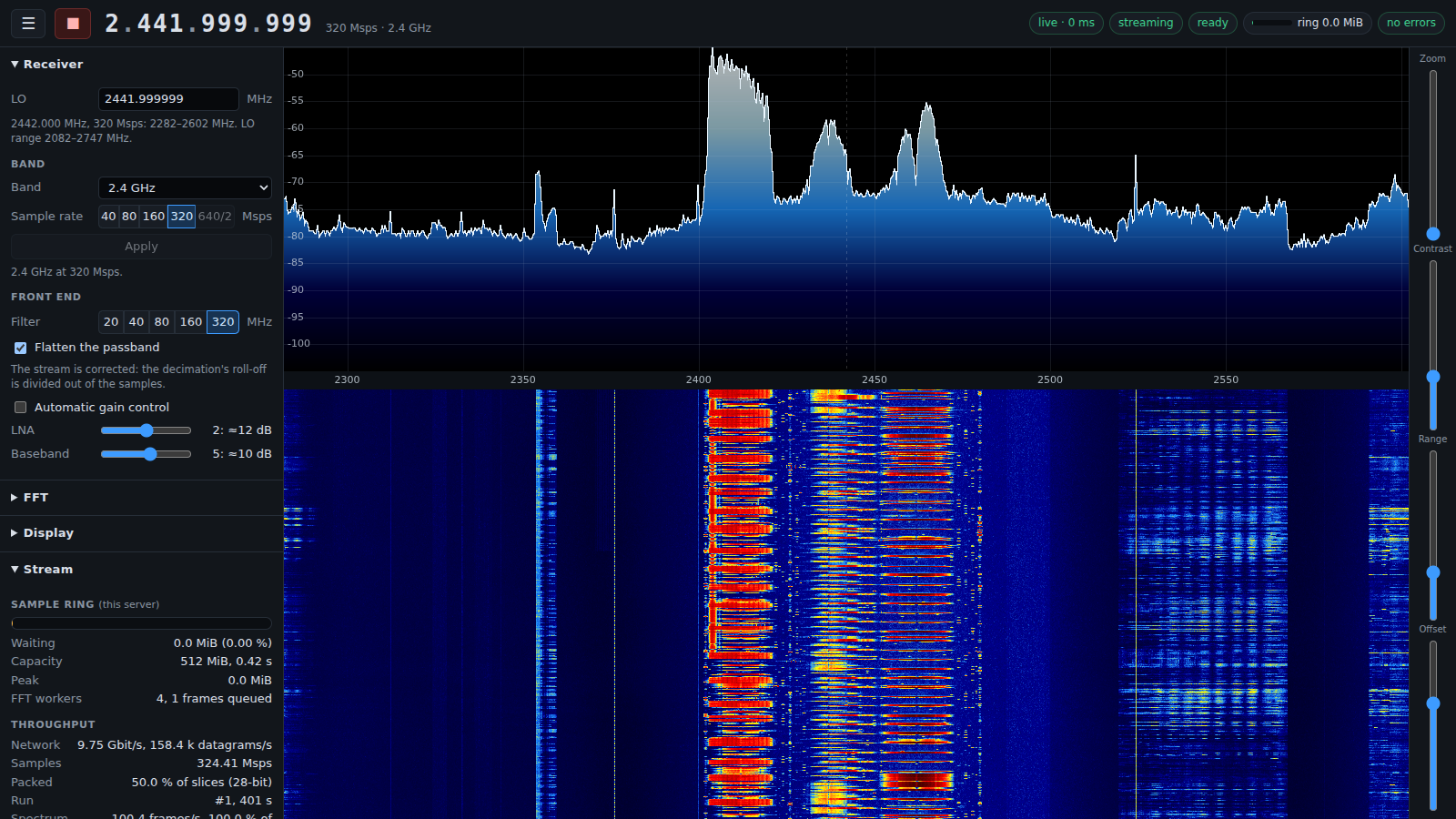
*2.4 GHz at 320 Msps, flattened: Wi-Fi frames and shorter hopping bursts on a
floor that stays level to the band's edges. The Stream panel shows the link
carrying 9.75 Gbit/s, half of the slices packed, and every sample transformed.*
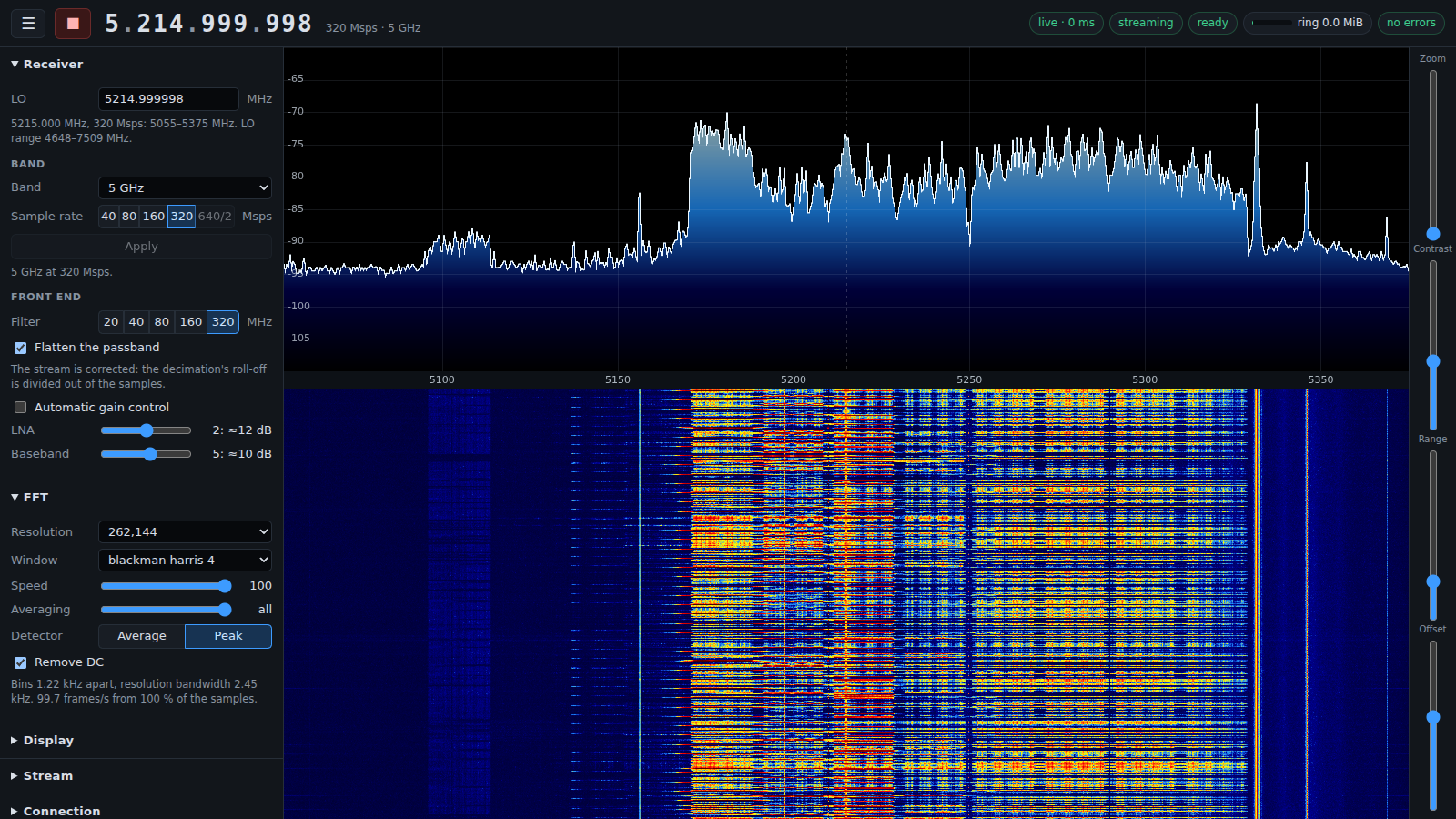
*Two busy 80 MHz Wi-Fi channels at 5170–5330 MHz in a flattened 320 MHz view.*
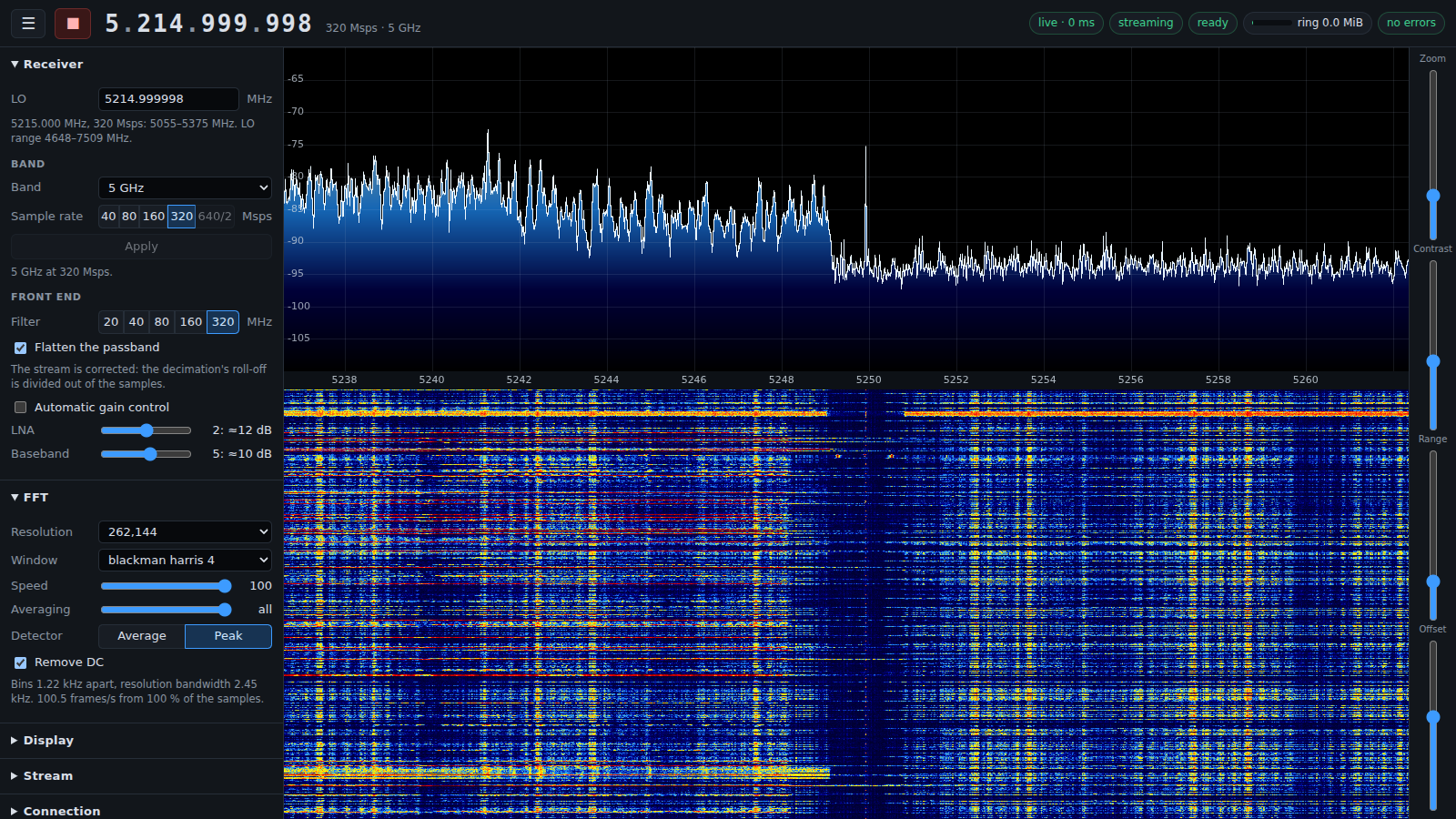
*Zoomed to 24 MHz around 5250 MHz: the two channels' edges and the guard gap
between them, in 1.22 kHz bins.*
## Repository
| Path | |
| --- | --- |
| [`platform/`](platform/README.md) | What runs on the SoC: our U-Boot, Linux 6.18 with board patches, a read-only BusyBox root |
| [`kernel/w1700k_sdr/`](kernel/w1700k_sdr/README.md) | The MT7996 driver (firmware download, the DMA ring, the 10 GbE export, the firmware's command mailbox, the status LED) and its unit-side clients |
| [`firmware/`](firmware/README.md) | Our MT7996 firmware: the ROM patch, the WM (radio bring-up and band set-up, streams, RF control), the WA (packer) and the DSP image (spectrum occupancy) |
| [`host/w1700k/`](host/w1700k/README.md) | Host control: firmware load, streaming, RF control as firmware commands; `w1700k serve` for the web UI |
| [`host/stream/`](host/stream/README.md) | `w1700k-stream`, the host's one receiver of the export: the IQ stream in shared memory for every consumer, and the roll-off correction |
| [`host/spectrum/`](host/spectrum/README.md) | The spectrum/waterfall web server |
| [`host/recv/`](host/recv/README.md) | `sdr-recv`, the stream recorder |
| [`host/soapy/`](host/soapy/README.md) | The SoapySDR module (`driver=w1700k`): the receiver in GNU Radio and other SoapySDR programs |
| [`init/`](init/README.md) | Installation from stock, updates, recovery, return to stock |
| [`include/hw/`](include/hw/README.md) | Register reference: every known MT7996, A-die and AN7581 register, as C headers |
| [`docs/`](docs/) | [Architecture](docs/architecture.md), [the front LED](docs/led.md), [the Bluetooth/Zigbee radio and the GPS receiver](docs/ble-zigbee-and-gps.md), [roadmap](docs/roadmap.md) |
| `tests/`, `tools/` | The test suite and its report page (`tools/test_report.py`), the on-unit sweep of the stream modes (`tools/unit_sweep.py`), a trial of the host's receive settings (`tools/host_rx_trial`), a benchmark of what the host takes in (`tools/host_bench.py`), and the driver and notes for a USB adapter on the stream link ([`tools/r8152-rtl8159`](tools/r8152-rtl8159/README.md)) |
## Getting started
You need a W1700K (HW 1.x) or W1700K2 (HW 2.1), a 3.3 V USB serial adapter on
its console header, an Ethernet cable to its `lan3` port for installation, and
a 10 GbE NIC on the host cabled to its `wan` port (10GBASE-T; an X710 with a
copper SFP+ module works) for the IQ stream; a slower NIC or USB adapter works
at lower sample rates (see "Links slower than 10 GbE"). The stream port is
linked 5 to 6 s after it starts where the far end trains at what it offers.
A host without a 10 GbE port can use a USB adapter with Realtek's RTL8159,
about 80 dollars: it links at 5 Gbit/s (18 s after the unit's port starts),
which carries 160 Msps lossless and 320 Msps at 14 bits per sample pair, and
every mode of the 5 Gbit/s row above passes on a unit with one.
[`tools/r8152-rtl8159`](tools/r8152-rtl8159/README.md) has its driver for
kernels that lack it, what was measured, and how the host is set up for it. Both revisions run the same images.
Most units carry a W25N04KV NAND; some W1700K2s carry a W25N04LV (ID `ef 8b 23`),
which is supported but has never been run on a unit: `init/install` stops on
one until you pass `--i-dont-care-about-nand-corruption`, and asks for a raw
dump of it (`init/rawdump`) for the maintainers.
```sh
make # everything, from public sources (~10 min plus downloads)
make check # the test suite; its report: tests/build/report.html
sudo init/host/link up IFACE # 192.168.1.10/24 on the NIC cabled to lan3
sudo init/host/tftp-forward enable IFACE # or skip it and pass --stock-transport serial to init/install
init/install # back up the NAND, install, save the radio calibration
sudo init/host/link keep IFACE10G 10.77.0.10/24 9216 # the 10 GbE stream link: address, jumbo frames
host/stream/build/w1700k-stream & # the stream, for every consumer on this host
host/spectrum/build/w1700k-spectrum --controller "host/bin/w1700k serve" --listen 0.0.0.0:8073
```
Then open the link it prints and press ▶. Listening beyond its own machine,
as here, the server wants an access token with every request, and the link
carries it: whoever has the link has the receiver, and nobody else on the
network does ([host/spectrum/README.md](host/spectrum/README.md#who-is-answered)).
The first start loads the radio firmware and brings the radio up (about 2 s). Without the browser, the same
operations are `host/bin/w1700k load|start|band|tune|gain|filter|stop|status`.
## Updating from an older version
The flash layout changed on 17 November 2026. A unit installed from a checkout
older than that cannot take this version as an update: `init/flash` compares
the unit's partitions with the build's first, and stops without writing
anything. Move such a unit once, over the serial console, with the host set up
as for a first installation:
```sh
make
init/install --force # installs again on the new layout; the NAND backup you have is kept
init/restore --stock-slot # puts back stock's second firmware slot, which the old layout reached into
```
The first takes about a minute and a half and empties the unit's durable
storage. The second rewrites only the blocks that differ from the backup, and
boots the installed system again. From then on the unit updates over ssh
(below). [init/README.md](init/README.md#a-unit-installed-from-an-earlier-version)
has the details.
## Updating over ssh
Once installed, a unit takes its updates over the Ethernet cable to `lan3`
alone, no serial console:
```sh
make
init/flash --ssh # this build: the loader and the root, one reboot
init/flash --bundle platform/build/images/w1700k-update.tar # the same from an update archive
```
`make` also writes the archive, `w1700k-update.tar` (3 MiB): the loader, the
root and a list of their digests, in one file that can be handed to someone
who has the tools but does not build. Either command takes about a minute.
`init/flash --rootfs --ssh` and `--loader --ssh` update one of the two.
- **The root** holds the radio driver, the unit's programs and its start-up:
most updates. Linux never writes the system flash. It leaves the new root
in the unit's durable storage, and the loader writes it at the next boot.
- **The loader** is updated beside itself. The loader that stock U-Boot boots
is written over the serial console only; one that comes over ssh goes into
a second partition, and the first starts it. A unit is therefore never
without a loader that is known to work.
- **Nothing stays that was not confirmed.** The tool confirms an update when
the unit answers again on it and its storage check passes. A root or a
loader that is never confirmed is undone by the next boot: the previous
root is written back, the second loader is removed. A unit that does not
come back from an update is recovered by a power cycle.
- **An archive built for another flash layout is not sent**, nor is this
build to a unit installed under an older one, over the network or the serial
console: the tool compares the unit's partitions first, and says how such a
unit is moved.
The kernel image and a unit's first installation still take the serial
console. A unit's login key does not: `init/key` and a paperclip set it
([init/README.md](init/README.md#the-paperclip-key)). [init/README.md](init/README.md#updates) has the details, and what to
do with a unit installed from an earlier version.
Build requirements: a C/C++ compiler, make, git, Python 3.10+, the usual
Buildroot prerequisites, clang, ld.lld, llvm-objcopy and llvm-readobj (RISC-V
firmware), openssl (firmware container encryption), and
`libfftw3-dev` and `zlib` for the stream service and the spectrum server. No vendor firmware is
downloaded or needed.
## Testing
```sh
make check # every test; needs no unit
make sweep # every stream mode on a real unit, about five minutes
make bench # watch the stream this host takes in, until Ctrl-C, and report
```
`make check` runs the suite as `python3 -m unittest discover -s tests` does and
writes a page of what happened, `tests/build/report.html`: every test by module
under what the module says it tests, failures with their tracebacks, skips with
their reasons. The tests stand in for the hardware: simulated units for
installation and updates, the radio's packing kernels run from their machine
code in an emulator, the loader's update script run against a model of the
flash, and the host programs fed over loopback.
Every push and every pull request has it run on GitHub
(`.github/workflows/tests.yml`), a push in the repository pushed to, so a fork
shows its own result first: `make firmware host`, then `make check`, on
the oldest Python the project promises and on a current one, with the report
page kept with each run. GitHub lists a run by its jobs, one a Python, and
not by its tests: the breakdown is in each job's step "Say what the tests did"
and on the run's summary page (`tools/ci_report.py`), the count, a line for
each test module, each skipped test with its reason and each failed test with
what it said. The tests that need the kernel, the root filesystem
or the boot images built skip there and say so; they run where `make` has
been run.
`make sweep` (`tools/unit_sweep.py`) does what they cannot. With a unit
reachable and `w1700k-stream` running, it runs every band at every sample rate,
every other packing the link carries, and the 640/2 capture, a few seconds
each, and checks that the samples arrive at the rate set, that next to none are
lost, that they are the kind the packing makes, that their level is plausible,
that the synthesizer is in lock, and that the front LED shows the mode. Its
results join the report page.
`make bench` (`tools/host_bench.py`) measures the host, not the unit. Use the
receiver as you mean to, the spectrum page open in a browser for instance, and
let it run beside: it changes nothing, and every second writes down what the
stream service filed and lost, what the adapter itself missed, how busy each
CPU was and at what clock, the temperature and the power limit. A line every
ten seconds, and when stopped the whole of it: the share lost, how the loss was
spread over the seconds, which CPU took the packets, and which programs used
the most CPU, in `tests/build/host-bench.txt` and `.json`. With
`--run 320,160` it starts and stops the streams itself.
## Read before use
- **Our firmware is receive-only.** It runs none of MediaTek's transmit
calibrations and keeps the MAC's transmit path disabled; a gapless watch at
5250 MHz saw nothing during a load, where MediaTek's firmware transmits a
full-power burst. Still, do not cable an antenna port straight into a
sensitive instrument without an attenuator.
- **Our ROM patch writes no eFuse.** MediaTek's ROM patches since 2025
permanently program one eFuse gate bit on their first run (also with
MediaTek's own driver); a unit that ever ran one has that bit set.
- **Installation replaces the stock operating system.** `init/install` first
copies the NAND's data to the host; keep that copy. `init/restore` writes it
back and returns the unit to its stock firmware.
- Accessing undocumented MT7996 or AN7581 addresses can hang the SoC or wedge
the radio until a power cycle. `include/hw/` marks every known hazard.
## Community
Questions, captures and development talk are on the
[SDR Labs Discord](https://discord.com/invite/AGDYSdUPsz).
## Licence
MIT, except the Linux driver and kernel patches (GPL-2.0-only), U-Boot patches
(GPL-2.0+), the driver's user-space header (GPL-2.0 WITH Linux-syscall-note)
and files derived from MediaTek's mt76 driver (BSD-3-Clause-Clear). See
[LICENSE](LICENSE).