[简体中文](README.md) | English
# dsh-token-stats
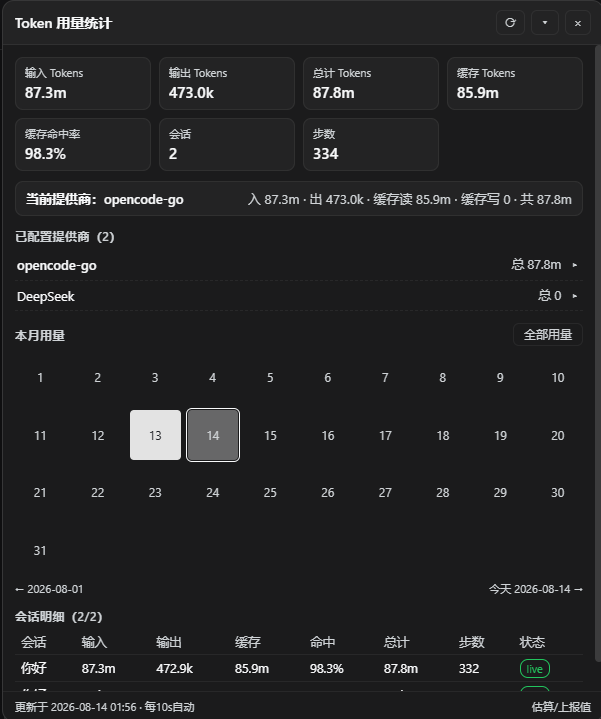
A floating token usage statistics panel for the [DeepSeek Harness](https://github.com/deepseek-ai/deepseek-harness) Web interface. After installation, a draggable overlay appears in the bottom-right corner, displaying real-time input / output / cache / hit rate, per-provider and per-model usage breakdowns, a current-month daily heatmap, and per-session request-level records.
## Features
- **Total Overview**: Input, output, total, cache read / write, cache hit rate, session count, step count
- **Current Session Provider**: Automatically highlights the provider used by the current session with its cumulative usage
- **Provider Breakdown**: Only shows providers you actually configured (from `llm-pi-ai` / `llm-deepseek` settings) plus routes that produced usage; click to expand per-model usage details
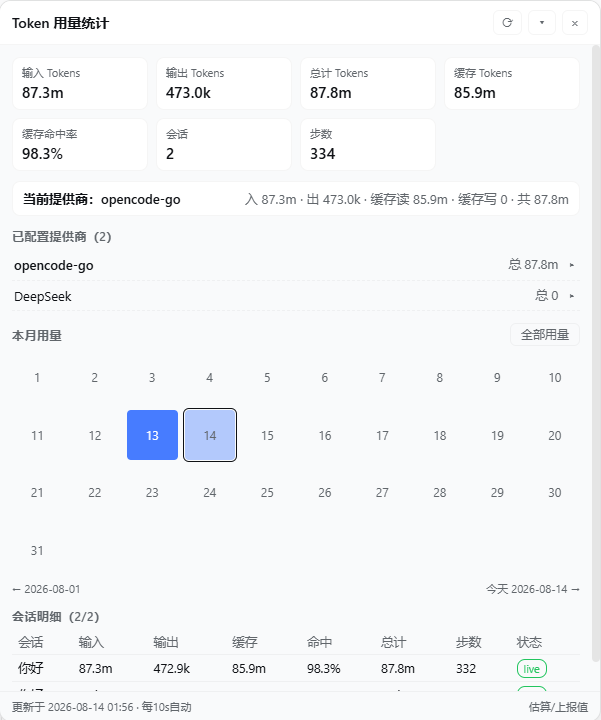
- **Monthly Heatmap**: Daily usage squares for the current month (darker = more usage in dark mode, bluer = more in light mode); click any date to switch the entire panel to that day's data, click "All Usage" to return to the full view
- **Session Details**: Per-session input / output / cache / hit rate / total / steps; expand to view bucketed stats, context pressure, and recent per-request records (time, provider / model, input, output, cache read, cache write)
- **Panel Interaction**: Draggable, collapsible into a summary bar, reopen from a floating ball after closing
- **Auto Refresh**: Data refreshes every 10 seconds; color scheme follows Harness light / dark theme
## Installation
```bash
npx dsh-token-stats install
```
The installer automatically (idempotent, safe to re-run):
1. Installs the package into `$DSH_HOME/profiles/node_modules/dsh-token-stats` (the dsh plugin resolution root, a real directory)
2. Writes the composition row into `$DSH_HOME/profiles//cordis.patch.yml`
Then **restart dsh and refresh the browser page** to see the panel. Restarting is the only manual step — host modules and compositions are cached in-process; a plugin cannot safely restart its own host process.
### Options
| Flag | Description |
|------|-------------|
| `--profile ` | Target profile (default `web`) |
| `--force` | Re-overwrite the installed package |
### Install from Source
```bash
git clone https://github.com/H1a3x/dsh-token-stats.git
cd dsh-token-stats
node scripts/install.js --from . --force
```
## Uninstall
Remove the `$DSH_HOME/profiles/node_modules/dsh-token-stats` directory, delete the following lines from `cordis.patch.yml`, then restart dsh:
```yaml
- insert:
- id: token-stats
name: dsh-token-stats
```
You can also keep the composition row and disable the plugin in the Harness settings page.
## How It Works
```
lib/index.js Host half: incrementally folds session logs, aggregates stats, serves via HTTP route /token-stats
lib/client.js Browser half: panel UI (shell module-table format, no build step)
scripts/install.js One-command installer: copies package + writes composition row
```
**Data Source**: Harness `tokenUsage` / `sessionStats` projections (provider-reported values) combined with the plugin's incremental fold of session logs (`request/header` + `assistant/message` usage). Historical sessions are read once and cached; incremental updates only read events past the last watermark.
**Plugin Loading Contract**:
- `package.json` declares `dsh.client.platform = "web"` and `inject` dependencies; the host scanner generates `window.__DSH_BOOT__` graph rows and mounts the `/plugins//client.js` route
- The browser half is bundled in module-table format; the factory returns `{ apply, inject }`, service dependencies follow the exported `inject`
- UI entry injected via `ctx.slots.inject('shell.overlay', …)` as a root-scope overlay
- Hot reload boundary: `lib/client.js` changes take effect on page refresh; `dsh.client` declaration changes require a dsh restart
## Development
```bash
# Syntax check
npm run check
# Local install verification
npm run install:local
```
## Source & License
`dsh-token-stats` is developed by **H1a3x**, licensed under [MIT](LICENSE).
- Repository: https://github.com/H1a3x/dsh-token-stats
- npm: https://www.npmjs.com/package/dsh-token-stats
Third-party code must retain its original LICENSE and attribution; active third-party dependencies with upstream should be referenced via npm dependencies, not copied.
## Links
- [Linux.do](https://linux.do/)