
Hack from the terminal.



Installation •
Usage •
Documentation •
Contributing
---
**gori** (고리 — Korean for *ring, link, loop*) sits in the loop between your client and its target,
capturing every request and response as a *flow* you can replay, fuzz, and scan across HTTP/1.1,
HTTP/2, WebSocket, gRPC, and SSE, and intercept in flight on HTTP/1.1 and HTTP/2. Core assessment
actions that cross surfaces use the same engines, and those workflows are also
available through `gori run` and MCP, so scripts and AI agents can drive the same engagement.
The [capability matrix](https://gori.hahwul.com/reference/capabilities/) names the protocol and
surface limits explicitly.
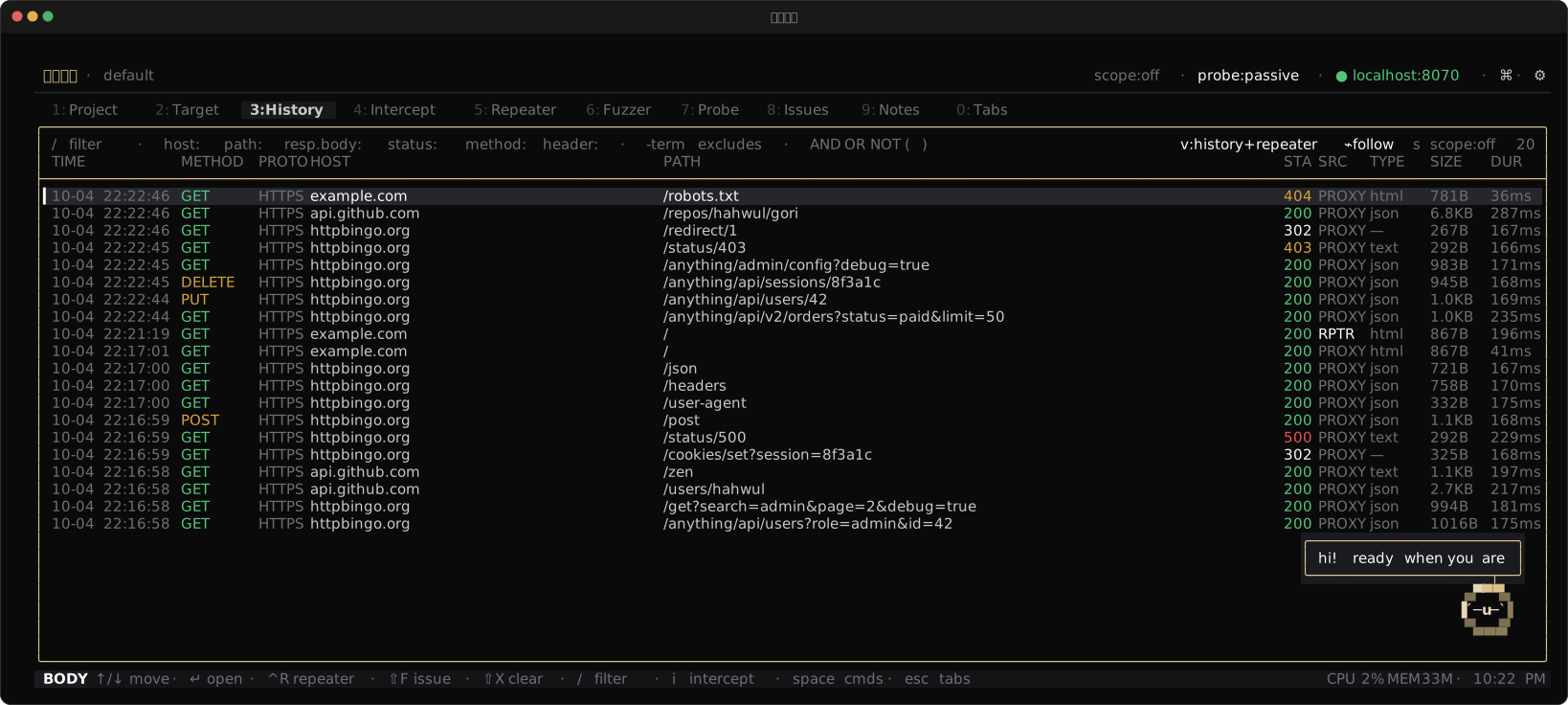
Features
### Capture & Intercept
- Capturing proxy for HTTP/1.1, HTTP/2, WebSocket, gRPC, and SSE
- Intercept on HTTP/1.1 and HTTP/2, gRPC included: hold, edit, forward, or drop in flight — and per-message on an HTTP/1.1 WebSocket, opt in with `proto:ws`
- Searchable History of every flow, with a query language for filtering
- Scope rules, hostname overrides, and match & replace
### Replay, Fuzz & Decode
- Repeater workbench for crafting and re-sending requests (incl. WebSocket & gRPC)
- Intruder-style Fuzzer with four attack modes
- Decoder pipeline for chained encode / decode / hash, including signed session cookies
- Side-by-side Comparer for diffing two flows
- Inline JWT / SAML / GraphQL / protobuf / MessagePack / CBOR decoding, hex view, and pretty-printing
- Copy any request as cURL, Python, `fetch`, Go, httpie, or a CSRF PoC
### Discover & Scan
- Probe passive & light-touch active vulnerability scanner
- Param Miner for hidden-parameter discovery
- Authorize matrix: replay one request under several identities to find broken access control
- Sequencer for grading the randomness of session, CSRF, and reset tokens
- Cookie workbench to verify, crack, and re-sign Flask / Rack / Django session cookies
- OAST collector for confirming blind SSRF, XXE, and injection out of band
- Findings triage with Markdown / JSON / SARIF export
### Keyboard-first Workflow
- Command palette (`Ctrl-P`) and context space menu (`Space`) reach every action
- Rebindable hotkeys and switchable colour themes
- Mouse support, multi-line editing, and go-to-line navigation
### Headless & Scriptable
- `gori run` exposes the core project and testing workflows for non-interactive use
- MCP server (`gori mcp`) exposes those workflows to AI agents (it does not start a capture proxy)
## Installation
### Quick install (macOS / Linux)
```bash
curl -fsSL https://gori.hahwul.com/install.sh | bash
```
Then update later with `gori update` (self-update for binary installs; package-manager guidance for Chocolatey / Homebrew / Snap / AUR).
On Windows, use [Chocolatey](#chocolatey), or download `gori-windows-x86_64.exe` from [Releases](https://github.com/hahwul/gori/releases/latest), rename it to `gori.exe` and put it on your `PATH`.
### Chocolatey
The [Chocolatey package](https://community.chocolatey.org/packages/gori) installs the Windows x86_64 binary:
```powershell
choco install gori
```
### Homebrew
```bash
brew tap hahwul/gori
brew install gori
```
### Nix
The repo is a flake, so it runs without being installed:
```bash
nix run github:hahwul/gori
nix profile install github:hahwul/gori # or keep it
```
### From source
Requires [Crystal](https://crystal-lang.org/) `>= 1.21.0` and `pkg-config`.
```bash
git clone https://github.com/hahwul/gori.git
cd gori
shards build --release
```
The binary is written to `bin/gori`.
> For system libraries (Brotli / Zstd), offline builds, and other options, see the
> [Installation guide](https://gori.hahwul.com/getting-started/installation/).
## Usage
gori runs one engine and one project behind three entry points. Drive it yourself, hand it to an
AI agent, or script it, and pick the one that fits who is at the controls.
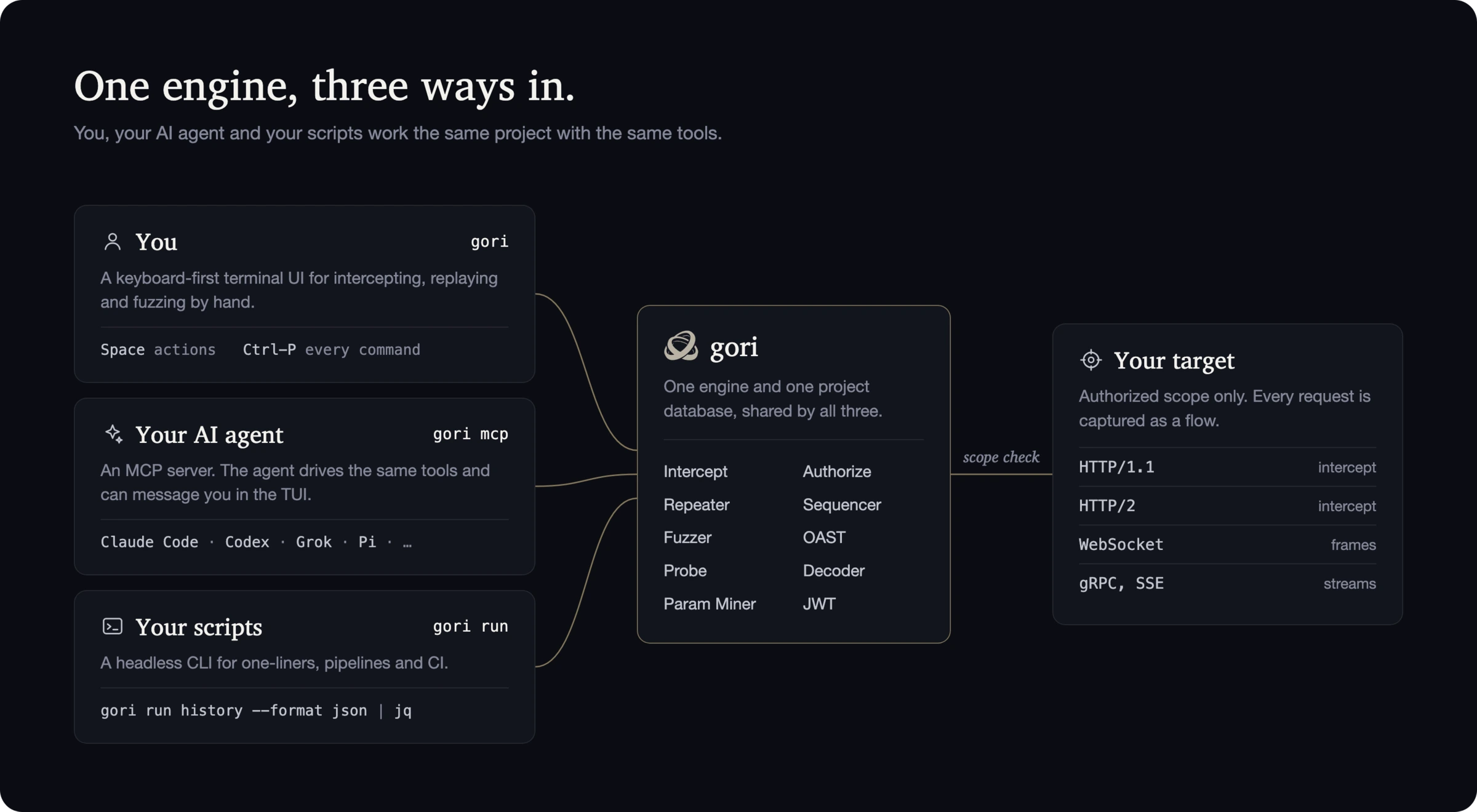
### For humans: `gori` (TUI)
Start the proxy and open the interactive terminal UI. No subcommand needed:
```bash
gori
```
The proxy listens on `127.0.0.1:8070` by default, and a short first-run wizard picks the
**global default** bind and theme (projects can pin their own later). To intercept HTTPS, trust
gori's root CA. The quickest path is the palette's **Open browser** (`Ctrl-P`), which launches a
browser already trusted and proxied. Captured traffic lands in **History**; press `Ctrl-P` for the
command palette or `Space` for context actions.
```bash
gori --listen 0.0.0.0 --port 8080 # global bind for this run only (not persisted)
```
### For AI agents: `gori mcp` (MCP server)
`gori mcp` is a [Model Context Protocol](https://modelcontextprotocol.io) server. An AI client
spawns it over stdio, reads your traffic, and drives the same tools you do. Let gori write the
config for your agent, then restart the client:
```bash
gori mcp --install-claude-code # Claude Code (~/.claude.json)
gori mcp --install-claude # Claude Desktop
gori mcp --install-codex # OpenAI Codex
gori mcp --install-agy # Antigravity CLI
gori mcp --install-grok # Grok
gori mcp --install-hermes # Hermes (~/.hermes/config.yaml)
gori mcp --install-pi # Pi (~/.pi/agent/mcp.json)
```
Pi needs an MCP adapter, such as [pi-mcp-adapter](https://github.com/nicobailon/pi-mcp-adapter)
(`pi install npm:pi-mcp-adapter`). The installer honors `PI_CODING_AGENT_DIR` when set.
Add `--read-only` to hand a project to an untrusted agent (read tools only, no live requests). The
[AI Setup guide](https://gori.hahwul.com/getting-started/ai-setup/) walks through connecting an agent and
running your first request.
### For scripts: `gori run` (headless CLI)
`gori run` exposes the same core project and testing engines without the interactive UI. It is
built for scripting and CI, but works just as well by hand or from an agent's shell:
```bash
gori run history --format json # dump captured flows as JSON
gori run sitemap # endpoints seen so far
gori run --help # every subcommand
```
All three entry points share the same project database. See the [documentation](https://gori.hahwul.com) for the
full guide, or open the **Help** tab in the app.
## Development
```bash
shards build # debug binary at bin/gori (add --release to optimise)
shards run gori # run without installing
```
If linking fails with undefined `BrotliDecoder*` symbols, `libbrotlidec` is missing or
`pkg-config` cannot find it — see the
[Installation guide](https://gori.hahwul.com/getting-started/installation/) for the system libraries and the
`-Dwithout_native_codecs` offline build.
## Contributors
[](https://github.com/hahwul/gori/graphs/contributors)
Contributions are welcome — see [CONTRIBUTING.md](.github/CONTRIBUTING.md) to get set up.
Not every kind of help lands as a commit, so the line under each name says what it was: the bug
reports and reproductions up there found things gori would not have found on its own. To credit
someone, edit [`.github/contributor-mural.yml`](.github/contributor-mural.yml).
## Why "gori"?
gori (고리) is the Korean word for a **ring, link, or loop** — exactly where the tool sits: in the
loop between your client and its target, capturing and reshaping each request as it passes through.
*Sit in the loop.*