▄████▄   ██▀███   ▄▄▄       ██▓  ▄████
  ▒██▀ ▀█  ▓██ ▒ ██▒▒████▄    ▓██▒ ██▒ ▀█▒
  ▒▓█    ▄ ▓██ ░▄█ ▒▒██  ▀█▄  ▒██▒▒██░▄▄▄░
  ▒▓▓▄ ▄██▒▒██▀▀█▄  ░██▄▄▄▄██ ░██░░▓█  ██▓
  ▒ ▓███▀ ░░██▓ ▒██▒ ▓█   ▓██▒░██░░▒▓███▀▒
  ░ ░▒ ▒  ░░ ▒▓ ░▒▓░ ▒▒   ▓▒█░░▓   ░▒   ▒
    ░  ▒     ░▒ ░ ▒░  ▒   ▒▒ ░ ▒ ░  ░   ░
  ░          ░░   ░   ░   ▒    ▒ ░░ ░   ░
  ░ ░         ░           ░  ░ ░        ░

**An agnostic orchestrator TUI, for the people.** [![npm](https://img.shields.io/npm/v/craig-cli)](https://www.npmjs.com/package/craig-cli) [![License: MIT](https://img.shields.io/badge/License-MIT-green.svg)](https://github.com/hallsamuel90/craig/blob/main/LICENSE) [![Node 22+](https://img.shields.io/badge/node-22%2B-brightgreen)](https://nodejs.org) [Website](https://craig-cli.com) · [Documentation](https://craig-cli.com/docs/) · [CLI reference](https://craig-cli.com/docs/cli/)
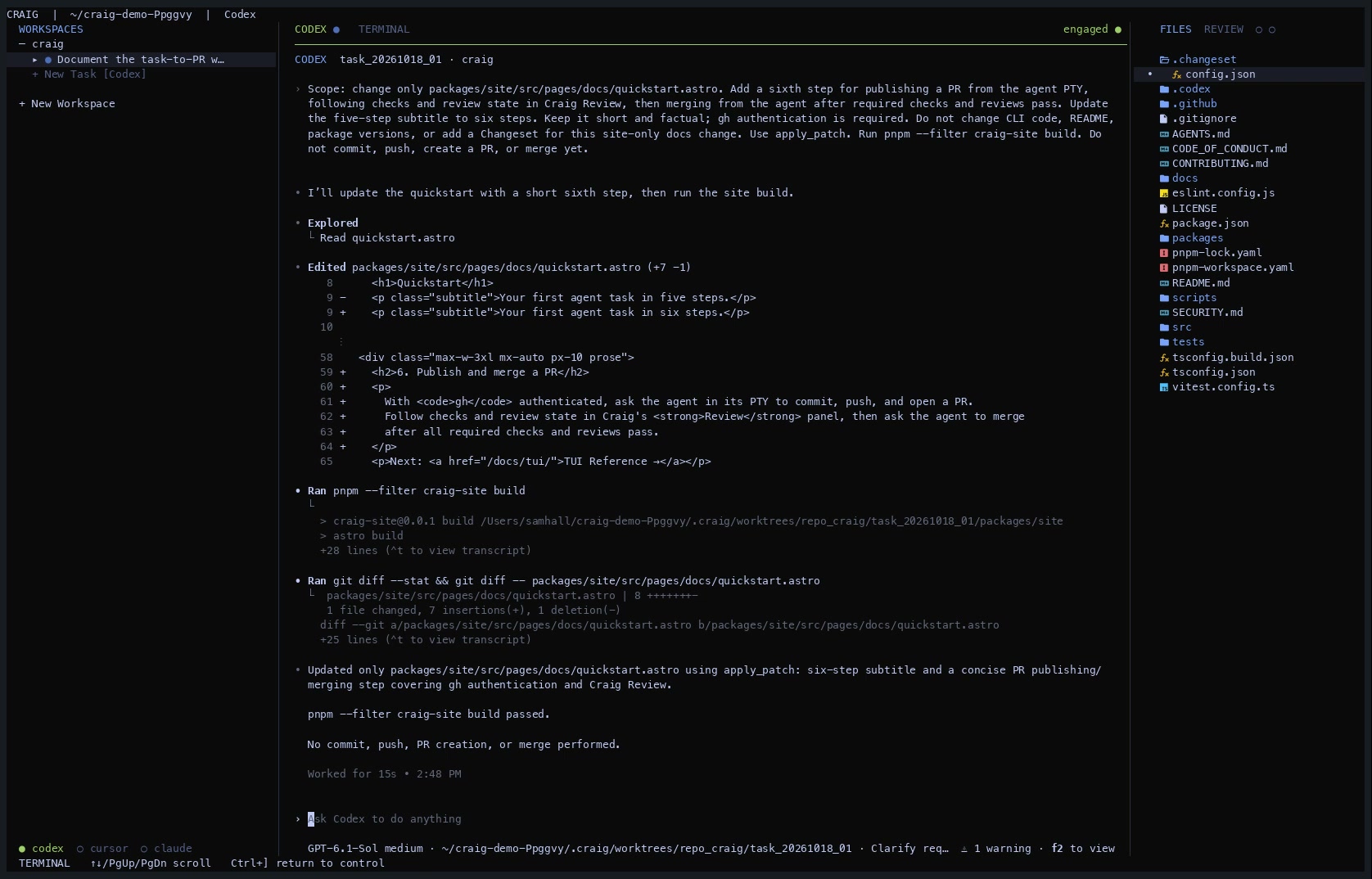
Watch Craig's task-to-merge demo: agent work, pull request checks, and merge [▶ Watch the full task-to-merge demo (65 seconds)](https://craig-cli.com/#demo) Craig gives every task its own Git branch, isolated worktree, and live PTY, then keeps the agents, changes, pull requests, and checks together in one keyboard-driven workspace. Bring the agent CLIs you already use—Claude Code, Codex, or Cursor. Craig is not another coding agent; it is the heads-up display and controls around them. The paneled terminal UI is enabled by default, including framed panes, integrated tabs, a compact workspace sidebar, and live summaries on the start and pause menus. No Panel polish preview toggle is required. The Pi coding agent is also available as an opt-in feature preview. The Agent file opening preview lets an attached agent run `craig file open ` to display any readable text file directly in the active Craig TUI. _It's like a game, except the PRs are real._ ## Why Craig? - **Run agents in parallel.** Each task works in an isolated Git worktree, so one agent does not overwrite another. - **Keep the native agent experience.** Every runner opens in a real PTY instead of a lowest-common-denominator chat wrapper. - **Stay in flow.** Launch agents, move between tasks, inspect changes, and watch PR checks without leaving the keyboard. - **Work across repositories.** Treat one repo or a directory of repos as a workspace while preserving real repository boundaries. - **Let agents operate the workspace.** The same task model backs the TUI and CLI, so agents and scripts can inspect context and perform Craig actions directly. - **Leave and come back.** A local daemon keeps agent sessions and PR synchronization alive when the foreground TUI closes. ## Install ```bash npm install -g craig-cli ``` Craig requires Node.js 22+ and `git`. Install and authenticate at least one supported runner: Claude Code, Codex, or Cursor. Pull request discovery and review status also require an authenticated `gh` CLI. ## Quick start Run `craig` in a full-screen terminal, then work through the TUI: 1. Select **+ New Workspace** and choose a Git repository. You can also choose a parent directory to work across its direct-child repositories. 2. Press `n`, name the task, and use `Ctrl+R` to choose Claude Code, Codex, or Cursor. Press `Enter` to create it. 3. Craig creates an isolated branch and worktree, starts the runner there, and takes you directly into its live PTY. Tell the agent what you want it to do. 4. Press `Ctrl+]` to return to Craig's control mode. Move between panels with `Tab`, navigate with the arrow keys or `hjkl`, and press `Enter` on a task to reattach to its agent. 5. Press `n` again to start more tasks while the first agent keeps working. Each task remains isolated in its own worktree. 6. Use **Files** to inspect the worktree and **Review** to follow diffs, pull requests, checks, and review state. Ask the agent to commit, push, create the PR, or merge from its PTY; Craig keeps the status in sync. Agent dots animate while working. Green dots mean the agent is ready. Bold task titles and agent tab labels indicate unread output; viewed responses use normal text weight. Focus the agent pane or attach to it to mark the latest output read. Highlighting a task in the sidebar does not clear unread output, and read state survives restarts. The top-right of the main shell and splash/pause screens shows the current Craig version, such as `v0.19.0`. When an update is available, the same label reads `v0.19.0 → v0.20.0 available`. Ignoring a version returns the label to the current version alone. See the [TUI reference](https://craig-cli.com/docs/tui/) for every panel and keyboard shortcut. ## Local by default Craig stores workspace state, task records, worktrees, and runtime metadata under `.craig/` at the workspace root. Do not commit this directory; ignore `.craig/` when the workspace root is itself a Git repository. Craig does not require an account or hosted control plane. Your agent CLIs still use their own authentication and network services. ## Go deeper - [TUI reference](https://craig-cli.com/docs/tui/) — layout, controls, and task navigation - [Runners](https://craig-cli.com/docs/runners/) — Claude Code, Codex, and Cursor setup - [CLI reference](https://craig-cli.com/docs/cli/) — commands for humans, scripts, and agents - [Configuration](https://craig-cli.com/docs/config/) — runners, checks, GitHub polling, and previews - [Agent orchestration](https://craig-cli.com/docs/orchestration/) — delegation, durable prompts, events, and Fury workflows ## Contributing Craig is open source under the [MIT License](https://github.com/hallsamuel90/craig/blob/main/LICENSE), but it is not a community-maintained project. Bug reports and focused questions are welcome. Please read the [contribution guide](https://github.com/hallsamuel90/craig/blob/main/CONTRIBUTING.md) before proposing a change and report security issues through the [security policy](https://github.com/hallsamuel90/craig/blob/main/SECURITY.md). ## Development ```bash pnpm install pnpm test pnpm typecheck pnpm lint pnpm build pnpm build:npm pnpm package:audit pnpm package:smoke ``` The npm package is published as [`craig-cli`](https://www.npmjs.com/package/craig-cli) from `packages/cli`.