tokenusage
Stop getting throttled without warning. Know your AI coding costs in 0.08s.


English | 中文
---
### Install in one line
```bash
npm i -g tokenusage # or: cargo install tokenusage --bin tu
```
### Run it
```bash
tu # daily cost report in 0.08s
```
---
214x faster than ccusage on Claude logs · 138x faster on Codex logs · See benchmark
If tokenusage saves you time, give it a star — it directly helps other Codex and Claude users find it.
---
## Screenshots
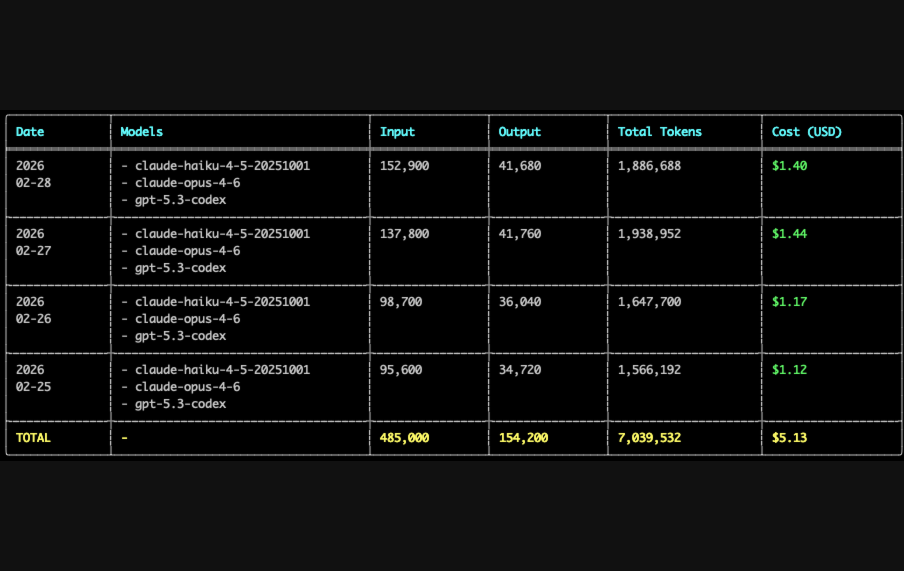
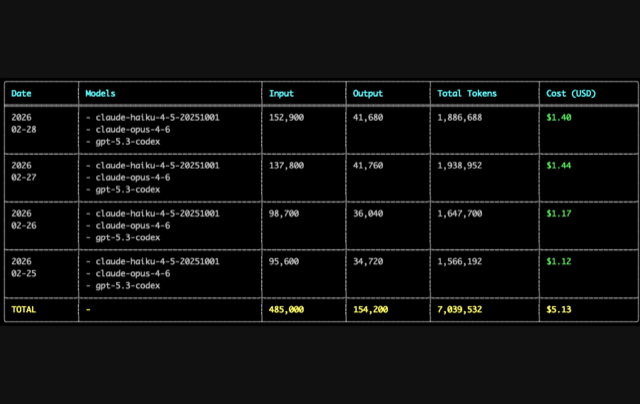
tu — daily report
|
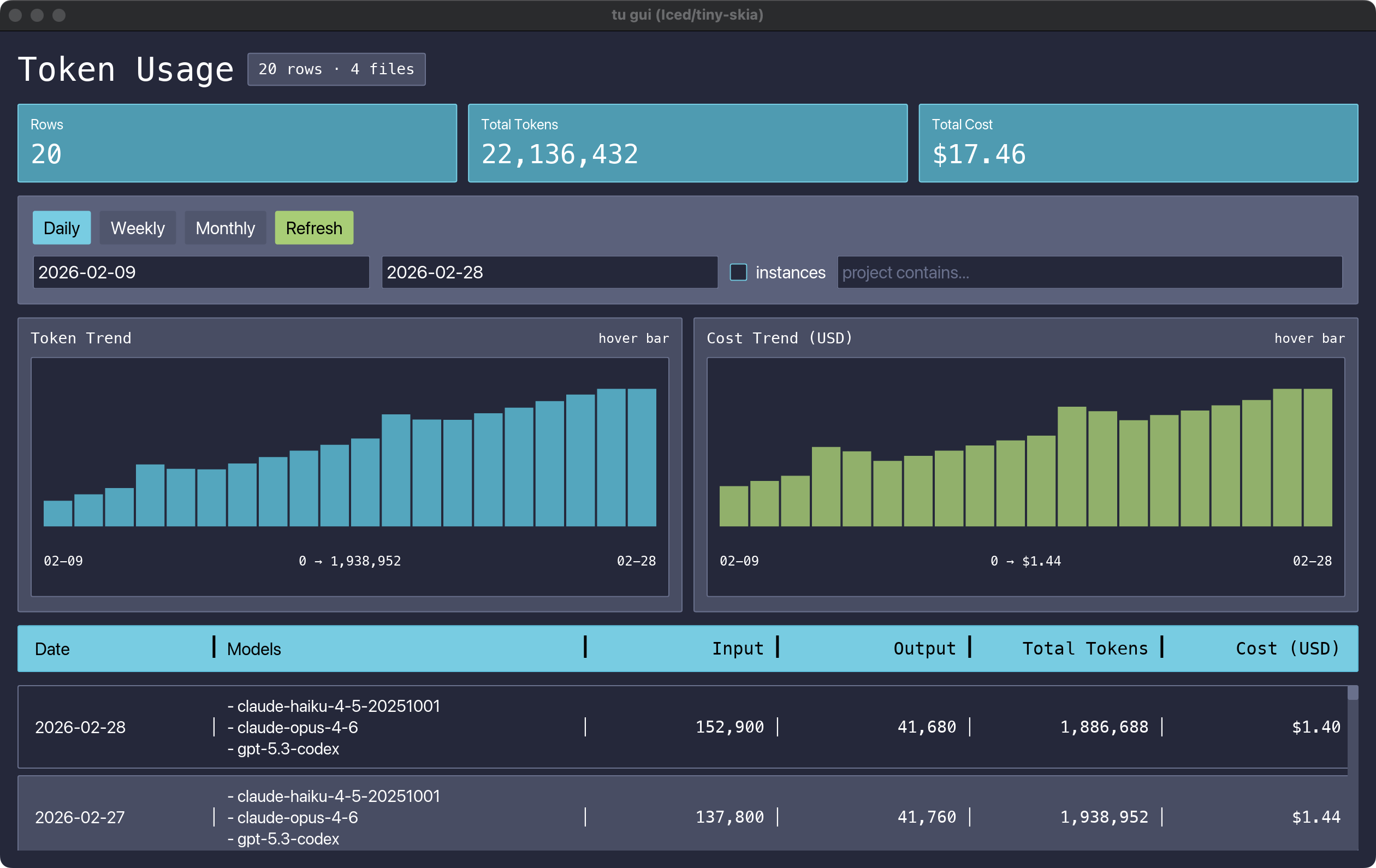
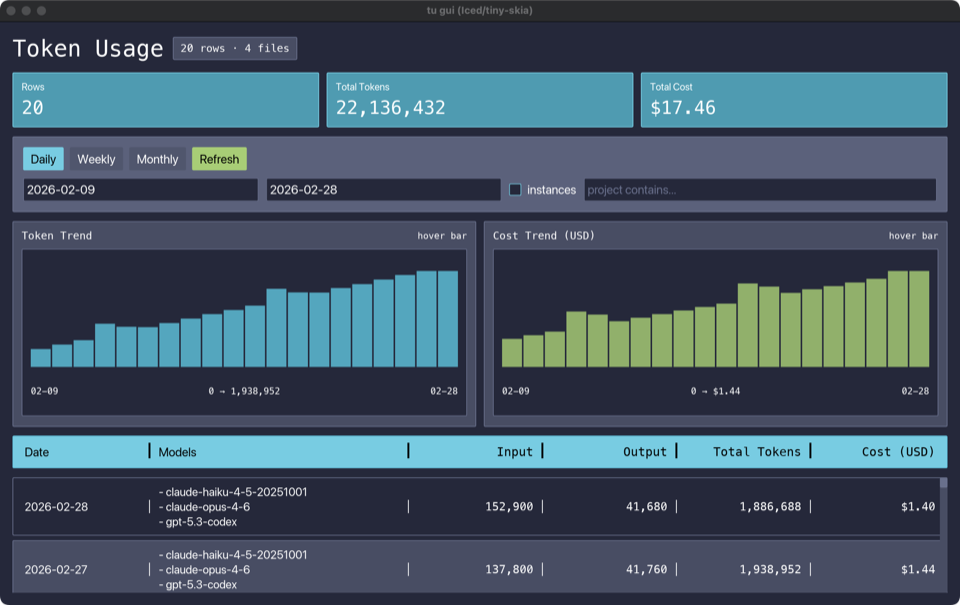
tu gui — desktop dashboard
|
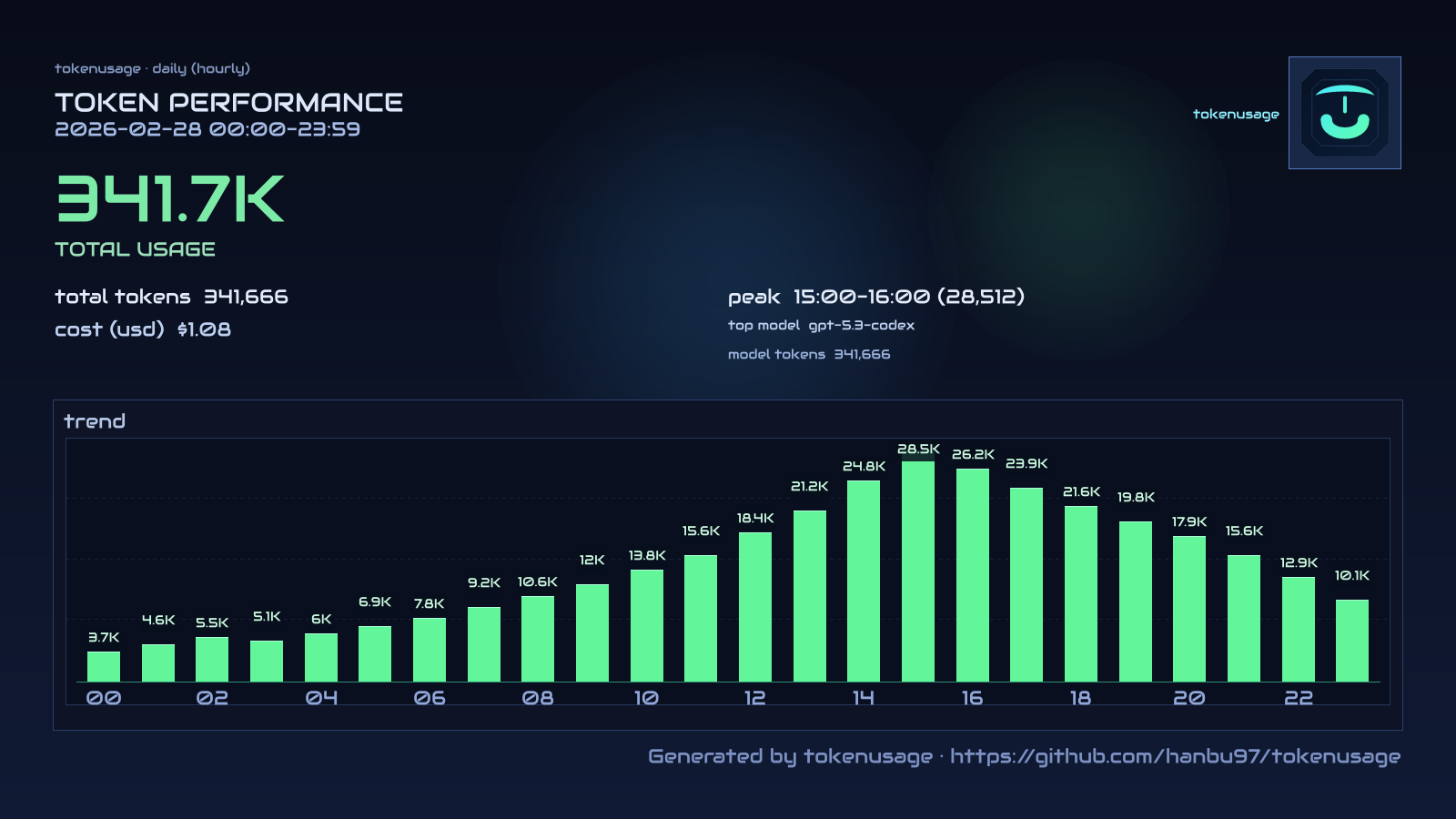
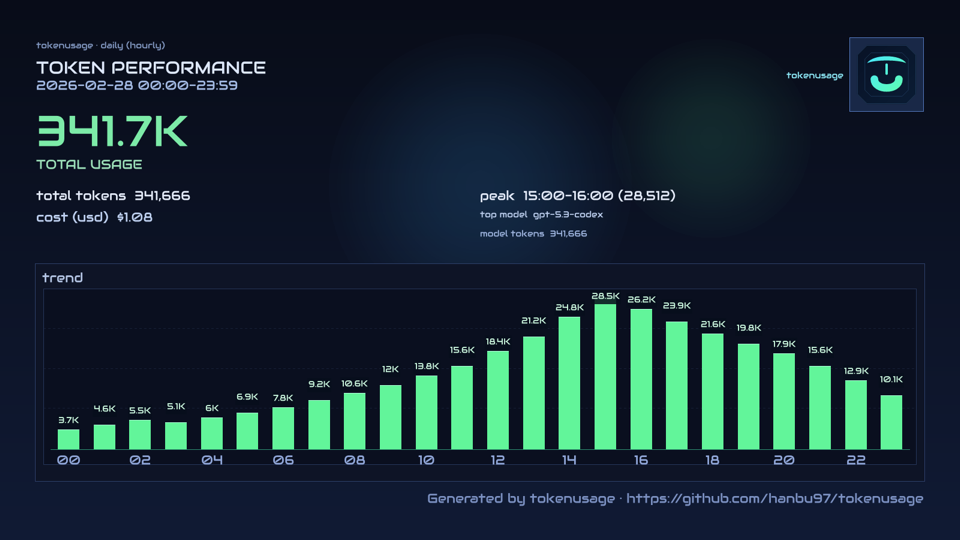
tu img day — shareable card
|
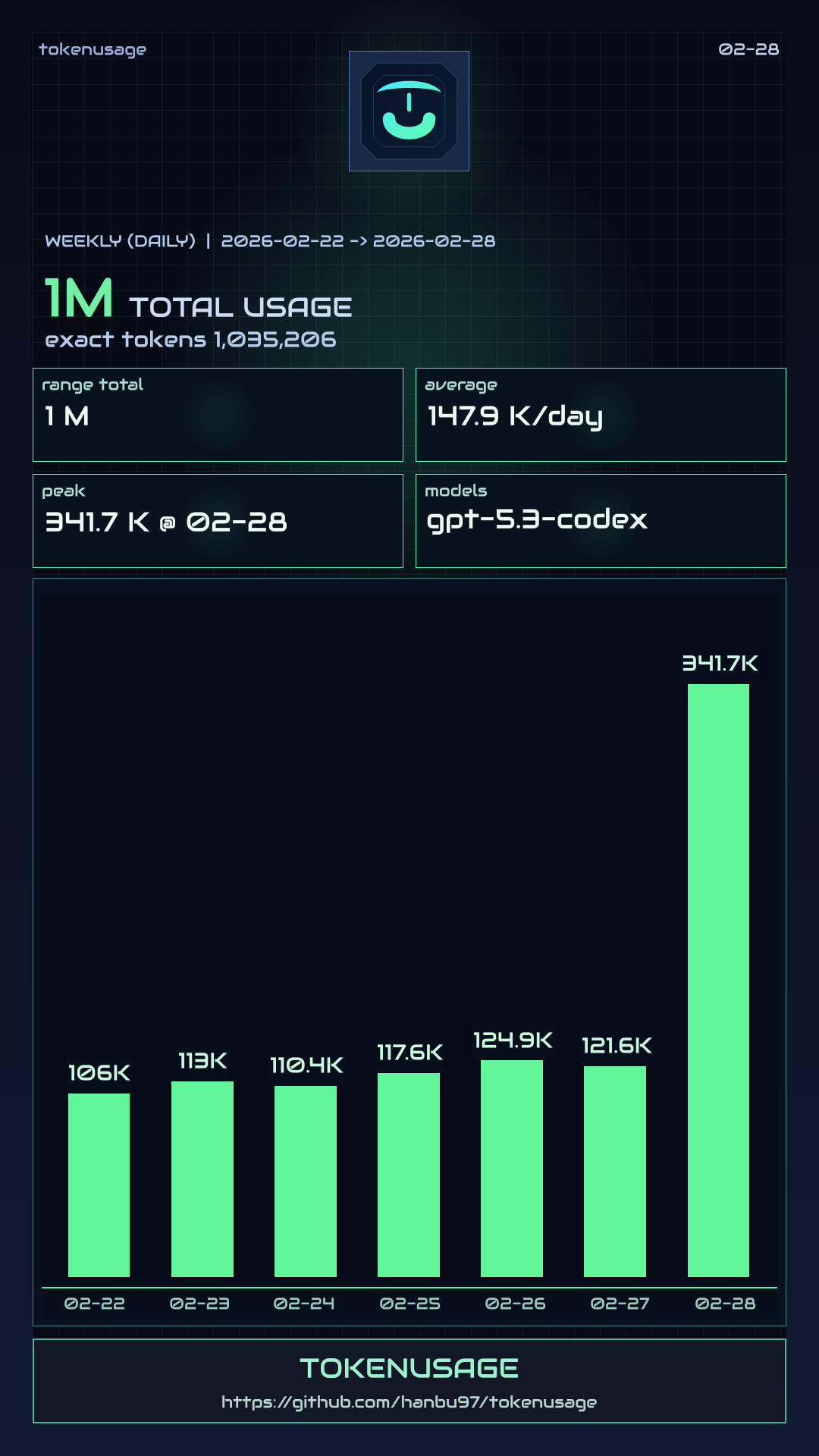
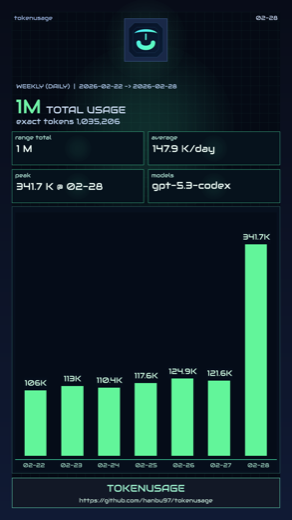
tu img week — weekly card
|
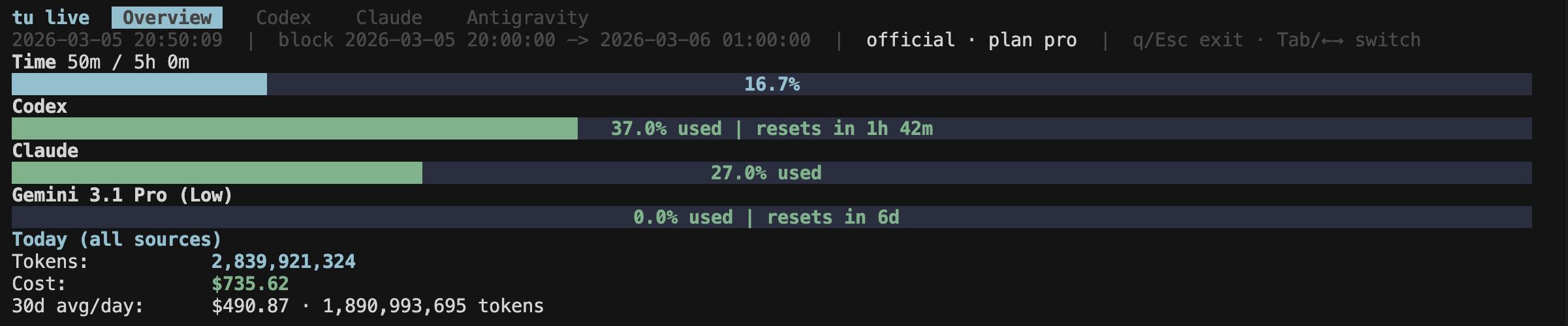
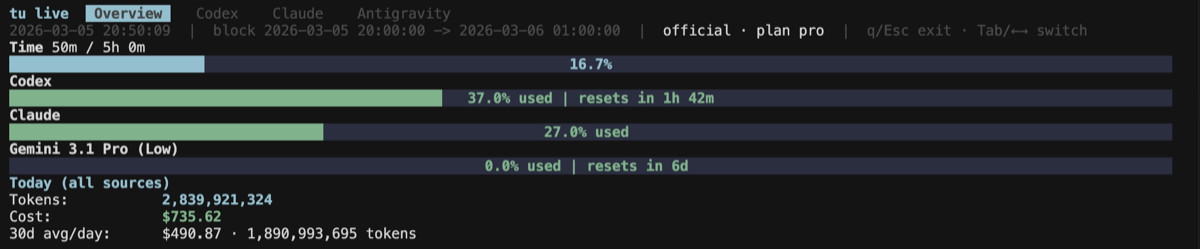
tu live — real-time TUI monitor
|
## Why tokenusage
| Problem | tokenusage solution |
|---|---|
| Hit rate limits mid-refactor, no warning | `tu live` shows usage in real-time |
| No idea what AI coding costs per day | `tu` gives daily cost breakdown in 0.08s |
| Codex + Claude logs in separate places | One merged dashboard across all sources |
| Existing tools are slow on large logs | 214x faster than ccusage (Rust + parallel scan + cache) |
| Don't want to upload logs to a cloud | 100% local parsing, no data leaves your machine |
| Want coding-time context, not just raw tokens | `tu` keeps the classic token table by default; `--with-activity` opt-in adds coding time and tokens/hour |
| Want to share usage stats | `tu img` generates shareable image cards |
## Install
### npm (recommended)
```bash
npm install -g tokenusage
```
### cargo (crates.io)
```bash
cargo install tokenusage --bin tu
```
### pip (PyPI)
```bash
pip install tokenusage
```
### cargo-binstall (prebuilt binary)
```bash
cargo binstall tokenusage --no-confirm
```
## Quick Start
```bash
# Daily report (default)
tu # classic merged token report
tu --tui # same report in terminal UI
# Source-specific
tu codex
tu claude
tu antigravity
# Date filter
tu --since 2026-02-01 --until 2026-02-28
# Weekly / monthly
tu weekly --start-of-week monday
tu monthly
# Native time views inferred from local AI usage
tu today
tu activity
tu activity --days 14
tu activity --project tokenusage
# Add locally inferred coding activity columns (Coding / Tok/hr)
tu --with-activity
tu --with-activity --tui
tu live --with-activity
# Native local heartbeat collector
tu heartbeat watch .
tu heartbeat stats
tu heartbeat ping src/main.rs --write
# Live monitor (tabs: Codex / Claude / Antigravity)
tu live
tu live codex
tu live claude
tu live antigravity
# Real-time per-session viewer (htop for tokens)
tu top
tu top --active-hours 12 # show sessions active in last 12h
tu top --active-hours 0 # show all sessions
# GUI dashboard
tu gui
# Share image card (for social posting)
tu img
tu img day
tu img week
```
## Benchmark Details
**Setup:**
- Machine: Apple M3 Max, macOS 15.6.1
- `tu` version: `1.2.6` · `ccusage` version: `18.0.8` · `@ccusage/codex` version: `18.0.8`
- Default mode (no date filters, online pricing, network enabled)
**Codex** — 91 JSONL files, 1.7 GB (`~/.codex/sessions`)
| | `tu codex` | `bunx @ccusage/codex` | Speedup |
|---|---:|---:|---:|
| Cold (rebuild cache) | **0.92s** | 20.76s | **22.6x** |
| Warm (best of 5 / avg of 3) | **0.15s** | 20.76s | **138x** |
**Claude** — 1 521 JSONL files, 2.2 GB (`~/.claude/projects`)
| | `tu claude` | `bunx ccusage` | Speedup |
|---|---:|---:|---:|
| Cold (rebuild cache) | **0.73s** | 17.15s | **23.5x** |
| Warm (best of 5 / avg of 3) | **0.08s** | 17.15s | **214x** |
> Results vary by hardware, filesystem cache state, and log volume.
For a detailed feature comparison, see [tokenusage vs ccusage](docs/compare/tokenusage-vs-ccusage.md).
## FAQ
### Where does the data come from?
From local log directories and IDE probes:
- Claude: `~/.config/claude/projects`, `~/.claude/projects`
- Codex: `~/.codex/sessions`, `~/.config/codex/sessions`
- Antigravity: probed from running IDE language server (no log files needed)
You can override with `--claude-projects-dir` and `--codex-sessions-dir`.
### How is cost estimated?
`tu` uses OpenRouter pricing when available, caches it for 6 hours, and falls back to built-in offline rates when network pricing is unavailable.
### How does `--with-activity` work?
`tu` infers coding activity locally from your machine. By default it clusters nearby AI usage events into active windows. If you enable the native heartbeat collector (`tu heartbeat watch ...`), `tu` will prefer heartbeat-backed activity on days with sufficient heartbeat coverage and fall back to token-event inference elsewhere.
From that local activity signal, `tu` derives:
- coding time
- tokens per coding hour
- cost per coding hour
- project / language / source breakdowns
The dedicated time views (`tu today`, `tu activity`) enable this automatically. `--with-activity` adds the same local activity context to daily/weekly/monthly reports and `tu live`.
By default, `tu` keeps the original merged token report layout. The extra `Coding` / `Tok/hr` columns only appear when activity context is explicitly enabled with `--with-activity`, or when you use the dedicated time views.
### Is my data private?
Yes for usage logs: parsing is local. `tu` only requests pricing metadata unless you run `--offline`.
## Command Overview
```text
tu [daily|today|activity|heartbeat|codex|claude|antigravity|monthly|weekly|img|session|blocks|live|top|statusline|gui]
```
Useful commands:
- `tu --tui`
- `tu --with-activity --tui`
- `tu daily --tui`
- `tu daily --json`
- `tu daily --jq '.rows[0]'`
- `tu today`
- `tu activity --days 14`
- `tu heartbeat watch .`
- `tu heartbeat stats`
- `tu blocks --active`
- `tu blocks --live`
- `tu live`
- `tu img --output tokenusage-share.png` (today, hourly)
- `tu img --period weekly --output tokenusage-week.png` (7 days, daily)
- `tu img --logo ./logo.png --brand-url tokenusage.dev`
- `tu statusline`
## Config File
Config search order:
1. `./.tu/tu.json`
2. `~/.config/tu/tu.json`
3. `~/.config/tokenusage/tokenusage.json`
Use an explicit config file:
```bash
tu --config /path/to/tu.json
```
Example:
```json
{
"defaults": {
"timezone": "Asia/Shanghai",
"workers": 16,
"compact": false
},
"commands": {
"daily": {
"instances": true
},
"live": {
"sessionLength": 5,
"refreshInterval": 1
},
"img": {
"period": "daily",
"bars": 24,
"brand": "tokenusage",
"brandUrl": "https://github.com/hanbu97/tokenusage"
},
"weekly": {
"startOfWeek": "monday"
}
}
}
```
## Pricing
```bash
tu --pricing-file ./pricing.json
```
Offline-only mode:
```bash
tu --offline
```
## Demo Dataset (No Real Data)
```bash
python3 examples/demo/generate_demo_data.py
tu daily --config ./examples/demo/tu.demo.json --since 2026-02-09 --until 2026-02-28
tu live --config ./examples/demo/tu.demo.json
tu gui --config ./examples/demo/tu.demo.json --since 2026-02-09 --until 2026-02-28
tu img --config ./examples/demo/tu.demo.json --since 2026-02-28 --until 2026-02-28 --output ./docs/images/share-demo.png
tu img --config ./examples/demo/tu.demo.json --period weekly --since 2026-02-22 --until 2026-02-28 --output ./docs/images/share-week-demo.png
```
## Development
```bash
cargo fmt
cargo clippy --all-targets --all-features
cargo check
```
## License
MIT. See [LICENSE](./LICENSE).