
Run a team of coding agents in one native window, and steer them from your phone.
Claude Code and Codex (beta), side by side. Either one is enough.


Download · Guide · Changelog · Website · Discord
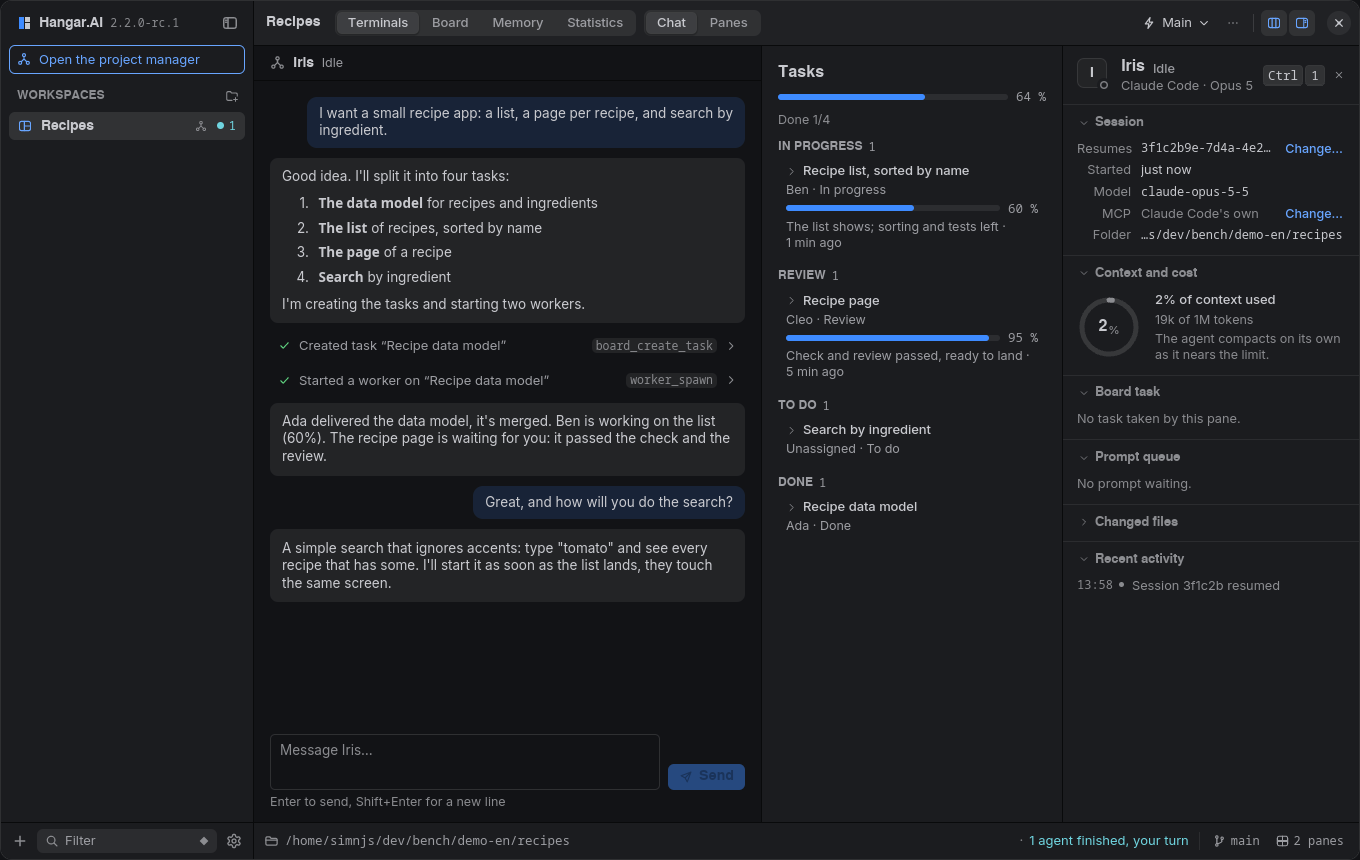 HangarAI is a native desktop app (Rust, no Electron) that runs the coding agents already on your machine — Claude Code and Codex (beta), either one or both — as many sessions as you need, with a shared board, a shared memory and an orchestrator. No usage telemetry; the optional HangarAI account and what it sends are described on the [privacy page](https://hangarai.dev/privacy.html). This repository holds HangarAI's releases, its user guide, its website and its issue tracker. The source code is not public. ## What it does - 🖥️ **Many agents, one window.** Up to 16 terminals per workspace, Claude Code, Codex or any shell, each showing whether its agent is working, waiting for you, or done. - 📋 **A shared board and memory over MCP.** Agents claim tasks atomically, leave notes, and record what the next session should know. - 🧭 **Orchestrator and workers, of either agent.** One agent plans, Claude Code or Codex; workers, of the same agent or the other, each get a git worktree and a branch. Every delivery is merged in a scratch worktree, run through your check command, read by a reviewer agent, then landed locally. Hangar never pushes. - 🤝 **Delegate.** An agent hands a sub-task to the other one — a review, a question about the repository, a set of images — and gets the result back, with no board task. - 🎨 **Images from Codex.** What a Codex session draws shows in the chat, on your phone and on Discord; a Claude Code orchestrator can ask Codex for images and use the files. - 📱 **Hangar Mobile.** See what waits for you, answer your agents' questions with a tap, allow or deny permissions — from your phone, over your own Tailscale network. - 🧩 **Kits and previews.** Kits add skills, MCP servers and tabs of their own; agents show you images, code, Markdown, PDFs, web pages, video and 3D models beside their terminal. - 🎙️ **Dictation.** Hold a key and speak; whisper.cpp transcribes locally. More: [features](docs/guide/features.md) · [orchestration](docs/guide/orchestration.md) · [Codex (beta)](docs/guide/codex.md) · [MCP tools](docs/guide/mcp.md) · [privacy](docs/guide/privacy.md) ## Claude Code and Codex Hangar asks each agent what it can do, never which agent it is, so every feature works with either one alone, and says so where one does less: | | Claude Code | Codex (beta) | |---|---|---| | Orchestrator, workers, project manager | yes | yes | | Delivery reviewer | `claude -p` | `codex exec`, read-only | | Chat view, answers from Mobile and Discord | yes | yes; keys checked on screen when Hangar cannot attach | | Context gauge, plan limits | yes | yes, exact, with their reset times | | Several accounts | yes | yes | | Kits | everything | MCP servers; skills and hooks once added to Codex; commands and agents: Claude Code only | | Usage statistics | yes | yes | | Generates images | no | yes | | `delegate`, as the one asked | yes | yes | The full table, and what Hangar does when it cannot attach to Codex: [Codex (beta)](docs/guide/codex.md). Codex support is **beta** until its users confirm it. Hangar was written against the protocol OpenAI publishes for Codex, without a recorded session, and relies on a few things only Codex's source shows: that Codex's own terminal draws a turn Hangar started, that it resumes a session through Hangar's server, that the first of two answers to an approval wins, and how an image is written in its newer session files. On Windows, Codex panes run without Hangar attached for now ([what that changes](docs/guide/codex.md#attached-or-the-plain-terminal)). Something wrong in a Codex pane? Use the [Codex bug form](https://github.com/hangar-ai/hangar/issues/new?template=codex-bug.yml). ## Install Grab the file for your system from the **[latest release](https://github.com/hangar-ai/hangar/releases/latest)** (under **Assets**). After that, HangarAI updates itself in one click. | System | File | |---|---| | Windows (x64) | `Hangar.AI_
 simnJS Creator He/Him/Femboy Website / GitHub |
 Kisakay Contributor · NixOS She/Her GitHub |
 McSon2 Contributor · macOS He/Him GitHub |
 SimonB44470 Contributor · Accounts He/Him GitHub |