
# YOLO
**Say it once. Keep it on track.**
*A personal AI assistant for deepseek-harness that organizes matters from conversations, tracks changes, and reminds you when needed.*
[中文](README.md)
[](https://github.com/hanshanyike/dsh-yolo/stargazers)
[](https://www.npmjs.com/package/dsh-plugin-yolo)
[](https://www.npmjs.com/package/dsh-plugin-yolo)
[](LICENSE)
---
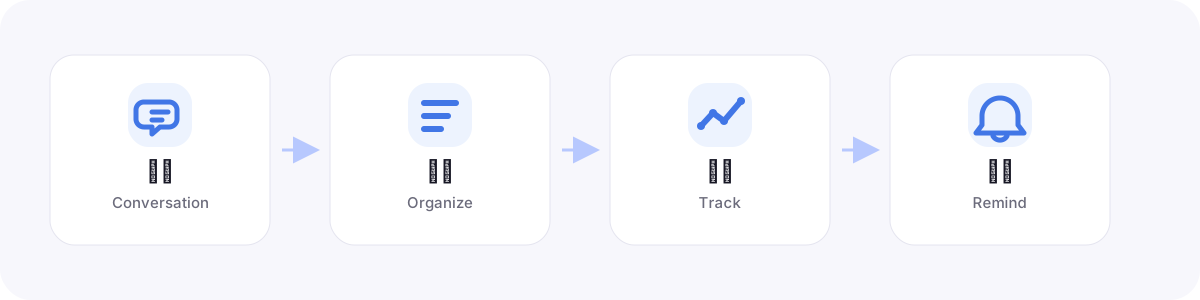
Todos, deadlines, and milestones are often scattered across multiple conversations.
As sessions accumulate, it becomes difficult to tell what is unfinished and what
has changed. **YOLO** identifies the items that still need attention and turns them
into a plan that remains visible, editable, and eligible for reminders across sessions.
Over time, YOLO is intended to become a personal assistant for work and life: within
the user's authorization, it maintains continuity across conversations and gradually
connects people with delegated agents. The current release focuses on cross-session
organization, reminders, and user control.
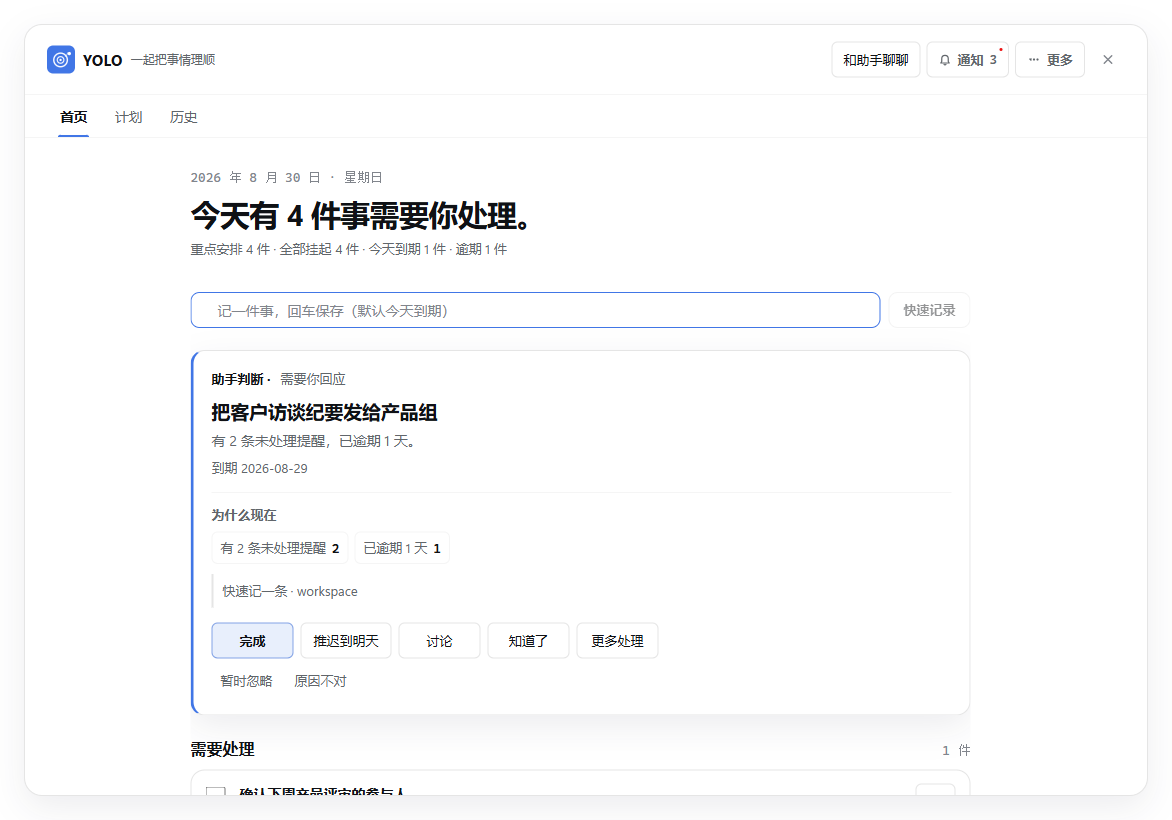
The YOLO dashboard in a real dsh host · illustrative data
YOLO organizes information and tracks progress; you still decide what to do and
how to do it. It can:
- **Organize automatically** after conversations that contain clear follow-up
items, identifying explicit todos, goals, milestones, and reminder rules.
- **Preserve items across sessions** in a workspace-scoped, searchable store.
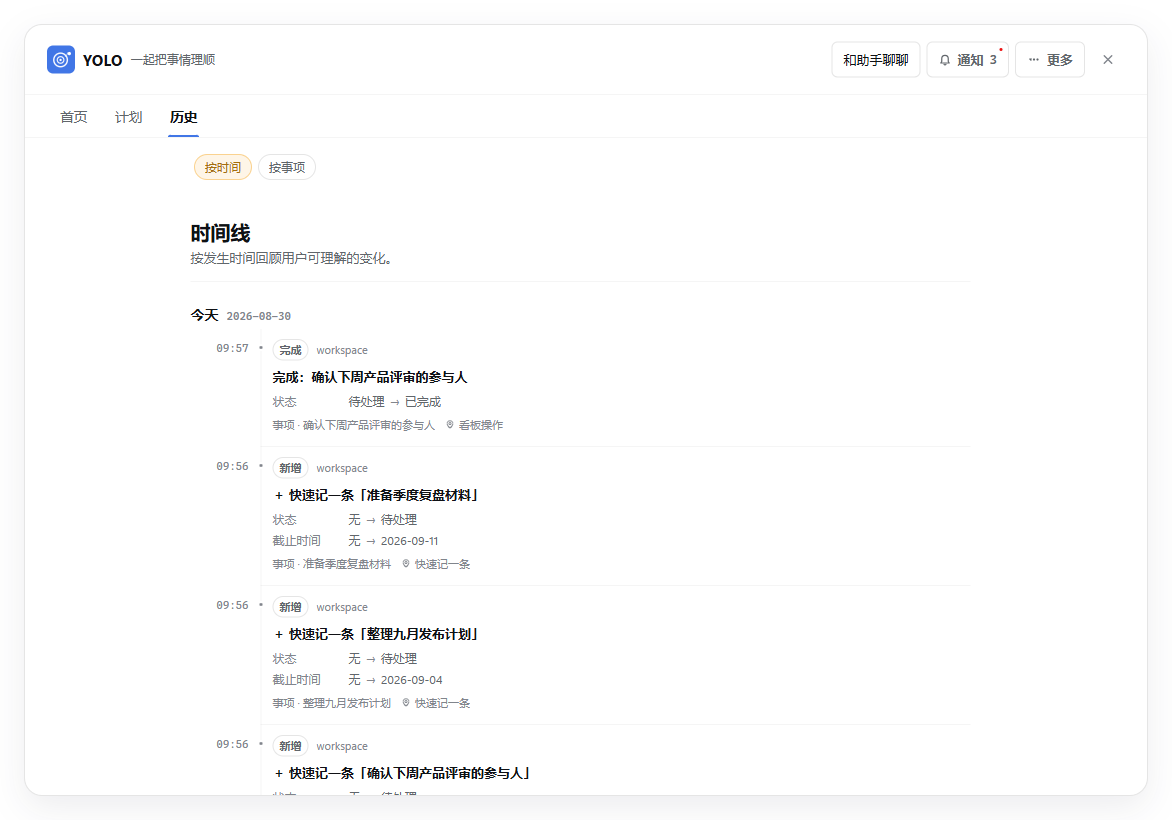
- **Track changes** when you say “done,” “move it to Friday,” or “halfway there,”
while keeping a record of each update.
- **Remind you when items are due** through YOLO notifications and its own
conversation, without injecting messages into an active work conversation.
- **Provide one place to review and act** through Home for current attention,
Plans for organized commitments, and History grouped either by time or by item.
- **Distinguish cancellation from deletion**: cancelled items keep their change history and
remain reopenable, while “Delete items by date” can preview bulk cancellation or
permanently delete items and their directly linked data after strong confirmation.
- **Keep notification deliveries traceable** with an unread badge and a paginated
notification record; viewing a delivery never changes the underlying item state.
The record stays yours to prune: dismiss one delivery with its `×`, or clear the
whole record behind a confirmation once the pile has grown.
- **Preserve bounded source evidence** for newly extracted items, with a preview
before navigating back to the originating host conversation when supported;
items can retain evidence from multiple sessions, turns, and assistant actions.
- **Prevent duplicate writes** when an extraction turn, assistant tool call, or
dashboard action is retried; merged historical records do not re-enter reminders.
- **Notice a new release**: the plugin configuration card shows when a newer
version is published and gives the exact update command; the check can be
turned off in the same card.
- **Connect agents (planned)** with explicit permissions, results, and verification;
the current release does not execute external actions automatically.
YOLO understands follow-up items in a conversation without requiring fixed
keywords. It keeps items and rules that need continued management while filtering
acknowledgements, generic knowledge, and unrelated personal profiling.
## Quick Start
YOLO requires a **dsh 0.1.5-rc.1 or newer** host; older hosts cannot load this
version's browser panel, and the Plugins settings page does not render this
version's configuration card (check with `npx @deepseek-ai/dsh --version`, and
upgrade via `npm install -g @deepseek-ai/dsh@latest` if needed).
Install [Node.js](https://nodejs.org/) 22 LTS (22.19 or newer within the 22.x
line) or Node.js 24, and make sure `pnpm` is available. If needed, run
`corepack enable` first. Then run:
```bash
npx @deepseek-ai/dsh plugin --profile web add dsh-plugin-yolo@0.5.0
npx @deepseek-ai/dsh web
```
This installs YOLO and starts dsh. The page opens at
[http://127.0.0.1:3080](http://127.0.0.1:3080) by default. Select a workspace,
start a conversation, and use the **YOLO** button at the bottom of the sidebar
to open the dashboard.
Pass `--no-open` to start without opening a browser. If port 3080 is occupied,
append `--port 4080` and open
[http://127.0.0.1:4080](http://127.0.0.1:4080). The
[Chinese user guide](docs/usage.md) covers GitHub installation, additional
installation options, and troubleshooting.
To install the current stable release directly from source:
```bash
git clone https://github.com/hanshanyike/dsh-yolo.git
cd dsh-yolo
git checkout v0.5.0
corepack enable
pnpm install --frozen-lockfile
pnpm build
npx @deepseek-ai/dsh plugin --profile web add .
npx @deepseek-ai/dsh web
```
### A typical flow
In any dsh conversation, say “Remind me tomorrow at 3 PM to send the customer
interview notes to the product team.” After the turn completes, YOLO organizes
the item. Later, say “move it to Friday” or “it is done,” or handle it directly
from the dashboard. Due reminders stay in YOLO notifications and its dedicated
conversation instead of interrupting your active work session.
See the traceable History timeline
## Data and privacy
YOLO stores data under `.dsh/yolo/` in each workspace and isolates it by
workspace. Git branches in the same workspace share one plan. It keeps the working plan in a local database and
creates readable Markdown snapshots for review and backup. Understanding a
conversation uses the model configured in dsh, so data handling also depends on
that model service.
## Roadmap
YOLO develops through four stages: **remember → organize → manage →
collaborate**. It currently supports cross-session records, plan organization,
due reminders, and dashboard actions. Future work focuses on better priority
judgment, reminder experience, and agent collaboration under explicit
authorization. See the full direction in [docs/VISION.md](docs/VISION.md).
## Docs
- [Changelog](CHANGELOG.md) — notable changes in each version
- [Chinese user guide](docs/usage.md) — installation, settings, features, and troubleshooting
## Contributing
If YOLO solves a cross-session follow-up problem for you, a Star helps other
people with the same problem discover it. Contributions are welcome; see
[CONTRIBUTING.md](CONTRIBUTING.md). Open an issue for bugs and ideas, and use the
private channel in [SECURITY.md](SECURITY.md) for security reports.
## License
[MIT](LICENSE) © dsh-yolo contributors
---
Made for deepseek-harness — Turn important conversations into plans you can revisit and update.