🏎 NBping

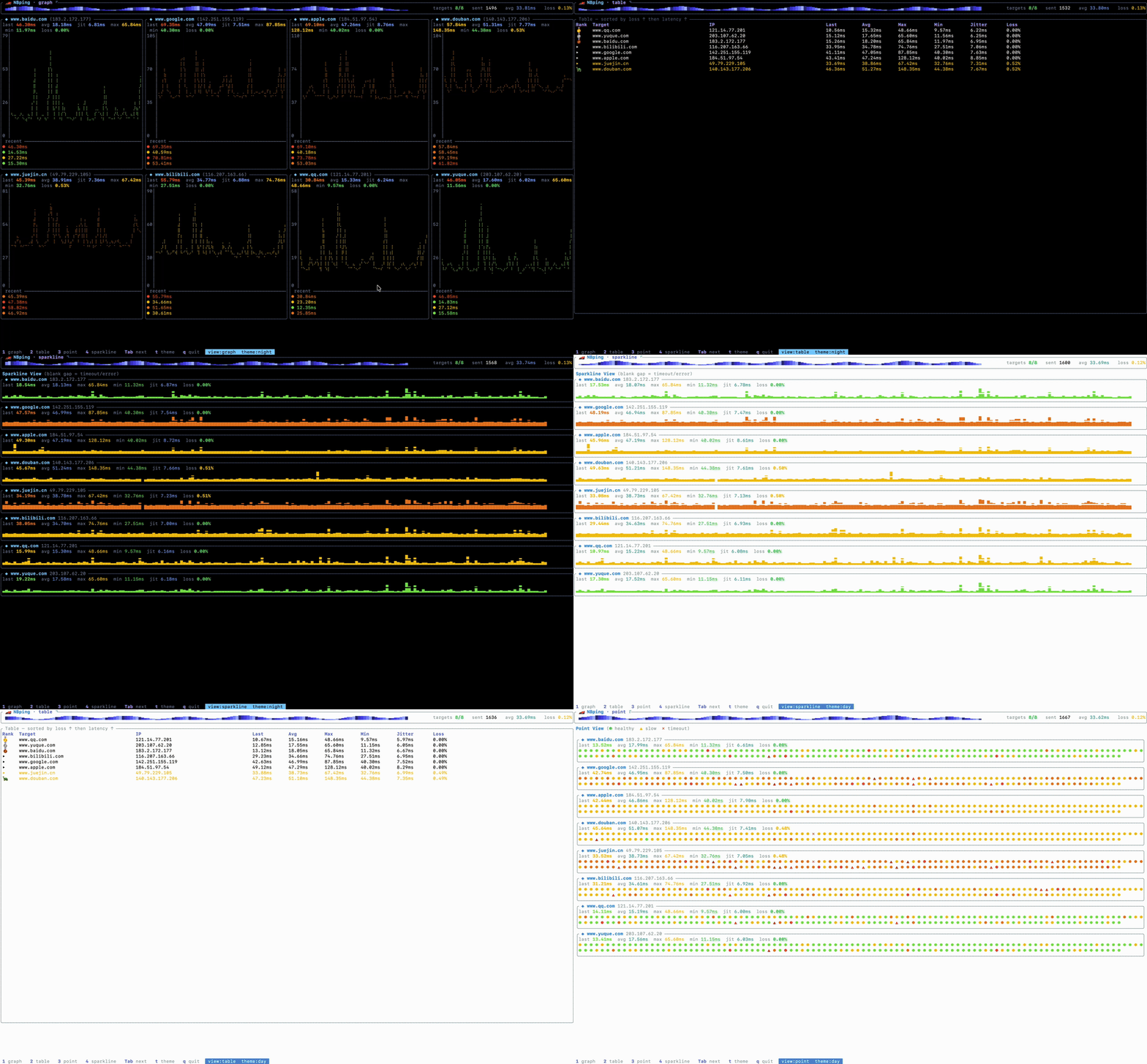
NBping is a Ping tool developed in Rust. It supports concurrent Ping for multiple addresses, visual chart display, real-time data updates, and other features.


NBping demo

Featured|HelloGitHub hanshuaikang%2FNping | Trendshift

NBping demo

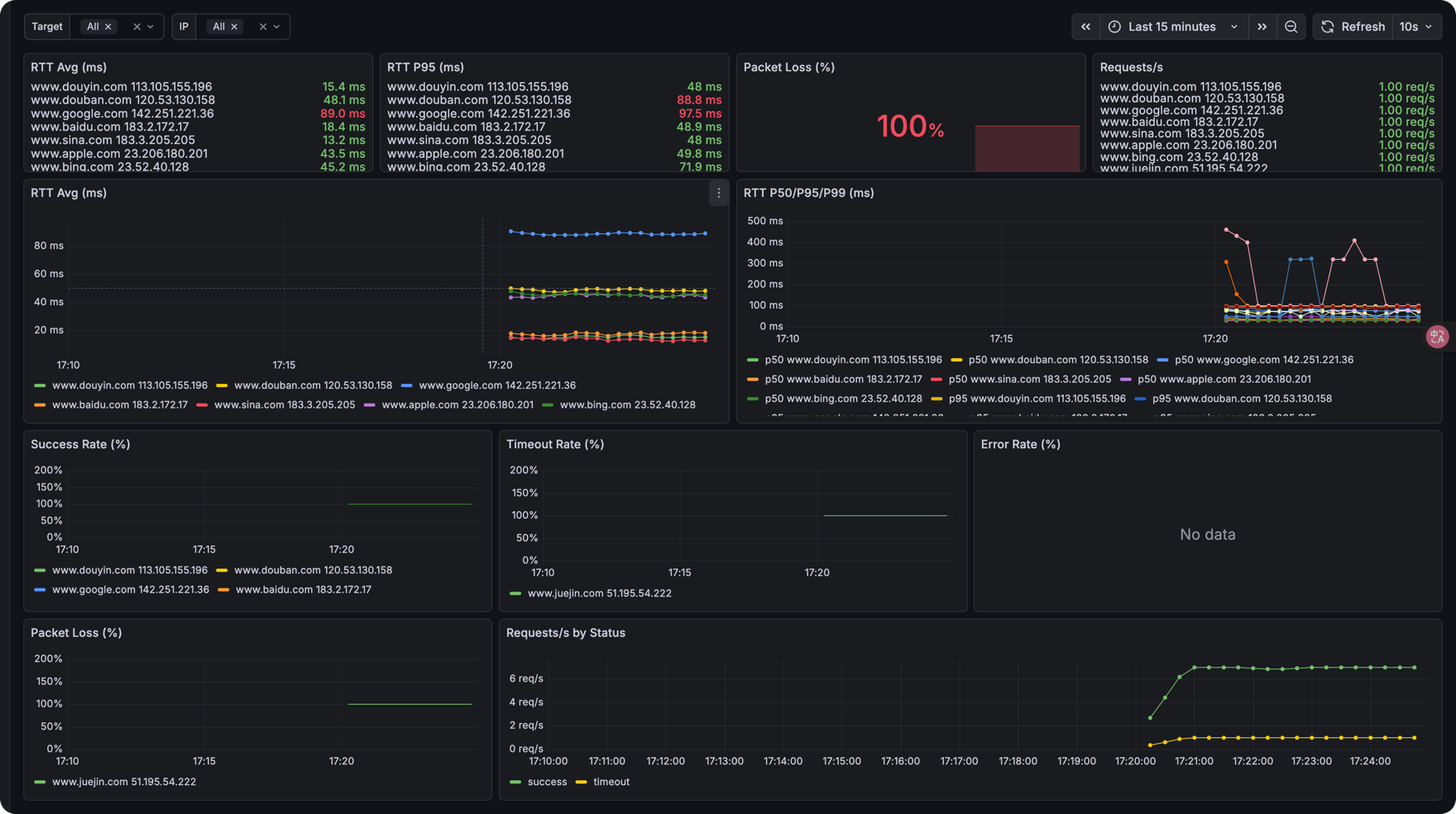
[中文文档](./README_ZH.md) 📢 **NBPing (formerly Nping)** > [!IMPORTANT] > **Renaming Notice** > > This project has been officially renamed from **Nping** to **NBPing**. > > Please update your bookmarks, dependencies, and installation scripts accordingly. The old name is now deprecated and will no longer be maintained. > ```bash > nbping --help > ``` **Exporter Mode** Now NBping supports exporting ping metrics to Prometheus format, so you can visualize them with tools like Grafana. ```bash nbping exporter www.baidu.com www.google.com -i 1 -p 9100 ``` Then, you can scrape the metrics from `http://localhost:9100/metrics` You can use Grafana to visualize the data:
NBping demo

## Installation #### MacOS Homebrew ```bash brew install nbping nbping --help ``` ## Feature: - TCP Ping support - IP range Ping support ## Roadmap: - Optimize UI interface, add more dynamic effects. ## Usage ```bash nbping www.baidu.com www.google.com www.apple.com www.sina.com -c 20 -i 2 nbping --help 🏎 NBping mean NB Ping, A Ping Tool in Rust with Real-Time Data and Visualizations Usage: nbping [OPTIONS] ... Arguments: ... target IP address or hostname to ping Options: --config Path to a YAML config file (CLI flags override its values) -c, --count Number of pings to send [default: 0 = unlimited] -i, --interval Interval in seconds between pings [default: 0] -6, --force_ipv6 Force using IPv6 (config-only field can also enable this) -m, --multiple Specify the maximum number of target addresses, Only works on one target address [default: 0] -v, --view-type Initial view mode: graph/table/point/sparkline (switch at runtime with 1-4 / Tab) [default: graph] -o, --output Output file to save ping results -h, --help Print help -V, --version Print version ``` ### Exporter Usage ```bash nbping exporter www.baidu.com www.google.com -i 1 -p 9100 ./nbping exporter --help Exporter mode for monitoring Usage: nbping exporter [OPTIONS] [TARGET]... Arguments: [TARGET]... target IP addresses or hostnames to ping Options: --config Path to a YAML config file (CLI flags override its values) -i, --interval Interval in seconds between pings [default: 1] -p, --port Prometheus metrics HTTP port [default: 9090] -6, --force_ipv6 Force using IPv6 (config-only field can also enable this) -h, --help Print help ``` ### Configuration file Instead of passing everything on the command line, you can start NBping from a YAML file with `--config`: ```bash nbping --config nbping.yaml ``` The file mirrors the command-line flags. See [`nbping.example.yaml`](nbping.example.yaml): ```yaml mode: tui # tui | exporter (default: tui) targets: - google.com - github.com - apple.com - baidu.com - 1.1.1.1 count: 0 # 0 = unlimited interval: 1 # seconds force_ipv6: false multiple: 0 # tui mode only view_type: graph # graph | table | point | sparkline (tui mode only) # output: results.log # tui mode only port: 9090 # exporter mode only ``` Notes: - **Precedence:** command-line flags override the config file, which overrides built-in defaults (`CLI flag > YAML config > default`). For example, `nbping --config nbping.yaml -i 1` forces a 1-second interval regardless of the file. - **Mode:** the `mode` field selects TUI or exporter mode when no subcommand is given. Running the explicit `nbping exporter ...` subcommand always uses exporter mode. - **`force_ipv6`:** the `-6` flag can only turn IPv6 *on*; to disable IPv6 while a config enables it, set `force_ipv6: false` in the file. - Unknown keys are rejected, so typos surface as errors at startup. ## Acknowledgements Thanks to these people for their feedback and suggestions for 🏎NBping! | [ThatFlower](https://github.com/ThatFlower) | [zx4i](https://github.com/zx4i) | [snail2sky](https://github.com/snail2sky) | [shenshouer](https://github.com/shenshouer) | [vnt-dev](https://github.com/vnt-dev) | [qingyuan0o0](https://github.com/qingyuan0o0) | [Onlywzr](https://github.com/Onlywzr) Thanks to these self-media for reposting and paying attention to 🏎NBping! | [阮一峰的网络日志](https://www.ruanyifeng.com/blog/weekly/) |[Rust 中文社区](https://rustcc.cn/) | [公众号:奇妙的linux世界](https://mp.weixin.qq.com/s/lK_OqKp2yY8lDBoyLxtdGA) | [公众号:IT运维技术圈](https://mp.weixin.qq.com/s/bDJZ-H02dIKG3R7LQCeyaQ) | [X:@geekbb](https://x.com/geekbb/status/1875754541905539510) | [公众号:一飞开源](https://mp.weixin.qq.com/s/BZjr54h8dIQgzr8UW3fwOQ) | [公众号: 开源日记](https://mp.weixin.qq.com/s/uGtkD4x_XOFyKNbIy5pHYA) ## Star History [![Star History Chart](https://api.star-history.com/svg?repos=hanshuaikang/Nping&type=Date)](https://star-history.com/#hanshuaikang/Nping&Date)