
[](https://python.org)
[](https://pypi.org/project/model-compose/)
[](https://opensource.org/licenses/MIT)
[](https://pepy.tech/project/model-compose)
[](http://makeapullrequest.com)
[한국어](README.ko.md) | [中文](README.zh-cn.md)
---
# model-compose
One YAML file. Any model. Any protocol. Any runtime.
Build chat APIs, RAG pipelines, autonomous agents, and MCP servers without writing orchestration code — then run the same definition anywhere, like `docker-compose`.
AI systems shouldn't be locked into a single provider, runtime, or cloud. model-compose is built on four principles:
- **Composable** — Models, agents, workflows, tools, memory, and protocols are interchangeable building blocks.
- **Portable** — Define your AI system once and run it anywhere without re-engineering.
- **Model-Agnostic** — Mix local models and cloud APIs in the same system.
- **Stream-Native** — Tokens, audio, video frames, and events flow through workflows as first-class values.
[Quick Start](#quick-start) · [What You Can Build](#what-you-can-build) · [Documentation](docs/user-guide/README.md) · [Examples](examples/README.md)
---
## Quick Start
Install with [uv](https://docs.astral.sh/uv/):
```bash
uv pip install model-compose
```
Or with pip:
```bash
pip install model-compose
```
Create `model-compose.yml`:
```yaml
controller:
adapter:
type: http-server
port: 8080
webui:
port: 8081
workflow:
job:
component: chatgpt
input:
prompt: ${input.prompt}
output: ${output as stream/text}
component:
id: chatgpt
type: http-client
base_url: https://api.openai.com/v1
action:
path: /chat/completions
method: POST
headers:
Authorization: Bearer ${env.OPENAI_API_KEY}
Content-Type: application/json
body:
model: gpt-4o
messages:
- role: user
content: ${input.prompt}
stream: true
stream_format: json
output: ${response[].choices[0].delta.content}
```
Run it:
```bash
export OPENAI_API_KEY=your-key
model-compose up
```
**That's it.** You're serving GPT-4o at `http://localhost:8080` with a web UI at `http://localhost:8081`. No application code. No framework boilerplate. Same file runs locally, in Docker, or in production.
---
## Automatic Web UI
Every workflow gets a browser UI for free — inputs, outputs, streaming, and file uploads are inferred from the schema. Two lines of YAML, no frontend code.
```yaml
controller:
webui:
driver: gradio
port: 8081
```
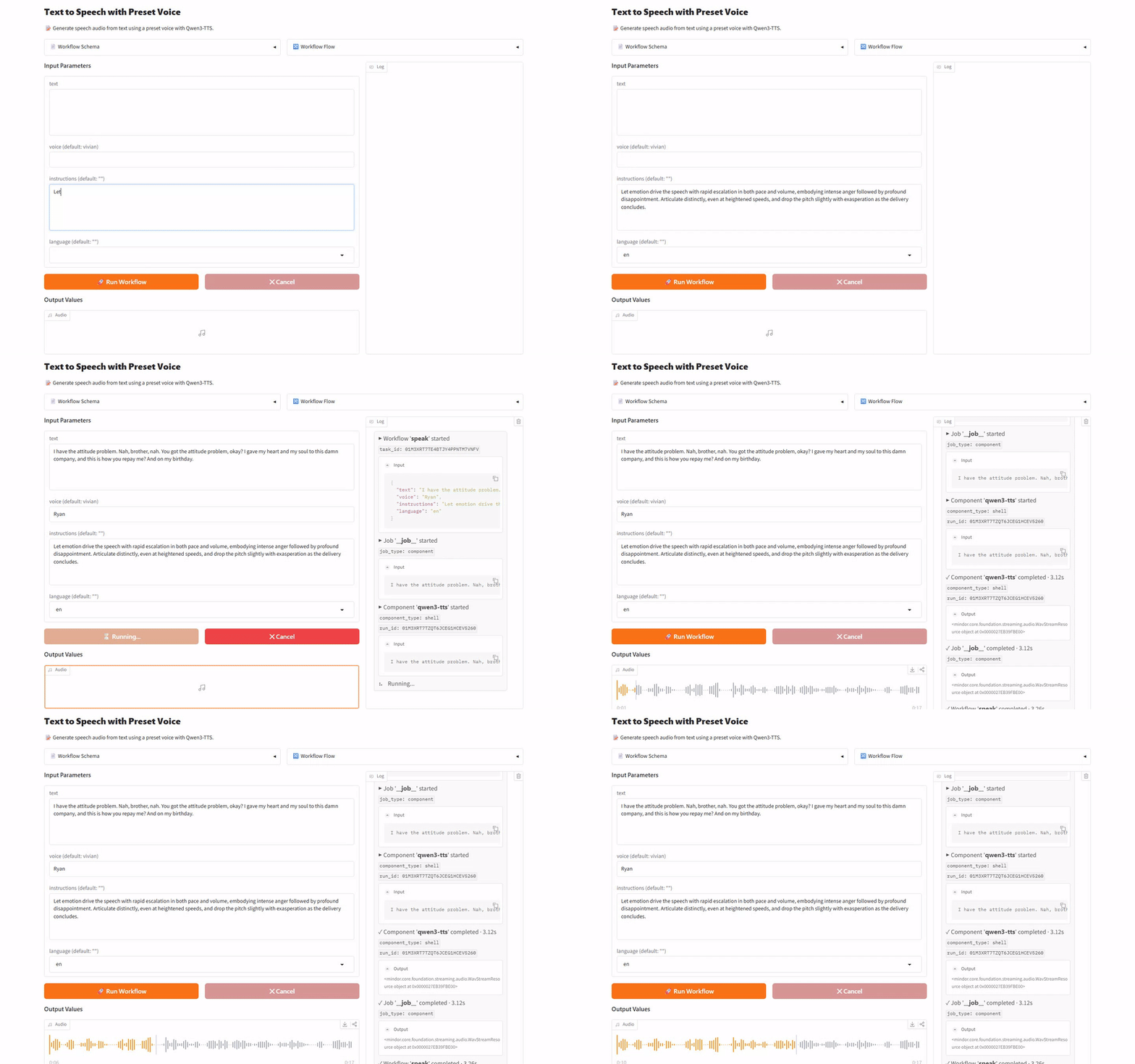
Perfect for iteration, demos, and sharing a workflow with non-engineers before wiring it into production.
---
## What You Can Build
Here's what a single YAML file can serve today — just a few examples.
### 🤖 Autonomous Agents
Build a ReAct agent that plans, uses tools, and completes multi-step tasks — declaratively.
```yaml
component:
id: research-agent
type: agent
tools: [search-web, fetch-page]
max_iteration_count: 10
action:
model:
component: chatgpt
system_prompt: You are a web research assistant.
user_prompt: ${input.question}
```
See simple agents like a code reviewer, a RAG assistant, and a web researcher in [agents/](examples/agents/).
### 🧠 Local Models
Run open-weight models on your own hardware with PyTorch, vLLM, or llama.cpp — same YAML surface as cloud APIs, no SDK code.
```yaml
component:
type: model
task: chat-completion
model: HuggingFaceTB/SmolLM3-3B
action:
messages:
- role: system
content: ${input.system_prompt}
- role: user
content: ${input.user_prompt}
```
Point `model:` at any Hugging Face repo, or a local GGUF file via llama.cpp. Browse local chat, embedding, TTS, VLM, image/audio/video tasks under [model-tasks/](examples/model-tasks/).
### 🔍 RAG Pipelines
Compose embedding, vector search, and generation into a single workflow — no glue code.
```yaml
workflow:
jobs:
- id: embed
component: embedder
input: { text: ${input.query} }
- id: retrieve
component: knowledge
action: search
input: { vector: ${jobs.embed.output} }
- id: answer
component: chatgpt
input:
context: ${jobs.retrieve.output}
question: ${input.query}
```
Native drivers ship for Chroma, Milvus, Qdrant, FAISS, Neo4j, ArangoDB, and Redis.
### 🎬 Media Pipelines
Chain audio, video, and image stages across models and native codecs — swap any step without touching the rest.
```yaml
workflow:
jobs:
- id: extract-audio
component: audio-extractor
input: { source: ${input.video as video} }
- id: transcribe
component: whisper
input: { audio: ${jobs.extract-audio.output} }
- id: translate
component: translator
input: { text: ${jobs.transcribe.output} }
- id: dub
component: tts
input: { text: ${jobs.translate.output} }
- id: lip-sync
component: wav2lip
input:
video: ${input.video as video}
audio: ${jobs.dub.output as audio/wav}
output: ${output as video/mp4}
```
See full video dubbing, scene detection, voice cloning, and face mosaic pipelines in [media-processing/](examples/media-processing/).
### ⚡ Streaming Multi-Modal Workflows
Stream tokens, audio chunks, and video frames end-to-end — first-class across every stage.
```yaml
workflow:
job:
component: chatgpt
output: ${output as sse-text}
component:
id: chatgpt
type: http-client
action:
body: { stream: true, ... }
stream_format: json
output: ${response[].choices[0].delta.content}
```
Real-time TTS, video-to-frames, and live chat examples live under [data-streaming/](examples/data-streaming/) and [showcase/](examples/showcase/).
### 🌐 MCP Servers
Turn any workflow into an MCP server that Claude, ChatGPT, or Cursor can use — one line change.
```yaml
controller:
adapter:
type: mcp-server # ← was: http-server
port: 8080
```
Full examples live in [mcp-servers/](examples/mcp-servers/), including a Slack bot MCP.
---
## From Development to Production
The same YAML that runs on your laptop scales without a rewrite.
### 1. Develop locally
```bash
model-compose up
```
Runs on your machine with a Gradio web UI at `:8081` — perfect for iteration.
### 2. Deploy as a container
Add a `runtime:` block. Same file, same behavior:
```yaml
controller:
runtime:
type: docker
image: my-ai-service:latest
ports: [ "8080:8080" ]
```
### 3. Scale horizontally
Add a queue. Dispatchers accept jobs, subscribers process them across N machines:
```yaml
controller:
adapter: { type: http-server, port: 8080 }
queue:
driver: redis
host: redis.internal
name: my-queue
```
No shared filesystem. No code changes. Just add more subscribers to scale.
---
## Why model-compose?
| | **model-compose** | Managed APIs (OpenAI, etc.) | Code Frameworks (LangChain, etc.) |
|---|---|---|---|
| **Time to first API** | **Minutes** (one YAML) | Hours (SDK + server code) | Days (framework + integration) |
| **Provider Coupling** | **Multi-provider via config** | Single provider per SDK | Multi-provider via abstractions |
| **Code Coupling** | **Declarative YAML — no application code** | Application code required | Framework-specific code required |
| **Infrastructure Control** | **Full Sovereignty** | Provider-controlled | Heavy Abstraction |
| **Runtime Flexibility** | **Hybrid-First (Local + Cloud)** | Cloud Only | Complex to customize |
| **Protocol Support** | **HTTP / WebSocket / MCP** | Provider-specific | Limited |
| **Data Streaming** | **First-class across all stages** | Response-only (SSE tokens) | Framework-wrapped generators |
| **Deployment** | **Docker / Native / Virtualenv / Process** | Provider-managed | Manual integration |
---
## Highlights
- **Any model, anywhere** — HuggingFace, vLLM, llama.cpp locally, or OpenAI/Anthropic/Google/xAI via HTTP
- **Agents in YAML** — ReAct loops, tool use, multi-step reasoning — no code
- **Human-in-the-loop** — pause workflows for approval, resume from CLI/UI/API
- **100+ components** — models, agents, HTTP/WebSocket clients, vector/graph stores, shell, browsers, and more
- **Any protocol** — HTTP REST, WebSocket, or MCP with one line
- **Any runtime** — Docker, native, virtualenv, process, embedded — switch in one line
- **Distributed** — Redis queue dispatch for horizontal scaling
- **Instant Web UI** — Gradio-powered UI in 2 lines of YAML
- **Streaming everywhere** — SSE, WebSocket, and inter-job streams as first-class values
---
## Examples
Browse examples by category:
| Category | What's inside |
|---|---|
| [`agents/`](examples/agents/) | Code reviewer, RAG assistant, Web researcher, Web page analyzer, ... |
| [`showcase/`](examples/showcase/) | End-to-end pipelines: disk analysis, face-based scene search, real-time TTS |
| [`model-providers/`](examples/model-providers/) | OpenAI, Anthropic, xAI, Google, ElevenLabs, vLLM |
| [`model-tasks/`](examples/model-tasks/) | Local chat, embedding, TTS, VLM, face embedding, ... |
| [`media-processing/`](examples/media-processing/) | Audio/video/image processing: extraction, conversion, scene detection |
| [`media-broadcast/`](examples/media-broadcast/) | Live broadcasting pipelines (e.g. YouTube Live over RTMP) |
| [`web-automation/`](examples/web-automation/) | Web scraping, headless browser automation, page capture |
| [`text-processing/`](examples/text-processing/) | Text chunking and preprocessing |
| [`mcp-servers/`](examples/mcp-servers/) | Build MCP servers exposed to Claude, Cursor, ChatGPT |
| [`workflow-queue/`](examples/workflow-queue/) | Redis-backed distributed dispatch (streaming + non-streaming) |
| [`data-streaming/`](examples/data-streaming/) | Video-to-frames, YouTube live chat, streaming inputs |
| [`job-flow/`](examples/job-flow/) | Workflow control: conditional routing, hooks, interrupts |
| [`integrations/`](examples/integrations/) | Vector/graph/KV stores, search engines, channels, tunnels |
| [`runtime/`](examples/runtime/) | Component execution runtimes: Docker, Apple Container, virtualenv, ... |
Browse the full catalog in [examples/README.md](examples/README.md).
---
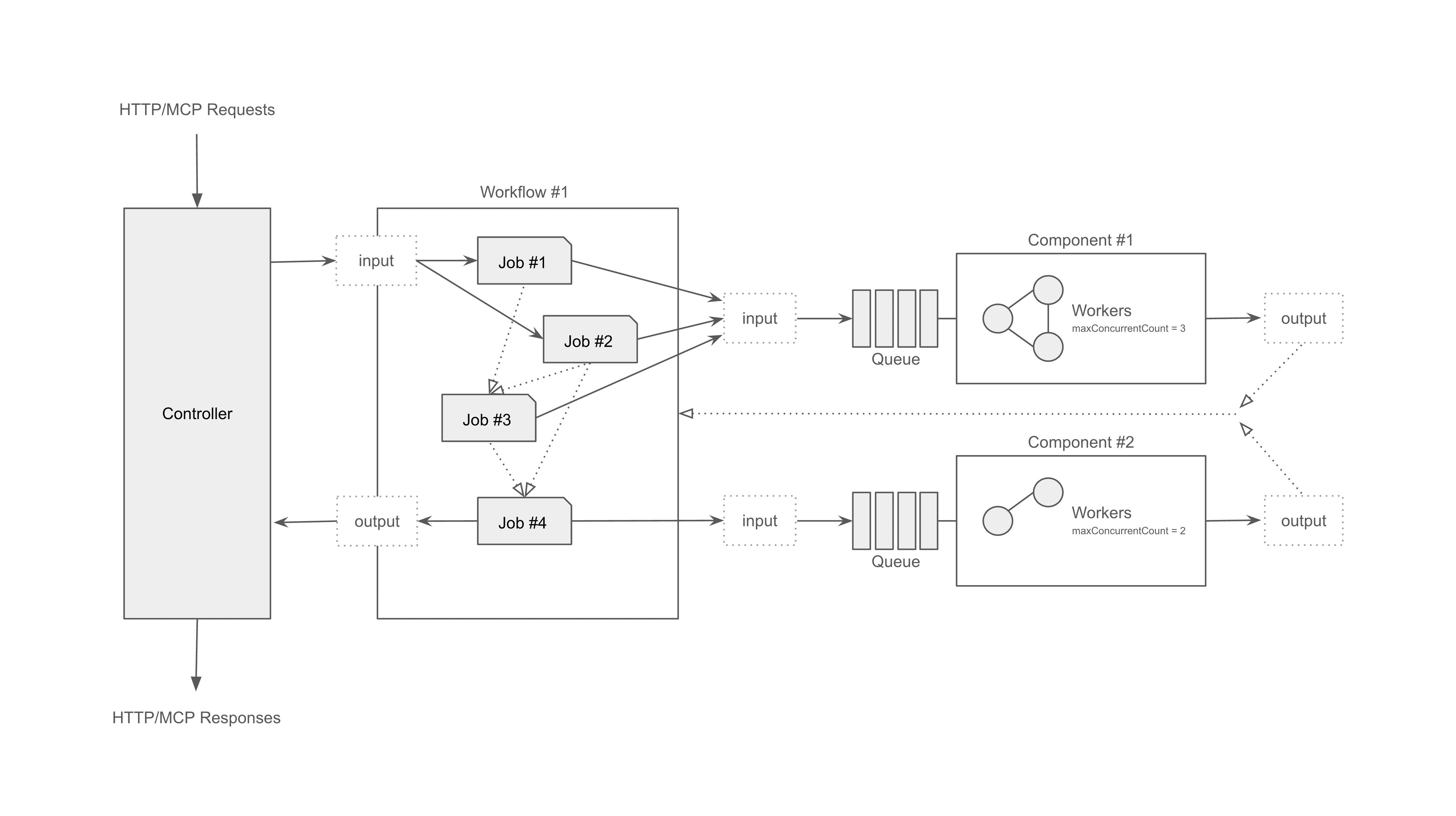
## Architecture
Protocol adapters → Composition engine → Runtime executors
---
## Contributing
We welcome all contributions — bug fixes, docs improvements, new examples.
```bash
git clone https://github.com/hanyeol/model-compose.git
cd model-compose
pip install -e .
```
See [CONTRIBUTING](CONTRIBUTING.md) if available, or open a PR directly.
---
## License
MIT License © 2025-2026 Hanyeol Cho.
---
## Contact
Have questions, ideas, or feedback? [Open an issue](https://github.com/hanyeol/model-compose/issues) or start a discussion on [GitHub Discussions](https://github.com/hanyeol/model-compose/discussions).