eitango - TUI English Vocabulary Tool
  
 []() [](https://github.com/harumiWeb/eitango/actions/workflows/ci.yml) [](https://app.codacy.com/gh/harumiWeb/eitango/dashboard?utm_source=gh&utm_medium=referral&utm_content=&utm_campaign=Badge_grade)
---
# eitango
`eitango` is an offline English vocabulary trainer with a terminal UI. It uses Bubble Tea for the interactive interface and a local SQLite database for progress tracking.
In addition to SRS-based review, it offers two modes: multiple-choice `choice` and input-based `write`. Audio playback is also supported.
The embedded vocabulary currently contains **10165** words, and external dictionary import from CSV / JSONL is also supported. The tool includes learning statistics, progress management, update notifications, and diagnostic tools.
[日本語README](README.md) / [Contributing Guide](CONTRIBUTING.md) / [Security Policy](SECURITY.md)
 ## What It Can Do
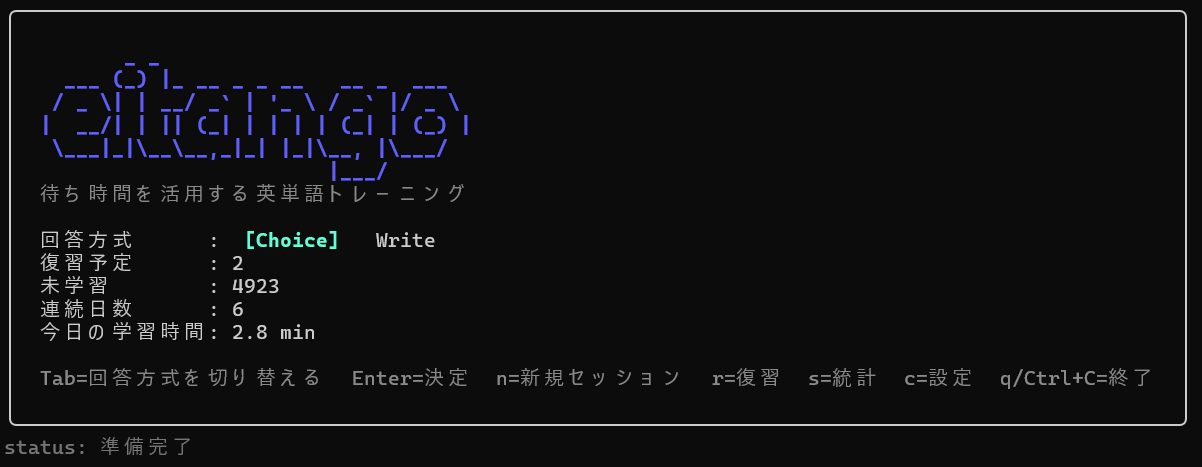
- `eitango` opens the home screen, where you can choose modes and change settings in the TUI
## What It Can Do
- `eitango` opens the home screen, where you can choose modes and change settings in the TUI
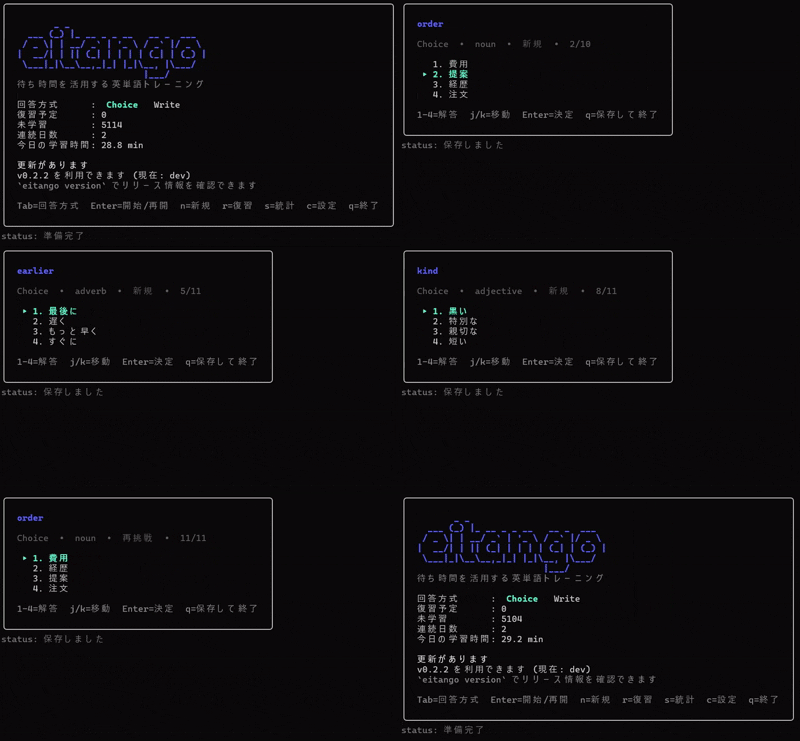
choice mode
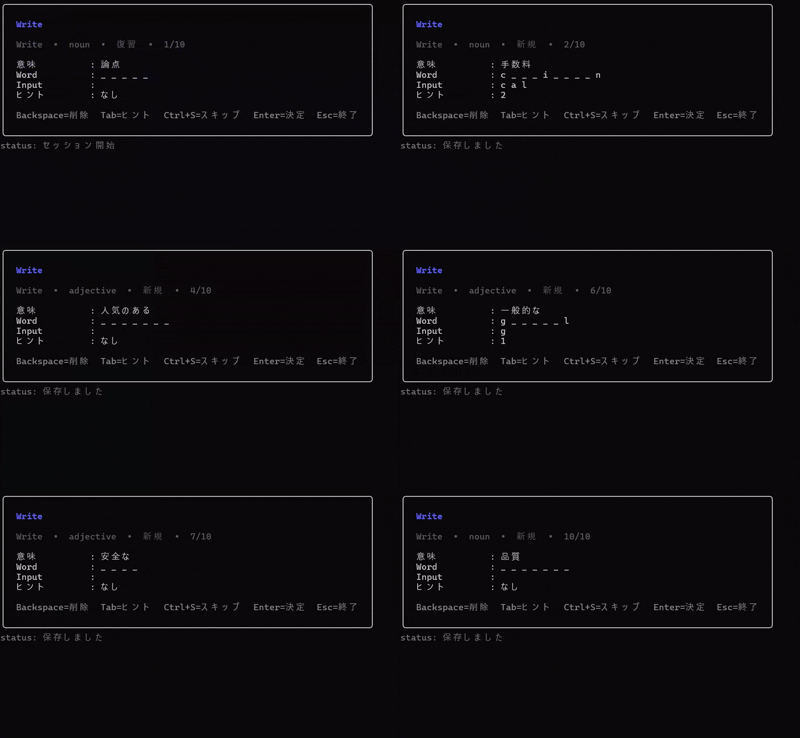
write mode
- on the home screen, `Tab` switches `choice / write`, `Enter` starts play, and `r` starts review
- the home settings screen can switch Write difficulty between `basic` and `hard`
- the home settings screen can switch theme mode between `default`, `no_color`, `neon`, and `custom`
- the home settings screen can open a Key Bindings Editor and apply changes immediately
- on macOS / Windows, `Ctrl+P` plays the current word and `Shift+Tab` toggles session-local autoplay
- `eitango play [choice|write]` starts a standard learning session
- `eitango review [choice|write]` starts a review session
- due cards start the normal due-only review flow
- when due is 0, you can confirm a random reviewed-only fallback session
- the reviewed-only fallback does not update SRS and uses Enter-only feedback
- `eitango stats` shows learning statistics
- `eitango version` shows the current build info and the latest release
- `eitango doctor` runs read-only diagnostics on the DB and dictionary
- `eitango validate` validates the embedded dictionary or external CSV / JSONL files
- `eitango import` / `eitango export` / `eitango reset` maintain dictionaries and learning progress
## Installation
### 1. Use winget on Windows
On Windows, you can install `eitango` from winget. The manifest points to the Windows zip published in GitHub Releases.
```powershell
winget install HarumiWeb.Eitango
```
To upgrade:
```powershell
winget upgrade HarumiWeb.Eitango
```
If you do not want to use winget, you can still use the GitHub Releases zip described below.
### 2. Use Homebrew on macOS / Linux
On macOS / Linux, you can also install `eitango` from the Homebrew tap. The formula points to the darwin / linux `tar.gz` archives published in GitHub Releases.
```bash
brew tap harumiWeb/eitango
brew install eitango
```
To upgrade:
```bash
brew upgrade eitango
```
### 3. Use `curl | sh` on macOS / Linux
`install.sh` calls the GitHub Releases API (`/releases/latest`) when `--version` is omitted to resolve the latest version, then downloads the matching GitHub Release archive and `checksums.txt`. It installs into `~/.eitango/` only after the SHA256 check passes, and it never edits shell rc files automatically.
```bash
curl -fsSL https://raw.githubusercontent.com/harumiWeb/eitango/main/install.sh | sh
```
To pin a specific version:
```bash
curl -fsSL https://raw.githubusercontent.com/harumiWeb/eitango/main/install.sh | sh -s -- --version v0.2.0
```
The installer writes:
- `~/.eitango/bin/eitango`
- `~/.eitango/version`
- `~/.eitango/share/`
Legal notices are kept under `~/.eitango/share/`. If `~/.eitango/bin` is not already on PATH, add:
```bash
export PATH="$HOME/.eitango/bin:$PATH"
```
If you want to inspect the script before running it:
```bash
curl -fsSLo install.sh https://raw.githubusercontent.com/harumiWeb/eitango/main/install.sh
sh install.sh --version v0.2.0
```
To uninstall the installer-managed files while keeping study data:
```bash
curl -fsSL https://raw.githubusercontent.com/harumiWeb/eitango/main/install.sh | sh -s -- --uninstall
```
To also delete the data directory, add `--purge-data`. If you use `EITANGO_DATA_DIR`, pass the same env var when uninstalling.
```bash
curl -fsSL https://raw.githubusercontent.com/harumiWeb/eitango/main/install.sh | sh -s -- --uninstall --purge-data
```
Required tools are `sh`, `curl`, `tar`, `mktemp`, and one of `sha256sum`, `shasum`, or `openssl`. Windows is out of scope for this installer, so use winget or the release zip there.
### 4. Use GitHub Releases
Published archives include the executable plus `LICENSE`, `THIRD_PARTY_NOTICES.md`, and `third_party/licenses/`. Extract the artifact for your OS and run `eitango`.
※ You need to manually add it to your `PATH`.
### 5. Install with Go
Go 1.26 or newer is required.
```bash
go install github.com/harumiWeb/eitango/cmd/eitango@latest
```
Builds installed with `go install` also report the embedded module version in `eitango version`.
## Quick Start
```bash
eitango
```
You can also start directly in a specific mode.
```bash
eitango play
eitango play write
eitango review --focus-mode
eitango review write
eitango stats
eitango version
eitango doctor
```
`eitango learn` remains as a backward-compatible alias, but `eitango play` is now the canonical form in the docs.
On first run, `eitango` initializes the local database. By default it uses the embedded `assets/words_core.jsonl` as the seed dictionary.
## Support Policy
- supported operating systems are Windows, macOS, and Linux
- audio playback currently targets macOS and Windows
- on Linux, the core learning features remain available without audio playback
- support scope and platform policy may change in future releases
- see [SECURITY.md](SECURITY.md) for the private vulnerability reporting process and supported-version policy
## Narrow Terminal Width
- on major screens, the same layout keeps the panel border and continuously shrinks to the terminal width as long as the terminal stays above the minimum width
- single-line UI such as key guides and keymap displays is shortened with `...` when it would otherwise overflow
- below that minimum width, `eitango` shows a dedicated fallback message instead of rendering a broken layout
- widening the terminal automatically returns to the normal screen
- if the UI looks simplified in a split pane, SSH session, or mobile terminal, increase the terminal width first
## Write Difficulty
- `write_mode_difficulty = "basic"` is the default
- in `basic`, Learn + Write only uses words that have appeared at least once in Choice mode for its new-card pool
- in `hard`, Write can still pull words that have never appeared in Choice mode
- under `basic`, sessions may contain fewer new Write questions when the eligible pool is small
You can set it in `config.toml`:
```toml
write_mode_difficulty = "basic"
```
## Display Themes
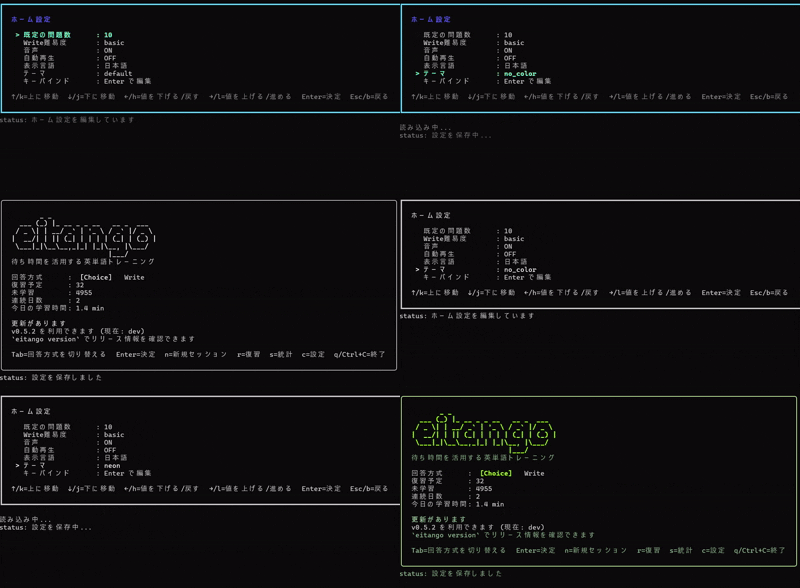
- `theme_mode = "default"` keeps the default palette
- `theme_mode = "no_color"` removes color styling and uses the terminal defaults
- `theme_mode = "neon"` applies a light-green high-contrast preset
- `theme_mode = "custom"` applies role-based overrides from `theme_palette`
- the home settings overlay only switches the mode; edit custom colors in `config.toml`
Minimal example:
```toml
theme_mode = "no_color"
```
Custom example:
```toml
theme_mode = "custom"
[theme_palette]
accent = "#00D7FF"
success = "#00FF87"
danger = "#FF5F5F"
muted = "#B2B2B2"
border = "#FFFFFF"
```
## Audio Playback
- the initial audio implementation targets macOS and Windows only; Linux falls back to silent no-op behavior
- press `Ctrl+P` to play the current word manually
- press `Shift+Tab` to toggle autoplay for the current session only
- autoplay runs when a session starts and whenever the next question is shown
Set the defaults in `config.toml`:
```toml
audio_enabled = true
audio_autoplay = false
audio_voice = "Samantha"
```
- leave `audio_voice` empty or omit it to use the default English voice automatically
- use the `Local voice` row in the home settings overlay to switch between available local voices
- you can still browse and save voice choices when `audio_enabled = false`
- if the saved voice disappears, playback safely falls back to automatic voice selection
## Key Bindings
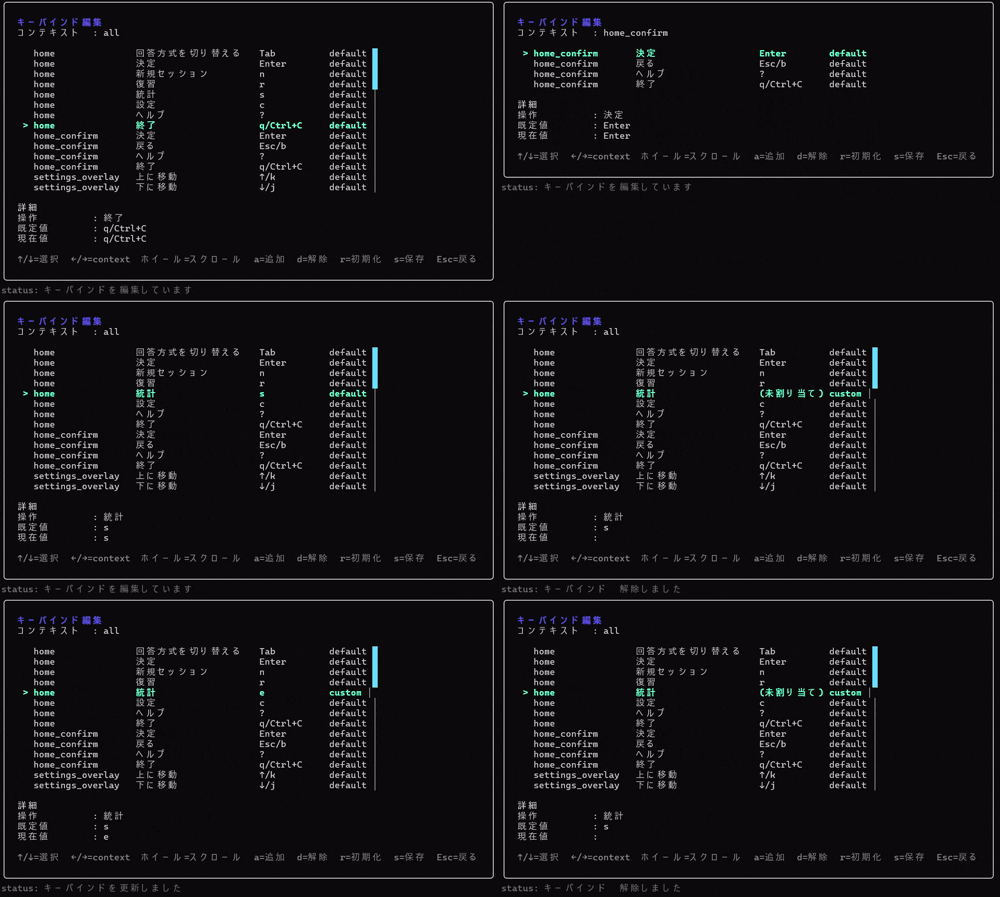
- open the editor from the `Key bindings` row in the home settings overlay
- the editor supports add / clear / reset / save per context
- saving from the keymap editor also persists any unsaved draft changes in the settings overlay
- saved bindings update runtime input handling, help, and key guides immediately
- `quiz.write` rejects single ASCII-letter bindings that would collide with answer input
- use `Ctrl+G` to cancel recording mode; `Esc` itself can be assigned from the editor
Use `[keymap]` in `config.toml`:
```toml
[keymap]
version = 1
[keymap.home]
toggle_answer_mode = ["x"]
[keymap.quiz.write]
hint = ["tab"]
skip = ["ctrl+s"]
confirm = ["enter"]
write_quit = ["esc"]
```
## Data Directory
- Windows: `%AppData%\\eitango-cli\\`
- macOS: `~/Library/Application Support/eitango-cli/`
- Linux: `~/.local/share/eitango-cli/`
The following files and directories are created there:
- `user.db`
- `config.toml`
- `logs/`
- `update-check.json`
Set `EITANGO_DATA_DIR` to override the default location.
## Network / Update Checks
Regular study sessions are local-first and use the local SQLite database. Network access is mainly used for the optional update check performed by `eitango`, `eitango play`, `eitango review`, and `eitango version` against the latest GitHub Release metadata.
- update checks are optional helper behavior, not a requirement for starting or continuing a study session
- the request is only used to fetch lightweight release metadata such as the latest version and release URL
- the home-screen notice revalidates the latest release asynchronously on every launch by default, and you can toggle it via the settings screen or `startup_update_check` in `config.toml`
- the first successful check seeds the cache without showing a notice
- `update-check.json` stores the most recent successful result and is used as a fallback when the request times out or fails
- later launches show a lightweight home-screen notice when a newer version is available
- `eitango version` prints the current build info plus the latest release URL when available
- timeouts and offline failures are skipped silently so they do not interrupt study sessions
- set `EITANGO_DISABLE_UPDATE_CHECK=1` to disable the feature completely
Updates are still manual. Download the latest GitHub Release artifact, or rerun the Go install command if that is how you installed `eitango`.
```bash
go install github.com/harumiWeb/eitango/cmd/eitango@latest
```
If you installed via `curl | sh`, rerun the installer to move to the latest release.
```bash
curl -fsSL https://raw.githubusercontent.com/harumiWeb/eitango/main/install.sh | sh
```
## Command Reference
| Command | Purpose |
| --- | --- |
| `eitango version` | Show the current build info and the latest release |
| `eitango play [choice write] [--focus-mode] [--questions N]` | Start a standard learning session |
| `eitango review [choice write] [--focus-mode] [--questions N] [--restart]` | Start a review session; when due is 0, you can enter an SRS-free reviewed-only random fallback |
| `eitango stats` | Show learning statistics |
| `eitango --license` | Print bundled licenses and notices |
| `eitango doctor` | Run DB / dictionary diagnostics |
| `eitango validate --embedded-core` | Validate the embedded core dictionary |
| `eitango validate --file words.csv --format csv --kind import` | Validate a dictionary file for import |
| `eitango import --file words.jsonl --format jsonl --source my-pack` | Import an external dictionary |
| `eitango export wrong-words --output wrong.csv` | Export difficult words as CSV |
| `eitango export progress --output progress.json` | Export progress as JSON |
| `eitango reset --progress` / `eitango reset --reseed` | Reset learning history / reseed the bundled core |
In the TUI home screen, `Tab` switches `choice / write`, `Enter` starts play, and `r` starts review. `write` shows the Japanese meaning and asks you to type the English word, with staged hints on `Tab` and skip on `Ctrl+S`.
During quiz and feedback screens, `Ctrl+P` plays the current word and `Shift+Tab` toggles autoplay for that session only. In `write`, both actions are limited to the correct/incorrect feedback screen so the prompt itself does not give away the answer. Write difficulty and audio defaults are controlled by the home settings screen or `config.toml`; there is no CLI flag override.
## Dictionary Data and Licensing
The application code is licensed under [Apache License 2.0](LICENSE). However, the bundled `assets/words_core.jsonl` is vocabulary data with a separate provenance and should not be treated as if Apache-2.0 alone covered it.
In this repository, the bundled core vocabulary is limited to the Leipzig Corpora Collection English News 2024 1M word list and Japanese WordNet (`wnjpn.db`).
- `assets/words_core.jsonl` is the project's curated core vocabulary data
- `meaning_ja` contains Japanese meanings curated with Japanese WordNet as the upstream lexical source
- `frequency_rank` is the bundled-core ranking derived from the Leipzig Corpora Collection English News 2024 1M word list
- `level` is an internal `core-1` through `core-4` bucket, not an upstream dataset label
- the vocabulary generation scripts read local inputs from `tmp/eng_news_2024_1M-words.txt` and `tmp/wnjpn.db`
- raw Leipzig / WordNet inputs are not shipped in release artifacts; generation conditions are pinned in `scripts/vocab/source_manifest.json`
- if you publish or redistribute results that directly or indirectly use Japanese WordNet, keep the recommended attribution wording, links, and license guidance from `third_party/licenses/Japanese-WordNet.txt`
Public-facing Japanese WordNet attribution in released artifacts is expected to include wording at least as explicit as the following examples. If you swap in a different local input version, update the version number as well.
```text
Japanese Wordnet (v1.1) © 2009-2011 NICT, 2012-2015 Francis Bond and 2016-2024 Francis Bond, Takayuki Kuribayashi
https://bond-lab.github.io/wnja/index.en.html
```
```text
日本語ワードネット(1.1版)© 2009-2011 NICT, 2012-2015 Francis Bond and 2016-2024 Francis Bond, Takayuki Kuribayashi
https://bond-lab.github.io/wnja/index.ja.html
```
Before redistributing the repository or packaged artifacts, review:
- [THIRD_PARTY_NOTICES.md](THIRD_PARTY_NOTICES.md)
- [`third_party/licenses/`](third_party/licenses)
In particular, any redistribution that includes `words_core.jsonl` should preserve both the third-party data notices and the Japanese WordNet attribution guidance.
## Development
The application itself runs entirely on Go, but the vocabulary generation pipeline uses Python 3.11 or newer.
```bash
uv sync
go test ./...
go build ./...
shellcheck install.sh
golangci-lint run
go run ./cmd/eitango --help
```
As a convenience, the `lefthook` pre-commit hook auto-runs `goimports -w cmd internal assets`, `golangci-lint run`, and `go test ./...` before commit. The hook is there to improve local developer experience, while CI is the required quality gate for `golangci-lint run`, `shellcheck install.sh`, `go test ./...`, and `go build ./...`.
If the lint job fails in CI, rerun the same commands locally in that order to narrow down the cause before pushing again.
The scripts in `scripts/vocab/` expect local inputs such as `tmp/eng_news_2024_1M-words.txt` and `tmp/wnjpn.db`. End users do not need these files for normal use.
## License
- Application code: [Apache License 2.0](LICENSE)
- Third-party software and data: [THIRD_PARTY_NOTICES.md](THIRD_PARTY_NOTICES.md)
- Reference license texts and data provenance notes: [`third_party/licenses/`](third_party/licenses)