# dsh-excel-chat — talk to Excel, get the work done
**[简体中文](README.md) | English**
[](https://www.npmjs.com/package/dsh-excel-chat)
[](https://github.com/hccccc01333/dsh-excel-chat/releases)
[](LICENSE)
[](https://www.dsh.so/artifact/dsh-excel-chat/)
A third party ([dsh.so](https://www.dsh.so/artifact/dsh-excel-chat/)) statically scans each
release and verifies it installs and runs: currently **risk low**, 0 critical/high/medium
findings, no external credentials detected.

Work on Excel in plain language inside
[DeepSeek Harness](https://github.com/deepseek-ai/deepseek-harness): say "add a margin
formula in column D, bold the header, freeze the first row, add a filter" and the agent
calls `excel_operate` to do it. Every edit is followed by an automatic formula check, and
you can also ask it to "find what's wrong with this sheet" and repair it. Everything
happens in the conversation — there is no Excel UI to memorise.
What changed in each version is in the [CHANGELOG](CHANGELOG.md), and the release notes
are on [Releases](https://github.com/hccccc01333/dsh-excel-chat/releases).

Want to see it run first? Clone the repo and run `npm run demo` — it walks the sample
workbook through **edit → check → repair → verify → output** and prints the engine's real
output. No model and no `dsh` install needed. Full output and the walkthrough are in
[Five-minute start](#five-minute-start).
The demo that used to sit here was recorded on 2026-08-15 (around v0.23). The UI and the
operation catalogue have both moved on since, so it had become more misleading than useful.
What updates with the version now is `npm run demo`, and a test pins its output — drop a
stage, or let the repair stop working, and the test goes red. A fresh UI recording is welcome.
## Why this exists
Most "let an AI edit my spreadsheet" setups stop at **doing the thing** — they write the
formula and report success. This one has two more steps after that, and those are the
reason it exists:
1. **It checks whether it broke anything.** Every operation is followed by a validation
pass: column-pattern drift, hardcoded cells where the rest of the column has
formulas, dead references, circular references. **It tells you, instead of leaving you
to find out when you open Excel.**
2. **It shows you the evidence.** Cell-level diffs, an audit log you can roll back, and a
health report written into the workbook itself.
A third thing is easy to miss: **the core does not need Excel.** Formula validation and
repair, reading and writing cells, styles, summaries, joins and pivot tables are written
as plain XML and JavaScript, so they run on macOS and Linux too. Only the features that
genuinely drive Excel — charts, native pivot tables, PDF export — require Windows.
## What's new
**v0.43.0**(2026-10-15)· [Full changelog](CHANGELOG.md) · [Releases](https://github.com/hccccc01333/dsh-excel-chat/releases)
## Contents
- [Why this exists](#why-this-exists) · [What's new](#whats-new)
- [In action](#in-action-real-screenshots-from-the-conversation) · [Architecture](#architecture) · [Five-minute start](#five-minute-start)
- [Tools](#tools) · [Benchmarks and reliability](#benchmarks-and-reliability)
- [Known limitations](#known-limitations) · [Links](#links)
## In action (real screenshots from the conversation)
| Capability menu: hand it a file, get options | Data insight: problems found for you |
| --- | --- |
|  |  |
| Table preview: a real grid inline | Formula check + auto-repair: the diff at a glance |
| --- | --- |
|  |  |
This one is **why you can let it touch your file**: one row of a formula column was silently
broken; it names the cell and fixes it. The cell, both formulas and the health score are the
engine's own output.
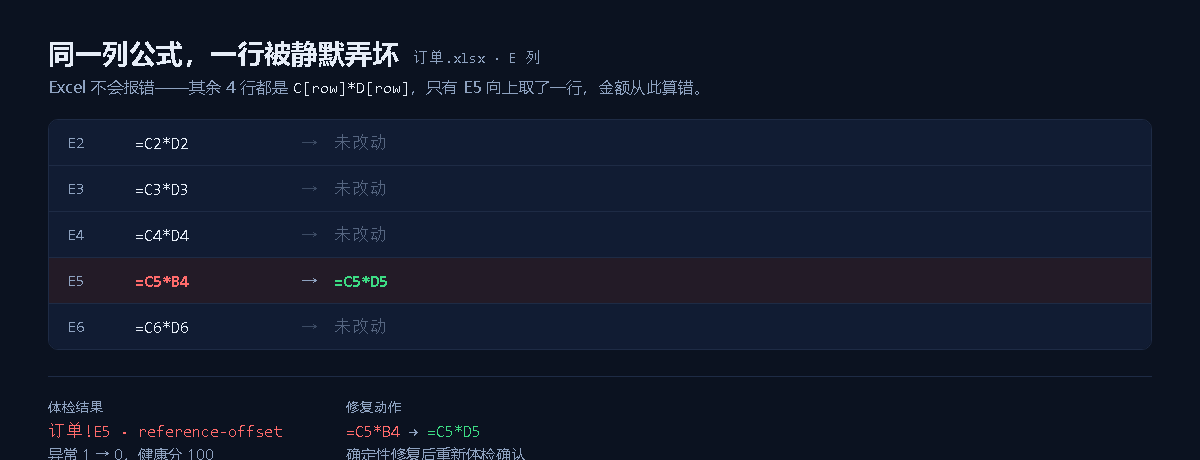
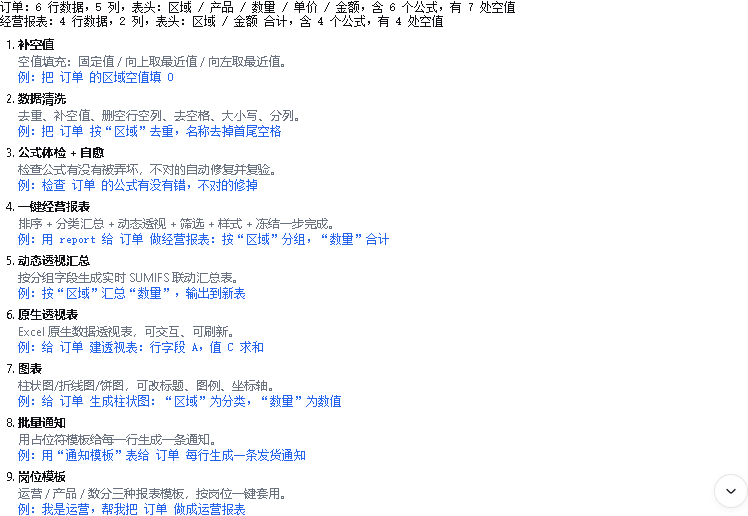
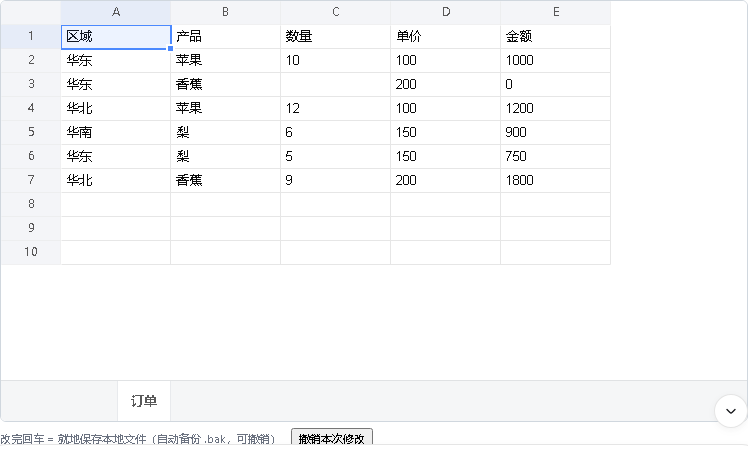
All four screenshots come from a real model calling the tools inside DeepSeek Harness Web,
rendered inline in the message stream: capability menu, issue list, editable table, and the
before/after repair diff.
## Architecture
```mermaid
flowchart LR
U[User, plain language] --> H[DeepSeek Harness]
H --> P["excel_profile / excel_read · structure overview / paged reads"]
P --> M["excel_menu / excel_insight · capability menu / data insight"]
M --> O["excel_operate / excel_task · operation DSL / multi-step / goal loop"]
O --> V["excel_validate_formulas · formula check"]
V -->|anomalies| R["excel_autofix / excel_repair_formulas · deterministic + LLM repair"]
V -->|clean| OUT[Output workbook]
R --> V2[Re-validate]
V2 --> OUT
OUT --> X["excel_explain_formula / excel_diff_workbook / excel_undo · explain / diff / rollback"]
```
The core loop is **understand → operate → verify → repair → re-verify → output**.
`excel_task`'s goal mode turns that loop into a **Plan → Act → Observe → Verify → Replan**
agent cycle.
## Five-minute start
### Step 1: see what it does (no `dsh` install)
```sh
git clone https://github.com/hccccc01333/dsh-excel-chat && cd dsh-excel-chat
npm install && npm run demo
```
`npm run demo` runs the whole loop on a copy of the sample workbook and prints the engine's
real output. The sample ships with Chinese data and headers, and the demo prints in the
workbook's language, so the output below is verbatim:
```text
① 改表 「按区域汇总金额,输出到新表」
销售台账-汇总:A1「区域」 B1「金额 合计」/ 华东 / 华北 / 华南 / 总计
② 体检 编辑后自动体检:87 个单元格,14 条公式 —— 检出 1 处异常
· 销售台账!G9 [reference-offset]
③ 修复 销售台账!G9 =E9*F8 → =E9*F9
④ 复验 异常 0 —— 公式列重新一致
⑤ 输出 repaired.xlsx + the audit log (before and after, rollback-able)
```
Note step ②: that error was **already in the file** — you only asked for a summary, and it
found the problem on the way past. `examples/sales-ledger.xlsx` is the file in the
repository — **no real business data**, ten invented orders across three invented regions.
The demo runs on a temporary copy, so the file in the repository is never touched.
### Step 2: connect it to the conversation
Requires DeepSeek Harness (the `dsh` CLI or the desktop app).
```sh
dsh plugin --profile demo add dsh-excel-chat # from npm
# or from GitHub:
# dsh plugin --profile demo add github:hccccc01333/dsh-excel-chat
# or a local bundle directory:
# dsh plugin --profile demo add ./bundle
dsh web --profile demo # open the conversation UI
```
**Want us to know someone is using it?** The official command reports nothing, so we
cannot see users — the plugin's [public install count](https://deepseek1024.com/plugins/hccccc01333/dsh-excel-chat)
is currently 0. The community store's tracked CLI fixes that: it is the **same command**
under a different name, and it additionally reports one **anonymous** install result — a
locally generated install ID, not an account and not a person.
> `npx dsh1024 plugin --profile demo add dsh-excel-chat`
It is a third-party tool (MIT, [source](https://github.com/imsai-sh/awesome-deepseek-harness-plugins)),
not a dependency of this project. Ignore this if you prefer — the official command always works.
Run the self-check once after installing, to confirm the host package isolation and the
engine are fine:
```sh
dsh-excel-chat-doctor # when installed globally / via npx
# or from inside the profile:
# ~/.dsh/profiles/demo/node_modules/.bin/dsh-excel-chat-doctor
```
Drag `examples/sales-ledger.xlsx` into the conversation and say three things to walk the whole
loop — **understand → act → verify → repair → re-verify → output**:
1. "Does this ledger have any problems?" — it points at the formula in the amount column
2. "Fix it" — the repair is followed by a re-check (deterministic, not the model's opinion)
3. "Summarise the amount by region, into a new sheet" — a summary sheet, bold header, frozen first row
Or say something else, or bring your own file:
- "Turn report.xlsx into a report: margin in column D, totals in column E, bold the header, freeze the first row, add a filter"
- "Check the formulas in column D of sales.xlsx and fix the wrong ones"
- "Build a pivot table by region summing the amount, then a bar chart"
**Platform notes**: formula checking and repair, reading and writing cells, styling,
subtotals, merges and mail merge work across platforms. Chart creation and editing,
native pivot tables, chart PNG export and PDF export need Windows with a local Excel
install.
**Pinning a version**: `dsh plugin --profile demo add dsh-excel-chat@0.43.0` (omitting
the version gets `latest`).
**Switching the output language** (Chinese by default): add an override to your profile's
`cordis.patch.yml` — `- id: vera` / `config:` / `language: en`. Only the *messages* are
translated; data inside the workbook (subtotal labels, generated sheet names) is not,
because code keys off it. See [docs/usage.md](docs/usage.md).
The full guide is in [docs/usage.md](docs/usage.md); role-specific recipes (operations,
product, data analysis) are in [docs/roles.md](docs/roles.md).
## Tools
Grouped by **what you want to do**, not by source module.
### Look at the file first
| Tool | What it does |
|---|---|
| `excel_profile` | Quick look at a big sheet: detects the header, per-column type / missing / uniques / numeric range / frequent values / samples, and suggests a read range; together with `excel_read`'s `maxRows` paging it keeps a whole sheet from flooding the conversation with tokens |
| `excel_semantic_profile` | Semantic profile: classifies each column as time / dimension / measure / identifier, detects granularity, derived measures (formulas) and cross-sheet join keys; run it first for analysis tasks so the agent stops guessing "is region column B?" |
| `excel_read` | Exact reads: value / formula / type / number format / font / fill / alignment / merges / data validation, so you can see the cell state before editing |
| `excel_preview` | Table preview: renders the requested sheet or range as a Markdown table (visible inline) plus an HTML preview file. Answers "what does this table look like" |
| `excel_menu` | Can't describe what you want? Hand it a file and get a menu — a one-line summary of what's inside, then options for cleaning, filling blanks, reports, pivots, charts, health checks, notifications and role templates, each with example wording you can just pick |
| `excel_insight` | Data insight: a one-line summary plus heuristic checks for missing values, duplicates, outliers, negatives, stray whitespace and formulas, **analytical findings (a measure trending across periods, a measure concentrated in a few categories)**, and next-step suggestions. Answers "what's wrong with this sheet", "what is this sheet trending towards" and "summarise it for me" |
### Change the file
| Tool | What it does |
|---|---|
| `excel_operate` | Fine-grained Excel operations — **77 kinds**: values, row and column edits, sorting, report templates, pivot tables, joins, conditional formatting, and most other formatting and structure operations. The full inventory is in the fold below. |
excel_operate: the 77 operations (click)
Fine-grained Excel operations: set values, fill / series, insert and delete rows and columns, copy / move / transpose / values-only paste, format painter (copyStyle), formula-to-value (freezeFormulas), unique values (uniqueValues), rank column (rankColumn), sorting (multi-key / by fill or font colour / custom list), the `report` one-shot template (sort + subtotals + dynamic SUMIFS + filter + style + freeze + number format), subtotals, dynamic pivot-style summaries, two-dimensional crosstabs (crosstab), exact keyed backfill from a second table (joinSheets — VLOOKUP without formulas), advanced filters, styling (size / font / border / strikethrough / rotation / indent), data validation, conditional formatting (data bars / colour scales / icon sets), autofilter, structured tables, page setup, headers and footers (headerFooter), manual page breaks (rowPageBreaks), print titles (printTitles), defined names, freeze and unfreeze panes, zoom (setZoom), gridline toggle (showGridLines), formula view (showFormulas), hidden rows and columns (hideRows/hideColumns), row and column grouping (groupRows/groupColumns), content-based column widths (autoFitColumnWidths), hyperlinks (internal and external URLs), cell comments (addComment), per-row trend sparklines (addSparklines), embedded images (insertImage — png/jpeg/gif with explicit pixel size, implemented at the XML layer and cross-platform without Excel), CSV import and export (importCsv/exportCsv, export guards against formula injection by default), find and replace, sheet protection (fine-grained permissions), mail merge, sheet management (add / rename / delete / duplicate / hide / tab colour / reorder via moveSheet), document properties and recalculate-on-open (setWorkbookProperties), merge, unmerge all (unmergeAll), data cleaning (dedupe / fill missing / remove empty rows and columns / trim / case conversion / fullwidth-to-halfwidth / split columns by delimiter or fixed width / range clearing via clearRange), whole-row conditional highlighting (highlightRows) and two-table fuzzy matching (fuzzyMatch); formulas are re-validated afterwards and an audit log is written
| `excel_task` | Two modes: `steps` multi-step orchestration (each step validates and auto-repairs formulas); `goal` agent loop (LLM plans steps → executes → verifies → replans when not achieved, up to maxRounds) |
| `excel_undo` | Rolls back an edit using the `.patch.json` audit log `excel_operate` writes |
### Formula checks and repair (the point of this project)
| Tool | What it does |
|---|---|
| `excel_validate_formulas` | Silent formula error detection: column pattern drift, structure mismatches, hardcoded cells, empty gaps, circular references, and error values such as `#REF!` / `#DIV/0!` |
| `excel_autofix` | One-call self-healing loop: check → deterministic repair (optionally LLM) → re-check → plain-language report, writing a repaired copy with a hidden health-report sheet (disable with `healthReport:false`) |
| `excel_repair_formulas` | Deterministic repair plus optional LLM repair (`useLlm` / `autoTable` / `oraclePath` / `outPath`), writing a repaired copy and re-validating |
| `excel_health_report` | Writes the formula health check into the workbook itself: a hidden `_dsh_体检报告` sheet with a score, the anomaly list and a timestamp, so the report travels with the file |
| `excel_find_errors` | Lists every **error-value** cell (`#DIV/0!` / `#N/A` / `#NAME?` / `#NULL!` / `#NUM!` / `#REF!` / `#VALUE!` / `#GETTING_DATA`) with the formula that produced it and a count per error code. Distinguishes real error values from text that happens to read the same way, and can be limited to one sheet |
| `excel_explain_formula` | Plain-language formula explanation: parsed functions (SUMIFS/VLOOKUP/IF/date/text/statistics), referenced ranges, cross-sheet references. Answers "what does this formula mean" |
| `excel_compile_formula` | Formula IR (binary / ratio / aggregate / function: VLOOKUP, IF, XLOOKUP, statistics, dates, …) → a deterministic Excel formula |
| `excel_trace` | Traces a cell's formula dependency chain: precedents (what it reads) and dependents (what reads it), with a configurable depth. Excel's trace arrows are UI state that is never written to the file, so the chain is returned as data, with each cell's current value and depth, and circular references reported |
### Diff, charts and export
| Tool | What it does |
|---|---|
| `excel_diff_workbook` | Cell-level diff between two workbooks |
| `excel_validate_charts` | Chart structure validation: type, series, missing cells, two-dimensional ranges, date ordering |
| `excel_validate_charts_visual` | Excel PNG export plus a visual LLM review |
| `excel_create_chart` | Create a chart with local Excel: data range, type, title (Windows) |
| `excel_modify_chart` | Modify chart parameters: type, title, legend, axes (Windows) |
| `excel_export_charts` | Export charts to PNG with local Excel (Windows) |
| `excel_create_pivot` | Native pivot table (pivotCache + pivotTable): multiple row fields, column fields, report filters and value fields (sum / count / average / max / min), generated by Excel and refreshable (Windows) |
| `excel_export_pdf` | Export a workbook or a single sheet to PDF through Excel COM (Windows; opens read-only and leaves the source file untouched) |
## Benchmarks and reliability
Depth and reliability: on a self-built evaluation corpus of 144 workplace tasks (ExcelBench
lite), goal mode with glm-5.3-flash reaches a measured task success rate of 86% (DeepSeek
baseline 52%). **The per-run results table is [docs/benchmark-results.md](docs/benchmark-results.md)**
— generated from raw run output, and you can run a row yourself. The metrics and failure
attribution are in
[docs/benchmark.md](docs/benchmark.md). The design and measurements of the editable Excel
panel are in [docs/web-panel.md](docs/web-panel.md).
## Example
`D4 = B4-C3` inside a column where every other row is `=B[row]-C[row]` is reported as a
`reference-offset` anomaly with confidence = majority support fraction (e.g. 3/4 = 0.75).
The tool accepts either `cells` (a map) or `path` (an absolute `.xlsx` path) — exactly one.
## Links
- npm:
- GitHub:
- Community listing: [awesome-dsh-plugin](https://github.com/awesome-dsh-plugin/awesome-dsh-plugin)
## Known limitations
- Formula parsing is a lightweight scanner, not a full grammar: quoted strings are stripped and
cell-like tokens followed by `(` are treated as function names. The awkward shapes that
approach invites — `1E5` ahead of a real reference, a quote doubled inside a string, `LOG10`
— are pinned by tests in `tests/formula.test.ts` rather than left to chance.
- Whole-column references (`Sales!$H:$H`) do not produce cell-level dependency edges.
- Range edges are enumerated only up to 10,000 cells; larger ranges contribute start/end edges only.
- **The web panel edits the first sheet only.** The grid library's edit event carries a row
and a column but no sheet identity, and its instance exposes only the sheet it was built
with. An edit made while another sheet is on screen is therefore reported against the
first one. Everything reachable through the tools and the CLI is unaffected.
- **Undo restores the file but not the panel.** `/excel-undo` puts the workbook back, and
the grid goes on showing the pre-undo data until the file is read again. A command result
carries `kind`, `text` and `sourceEventSeq` and nothing else, so the panel has no channel
to ask for a fresh read — closing this needs a capability the host does not expose yet.