A native macOS app that feels like a TUI, with vim modes and keys, for running coding agents.
heed hosts Claude, Codex, Cursor, pi, opencode and gemini in real terminals, taps you only when one needs you,
then gets their pull requests green and merged.
## Install
```sh
brew install --cask heed-build/tap/heed
```
Or [download the latest release](https://github.com/heed-build/heed/releases/latest/download/Heed-arm64.dmg)
(signed and notarized, Apple silicon), or `curl -fsSL https://heed.build/install.sh | sh`. Then press `t` on the
first screen for the tour, or `:tutor` any time.
## What it does
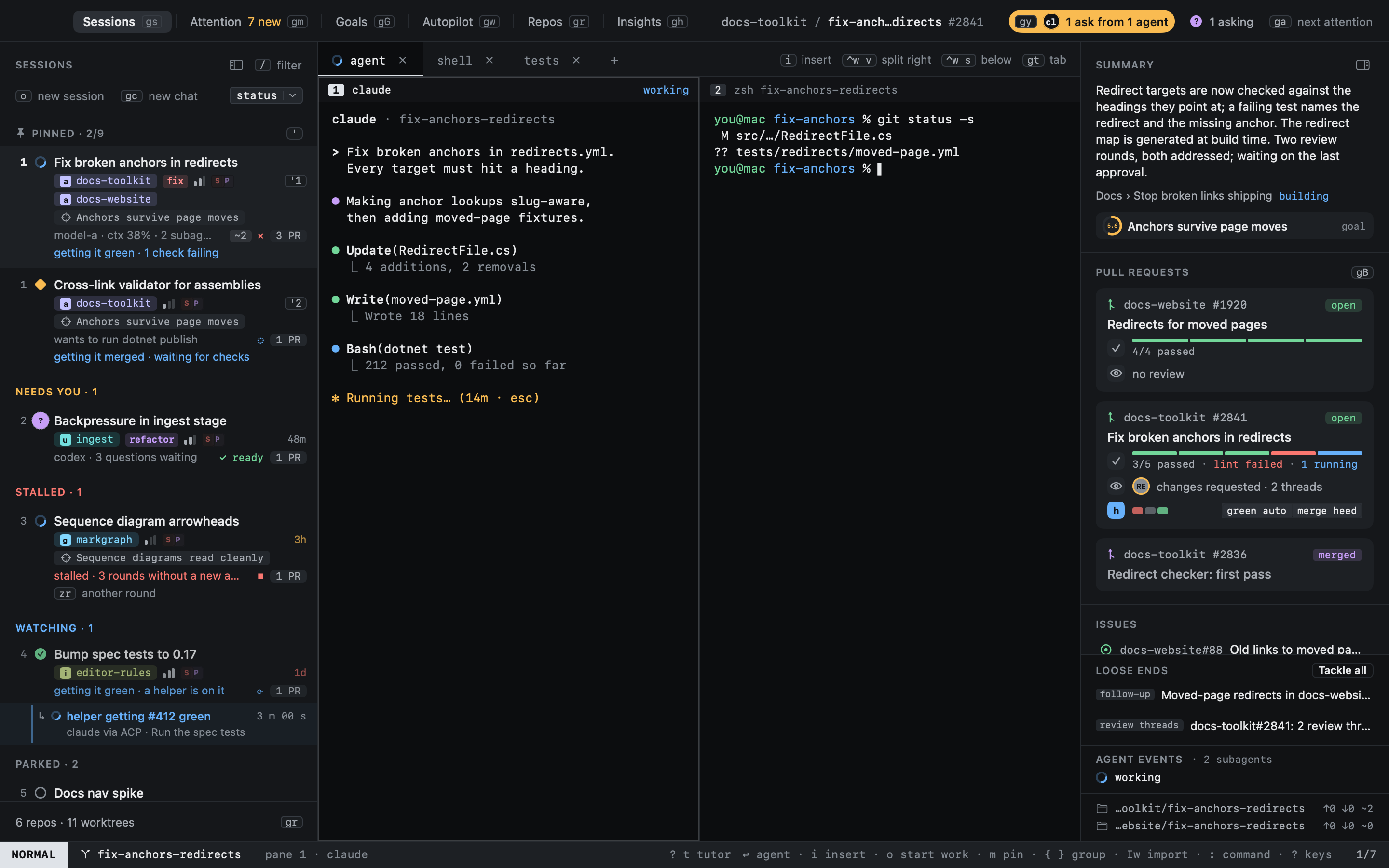
- **Every agent, one window.** Claude, Codex, Cursor, pi, opencode, gemini or any command, each in a real libghostty
terminal with tabs and splits. Agents report their state through hooks (working, idle, blocked, asking, done), so
heed knows who needs you, and `ga` jumps there.
- **Start work in one line.** Press `o`, describe the task: heed picks the repo, makes a worktree named after it and
starts the agent with your prompt; on macOS 26 with Apple Intelligence, Apple's on-device model sharpens the repo
and branch guesses, on this Mac. Sessions resume where you left them after a restart.
- **Goals.** Work that outlives a session gets a goal (`gG`) with a `GOAL.md`; new work finds its goal on its own,
and reviewers score it against bars that fit it. See [Goals](#goals).
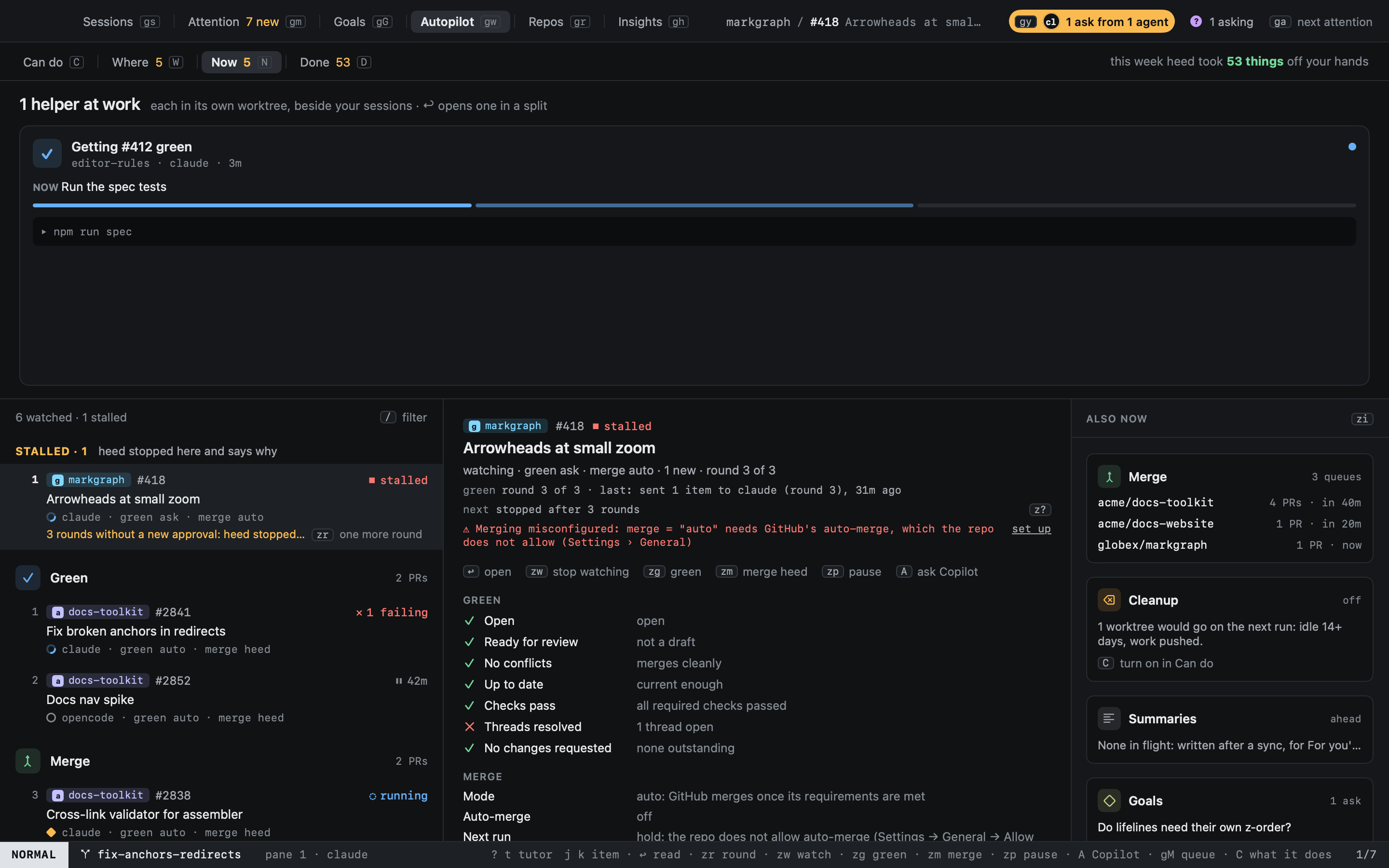
- **Get it green.** heed watches the PRs your sessions open. Review comments, failing checks (with the failed log) and
merge conflicts become items for the agent that wrote the code, sent once it is idle. Or hand conflicts and
comments to GitHub's Copilot coding agent and spare your agent's tokens.
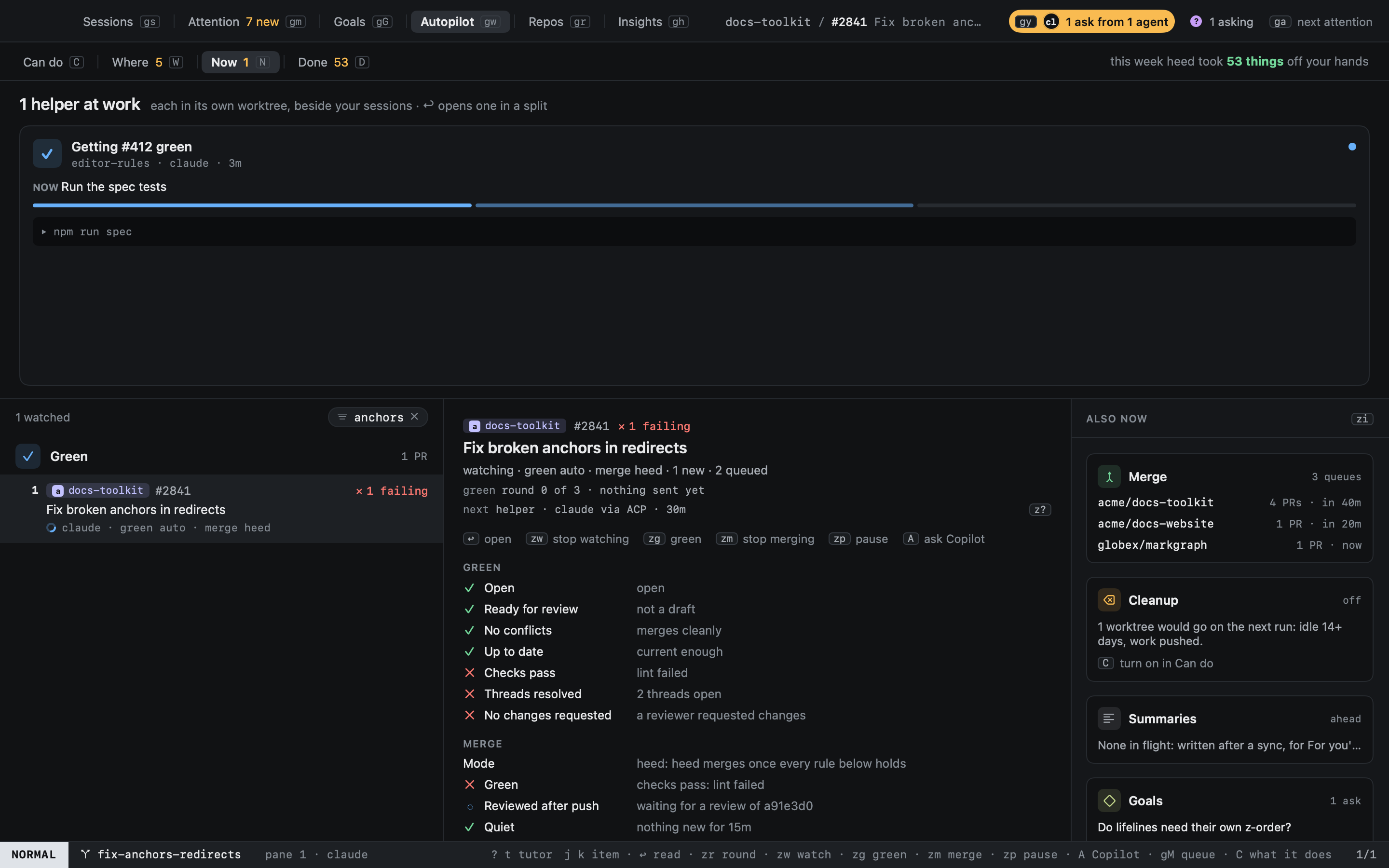
- **Get it merged.** Turn merging on per PR, repo or org. Each repo gets a merge queue: GitHub's auto-merge, or heed
merging itself once your rules hold (green, reviewed after the last push, quiet, gate checks, no hold label, an
optional self-review). With merging off, PRs that could merge say **Ready to merge** and `zM` merges one now. The
setup wizard (`M` in Repos) proposes a repo's settings from its last 30 merged PRs and its CI failures.
- **Keyboard first.** NORMAL, INSERT, VISUAL, COMMAND and HINT modes, counts, relative numbers, `:` commands, and every
feature a named command you can rebind. The tutor teaches it by doing, on a pretend world. The mouse works too:
every command is in the menu bar and the right-click menus with its key beside it, key hints are buttons, tabs drag
and panes resize.
- **Worktrees that tidy up.** Create, list and remove worktrees across repos; cleanup removes only what has been quiet
for days, never dirty or unpushed work, and saves each one's commits and changes as a git ref first, so History can
reopen it.
- **Attention.** `gm` is one feed of everything that wants you: GitHub notifications, review requests, mentions (your
teams' too), your PRs and the agents waiting on you, one row per thread with every reason. Rules in config.toml boost,
lower, pin, ignore or notify.
- **Chats.** `gc` starts an agent in a folder, no repo or branch, for a question; `:promote` turns it into work.
- **History.** What ended, with its outcome (`gh`), and from there a timeline of what happened by day (`T`), a ledger
with a short summary of each piece of work (`L`), and a dashboard of what it amounted to (`D`).
- **Cheap model calls, no API key.** Summaries, drafted replies and suggestions go through the agent CLIs you are
already logged in to, on their cheapest model, with daily caps. Every command, GitHub call and model call heed makes
is in the call log (`:log`).
Watch (gw): every PR by what it needs
Get it merged: the rules, and the repo's merge queue
## Goals
A goal is work that outlives one session: a feature, a migration, a cleanup. Its sessions, chats and PRs belong to it,
and its `GOAL.md` says what it is, what it is not, when it is done, what is open and what was decided. `gG` opens Goals.
- **It finds its work.** New sessions and chats go on their goal by themselves when heed is sure, from free signals
(worktree, branch, PRs, files, the prompt) and a cheap model call when unsure; otherwise heed asks once, with one
key. Corrections become rules in `attach.rules`.
- **Items on a board.** heed breaks the goal into items and moves them on evidence: a session on one, a review, a PR,
a merge. Edits that record what happened apply to `GOAL.md` as versions you can undo; edits that change the goal
wait for you.
- **Quality bars.** Each goal gets the bars it needs (a spike is not a public API), reviewers that never edit your
code score the work against them within a daily budget, and stranger walks time a first run in a fresh clone. When
every criterion and bar is met, heed marks the goal done.
- **Personas.** Who the goal needs now, from its board, and one key to start a session, chat or reviewer as them.
- **Agents keep it.** claude and codex on a goal read `GOAL.md` first and keep it with `heed goal`, taught by heed's
`heed-goal` skill (loaded with `--plugin-dir`, nothing installed); `heed goal item spawn` starts work on an item.
- **Colleagues follow along.** Mirror a goal (`M`) to a tracker repo as a meta issue with a sub-issue per item;
their changes come back as questions for you.
- **Swarms.** A lead agent plans the goal, you approve the plan, and workers take its tasks in parallel, each in a
worktree of its own; their PRs stack on each other and merge in order. Questions go to whoever may answer them (a
peer, heed's controller, you), a stuck worker is nudged and helped on its own, the agents pane and a map show how it
goes, and a done swarm writes its end-of-build summary.
heed keeps a record of each session (its timeline, outcome and summary, in SQLite); the agents own their transcripts.
It is macOS only and not sandboxed: it has to spawn shells, git and agents.
## Development
```sh
mise install # zig (libghostty), swiftformat, swiftlint
mise run doctor # what is missing: Xcode licence, Metal toolchain, zig, gh
mise run ghostty # build Vendor/GhosttyKit.xcframework from the pinned Ghostty commit
mise run dev # build, assemble build/Heed.app, copy it to HEED_DEPLOY_DIR, launch
mise run test # Swift Testing (HeedCore)
mise run lint # swiftformat + swiftlint
```
Without GhosttyKit the app builds with placeholder panes, so everything but the terminal can be worked on.
Headless checks: `HEED_SNAPSHOT=out.png build/Heed.app/Contents/MacOS/Heed` renders the window to a PNG and quits;
`HEED_SNAPSHOT_KEYS="2js?"` types keys first (vim notation).
## Documentation
`docs/` is a [docs-builder](https://github.com/elastic/docs-builder) site published to heed.build by
`.github/workflows/docs.yml`; `docs/heed-landing.html` is a standalone page copied over the generated home page.
`mise run docs` builds it the same way and serves it on :4000 (`docs-builder serve` would skip the landing page).
Both build with docs-builder's design-system layout (`FEATURE_NAVIGATION_PREVIEW=true`), then run
`scripts/docs-finish.sh`, which appends the heed theme (`docs/heed-docs.css`) to its stylesheet and patches the pages
(`scripts/docs-pages.py`). `DOCS_BUILDER= mise run docs` builds with a local docs-builder binary.
## Outside the window
- `⌃⌥H` (`[keys] global_activate`) brings Heed to the front from any app, reopening the window if it was closed.
- The menu bar owl (`[ui] menu_bar`, on by default) shows how many sessions need you; its menu lists them (choosing
one opens Heed on it), plus Start work, Open Heed, Settings and Quit. With it on, closing the window keeps Heed
and its agents running.
- The Dock icon (`[ui] dock_state`, on by default) gets a badge in the state's colour (blocked, else asking) with the
count.
- A notification (`[notifications]`, on by default) when a session, a helper tab or a PR has needed you for 30
seconds, unless Heed is in front on it, and one reminder after 15 minutes; a burst comes as one. Attention items a
rule says to notify about get one too. None during quiet hours (`[attention] quiet`). Open brings Heed forward on
the session; a Claude permission prompt also gets Allow.
The brand pack (icon, logo, menu bar template, social preview, org avatars) lives in `design/brand/`.
Other apps and scripts drive Heed through `control.sock`: `heed start`, `send`, `show`, `sessions` and `watch` (see
[the CLI reference](https://heed.build/reference/cli/)).
## Start work from anywhere
`⌃⌥Space` (`[keys] global_start_work` in config.toml; `""` turns it off) opens Start work in a floating panel over
whatever app is in front. It takes the keyboard without bringing Heed forward; `⎋ ⎋` or a click elsewhere closes it,
`⌘↩` starts the session. The panel's window title is always `Heed Start Work` (bundle id `build.heed.app`), so a
tiling window manager can leave it alone:
```toml
# OmniWM: ~/.config/omniwm/settings.toml (id is any UUID)
[[appRules]]
bundleId = "build.heed.app"
id = "75CF2DF1-FF34-4187-9CC9-01DD190EFC51"
layout = "float"
titleRegex = "^Heed Start Work$"
```
```sh
# yabai
yabai -m rule --add app="^Heed$" title="^Heed Start Work$" manage=off
```
## Layout
| Path | What |
| --- | --- |
| `Sources/HeedCore` | No UI: key notation, keymaps, the mode engine, commands, sessions, pane trees, the hook protocol |
| `Sources/HeedApp` | SwiftUI shell, AppKit key routing (`Keys/KeyRouter.swift`), terminal hosting (`Terminal/`) |
| `Sources/HeedTerminal` | The libghostty wrapper; the only code that touches `ghostty.h` (built when GhosttyKit exists) |
| `Sources/heed` | The CLI agent hooks call: `heed state blocked --reason "..."` over a unix socket, spooled while the app is closed |
| `design/` | The approved boards (`screens/*.png`) and the original brief (`BRIEF.md`) |
| `PLAN.md` | The plan, decisions and build order |
## Contributing and releasing
`main` only changes through pull requests, and CI must pass: lint, the tests, a release build and the tutor check on
macOS, and the docs build. Branch names label pull requests for the release notes: `feature/…`, `fix/…`, `docs/…`.
[release-drafter](https://github.com/release-drafter/release-drafter) keeps a draft release up to date as pull requests
merge, and works out the next version from their labels (`major`, `minor` or `enhancement`, otherwise a patch). To
release, run the **release** workflow (`gh workflow run release`, optionally `-f version=0.2.0`): it builds `main`,
signs it with the Developer ID (hardened runtime, `scripts/sign.sh`), has Apple notarize it and staples the ticket,
builds the drag-to-Applications disk image (`scripts/dmg.sh`, laid out by dmgbuild over `packaging/dmg/`) and has it
notarized and stapled too (`scripts/notarize.sh`), attaches `Heed-arm64.dmg`, `Heed-arm64.zip` and their sha256 files
to the draft, checks they are all there, and only then publishes the draft, which tags the commit it built. A rejected notarization stops it before anything is attached. `-f dry_run=true` does all
but the release, from any branch, and keeps the notarized zip and disk image on the run. It then writes the cask
(`packaging/homebrew/heed.rb`) to [heed-build/homebrew-tap](https://github.com/heed-build/homebrew-tap) with
`scripts/bump-tap.sh`; the **tap** workflow redoes that by hand. `install.sh` installs from the latest release. The signing and notarization secrets come from `scripts/release-secrets.sh`. The **notary** workflow asks Apple how
submissions are doing. Until the first release exists, **notary-watch** checks every two hours and starts the release
itself once Apple accepts a submission (a new Developer ID's first notarizations can take hours or days), then turns
itself off.
## Deploying to the MacBook
`mise run build` copies `build/Heed.app` to `$HEED_DEPLOY_DIR` (set in `mise.local.toml`, not committed). Skipped,
never failed, when the share is not mounted.
## License
heed is free and open source under the [MIT license](LICENSE).