 # AsyncGraphics
AsyncGraphics is a Swift package for working with images and video with concurrency on the GPU. The core type is called [`Graphic`](https://heestand-xyz.github.io/AsyncGraphics-Docs/documentation/asyncgraphics/graphic), it's like an image and is backed by a [`MTLTexture`](https://developer.apple.com/documentation/metal/mtltexture).
## Documentation
[**Documentation**](https://heestand-xyz.github.io/AsyncGraphics-Docs/documentation/asyncgraphics) (DocC)
See the [**Graphic**](https://heestand-xyz.github.io/AsyncGraphics-Docs/documentation/asyncgraphics/graphic) docs for all content and effects.
### Articles
- [Blending](https://heestand-xyz.github.io/AsyncGraphics-Docs/documentation/asyncgraphics/blending)
- [Layout](https://heestand-xyz.github.io/AsyncGraphics-Docs/documentation/asyncgraphics/layout)
- [Video Playback](https://heestand-xyz.github.io/AsyncGraphics-Docs/documentation/asyncgraphics/videoplayback)
- [Video Editing](https://heestand-xyz.github.io/AsyncGraphics-Docs/documentation/asyncgraphics/videoediting)
- [Camera](https://heestand-xyz.github.io/AsyncGraphics-Docs/documentation/asyncgraphics/camera)
### Resources
[Image](https://heestand-xyz.github.io/AsyncGraphics-Docs/documentation/asyncgraphics/graphic#Image),
[Video](https://heestand-xyz.github.io/AsyncGraphics-Docs/documentation/asyncgraphics/graphic/#Video),
[Camera](https://heestand-xyz.github.io/AsyncGraphics-Docs/documentation/asyncgraphics/graphic/#Camera),
[View](https://heestand-xyz.github.io/AsyncGraphics-Docs/documentation/asyncgraphics/graphic/#View),
[Screen](https://heestand-xyz.github.io/AsyncGraphics-Docs/documentation/asyncgraphics/graphic/#Screen),
[Maps](https://heestand-xyz.github.io/AsyncGraphics-Docs/documentation/asyncgraphics/graphic/#Maps)
### Shapes
[Rectangle](https://heestand-xyz.github.io/AsyncGraphics-Docs/documentation/asyncgraphics/graphic/#Rectangle),
[Circle](https://heestand-xyz.github.io/AsyncGraphics-Docs/documentation/asyncgraphics/graphic/#Circle),
[Polygon](https://heestand-xyz.github.io/AsyncGraphics-Docs/documentation/asyncgraphics/graphic/#Polygon),
[Arc](https://heestand-xyz.github.io/AsyncGraphics-Docs/documentation/asyncgraphics/graphic/#Arc),
[Star](https://heestand-xyz.github.io/AsyncGraphics-Docs/documentation/asyncgraphics/graphic/#Star),
[Line](https://heestand-xyz.github.io/AsyncGraphics-Docs/documentation/asyncgraphics/graphic/#Line)
### Visuals
[Color](https://heestand-xyz.github.io/AsyncGraphics-Docs/documentation/asyncgraphics/graphic/#Color),
[Gradient](https://heestand-xyz.github.io/AsyncGraphics-Docs/documentation/asyncgraphics/graphic/#Gradient),
[Noise](https://heestand-xyz.github.io/AsyncGraphics-Docs/documentation/asyncgraphics/graphic/#Noise)
### Particles
[Particles](https://heestand-xyz.github.io/AsyncGraphics-Docs/documentation/asyncgraphics/graphic/#Particles)
### Color Effects
[Levels](https://heestand-xyz.github.io/AsyncGraphics-Docs/documentation/asyncgraphics/graphic/#Levels) (Brightness, Contrast, Invert, Opacity),
[Luma Levels](https://heestand-xyz.github.io/AsyncGraphics-Docs/documentation/asyncgraphics/graphic/#Luma-Levels),
[Color Shift](https://heestand-xyz.github.io/AsyncGraphics-Docs/documentation/asyncgraphics/graphic/#Color-Shift) (Hue, Saturation),
[Luma Color Shift](https://heestand-xyz.github.io/AsyncGraphics-Docs/documentation/asyncgraphics/graphic/#Luma-Color-Shift),
[Sepia](https://heestand-xyz.github.io/AsyncGraphics-Docs/documentation/asyncgraphics/graphic/#Sepia),
[Threshold](https://heestand-xyz.github.io/AsyncGraphics-Docs/documentation/asyncgraphics/graphic/#Threshold),
[Quantize](https://heestand-xyz.github.io/AsyncGraphics-Docs/documentation/asyncgraphics/graphic/#Quantize),
[Lookup](https://heestand-xyz.github.io/AsyncGraphics-Docs/documentation/asyncgraphics/graphic/#Lookup),
[Gradient Lookup](https://heestand-xyz.github.io/AsyncGraphics-Docs/documentation/asyncgraphics/graphic/#Gradient-Lookup),
[Clamp](https://heestand-xyz.github.io/AsyncGraphics-Docs/documentation/asyncgraphics/graphic/#Clamp),
[Cross](https://heestand-xyz.github.io/AsyncGraphics-Docs/documentation/asyncgraphics/graphic/#Cross) (Fade),
[Chroma Key](https://heestand-xyz.github.io/AsyncGraphics-Docs/documentation/asyncgraphics/graphic/#Chroma-Key) (Green Screen),
[Person Segmentation](https://heestand-xyz.github.io/AsyncGraphics-Docs/documentation/asyncgraphics/graphic/#Person-Segmentation) (Background Removal),
[Color Convert](https://heestand-xyz.github.io/AsyncGraphics-Docs/documentation/asyncgraphics/graphic/#Color-Convert),
[Range](https://heestand-xyz.github.io/AsyncGraphics-Docs/documentation/asyncgraphics/graphic/#Range)
### Space Effects
[Blur](https://heestand-xyz.github.io/AsyncGraphics-Docs/documentation/asyncgraphics/graphic/#Blur),
[Rainbow Blur](https://heestand-xyz.github.io/AsyncGraphics-Docs/documentation/asyncgraphics/graphic/#Rainbow-Blur),
[Luma Rainbow Blur](https://heestand-xyz.github.io/AsyncGraphics-Docs/documentation/asyncgraphics/graphic/#Luma-Rainbow-Blur),
[Pixelate](https://heestand-xyz.github.io/AsyncGraphics-Docs/documentation/asyncgraphics/graphic/#Pixelate),
[Displace](https://heestand-xyz.github.io/AsyncGraphics-Docs/documentation/asyncgraphics/graphic/#Displace),
[Edge](https://heestand-xyz.github.io/AsyncGraphics-Docs/documentation/asyncgraphics/graphic/#Edge),
[Sharpen](https://heestand-xyz.github.io/AsyncGraphics-Docs/documentation/asyncgraphics/graphic/#Sharpen),
[Kaleidoscope](https://heestand-xyz.github.io/AsyncGraphics-Docs/documentation/asyncgraphics/graphic/#Kaleidoscope),
[Morph](https://heestand-xyz.github.io/AsyncGraphics-Docs/documentation/asyncgraphics/graphic/#Morph),
[Channel Mix](https://heestand-xyz.github.io/AsyncGraphics-Docs/documentation/asyncgraphics/graphic/#Channel-Mix)
### Layout
[Stack](https://heestand-xyz.github.io/AsyncGraphics-Docs/documentation/asyncgraphics/graphic/#Stack),
[Resize](https://heestand-xyz.github.io/AsyncGraphics-Docs/documentation/asyncgraphics/graphic/#Resize) (Resolution),
[Mirror](https://heestand-xyz.github.io/AsyncGraphics-Docs/documentation/asyncgraphics/graphic/#Mirror),
[Rotate](https://heestand-xyz.github.io/AsyncGraphics-Docs/documentation/asyncgraphics/graphic/#Rotate)
### Info
[Pixels](https://heestand-xyz.github.io/AsyncGraphics-Docs/documentation/asyncgraphics/graphic/#Pixels),
[Channels](https://heestand-xyz.github.io/AsyncGraphics-Docs/documentation/asyncgraphics/graphic/#Channels),
[Stereoscopic](https://heestand-xyz.github.io/AsyncGraphics-Docs/documentation/asyncgraphics/graphic/#Stereoscopic)
### Convert
[Crop](https://heestand-xyz.github.io/AsyncGraphics-Docs/documentation/asyncgraphics/graphic/#Crop),
[Padding](https://heestand-xyz.github.io/AsyncGraphics-Docs/documentation/asyncgraphics/graphic/#Padding),
[Corner Pin](https://heestand-xyz.github.io/AsyncGraphics-Docs/documentation/asyncgraphics/graphic/#Corner-Pin),
[Sample Line](https://heestand-xyz.github.io/AsyncGraphics-Docs/documentation/asyncgraphics/graphic/#Sample-Line),
[Slope](https://heestand-xyz.github.io/AsyncGraphics-Docs/documentation/asyncgraphics/graphic/#Slope),
[Remap](https://heestand-xyz.github.io/AsyncGraphics-Docs/documentation/asyncgraphics/graphic/#Remap),
[Polar](https://heestand-xyz.github.io/AsyncGraphics-Docs/documentation/asyncgraphics/graphic/#Polar),
[Flood Fill](https://heestand-xyz.github.io/AsyncGraphics-Docs/documentation/asyncgraphics/graphic/#Flood-Fill),
[Reduce](https://heestand-xyz.github.io/AsyncGraphics-Docs/documentation/asyncgraphics/graphic/#Reduce),
[LUTs](https://heestand-xyz.github.io/AsyncGraphics-Docs/documentation/asyncgraphics/graphic/#LUTs),
[Buffer](https://heestand-xyz.github.io/AsyncGraphics-Docs/documentation/asyncgraphics/graphic/#Buffer)
### Detection
[Face Detection](https://heestand-xyz.github.io/AsyncGraphics-Docs/documentation/asyncgraphics/graphic/#Face-Detection)
### Metal
[Metal](https://heestand-xyz.github.io/AsyncGraphics-Docs/documentation/asyncgraphics/graphic/#Metal)
## Install
```swift
.package(url: "https://github.com/heestand-xyz/AsyncGraphics", from: "3.0.0")
```
## Views
In AsyncGraphics there are a couple ways to present a graphic.
- [AGView](https://heestand-xyz.github.io/AsyncGraphics-Docs/documentation/asyncgraphics/agview) to declaratively view [AGGraph](https://heestand-xyz.github.io/AsyncGraphics-Docs/documentation/asyncgraphics/aggraph)s
- [GraphicView](https://heestand-xyz.github.io/AsyncGraphics-Docs/documentation/asyncgraphics/graphicview) to imperatively view [Graphic](https://heestand-xyz.github.io/AsyncGraphics-Docs/documentation/asyncgraphics/graphic)s
- [AsyncGraphicView](https://heestand-xyz.github.io/AsyncGraphics-Docs/documentation/asyncgraphics/asyncgraphicview) to imperatively view [Graphic](https://heestand-xyz.github.io/AsyncGraphics-Docs/documentation/asyncgraphics/graphic)s asynchronously.
- [Graphic3DView](https://heestand-xyz.github.io/AsyncGraphics-Docs/documentation/asyncgraphics/graphic3dview) to view [Graphic3D](https://heestand-xyz.github.io/AsyncGraphics-Docs/documentation/asyncgraphics/graphic3d/)s
```swift
import AsyncGraphics
struct ContentView: View {
var body: some View {
AsyncGraphicView { resolution in
try await .circle(resolution: resolution)
}
}
}
```
or for more control:
```swift
import AsyncGraphics
struct ContentView: View {
private static let resolution = CGSize(width: 1000, height: 1000)
@State private var graphic: Graphic?
var body: some View {
ZStack {
if let graphic {
GraphicView(graphic: graphic)
}
}
.task {
graphic = try? await .circle(resolution: Self.resolution)
}
}
}
```
# Examples
## Images
To import and export images there are [multiple ways](https://heestand-xyz.github.io/AsyncGraphics-Docs/documentation/asyncgraphics/graphic/#Image) to do this. The simplest way is to load an asset from the asset catalog by name. If the asset does not exist, an error will be thrown.
```swift
let graphic: Graphic = try await .image(named: "Kite")
```
To export an UIImage or NSImage just call `try await graphic.image` or for a SwiftUI image `try await graphic.imageForSwiftUI`.
## Blending
# AsyncGraphics
AsyncGraphics is a Swift package for working with images and video with concurrency on the GPU. The core type is called [`Graphic`](https://heestand-xyz.github.io/AsyncGraphics-Docs/documentation/asyncgraphics/graphic), it's like an image and is backed by a [`MTLTexture`](https://developer.apple.com/documentation/metal/mtltexture).
## Documentation
[**Documentation**](https://heestand-xyz.github.io/AsyncGraphics-Docs/documentation/asyncgraphics) (DocC)
See the [**Graphic**](https://heestand-xyz.github.io/AsyncGraphics-Docs/documentation/asyncgraphics/graphic) docs for all content and effects.
### Articles
- [Blending](https://heestand-xyz.github.io/AsyncGraphics-Docs/documentation/asyncgraphics/blending)
- [Layout](https://heestand-xyz.github.io/AsyncGraphics-Docs/documentation/asyncgraphics/layout)
- [Video Playback](https://heestand-xyz.github.io/AsyncGraphics-Docs/documentation/asyncgraphics/videoplayback)
- [Video Editing](https://heestand-xyz.github.io/AsyncGraphics-Docs/documentation/asyncgraphics/videoediting)
- [Camera](https://heestand-xyz.github.io/AsyncGraphics-Docs/documentation/asyncgraphics/camera)
### Resources
[Image](https://heestand-xyz.github.io/AsyncGraphics-Docs/documentation/asyncgraphics/graphic#Image),
[Video](https://heestand-xyz.github.io/AsyncGraphics-Docs/documentation/asyncgraphics/graphic/#Video),
[Camera](https://heestand-xyz.github.io/AsyncGraphics-Docs/documentation/asyncgraphics/graphic/#Camera),
[View](https://heestand-xyz.github.io/AsyncGraphics-Docs/documentation/asyncgraphics/graphic/#View),
[Screen](https://heestand-xyz.github.io/AsyncGraphics-Docs/documentation/asyncgraphics/graphic/#Screen),
[Maps](https://heestand-xyz.github.io/AsyncGraphics-Docs/documentation/asyncgraphics/graphic/#Maps)
### Shapes
[Rectangle](https://heestand-xyz.github.io/AsyncGraphics-Docs/documentation/asyncgraphics/graphic/#Rectangle),
[Circle](https://heestand-xyz.github.io/AsyncGraphics-Docs/documentation/asyncgraphics/graphic/#Circle),
[Polygon](https://heestand-xyz.github.io/AsyncGraphics-Docs/documentation/asyncgraphics/graphic/#Polygon),
[Arc](https://heestand-xyz.github.io/AsyncGraphics-Docs/documentation/asyncgraphics/graphic/#Arc),
[Star](https://heestand-xyz.github.io/AsyncGraphics-Docs/documentation/asyncgraphics/graphic/#Star),
[Line](https://heestand-xyz.github.io/AsyncGraphics-Docs/documentation/asyncgraphics/graphic/#Line)
### Visuals
[Color](https://heestand-xyz.github.io/AsyncGraphics-Docs/documentation/asyncgraphics/graphic/#Color),
[Gradient](https://heestand-xyz.github.io/AsyncGraphics-Docs/documentation/asyncgraphics/graphic/#Gradient),
[Noise](https://heestand-xyz.github.io/AsyncGraphics-Docs/documentation/asyncgraphics/graphic/#Noise)
### Particles
[Particles](https://heestand-xyz.github.io/AsyncGraphics-Docs/documentation/asyncgraphics/graphic/#Particles)
### Color Effects
[Levels](https://heestand-xyz.github.io/AsyncGraphics-Docs/documentation/asyncgraphics/graphic/#Levels) (Brightness, Contrast, Invert, Opacity),
[Luma Levels](https://heestand-xyz.github.io/AsyncGraphics-Docs/documentation/asyncgraphics/graphic/#Luma-Levels),
[Color Shift](https://heestand-xyz.github.io/AsyncGraphics-Docs/documentation/asyncgraphics/graphic/#Color-Shift) (Hue, Saturation),
[Luma Color Shift](https://heestand-xyz.github.io/AsyncGraphics-Docs/documentation/asyncgraphics/graphic/#Luma-Color-Shift),
[Sepia](https://heestand-xyz.github.io/AsyncGraphics-Docs/documentation/asyncgraphics/graphic/#Sepia),
[Threshold](https://heestand-xyz.github.io/AsyncGraphics-Docs/documentation/asyncgraphics/graphic/#Threshold),
[Quantize](https://heestand-xyz.github.io/AsyncGraphics-Docs/documentation/asyncgraphics/graphic/#Quantize),
[Lookup](https://heestand-xyz.github.io/AsyncGraphics-Docs/documentation/asyncgraphics/graphic/#Lookup),
[Gradient Lookup](https://heestand-xyz.github.io/AsyncGraphics-Docs/documentation/asyncgraphics/graphic/#Gradient-Lookup),
[Clamp](https://heestand-xyz.github.io/AsyncGraphics-Docs/documentation/asyncgraphics/graphic/#Clamp),
[Cross](https://heestand-xyz.github.io/AsyncGraphics-Docs/documentation/asyncgraphics/graphic/#Cross) (Fade),
[Chroma Key](https://heestand-xyz.github.io/AsyncGraphics-Docs/documentation/asyncgraphics/graphic/#Chroma-Key) (Green Screen),
[Person Segmentation](https://heestand-xyz.github.io/AsyncGraphics-Docs/documentation/asyncgraphics/graphic/#Person-Segmentation) (Background Removal),
[Color Convert](https://heestand-xyz.github.io/AsyncGraphics-Docs/documentation/asyncgraphics/graphic/#Color-Convert),
[Range](https://heestand-xyz.github.io/AsyncGraphics-Docs/documentation/asyncgraphics/graphic/#Range)
### Space Effects
[Blur](https://heestand-xyz.github.io/AsyncGraphics-Docs/documentation/asyncgraphics/graphic/#Blur),
[Rainbow Blur](https://heestand-xyz.github.io/AsyncGraphics-Docs/documentation/asyncgraphics/graphic/#Rainbow-Blur),
[Luma Rainbow Blur](https://heestand-xyz.github.io/AsyncGraphics-Docs/documentation/asyncgraphics/graphic/#Luma-Rainbow-Blur),
[Pixelate](https://heestand-xyz.github.io/AsyncGraphics-Docs/documentation/asyncgraphics/graphic/#Pixelate),
[Displace](https://heestand-xyz.github.io/AsyncGraphics-Docs/documentation/asyncgraphics/graphic/#Displace),
[Edge](https://heestand-xyz.github.io/AsyncGraphics-Docs/documentation/asyncgraphics/graphic/#Edge),
[Sharpen](https://heestand-xyz.github.io/AsyncGraphics-Docs/documentation/asyncgraphics/graphic/#Sharpen),
[Kaleidoscope](https://heestand-xyz.github.io/AsyncGraphics-Docs/documentation/asyncgraphics/graphic/#Kaleidoscope),
[Morph](https://heestand-xyz.github.io/AsyncGraphics-Docs/documentation/asyncgraphics/graphic/#Morph),
[Channel Mix](https://heestand-xyz.github.io/AsyncGraphics-Docs/documentation/asyncgraphics/graphic/#Channel-Mix)
### Layout
[Stack](https://heestand-xyz.github.io/AsyncGraphics-Docs/documentation/asyncgraphics/graphic/#Stack),
[Resize](https://heestand-xyz.github.io/AsyncGraphics-Docs/documentation/asyncgraphics/graphic/#Resize) (Resolution),
[Mirror](https://heestand-xyz.github.io/AsyncGraphics-Docs/documentation/asyncgraphics/graphic/#Mirror),
[Rotate](https://heestand-xyz.github.io/AsyncGraphics-Docs/documentation/asyncgraphics/graphic/#Rotate)
### Info
[Pixels](https://heestand-xyz.github.io/AsyncGraphics-Docs/documentation/asyncgraphics/graphic/#Pixels),
[Channels](https://heestand-xyz.github.io/AsyncGraphics-Docs/documentation/asyncgraphics/graphic/#Channels),
[Stereoscopic](https://heestand-xyz.github.io/AsyncGraphics-Docs/documentation/asyncgraphics/graphic/#Stereoscopic)
### Convert
[Crop](https://heestand-xyz.github.io/AsyncGraphics-Docs/documentation/asyncgraphics/graphic/#Crop),
[Padding](https://heestand-xyz.github.io/AsyncGraphics-Docs/documentation/asyncgraphics/graphic/#Padding),
[Corner Pin](https://heestand-xyz.github.io/AsyncGraphics-Docs/documentation/asyncgraphics/graphic/#Corner-Pin),
[Sample Line](https://heestand-xyz.github.io/AsyncGraphics-Docs/documentation/asyncgraphics/graphic/#Sample-Line),
[Slope](https://heestand-xyz.github.io/AsyncGraphics-Docs/documentation/asyncgraphics/graphic/#Slope),
[Remap](https://heestand-xyz.github.io/AsyncGraphics-Docs/documentation/asyncgraphics/graphic/#Remap),
[Polar](https://heestand-xyz.github.io/AsyncGraphics-Docs/documentation/asyncgraphics/graphic/#Polar),
[Flood Fill](https://heestand-xyz.github.io/AsyncGraphics-Docs/documentation/asyncgraphics/graphic/#Flood-Fill),
[Reduce](https://heestand-xyz.github.io/AsyncGraphics-Docs/documentation/asyncgraphics/graphic/#Reduce),
[LUTs](https://heestand-xyz.github.io/AsyncGraphics-Docs/documentation/asyncgraphics/graphic/#LUTs),
[Buffer](https://heestand-xyz.github.io/AsyncGraphics-Docs/documentation/asyncgraphics/graphic/#Buffer)
### Detection
[Face Detection](https://heestand-xyz.github.io/AsyncGraphics-Docs/documentation/asyncgraphics/graphic/#Face-Detection)
### Metal
[Metal](https://heestand-xyz.github.io/AsyncGraphics-Docs/documentation/asyncgraphics/graphic/#Metal)
## Install
```swift
.package(url: "https://github.com/heestand-xyz/AsyncGraphics", from: "3.0.0")
```
## Views
In AsyncGraphics there are a couple ways to present a graphic.
- [AGView](https://heestand-xyz.github.io/AsyncGraphics-Docs/documentation/asyncgraphics/agview) to declaratively view [AGGraph](https://heestand-xyz.github.io/AsyncGraphics-Docs/documentation/asyncgraphics/aggraph)s
- [GraphicView](https://heestand-xyz.github.io/AsyncGraphics-Docs/documentation/asyncgraphics/graphicview) to imperatively view [Graphic](https://heestand-xyz.github.io/AsyncGraphics-Docs/documentation/asyncgraphics/graphic)s
- [AsyncGraphicView](https://heestand-xyz.github.io/AsyncGraphics-Docs/documentation/asyncgraphics/asyncgraphicview) to imperatively view [Graphic](https://heestand-xyz.github.io/AsyncGraphics-Docs/documentation/asyncgraphics/graphic)s asynchronously.
- [Graphic3DView](https://heestand-xyz.github.io/AsyncGraphics-Docs/documentation/asyncgraphics/graphic3dview) to view [Graphic3D](https://heestand-xyz.github.io/AsyncGraphics-Docs/documentation/asyncgraphics/graphic3d/)s
```swift
import AsyncGraphics
struct ContentView: View {
var body: some View {
AsyncGraphicView { resolution in
try await .circle(resolution: resolution)
}
}
}
```
or for more control:
```swift
import AsyncGraphics
struct ContentView: View {
private static let resolution = CGSize(width: 1000, height: 1000)
@State private var graphic: Graphic?
var body: some View {
ZStack {
if let graphic {
GraphicView(graphic: graphic)
}
}
.task {
graphic = try? await .circle(resolution: Self.resolution)
}
}
}
```
# Examples
## Images
To import and export images there are [multiple ways](https://heestand-xyz.github.io/AsyncGraphics-Docs/documentation/asyncgraphics/graphic/#Image) to do this. The simplest way is to load an asset from the asset catalog by name. If the asset does not exist, an error will be thrown.
```swift
let graphic: Graphic = try await .image(named: "Kite")
```
To export an UIImage or NSImage just call `try await graphic.image` or for a SwiftUI image `try await graphic.imageForSwiftUI`.
## Blending
 First we create an [AGView](https://heestand-xyz.github.io/AsyncGraphics-Docs/documentation/asyncgraphics/agview/), this is the container for all [AGGraph](https://heestand-xyz.github.io/AsyncGraphics-Docs/documentation/asyncgraphics/aggraph)s.
In this example we have a [AGZStack](https://heestand-xyz.github.io/AsyncGraphics-Docs/documentation/asyncgraphics/agzstack) with 3 [AGHStack](https://heestand-xyz.github.io/AsyncGraphics-Docs/documentation/asyncgraphics/aghstack)s. Each graph has a blend mode ([AGBlendMode](https://heestand-xyz.github.io/AsyncGraphics-Docs/documentation/asyncgraphics/agblendmode)), in this case .screen.
```swift
import SwiftUI
import AsyncGraphics
struct ContentView: View {
var body: some View {
AGView {
AGZStack {
AGHStack {
AGSpacer()
AGCircle()
.foregroundColor(.red)
}
AGHStack {
AGSpacer()
AGCircle()
.foregroundColor(.green)
AGSpacer()
}
.blendMode(.screen)
AGHStack {
AGCircle()
.foregroundColor(.blue)
AGSpacer()
}
.blendMode(.screen)
}
}
}
}
```
## Layout
First we create an [AGView](https://heestand-xyz.github.io/AsyncGraphics-Docs/documentation/asyncgraphics/agview/), this is the container for all [AGGraph](https://heestand-xyz.github.io/AsyncGraphics-Docs/documentation/asyncgraphics/aggraph)s.
In this example we have a [AGZStack](https://heestand-xyz.github.io/AsyncGraphics-Docs/documentation/asyncgraphics/agzstack) with 3 [AGHStack](https://heestand-xyz.github.io/AsyncGraphics-Docs/documentation/asyncgraphics/aghstack)s. Each graph has a blend mode ([AGBlendMode](https://heestand-xyz.github.io/AsyncGraphics-Docs/documentation/asyncgraphics/agblendmode)), in this case .screen.
```swift
import SwiftUI
import AsyncGraphics
struct ContentView: View {
var body: some View {
AGView {
AGZStack {
AGHStack {
AGSpacer()
AGCircle()
.foregroundColor(.red)
}
AGHStack {
AGSpacer()
AGCircle()
.foregroundColor(.green)
AGSpacer()
}
.blendMode(.screen)
AGHStack {
AGCircle()
.foregroundColor(.blue)
AGSpacer()
}
.blendMode(.screen)
}
}
}
}
```
## Layout
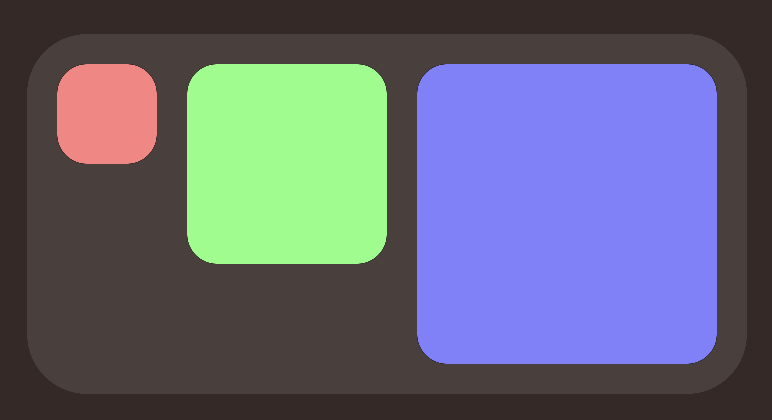 First we create an [AGView](https://heestand-xyz.github.io/AsyncGraphics-Docs/documentation/asyncgraphics/agview/), this is the container for all [AGGraph](https://heestand-xyz.github.io/AsyncGraphics-Docs/documentation/asyncgraphics/aggraph/)s.
In this example we create an [AGHStack](https://heestand-xyz.github.io/AsyncGraphics-Docs/documentation/asyncgraphics/aghstack/) to contain the boxes, then we loop 3 times with an [AGForEach](https://heestand-xyz.github.io/AsyncGraphics-Docs/documentation/asyncgraphics/agforeach/), calculate the width and create [AGRoundedRectangles](https://heestand-xyz.github.io/AsyncGraphics-Docs/documentation/asyncgraphics/agroundedrectangle/). After that we set the frame to get a fixed size and apply a color. After the stack we apply some padding and finally add a background.
```swift
import SwiftUI
import AsyncGraphics
struct ContentView: View {
var body: some View {
AGView {
AGHStack(alignment: .top, spacing: 15) {
AGForEach(0..<3) { index in
let width = 50 * CGFloat(index + 1)
AGRoundedRectangle(cornerRadius: 15)
.frame(width: width, height: width)
.foregroundColor(Color(hue: Double(index) / 3,
saturation: 0.5,
brightness: 1.0))
}
}
.padding(15)
.background {
AGRoundedRectangle(cornerRadius: 30)
.opacity(0.1)
}
}
}
}
```
## Camera
```swift
import SwiftUI
import AsyncGraphics
struct ContentView: View {
var body: some View {
AGView {
AGZStack {
AGCamera(.front)
.resizable()
.aspectRatio(contentMode: .fill)
AGCircle()
.blendMode(.multiply)
}
}
}
}
```
You can also do the same with `Graphic`s:
```swift
import SwiftUI
import AsyncGraphics
struct ContentView: View {
@State private var graphic: Graphic?
var body: some View {
ZStack {
if let graphic {
GraphicView(graphic: graphic)
}
}
.task {
do {
let resolution = CGSize(width: 1_000, height: 1_000)
let circleGraphic: Graphic = try await .circle(radius: 500,
backgroundColor: .clear,
resolution: resolution)
for await cameraGraphic in try await Graphic.camera(at: .front) {
graphic = try await circleGraphic
.blended(with: cameraGraphic,
blendingMode: .multiply,
placement: .fill)
}
} catch {
print(error)
}
}
}
}
```
> Remember to set the Info.plist key `NSCameraUsageDescription` "Privacy - Camera Usage Description"
## Metal
There is the option to write high level [metal](https://heestand-xyz.github.io/AsyncGraphics-Docs/documentation/asyncgraphics/metal) code in AsyncGraphics. No need to setup a pipeline.
## Colors
Colors are represented with the `PixelColor` type.
`import PixelColor` to create custom colors with hex values.
[PixelColor](https://github.com/heestand-xyz/PixelColor) on GitHub.
## Tiling
Most shapes can be tiled (rendered in chunks).
Use the [tiled](https://heestand-xyz.github.io/AsyncGraphics-Docs/documentation/asyncgraphics/graphic/#Tile) methods to render tiles. Add padding if using a space effect, like blur or displace.
## Author
Created by [Anton Heestand](http://heestand.xyz)
## License
[MIT](https://github.com/heestand-xyz/AsyncGraphics/blob/main/LICENSE)
First we create an [AGView](https://heestand-xyz.github.io/AsyncGraphics-Docs/documentation/asyncgraphics/agview/), this is the container for all [AGGraph](https://heestand-xyz.github.io/AsyncGraphics-Docs/documentation/asyncgraphics/aggraph/)s.
In this example we create an [AGHStack](https://heestand-xyz.github.io/AsyncGraphics-Docs/documentation/asyncgraphics/aghstack/) to contain the boxes, then we loop 3 times with an [AGForEach](https://heestand-xyz.github.io/AsyncGraphics-Docs/documentation/asyncgraphics/agforeach/), calculate the width and create [AGRoundedRectangles](https://heestand-xyz.github.io/AsyncGraphics-Docs/documentation/asyncgraphics/agroundedrectangle/). After that we set the frame to get a fixed size and apply a color. After the stack we apply some padding and finally add a background.
```swift
import SwiftUI
import AsyncGraphics
struct ContentView: View {
var body: some View {
AGView {
AGHStack(alignment: .top, spacing: 15) {
AGForEach(0..<3) { index in
let width = 50 * CGFloat(index + 1)
AGRoundedRectangle(cornerRadius: 15)
.frame(width: width, height: width)
.foregroundColor(Color(hue: Double(index) / 3,
saturation: 0.5,
brightness: 1.0))
}
}
.padding(15)
.background {
AGRoundedRectangle(cornerRadius: 30)
.opacity(0.1)
}
}
}
}
```
## Camera
```swift
import SwiftUI
import AsyncGraphics
struct ContentView: View {
var body: some View {
AGView {
AGZStack {
AGCamera(.front)
.resizable()
.aspectRatio(contentMode: .fill)
AGCircle()
.blendMode(.multiply)
}
}
}
}
```
You can also do the same with `Graphic`s:
```swift
import SwiftUI
import AsyncGraphics
struct ContentView: View {
@State private var graphic: Graphic?
var body: some View {
ZStack {
if let graphic {
GraphicView(graphic: graphic)
}
}
.task {
do {
let resolution = CGSize(width: 1_000, height: 1_000)
let circleGraphic: Graphic = try await .circle(radius: 500,
backgroundColor: .clear,
resolution: resolution)
for await cameraGraphic in try await Graphic.camera(at: .front) {
graphic = try await circleGraphic
.blended(with: cameraGraphic,
blendingMode: .multiply,
placement: .fill)
}
} catch {
print(error)
}
}
}
}
```
> Remember to set the Info.plist key `NSCameraUsageDescription` "Privacy - Camera Usage Description"
## Metal
There is the option to write high level [metal](https://heestand-xyz.github.io/AsyncGraphics-Docs/documentation/asyncgraphics/metal) code in AsyncGraphics. No need to setup a pipeline.
## Colors
Colors are represented with the `PixelColor` type.
`import PixelColor` to create custom colors with hex values.
[PixelColor](https://github.com/heestand-xyz/PixelColor) on GitHub.
## Tiling
Most shapes can be tiled (rendered in chunks).
Use the [tiled](https://heestand-xyz.github.io/AsyncGraphics-Docs/documentation/asyncgraphics/graphic/#Tile) methods to render tiles. Add padding if using a space effect, like blur or displace.
## Author
Created by [Anton Heestand](http://heestand.xyz)
## License
[MIT](https://github.com/heestand-xyz/AsyncGraphics/blob/main/LICENSE)