# code996
code996 is an analysis tool that statistics Git project commit time distribution to deduce the coding work intensity of a project.
It helps you understand new team's working patterns and identify potential overtime culture.
**Easy to use, just one command: `npx code996`**
English | [简体中文](./README.md)
## What's It For
During interviews, we ask about overtime policies, but the answers aren't always truthful. However, code commit times don't lie, which is why this tool exists.
When you join a new company, run `npx code996` to see the truth behind the data and judge the real overtime culture.
Instead of suffering for three months, better see the truth early! Don't wait until your probation ends to regret!
## Features
- **📊 996 Index**: Convert complex overtime situations into intuitive numbers, see project intensity at a glance
- **🕰️ Smart Working Hours Detection**: Uses percentile and inflection point detection algorithms to accurately reconstruct team's real start/end work time windows
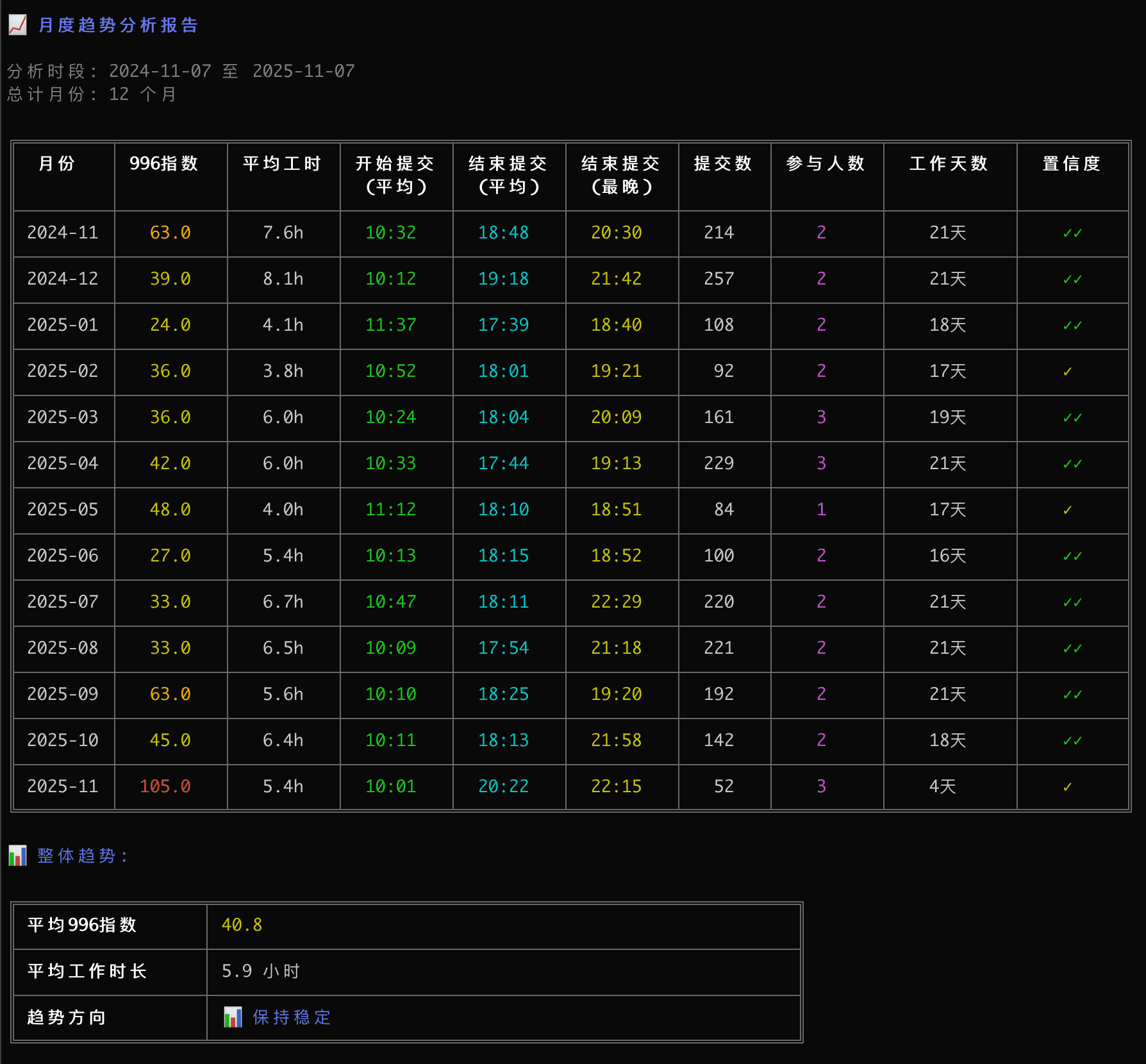
- **📈 Monthly Trend Tracking**: Identify whether the project is "getting more intense" or "stabilizing" through trends
- **📅 Multi-dimensional Overtime Profile**: Comprehensive analysis, identifying not only weekday/weekend overtime peaks but also the overtime ratio of team members
- **📦 Multi-repo Comparison**: One-click scan and analyze multiple repositories under a folder, auto-generate comparisons
- **🖥️ Local Web Report**: Save an offline bilingual visualization alongside the terminal report by default, and use `--open` to open it automatically
- **🌍 Cross-timezone Detection**: Automatically identify timezone distribution, support specified timezone for precise analysis
- **🇨🇳 Chinese Holiday Support**: Built-in Chinese holiday and makeup workday logic, precisely exclude holiday interference
- **🔒 Privacy Safe**: Pure local execution, offline analysis based on git log
## Preview
#### Core Results
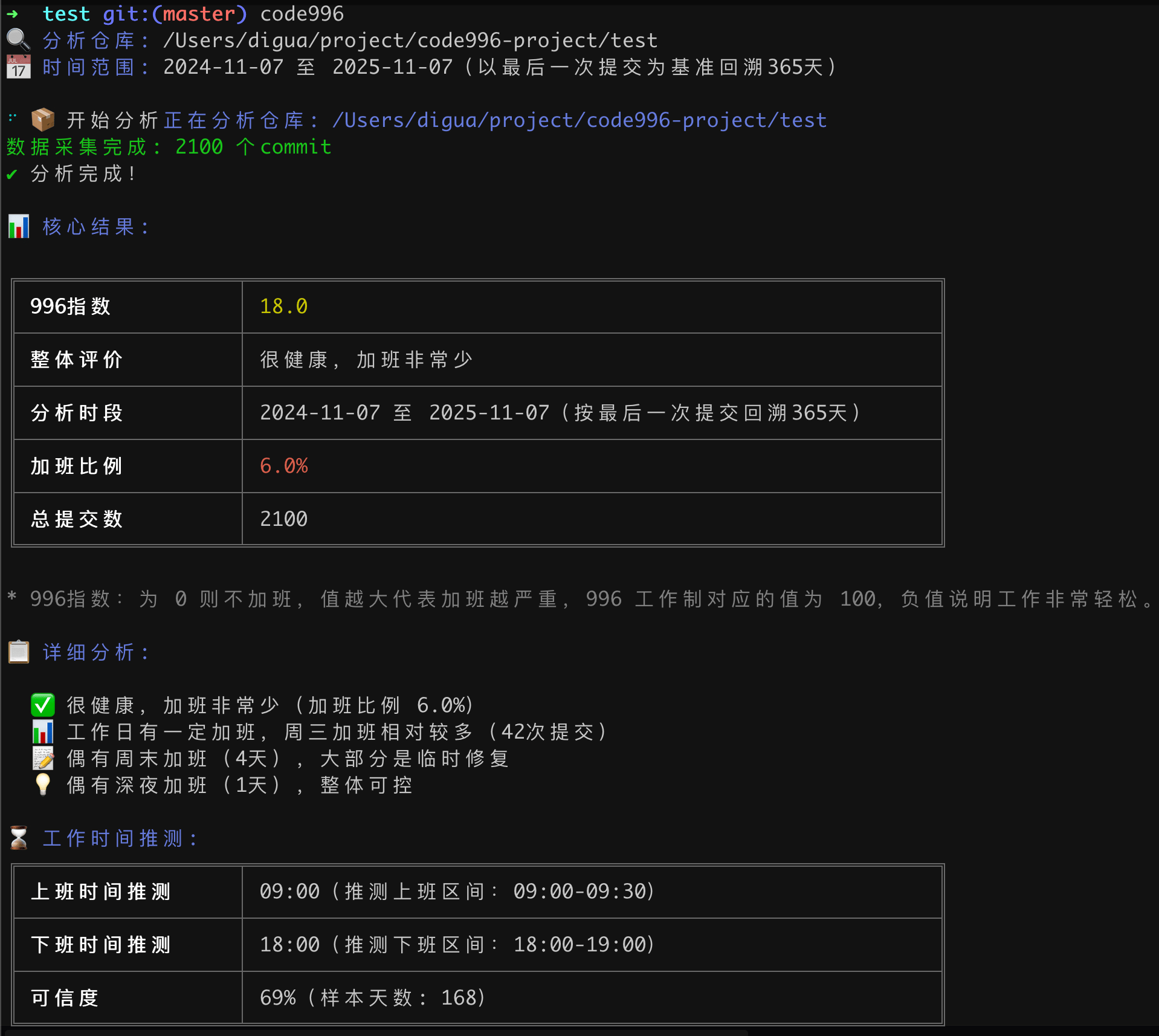
### Other Module Previews Click to Expand →
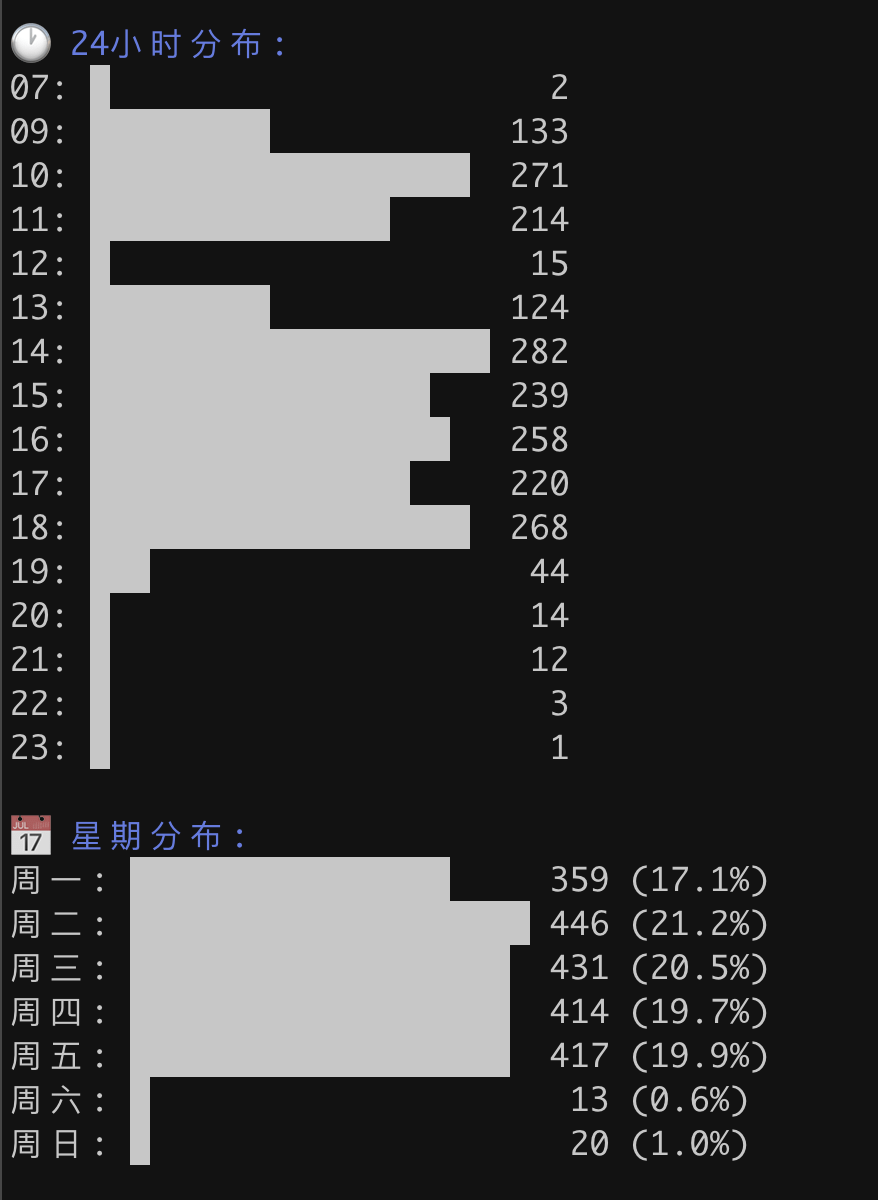
#### Commit Time Distribution
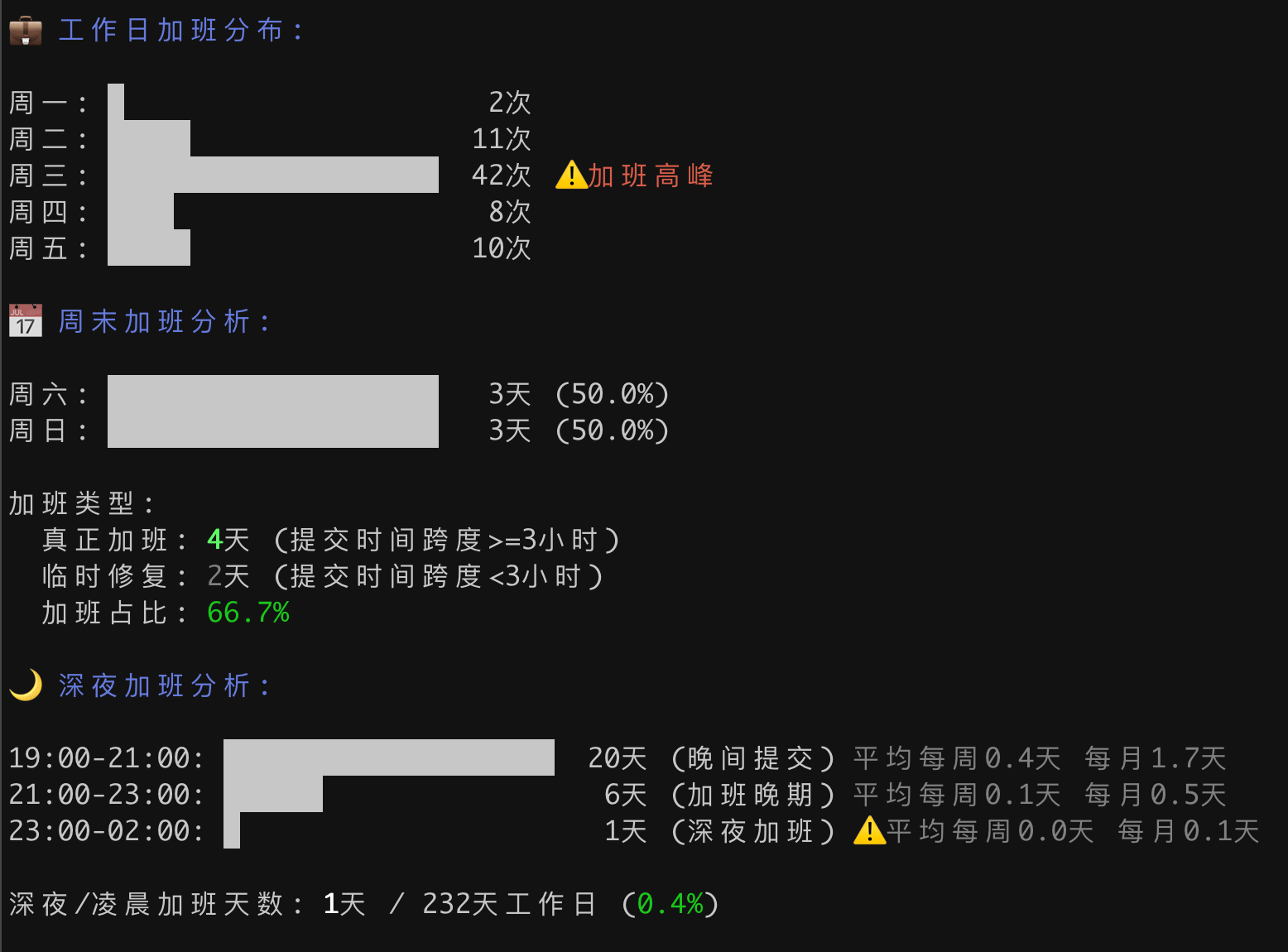
 #### Overtime Analysis
 #### Monthly Trend Analysis
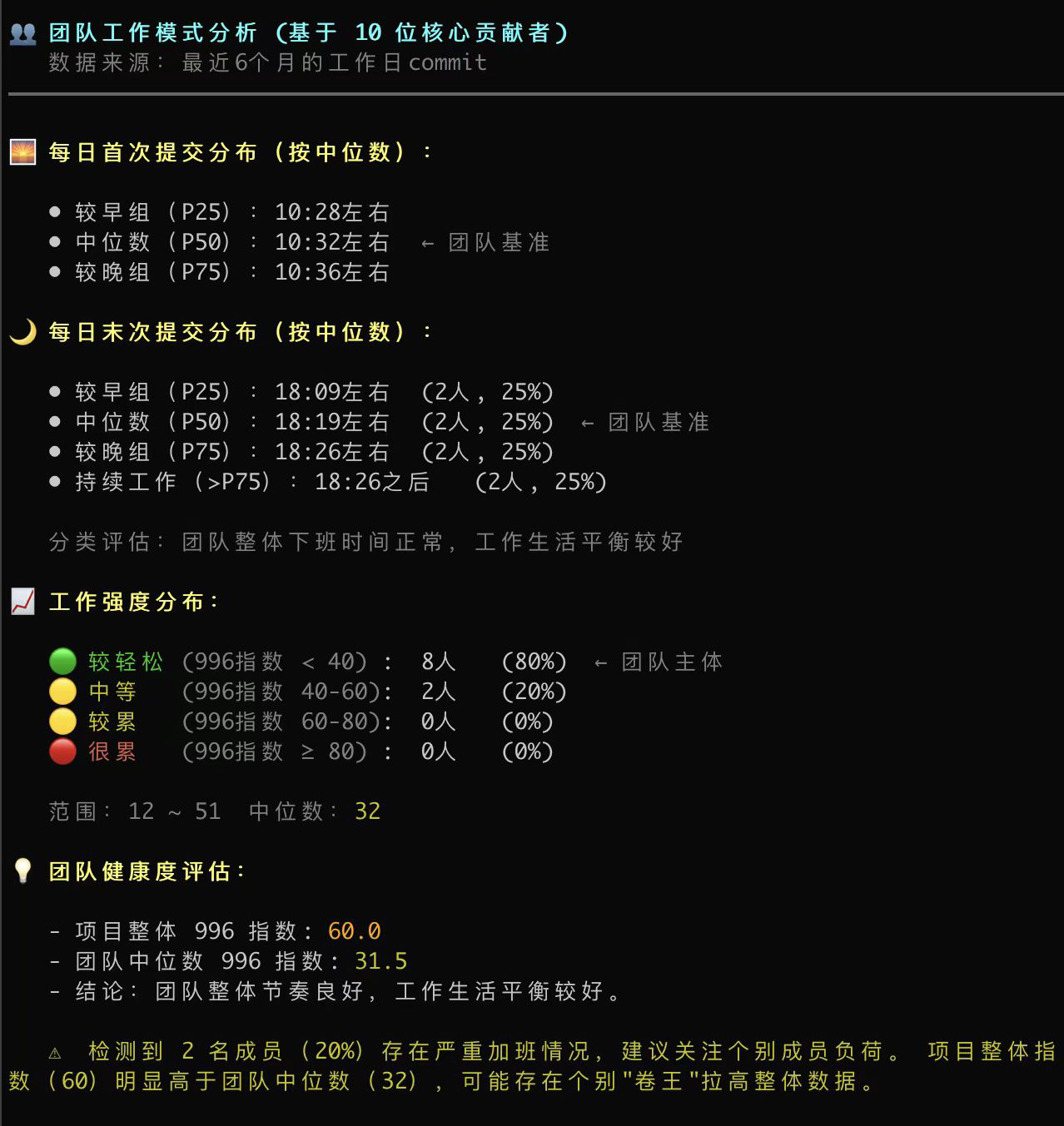
 #### Team Work Pattern Analysis
## 🚀 Quick Start
First make sure Node.js 18 or newer is installed, then:
```bash
# Run in current repo or parent directory of repos
npx code996
```
By default, code996 prints the traditional text report and also saves the visual report under `Downloads/code996-report/date_time_project/` without opening a browser, for example `Downloads/code996-report/2026-07-18_10-11-46_demo/`. Run `npx code996 --open` to open the generated report automatically. The report remains available after the CLI exits, and deleting that directory removes the whole report. Repository data is never uploaded and no localhost server is required.
You can also install it first so you don't have to re-download every time:
```bash
# Global install
npm i -g code996
# Use
code996
```
## 🤖 Generate Reports with AI Coding Agents
Use with AI coding agents that support [Agent Skills](https://agentskills.io/) (Codex / Claude Code / WorkBuddy, etc.) to generate a narrative work-intensity report in one sentence — including overtime semantics, contributor comparison, and improvement suggestions.
```bash
# Requires Node.js ≥ 18; the installer detects AI agents on your machine and lets you choose targets
npx skills add hellodigua/code996 --skill code996 -g
```
If the Skill does not appear after install, restart the corresponding agent. Open the target repo in the agent and send something like:
```
Analyze the team work intensity of the current project using code996 and generate a 996 report
```
You can also specify a year, compare multiple repos, or ask for Markdown / HTML output:
```
Analyze our team's overtime situation for 2025 and generate a report
Compare the overtime intensity of /workspace/proj-a and /workspace/proj-b
Analyze this repo with code996 and open the local Web report
```
> Installing the Skill and running the code996 CLI both require Node.js ≥ 18.
## 🤖 Smart Analysis Mode
code996 automatically selects the most suitable analysis mode based on context:
- **Running in a Git repo** → Single repo deep analysis
- **Multiple repos in directory** → Auto-enter multi-repo analysis mode
```bash
# Smart detection, auto-select analysis mode
code996 # Smart detect current environment
code996 /path/to/repo # Analyze specified repo
code996 /proj1 /proj2 # Auto-enter multi-repo mode
code996 /workspace # Auto-scan subdirectories
```
## 📖 Detailed Usage
### Time Range Options
| Option | Short | Description |
| ---------------- | ----- | ---------------------------------------------------------------------------- |
| `--year ` | `-y` | Specify year or year range (recommended). Single: `2025`; Range: `2023-2025` |
| `--since ` | `-s` | Custom start date (YYYY-MM-DD) |
| `--until ` | `-u` | Custom end date (YYYY-MM-DD) |
| `--all-time` | - | Cover entire repository history |
### Filter & Display Options
| Option | Short | Description |
| ------------------------- | ----- | ----------------------------------------------------------------------------------- |
| `--hours ` | `-H` | Specify standard working hours (e.g., 9-18) ⭐ **Recommended for accurate results** |
| `--half-hour` | - | Display in half-hour granularity (default hourly) 📊 More precise |
| `--timezone ` | - | Specify timezone (e.g., +0800, -0700) 🌍 For cross-timezone teams |
| `--cn` | - | Force enable Chinese holiday mode (+0800 auto-enabled) |
| `--self` | - | Only count current Git user's commits |
| `--ignore-author ` | - | Exclude authors matching regex (e.g., `bot\|jenkins`) |
| `--ignore-msg ` | - | Exclude commits matching regex (e.g., `^Merge\|lint`) |
| `--lang ` | - | Specify interface language (`zh-CN`, `en`, and common aliases) |
### Report Output Modes
| Option | Behavior |
| ----------------- | ---------------------------------------------------------------------------- |
| Default | Print the terminal report and save the Web report without opening a browser |
| `--open` | Print the terminal report, save the Web report, and open it in a browser |
| `--json` / `--md` | Emit stable JSON data or Markdown tables without generating a Web report |
| `--output [path]` | Save `--json` or `--md` to a path; omit the path to use the default filename |
`--json` and `--md` are mutually exclusive, and `--open` cannot be combined with either structured output mode. The Web report can switch between Chinese and English from the top-right control; `--lang` selects the initial language.
### Interface Language
code996 automatically selects the interface language based on your computer's system language. Priority:
1. `--lang ` CLI option
2. `CODE996_LANG` environment variable
3. Operating system language
4. Terminal locale (`LC_ALL`, `LC_MESSAGES`, `LANG`)
5. Node.js Intl locale
6. English fallback
Currently supported output languages are Chinese and English. Explicit values may be `zh`, `zh-CN`, `zh_CN`, `zh-Hans-CN`, `en`, `en-US`, or `en_US`. Unsupported explicit values make the command exit with an error.
### Usage Examples
```bash
# ===== Single Repo Analysis (Smart Mode) =====
code996 # Analyze current repo (past year)
code996 /path/to/repo # Analyze specified repo
code996 -y 2025 # Analyze year 2025
code996 -y 2023-2025 # Analyze 2023-2025
code996 -s 2025-01-01 -u 2025-06-30 # Custom date range (first half of year)
code996 --since 2024-07-01 # Analyze from specified date to now
code996 --all-time # Query entire repo history
code996 --self # Only analyze current user's commits
code996 --self -y 2025 # Analyze your commits in 2025
# ===== Multi-repo Analysis (Smart Auto-detect) =====
code996 # If subdirs have multiple repos, auto-enter multi-repo mode
code996 /path/proj1 /path/proj2 # Pass multiple paths, auto-analyze multiple repos
code996 /workspace # Scan all sub-repos in specified directory
code996 /workspace -y 2025 # Analyze 2025 data and trends
code996 --self # Only count current user's commits across all repos
# Specify Working Hours (Recommended)
code996 --hours 9.5-18.5 # Specify 9:30-18:30 (supports decimals)
code996 --hours 9.5-19 -y 2025 # Combine with year analysis
# Fine-grained Analysis (Half-hour Granularity)
code996 --half-hour # Display time distribution in half-hour granularity
code996 -y 2025 --half-hour # Combine with year analysis, fine display
code996 /proj1 /proj2 --half-hour # Multi-repo analysis, half-hour granularity
# Cross-timezone Project Analysis
code996 --timezone="+0800" # Only analyze commits from UTC+8 (China)
code996 --timezone="-0700" # Only analyze commits from UTC-7 (US West Coast)
code996 -y 2025 --timezone="+0800" # Analyze 2025 commits in specific timezone
# Chinese Holiday Makeup Workday Analysis
code996 # System auto-enables holiday mode when primary timezone is +0800
code996 --cn # Manually force enable holiday mode (for non +0800 timezone projects)
code996 --timezone="-0700" --cn # Analyze non-China timezone project but judge by Chinese holidays
# Filter Noise Data (Exclude CI/CD bots, merge commits, etc.)
code996 --ignore-author "bot" # Exclude all authors containing "bot"
code996 --ignore-author "bot|jenkins|github-actions" # Exclude multiple authors (use | to separate)
code996 --ignore-msg "^Merge" # Exclude all commit messages starting with "Merge"
code996 --ignore-msg "merge|lint|format" # Exclude multiple keywords
code996 -y 2025 --ignore-author "renovate|dependabot" --ignore-msg "^Merge" # Combined filter
# Specify interface language
code996 --lang zh-CN # Force Chinese UI
code996 --lang en # Force English UI
# Report output
code996 # Print the terminal report and save the Web report without opening it
code996 --open # Print the terminal report, save the Web report, and open it
code996 --json --output report.json
code996 --md --output report.md
```
**Common Exclusion Scenarios**:
```bash
# Exclude all CI/CD bots
--ignore-author "bot|jenkins|github-actions|gitlab-ci|circleci|travis"
# Exclude dependency update bots
--ignore-author "renovate|dependabot|greenkeeper"
# Exclude merge and formatting commits
--ignore-msg "^Merge|^merge|lint|format|prettier"
# Exclude auto-generated commits
--ignore-msg "^chore|^build|^ci|auto"
```
## How It Works
1. Use git-log to get project commit related data
2. Compute the analysis locally and build one shared ReportData payload
3. Print the terminal report and save the Web page by default, or explicitly open Web / emit JSON / Markdown
### Data Collection Flow
```
Git Repo → git log collection → Daily first commit + Hourly distribution → Percentile estimation of start/end work → 996 Index calculation → Result output
```
### Key Algorithms
1. **Time Distribution Analysis**:
- Data collection: Collect commit times at minute-level, auto-aggregate into 48 half-hour points
- Algorithm processing: Auto-aggregate into 24 hours for work time identification and 996 index calculation
- Display mode: Default hourly display (24 points), optional half-hour mode (48 points)
2. **Work Time Identification**: Use 10%-20% percentile of recent samples to estimate start work time window, combined with evening commit inflection point to estimate end work time
3. **996 Index Calculation**: Build index based on overtime ratio, output Chinese description
4. **Project Type Identification**: Through work time regularity, weekend activity, evening activity patterns, auto-identify whether project is "corporate project" or "open source project"
5. **Cross-timezone Collaboration Detection**: Identify cross-timezone projects through timezone dispersion and "sleep period" commit ratio (threshold: non-dominant timezone >1%), provide timezone filter suggestions
6. **Holiday Makeup Workday Recognition**: When primary timezone is +0800 and accounts for >50%, auto-enable Chinese holiday judgment (workday/weekend considers legal holidays and makeup workdays), other timezones can manually enable via `--cn` parameter
7. **Data Validation**: Verify statistical data matches total commit count, avoid deviation from missing data
8. **Algorithm Advantages**: New version uses percentile and inflection point estimation, can more intelligently filter out late-night sporadic commits, precisely locate real work time windows
## Usage Tips
- Privacy Protection: All Git data analysis is performed locally, no results or logs are uploaded.
- Analysis Limitations: The tool only counts commit times in git log. However, actual work also includes meetings, learning, maintaining documentation, debugging, testing, etc. Therefore, reports cannot cover all actual work time, analysis results have limited accuracy, please use with caution.
- Usage Restrictions: This project's analysis results are for personal reference only, please do not use for "evil" or improper purposes.
- Disclaimer: code996 is not responsible for any consequences caused by using, distributing this program and its derivatives.
## Other Questions
> Here are some common questions. If you have other questions, feel free to open an issue.
### 💡 Need code to analyze, isn't it too late to use after joining?
Not really. The core value of code996 is breaking information asymmetry, using real data to counter verbal promises.
1. Probation is "inspection period": Joining doesn't mean selling yourself. The legal probation period is also our inspection period for the company. If you find it's a pit on day one, cutting losses early is also an avoidance strategy.
2. Background check during referral: Think bigger! You can totally ask your inside friend at that company to run it for you. Isn't that the most hardcore referral background check? 🐶
3. Decision basis: Even after joining, having solid overtime evidence in hand, whether to use it as reason for transfer, or as basis for resignation decision, is much better than self-doubt.
### 📉 Will Squash commits affect accuracy if the project habit is local multiple commits then Squash before push?
There will be some impact, but code996 relies on statistical patterns. As long as commit samples reach a certain number, what's finally shown is the team's collective work pattern, special commit habits will be filtered out as "noise" statistically.
### 🛡️ Why not support viewing individual member's 996 index?
Although technically feasible, we deliberately abandoned this feature:
Viewing 996 index by user, this feature is too easy to be misused and abused. It can easily be used by some people to analyze team members' "overtime situation".
Although I've emphasized the tool's limitations more than once (actual work also includes meetings, learning, maintaining documentation, debugging, testing, etc.), you just can't stop some people from only looking at numbers 🤦
The original intention of this project is to help avoid pit projects, not to provide new ammunition for internal competition. Therefore, the project only provides two perspectives: viewing team and viewing yourself (--self).
Finally, code commit volume and timing don't equal work output. If used for performance evaluation, it will not only cause the team to produce lots of junk commits for stats, but also destroy team trust.
### 🚀 What's the project roadmap?
Future features will follow the WLB and work pit-avoidance line, including: more refined overtime ratio analysis, and analyzing code's shit-mountain index (complexity analysis), after all maintaining shit-mountains is also one of the culprits of 996.
## AI Collaboration
🤖 **Note for AI Collaboration Partners**: This project adopts standardized AI collaboration workflow, please check [.docs/README.md](.docs/README.md) for collaboration guidelines.
## 📄 License
MIT License