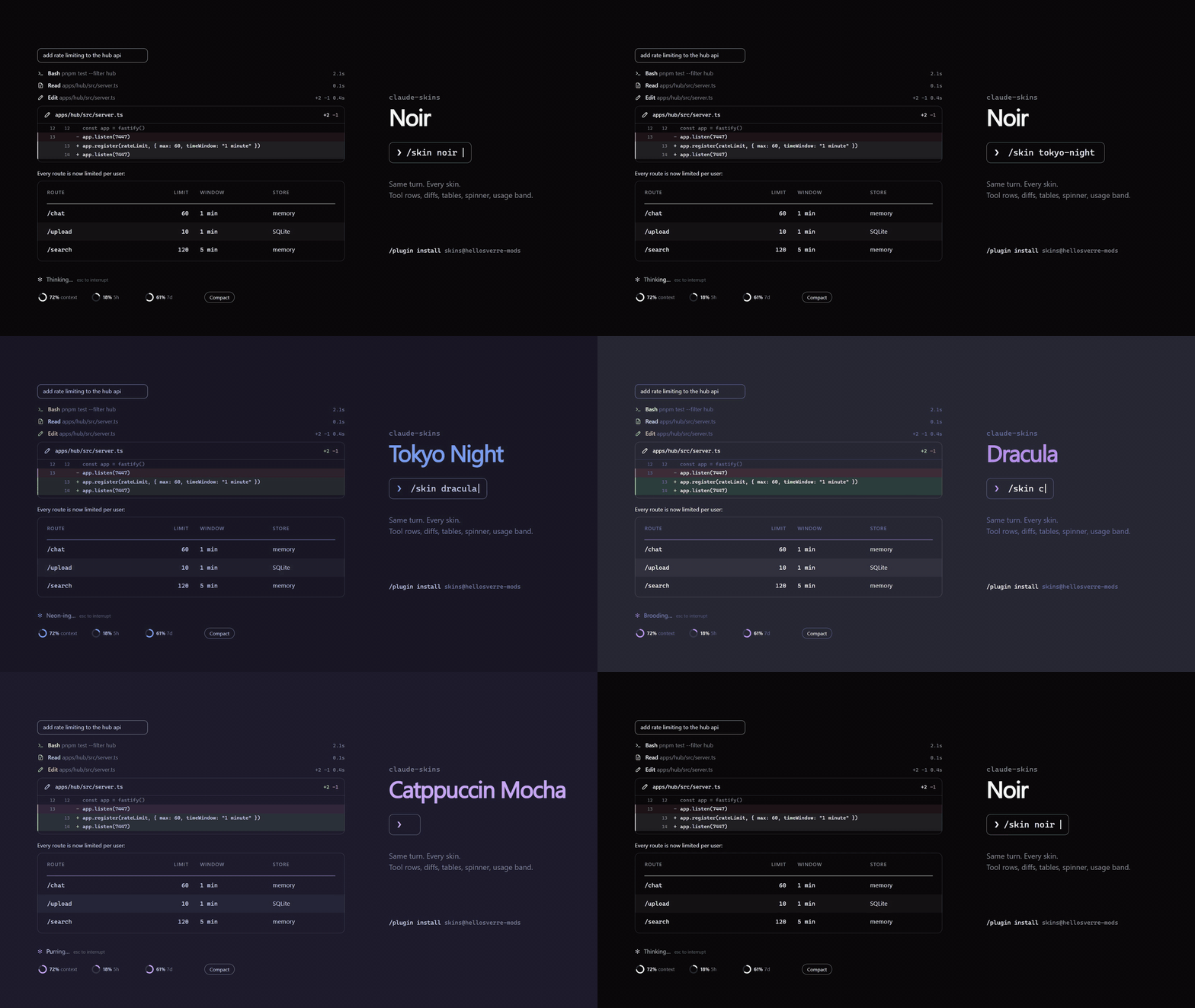
Tool calls with icons and timings, edits as diff cards, tables, code and Mermaid charts as cards, a live usage band, and sixteen skins you can repaint or have Claude design for you.
## Install
Needs Claude Code **2.1.287** or later, in a terminal or the desktop app's Code tab. Run both inside Claude Code:
```
/plugin marketplace add hellosverre/claude-skins
```
```
/plugin install skins@hellosverre-mods
```
Restart Claude Code. The **noir** skin is on; type `/skin` to change it.
Looking for more mods? `/plugin install mod-store@hellosverre-mods`, then `/mods` browses and installs about 2,700 of them from a pane, showing what each one can access first.
## Update
skins checks for a new release once a day and shows a toast when you are behind. To update:
```bash
claude plugin marketplace update hellosverre-mods
```
```bash
claude plugin update skins@hellosverre-mods
```
Then restart Claude Code. Open sessions keep the version they started with.
## Uninstall
```bash
claude plugin uninstall skins@hellosverre-mods
```
To keep it installed but go back to Claude Code's own drawing, run `/skin off`.
## Use
`/skin help` lists every command in Claude Code; `/skin list` shows every skin and setting.
**Skins**
| Command | What it does |
|---|---|
| `/skin` | Settings: pick a skin with a live preview, toggle parts, repaint any colour |
| `/skin ` | Switch skin (names below) |
| `/skin list` | Every skin, yours included, and every setting |
| `/skin help` | Every command, in a table |
| `/skin off` · `on` | Back to Claude Code's own drawing, or skins back on |
| `/skin gallery` | Every element the skin draws, numbered, to point at |
| `/skin pin` · `unpin` · `share` | Give this folder its own look, drop it, or make it the default |
| `/skin copy` · `copy code` | Copy Claude's last reply, or just its last code block |
| `/skin calm` · `calm off` | No motion, one line per tool row, read-only output folded, failures always whole; `calm off` puts back what you had |
Built-in skins: `noir`, `tokyo-night`, `dracula`, `catppuccin`, `rose-pine`, `nord`, `gruvbox`,
`kanagawa`, `everforest`, `one-dark`, `solarized`, `night-owl`, `ayu`, `github`, `mono`, `terminal`.
**Options**
| Command | What it does |
|---|---|
| `/skin tables on/text/off` | Tables as cards, as selectable text on the desktop, or Claude Code's own |
| `/skin prompt left/right/plain` | In the terminal, which side your prompt's outline sits on, or a plain leading marker. The desktop keeps Claude Code's own messages, with copy and rewind |
| `/skin words claude/skin` | Whose words the spinner and the turn footer show: Claude Code's own, or the skin's (the default) |
| `/skin icons unicode/ascii` | The icon set, and ASCII-only diagrams in the terminal |
**Parts**, each switched with `/skin on` or `off`:
| Part | What it does |
|---|---|
| `rail` | The coloured rail beside tool rows |
| `shimmer` | The band of light across the spinner word |
| `band` | The usage meters above the prompt |
| `countdown` | Time left on each limit in the band |
| `compact` | The Compact button in the band, with a nudge from 70% context (on by default) |
| `clip` | Trim Claude Code's own shell output to its head and tail |
| `markdown` | Alerts and task lists drawn |
| `quiet` | Reads, searches and read-only commands folded to one row |
| `charts` | Mermaid fences as charts |
| `math` | Math typeset |
| `commands` | Slash-command output as tables and cards |
| `shell` | Shell output as a card |
| `highlight` | Code blocks highlighted in the skin's colours |
| `hints` | Tell Claude that charts draw here |
| `links` | URLs and paths as links |
| `copy` | Copy buttons on cards |
| `fold` | Long blocks fold behind `▾ N more` |
| `expand` | Every run of reads and searches open, instead of the one line `Read 3 · Search 2 ▸`; off by default |
**Design one with Claude.** Ask "make me a skin that feels like a sunset". skins gives Claude a
`design` tool, so it builds the skin and applies it while you watch. Repainting a built-in skin saves
it as your own `my-`. Choices are remembered across sessions.
## Preview
Drawn by the mod's own card code (`scripts/previews.ts`), not screenshots.
## What it redraws
| Part | Desktop app | Terminal |
|---|---|---|
| Tool calls | Icon per kind, spinner while running, lines changed, time taken. `▸` opens the row: the call's input in full and its answer (a read's text with line numbers, a search's matches, the shell card, the diff); a failed call opens by itself | A node on the turn's rail, with the same `▸` |
| Edits | Diff card with `+N −M` and numbered lines | Claude Code's own diff |
| Shell commands | Terminal card with status, stderr apart, long output folded; paths, numbers and error, warning and pass words coloured | Card with the command, the output coloured the same way, `✓` or `✗ exit N`, stderr in red under its own label, each stream folded to 8 + 4 lines (`/skin shell off` for Claude Code's own) |
| Quiet output (off by default) | Reads, searches and read-only commands fold to one row; a failure keeps its error line | The same |
| Tables | Card with header rule, zebra rows, colour swatches | Cell grid with a header band |
| Charts | ` ```mermaid ` as a card: flowchart, xy, pie, gantt, timeline, journey, kanban, mindmap, quadrant, radar, sankey, gitGraph, treemap, packet, block, architecture, C4 | The same seventeen drawn in cells, ASCII with `/skin icons ascii` |
| Math | `$$…$$`, `\[…\]` and ` ```math ` as a typeset card: fractions, roots, sums and integrals with limits, matrices, aligned lines; `$…$` inline turns into Unicode | Fractions and limits stacked in cells, inline `$…$` as Unicode |
| Command output | `/cost`, `/context` and plugin output: tables, code and `key: value` runs as cards | The same as cell grids |
| Alerts and task lists | `> [!NOTE]` as a titled box, `- [ ]` with ticks and a done count | The same |
| Code blocks | Card with language, line numbers, highlighting; shell blocks keep the Run button | Framed, the language on the frame, highlighted in the skin's colours: TS/JS, JSON, shells, PowerShell, Python, Rust, Go, C/C++, C#, F#, Java, YAML, TOML, HTML/XML, CSS, SQL, diff, Markdown, Lua (`/skin highlight off` for Claude Code's own) |
| Spinner | Animated icon per phase | The skin's word with a band of light |
| Above the prompt | Context and plan-limit rings, Compact button, nudge at 70% | Block meters, same button |
| Your prompts | Claude Code's own, so copy, rewind and selection stay | Rounded outline, or a plain marker |
| Links and files | URLs are the app's own links; tool rows colour files this turn created (`ok`) or edited (`warn`) | URLs in prose are OSC 8 links where the terminal draws them (`FORCE_HYPERLINK=1` or `0` overrides the check), plain text elsewhere; paths with `:line`, numbers and versions coloured, this turn's files in `ok` or `warn` in rows and prose |
| Diff fences | ` ```diff ` as the diff card, with Copy and `new only` (the code after the change) | Numbered old and new lines, the `+` and `-` in the skin's colours and the code highlighted in the language its `+++` path or a ` ```diff-fsharp ` tag names, the same two copies |
| Side by side | Two or more tables or charts in a row share it when each gets 75 columns; stack otherwise | Tables and diagrams in a row sit side by side while their natural widths fit; stack otherwise |
| Long blocks | Code cards past 24 lines cut there, with `▾ N more` | Code past 24 lines, tables past 14 rows and shell output past 8 + 4 lines fold behind `▾ N more` / `▴ less` |
Every card has a Copy button (tables also `as text`, the table as drawn; a reply of several blocks ends in `copy reply`) and animates once, on first draw, respecting reduced motion. Only the
drawing changes: the stored conversation and what the model reads are untouched. Agents, plan mode
and the permission prompt keep Claude Code's own drawing.
**Chart hints.** While charts are on, Claude gets a short model-only note (about 130 tokens, estimated from its 458 characters) saying ` ```mermaid ` fences draw here, so it reaches for a chart when one reads better. Never for headless `claude -p` runs. `/skin hints off` drops it and keeps charts drawing.
**Light and dark.** Every skin has both and follows Claude Code's theme. On `auto` it follows your
terminal (`COLORFGBG`) or the system. Force one with `SKINS_THEME=light` or `SKINS_THEME=dark`.
**Your terminal's colours.** The `terminal` skin paints the terminal in its own 16-colour palette
(`ansi256(0)` to `ansi256(15)`), so it follows whatever theme the terminal has, light or dark. Body
text and table bands use Claude Code's own theme colours; pick an ANSI theme in `/config` to have
those follow the terminal too. The desktop app has no terminal palette and draws it as `noir`.
## For other mods
skins adds `$.skins.markdown` to `$`. It draws markdown the way skins draws a reply, in the person's skin. It answers a tree, or `undefined` when skins is off or the text holds nothing it draws, and throws on a malformed argument. It draws no copy or fold controls, because a press cannot cross from one mod's tree to another's. List `skins` under `dependencies` in your `plugin.json` and Claude Code lays its types into your `.claude-plugin/types/`.
```tsx
let drawn
try {
drawn = await $.skins.markdown({ surface: e.surface, text, columns: e.props.bodyColumns })
} catch {}
return drawn ??
```
## Compatibility
Checked by hand on Windows (terminal and desktop app, 0.3.0) and run on Linux (terminal, 0.5.0,
Claude Code 2.1.288, 168 engine tests). [CI](.github/workflows/ci.yml) runs the tests, the
manifest checks and the type check on Linux, Windows and macOS. macOS, VS Code and mobile have
not been looked at by hand. The surface × OS matrix and
render times per row are in [docs/compat.md](docs/compat.md). To measure on your machine:
```bash
scripts/bench.sh
```
## Known limitations
| What | What you get instead | Where |
|---|---|---|
| An opened row for an image, PDF or notebook read, a background command, or an answer it cannot read | Claude Code's own row, drawn in the opened row | `bodyOf` in [`hooks/detail.ts`](hooks/detail.ts); test "an opened image Read is Claude Code's own drawing…" |
| Agents, plan mode, todos, the permission prompt | Claude Code's own rows and dialogs | `kindOf` in [`hooks/tools.ts`](hooks/tools.ts); test "tools a skin cannot redraw faithfully keep their own row" |
| Edits on the terminal, failed edits everywhere | Claude Code's own diff | [`hooks/register.tsx`](hooks/register.tsx) `ToolResult`; test "on the desktop an edit is a diff card…" |
| Code blocks on the terminal in a language the highlighter does not know | Claude Code's own markdown | `languageOf` in [`hooks/highlight.ts`](hooks/highlight.ts); test "a fence in a language it does not know keeps Claude Code's markdown" |
| Shell fences (` ```bash `) on the desktop | The app's own block, so its Run button stays | test "on the desktop a shell fence keeps the app's own block" |
| Sequence, state, class and ER diagrams on the desktop | A code card: only the terminal's vendored layout draws them | `artKind` in [`hooks/mermaid-art.ts`](hooks/mermaid-art.ts), `parseMermaid` in [`hooks/mermaid.ts`](hooks/mermaid.ts) |
| Korean, Chinese, Japanese or other wide characters in a terminal diagram's node id or state name (`A[開始] --> 請求`) | The code: the vendored layout drops such nodes. Wide labels draw as art | `drawsWide` in [`hooks/mermaid-art.ts`](hooks/mermaid-art.ts); test "a diagram the renderer cannot lay out with wide characters falls back to code" |
| A diagram too wide or too long (over 80 lines or 8,000 characters on the terminal) | Rows for flowchart, xy and pie, else the code | test "a diagram too wide for the terminal falls back to rows…" |
| A reply block over 9,000 characters, a prompt over 4,000 | Claude Code's own drawing of the whole message | `MAX_MARKDOWN`, `MAX_PROMPT` in [`hooks/register.tsx`](hooks/register.tsx) |
| Code cards past 80 lines | The first 80 and a `N more lines` note; Copy takes all of it | `MAX_LINES` in [`hooks/svg-code.ts`](hooks/svg-code.ts) |
| TeX commands the parser does not know | Drawn as written, `\name` | [`hooks/math.ts`](hooks/math.ts) |
| Shell output on the terminal vs the desktop | The terminal card names the command and folds each stream to 8 + 4 lines; the desktop card says `Output` and folds both streams together to 6 + 6 | [`hooks/shell-rows.tsx`](hooks/shell-rows.tsx), [`hooks/svg-terminal.ts`](hooks/svg-terminal.ts) |
| A failed shell call that hands back error text, not its record | stdout and stderr arrive merged, so the whole text is drawn as stderr | `shellResultOf` in [`hooks/shell.ts`](hooks/shell.ts) |
| A command sent to the background, or output that is an image | Claude Code's own row, which says where it went or draws the image | `keepsOwnRow` in [`hooks/shell.ts`](hooks/shell.ts); test "/skin shell off gives shell output back…" |
| Shell cards and tool timings after `/resume` | No command in the header and no time: both are recorded as the call runs | `commandAtom`, `durationAtom` in [`hooks/register.tsx`](hooks/register.tsx) |
| Slash-command errors and `/skin`'s own output | Claude Code's own row | test "slash-command output with key: value lines is a table, prose keeps its row" |
| `/skin calm` and Claude Code's spinner | Calm hands the spinner back to Claude Code, whose own spinner still moves | `Spinner` in [`hooks/register.tsx`](hooks/register.tsx) |
| The settings pane on mobile | A line saying to use the terminal or the desktop app | `Pane` in [`hooks/register.tsx`](hooks/register.tsx) |
| File paths as links | Coloured, not clickable: the engine's `Link` takes only `https:` and `http://localhost` | `safeHref` in [`hooks/links.ts`](hooks/links.ts) |
| Folding on the desktop | Code cards fold; table cards and the shell card keep their full height or their own 6 + 6 fold | [`hooks/fold.tsx`](hooks/fold.tsx) |
| Icons and the rail | Icons on the desktop only (the terminal draws no `Svg`); the rail on the terminal only | `lookOf` in [`hooks/register.tsx`](hooks/register.tsx) |
## Compared with
Other mods that change how the transcript looks, from their READMEs on 2026-10-10. Blank means
the README does not say.
| | skins | [Prismantis](https://github.com/NahumLitvin/prismantis) | [glint](https://github.com/manikosto/glint) | [tweakcc](https://github.com/Piebald-AI/tweakcc) | [claude-gfm-render](https://github.com/briangtn/claude-gfm-render) | [ccstatusline](https://github.com/sirmalloc/ccstatusline) |
|---|---|---|---|---|---|---|
| How | Function-hooks plugin | Function-hooks plugin | Function-hooks plugin, a Prismantis fork | Patches Claude Code's JavaScript; reapply after each update | Function-hooks mod | Status line command |
| Claude Code | 2.1.287+ | 2.1.287+ | 2.1.289+ | Verified on 2.1.162 | 2.1.286+ | |
| Platforms named | Windows by hand, Linux by tests; CI on Linux, Windows, macOS ([compat](docs/compat.md)) | macOS terminal by hand; CI on macOS, Linux, Windows | | Windows, macOS, Linux | Terminal and desktop app | Windows guide in its docs |
| Themes | 16, repaint any colour, or have Claude design one | 15 and `mono`, 20 colour slots | 15 | Your own, for Claude Code's whole UI | | Powerline themes |
| Recolours Claude Code's own UI | No | No | No | **Yes** | No | No |
| Tool rows | Icons, timings, rail; **open to the input and answer** | 4 styles | | | No | No |
| Read-only output hidden | `/skin quiet` | `toolOutput: quiet` | | | No | No |
| Edit diffs | Card on the desktop; the engine's diff in an opened row on the terminal | Claude Code's own | | | No | No |
| ` ```diff ` fences | Diff card or numbered rows, `new only` copy | | Numbered, `⧉ new only` | | | No |
| Shell output | Card on both surfaces, paths, numbers and errors coloured | Boxed in expanded groups | | | No | No |
| Code highlighting on the terminal | 20 language families in the skin's colours | Prism, two dozen languages | 20+ languages | | | No |
| Tables | Card or cell grid, side by side with diagrams | 4 styles, side by side with diagrams | | 4 formats | No | No |
| Mermaid | 17 kinds; sequence, state, class, ER on the terminal only | Flowchart, sequence, state, class, ER, xy; no pie | Flowchart, sequence, xy | | Flowchart, sequence, state, class, ER, xy; SVG on the desktop | No |
| Math | Card on the desktop, stacked cells on the terminal | Typeset image in kitty and Ghostty via RaTeX, text elsewhere | | | Not handled | No |
| Links | URLs as OSC 8 links; this turn's files coloured | Links and bare URLs clickable | **URLs and file paths clickable**; changed files coloured; link band | | | No |
| Long blocks folded | Code, tables, shell output (`/skin fold`) | | Code, lists, tables | | | No |
| Right-to-left text | No | **Hebrew and Arabic** | Hebrew and Arabic | | | No |
| Usage meters | Context and plan limits above the prompt | | | | No | **Many widgets**, Powerline |
| Spinner words | The skin's, with a shimmer | | | **Your own verbs and animations** | No | No |
| Copy | Cards, tables as markdown or as drawn, `copy reply`, `/skin copy` | Buttons, `/prismantis copy`, HTML tables | Code, tables, diagrams, lists, quotes | | | No |
| API for other mods | `$.skins.markdown` | `$.prismantis.markdown` | | | | No |
Where they are better: **tweakcc** recolours all of Claude Code, not only what a hook can
redraw, at the cost of patching the binary. **Prismantis** handles right-to-left text, copies
tables as HTML and typesets math as images. **glint** makes file paths clickable and keeps a
band of the last reply's links. **ccstatusline** has a far deeper status line.
**claude-gfm-render** draws sequence and other diagrams as SVG on the desktop, where skins falls
back to a code card. What skins plans next is in [ROADMAP.md](ROADMAP.md).
## Privacy
skins draws and remembers, nothing else. It reads the session directory, your context and plan
usage, the theme setting and `SKINS_THEME` / `COLORFGBG`, and keeps its settings in the mod store.
Its one network call is the daily version check: a GET of this repo's
[`plugin.json`](.claude-plugin/plugin.json) on `raw.githubusercontent.com`, sending nothing. On `auto`
it asks the OS for light or dark mode (`defaults` on macOS, `gsettings` on GNOME). It compacts or
copies only when you press the button. Check it yourself with `claude plugin validate .`.
## Vendored code
Terminal diagrams are laid out by [beautiful-mermaid](https://github.com/lukilabs/beautiful-mermaid)
(MIT), bundled into `hooks/vendor/mermaid-ascii.js` with its licence in the header. To rebuild it:
```bash
cd scripts/vendor && npm install && npm run build
```
## Develop
```bash
git clone https://github.com/hellosverre/claude-skins && cd claude-skins
```
```bash
claude --plugin-dir .
```
Saving a file reloads the mod in the running session. Tests: `claude plugin test .`. Previews:
`npx tsx scripts/previews.ts`. A new built-in skin is one file: copy `hooks/themes/nord.ts`, change
the colours and words, add a line to `hooks/themes/index.ts`.
## More mods
- [redgreen](https://github.com/hellosverre/redgreen): test results in a pane beside the chat
- [smart-compact](https://github.com/hellosverre/smart-compact): compacts after a commit, green tests, before the prompt cache expires, or when Claude asks
- [mod-store](https://github.com/hellosverre/mod-store): browse, search and install 2,700 mods from a pane
## License
MIT



 ## Install
Needs Claude Code **2.1.287** or later, in a terminal or the desktop app's Code tab. Run both inside Claude Code:
```
/plugin marketplace add hellosverre/claude-skins
```
```
/plugin install skins@hellosverre-mods
```
Restart Claude Code. The **noir** skin is on; type `/skin` to change it.
Looking for more mods? `/plugin install mod-store@hellosverre-mods`, then `/mods` browses and installs about 2,700 of them from a pane, showing what each one can access first.
## Update
skins checks for a new release once a day and shows a toast when you are behind. To update:
```bash
claude plugin marketplace update hellosverre-mods
```
```bash
claude plugin update skins@hellosverre-mods
```
Then restart Claude Code. Open sessions keep the version they started with.
## Uninstall
```bash
claude plugin uninstall skins@hellosverre-mods
```
To keep it installed but go back to Claude Code's own drawing, run `/skin off`.
## Use
`/skin help` lists every command in Claude Code; `/skin list` shows every skin and setting.
**Skins**
| Command | What it does |
|---|---|
| `/skin` | Settings: pick a skin with a live preview, toggle parts, repaint any colour |
| `/skin
## Install
Needs Claude Code **2.1.287** or later, in a terminal or the desktop app's Code tab. Run both inside Claude Code:
```
/plugin marketplace add hellosverre/claude-skins
```
```
/plugin install skins@hellosverre-mods
```
Restart Claude Code. The **noir** skin is on; type `/skin` to change it.
Looking for more mods? `/plugin install mod-store@hellosverre-mods`, then `/mods` browses and installs about 2,700 of them from a pane, showing what each one can access first.
## Update
skins checks for a new release once a day and shows a toast when you are behind. To update:
```bash
claude plugin marketplace update hellosverre-mods
```
```bash
claude plugin update skins@hellosverre-mods
```
Then restart Claude Code. Open sessions keep the version they started with.
## Uninstall
```bash
claude plugin uninstall skins@hellosverre-mods
```
To keep it installed but go back to Claude Code's own drawing, run `/skin off`.
## Use
`/skin help` lists every command in Claude Code; `/skin list` shows every skin and setting.
**Skins**
| Command | What it does |
|---|---|
| `/skin` | Settings: pick a skin with a live preview, toggle parts, repaint any colour |
| `/skin 


