
Downtify
Install •
Documentation •
Android App •
iOS App
Features •
Changelog •
Sponsor •
Contributing
Self-hosted music downloader. Paste a Spotify link,
get a perfectly tagged audio file no API keys, no account, no hassle
[](https://github.com/henriquesebastiao/downtify/actions/workflows/test.yml)
[](https://github.com/henriquesebastiao/downtify/releases)
[](/LICENSE)
[](https://github.com/henriquesebastiao/downtify/pkgs/container/downtify)
[](https://github.com/henriquesebastiao/downtify)
## Overview
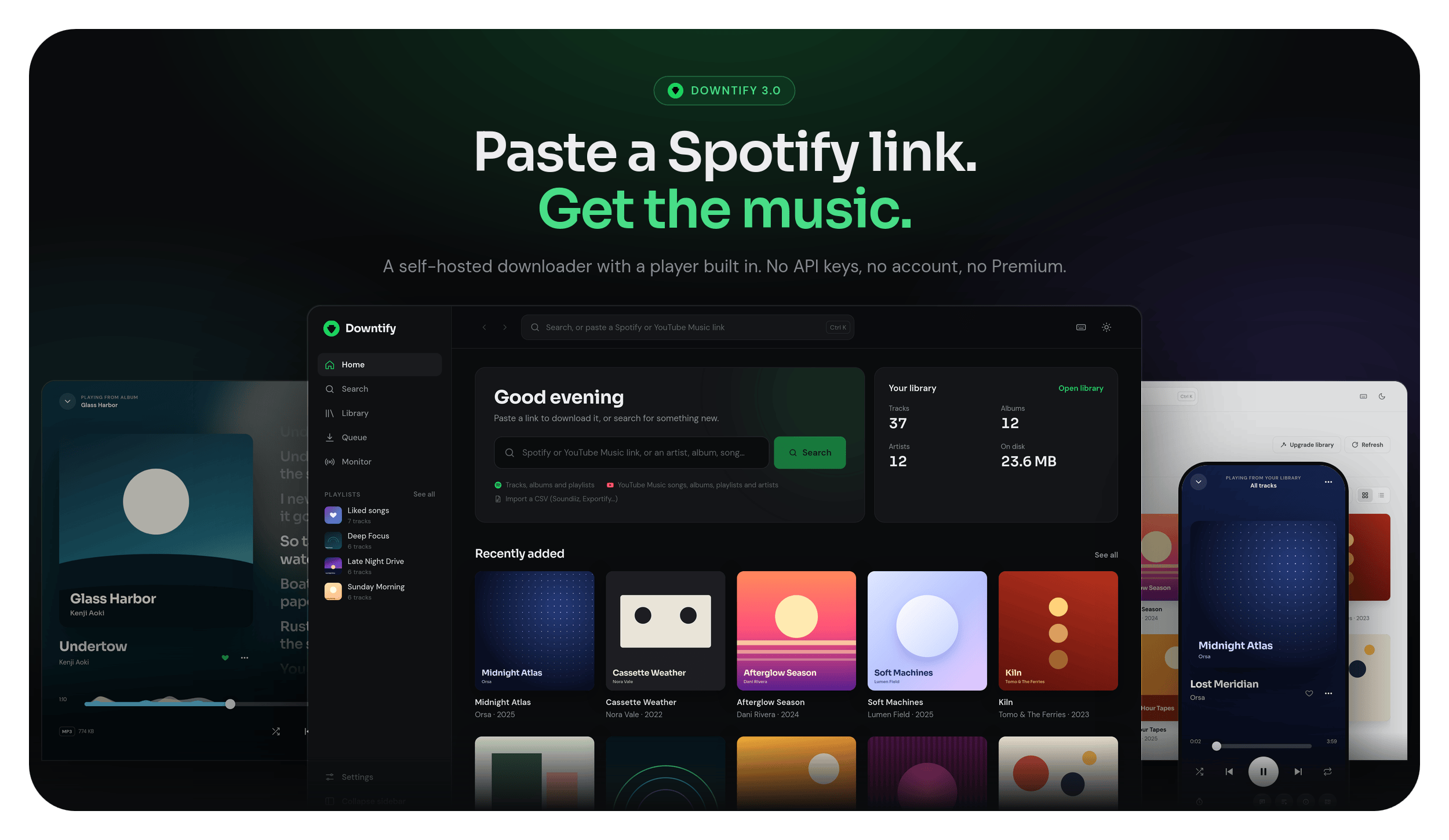
Downtify is a self-hosted web app that turns Spotify and YouTube Music links into a tagged audio library. It never touches the Spotify API, and it needs no account and no Premium subscription. It also plays that library back, so what you download is one tab away from listening.
```
Spotify embed page → YouTube Music search → yt-dlp + ffmpeg + mutagen
(metadata) (audio match) (download & tag)
```
1. **Metadata.** Track, album and playlist links are resolved from the public `open.spotify.com/embed` pages, so no Spotify credentials of any kind are needed.
2. **Audio match.** [`ytmusicapi`](https://ytmusicapi.readthedocs.io/) finds the best YouTube Music result by comparing durations. When there is no good match, standard YouTube is searched automatically ([details](https://henriquesebastiao.github.io/downtify/how-it-works/#fallback-to-standard-youtube)). The player applies the same 10-second duration tolerance when resolving an undownloaded track.
3. **Download and tag.** [`yt-dlp`](https://github.com/yt-dlp/yt-dlp) fetches the audio; `ffmpeg` converts it to your chosen format or keeps the best available source audio without re-encoding. [`mutagen`](https://mutagen.readthedocs.io/) embeds title, every credited artist, album, album artist, year and cover art; a song with several artists is filed under its album artist (see [File organization](https://henriquesebastiao.github.io/downtify/features/file-organization/#several-artists-and-compilations)).
All of it runs inside a single Docker container. See **[How it works](https://henriquesebastiao.github.io/downtify/how-it-works/)** for the full pipeline.
Optional **OpenID Connect** login works alongside local accounts and can restrict sign-in by group; local password login can also be disabled while keeping OIDC and app pairing. See [Users & sign-in](https://downtify.henriquesebastiao.com/features/users/) for setup.
## Features
| | |
| -------------------------------- | ---------------------------------------------------------------------------------------------------------------------------------------------------------------------------------------------------------------------------------------------------------------------------------------------------------------------------------------------------------------------------------------------------------------------------------------------------------------------------------------------------------------------------------------------------------------------------------------------------------------------------------------------------------------------------------------------------------------------------------------------------------------------------------------------------------------------------------------------------------------------------------------------------------------------------------------------------------------------------------------------------------------------------------------------------------------------------------------------------------------------------------------------------------------------------------------------------------------------------------------------------------------------------------------------------------------------------------------- |
| **Download** | Spotify tracks, albums, playlists and artists (their releases and top songs); YouTube Music songs, albums, playlists and artists; SoundCloud tracks; free-text search; CSV imports from Soundiiz, TuneMyMusic and Exportify. MP3, FLAC, M4A, OGG or OPUS at the bitrate you pick, or keep the best available source audio without re-encoding. SoundCloud can also be turned on as an audio source for songs missing elsewhere ([SoundCloud](https://downtify.henriquesebastiao.com/features/soundcloud/)). See [Download settings](https://henriquesebastiao.github.io/downtify/features/download-settings/) and [Library import](https://henriquesebastiao.github.io/downtify/features/library-import/). |
| **Pause the queue** | Pause downloads and new automatic checks from the queue, download settings or Playlist Monitor before changing settings, troubleshooting or updating: downloads already running finish, nothing new starts, and the waiting songs (and the pause itself) survive a restart. Resume when ready. See [Download Queue](https://downtify.henriquesebastiao.com/features/download-queue/). |
| **Charts** | Browse Deezer's global "what's trending" chart — tracks (streaming in full, downloadable straight from the list), plus albums, artists and playlists to explore. See [Charts](https://henriquesebastiao.github.io/downtify/features/charts/). |
| **Similar** | Name an artist and a track to get similar tracks from YouTube Music's radio mix — every row plays in full in the player, downloaded or streamed, no key needed. See [Similar](https://henriquesebastiao.github.io/downtify/features/similar/). |
| **Finder** | Discover's search box: search Deezer, then explore an artist in Finder-style columns: their profile and bio, their whole discography, and any album's tracks playing in full, ready to download. See [Finder](https://henriquesebastiao.github.io/downtify/features/finder/). |
| **Tags and lyrics** | Title, artist, album, year and cover art embedded in every file, plus an explicit marker (the "E" you know from Spotify) on songs with explicit lyrics, shown in search, the Library and the player. Plain and time-synced lyrics from LRCLIB and NetEase, tried in the order you choose. See [Lyrics](https://henriquesebastiao.github.io/downtify/features/lyrics/) and [Explicit marker](https://henriquesebastiao.github.io/downtify/features/explicit-marker/). |
| **Playlist Monitor** | Watch Spotify, public Deezer or YouTube Music playlists, and Spotify or YouTube Music artists; new tracks and new releases download on a schedule you set. Artist watches can be limited to albums, singles or EPs, and to releases from now on. Start one from a Library artist page (**Watch artist**) or a chart playlist's **⋯** menu, too. The Artists tab suggests artists to follow from your listening and your library. Each watch shows how many songs it adds per week, whether that pace is rising, and the storage only it uses, and every song can tell which watch brought it in ([details](https://henriquesebastiao.github.io/downtify/features/playlist-monitor/#activity-and-storage-per-watch)). See [Playlist Monitor](https://henriquesebastiao.github.io/downtify/features/playlist-monitor/). |
| **Playlist display names** | Rename the displayed title of your playlists, including synchronized playlists, while preserving their source and synchronization. See [the guide](https://downtify.henriquesebastiao.com/features/playlist-names/). |
| **Hidden playlist songs** | Hide songs you don't want from a downloaded or watched playlist, on the web or from the apps; they stay out when the playlist syncs again and stay in your library. See [Hidden playlist songs](https://downtify.henriquesebastiao.com/features/hidden-playlist-songs/). |
| **Support the artist** | Found something you love? Open where to buy it: the iTunes Store item with its price, Bandcamp and Qobuz searches, and the artist's own website. See [Support the Artist](https://downtify.henriquesebastiao.com/features/support-artists/). |
| **Playlist search** | Search a whole playlist, however long (`Ctrl`/`⌘`+`F` on its page), filter its songs, and check a Spotify playlist's pipeline counts from its source tracklist through Navidrome. See [Search and diagnostics](https://downtify.henriquesebastiao.com/features/library-catalog/#search-a-playlist). |
| **Built-in player** | Full-screen Now playing with synced lyrics, a karaoke view you can project on a second screen, an editable queue, a sleep timer, keyboard shortcuts, media keys and a ten-band equalizer (experimental). See [Built-in player](https://henriquesebastiao.github.io/downtify/features/player/). |
| **Volume normalization** | Play every song at a similar loudness in the web player and the Android app, from measurements an admin starts. Choose Normal, Louder or Maximum in the web player, with measured peak protection; audio files are never changed. See [Volume normalization](https://downtify.henriquesebastiao.com/features/playback-normalization/). |
| **Liked songs** | Tap the heart on a song and a _Liked songs_ playlist of everything you have liked appears, in Downtify and in your media server. See [Liked songs](https://henriquesebastiao.github.io/downtify/features/liked-songs/). |
| **Podcasts** | Subscribe by RSS feed, Spotify link or name; new episodes download, tag and keep their resume position on their own. See [Podcasts](https://henriquesebastiao.github.io/downtify/features/podcasts/). |
| **Discover** | Artists, albums and playlists you don't have yet, suggested from your library, liked songs and what you play — from Deezer first, with Spotify's picks added as they arrive, no account or API key. Artists and Deezer albums open in the Finder; play any album's or playlist's songs in full before downloading, and hide any artist you never want suggested. See [Discover](https://henriquesebastiao.github.io/downtify/features/discover/). |
| **Users & activity** | Sign in with a username and password; admins add accounts for the rest of the house. The library is shared — everyone sees every downloaded song — and admins can hide songs, albums or artists from users. Likes and playlists stay per account unless you share a playlist with named users or with everyone — view-only, or letting the people you pick add and remove its songs ([Collaborative playlists](https://downtify.henriquesebastiao.com/features/collaborative-playlists/)) — and an activity log shows who signed in and who is playing what. See [Users & sign-in](https://henriquesebastiao.github.io/downtify/features/users/). |
| **Mobile apps** _(experimental)_ | Sign in to a phone app with your account (or pair it by QR code) and stream your library to it, with offline copies. The server also supports transcoding and casting; app features vary. See the [Android](#downtify-for-android) and [iOS](#downtify-for-ios) apps. See [Mobile apps](https://henriquesebastiao.github.io/downtify/features/mobile-apps/). |
| **Library** | Albums, artists, playlists and tracks in a grid or a list, with filtering, sorting (the Tracks tab and every playlist's songs too), multi-select and download as a ZIP. Create your own playlists (and rename them), add songs from downloads or extra folders, put them in any order and repeat a song ([Playlist order](https://downtify.henriquesebastiao.com/features/playlist-order/)); imported Spotify/YouTube playlists stay read-only until you detach them from their source to edit them. **Existing music folders** import a collection you already have (tags stay on disk; artists are matched to the library). **Upgrade library** repairs small covers, missing lyrics and incomplete tags on music you already have, without re-downloading, and **Replace audio** swaps a wrongly matched song for the version you pick, keeping it in its playlists. **Mark as Various Artists** turns an album into a compilation in its tags ([details](https://henriquesebastiao.github.io/downtify/features/file-organization/#marking-an-album-as-various-artists)). Pick a real photo and banner for an artist from YouTube Music, Deezer, Spotify or your own upload. See [Library catalog](https://henriquesebastiao.github.io/downtify/features/library-catalog/), [Existing music folders](https://henriquesebastiao.github.io/downtify/features/external-library/), [Upgrade library](https://henriquesebastiao.github.io/downtify/features/library-upgrade/), [Replace audio](https://henriquesebastiao.github.io/downtify/features/replace-audio/) and [Artist photo & banner](https://henriquesebastiao.github.io/downtify/features/artist-images/). |
| **Storage & usage** | For admins: how big the library is and how fast it grows (day by day), which source each part came from (YouTube Music, YouTube, Soulseek...), how downloads ended (completed, skipped, failed) and the free space left, plus what could be cleaned up - duplicate songs, slskd working copies kept apart from the library, leftover temporary files and orphaned lyrics or covers. Nothing is deleted from it. See [Storage & Usage](https://downtify.henriquesebastiao.com/features/storage-usage/). |
| **Music trash** | Optional (`DOWNTIFY_TRASH=true`): an admin's delete moves songs to a trash kept for 30 days instead, restorable with their likes and playlists from the web or the Android app, and automatic downloads skip them meanwhile. See [Music Trash](https://downtify.henriquesebastiao.com/features/music-trash/). |
| **Import existing playlists** | Preview and select existing M3U/M3U8 playlists from configured music folders, importing references to available files without copying or downloading audio. See [the guide](https://downtify.henriquesebastiao.com/features/external-playlists/). |
| **Playlist files** | Standard M3U files that Jellyfin, Navidrome and Plex pick up, plus each playlist's own cover art, saved before its tracks. Upload a custom cover for a playlist you created (JPEG, PNG or WebP, up to 10 MiB). A flat folder layout or one folder per artist. See [M3U export](https://henriquesebastiao.github.io/downtify/features/m3u-export/), [Playlist cover art](https://henriquesebastiao.github.io/downtify/features/playlist-cover-art/) and [File organization](https://henriquesebastiao.github.io/downtify/features/file-organization/). |
| **Integrations** | Optionally download from Soulseek through your own slskd server and mirror playlists into Navidrome, each with a **Test connection** button in Settings. See [slskd & Navidrome](https://henriquesebastiao.github.io/downtify/features/slskd-navidrome/). |
| **Interface** | Light and dark themes, one layout from phone to widescreen, an installable app ([PWA](https://henriquesebastiao.github.io/downtify/features/pwa/)), live download progress, update notices and eight languages. |
In **Library → Tracks**, sort by release date from the column heading or **Sort by** menu. See [Library catalog](https://downtify.henriquesebastiao.com/features/library-catalog/#library-page).
Soulseek downloads can use strict format tiers (for example, FLAC before MP3 at a minimum bitrate) and optionally reject formats outside the configured list. Search-bar downloads also follow the configured audio source order. See [slskd & Navidrome](https://downtify.henriquesebastiao.com/features/slskd-navidrome/#how-a-track-is-matched).
Turn off **Leave files in the slskd folder** to remove a Soulseek source after its library copy is successfully imported; failed imports keep the source. See [slskd & Navidrome](https://downtify.henriquesebastiao.com/features/slskd-navidrome/#leave-files-in-place).
Route supported outbound requests through an optional HTTP(S) or SOCKS5 proxy, with fail-closed startup and an admin connection check. See [Outbound Proxy](https://downtify.henriquesebastiao.com/features/outbound-proxy/).
Read-only music folders stay protected during **Upgrade library**: their tracks are skipped before remote lookups, without changing files or marking unchecked categories as complete. See [Upgrade library](https://henriquesebastiao.github.io/downtify/features/library-upgrade/#read-only-music-folders).
Existing Library `.m3u` playlists can use UTF-8 or the Windows-1252 legacy fallback. Unreadable playlists are skipped with a warning; reading keeps existing files intact. See [M3U compatibility](docs/features/m3u-export.md#compatibility).
## Quick start
You only need [Docker](https://docs.docker.com/get-docker/).
```bash
docker run -d -p 8000:8000 --name downtify \
-v /path/to/downloads:/downloads \
-v downtify_data:/data \
ghcr.io/henriquesebastiao/downtify
```
Open [http://localhost:8000](http://localhost:8000), sign in as **`admin`** / **`downtify`**, change that password in **Settings → General** (or turn accounts off with `DOWNTIFY_DISABLE_AUTH=true` on a server only you can reach), then paste a link and start the download. Replace `/path/to/downloads` with the folder where you want your music.
`/downloads` holds your audio files and `/data` holds Downtify's database and settings. Keep both persistent, or settings, likes and playlist tracking are lost when the container is recreated.
### Docker Compose
```yaml
services:
downtify:
container_name: downtify
image: ghcr.io/henriquesebastiao/downtify:latest
ports:
- '8000:8000'
volumes:
- ./downloads:/downloads
- downtify_data:/data
restart: unless-stopped
volumes:
downtify_data:
```
To serve it on another port, set `DOWNTIFY_PORT` and map the same port (or choose it in **Settings → Server → Port** and change the mapping to match):
```yaml
ports:
- '30321:30321'
environment:
- DOWNTIFY_PORT=30321
```
The remaining deployment options (timezone, monitor sync time, cookies file, IPv4) are listed under **[Environment variables](https://henriquesebastiao.github.io/downtify/getting-started/environment-variables/)**. Everything else is configured from **Settings** in the web interface.
### Home server platforms
| Platform | |
| ----------- | ---------------------------------------------------------------- |
| Umbrel | [Install on Umbrel](https://apps.umbrel.com/app/downtify) |
| CasaOS | [Install on CasaOS](https://casaos.zimaspace.com/) |
| HomeDock OS | [Install on HomeDock](https://www.homedock.cloud/apps/downtify/) |
## What you can paste in
| Input | Example |
| ---------------------------------------- | -------------------------------------------------------------- |
| Spotify track, album, playlist or artist | `open.spotify.com/track/…` |
| YouTube Music playlist | `music.youtube.com/playlist?list=…` |
| YouTube Music artist | `music.youtube.com/channel/UC…` or `music.youtube.com/@artist` |
| YouTube or YouTube Music video | `youtube.com/watch?v=…` |
| Deezer track, album, playlist or artist | `deezer.com/track/…` |
| SoundCloud track | `soundcloud.com/artist/track` |
| Free-text search | `The Night Owls Do I Still Recall` |
| Library export (CSV) | Soundiiz, TuneMyMusic, Exportify |
An artist link opens the artist's page, with their releases and a **Top Songs** button to pick from their most popular songs and download them, optionally as a playlist ([details](https://henriquesebastiao.github.io/downtify/features/top-songs/)). Artists in your Library also get a **Top songs** tab with their first five Spotify top songs, kept in a per-artist file for a week, each streaming in full until you download it; an artist's bio, genre and links are also filled in, in your language, in the background as their first track finishes downloading ([details](https://henriquesebastiao.github.io/downtify/features/top-songs/#on-an-artists-library-page)). Artists can also be watched for new releases with the **Playlist Monitor** — just albums, singles or EPs if you like, and optionally only what comes out from now on, skipping the back catalogue. Public Deezer playlists can be watched too; Deezer artist links can be downloaded but not watched.
## Downtify for Android
An Android app is being built: it signs in to your server with your username and password (or pairs by scanning a QR code from **Settings → Apps**), then browses your library, plays it in the original quality or a smaller one for mobile data, keeps songs on the phone for offline listening and casts to a Chromecast.
> [!WARNING]
> **The app is still in development and no version has been published yet** — there is nothing to install for now, and how it works may still change. The server side of it already ships with Downtify, which is why **Settings → Apps** is marked experimental.
Repository: **[henriquesebastiao/downtify-android](https://github.com/henriquesebastiao/downtify-android)**
## Downtify for iOS
An iPhone and iPad app signs in to your server with your username and password (or pairs by scanning a QR code from **Settings → Apps**), then browses and plays your library, keeps songs on the device for offline listening, and offers background and lock-screen playback controls. It requires iOS 17 or later.
Repository: **[michaelmoskie/Downtify-IOS-Client](https://github.com/michaelmoskie/Downtify-IOS-Client)**
Anything that talks to the server can be built against the same API — see the [mobile client contract](https://henriquesebastiao.github.io/downtify/mobile-client-contract/).
## Troubleshooting
Most download problems share one cause: YouTube wants a signed-in session. Upload a `cookies.txt` in **Settings → YouTube cookies** and they usually go away. If YouTube still rate-limits you, raise _Delay between downloads_, lower _Parallel downloads_, then try `DOWNTIFY_FORCE_IPV4=1`.
See **[Troubleshooting](https://henriquesebastiao.github.io/downtify/troubleshooting/)** for the full list of symptoms and fixes, and **[YouTube cookies](https://henriquesebastiao.github.io/downtify/features/youtube-cookies/)** for how to export the file.
## Translations
The interface is available in English, Spanish, Brazilian Portuguese, French, Turkish, Hungarian, Greek, Bulgarian, German, Korean, Simplified Chinese (简体中文, `zh-CN`) and Traditional Chinese (繁體中文, `zh-TW`). Switch the app's language in **Settings → Language**; the choice is saved in the browser and applies without a reload.
The [documentation](https://downtify.henriquesebastiao.com/) is translated into the same languages, with two exceptions: Simplified Chinese is partly translated, and Traditional Chinese is not available yet. It opens in your browser's language when it is translated into it (English otherwise), and the globe button in the top bar switches language. See [Internationalization](https://henriquesebastiao.github.io/downtify/features/internationalization/) for the app and documentation language list.
### Contributing translations
You can translate the app, the documentation, or both — they are independent, and partial work is welcome. For the app, adding a language is a small change and needs no tooling beyond the existing Vite setup:
1. Copy `frontend/src/i18n/locales/en.js` to a new file named after an [IETF language tag](https://en.wikipedia.org/wiki/IETF_language_tag) (`de.js`, `it.js`, `pt-PT.js`).
2. Translate the values. Keep the keys and placeholder tokens (`{count}`, `{name}`, `{file}`) unchanged, and set `language.name` to the language's native name.
3. Register the locale in `frontend/src/i18n/index.js`.
Missing keys fall back to English, so a partial translation is welcome. For the documentation, each language is a folder in `docs/` with the same pages as English; `npm run i18n -- status ` (from `docs/`) shows what is left to translate. The full walkthrough for both, with the registration snippet and tips, is in **[Internationalization](https://henriquesebastiao.github.io/downtify/features/internationalization/)**.
## Documentation
| | |
| -------------------------------------------------------------------------------- | -------------------------------------------------------------------------- |
| [Getting started](https://henriquesebastiao.github.io/downtify/getting-started/) | Installation, Docker Compose, one-click installs and environment variables |
| [Features](https://henriquesebastiao.github.io/downtify/features/) | One page per feature, with every option explained |
| [How it works](https://henriquesebastiao.github.io/downtify/how-it-works/) | The metadata, matching and tagging pipeline |
| [Troubleshooting](https://henriquesebastiao.github.io/downtify/troubleshooting/) | Symptoms, causes and fixes |
| [API reference](https://henriquesebastiao.github.io/downtify/api-reference/) | Every endpoint the web interface uses |
| [Changelog](https://henriquesebastiao.github.io/downtify/changelog/) | What changed in each release |
---
> [!WARNING]
> Users are responsible for their actions and any legal consequences. Downtify does not support unauthorized downloading of copyrighted material and takes no responsibility for user actions.
## slskd polling
Idle Soulseek transfers are checked every 60 seconds instead of repeatedly walking the music folders. `DOWNTIFY_POLL_INTERVAL` (5), `DOWNTIFY_POLL_IDLE_INTERVAL` (60), `DOWNTIFY_TRANSFERS_TTL` (3) and `DOWNTIFY_POLL_DEEP_SCAN_EVERY` (12) tune this behavior; see [slskd polling](docs/features/slskd-navidrome.md#how-a-track-is-matched) for limits and latency. The Compose example includes the defaults.
## Contributing
Contributions, issues and feature requests are welcome. Check the [issues page](https://github.com/henriquesebastiao/downtify/issues) or open a pull request.
Before sending a pull request, read [**CONTRIBUTING.md**](./CONTRIBUTING.md). It covers local setup, the coding and formatting standards (Ruff for Python, Prettier for the frontend), testing requirements, commit conventions and the pull request checklist.
If Downtify has been useful to you, a star on GitHub helps other people find it.
## Contributors
Thanks for your contribution to the project!
[](https://github.com/henriquesebastiao/downtify/graphs/contributors)
## Support
There are many ways to support Downtify:
- Use it! Write about it! Star it! If you love Downtify, drop me a line and tell me what you love.
- Blog about Downtify to spread the word. If you're good at writing, send PRs to improve the documentation at [downtify.henriquesebastiao.com](https://downtify.henriquesebastiao.com/).
- Sponsor my work at https://www.buymeacoffee.com/henriquesebastiao
 ## License
Licensed under the [AGPL-3.0](https://github.com/henriquesebastiao/downtify?tab=AGPL-3.0-1-ov-file#readme) License.
Icons by [Font Awesome](https://fontawesome.com) (Free, [CC BY 4.0](https://fontawesome.com/license/free)), loaded via [Iconify](https://iconify.design).
### Library-only mode
Settings → General can restrict every browser and Android client to music already in the server library, including search and tag-based similar tracks. External streams and downloads are disabled without deleting music or watched playlists. See [Library-only mode](docs/features/library-only.md).
Administrators can configure [download exclusions and cumulative attempt budgets](docs/features/download-exclusions.md).