# zlist
> A modern, colorful alternative to `ls` built with **Zig**.
[](https://github.com/here-Leslie-Lau/zlist)
[](https://ziglang.org/)
[](LICENSE)
**Note**: This is my **first CLI tool in Zig**! 🚀
I built this project to learn Zig, get comfortable with manual memory management, and explore the standard library. It might not be the fastest or smallest `ls` clone (yet), but it's usable today and still getting better.
## Table of Contents
- [Features](#features)
- [Preview](#preview)
- [Installation](#installation)
- [Usage](#usage)
- [Use as a Zig Module](#module)
- [Benchmark](#benchmark)
- [Roadmap](#roadmap)
- [Contributing](#contributing)
## Features
Already pretty capable for a learning project:
* **Compact grid layout** that stays easy to scan.
* **Color and Nerd Font icons** for common file types and languages.
* **Readable long view** with permissions, owner, size, and timestamps.
* **Optional recursive directory size** in long view and size sorting.
* **Multiple sort modes** including name, length, directories first, mtime, and size.
* **Recursive listing** with optional depth limits.
* **Useful filters** for files, directories, extensions, names, size, and modified time.
* **Quick summary report** for file and folder counts.
* **Git status indicators** in long view.
## Preview
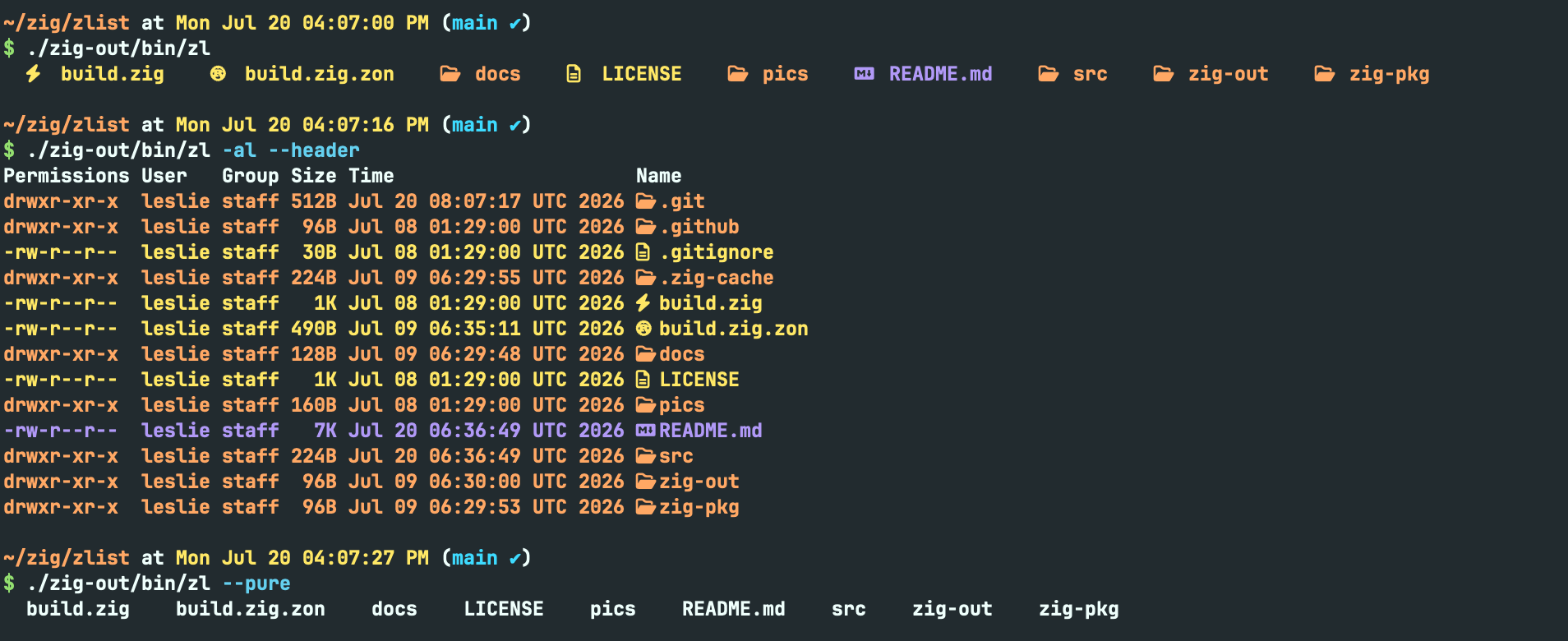
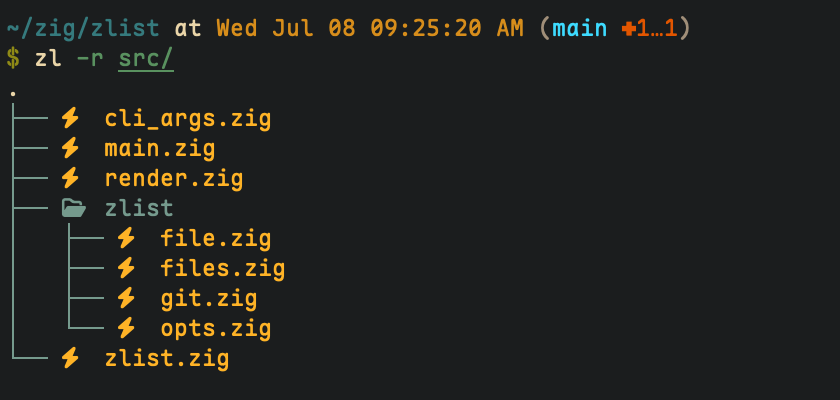
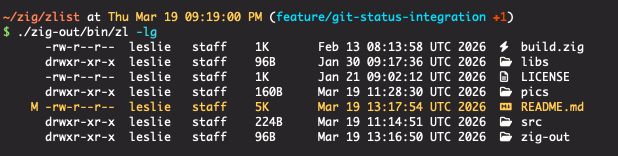
*(Make sure you have a [Nerd Font](https://www.nerdfonts.com/) installed in your terminal to see the icons!)*
## Installation
### macOS
Install with Homebrew:
```bash
brew tap here-leslie-lau/tap
# Maybe need trust
brew install zlist
```
### Precompiled Binaries
Download the latest binary for your system from the [Releases](https://github.com/here-Leslie-Lau/zlist/releases) page.
> **Note**: Windows is currently **not supported** due to differences in file system APIs. Support may be added in future versions.
### From Source
Requirements: `zig` (master/0.17.0-dev recommended).
```bash
# 1. Clone the repo
git clone git@github.com:here-Leslie-Lau/zlist.git
cd zlist
# 2. Build in release mode [ReleaseFast, ReleaseSafe, ReleaseSmall]
zig build -Doptimize=ReleaseFast
# 3. Run it. (Optional: add to PATH, it's up to you.)
./zig-out/bin/zl
```
## Usage
Just run:
```bash
zl [OPTIONS] [PATH]
```
```bash
$ zl --help
-h, --help
Usage: zl [OPTIONS] [PATH]...
-l, --long
Show the long view.
-H, --header
Show header in the long view.
--no-permissions
Hide permissions from the long view.
--no-user
Hide user from the long view.
--no-group
Hide group from the long view.
--no-size
Hide size from the long view.
--no-time
Hide time from the long view.
--no-icon
Hide icon from the long view.
-a, --a
Include hidden entries.
--du
Show recursive directory size in long view and size sort. This is the sum of file sizes, not the same as `du` disk usage.
--dir-grouping
Group directories before or after files. Default: none. OPTIONS: none, before, after.
-s, --sort
Sort results. Default: name. OPTIONS: name, length, mtime, size.
--reverse
Reverse sort.
--size ...
Filter files by size range (e.g. --size gt:10K --size lte:2M).
--changed-within
Only show entries changed within a time range (e.g. --changed-within 7d).
-r, --recursive
Recurse into subdirectories. Same as -L 0.
-L, --level
Limit recursion depth. 0 means no limit.
--root-display
Changes how root dir is displayed in recursive view. Default: dot. OPTIONS: dot, name, none.
-p, --pure
Show names only, without colors or icons.
-R, --report
Show a short summary of files and folders.
-d, --dir
Only show directories. If used with -D, both are ignored.
-D, --no_dir
Only show files. If used with -d, both are ignored.
-g, --git
Show git status in long view.
-e, --ext ...
Filter by extension (e.g. --ext zig,md,ts).
-m, --match ...
Filter names by substring (e.g. --match main,readme).
...
```
For common commands examples, see [zlist examples](docs/examples.md).
## Use as a Zig Module
`zlist` can also be used from another Zig project when you want the listing data without the CLI output.
Add it with Zig's package manager:
```bash
zig fetch --save git+https://github.com/here-Leslie-Lau/zlist
```
Then expose the module in your `build.zig`:
```zig
const zlist_dep = b.dependency("zlist", .{
.target = target,
.optimize = optimize,
});
exe.root_module.addImport("zlist", zlist_dep.module("zlist"));
```
Use it from code:
```zig
const std = @import("std");
const zlist = @import("zlist");
fn printNames(allocator: std.mem.Allocator, io: std.Io, dir: std.Io.Dir) !void {
var files = try zlist.Files.init(allocator, io, dir, .{ .path = "." });
defer files.deinit();
for (files.entries()) |entry| {
std.debug.print("{s}\n", .{entry.name});
}
}
```
For options, ownership rules, and more examples, see [Using zlist as a module](docs/using-as-a-module.md).
## Benchmark
Benchmarked with `hyperfine` on macOS with an Apple M4 CPU.
With icons and colors:
| Tool | n=50 | n=500 | n=5000 | n=50000 |
| :--- | :--- | :--- | :--- | :--- |
| `zl` | `696.4 µs ± 59.4 µs` | `957.2 µs ± 62.2 µs` | `4.4 ms ± 0.1 ms` | `45.9 ms ± 2.1 ms` |
| `eza` | `3.0 ms ± 0.2 ms` | `2.8 ms ± 0.2 ms` | `2.9 ms ± 0.1 ms` | `3.1 ms ± 0.2 ms` |
| `lsd` | `2.9 ms ± 0.1 ms` | `10.7 ms ± 0.6 ms` | `97.8 ms ± 2.1 ms` | `1.227 s ± 0.055 s` |
`eza` is the weirdly steady one here: its wall time barely moves whether the directory has 50 files or 50K. Its system CPU time also stays under 2 ms even at 50K entries. `zl` is already quick at smaller sizes, but this is exactly the kind of scaling behavior it should learn from next.
*Benchmark results may vary depending on filesystem and hardware.*
## Roadmap
* [x] Basic file listing & recursion
* [x] Color output & Nerd Font icons
* [x] Detailed file stats
* [x] Sorting by name (default), length, and modification time
* [x] Recursive directory traversal (`-r`)
* [x] Depth control for recursion (`-L`)
* [x] Clean output mode (`-p`)
* [x] Filter by files or directories (`-d`, `-D`)
* [x] Extension filter (`-e`, `--ext`)
* [x] Name match filter (`-m`, `--match`)
* [x] Smart dynamic grid layout
* [x] Summary report (`-R`)
* [x] Git status integration (`-g`)
* [x] Recursive directory size (`--du`)
* [x] Lib API for embedding in other Zig projects
* [ ] Multi-threading for faster `stat` calls
* [ ] Custom color/icon configurations (Maybe, if you need it)
## Contributing
Got an idea? Found a bug? Open an issue or send a PR. This is a fun side project, and contributions are always welcome.
1. Fork it
2. Create your feature branch (`git checkout -b feature/cool-thing`)
3. Commit your changes
4. Push to the branch
5. Open a Pull Request
---
*Crafted with ❤️ in Zig.*