# Inno Agent
> An open-source **personal learning agent** with layered memory, a proactive scheduler, multi-channel messaging, and a workspace-scoped Practice Lab — built on the [Pi coding-agent SDK](https://www.npmjs.com/package/@earendil-works/pi-coding-agent) **without modifying its kernel**.
[](./LICENSE)
[](https://nodejs.org)
[](https://github.com/hhyqhh/inno-agent/releases)
[](https://hhyqhh.github.io/inno-agent-website/)
**English** | [简体中文](./README.zh-CN.md)
🌐 **[Homepage](https://hhyqhh.github.io/inno-agent-website/)** · 📄 **[Technical Report](./docs/inno-agent.pdf)** (arXiv, June 2026) · 📦 **[Resource Hub](https://github.com/Chloris-Blaxk/inno-agent-hub)** (skill library + workspace presets)
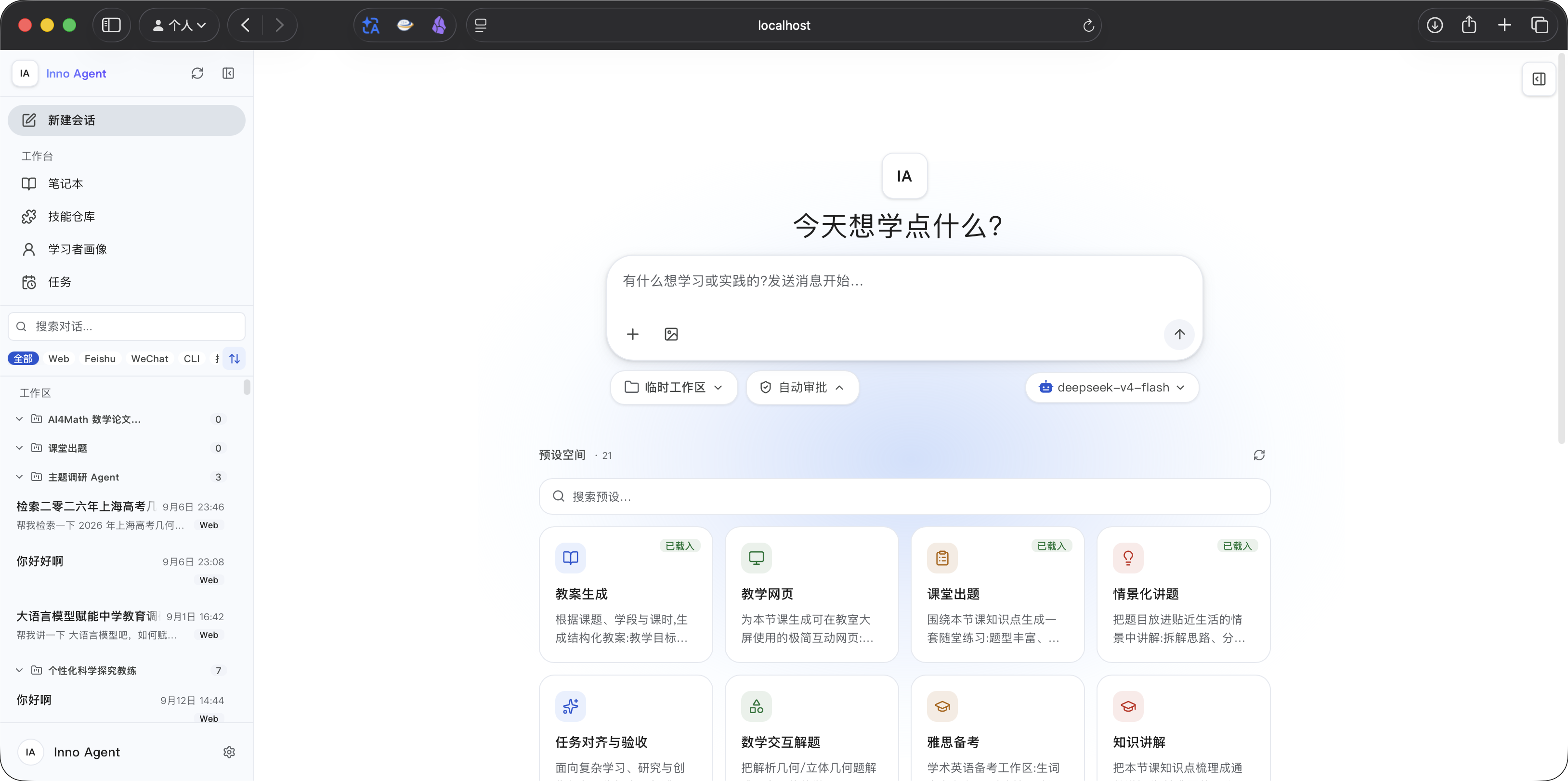
> 🎨 **September 2026 — the Web UI was rebuilt around the InnoSpark design language** (light + dark themes): a welcome page with one-click preset workspaces, a unified composer with permission-mode and model pills, an artifact-browser right panel, and rich streaming Markdown (Mermaid / SVG / ECharts / runnable code blocks) in the conversation.
Inno Agent is a single-learner companion that organizes long-term learning support into three explicit memory layers — an **L1 learner profile**, an **L2 native wiki knowledge base**, and **L3 session records with cross-conversation retrieval** — and wraps them in a learning loop: a cron scheduler, personal IM channels (Feishu / WeChat), and a Practice Lab with an in-browser terminal.
It ships in three forms that share the same runtime state:
- **Desktop app** (Electron) — one-click install for macOS and Windows.
- **Web UI** (React 19 + Tailwind 4) — Node HTTP server with SSE streaming, terminal, wiki graph, jobs, skills, and settings.
- **Terminal CLI** (`inno`) — a pure TUI agent, no HTTP.
## Why Inno Agent
General-purpose coding agents optimize for open-ended software engineering. Education is a different target: the value lies in **personalized explanation, misconception diagnosis, exercise generation, feedback, review scheduling, privacy, and low-latency continuous interaction**. Inno Agent's stances:
- **Layered memory, not a flat chat summary** — learner state, archived knowledge, and recent dialogue have different lifecycles and live in separate layers.
- **Durable facts go to tools, not replies** — anything that affects future teaching is written to L1/L2 via tools, so personalization is evidence-driven and traceable.
- **An open, correctable learner model** — the L1 profile is inspectable and editable by the learner; unevidenced labels are forbidden.
- **The SDK kernel is never modified** — all learning behavior is added through registered tools and one extension hook, keeping the runtime upstream-compatible.
### Non-goals
Inno Agent is a **personal** agent, and the architecture deliberately reflects that:
- **One process, one active agent session.** A single in-memory prompt queue serializes all work; sessions, workspaces, and channels share it. Session switching swaps session files in place — there is no per-session agent pool.
- **No multi-user concurrency, no horizontal scaling.** There is no auth model, no tenant isolation, and no sharded state. If you need a team deployment, run one instance per person.
- **Backpressure is a feature, not a bug.** When the queue is busy (e.g. another session's long turn or an unanswered question card), cross-session operations answer `409 session_busy` with blocker details instead of silently queueing for minutes — the UI surfaces this so you can finish or abort the blocking turn. See [issue #124](https://github.com/hhyqhh/inno-agent/issues/124) for the design discussion.
These constraints keep the memory layers, scheduler, and channels simple enough to reason about — which matters more for a tool that watches how you learn than for one that serves a crowd.
## Features
- 🧠 **Three-layer memory**
- **L1 learner profile** — goals, knowledge states, misconceptions, preferences; summarized into a context pack injected each turn.
- **L2 native wiki** — human-readable, agent-queryable pages with hybrid retrieval (lexical BM25 + knowledge graph), LLM-assisted summarization, and PDF/Office/image ingestion.
- **L3 session recall** — session history indexed into SQLite (FTS5) with threshold-gated cross-conversation retrieval.
- ⏰ **Proactive scheduler** — cron jobs created in natural language, runnable from the agent, the UI, or the daemon.
- 💬 **Personal IM channels** — Feishu (native) plus WeChat (iLink QR login or bridge mode), with a unified dispatcher for reminders.
- 🧪 **Practice Lab** — workspace-scoped web terminal (xterm.js over WebSocket) with run records the agent can read.
- 🎯 **Simple Mode + presets** — one-click preset workspaces (lesson plan, PPT creation, scenario explain) for non-technical users.
- 🧩 **Skill system + content hub** — browse and import skills/presets from a remote hub (GitHub repo or self-hosted bundle service).
- ✏️ **Conversation branch editing** — edit a previously sent plain-text Web message and regenerate from that point without keeping the abandoned branch in the active model context.
- 🔌 **Pluggable providers** — any `openai-completions` or `anthropic-messages` endpoint (Anthropic, OpenAI, DeepSeek, Ollama, local models); switch models live in the UI.
- 🌍 **i18n & themes** — Chinese/English UI, four themes.
- 🎬 **Session replay showcase** — export any real session (button or CLI) and replay it in a standalone site built from the real product UI, with streaming messages, workspace/notebook/profile panels, and generated artifacts.
- 🛡️ **Optional OS-level sandbox** — gate bash/file operations via [pi-sandbox](https://github.com/carderne/pi-sandbox); optional subagents via `pi-subagents`.
- 🖥️ **Computer use (desktop)** — the desktop app can observe and control the local screen (accessibility-tree-first) via [`pi-computer-use`](https://github.com/injaneity/pi-computer-use); off by default on server deployments. See [Computer Use](#computer-use).
## Quick Start
### Option A — Desktop app (easiest)
Download the latest installer from [**GitHub Releases**](https://github.com/hhyqhh/inno-agent/releases):
- **macOS** (Apple Silicon): `Inno.Agent-x.y.z-arm64.dmg` — unsigned; right-click → Open on first launch.
- **Windows** (x64): `Inno.Agent.Setup.x.y.z.exe` or `.msi`.
On first launch a default config is created at `~/.inno-agent/config/config.json` — add your provider API key there (or via the in-app settings).
### Option B — From source
```bash
git clone https://github.com/hhyqhh/inno-agent.git
cd inno-agent
npm install # pulls the Pi SDK from npm
npm run build # compiles backend + web
mkdir -p runtime/config runtime/data runtime/skills workspace
cp config.example.json runtime/config/config.json
# Edit runtime/config/config.json and set providers[*].apiKey
npm run server -- --home ./runtime --workspace ./workspace --port 3000
```
Open **http://localhost:3000**. See **[QUICKSTART.md](./QUICKSTART.md)** (中文) for a 5-minute walkthrough with provider examples.
### Option C — Docker
```bash
docker compose up -d # serves on :3000, mounts runtime/ and workspace/
```
## Run Modes
```bash
npm run server # Web UI (API + built frontend on :3000)
npm run start # CLI (terminal agent, no HTTP)
npm run electron # Desktop app locally
npm run server:sandbox # Web UI with OS-level sandbox (requires ripgrep)
# Dev: backend on :3000 + Vite HMR on :5173
npm run dev:server & npm run web:dev
```
`restart-dev.sh` orchestrates the dev lifecycle (build, start, stop, status, logs, smoke-test) — run `bash restart-dev.sh --help`.
## Configuration
Optional per-model reasoning effort is described in [Reasoning effort](docs/reasoning-effort.md).
`runtime/config/config.json` (template: [`config.example.json`](./config.example.json)):
```json
{
"defaultProvider": "innospark",
"defaultModel": "claude-sonnet-4-6",
"providers": {
"innospark": {
"baseUrl": "https://api.example.com",
"api": "anthropic-messages",
"apiKey": "replace-me",
"models": [{ "id": "claude-sonnet-4-6", "name": "Claude Sonnet 4.6" }]
}
},
"server": { "port": 3000 },
"channels": {
"feishu": { "enabled": false },
"wechat": { "enabled": false, "mode": "ilink" }
},
"memory": { "l1Enabled": true, "l2Enabled": true, "l3Enabled": true },
"ui": { "theme": "light", "closeBehavior": "ask" }
}
```
Each provider declares a `baseUrl`, an `api` (`openai-completions` or `anthropic-messages`), an `apiKey`, and a `models[]` list. The server hot-rewrites this file when you switch models in the UI.
### Runtime paths
Both CLI and server resolve paths through `apps/inno-agent/src/runtime.ts`. Precedence: **CLI flag > env var > `~/.inno-agent/...`**.
| CLI flag | Env var | Default |
|---|---|---|
| `--home` | `INNO_HOME` | `~/.inno-agent` |
| `--config-dir` | `INNO_CONFIG_DIR` | `/config` |
| `--data` | `INNO_DATA_DIR` | `/data` |
| `--skills` | `INNO_SKILLS_DIR` | `/skills` |
| `--workspace` | `INNO_WORKSPACE_DIR` | invocation CWD |
| `--port` | `INNO_PORT` | `3000` |
### Permissions & Sandbox
Two independent guardrails control what the agent's tools can do. The **permission layer** (pi-permission-system, on by default) gates tool calls with allow/ask/deny rules — `ask` pops an approval card in the web UI (allow once / allow for session / deny). Three policy modes — `default` (asks on non-allowlisted bash), `auto` (approves bash), `yolo` (approves everything) — switchable from the shield button in the composer toolbar, persisted as `plugins.permissionSystem.mode`, effective immediately without restart. A hard-deny floor (destructive commands, `~/.ssh/*`, `*.env`, …) applies in every mode. The **sandbox layer** (pi-sandbox, opt-in via `--sandbox`) enforces filesystem/network limits at the OS level (sandbox-exec on macOS, bubblewrap on Linux) — a permission approval never overrides it. Full details and configuration: [docs/PERMISSIONS_AND_SANDBOX.md](./docs/PERMISSIONS_AND_SANDBOX.md).
### Computer Use
The desktop app ships with GUI computer control (via [`@injaneity/pi-computer-use`](https://github.com/injaneity/pi-computer-use)): the agent observes windows through the OS accessibility tree and acts — click, type, scroll, or drive a browser. Passive observation tools stay allowed; every side-effecting action (`act_ui`, browser launch/navigation/evaluate) pops an approval card first. On macOS, first use installs a signed helper at `~/Applications/pi-computer-use.app` and needs **Accessibility** + **Screen Recording** grants in System Settings → Privacy & Security (if a fresh grant isn't picked up, restart the helper with `pkill -f pi-computer-use.app`).
**Enable / disable:**
- **Desktop app** — on by default. Toggle in **Settings → General → Computer use**, then restart the app (tools register at session start, so the change applies on restart).
- **Local server / CLI** — off by default. Start with the desktop flag to enable:
```bash
INNO_DESKTOP=1 npm run server -- --home ./runtime --workspace ./workspace --port 3000
```
To turn it back off, restart the service **without** `INNO_DESKTOP`.
- **Explicit override** (wins over the env default in both directions) in `config.json`:
```json
"plugins": { "computerUse": { "enabled": true } }
```
- **Online deployments** — leave it unset (no `INNO_DESKTOP`) and the feature stays off.
### Content Hub
The skill library and Simple Mode presets are fetched from a remote **content hub** — by default the public GitHub repo [`Chloris-Blaxk/inno-agent-hub`](https://github.com/Chloris-Blaxk/inno-agent-hub). Point `contentHub` in `config.json` (or **Settings → Content Hub**) at a private GitHub repo (`"type": "github"`) or a self-hosted bundle service (`"type": "bundle"`) — a zero-dependency bundle server lives in [`scripts/content-hub-server/`](./scripts/content-hub-server/). Presets are cached locally; bundled templates serve as an offline fallback.
## Architecture
Four layers: **user interfaces → application layer → Pi agent runtime → layered memory.**
```text
User Interfaces CLI · Web UI (React) · Desktop · Feishu · WeChat
↓
Application Layer Channel adapters · HTTP API (SSE) · Memory orchestration
Cron scheduler · Practice Lab · WebSocket terminal
↓
Agent Runtime Pi AgentSession · registered tools · inno extension
(Pi SDK, unmodified) General LLM provider ──or── distilled educational model
↓
Layered Memory L1 learner profile · L2 native wiki · L3 session records
```
- **Agent core** — `@earendil-works/pi-coding-agent` provides the loop. [`inno-extension.ts`](./apps/inno-agent/src/agent/inno-extension.ts) registers providers and tools (L1/L2/L3, scheduler, practice lab, documents, OCR) and a `before_agent_start` hook that injects the L1 context pack and threshold-gated L3 recall into the system prompt.
- **Memory** — L1 (`src/memory/learner/`): evidence-driven profile + event log. L2 (`src/memory/l2/`): structured wiki with graph, summarizer, ingestion, and hybrid retrieval; exposed via agent tools and `/api/wiki/*`. L3 (`src/memory/l3/`): a SQLite FTS5 index layered over Pi session JSONL files.
- **Scheduler** (`src/scheduler/`) — cron jobs persisted to `jobs.json` + `runs.jsonl`.
- **Channels** (`src/channels/`) — `ChannelRegistry` with Feishu, WeChat (iLink / bridge), and QQ (bridge).
- **HTTP server** (`src/server.ts`) — plain Node `http.createServer` with SSE chat streaming and a WebSocket terminal; route table in [`apps/inno-agent/README.md`](./apps/inno-agent/README.md).
- **Web UI** (`web/src/`) — React 19 + Tailwind 4. Framework-agnostic `EventEmitter` stores in `web/src/stores/`; REST/SSE calls in `web/src/api/`.
## Repository Layout
```text
apps/inno-agent/ Backend (CLI + HTTP server), TypeScript → dist/
apps/inno-agent/web/ Frontend (React 19 + Tailwind 4 + Vite)
apps/inno-agent/presets/ Bundled preset workspaces (offline fallback)
apps/showcase/ Session replay showcase site (real product UI + recorded cases)
electron/ Electron main process (desktop app)
scripts/content-hub-server/ Self-hosted Content Hub bundle service
runtime/ Local runtime state (config, data, skills) — gitignored
workspace/ Default agent working directory — gitignored
```
## Deployment
Typical production layout, separating code, config, data, and workspace:
```bash
INNO_CONFIG_DIR=/etc/inno-agent \
INNO_DATA_DIR=/var/lib/inno-agent/data \
INNO_SKILLS_DIR=/var/lib/inno-agent/skills \
INNO_WORKSPACE_DIR=/srv/inno-workspace \
INNO_PORT=3000 \
npm run server
```
A [`Dockerfile`](./Dockerfile) and [`docker-compose.yml`](./docker-compose.yml) are provided as starting points; see [`docs/SYSTEM_DEPENDENCIES.md`](./docs/SYSTEM_DEPENDENCIES.md) for the full dependency reference. Desktop packaging notes are in [`ELECTRON_BUILD.md`](./ELECTRON_BUILD.md).
## Showcase — Session Replay Site
[`apps/showcase/`](./apps/showcase) is a standalone site that replays recorded Inno Agent sessions through the **real product UI** (via a Vite alias into `apps/inno-agent/web/src`) — no backend, no model calls. A replay reproduces the streaming chat turn by turn and keeps the right-hand panels in sync: workspace files appear as tools write them (including bash-generated artifacts like HTML/PDF/PPTX), wiki notes accumulate in the notebook, and the learner profile lights up as learning events are recorded.
**Export a real session** from inside the product (hover a session in the sidebar → clapperboard icon) or from the CLI:
```bash
npm run showcase:export -- --session # pick one recorded session
npm run showcase:view # build + serve + open the replay site
```
Exported cases land in `runtime/data/showcase-exports/cases/` with automatic path/username/secret sanitization; the viewer overlays them on top of the published cases without a rebuild.
- [apps/showcase/README.md](./apps/showcase/README.md) — architecture, mock backend, and the constraints for keeping the replay UI in sync with product code.
- [apps/showcase/EXPORTING.md](./apps/showcase/EXPORTING.md) — full export handbook (中文): button flow, CLI reference, sanitization rules, troubleshooting.
## Use Cases & Docs
- [Skill Tutorial — Building a Workspace Agent](./docs/use-cases/skill-tutorial.md) — use `agent.md` and `.skills/` to build a custom learning agent scoped to a workspace.
- [QUICKSTART.md](./QUICKSTART.md) — 5-minute setup guide (中文).
- [apps/inno-agent/README.md](./apps/inno-agent/README.md) — backend API route table (中文).
## Contributing
Issues and PRs are welcome. Before opening a PR, run `npm run build` locally — the TypeScript build doubles as the sanity check (no lint/test runner is wired up yet). Keep changes focused, match the existing code style, and update docs when behavior changes.
## Community
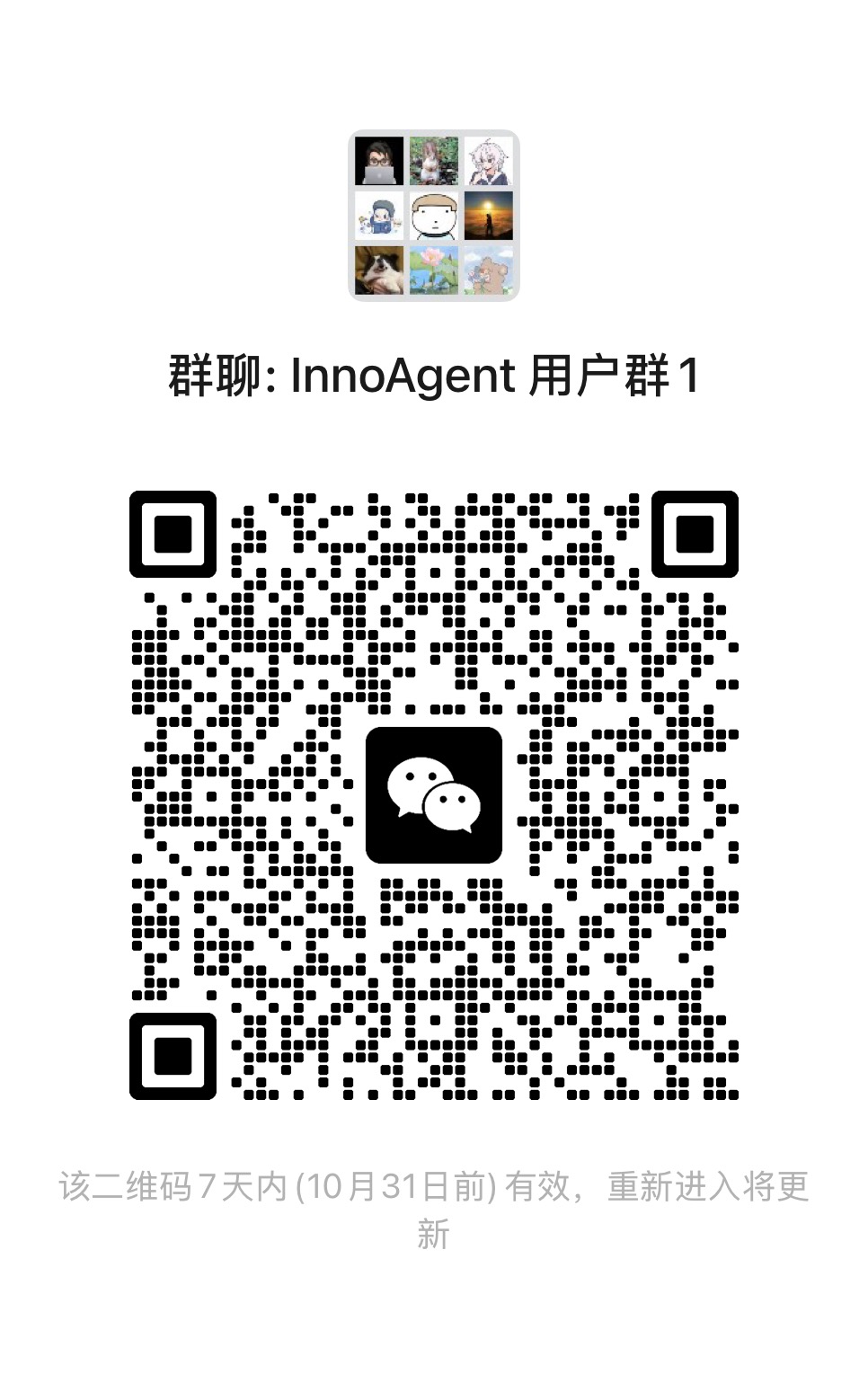
Join the WeChat user group to ask questions, share use cases, and follow updates:
## License
[MIT](./LICENSE). This project depends on the Pi SDK (`@earendil-works/pi-*` packages by Mario Zechner), also MIT-licensed and consumed via npm.
### Third-party licenses
The preview-side WYSIWYG document editors include an **AGPL-3.0** component: [PPTist](https://github.com/pipipi-pikachu/PPTist) (pptx editing, vendored build staged by `scripts/prepare-pptist.sh`). Distributed builds of the web UI therefore carry AGPL obligations for that component; its source and our modifications are available in this repository (the pinned upstream commit plus `scripts/patches/pptist-embed.patch`). The xlsx editor ([Univer](https://github.com/dream-num/univer)) is Apache-2.0.
## Citation
```bibtex
@misc{hao2026innoagent,
author = {Hao Hao, Ye Lu, Ruotong Yang, Yongheng Guo and Aimin Zhou},
title = {Inno Agent: An Open-Source Personal Learning Agent with Layered Memory, Educational Post-Training, and Local Deployment},
year = {2026},
publisher = {GitHub},
journal = {GitHub repository},
howpublished = {\url{https://github.com/hhyqhh/inno-agent}}
}
```