# Zsh Buddy Theme
Your coding buddy — a motivational Zsh theme with work-life balance reminders, multi-language support, and a touch of humor.
[](https://opensource.org/licenses/MIT)
[](https://www.zsh.org/)
[](https://github.com/hieudnm/zsh-buddy-theme)
[](https://github.com/hieudnm/zsh-buddy-theme/actions/workflows/test.yml)
## ✨ Features
- 🌍 **Multi-language support** (Vietnamese, English) with easy extension system
- 🕐 **Time-based buddy messages** with special overtime reminders (17:30-18:30)
- ⚡ **Command-specific responses** for Git, Docker, npm, Python, and 50+ commands
- 🎨 **Dynamic prompt** with time icons, git branch / dirty state / commits ahead-behind (⇡⇣), virtual environment info
- 🚀 **Fork-free prompt** - one `git` call inside repositories, none outside; fast even on Windows (Git Bash)
- 📱 **System detection** (WSL, macOS, Windows, Linux)
- ⚙️ **Configurable** language settings via config file or environment variables
- 🔄 **Auto-setup** - automatically creates required directories and default files
- 💬 **70+ contextual messages** for different times and commands
## 🚀 Quick Start
### One-Line Install (Recommended)
```bash
bash <(curl -sf https://raw.githubusercontent.com/hieudnm/zsh-buddy-theme/main/install.sh)
```
The installer will automatically:
- Detect your OS (macOS / Linux / WSL / Windows)
- Install Zsh if not present
- Download all theme files
- Install Nerd Font
- Set Zsh as default shell
### Manual Install
Click to expand manual installation steps
1. **Install Zsh** (if not already installed):
- macOS: `brew install zsh`
- Ubuntu/Debian: `sudo apt install zsh`
- Windows (MSYS2): https://packages.msys2.org/packages/zsh
2. **Download theme files:**
```bash
mkdir -p "$HOME/.troll_themer/lang" && curl -sf -o ~/.zshrc https://raw.githubusercontent.com/hieudnm/zsh-buddy-theme/main/.zshrc
```
```bash
curl -sf -o "$HOME/.troll_themer/zsh-buddy-theme.zsh" https://raw.githubusercontent.com/hieudnm/zsh-buddy-theme/main/zsh-buddy-theme.zsh
```
```bash
curl -sf -o "$HOME/.troll_themer/config" https://raw.githubusercontent.com/hieudnm/zsh-buddy-theme/main/.troll_themer/config
```
```bash
curl -sf -o "$HOME/.troll_themer/lang/vi.txt" https://raw.githubusercontent.com/hieudnm/zsh-buddy-theme/main/.troll_themer/lang/vi.txt && curl -sf -o "$HOME/.troll_themer/lang/en.txt" https://raw.githubusercontent.com/hieudnm/zsh-buddy-theme/main/.troll_themer/lang/en.txt
```
3. **Set Zsh as default and restart terminal:**
```bash
chsh -s $(which zsh)
```
After installation, restart your terminal and enjoy! 🎉
## 🌍 Language Configuration
### Method 1: Environment Variable (Recommended)
```bash
export TROLL_LANG="en" # English
export TROLL_LANG="vi" # Vietnamese (default)
```
### Method 2: Configuration File
The theme automatically creates `.troll_themer/config`:
```bash
# Available languages: vi (Vietnamese), en (English)
TROLL_LANG="vi"
```
## 🔇 Serious Mode
Sometimes you need to focus without the trolling. The theme includes a **serious mode** that temporarily disables all troll messages:
### Quick Mode Switching
```bash
# Enable serious mode (disable trolling)
serious
# or
export TROLL_MODE="serious"
# Back to troll mode (enable trolling)
troll
# or
unset TROLL_MODE
# Check current mode
mode-status
```
### Use Cases
- **Important presentations** - No unexpected messages during demos
- **Pair programming** - Professional environment with colleagues
- **Learning/tutorials** - Clean output when following tutorials
- **Production debugging** - Focus on serious troubleshooting
**Example:**
```bash
$ serious
🔇 Serious mode activated. Trolling disabled.
$ git commit -m "Fix critical bug"
# No troll messages, clean output
$ troll
🎭 Troll mode activated. Let the fun begin!
$ git push
Push thành công rồi, nghỉ xíu uống miếng nước người đẹp!
```
## 🗑️ Uninstall
```bash
uninstall
```
The uninstaller will:
- Restore your previous `.zshrc` from backup (if available)
- If no backup exists, extract and keep your custom config (PATH, aliases, exports added after `ZSH_BUDDY_THEME_END`)
- Remove `~/.troll_themer/` and all backups
- Remove `zsh-autosuggestions` plugin
- Remove zsh auto-start from `.bashrc` (if added by installer)
### Clean Backups
```bash
clean-backups
```
Remove all `.zshrc.backup` and `.troll_themer.backup` files. Useful if you want to free up space without uninstalling.
## 📁 Project Structure
```
zsh-buddy-theme/
├── .zshrc # Tiny loader installed as ~/.zshrc (sources the theme)
├── zsh-buddy-theme.zsh # The theme, installed as ~/.troll_themer/zsh-buddy-theme.zsh
├── .troll_themer/ # Configuration & resources directory
│ ├── config # Settings file (TROLL_LANG, ZBT_*)
│ ├── font/ # Included font
│ │ └── CaskaydiaMonoNerdFontMono-SemiBold.ttf
│ └── lang/ # Language packs directory
│ ├── vi.txt # Vietnamese messages
│ └── en.txt # English messages
├── tests/run.zsh # Test suite (zsh tests/run.zsh)
├── .github/workflows/ # CI: runs the tests on Linux and macOS
├── version.txt # Theme version
├── install.sh # One-line installer script
├── preview.png # Theme preview screenshot
├── LICENSE # MIT License file
└── README.md # This documentation
```
## � Message Categories
| Category | Count | Description |
|----------|-------|-------------|
| `welcome` | 1 | Welcome message on theme load |
| `update_*` | 2 | Update and repository messages |
| `overtime` | 30 | Work-life balance reminders (17:30-18:30) |
| `hour_*` | 24 | Time-specific messages for each hour |
| `cmd_*` | 57 | Command-specific responses |
### Supported Commands
Git, Docker, npm, yarn, Python, pip, system commands (ls, cd, mv, cp, rm), text editors (vim, nano), system monitoring (htop, ps, df, free), and many more!
## �️ Adding New Languages
1. **Create a language file:**
```bash
touch .troll_themer/lang/your_lang.txt
```
2. **Follow the format:**
```
# Your Language Pack for Zsh Buddy Theme
# Format: category:message
welcome:🎉 Welcome message in your language
overtime:Work late message
hour_08:Morning message
cmd_git_commit:Git commit response
```
3. **Set your language:**
```bash
export TROLL_LANG="your_lang"
```
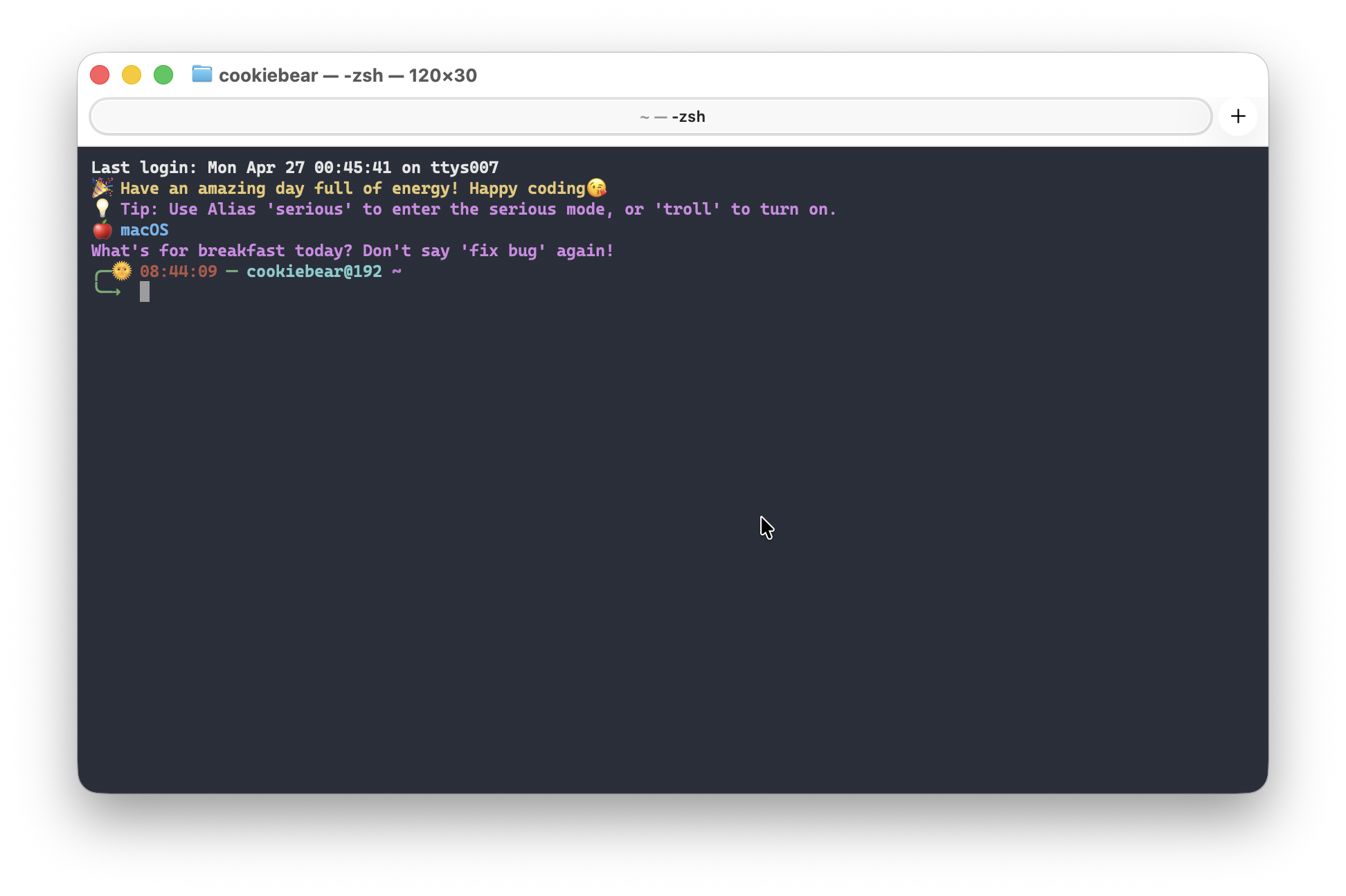
## 🎨 Theme Preview
## ⚙️ Configuration Options
### Settings
Every setting can be given in two ways, and you never have to edit the theme code:
1. As a `KEY="value"` line in `~/.troll_themer/config` (this file is **never overwritten** by `update`), or
2. As an environment variable, exported before the theme loads (for example in `~/.zshenv`). Environment variables win over the config file.
| Variable | Default | Meaning |
|----------|---------|---------|
| `TROLL_LANG` | `vi` | Language pack (`vi`, `en`, or your own) |
| `TROLL_MODE` | - | `serious` disables all messages |
| `ZBT_HISTFILE` | `~/.zhistory` | History file used by the theme's history setup |
| `ZBT_UPDATE_CHECK` | `true` | Check once a day for a new theme version |
| `ZBT_CURL_MAX_TIME` | `10` | Hard time limit in seconds for every download, so a stalled network can never hang the shell |
| `ZBT_TROLL_INTERVAL` | `300` | Seconds between time-based messages |
| `ZBT_TROLL_CHANCE` | `10` | Percent chance to show a time-based message before a command |
| `ZBT_OVERTIME_START` / `ZBT_OVERTIME_END` | `17:30` / `18:30` | Window for the work-life balance reminders |
| `ZBT_EXEC_TIME_MIN_MS` | `0` | Only show `[N ms]` on the right when the command took at least N ms |
| `ZBT_GIT_SHOW` | `true` | Show the git block |
| `ZBT_GIT_UNTRACKED` | `true` | Count untracked files as "dirty". Set to `false` on huge repositories to make the prompt faster |
| `ZBT_GIT_AHEAD_BEHIND` | `true` | Show commits ahead/behind upstream as `⇡N ⇣N` (no extra git call) |
| `ZBT_COLOR_GIT_CLEAN` / `ZBT_COLOR_GIT_DIRTY` / `ZBT_COLOR_VENV` | `10` / `9` / `11` | Prompt colors: a name (`red`, `green`) or a 0-255 index |
Example `~/.troll_themer/config`:
```bash
TROLL_LANG="en"
ZBT_TROLL_INTERVAL=900 # a message every 15 minutes at most
ZBT_EXEC_TIME_MIN_MS=1000 # only show the timer for slow commands
ZBT_GIT_UNTRACKED=false # faster prompt in a huge monorepo
```
### Hooks
The theme registers its prompt hooks with `add-zsh-hook`, so your own `precmd` / `preexec` functions and other plugins keep working next to it. All theme functions and variables are prefixed with `_zbt_` / `ZBT_`; the public commands are `update`, `serious`, `troll`, `mode-status`, `uninstall` and `clean-backups`.
### Custom User Config (Preserved During Updates)
`~/.zshrc` is a small loader that sources the theme from `~/.troll_themer/zsh-buddy-theme.zsh`. Add your custom PATH, aliases, exports, and other config **at the end** of `~/.zshrc`, after the `ZSH_BUDDY_THEME_END` marker:
```bash
# === ZSH_BUDDY_THEME_END ===
# Everything below this line is preserved during theme updates.
# Add your custom PATH, aliases, exports, and other config here.
export PATH="/usr/local/bin:$PATH"
alias ll="ls -la"
export MY_API_KEY="..."
```
When you run `update`, the theme code above the marker is replaced with the new version, but everything below it is **automatically preserved**.
### Environment Variables
- `TROLL_LANG` - Set preferred language (vi, en, or custom)
- `TROLL_MODE` - Set to "serious" to disable trolling temporarily
- `THEME_NAME` - Customize theme name in welcome message
### Files
- `.troll_themer/zsh-buddy-theme.zsh` - The theme code (replaced atomically by `update`)
- `.troll_themer/config` - Main configuration file
- `.troll_themer/update` - Update check timestamp
- `.troll_themer/lang/*.txt` - Language message files
## 🧪 Tests
```bash
zsh tests/run.zsh
```
A dependency-free zsh test suite (config parsing, git block, hooks, message matching) that runs in an isolated `$HOME`. It also runs on every push via GitHub Actions on Linux and macOS.
## 🔧 Requirements
- **Zsh 5.0+** - The theme is built for Zsh shell
- **UTF-8 terminal** - For proper emoji and Vietnamese character display
- **Git** (optional) - For git status display in prompt
### 🎨 Recommended Font
**We highly recommend using [Nerd Fonts](https://www.nerdfonts.com/) for the best experience:**
- **Free and open source** - Completely free to use
- **Rich character support** - Includes powerline symbols, icons, and Vietnamese characters
- **Beautiful display** - Makes your terminal look professional and modern
- **Wide compatibility** - Works with all major terminals and operating systems
#### 📁 Included Font (Ready to Use!)
**This theme includes a pre-configured font in the project:**
- **Cascadia Code Nerd Font Mono (SemiBold)** - Located in `.troll_themer/font/`
- **Perfect for this theme** - Optimized for Vietnamese characters and symbols
- **No additional download needed** - Just install the font file directly
**Installation from project folder:**
```bash
# Windows: Double-click the font file to install
# Or copy to: C:\Windows\Fonts\
# Linux/Ubuntu:
sudo cp .troll_themer/font/CaskaydiaMonoNerdFontMono-SemiBold.ttf /usr/share/fonts/
sudo fc-cache -fv
# macOS:
cp .troll_themer/font/CaskaydiaMonoNerdFontMono-SemiBold.ttf ~/Library/Fonts/
```
#### 🌐 Alternative Popular Choices
- [JetBrains Mono Nerd Font](https://github.com/ryanoasis/nerd-fonts/tree/master/patched-fonts/JetBrainsMono) - Clean, modern coding font
- [Fira Code Nerd Font](https://github.com/ryanoasis/nerd-fonts/tree/master/patched-fonts/FiraCode) - Popular with programming ligatures
- [Hack Nerd Font](https://github.com/ryanoasis/nerd-fonts/tree/master/patched-fonts/Hack) - Designed specifically for source code
**Download alternatives:**
```bash
# Download and install any Nerd Font from:
# https://www.nerdfonts.com/font-downloads
# For Ubuntu/Debian:
sudo apt install fonts-powerline
# For macOS:
brew tap homebrew/cask-fonts
brew install font-jetbrains-mono-nerd-font
```
### Optional Enhancements
- [zsh-autosuggestions](https://github.com/zsh-users/zsh-autosuggestions) - Command suggestions
- A powerline-compatible font for better prompt display
## 🐛 Troubleshooting
**Theme not loading?**
- Ensure you're using Zsh: `echo $SHELL`
- Check file permissions: `ls -la .zshrc`
**Messages not displaying?**
- Verify language files exist: `ls .troll_themer/lang/`
- Check language setting: `echo $TROLL_LANG`
**Encoding issues?**
- Ensure terminal supports UTF-8
- Try: `export LANG=en_US.UTF-8`
🐢 Windows (Git Bash / MSYS2) feels slow? Click to expand
On Windows the theme runs inside the MSYS runtime (Git for Windows / MSYS2). Three things make a shell feel slow there, and they stack. Measure first, then fix the one you actually have.
**1. Every command the prompt spawns is expensive (lag after each Enter)**
Spawning a process (`date`, `git`, `basename`, a `$(...)` subshell) costs well under 1 ms on Linux/macOS but 10-30 ms on MSYS, and 100 ms+ when an antivirus inspects every new process. A prompt that spawns ten of them adds a full second per command.
- Since **v1.4** the theme is fork-free: time comes from the `zsh/datetime` builtin, messages are passed through `$REPLY` instead of `$(func)`, git status is a single `git status --porcelain -b` call that is skipped outside repositories, and `zsh-autosuggestions` runs synchronously (its async mode forks a process on every keystroke).
- Check your own cost of one spawn:
```zsh
zmodload zsh/datetime; s=$EPOCHREALTIME; date >/dev/null; printf '%.0f ms per spawn\n' $(( (EPOCHREALTIME-s)*1000 ))
```
**2. Opening a shell takes 1-3 s because of `/etc/profile`**
Git Bash starts `bash --login`, which runs Git for Windows' `/etc/profile` (about ten spawned processes), and only then hands over to zsh via `exec zsh`. Launching zsh with `-l` runs the same file through `/etc/zsh/zprofile`.
Fix: start `zsh.exe` directly and **without** `-l`. In Windows Terminal add a profile whose command line is
```
"C:\Program Files\Git\usr\bin\zsh.exe"
```
and put the few things `/etc/profile` normally provides into `~/.zshenv` (read before `.zshrc`, never touched by the theme updater):
```zsh
# ~/.zshenv - fork-free replacement for /etc/profile when zsh.exe is launched directly
if [[ -d /mingw64/bin ]]; then
export MSYSTEM="${MSYSTEM:-MINGW64}"
typeset -U path
path=("$HOME/bin" /mingw64/bin /usr/local/bin /usr/bin /bin $path)
export PATH
export SHELL="${SHELL:-/usr/bin/zsh}"
[[ -z "${LC_ALL:-${LC_CTYPE:-$LANG}}" ]] && export LANG=en_US.UTF-8
if [[ -z "$SSH_ASKPASS" && -f /mingw64/bin/git-askpass.exe ]]; then
export DISPLAY=needs-to-be-defined SSH_ASKPASS=/mingw64/bin/git-askpass.exe
fi
fi
```
Expected result: a new tab is ready in well under a second.
**3. The shell hangs for exactly 45 seconds, but only sometimes**
If your PC is joined to a company domain and the domain controller is unreachable (working from home, VPN off), every new MSYS process started from a non-MSYS parent (Windows Terminal, VS Code) asks Windows for the name of your primary group. Windows waits 45 s for the domain controller before giving up, then caches the answer for a few minutes, which is why the hang comes and goes. It affects bash just as much as zsh. You can confirm it from PowerShell: `whoami` itself takes 45 s during such a window.
Fix: let the MSYS runtime read your account from local files instead of asking Windows. In an **elevated** Git Bash (right-click, Run as administrator):
```bash
mkpasswd -c > /etc/passwd
mkgroup -c > /etc/group
```
Afterwards `id` prints your group **name**, not just a number, and new shells start instantly even while `whoami` is still slow. Redo this if you reinstall Git for Windows.
## 🤝 Contributing
Contributions are welcome! Here's how you can help:
1. **Add new languages** - Create language packs for your locale
2. **Improve messages** - Make the trolling funnier or more relevant
3. **Add new commands** - Extend command-specific responses
4. **Bug fixes** - Report and fix issues
### Development Setup
```bash
git clone https://github.com/hieudnm/zsh-buddy-theme.git
cd zsh-buddy-theme
# Test your changes
source .zshrc
```
## 📜 License
This project is licensed under the MIT License - see the [LICENSE](LICENSE) file for details.
## � Acknowledgments
- Inspired by the Vietnamese developer community's love for humor and code
- Built with ❤️ for developers who enjoy a bit of trolling with their terminal
- Special thanks to all contributors and users
---
**Made with 💻 and ☕ by [hieudnm](https://github.com/hieudnm)**
*"Code smarter, laugh harder!"* 😄