🥧 seapie — A breakpoint should just mean >>>
pip install seapie








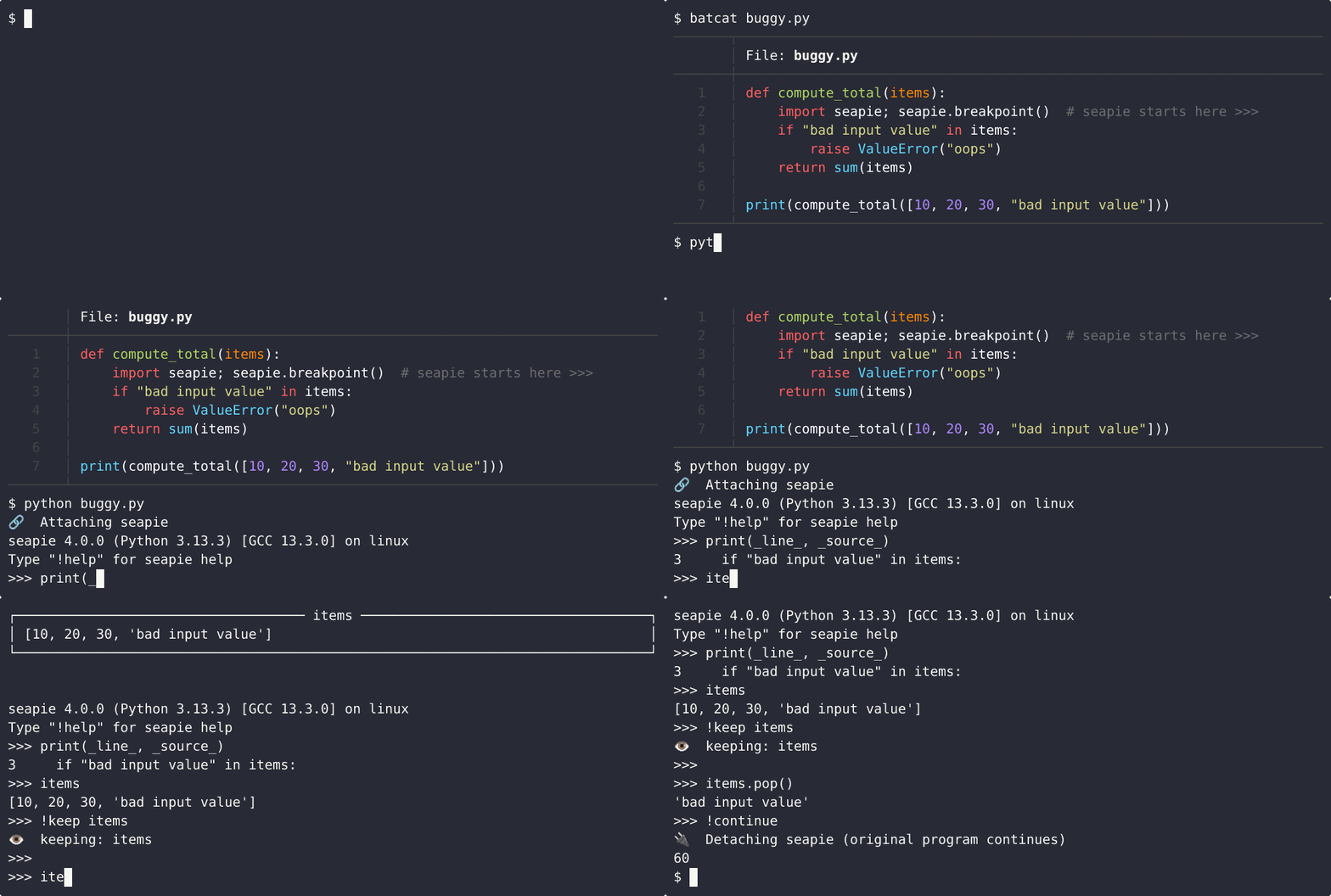
# Why seapie?
1. Debugging for humans
seapie comes with a user experience focused on discoverability: helpful error messages and built-in `help` you can reach from anywhere
2. Debug by describing what you want
All debuggers let you step. seapie lets **Python** expressions *walk* without magic syntax: _”stop when myfunc returns None, and call stack contains myhelper”_
`>>> !walk (_event_ == "return") and (_return_ is None) and ("myhelper" in _callstack_)`
3. REPL-first by design >>>
Checking a variable is `print(myvar)` changing it is `myvar = None`. Debugging `!commands` work in the REPL and inspecting state is just python:
```python
>>> _magic_
{'_line_': 8,
'_source_': ' return round(total_with_tax, 2)',
'_path_': '/home/hirsimak/seapie/test/demo.py',
'_return_': 35.64,
'_exception_': None,
'_event_': 'return',
'_callstack_': ['', 'checkout']}
>>>
```
# Hands on example
myscript.py
```python
print("script says hello!")
import seapie; seapie.breakpoint() # execution pauses here, you get >>>
do_stuff(myvariable)
```
terminal
```shell
user@system:~/$ python myscript.py
script says hello!
🔗 Attaching seapie
seapie 4.0.0 (Python 3.13.3) [GCC 13.3.0] on linux
Type "!help" for seapie help
>>>
```
# seapie.breakpoint() gives you `>>>`. Try it out
terminal
```python
>>> print(locals())
{'x': 1, 'myvariable': None}
>>>
>>> myvariable = x
>>>
>>> _magic_.keys()
dict_keys(['_line_', '_source_', '_path_', '_return_', '_exception_', '_event_', '_callstack_'])
>>>
>>> _line_, _source_
(18, ' while True:')
>>>
>>> !bad-command
💀 Unknown command !bad-command
⚡ !command quicklist (example: >>> !location)
!(h)elp Show help
!(l)ocation Show source code around currently executing line
!(t)raceback Show callstack with current frame highlighted
!(f)rame Move up and down in callstack
!(k)eep Constantly show any Python expression at the top of the terminal
!(s)tep Step through code execution
!(e)vent Step until a specific event type
!(u)ntil Step until a target like linenumber or file
... ( cut for brevity in readme ) ...
>>>
```
# Eventually, you’ll want time to move again
Seapie doesn’t lock you into the prompt - you can step forward, jump around, or
resume normal execution whenever you feel done exploring. If you’re ever curious
what’s possible, `!help` is always there, inside the shell.
(For the curious: a snapshot of the built-in help lives in `help_dump.txt`.)
## Misc / Notes
Click to expand
#### Origin of the name
seapie is short for 'Scope Escaping Arbitrary Python Injection Executor'.
#### Licensing
If you need license other than Unlicense, contact me ɯoɔ˙lᴉɐɯƃ (ʇɐ) snʞɹɐɯ˙ᴉʞɐɯᴉsɹᴉɥ.
#### Editable install
`seapie$ pip install -e .`
#### Build & publish
- `Remember: increment __version__ in __init__.py`
- `Remember: .pypirc file is needed.`
- `seapie$ python -m build --wheel`
- `seapie$ rm -rf build/ && rm -rf src/seapie.egg-info/`
- `seapie$ python -m twine check dist/*`
- `seapie$ python -m twine upload dist/*`
- `seapie$ rm -rf dist/`
#### Known limitations
- Seapie is essentially singleton; only one thread can be debugged at a time.
- Remote debugging support could be added in the future. Python 3.14 looks promising.
#### Why not pdb?
Overall, pdb is ok but it felt rough for the novice I once was. pdb asks you to learn a
small debugger language on top of Python and interaction with your code requires a
separate 'mode'. In my opinion the correct specification for debugger user experience
is that 'it works like i imagine it should work' and seapie tries to achieve that.
#### How to re-record the demo gif
- add `export PS1='$ '` to bashrc, comment out spam from `neofetch` and such
- resize terminal to about 81x15 characters. Check with `stty size`.
- `$ cd seapie/test`
- `$ clear`
- `$ asciinema rec --quiet demo.cast`
- `$ batcat buggy.py`
- `$ python buggy.py`
- `$ print(_source_)`
- `$ items`
- `$ items.remove("bad input value")`
- `$ items`
- `$ !continue`
- separate terminal: `$ pkill -f asciinema`
- back in first terminal: ctrl+D
- `$ asciinema play demo.cast`
- `$ asciinema-agg demo.cast demo.gif --font-family "DejaVu Sans Mono" --font-size 20`