#  Raspberry Pi MQTT Monitor
[](https://github.com/hjelev/rpi-mqtt-monitor/releases)
[](https://github.com/hjelev/rpi-mqtt-monitor)
[](https://github.com/hjelev/rpi-mqtt-monitor/issues)
[](https://github.com/hjelev/rpi-mqtt-monitor/issues?q=is%3Aissue+is%3Aclosed)
[](https://github.com/hjelev/rpi-mqtt-monitor)
[](https://github.com/hjelev/rpi-mqtt-monitor)
Raspberry Pi MQTT Monitor
[](https://github.com/hjelev/rpi-mqtt-monitor/releases)
[](https://github.com/hjelev/rpi-mqtt-monitor)
[](https://github.com/hjelev/rpi-mqtt-monitor/issues)
[](https://github.com/hjelev/rpi-mqtt-monitor/issues?q=is%3Aissue+is%3Aclosed)
[](https://github.com/hjelev/rpi-mqtt-monitor)
[](https://github.com/hjelev/rpi-mqtt-monitor)

The easiest way to monitor your Raspberry Pi or Linux system health in [Home Assistant](https://www.home-assistant.io/) — up and running in minutes with zero manual HA configuration.
## Features
- **Zero-config Home Assistant setup** — MQTT discovery messages create devices and sensors automatically
- **Remote control** — restart, shutdown, and update your device from Home Assistant
- **Custom scripts** — run your own scripts/programs on the host from Home Assistant buttons
- **Flexible delivery** — publish over MQTT or directly via the Home Assistant REST API
- **Run as a service or cron job** — auto-configured by the installer
- **External sensor support** — DS18B20 (temperature) and SHT21 (temperature + humidity)
- **Sensor availability** — sensors are marked unavailable in HA when readings fail
- **Multi-language** — English, German, French, and Bulgarian
- **Easy updates** — run `rpi-mqtt-monitor --update` or trigger from the Home Assistant UI
## What Gets Monitored
| Metric | Config key | Default |
|---|---|---|
| CPU load | `cpu_load` | enabled |
| CPU temperature | `cpu_temp` | enabled |
| Used disk space | `used_space` | enabled |
| Used disk space on extra paths/drives | `used_space_paths` | disabled |
| Memory usage | `memory` | enabled |
| Uptime (timestamp) | `uptime` | enabled |
| Uptime (seconds) | `uptime_seconds` | disabled |
| Network data sent/received | `net_io` | enabled |
| Swap usage | `swap` | disabled |
| CPU clock speed | `sys_clock_speed` | disabled |
| CPU voltage | `voltage` | disabled |
| WiFi signal quality (%) | `wifi_signal` | disabled |
| WiFi signal strength (dBm) | `wifi_signal_dbm` | disabled |
| Local IPv4 address | `local_ipv4` | disabled |
| Local IPv6 address | `local_ipv6` | disabled |
| External IPv4 address | `external_ipv4` | disabled |
| External IPv6 address | `external_ipv6` | disabled |
| RPi 5 fan speed | `rpi5_fan_speed` | disabled |
| RPi power/throttle status | `rpi_power_status` | disabled |
| HDD/SSD temperature | `drive_temps` | disabled |
| SSD SMART status | `ssd_health` | disabled |
| SSD wear / life used (%) | `ssd_health` | disabled |
| SSD power-on hours | `ssd_health` | disabled |
| SSD data written (TB) | `ssd_health` | disabled |
| APT updates available | `apt_updates` | disabled |
| Intel GPU render busy (%) | `intel_gpu_render` | disabled |
| Intel GPU video busy (%) | `intel_gpu_video` | disabled |
| Intel GPU frequency (MHz) | `intel_gpu_freq` | disabled |
| Intel GPU power (W) | `intel_gpu_power` | disabled |
| NVIDIA GPU utilization (%) | `nvidia_gpu_util` | disabled |
| NVIDIA GPU memory (%) | `nvidia_gpu_mem` | disabled |
| NVIDIA GPU frequency (MHz) | `nvidia_gpu_freq` | disabled |
| NVIDIA GPU power (W) | `nvidia_gpu_power` | disabled |
| NVIDIA GPU temperature (°C) | `nvidia_gpu_temp` | disabled |
| AMD GPU utilization (%) | `amd_gpu_util` | disabled |
| AMD GPU memory (%) | `amd_gpu_mem` | disabled |
| AMD GPU frequency (MHz) | `amd_gpu_freq` | disabled |
| AMD GPU power (W) | `amd_gpu_power` | disabled |
| AMD GPU temperature (°C) | `amd_gpu_temp` | disabled |
| Script update available | `git_update` | enabled |
| External sensors | `ext_sensors` | disabled |
> **GPU sensors.** The installer autodetects your GPU vendor and enables the matching sensors.
> - **Intel** uses `intel-gpu-tools` (`intel_gpu_top`); it requires root, so values only populate when running as the systemd service.
> - **NVIDIA** uses the native `pynvml` library (`nvidia-ml-py`) and the NVIDIA driver — no root required.
> - **AMD** reads `sysfs` (`/sys/class/drm`, in-kernel `amdgpu` driver) with no extra tools — no root required.
> **CPU temperature.** The reading comes from a `psutil` sensor whose key varies by board. Set `cpu_thermal_zone` to the right key — run `rpi-mqtt-monitor --config`, select `cpu_thermal_zone`, and pick from the sensors detected live on your machine (e.g. `soc_thermal` on a Rock64). If the configured key is unknown, the first available sensor is used automatically.
> **CPU voltage.** On a Raspberry Pi this reads `vcgencmd measure_volts`. On other hosts (e.g. x86 / Ubuntu) it falls back to a `Vcore` reading from `hwmon` (lm-sensors), which requires a supported Super-I/O driver — install `lm-sensors` and run `sensors-detect`; if `sensors` then shows a `Vcore` line it is picked up automatically. Many x86 boxes (especially no-name mini-PCs) have no Super-I/O voltage chip at all, so CPU voltage is simply unavailable there. In that case the sensor reports no value (rather than a misleading `0 V`); either disable `voltage` or set `use_availability = True` for an explicit "unavailable" state in Home Assistant.
> **SSD health.** The installer autodetects non-rotating drives (NVMe and SATA SSDs) and offers to install `smartmontools` and enable the `ssd_health` sensors. `smartctl` needs root, so values populate when running as the systemd service, or in cron mode via the passwordless sudoers entry the installer adds for `smartctl`. NVMe metrics come from the uniform SMART health log; SATA wear and data-written are read from the vendor attribute table and are best-effort (they vary by manufacturer).
## Table of Contents
- [Installation](#installation)
- [Automated](#automated)
- [Manual](https://github.com/hjelev/rpi-mqtt-monitor/wiki/Manual-Installation)
- [Uninstallation](#uninstallation)
- [CLI Reference](#cli-reference)
- [Configuration](https://github.com/hjelev/rpi-mqtt-monitor/wiki/Configuration)
- [External Sensors](https://github.com/hjelev/rpi-mqtt-monitor/wiki/External-Sensors)
- [Home Assistant Integration](#home-assistant-integration)
- [How to Update](https://github.com/hjelev/rpi-mqtt-monitor/wiki/How-to-update)
- [Feature Requests](#feature-requests)
## Installation
### Automated
```bash
bash <(curl -s https://raw.githubusercontent.com/hjelev/rpi-mqtt-monitor/master/remote_install.sh)
```
The installer will:
- Install missing dependencies (`git`, `python3`, `pip`, `paho-mqtt`, `requests`, `psutil`)
- Create a Python virtual environment (`rpi_mon_env`)
- Prompt you to configure MQTT host and credentials in `config.py`
- Set up a systemd service or cron job
> Running as a **service** is recommended — it enables the restart, shutdown, and display control buttons in Home Assistant.
### Automated Installation Preview
[](https://asciinema.org/a/726rhsITLusB88xL4VGPdU2sJ)
### Manual
See the [Manual Installation wiki page](https://github.com/hjelev/rpi-mqtt-monitor/wiki/Manual-Installation) for step-by-step instructions including service and cron configuration.
## Uninstallation
```bash
rpi-mqtt-monitor --uninstall
```
## CLI Reference
```
usage: rpi-mqtt-monitor [-h] [-H] [-d] [-s] [-v] [-u] [-w] [-c] [--uninstall]
Monitor CPU load, temperature, frequency, free space, etc., and publish the
data to an MQTT server or Home Assistant API.
options:
-h, --help show this help message and exit
-H, --hass_api send readings via Home Assistant API (not via MQTT)
-d, --display display values on screen
-s, --service run as a service; sleep interval set in config.py
-v, --version display installed version and exit
-u, --update update script and config then exit
-w, --hass_wake display Home Assistant wake-on-LAN configuration
-c, --config open the interactive TUI configurator and exit
--uninstall uninstall rpi-mqtt-monitor and remove all related files
```
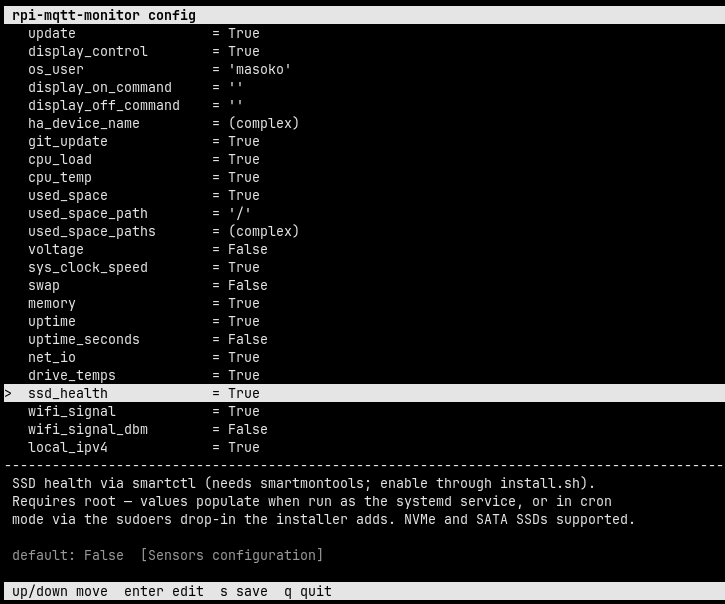
### Interactive configurator
Run `rpi-mqtt-monitor --config` to open a terminal UI for editing `config.py`. Move
through the settings with the **↑/↓** arrows; each setting shows its description and
default value. Press **Enter** to edit the selected value — booleans toggle, while numbers
and strings open an inline editor pre-filled with the current value (**Esc** cancels an
edit). Press **s** to save and **q** to quit. Comments, ordering, formatting and the
existing quote style in `config.py` are preserved; complex settings (lists and the output
function) are shown read-only with a note to edit them directly in the file.
## Configuration
All options live in `src/config.py`. Key settings:
| Setting | Description |
|---|---|
| `mqtt_host` | MQTT broker address |
| `mqtt_user` / `mqtt_password` | MQTT credentials |
| `mqtt_port` | MQTT port (default `1883`, `8883` for TLS) |
| `mqtt_tls` | Enable TLS/SSL for the MQTT connection |
| `mqtt_tls_ca_certs` / `mqtt_tls_insecure` | Optional CA file for a self-signed broker cert, or skip cert verification |
| `mqtt_websockets` / `mqtt_websocket_path` | Connect over MQTT-over-WebSockets (ports ~9001/8084) and its URL path |
| `mqtt_discovery_prefix` | HA discovery prefix (default `homeassistant`) |
| `mqtt_topic_prefix` | Topic prefix (default `rpi-MQTT-monitor`) |
| `mqtt_uns_structure` | Optional UNS prefix prepended to all topics |
| `discovery_messages` | Publish HA auto-discovery config messages |
| `service_sleep_time` | Seconds between readings when running as a service |
| `update_check_interval` | Seconds between update checks (default `3600`) |
| `use_availability` | Mark sensors unavailable in HA on read failure |
| `retain` | Set MQTT retain flag on published messages |
| `qos` | MQTT QoS level (`0`, `1`, or `2`) |
| `language` | UI language: `en`, `de`, `fr`, `bg` |
| `ha_device_name` | Override hostname as the HA device name |
| `hass_host` / `hass_token` | Home Assistant API URL and long-lived token |
| `restart_button` | Add a restart button to HA |
| `shutdown_button` | Add a shutdown button to HA |
| `display_control` | Add display on/off buttons to HA (auto-detects backend: see below) |
| `display_on_command` / `display_off_command` | Optional custom commands for display control (override auto-detection) |
| `custom_scripts` | Add buttons to HA that run custom scripts/programs on the host |
| `group_messages` | Send all values as a single CSV message (disables discovery) |
Full configuration reference: [Configuration wiki](https://github.com/hjelev/rpi-mqtt-monitor/wiki/Configuration)
### Display control backends
With `display_control = True`, the monitor on/off buttons auto-detect a working backend for the current environment:
| Environment | Backend used |
| --- | --- |
| X11 desktop | `xset dpms force on/off` |
| wlroots Wayland (Pi labwc/wayfire, sway) | `wlr-randr --output --on/--off` |
| Raspberry Pi | `vcgencmd display_power 1/0` |
| GNOME / generic Wayland | `ddcutil` (DDC/CI, hardware level) |
GNOME and most non-wlroots Wayland compositors expose no CLI to force monitors off, so external monitors are controlled over **DDC/CI** with `ddcutil`. When you enable display control during `install.sh`, the installer detects your backend and offers to perform this setup for you. To do it manually:
```bash
sudo apt install ddcutil
echo i2c-dev | sudo tee /etc/modules-load.d/i2c-dev.conf
sudo modprobe i2c-dev
sudo usermod -aG i2c $USER # the service runs as this user; re-login or restart the service afterwards
ddcutil detect # confirm your monitor(s) are listed
```
Each monitor must have **DDC/CI enabled in its on-screen (OSD) menu** — some ship with it off.
If none of the above fits your setup, set `display_on_command` / `display_off_command` in `config.py` to any custom command, which always takes precedence over auto-detection.
## Home Assistant Integration
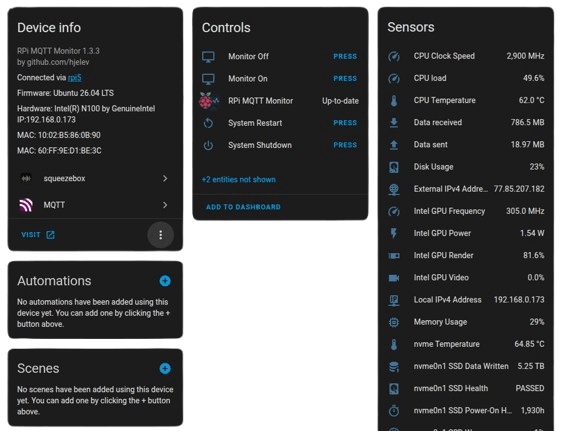
When `discovery_messages = True` (the default), a new MQTT device is created in Home Assistant automatically — no `configuration.yaml` edits required. Just add it to a dashboard.
The auto-created device groups all readings, controls (restart, shutdown, update), and sensors under a single Home Assistant entry:
### Home Assistant API
To bypass MQTT and push directly to the HA REST API, use the `--hass_api` flag and configure `hass_host` and `hass_token` in `config.py`.
### Wake on LAN
Run `rpi-mqtt-monitor --hass_wake` to print the YAML snippet for a Home Assistant Wake-on-LAN switch preconfigured with your device's MAC address and IP.
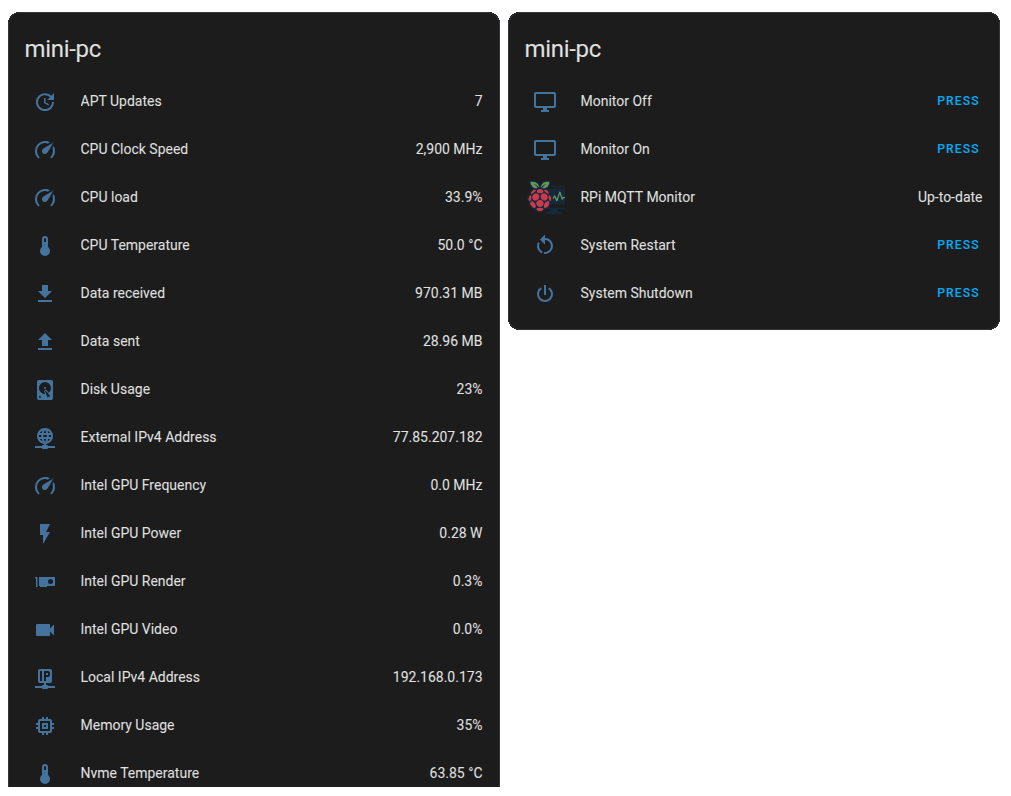
### Home Assistant Dashboard
## External Sensors
Supports DS18B20 (1-Wire temperature) and SHT21 (I²C temperature + humidity) sensors.
Configure in `config.py`:
```python
ext_sensors = [
["Housing", "ds18b20", "0014531448ff", -300],
["ext2", "sht21", 0, [-300, 0]],
]
```
Full setup guide: [External Sensors wiki](https://github.com/hjelev/rpi-mqtt-monitor/wiki/External-Sensors)
## Feature Requests
Open an [issue](https://github.com/hjelev/rpi-mqtt-monitor/issues) or submit a pull request — contributions are welcome.