[](https://travis-ci.org/hongymagic/react-number-input)
# React Number Input component
HTML `input` element clone with support for post-edit formatting of number
values. An input of `1000000` will format to `1,000,000` under `en-AU` locale.
## Usage
```
yarn add react-number-input
```
By default it points to `dist/index.js` which is a pre-built using babel and
compatible with CommonJS or ES6.
### Demo (Storybook)
```
git clone git@github.com:hongymagic/react-number-input.git
cd react-number-input
yarn
yarn storybook
```
### Screencast demo
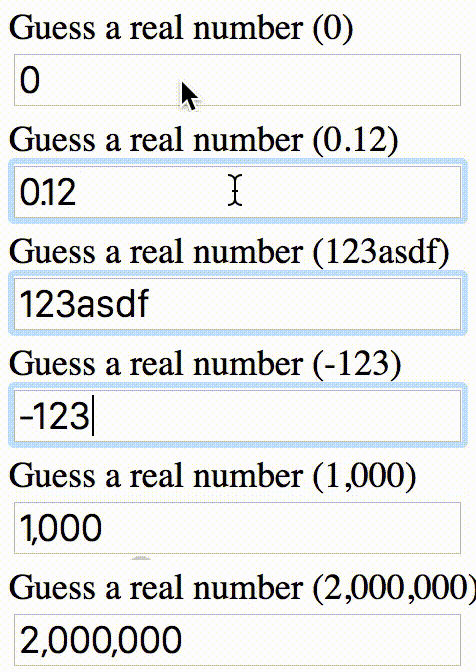
Screencast demo has the following configuration:
* Optionally format to 2 decimal places
* No minimum
* No maximum
### Install
```
npm install --save react-number-input
```
or
```
yarn add react-number-input --save
```
### Use
Use it like a normal [react form](http://facebook.github.io/react/docs/forms.html) element.
```jsx
```
All properties supplied to `NumberInput` will also be transferred to the
resulting `input` element (e.g., `style` or `className`).
### Supported event handlers
All event handlers supported by `` are supported. Except `onChange`
received the current number as its first argument and the `Event` object as
second argument.
## Contributing / Developing / Running demo
If you're thinking of contributing, there are a number of npm scripts you
can run to speed up the process.
### Building react-number-input
```
yarn
yarn build
```
### Testing react-number-input
```
yarn flow
yarn test
```
### Building and running the storybook
```
yarn build
yarn storybook
```
Then head to [http://localhost:6006/](http://localhost:6006) to see the demo.
## Note
* Renders `input[type=tel]` element, can be overriden by providing `type` property
* Number formatting is removed on focus
* Number formatting is applied on blur
* If input contains all zeroes, zeroes are left in place until blur
## TODO
* Add support for different locales