
Timeline Logo

Timeline

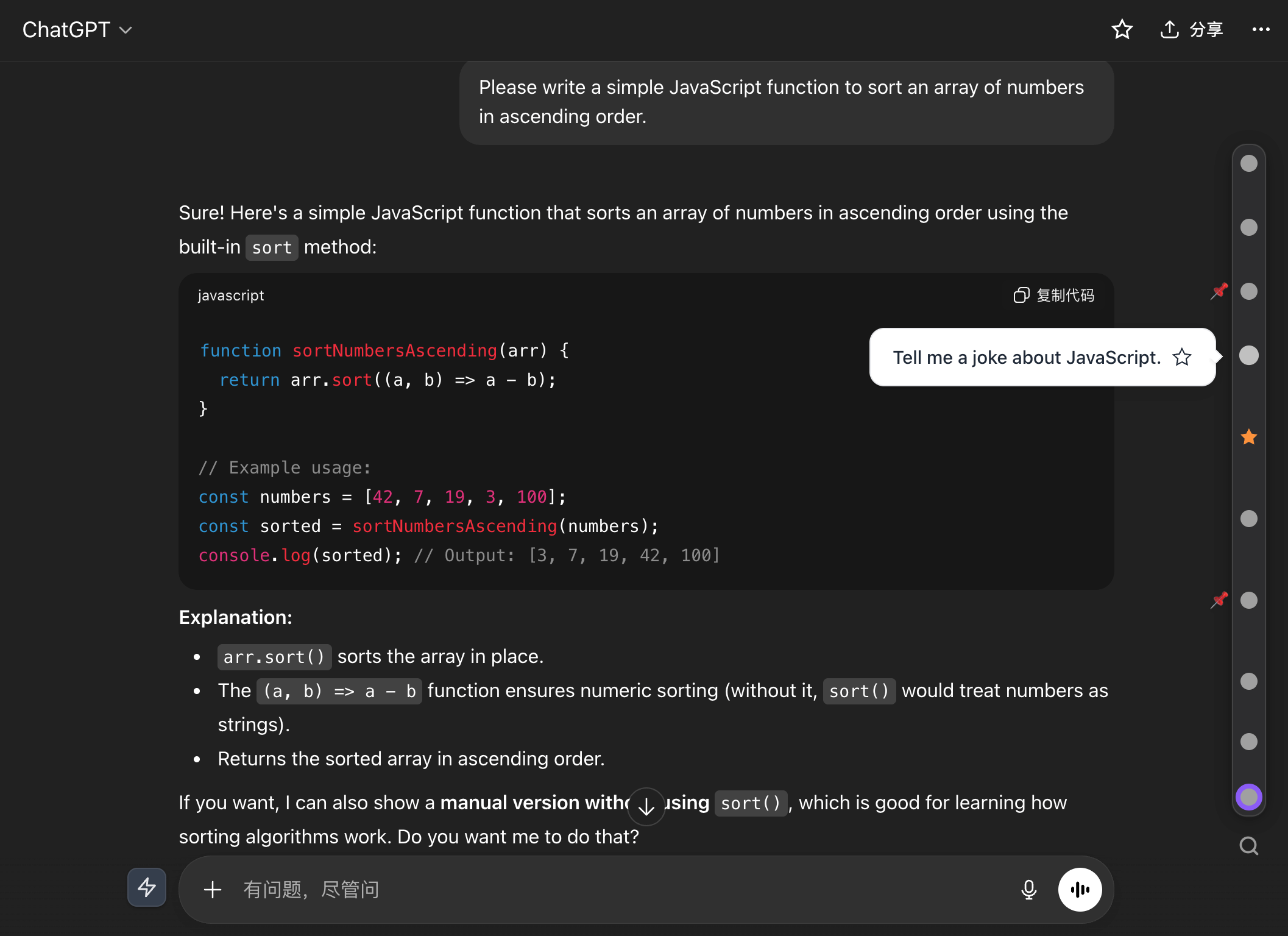
A super productivity extension built for ChatGPT, Gemini, DeepSeek, and other AI platforms

Timeline navigation · Starred folders · Prompt library · Conversation export · Formula copy · Pet animation · Data backup


Chrome Web Store Microsoft Edge Add-ons Firefox Add-ons

Manifest V3 GPL-3.0 License GitHub

简体中文 | English

Install Now

Chrome Web Store  |  Microsoft Edge Add-ons  |  Firefox Add-ons
Timeline preview
## DeepSeek Harness Timeline now supports DeepSeek Harness. If you use DeepSeek Harness, install the native **dsh-timeline** plugin — timeline, starred folders, prompt library, conversation export, and formula copy are all there, with theme syncing and zero setup. Repository: ## What is Timeline? Timeline is a productivity extension for ChatGPT, Gemini, DeepSeek, and other AI chat pages. It leaves each platform's native UI intact and adds what long conversations actually need: timeline navigation, starred folders, a prompt library, conversation export, formula copy, and data backup. The longer a chat gets, the harder it is to work with: - Jumping back to an earlier question means endless scrolling. - Valuable answers are scattered across sessions and hard to find later. - Formulas, code, and diagrams are awkward to copy and take away. - Input habits differ by platform, so prompts and follow-ups get repeated. - Extension data is stuck in one browser, making it hard to switch devices. ## Installation Install from the official browser extension stores: | Browser | Install | | --- | --- | | Chrome | **[Install for Chrome](https://chromewebstore.google.com/detail/timeline-ai-chat/fgebdnlceacaiaeikopldglhffljjlhh)** | | Microsoft Edge | **[Install for Edge](https://microsoftedge.microsoft.com/addons/detail/ai-timeline%EF%BC%9A%E5%8A%A9%E4%BD%A0%E4%BD%BF%E7%94%A8-ai-%E6%95%88%E7%8E%87%E7%BF%BB%E5%80%8D-/ekednjjojnhlajfobalaaihkibbdcbab)** | | Firefox | **[Install for Firefox](https://addons.mozilla.org/en-US/firefox/addon/ai-timeline/)** | | DeepSeek Harness | **[Install dsh-timeline on GitHub](https://github.com/houyanchao/dsh-timeline)** | After installation, open a supported AI chat page. Most features are enabled by default and can be adjusted per platform or per feature in the settings panel. ## Features | Category | Description | | --- | --- | | Conversation navigation | Adds a timeline on the right side of the page. Each node maps to a user question and supports click-to-jump, keyboard navigation, scroll-to-bottom, and question time labels. | | Question list | Displays all questions in the current conversation with jump, bookmark, and pin support. | | Bookmarks and archives | Saves individual Q&A entries or entire conversations, with folders, notes, search, and optional native-sidebar access on supported platforms. | | Input enhancements | Provides a prompt library, quick follow-up actions, Smart Enter behavior, input animations, and common settings. | | Reading and copying | Supports text highlighting, LaTeX / MathML formula copy, Mermaid diagram preview, and code block helpers. | | Code running | Runs or previews common code blocks including JavaScript, TypeScript, SQL, HTML, JSON, and Markdown. | | Data management | Supports JSON import/export and Google Drive backup/restore for migration and multi-device use. | | Personalization | Supports timeline theme colors, chat width adjustment, multi-language UI, and fine-grained feature switches. | ## Supported Platforms | Platform | Timeline | Highlight | Smart Input | Animations | Quick Quote | Question Time | Sidebar Bookmarks | Scroll to Bottom | | --- | :---: | :---: | :---: | :---: | :---: | :---: | :---: | :---: | | ChatGPT | ✅ | ✅ | ✅ | ✅ | ✅ | ✅ | ✅ | - | | Gemini | ✅ | ✅ | ✅ | ✅ | ✅ | ✅ | ✅ | ✅ | | DeepSeek | ✅ | ✅ | ✅ | ✅ | ✅ | ✅ | ✅ | - | | Claude | ✅ | ✅ | ✅ | - | ✅ | - | ✅ | - | | Kimi | ✅ | ✅ | ✅ | ✅ | ✅ | ✅ | ✅ | - | | Doubao | ✅ | ✅ | ✅ | ✅ | ✅ | ✅ | ✅ | - | | Tongyi Qianwen | ✅ | ✅ | ✅ | ✅ | ✅ | ✅ | ✅ | - | | Qwen International | ✅ | ✅ | ✅ | ✅ | ✅ | ✅ | ✅ | - | | Grok | ✅ | ✅ | ✅ | ✅ | ✅ | - | - | - | | Perplexity | ✅ | ✅ | ✅ | - | ✅ | - | - | - | | Tencent Yuanbao | ✅ | ✅ | ✅ | ✅ | ✅ | - | - | - | | Wenxin Yiyan | ✅ | ✅ | - | - | ✅ | - | - | - | | NotebookLM | - | ✅ | ✅ | - | ✅ | - | - | - | Formula copy, code running, and Mermaid diagram features are not tied to a specific AI platform. When matching content is detected on a page, Timeline attempts to provide the corresponding action. ## Data and Privacy Timeline stores core data locally in the browser by default, including bookmarks, folders, prompts, settings, time labels, and notes. Optional Google Drive sync is used only after the user grants authorization, and only for backing up and restoring extension data. The extension does not collect, upload, or share conversation content or personal information. This project is open source, and the data handling logic can be reviewed in the repository. ## Permissions | Permission | Purpose | | --- | --- | | `storage` | Stores bookmarks, folders, prompts, feature settings, and local data. | | `unlimitedStorage` | Prevents long conversations, notes, and backup data from hitting default browser storage limits. | | `identity` | Enables Google Drive authorization for backup and restore. | | `activeTab` | Enables extension functionality on the user's active AI chat page. | ## Languages Timeline currently includes 19 language packs: | Language | Code | | --- | --- | | English | `en` | | English (US) | `en_US` | | English (GB) | `en_GB` | | Simplified Chinese | `zh_CN` | | Traditional Chinese | `zh_TW` | | Traditional Chinese (Hong Kong) | `zh_HK` | | Japanese | `ja` | | Korean | `ko` | | German | `de` | | French | `fr` | | Spanish | `es` | | Italian | `it` | | Portuguese | `pt_PT` | | Russian | `ru` | | Polish | `pl` | | Hindi | `hi` | | Thai | `th` | | Vietnamese | `vi` | | Bahasa Indonesia | `id` | ## Local Development This repository is a browser extension project and does not require a frontend build step. Load the source directory directly during development: 1. Open the Chrome or Edge extensions page. 2. Enable Developer Mode. 3. Choose "Load unpacked". 4. Select the repository root directory. 5. After changing code, reload the extension and refresh the target AI platform page. For Firefox, use `about:debugging` to temporarily load the extension. ## Feedback Feedback and feature requests are welcome: - [GitHub Issues](https://github.com/houyanchao/chatgpt-gemini-timeline/issues) - Email: houyanchao@outlook.com - Chrome / Edge / Firefox extension store reviews When reporting an issue, include the browser version, extension version, target AI platform, reproduction steps, expected behavior, actual behavior, and screenshots if possible. ## Credits This project builds on [chatgpt-conversation-timeline](https://github.com/Reborn14/chatgpt-conversation-timeline). Thanks to the original author for the open source contribution. The Gemini image watermark removal engine (`js/watermark/engine/`) is ported from [GargantuaX/gemini-watermark-remover](https://github.com/GargantuaX/gemini-watermark-remover) (MIT), whose reverse alpha blending algorithm and calibrated masks originate from [allenk/GeminiWatermarkTool](https://github.com/allenk/GeminiWatermarkTool) (MIT, © 2024 AllenK / Kwyshell). See [`js/watermark/engine/LICENSE`](./js/watermark/engine/LICENSE) for the full license text. ## License This project is open source under the [GPL-3.0](./LICENSE) license. ---

If Timeline is useful to you, please consider giving it a Star.


