# pgwd — Postgres Watch Dog

Watch your PostgreSQL connections
[](https://github.com/hrodrig/pgwd/releases)
[](https://github.com/hrodrig/pgwd/releases)
[](https://github.com/hrodrig/pgwd/actions)
[](https://codecov.io/gh/hrodrig/pgwd)
[](https://gghstats.hermesrodriguez.com/hrodrig/pgwd)
[](https://github.com/avelino/awesome-go)
[](https://go.dev/)
[](https://opensource.org/licenses/MIT)
[](https://pkg.go.dev/github.com/hrodrig/pgwd)
[](https://deps.dev/go/github.com%2Fhrodrig%2Fpgwd)
[](https://dev.to/hrodrig/pgwd-a-watchdog-for-your-postgresql-connections-1pjg)
[](https://deepwiki.com/hrodrig/pgwd)
**Repo:** [github.com/hrodrig/pgwd](https://github.com/hrodrig/pgwd) · **Releases:** [GitHub Releases](https://github.com/hrodrig/pgwd/releases) · **Spec:** [SPECIFICATIONS.md](SPECIFICATIONS.md) · **Operator:** [pgwd-selfhosted](https://github.com/hrodrig/pgwd-selfhosted) · **Changelog:** [CHANGELOG.md](CHANGELOG.md) · **Roadmap:** [ROADMAP.md](ROADMAP.md) · **Article:** [pgwd on DEV — a watchdog for your PostgreSQL connections](https://dev.to/hrodrig/pgwd-a-watchdog-for-your-postgresql-connections-1pjg)
**Supply chain (from v0.8.0):** each release attaches **SPDX** and **CycloneDX** SBOMs plus **Cosign** signatures for **`checksums.txt`** and **`ghcr.io/hrodrig/pgwd`** images — see [Supply chain verification](#supply-chain-verification).
Go CLI that checks PostgreSQL connection counts (active/idle) and notifies via **Slack** and/or **Loki** when configured thresholds are exceeded. It can also alert on **stale connections** (connections that stay open and never close).
### Why connection limits matter
PostgreSQL enforces a configured ceiling (`max_connections`). Slots reserved for privileged roles (`superuser_reserved_connections`, and on PostgreSQL 16+ `reserved_connections`) reduce how many ordinary application connections can succeed before the server starts refusing new sessions. When the limit is hit, clients fail to connect with SQLSTATE **53300** (“too many clients”). Size connection pools and reserved slots so applications fail loudly before total exhaustion rather than silently degrading. Under high concurrency, each backend is still a process: memory (`shared_buffers` plus per-session/`work_mem` pressure), CPU, and I/O can degrade even before hard rejection—or the OS can OOM.
**pgwd** watches connection pressure (and connect failures) so you can alert before or when saturation happens. It does **not** replace connection poolers or careful sizing. For hardware/app heuristics, reserved slots, WAL/standby notes, and developer pool pitfalls, see **[PostgreSQL connection limits and saturation](docs/postgresql-connection-limits.md)**.
**Self-hosted deployment (Docker Compose, Helm, Kubernetes manifests):** **[pgwd-selfhosted](https://github.com/hrodrig/pgwd-selfhosted)** — production paths, env layout, and observability stacks live there; this repo ships the application binary, packages, and container image only.
**Related tools (same maintainer):**
- **[pgwd](https://github.com/hrodrig/pgwd)** — PostgreSQL connection watchdog ([live traffic](https://gghstats.hermesrodriguez.com/hrodrig/pgwd); deploy: [pgwd-selfhosted](https://github.com/hrodrig/pgwd-selfhosted))
- **[gghstats](https://github.com/hrodrig/gghstats)** — GitHub repo traffic beyond 14 days ([live demo](https://gghstats.hermesrodriguez.com); deploy: [gghstats-selfhosted](https://github.com/hrodrig/gghstats-selfhosted))
- **[kzero](https://github.com/hrodrig/kzero)** — bastion-first declarative workload reset ([live traffic](https://gghstats.hermesrodriguez.com/hrodrig/kzero); deploy: [kzero-selfhosted](https://github.com/hrodrig/kzero-selfhosted))
- **[groot](https://github.com/hrodrig/groot)** — Kubernetes diagnostics archive ([live traffic](https://gghstats.hermesrodriguez.com/hrodrig/groot); deploy: [groot-selfhosted](https://github.com/hrodrig/groot-selfhosted))
**Documentation:** [ROADMAP.md](ROADMAP.md), [Operator use cases](docs/use-cases.md), [Connection limits](docs/postgresql-connection-limits.md), [SPECIFICATIONS.md](SPECIFICATIONS.md) (behavior contract), [Kubernetes passwords / DISCOVER migration](docs/kubernetes-passwords.md), [docs/](docs/README.md) (band plans, sequence diagrams, upgrades), `man pgwd`. **Scanning:** [tools/README.md](tools/README.md).

### How pgwd fits together
Click the diagram for the **interactive** viewer (guided views, pan/zoom, Present mode, source links, flow animation). GitHub cannot run the HTML inline — the preview below is a static snapshot.
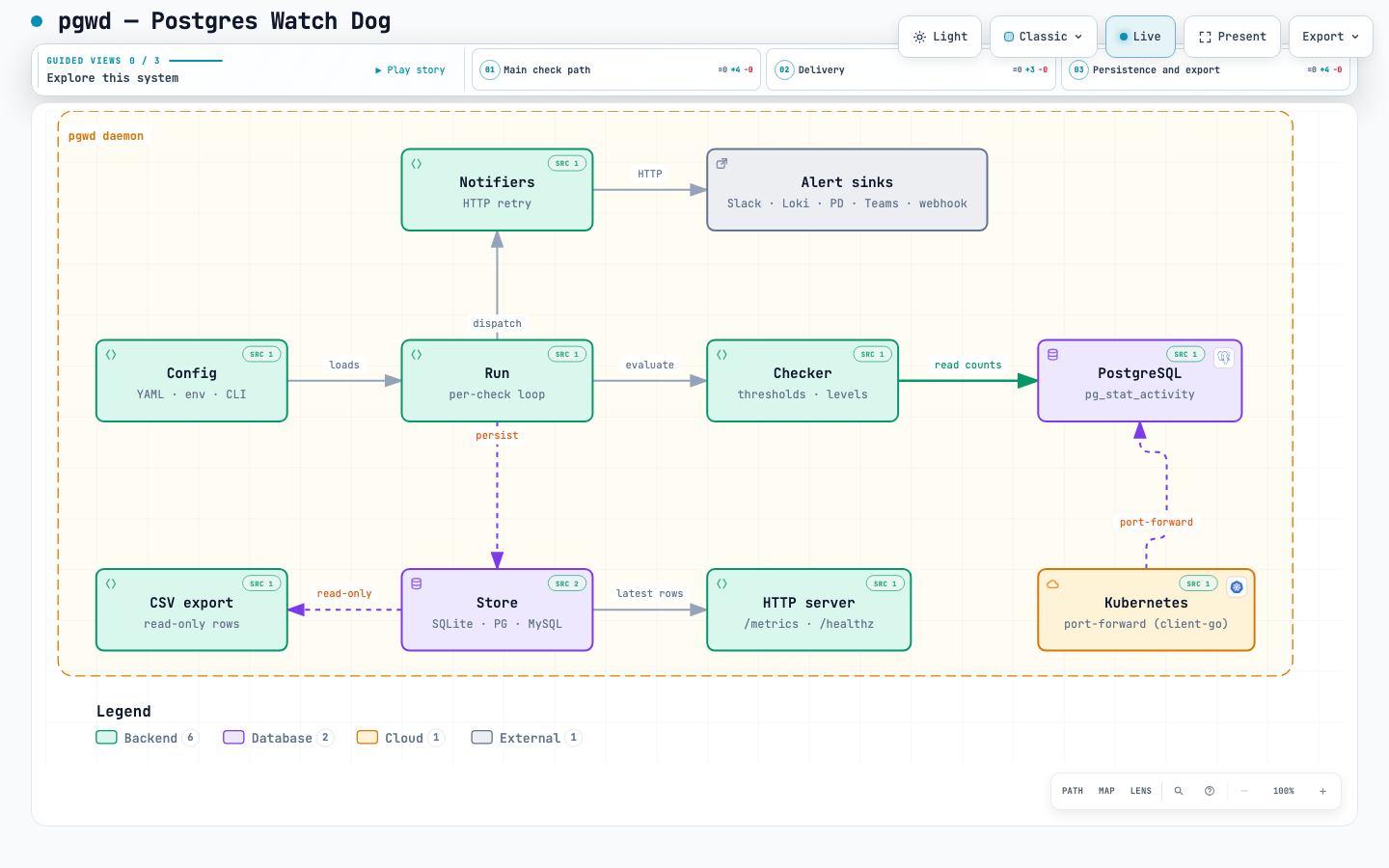
Open interactive architecture →
· or clone and open docs/pgwd-architecture.html locally
Config → check loop → PostgreSQL · notifiers → Slack/Loki/PagerDuty/Teams/webhook · store → `/metrics` + CSV · optional Kubernetes port-forward. Spec: [`docs/architecture.pgwd.json`](docs/architecture.pgwd.json).
## Table of contents
- [How pgwd fits together](#how-pgwd-fits-together)
- [Quick start](#quick-start)
- [Compare](#compare)
- [Configuration: CLI vs environment](#configuration-cli-vs-environment)
- [Usage examples](#usage-examples)
- [Typical scenarios](#typical-scenarios)
- [Kubernetes](#kubernetes)
- [Parameters](#parameters)
- [Install](#install)
- [Build](#build)
- [Testing](#testing)
- [Requirements](#requirements)
- [Slack](#slack)
- [Loki](#loki)
- [Troubleshooting](#troubleshooting)
- [FAQ](#faq)
- [Docker](#docker)
- [systemd](#systemd)
- [Debian / Ubuntu](#debian--ubuntu)
- [AlmaLinux](#almalinux)
- [OpenSUSE](#opensuse)
- [Arch Linux](#arch-linux)
- [Alpine Linux (OpenRC)](#alpine-linux-openrc)
- [OpenBSD](#openbsd)
- [FreeBSD](#freebsd)
- [NetBSD](#netbsd)
- [DragonFly BSD](#dragonfly-bsd)
- [Solaris](#solaris)
- [Roadmap](#roadmap)
- [Get involved](#get-involved)
- [License](#license)
---
## Quick start
```bash
# See all options
pgwd -h
# Minimal: check once, alert to Slack (3-tier levels 75/85/95% by default)
pgwd -db-url "postgres://user:pass@localhost:5432/mydb" \
-notifications-slack-webhook "https://hooks.slack.com/services/..."
# Custom 3-tier levels (default 75,85,95)
pgwd -db-url "postgres://..." -notifications-slack-webhook "https://..." -db-threshold-levels 70,85,90
```
### Breaking changes (upgrade from 0.9.x)
**1.0.0** removes legacy `db:`, total/active thresholds, and `notify-on-connect-failure`. Migration checklist: **[docs/UPGRADE-0.9-to-1.0.md](docs/UPGRADE-0.9-to-1.0.md)**.
### Breaking changes (upgrade from 0.5.x)
If you use CLI flags or env vars for notifications or DB thresholds, update your scripts:
| Old | New |
|-----|-----|
| `-threshold-total` | removed; use `-db-threshold-levels` |
| `-threshold-active` | removed; use `-db-threshold-levels` |
| `-threshold-idle` | `-db-threshold-idle` |
| `-threshold-stale` | `-db-threshold-stale` |
| `-threshold-levels` | `-db-threshold-levels` |
| `-stale-age` | `-db-stale-age` |
| `-default-threshold-percent` | `-db-default-threshold-percent` |
| `-slack-webhook` | `-notifications-slack-webhook` |
| `-loki-url` | `-notifications-loki-url` |
| `-loki-labels` | `-notifications-loki-labels` |
| `-loki-org-id` | `-notifications-loki-org-id` |
| `-loki-bearer-token` | `-notifications-loki-bearer-token` |
| `PGWD_SLACK_WEBHOOK` | `PGWD_NOTIFICATIONS_SLACK_WEBHOOK` |
| `PGWD_LOKI_URL` | `PGWD_NOTIFICATIONS_LOKI_URL` |
| `PGWD_LOKI_LABELS` | `PGWD_NOTIFICATIONS_LOKI_LABELS` |
| `PGWD_LOKI_ORG_ID` | `PGWD_NOTIFICATIONS_LOKI_ORG_ID` |
| `PGWD_LOKI_BEARER_TOKEN` | `PGWD_NOTIFICATIONS_LOKI_BEARER_TOKEN` |
| `PGWD_THRESHOLD_TOTAL` | removed; use `PGWD_DB_THRESHOLD_LEVELS` |
| `PGWD_THRESHOLD_ACTIVE` | removed; use `PGWD_DB_THRESHOLD_LEVELS` |
| `PGWD_THRESHOLD_IDLE` | `PGWD_DB_THRESHOLD_IDLE` |
| `PGWD_THRESHOLD_STALE` | `PGWD_DB_THRESHOLD_STALE` |
| `PGWD_THRESHOLD_LEVELS` | `PGWD_DB_THRESHOLD_LEVELS` |
| `PGWD_STALE_AGE` | `PGWD_DB_STALE_AGE` |
| `PGWD_DEFAULT_THRESHOLD_PERCENT` | `PGWD_DB_DEFAULT_THRESHOLD_PERCENT` |
Config file keys unchanged.
**Consolidated upgrade guide (0.5.x → 0.6.x):** [docs/UPGRADE-0.5-to-0.6.md](docs/UPGRADE-0.5-to-0.6.md) — checklist, Helm move, and optional 0.6.x features.
---
## Configuration: config file, env, CLI
pgwd loads settings from (in order): **config file** → **environment variables** → **CLI flags**. Each layer overrides the previous.
| Source | Path / prefix |
|--------|---------------|
| Config file | `/etc/pgwd/pgwd.conf` (or `-config` / `PGWD_CONFIG`) |
| Environment | `PGWD_*` |
| CLI | `-flag` |
**Config file** (YAML) — keys match `-flag` and `PGWD_*` env vars. See `contrib/pgwd.conf.example` (or **`pgwd --print-sample-config > /etc/pgwd/pgwd.conf`** when the example file is not on disk). Use **`databases:`** for one or more Postgres (required even for a single target). Legacy top-level **`db:`** was removed in v1.0. For kube.postgres, use a single `databases:` entry with a URL that kube port-forward rewrites (multi-DB + kube is not supported).
```bash
# Use default path /etc/pgwd/pgwd.conf
pgwd
# Or specify path
pgwd -config /etc/pgwd/pgwd.conf
PGWD_CONFIG=/path/to/pgwd.conf pgwd
```
**Precedence:** **CLI > config file > defaults** when a config file is loaded (`PGWD_*` env vars are **not** applied in that case). When **no** config file is loaded: **CLI > env > defaults**. Use env for secrets and one-off overrides when running without a file; use a config file for stable base settings.
**`-db-url` override (one-shot):** When the config file has `databases:` (multi-DB), passing `-db-url` and `-interval 0` runs against that single URL only, ignoring the databases from config for that run. Useful for quick ad-hoc checks without editing the config.
### Multi-database limitations
- **`-kube-postgres` / `kube.postgres` and `databases:` are mutually exclusive.** Validation rejects that combination. Multi-DB mode expects **direct** Postgres URLs (e.g. in-cluster DNS, VPN, or `localhost` after manual port-forward). For port-forward from **outside** the cluster, use **N port-forwards + one `databases:` config**, or **one pgwd process per** forwarded instance — see **[docs/use-cases.md](docs/use-cases.md)** (UC-5, UC-6, UC-7).
- **Persisted history and hysteresis** (SQLite) are keyed by **`(client, cluster, database)`**. The **host from the URL is not part of that key**. If several targets share the same database name and the same **derived** client (`base client` + `-` + name from the URL path), they **collide** in the store and resolution/hysteresis will be wrong. Give each `databases:` entry a **unique `client`** when monitoring the same logical DB name on different hosts.
- **Different credentials per database:** put the full DSN (user + password) in each `databases[].url`. pgwd does not read multiple K8s Secrets in one process — inject URLs at deploy (Helm/Kustomize) or use [kubernetes-passwords.md](docs/kubernetes-passwords.md) for single-DB kube patterns.
**Operator guide (all scenarios):** **[docs/use-cases.md](docs/use-cases.md)**.
**Ready-to-use profiles:** [`contrib/profiles/`](contrib/profiles/) — `minimal-slack`, `daemon-loki`, `kube-prod`, `multi-db`.
### Anonymous usage
Daemon mode (`interval > 0`) can optionally phone home to improve pgwd (same privacy model as [gghstats](https://github.com/hrodrig/gghstats)). **Both are off by default for telemetry; update check is on unless disabled.**
| Setting | Default | Outbound call | What is sent |
|---------|---------|---------------|--------------|
| `enable_collector` / `PGWD_ENABLE_COLLECTOR` | **off** | **POST** `https://collect.gghstats.com/a1b2c3d4e5f6a7b8` (once per daemon start) | `version`, `commit`, `build_date`, one-way `hash`, boolean `features` only (e.g. multi_db, has_slack, has_loki) |
| `enable_update_check` / `PGWD_ENABLE_UPDATE_CHECK` | **on** | **GET** `https://api.github.com/repos/hrodrig/pgwd/releases/latest` | No pgwd config; public release tag only (semver compare) |
**Never sent to either destination:** DSN/URL, hostnames, database names, `client`, cluster/namespace, webhook URLs, file paths, Loki labels, or any secret.
The ingest host is [collect.gghstats.com](https://collect.gghstats.com) (shared Hermes collector; server tags reports as `project=pgwd`). Operators can audit the payload at debug log level (`log_level: debug`). Errors are debug-logged only; outbound calls never block monitoring.
**Example collector payload** (POST body; illustrative values):
```json
{
"version": "1.2.0",
"commit": "abc1234",
"build_date": "2026-07-18T12:00:00Z",
"hash": "a1b2c3d4e5f67890",
"features": {
"multi_db": false,
"uses_level_mode": true,
"long_query_enabled": false,
"has_slack": true,
"has_loki": true,
"has_kube_postgres": false,
"has_kube_loki": false,
"has_sqlite_store": true,
"has_sql_metrics_store": false,
"has_http_listen": true,
"confirm_alert_gt_1": false,
"confirm_ok_gt_1": false,
"dry_run": false
}
}
```
`hash` is a short one-way fingerprint of the feature shape (dedup only; not reversible config).
### Using only environment variables
```bash
export PGWD_DB_URL="postgres://user:pass@localhost:5432/mydb"
export PGWD_DB_THRESHOLD_LEVELS="75,85,95"
export PGWD_DB_THRESHOLD_IDLE=50
export PGWD_NOTIFICATIONS_SLACK_WEBHOOK="https://hooks.slack.com/services/..."
export PGWD_INTERVAL=60
pgwd
# Runs as daemon every 60s; no need to pass any flag.
```
### Env for defaults, CLI to override
```bash
export PGWD_DB_URL="postgres://localhost:5432/mydb"
export PGWD_DB_THRESHOLD_LEVELS="70,85,90"
export PGWD_NOTIFICATIONS_SLACK_WEBHOOK="https://hooks.slack.com/..."
# Override DB and run once (e.g. for a different host)
pgwd -db-url "postgres://prod-host:5432/mydb" -interval 0
# Override threshold for a quick test
pgwd -db-threshold-levels 5,10,15 -dry-run
```
---
## Usage examples
### By threshold type
| Threshold | Use when you care about… | Example |
|-----------|---------------------------|--------|
| **levels** (3-tier) | % of `max_connections` — attention / alert / danger (default mode) | `-db-threshold-levels 75,85,95` (default) or `-db-threshold-levels 70,85,90` |
| **idle** | Pool size / connections sitting idle | `-db-threshold-idle 40` |
| **stale** | Connections open too long (leaks, never closed) | `-db-stale-age 600 -db-threshold-stale 1` |
```bash
# 3-tier levels (default 75,85,95% of max_connections) — one-shot, Slack
pgwd -db-url "postgres://user:pass@localhost:5432/mydb" \
-notifications-slack-webhook "https://hooks.slack.com/services/..."
# Custom levels (e.g. 70,85,90%) — one-shot, Loki
pgwd -db-url "postgres://..." -db-threshold-levels 70,85,90 -notifications-loki-url "http://localhost:3100/loki/api/v1/push"
# Idle connections ≥ 40 (daemon every 60s, Slack)
pgwd -db-url "postgres://..." -db-threshold-idle 40 -interval 60 -notifications-slack-webhook "https://..."
# Stale: ≥ 1 connection open longer than 10 minutes
pgwd -db-url "postgres://..." -db-stale-age 600 -db-threshold-stale 1 -notifications-slack-webhook "https://..."
```
### Multiple thresholds in one run
You can combine several thresholds; each one that is exceeded generates an alert (same run can send multiple events).
```bash
# Alert on levels (3-tier) OR idle OR stale in a single run
pgwd -db-url "postgres://..." \
-db-threshold-levels 75,85,95 \
-db-threshold-idle 60 \
-db-stale-age 600 -db-threshold-stale 1 \
-interval 120 \
-notifications-slack-webhook "https://..." \
-notifications-loki-url "http://localhost:3100/loki/api/v1/push"
```
### By notifier
```bash
# Slack only (default 3-tier levels)
pgwd -db-url "postgres://..." -notifications-slack-webhook "https://hooks.slack.com/..."
# Loki only (optional labels)
pgwd -db-url "postgres://..." \
-notifications-loki-url "http://localhost:3100/loki/api/v1/push" \
-notifications-loki-labels "app=pgwd,env=prod,db=myapp"
# Slack and Loki (same event sent to both)
pgwd -db-url "postgres://..." \
-notifications-slack-webhook "https://hooks.slack.com/..." \
-notifications-loki-url "http://localhost:3100/loki/api/v1/push"
```
### Run mode and dry-run
| `interval` | Behavior |
|-------------|----------|
| **0** | One-shot — check once, then exit |
| **> 0** (e.g. 60) | Daemon — check every N seconds until Ctrl+C or SIGTERM |
**Recommendation: use daemon mode** (`interval` > 0) when you need resolution notifications, hysteresis (`confirm_ok`, `confirm_alert`), the HTTP server (`/metrics`, `/healthz`), or SQLite metrics history. In one-shot or timer mode, pgwd runs once per tick and exits — there is no state history, so resolution alerts, Prometheus scraping, and hysteresis do not apply.
```bash
# One-shot: run once, then exit (ideal for cron)
pgwd -db-url "postgres://..." -notifications-slack-webhook "https://..."
# or: PGWD_INTERVAL=0 pgwd
# Daemon: run every N seconds until Ctrl+C or SIGTERM
pgwd -db-url "postgres://..." -interval 60 -notifications-slack-webhook "https://..."
# Dry run: only print stats (total/active/idle), no notifications; no webhook/loki needed
pgwd -db-url "postgres://..." -dry-run
# With interval > 0 (default 60): runs as daemon, prints every interval — Ctrl+C to stop
# With interval 0: runs once and exits — quick connectivity test
pgwd -db-url "postgres://..." -dry-run -interval 0
# Force notification: send a test message to all configured notifiers (no threshold required)
# Use to validate delivery and format before relying on real alerts
pgwd -db-url "postgres://..." -notifications-slack-webhook "https://..." -force-notification
pgwd -db-url "postgres://..." -notifications-loki-url "http://localhost:3100/loki/api/v1/push" -force-notification
```
**Quick test** (after install): `pgwd -dry-run -interval 0` — one check, prints stats, exits. Use config file or `-db-url` + `-config`.
[↑ Back to top](#top)
---
## Typical scenarios
| Scenario | Suggestion |
|----------|------------|
| **Many Postgres instances** | Use `databases:` in one config (daemon mode) for multiple **direct** URLs. You cannot combine `databases:` with `-kube-postgres`. Use a **distinct `client` per entry** when the same DB name appears on different hosts (see [Multi-database limitations](#multi-database-limitations)). For diverse setups (different clusters, kube contexts), one config per instance with cron may be simpler. |
| **Cron check every 5 min** | One-shot (`interval` 0 or unset), one or more thresholds, Slack or Loki. Run from cron every 5 minutes. No resolution alerts, /metrics, or hysteresis. |
| **Long-running watcher** | Daemon with `-interval 60` (or 120). Run under systemd/supervisor; stop with SIGTERM. **Recommended** for resolution notifications, Prometheus /metrics, and hysteresis. |
| **Detect connection leaks** | Use `stale-age` + `threshold-stale` (e.g. 600 and 1). Alert when any connection stays open longer than 10 min. |
| **Pre-production test** | `-dry-run` and low thresholds to see current counts without sending alerts. |
| **Validate notifications** | `-force-notification` with Slack/Loki: sends one test message regardless of thresholds. Use one-shot to confirm delivery, format, and how messages look. (If the connection to Postgres fails, pgwd always sends a connect-failure alert when a notifier is configured.) |
| **Test alerts without low max_connections** | Use `-test-max-connections N` (e.g. 20) with `-force-notification` or low thresholds: thresholds and messages use N as “max_connections”, while stats stay real. Notifications show “(test override)” so total can exceed N. See [docs/testing-alert-levels.md](docs/testing-alert-levels.md) for a procedure to trigger attention/alert/danger against production without changing Postgres config. |
| **Zero config (use defaults)** | Only set `-db-url` and a notifier; pgwd uses 3-tier levels (75,85,95%) by default. Use `-db-threshold-levels` to customize; `-db-default-threshold-percent` is retained for compatibility only. |
| **Multiple environments** | Set `PGWD_*` in env per environment; override `-db-url` or `-notifications-loki-labels` per deploy. |
| **Postgres in Kubernetes** | **pgwd inside K8s:** Use direct URLs (`postgres://...@postgres.namespace.svc.cluster.local:5432/mydb`). **pgwd outside K8s:** Use `-kube-postgres namespace/svc/name`; requires kubeconfig (no kubectl binary). |
| **Alert when Postgres is unreachable** | If you configure a notifier (Slack/Loki), pgwd **always** sends an alert when the connection fails (e.g. refused, timeout, or "too many clients"). No extra flag needed. |
### Running from cron
**Daemon or cron.** For multiple Postgres with direct URLs, use `databases:` in one config with a daemon. When instances are diverse (different clusters, kube contexts), cron with one config per instance is often simpler: one cron entry per config, no daemon to manage. **Note:** Cron (one-shot per tick) does not support resolution notifications, /metrics, or hysteresis — use the daemon (`pgwd.service`) if you need those.
Cron runs with a **minimal environment** (e.g. `PATH=/usr/bin:/bin`). Two things to keep in mind:
1. **`-kube-postgres` and kubeconfig:** If you use `-kube-postgres`, cron must have access to a valid kubeconfig. Set `KUBECONFIG` in the cron environment or ensure `~/.kube/config` exists:
```bash
# In crontab: set PATH and KUBECONFIG
PATH=/usr/local/bin:/usr/bin:/bin
KUBECONFIG=/path/to/kubeconfig
*/5 * * * * /usr/local/bin/pgwd -kube-postgres default/svc/postgres -db-url "postgres://..." -notifications-slack-webhook "https://..."
```
Or use a wrapper script that exports PATH and runs pgwd:
```bash
#!/bin/sh
export PATH="/usr/local/bin:$PATH"
exec /usr/local/bin/pgwd "$@"
```
2. **Seeing errors:** If kubeconfig is missing or invalid, pgwd exits with a clear message. Cron often mails stderr to the user; otherwise redirect stdout and stderr to a log file so you can see why the job failed:
```bash
*/5 * * * * /usr/local/bin/pgwd -db-url "postgres://..." -notifications-slack-webhook "https://..." >> /var/log/pgwd.log 2>&1
```
Here `>>` appends stdout to the file and `2>&1` sends stderr to the same place.
3. **Log rotation:** When redirecting to a file, it grows indefinitely. Use logrotate to avoid filling disk. Example `/etc/logrotate.d/pgwd`:
For `/var/log/pgwd.log`:
```
/var/log/pgwd.log {
daily
rotate 7
compress
missingok
notifempty
}
```
For `/home/username/log/pgwd-cron.log` (logs in user home): add `su username groupname` so logrotate runs as the file owner (avoids "insecure permissions" error). Use the same user and group that runs pgwd (e.g. the cron user).
```
/home/username/log/pgwd-cron.log {
daily
rotate 7
compress
missingok
notifempty
su username groupname
}
```
### Example: multiple services and heartbeat via bash + cron
**Simpler: one cron line per instance.** If each instance has its own config file (e.g. `/etc/pgwd/prod-db1.conf`, `/etc/pgwd/analytics.conf`), add one cron entry per config:
```bash
PATH=/usr/local/bin:/usr/bin:/bin
*/5 * * * * pgwd -config /etc/pgwd/prod-db1.conf >> /var/log/pgwd-prod-db1.log 2>&1
*/5 * * * * pgwd -config /etc/pgwd/analytics.conf >> /var/log/pgwd-analytics.log 2>&1
```
Each run is independent; no port clashes when using different configs (each has its own `kube.local_port` if using kube).
**Alternative: single script for many services.** You can run pgwd for several Postgres instances (e.g. one per Kubernetes service) from a single cron schedule: use a bash script that sets `KUBECONFIG`, `PGWD_NOTIFICATIONS_SLACK_WEBHOOK`, and `PATH`, then invokes pgwd once per service with distinct **`-kube-local-port`** values so port-forwards do not clash. Add a second script that runs **`-force-notification`** on a schedule (e.g. every 2 hours) as a “still alive” heartbeat.
> **Passwords:** Prefer a Secret-backed `PGWD_DB_URL` (see [Kubernetes — outside cluster](#pgwd-outside-kubernetes-port-forward-via-client-go)). **`DISCOVER_MY_PASSWORD`** is **deprecated** (removed 0.9.x) — [why and what to use instead](docs/kubernetes-passwords.md).
**Check script** (e.g. `~/bin/pgwd-cron.sh`): runs every 5 minutes, checks all services, alerts only when thresholds are exceeded.
```bash
#!/bin/bash
mkdir -p ~/log
export KUBECONFIG=/path/to/your/kubeconfig
export PGWD_NOTIFICATIONS_SLACK_WEBHOOK="https://hooks.slack.com/services/..."
export PATH="/usr/local/bin:$PATH"
PGWD=${PGWD:-/usr/local/bin/pgwd}
# Password from Secret (preferred — do not use DISCOVER_MY_PASSWORD; removed in 0.9.x)
PGPASSWORD=$(kubectl get secret postgres-credentials -n mynamespace -o jsonpath='{.data.password}' | base64 -d)
echo "$(date -u +%Y-%m-%dT%H:%M:%SZ) checking postgres-a"
$PGWD -kube-postgres mynamespace/svc/postgres-a \
-kube-local-port 15432 \
-db-url "postgres://postgres:${PGPASSWORD}@localhost:15432/db_a?sslmode=disable"
echo "$(date -u +%Y-%m-%dT%H:%M:%SZ) checking postgres-b"
$PGWD -kube-postgres mynamespace/svc/postgres-b \
-kube-local-port 15433 \
-db-url "postgres://postgres:${PGPASSWORD}@localhost:15433/db_b?sslmode=disable"
echo "$(date -u +%Y-%m-%dT%H:%M:%SZ) checking postgres-c"
$PGWD -kube-postgres mynamespace/svc/postgres-c \
-kube-local-port 15434 \
-db-url "postgres://postgres:${PGPASSWORD}@localhost:15434/db_c?sslmode=disable"
exit 0
```
**Heartbeat script** (e.g. `~/bin/pgwd-heartbeat.sh`): runs every 2 hours, sends a test notification per service so you know the pipeline is up. Use different local ports (e.g. 25432…) so they do not conflict with the check script if both run close together.
```bash
#!/bin/bash
mkdir -p ~/log
export KUBECONFIG=/path/to/your/kubeconfig
export PGWD_NOTIFICATIONS_SLACK_WEBHOOK="https://hooks.slack.com/services/..."
export PATH="/usr/local/bin:$PATH"
PGWD=${PGWD:-/usr/local/bin/pgwd}
PGPASSWORD=$(kubectl get secret postgres-credentials -n mynamespace -o jsonpath='{.data.password}' | base64 -d)
$PGWD -kube-postgres mynamespace/svc/postgres-a \
-kube-local-port 25432 \
-db-url "postgres://postgres:${PGPASSWORD}@localhost:25432/db_a?sslmode=disable" \
-force-notification
$PGWD -kube-postgres mynamespace/svc/postgres-b \
-kube-local-port 25433 \
-db-url "postgres://postgres:${PGPASSWORD}@localhost:25433/db_b?sslmode=disable" \
-force-notification
exit 0
```
**Crontab** (`crontab -e`): run checks every 5 minutes and heartbeat every 2 hours; append output to one log file.
```
PATH=/usr/bin:/bin
*/5 * * * * /bin/bash -l -c '~/bin/pgwd-cron.sh >> ~/log/pgwd.log 2>&1'
0 */2 * * * /bin/bash -l -c '~/bin/pgwd-heartbeat.sh >> ~/log/pgwd.log 2>&1'
```
Adjust `KUBECONFIG`, webhook URL, namespace, service names, database names, and `PGWD` path to your environment. For passwords, use `kubectl get secret` (as in the script) or **`kube.password_from_secret`** in a config file — see **[docs/kubernetes-passwords.md](docs/kubernetes-passwords.md)** and **`contrib/k8s/pgwd-kube-run.sh`**. The `echo` lines in the check script make it easy to see which service produced an error in the log.
[↑ Back to top](#top)
---
## Kubernetes
**Two deployment models:** Choose based on where pgwd runs.
| Where pgwd runs | How to connect | kubectl needed? |
|-----------------|----------------|------------------|
| **Inside the cluster** (Deployment, daemon) | Direct URLs: `postgres://...@postgres.namespace.svc.cluster.local:5432/mydb`, `http://loki.monitoring.svc.cluster.local:3100/loki/api/v1/push` | **No** |
| **Outside the cluster** (VM, cron) | `-kube-postgres` / `-kube-loki` with port-forward (client-go, no kubectl) | **No** |
### pgwd inside Kubernetes (recommended for daemon mode)
When you run pgwd as a Deployment (Docker image in K8s), use **direct service URLs**. No kubectl in the container.
- **Postgres:** `databases[].url` with in-cluster DNS, e.g. `postgres://user:pass@postgres.default.svc.cluster.local:5432/mydb` (shorter: `postgres-service.namespace:5432`).
- **Loki:** `notifications.loki.url` with in-cluster DNS, e.g. `http://loki.monitoring.svc.cluster.local:3100/loki/api/v1/push`.
- **Passwords:** From a Secret via env (`PGWD_*` or `-config`). **Do not use `DISCOVER_MY_PASSWORD`** (deprecated; removed in 0.9.x).
- **HTTP:** Set `http.listen: ":8080"` for `/healthz` and `/metrics` (liveness, Prometheus).
- **CSV export (metrics store):** Check history is persisted under **`sqlite.path`** (SQLite) or **`metrics_store.driver`** + **`metrics_store.dsn`** (PostgreSQL / MySQL). **[TimescaleDB](https://www.timescale.com/)** works as **`driver: postgres`** pointing at your Timescale endpoint (plain `metrics` table; no pgwd-specific hypertable integration). To dump stored rows: **`pgwd -config /etc/pgwd/pgwd.conf -export-metrics-format csv -export-metrics-destination /path/out.csv`**. SQLite export opens the file **read-only** (safe while the daemon runs). Overwrites the CSV each run; use **cron** for periodic snapshots. See **`internal/metricsstore`** and **`contrib/pgwd.conf.example`**.
Simplest: use env vars from Secrets (no config file). Example Deployment env:
```yaml
env:
- name: PGWD_DB_URL
valueFrom:
secretKeyRef:
name: pgwd-db
key: url
- name: PGWD_CLIENT
value: "pgwd-prod"
- name: PGWD_INTERVAL
value: "60"
- name: PGWD_NOTIFICATIONS_SLACK_WEBHOOK
valueFrom:
secretKeyRef:
name: pgwd-secrets
key: slack-webhook
- name: PGWD_HTTP_LISTEN
value: ":8080"
- name: PGWD_SQLITE_PATH
value: "/var/lib/pgwd/pgwd.db"
- name: PGWD_NOTIFICATIONS_LOKI_URL
value: "http://loki.monitoring.svc.cluster.local:3100/loki/api/v1/push"
```
When using a config file, template it with Helm/Kustomize so the DB URL (with password) is injected from a Secret.
### pgwd outside Kubernetes (port-forward via client-go)
When pgwd runs on a host (VM, cron) and Postgres/Loki are inside the cluster, use **`-kube-postgres`** and **`-kube-loki`**. pgwd uses **client-go** natively — no kubectl binary required. A valid **kubeconfig** (e.g. `~/.kube/config` or `KUBECONFIG`) is needed.
**Format:** `-kube-postgres //` with `type` = `svc` or `pod`, e.g. `default/svc/postgres` or `default/pod/postgres-0`.
- Set **`PGWD_DB_URL`** with host **`localhost`** and the same port as **`-kube-local-port`** (default 5432). Example: `postgres://user:pass@localhost:5432/mydb`.
- **Password:** Use a Secret-backed URL, **`kube.password_from_secret`** in config, or **`contrib/k8s/pgwd-kube-run.sh`**. **`DISCOVER_MY_PASSWORD` removed in 0.9.x** — step-by-step migration: **[docs/kubernetes-passwords.md](docs/kubernetes-passwords.md)** (profile: **`contrib/profiles/kube-prod.yml`**).
- **Requires:** A valid kubeconfig (file or `KUBECONFIG` env). **When running from cron**, ensure `KUBECONFIG` is set or `~/.kube/config` exists and is readable.
- **Multiple contexts:** Use **`-kube-context`** (or `PGWD_KUBE_CONTEXT`) to select context.
- **Validate connectivity:** Use **`-validate-k8s-access`** to check cluster access before a real run.
- **Loki inside the cluster:** Use **`-kube-loki namespace/svc/loki`** instead of `-notifications-loki-url`. pgwd port-forwards to Loki. Mutually exclusive with `-notifications-loki-url`.
```bash
# Validate cluster connectivity (no DB or notifier needed)
pgwd -validate-k8s-access
# With specific context:
pgwd -kube-context prod -validate-k8s-access
# With password in URL (from Secret / env — preferred)
PGWD_DB_URL="postgres://postgres:secret@localhost:5432/mydb" \
pgwd -kube-postgres default/svc/postgres -notifications-slack-webhook "https://..." -dry-run
# Legacy (deprecated — removed in 0.9.x): DISCOVER_MY_PASSWORD reads pod env via pods/exec
# PGWD_DB_URL="postgres://postgres:DISCOVER_MY_PASSWORD@localhost:5432/mydb" \
# pgwd -kube-postgres default/svc/postgres -dry-run
# Loki inside cluster (pgwd runs outside): port-forward to Loki, then notify
PGWD_DB_URL="postgres://postgres:secret@localhost:5432/mydb" \
pgwd -kube-postgres default/svc/postgres -kube-loki monitoring/svc/loki -notifications-slack-webhook "https://..." -force-notification
# Port 3100 already in use: use -kube-loki-local-port (like -kube-local-port for Postgres)
pgwd -kube-postgres default/svc/postgres -kube-loki monitoring/svc/loki -kube-loki-local-port 13100 \
-db-url "postgres://..." -notifications-slack-webhook "https://..." -force-notification
# Grafana/Loki stack (kube-prometheus-stack etc.): match Grafana's X-Scope-OrgId or logs won't appear
# Check your Grafana Loki data source (or Helm values: secureJsonData.httpHeaderValue1 for Loki)
pgwd -kube-postgres mynamespace/svc/postgres -kube-local-port 15432 \
-kube-loki mynamespace/svc/loki -kube-loki-local-port 13100 \
-notifications-loki-org-id 1 \
-db-url 'postgres://postgres:secret@localhost:15432/mydb?sslmode=disable' \
-force-notification
```
[↑ Back to top](#top)
---
## Parameters
All parameters can be set via **config file**, **CLI**, or **environment variables** (`PGWD_*`). **Precedence:** when a config file is loaded, **CLI > file** (`PGWD_*` ignored). When no file is loaded, **CLI > env > defaults**.
| CLI | Env | Description |
|-----|-----|-------------|
| `--print-sample-config` | — | Print annotated sample config to **stdout** and exit (same as `contrib/pgwd.conf.example`). |
| `-config` | `PGWD_CONFIG` | Config file path (YAML). Default `/etc/pgwd/pgwd.conf`. See `contrib/pgwd.conf.example`. |
| `-db-url` | `PGWD_DB_URL` | PostgreSQL connection URL (required). With `-kube-postgres`, use host localhost and port matching `-kube-local-port`. |
| `-kube-postgres` | `PGWD_KUBE_POSTGRES` | Connect via port-forward (client-go): `namespace/type/name` (e.g. `default/svc/postgres`). Requires kubeconfig. |
| `-kube-loki` | `PGWD_KUBE_LOKI` | Connect to Loki via port-forward when Loki is inside the cluster: `namespace/type/name` (e.g. `monitoring/svc/loki`). Mutually exclusive with `-notifications-loki-url`. |
| `-kube-loki-local-port` | `PGWD_KUBE_LOKI_LOCAL_PORT` | Local port for Loki port-forward (default 3100). |
| `-kube-loki-remote-port` | `PGWD_KUBE_LOKI_REMOTE_PORT` | Remote port on the Loki service (default 3100). Use when Loki listens on a different port. |
| `-kube-context` | `PGWD_KUBE_CONTEXT` | Kubectl context to use (empty = current context). Use when you have multiple contexts in kubeconfig and want to target a specific cluster. |
| `-kube-local-port` | `PGWD_KUBE_LOCAL_PORT` | Local port for port-forward (default 5432). Use different ports to run multiple pgwd against different Postgres in the cluster. |
| `-kube-password-var` | `PGWD_KUBE_PASSWORD_VAR` | **Deprecated** (removed 0.9.x). Pod env var when URL password is `DISCOVER_MY_PASSWORD` (default `POSTGRES_PASSWORD`). |
| `-kube-password-container` | `PGWD_KUBE_PASSWORD_CONTAINER` | **Deprecated** (removed 0.9.x). Container name for legacy password discovery. |
| `-validate-k8s-access` | `PGWD_VALIDATE_K8S_ACCESS` | Validate cluster connectivity and list pods, then exit. Use `-kube-context` to select context. No DB or notifier required. |
| `-client` | `PGWD_CLIENT` | **Required.** Custom name for this monitor instance (e.g. prod-db-primary). Identifies which monitor sent the alert when multiple instances run. Cluster name is computed from kubeconfig when using `-kube-postgres`; not configurable. |
| `-db-threshold-idle` | `PGWD_DB_THRESHOLD_IDLE` | Alert when idle connections ≥ N |
| `-db-stale-age` | `PGWD_DB_STALE_AGE` | Consider connection stale if open longer than N seconds (requires `-db-threshold-stale`) |
| `-db-threshold-stale` | `PGWD_DB_THRESHOLD_STALE` | Alert when stale connections (open > stale-age) ≥ N |
| `-notifications-slack-webhook` | `PGWD_NOTIFICATIONS_SLACK_WEBHOOK` | Slack Incoming Webhook URL |
| `-notifications-loki-url` | `PGWD_NOTIFICATIONS_LOKI_URL` | Loki push API URL (e.g. `http://localhost:3100/loki/api/v1/push`) |
| `-notifications-loki-labels` | `PGWD_NOTIFICATIONS_LOKI_LABELS` | Loki labels, e.g. `app=pgwd,env=prod` |
| `-notifications-loki-org-id` | `PGWD_NOTIFICATIONS_LOKI_ORG_ID` | Loki `X-Scope-OrgID` header (multi-tenancy). Required for 401; **must match Grafana's Loki data source** or logs won't appear (e.g. `1`, `my-tenant`). |
| `-notifications-loki-bearer-token` | `PGWD_NOTIFICATIONS_LOKI_BEARER_TOKEN` | Loki `Authorization: Bearer` token |
| `-notifications-pagerduty-enabled` | `PGWD_NOTIFICATIONS_PAGERDUTY_ENABLED` | Enable PagerDuty Events v2 |
| `-notifications-pagerduty-routing-key` | `PGWD_NOTIFICATIONS_PAGERDUTY_ROUTING_KEY` | PagerDuty routing key |
| `-notifications-pagerduty-severity` | `PGWD_NOTIFICATIONS_PAGERDUTY_SEVERITY` | PagerDuty default severity (default `warning`) |
| `-notifications-pagerduty-source` | `PGWD_NOTIFICATIONS_PAGERDUTY_SOURCE` | PagerDuty event source (default `pgwd`) |
| `-notifications-teams-enabled` | `PGWD_NOTIFICATIONS_TEAMS_ENABLED` | Enable Microsoft Teams webhook |
| `-notifications-teams-webhook` | `PGWD_NOTIFICATIONS_TEAMS_WEBHOOK` | Microsoft Teams incoming webhook URL |
| `-notifications-generic-enabled` | `PGWD_NOTIFICATIONS_GENERIC_ENABLED` | Enable generic webhook |
| `-notifications-generic-webhook-url` | `PGWD_NOTIFICATIONS_GENERIC_WEBHOOK_URL` | Generic webhook target URL |
| `-notifications-generic-json-key` | `PGWD_NOTIFICATIONS_GENERIC_JSON_KEY` | JSON field for message text (default `text`) |
| `-notifications-generic-headers` | `PGWD_NOTIFICATIONS_GENERIC_HEADERS` | Custom headers as JSON object string |
| `-notifications-generic-extra-fields` | `PGWD_NOTIFICATIONS_GENERIC_EXTRA_FIELDS` | Extra JSON fields as JSON object string |
| `-notifications-generic-body-template` | `PGWD_NOTIFICATIONS_GENERIC_BODY_TEMPLATE` | Go template for custom JSON body |
| `-notifications-generic-hmac-secret` | `PGWD_NOTIFICATIONS_GENERIC_HMAC_SECRET` | HMAC-SHA256 signing secret |
| `-notifications-generic-hmac-header` | `PGWD_NOTIFICATIONS_GENERIC_HMAC_HEADER` | HMAC signature header (default `X-Pgwd-Signature`) |
| `-notifications-retry-max-attempts` | `PGWD_NOTIFICATIONS_RETRY_MAX_ATTEMPTS` | Notifier HTTP retry max attempts (default 3) |
| `-notifications-retry-initial-backoff` | `PGWD_NOTIFICATIONS_RETRY_INITIAL_BACKOFF` | Initial retry backoff, e.g. `1s` |
| `-notifications-retry-max-backoff` | `PGWD_NOTIFICATIONS_RETRY_MAX_BACKOFF` | Max retry backoff, e.g. `10s` |
| `-interval` | `PGWD_INTERVAL` | Run every N seconds; 0 = run once |
| `-strict` | `PGWD_STRICT` | Exit **4** when notifier delivery fails for a threshold event |
| `-enable-collector` | `PGWD_ENABLE_COLLECTOR` | Opt-in anonymous usage telemetry on daemon startup (default false) |
| `-enable-update-check` | `PGWD_ENABLE_UPDATE_CHECK` | Check GitHub for newer releases on daemon startup (default true) |
| `-dry-run` | `PGWD_DRY_RUN` | Only print stats, do not send notifications |
| `-force-notification` | `PGWD_FORCE_NOTIFICATION` | Always send at least one notification: test event when connected (to validate delivery, format, and channel). Requires at least one notifier. (Connection failure is always notified when a notifier is configured, with or without this flag.) |
| `-db-default-threshold-percent` | `PGWD_DB_DEFAULT_THRESHOLD_PERCENT` | Retained for config compatibility. Default: 80. No longer fills total/active thresholds. |
| `-db-threshold-levels` | `PGWD_DB_THRESHOLD_LEVELS` | When both total and active are 0: comma-separated percentages for 3-tier alerts (e.g. 75,85,95). Levels: attention (1st), alert (2nd), danger (3rd). Only highest breached level fires. Default: 75,85,95. |
| `-test-max-connections` | `PGWD_TEST_MAX_CONNECTIONS` | Override server `max_connections` for level-mode calculations and display (testing only). When set, notifications use this value instead of the server’s; stats (total/active/idle) remain real. Notifications show “(test override)” so you can simulate e.g. a low limit and trigger alerts without a real low max_connections. |
**Stale connections:** A connection is "stale" if it has been open longer than `stale-age` seconds (based on `backend_start` in `pg_stat_activity`). Use this to detect leaks or connections that are never closed. When using `threshold-stale`, `stale-age` must be set and > 0.
**Default thresholds:** pgwd uses **3-tier level mode** with **`-db-threshold-levels`** (default **75,85,95**) unless you choose idle/stale thresholds. At 75% of `max_connections` → attention (yellow); at 85% → alert (orange); at 95% → danger (red). Only the highest breached level fires. Use `-db-threshold-levels 70,80,90` to customize. `-db-default-threshold-percent` is retained for compatibility but no longer fills threshold values. Idle and stale have no default (0 = disabled). The DB user must be able to read `max_connections` (any normal role can).
[↑ Back to top](#top)
---
## Install
**From source (recommended):**
```bash
go install github.com/hrodrig/pgwd@latest
```
This installs the binary to `$GOBIN` (default `$HOME/go/bin`). Ensure `$GOBIN` is on your `PATH`.
**One-liner (Linux, macOS, BSD) — installs latest release:**
```bash
curl -sSL https://raw.githubusercontent.com/hrodrig/pgwd/main/scripts/install.sh | bash
```
**Package managers:**
| Platform | Command |
|----------|---------|
| **Homebrew (macOS)** | `brew install hrodrig/pgwd/pgwd` |
| **Debian/Ubuntu** | `wget -q -O /tmp/pgwd.deb https://github.com/hrodrig/pgwd/releases/download/v1.2.0/pgwd_v1.2.0_linux_amd64.deb && sudo dpkg -i /tmp/pgwd.deb` |
| **Fedora / RHEL / AlmaLinux / Rocky / Oracle Linux** | Same `.rpm`: `sudo dnf install https://github.com/hrodrig/pgwd/releases/download/v1.2.0/pgwd_v1.2.0_linux_amd64.rpm` |
| **OpenSUSE** | Same `.rpm` via zypper: see [OpenSUSE](#opensuse) |
| **Alpine** | `wget -qO- https://github.com/hrodrig/pgwd/releases/download/v1.2.0/pgwd_v1.2.0_linux_amd64.tar.gz \| tar -xzf - -C /usr/local/bin` — see [Alpine (OpenRC)](#alpine-linux-openrc) |
| **OpenBSD** | tarball with rc.d: see [OpenBSD](#openbsd) |
| **FreeBSD** | port or tarball: see [FreeBSD](#freebsd) |
| **NetBSD** | tarball with rc.d: see [NetBSD](#netbsd) |
| **DragonFly BSD** | tarball with rc.d: see [DragonFly BSD](#dragonfly-bsd) |
| **illumos / Solaris** | tarball with SMF: see [Solaris](#solaris) |
Replace `v1.2.0` and `amd64` with your desired version and arch (e.g. `arm64`). See [Releases](https://github.com/hrodrig/pgwd/releases) for all assets. If a tag is not published yet, build packages locally with `make snapshot` and install the `.rpm` / `.deb` from `dist/`. **AlmaLinux 8/9:** see [AlmaLinux](#almalinux).
**Pre-built binaries:** [Releases](https://github.com/hrodrig/pgwd/releases) provide binaries (tar.gz, zip), `.deb`, and `.rpm` packages for Linux, macOS, and Windows (amd64 and arm64). The `.deb` and `.rpm` packages include the man page (`man pgwd`) and install `/etc/pgwd/pgwd.conf` (edit before use). The `.rpm` is the same artifact for Fedora, RHEL, AlmaLinux, Rocky Linux, and Oracle Linux (`dnf`); **AlmaLinux** + **systemd** were validated (install, `pgwd -dry-run -interval 0`, `systemctl enable --now pgwd.service`).
## Build
```bash
go build -o pgwd ./cmd/pgwd
# or use GNU Make (repo root GNUmakefile):
make build
make install
# Custom install path: GOBIN=~/bin make install (default is $HOME/go/bin)
# Install man page: make install-man (MANDIR=/usr/share/man for system-wide)
```
**FreeBSD:** `/usr/bin/make` is **BSD Make**; the repo ships a small **`Makefile`** stub that forwards to **`gmake`** (uses **`all`** + **`.DEFAULT`** with **`gmake $@`**, not **`$(.MAKE.CMDGOALS)`**, which can be empty under BSD Make). Install **`devel/gmake`** (`pkg install gmake`) and a **Go** toolchain on **`PATH`** (`pkg install go` — binary is usually **`/usr/local/bin/go`**). Then **`make build`** or **`gmake build`**. Linux, macOS, and CI use **GNU Make**, which reads **`GNUmakefile`** first.
**Release (GitHub):** See [Release steps](#release-steps) below for the full workflow. Quick: from `main`, `git tag v1.2.0`, `make release`. Requires [goreleaser](https://goreleaser.com) (`brew install goreleaser`). For a local snapshot build without publishing: `make snapshot` (outputs to `dist/`).
### Release steps
Example: releasing **v1.2.0**. Copy, adjust the version and token, then run.
**1. Prerequisites** (install once):
```bash
brew install goreleaser grype
# Optional (verify release signatures): brew install cosign
# Docker: required for test-integration, docker-scan, and E2E tests (kind, test-e2e-kube)
```
**2. On `develop`** — ensure everything is committed and checks pass:
```bash
git checkout develop
git pull origin develop
# Mandatory checks (all must pass)
make release-check
# Runs: lint, test, test-integration, docker-scan
```
**3. Update version** — edit `VERSION` and `CHANGELOG.md`:
```bash
echo "1.2.0" > VERSION
# Edit CHANGELOG.md: move [Unreleased] items into [1.2.0], update compare links
# Regenerate docs/demo.gif so embedded version matches (from repo root):
make install && bash -c "vhs docs/demo.tape"
# Update contrib/man/man1/pgwd.1 — .TH date and version (see man-page-sync rule)
git add VERSION CHANGELOG.md README.md docs/demo.gif contrib/man/man1/pgwd.1 # README badge if needed
git commit -m "Release 1.2.0"
git push origin develop
```
**4. Merge to `main`** and tag:
```bash
git checkout main
git pull origin main
git merge develop
git push origin main
git tag -a v1.2.0 -m "Release 1.2.0"
git push origin v1.2.0
```
**5. Publish release** — tokens required:
**GitHub Actions (tag push):** In the **pgwd** repo, add **Settings → Secrets and variables → Actions**:
| Secret | Purpose |
|--------|---------|
| `GITHUB_TOKEN` | Provided automatically — release assets and `ghcr.io` image. |
| `HOMEBREW_TAP_TOKEN` | **Required.** PAT with **contents:write** on [`hrodrig/homebrew-pgwd`](https://github.com/hrodrig/homebrew-pgwd) so GoReleaser can push `Casks/pgwd.rb`. The workflow fails if this secret is missing. |
**Local `make release`:**
```bash
export GITHUB_TOKEN="ghp_xxxxxxxxxxxxxxxxxxxxxxxxxxxxxxxxxxxx"
export HOMEBREW_TAP_TOKEN="ghp_xxxxxxxxxxxxxxxxxxxxxxxxxxxxxxxxxxxx"
make release
```
- **HOMEBREW_TAP_TOKEN:** classic `repo` scope, or fine-grained token with write access to **`homebrew-pgwd`** only. Can be the same PAT as `GITHUB_TOKEN` if it has access to both repos.
Use a [Personal Access Token](https://github.com/settings/tokens). Before releasing, verify **expiration** and **scopes** at [github.com/settings/tokens](https://github.com/settings/tokens).
**Snapshot (no publish):** `make snapshot` — outputs to `dist/` without pushing (no Docker; install [goreleaser](https://goreleaser.com) on `PATH`).
### Supply chain verification
From **v0.8.0**, GitHub Releases include **SPDX** and **CycloneDX** SBOMs and **Cosign** signatures for **`checksums.txt`** and the **`ghcr.io/hrodrig/pgwd`** image. Signing runs in the [Release workflow](.github/workflows/release.yml) (keyless OIDC via GitHub Actions).
**Verify the container image** (replace the tag):
```bash
cosign verify ghcr.io/hrodrig/pgwd:v1.2.0 \
--certificate-oidc-issuer https://token.actions.githubusercontent.com \
--certificate-identity-regexp '^https://github\.com/hrodrig/pgwd/\.github/workflows/release\.yml@refs/tags/v'
```
**Verify release checksums** (download `checksums.txt` and `checksums.txt.sigstore.json` from the release assets; Cosign v3+ bundle):
```bash
cosign verify-blob \
--bundle checksums.txt.sigstore.json \
checksums.txt
```
**Inspect SBOMs:** download `pgwd__sbom.spdx.json` or `pgwd__sbom.cyclonedx.json` from the release page, or scan with Grype: `grype sbom:pgwd_v1.2.0_sbom.spdx.json`.
Local `make release` does not sign artifacts — use the tag-push CI workflow for signed releases.
## Testing
```bash
make test # all packages
make bench # go test -bench=. ./internal/... (optional; CI non-blocking, not in release-check)
```
Unit tests for config (env, defaults, overrides) and notify (Loki label parsing):
```bash
go test ./internal/config/... ./internal/notify/... -v
```
Run all tests (including any in other packages):
```bash
go test ./...
```
## Development — validating locally
Run a PostgreSQL container to test pgwd without a real server. Use port **5433** on the host so connections from your machine go to the container and not to a local Postgres on 5432 (common on macOS):
```bash
docker stop pgwd-pg 2>/dev/null; docker rm pgwd-pg 2>/dev/null
docker run -d --name pgwd-pg \
-e POSTGRES_PASSWORD=secret \
-e POSTGRES_DB=postgres \
-p 5433:5432 \
postgres:16-alpine
```
**Connection URL** (host port 5433, `sslmode=disable`):
`postgres://postgres:secret@127.0.0.1:5433/postgres?sslmode=disable`
**Dry-run:**
```bash
pgwd -db-url "postgres://postgres:secret@127.0.0.1:5433/postgres?sslmode=disable" -dry-run
```
**With a notifier** (e.g. Slack): add `-notifications-slack-webhook "https://..."` (default 3-tier levels 75,85,95%).
**Stop and remove:**
```bash
docker stop pgwd-pg && docker rm pgwd-pg
```
Using **127.0.0.1** and host port **5433** avoids hitting a local Postgres on 5432 and avoids IPv6 resolution quirks.
**Who is on 5432?** Run `lsof -i :5432`. If you see both `postgres` (local) and `com.docker` (Docker), connections to **localhost:5432** go to the local postgres (it binds to localhost); the container is on `*:5432`. Use host port **5433** for the container so your client clearly reaches the container.
## Requirements
- At least one of: a threshold (`-db-threshold-levels` for 3-tier, `-db-threshold-idle`, or `-db-threshold-stale` with `-db-stale-age`), `-dry-run`, or `-force-notification`. If you set only `-db-url` and a notifier, pgwd uses 3-tier levels (75,85,95%) of `max_connections`.
- If not using `-dry-run`: at least one notifier (Slack, Loki, `-kube-loki`, PagerDuty, Teams, or generic webhook). For `-force-notification`, a notifier is required.
- For `threshold-stale`, `stale-age` must be set and greater than 0.
## Behavior and exit
- **One-shot** (`interval` 0 or unset): runs one check, sends alerts if thresholds are exceeded, then exits.
- **Daemon** (`interval` greater than 0): runs every `interval` seconds until interrupted (Ctrl+C or SIGTERM). Exits with 0 after a clean shutdown. Query errors during a tick are logged; the process keeps running.
- **Dry run**: same as above but no HTTP calls to notifiers; only logs stats to stdout.
| Exit | Meaning |
|------|---------|
| **0** | Success |
| **1** | Config validation error |
| **2** | Postgres connection failure (single-target; multi-DB logs and skips the target) |
| **3** | Stats/query error — one-shot single-target only |
| **4** | Notifier delivery failure when **`-strict`** is set |
Full contract: [SPECIFICATIONS.md — Exit codes](SPECIFICATIONS.md#exit-codes).
## Compare
Honest positioning vs common options (connection watchdog vs full metrics stack / SaaS / DIY):
| Need | Prefer |
|------|--------|
| Connection / stale / long-query alerts, single binary, Slack/Loki/PagerDuty | **pgwd** |
| Broad Postgres metrics + PromQL + Grafana | **postgres_exporter** (+ Alertmanager) |
| Rich dashboards / monitoring suite | **pgwatch** |
| Full APM / hosted observability | **Datadog / New Relic** (etc.) |
| Cloud-only managed DB alarms | **CloudWatch / GCP / Azure** alarms |
| Zero deps, custom scripts | **cron + psql** |
Full matrix and “when not pgwd”: **[docs/compare.md](docs/compare.md)**. Deployment scenarios: **[docs/use-cases.md](docs/use-cases.md)**.
## Help
```bash
pgwd -h
```
Shows all flags and their env equivalents.
**Man page:** When installed via `.deb` or `.rpm`, run `man pgwd` for the full manual. From source: `make install-man` (or `MANDIR=/usr/share/man make install-man` for system-wide).
## Slack
Create an [Incoming Webhook](https://api.slack.com/messaging/webhooks) in your Slack workspace and set `PGWD_NOTIFICATIONS_SLACK_WEBHOOK` or `-notifications-slack-webhook`.
**Notification format:** One message per alert. Body (plain text in the webhook payload):
```
:warning: *pgwd* – Threshold exceeded
**
Connections: total=, active=, idle= (limit =)
```
- `` is the event message (e.g. `Total connections 85 >= 80` or `Test notification — delivery check (force-notification).`).
- ``, ``, `` are the current connection counts from `pg_stat_activity` for the current database.
- `` is one of `total`, `active`, `idle`, `stale`, or `test` (for force-notification).
- `` is the configured limit that was exceeded (0 for `test`).
**3-tier levels:** When using `-db-threshold-levels` (or when level is derived from percentage), Slack shows distinct colors and emojis: **attention** (yellow bar, yellow circle), **alert** (orange bar, orange circle), **danger** (red bar, red circle).
## Loki
Set the Loki push endpoint URL (e.g. `http://loki:3100/loki/api/v1/push`). Optionally set `PGWD_NOTIFICATIONS_LOKI_LABELS` for stream labels (e.g. `app=pgwd,env=prod`); default includes `app=pgwd`.
**Auth:** If Loki returns `401 Unauthorized`, set `-notifications-loki-org-id` (e.g. `1`) for multi-tenancy, or `-notifications-loki-bearer-token` if your Loki requires auth (env: `PGWD_NOTIFICATIONS_LOKI_ORG_ID`, `PGWD_NOTIFICATIONS_LOKI_BEARER_TOKEN`).
**Grafana / Loki stacks (kube-prometheus-stack, etc.):** Grafana's Loki data source is often provisioned with a specific `X-Scope-OrgId` (e.g. `1`, `my-tenant`). **pgwd must use the same org ID** or logs will not appear in Grafana. Check your Grafana Loki data source config (or Helm values: `grafana.additionalDataSources` → Loki → `secureJsonData.httpHeaderValue1`). Use `-notifications-loki-org-id ` to match.
**Notification format:** Each alert is one log line in a stream. The stream has labels from `PGWD_NOTIFICATIONS_LOKI_LABELS` plus `app=pgwd` (if not set), `threshold`, `level` (attention/alert/danger), `namespace` (when using `-kube-postgres`), `database`, `cluster`, and `client` (when set). The log line includes database, cluster, and client at the start when available:
Filter by instance: `{app="pgwd", client="my-monitor"}` in Grafana.
```
pgwd [cluster=] [database=] [client=]: | total= active= idle= (limit =)
```
Example: `pgwd [cluster=prod] [database=myapp] [client=pgwd-vps-01]: Test notification — delivery check (force-notification). | total=33 active=1 idle=32 max_connections=2048 (delivery check)`
Same placeholders as Slack. Timestamp is the time of the push. You can query in Grafana or LogCLI by label (e.g. `{app="pgwd", threshold="total"}` or `{app="pgwd", level="danger"}`). For Grafana alert rules, see [docs/loki-grafana-alerts.md](docs/loki-grafana-alerts.md) (labels, LogQL examples, payload structure).
## PagerDuty
Set `notifications.pagerduty.routing_key` (or `-notifications-pagerduty-routing-key` / `PGWD_NOTIFICATIONS_PAGERDUTY_ROUTING_KEY`) and enable PagerDuty (`enabled: true` or set routing key via env/CLI). Events POST to PagerDuty Events API v2 with severity derived from pgwd levels (`danger` / connect failures → `critical`, `alert` → `warning`, `attention` / resolution / test → `info`). Optional `severity` and `source` (default `pgwd`).
## Microsoft Teams
Create an [Incoming Webhook](https://learn.microsoft.com/en-us/microsoftteams/platform/webhooks-and-connectors/how-to/add-incoming-webhook) in your Teams channel. Set `notifications.teams.webhook_url` or `-notifications-teams-webhook`. Payload is plain text (`{"text": "..."}`) with the same summary fields as Slack (connections, cluster, database, client).
## Generic webhook
For custom APIs (including JWT bearer auth), set `notifications.generic.webhook_url`. Default JSON: `{"text": "", ...extra_fields}`. Set `headers` for auth (e.g. `Authorization: Bearer `). Optional `body_template` (Go template, must render valid JSON). Optional `hmac_secret` signs the body as `sha256=` in `hmac_header` (default `X-Pgwd-Signature`).
All notifiers share HTTP retry settings under `notifications.retry` (or `-notifications-retry-*`).
---
## Troubleshooting
| Symptom | What to check |
|--------|----------------|
| **"missing database URL"** | Set `PGWD_DB_URL` or `-db-url`. The URL must be a valid [PostgreSQL connection string](https://www.postgresql.org/docs/current/libpq-connect.html#LIBPQ-CONNSTRING). |
| **"no thresholds set and could not default from server..."** | pgwd could not read `max_connections` from the server (error or 0). Use `-test-max-connections N` to override, or `-dry-run`, or `-force-notification`. With a normal Postgres, only `-db-url` and a notifier should be enough (defaults to 3-tier levels 75,85,95%). |
| **"no notifier configured"** | Set a notification channel: Slack, Loki, `-kube-loki`, PagerDuty, Teams, or generic webhook (or use `-dry-run`). |
| **"force-notification requires at least one notifier"** | Use `-force-notification` together with at least one configured notifier. |
| **"load kubeconfig" / cluster unreachable** | When using `-kube-postgres` or `-kube-loki`, ensure a valid kubeconfig exists (`KUBECONFIG` env or `~/.kube/config`). pgwd uses client-go; no kubectl binary required. |
| **"when using -db-threshold-stale, -db-stale-age must be > 0"** | Set `-db-stale-age N` (e.g. 600) when using `-db-threshold-stale`. |
| **Slack/Loki not receiving alerts** | Run once with `-force-notification` to send a test message. Check webhook URL, network/firewall, and that the app can reach Slack/Loki. |
| **Loki: 401 Unauthorized** | Loki requires auth. Set `-notifications-loki-org-id 1` (multi-tenancy) or `-notifications-loki-bearer-token ` (or env `PGWD_NOTIFICATIONS_LOKI_ORG_ID` / `PGWD_NOTIFICATIONS_LOKI_BEARER_TOKEN`). |
| **Logs sent to Loki but not visible in Grafana** | Grafana queries a specific tenant. pgwd must use the **same** `-notifications-loki-org-id` as Grafana's Loki data source (e.g. `1`, `my-tenant`). Check Grafana data source config or Helm values (`secureJsonData.httpHeaderValue1` for Loki). |
| **"postgres connect: ..."** | DB unreachable: check host, port, TLS, credentials, and that the pgwd host can reach the Postgres server. |
| **Stats or stale count errors in logs** | Permissions: the DB user must be able to read `pg_stat_activity` (usually any role can). Check `log.Printf` output for the exact error. |
| **`systemctl enable --now pgwd` hangs** / **`pgwd.service` inactive, no journal lines** | Often **wait for `network-online.target`** (e.g. `systemd-networkd-wait-online`). Use current units from `contrib/systemd/` (they use `network.target`) or add a drop-in; do not interrupt with Ctrl+C — use `systemctl reset-failed pgwd.service` then `systemctl start pgwd.service`. Details: [contrib/systemd/README.md#troubleshooting](contrib/systemd/README.md#troubleshooting). |
[↑ Back to top](#top)
---
## FAQ
What is max_connections and why does pgwd need it?
pgwd uses `max_connections` (from Postgres) to compute percentage-based thresholds. With `-db-threshold-levels 75,85,95`, at 75% of max_connections you get an "attention" alert, at 85% an "alert", at 95% "danger". If pgwd cannot read it (e.g. restricted role), use `-test-max-connections N` to override for testing.
Can I run pgwd from cron?
Yes. Use one-shot mode (`PGWD_INTERVAL=0` or omit it). Run pgwd every 5 minutes (or your preferred interval). Set `KUBECONFIG` if you use `-kube-postgres` (pgwd uses client-go; no kubectl needed). See [Running from cron](#running-from-cron) for details and log rotation. **Resolution notifications, /metrics, and hysteresis require daemon mode** — use `pgwd.service` instead.
Can I monitor multiple Postgres instances?
Yes. Use `databases:` in one config for multi-DB in daemon mode (direct URLs only; not with `-kube-postgres`). Use a **unique `client` per entry** when the same database name is used on different hosts. See [Multi-database limitations](#multi-database-limitations), [Example: multiple services](#example-multiple-services-and-heartbeat-via-bash--cron), and `contrib/pgwd.conf.example`.
How do I validate Slack/Loki before going live?
Use `-force-notification`: pgwd sends one test message to all configured notifiers regardless of thresholds. Run once to confirm delivery, format, and that messages look correct in your channel.
Postgres is in Kubernetes — how do I connect?
Use `-kube-postgres namespace/svc/name` (e.g. `default/svc/postgres`). pgwd uses client-go to port-forward and connects to localhost. Validate first with `-validate-k8s-access`. See [Kubernetes](#kubernetes).
Loki is inside the cluster — what if pgwd runs outside?
Use `-kube-loki namespace/svc/loki` (e.g. `monitoring/svc/loki`). pgwd port-forwards to Loki (port 3100) and sends notifications to localhost. Mutually exclusive with `-notifications-loki-url`; use one or the other. See [Kubernetes](#kubernetes).
Logs sent to Loki but not visible in Grafana — why?
Loki uses multi-tenancy: each `X-Scope-OrgId` is a separate tenant. Grafana's Loki data source is provisioned with a specific org ID (e.g. `1`, `my-tenant`). pgwd must use the **same** value via `-notifications-loki-org-id` or `PGWD_NOTIFICATIONS_LOKI_ORG_ID`. Check your Grafana Loki data source config (or Helm values: `grafana.additionalDataSources` → Loki → `secureJsonData.httpHeaderValue1`).
What are the 3-tier levels (attention / alert / danger)?
When you use `-db-threshold-levels 75,85,95` (default), pgwd fires one alert per run at the highest breached level: 75% → attention (yellow), 85% → alert (orange), 95% → danger (red). Slack and Loki show distinct colors/emojis per level.
[↑ Back to top](#top)
---
## Docker
**Published image (each release):** Multi-arch images (linux/amd64, linux/arm64) are published to [GitHub Container Registry](https://github.com/hrodrig/pgwd/pkgs/container/pgwd) as `ghcr.io/hrodrig/pgwd`. Use a version tag or `latest`:
```bash
docker pull ghcr.io/hrodrig/pgwd:v1.2.0
# or
docker pull ghcr.io/hrodrig/pgwd:latest
```
**Build from source:** Multi-stage **Dockerfile** (Go 1.26.6 build; **distroless/static-debian13:nonroot** runtime): static binary, non-root, no Alpine OS packages. Use `make docker-build` locally; release images via GoReleaser + **`Dockerfile.release`** (same distroless base).
**Image details**
- **Runtime base:** Alpine **3.24.1** (OpenSSL security fixes, incl. CVE-2026-2673). Only `ca-certificates` for HTTPS (Slack/Loki). No `wget`, `nc`, or `curl` (base image’s `wget`/`nc` are BusyBox applets and are removed; they are not separate packages, so we remove the symlinks).
- **User:** Runs as non-root user `pgwd` (binary in `/home/pgwd/pgwd`).
- **Labels:** OCI image labels (title, description, source, authors).
- **Build context:** `.dockerignore` uses a whitelist: only `go.mod`, `go.sum`, `cmd/`, and `internal/` are sent; `docs/`, `contrib/`, README, etc. are excluded.
**Build (from repo root)**
Use **`make docker-build`** so the image gets version, commit, and build date from the `VERSION` file and git (same as `make build`):
```bash
make docker-build
```
This runs `docker build` with `--build-arg VERSION=...`, `--build-arg COMMIT=...`, `--build-arg BUILDDATE=...`. If you build with plain `docker build -t pgwd .`, the binary will report `dev` / `unknown` for version and commit.
**Validate the image**
Use the published image `ghcr.io/hrodrig/pgwd:latest` (or `:v1.2.0`), or `pgwd` if you built locally with `make docker-build`:
```bash
# Help (no DB needed)
docker run --rm ghcr.io/hrodrig/pgwd:latest -h
# Version (should show e.g. pgwd v1.2.0 (branch develop, commit ..., built ...))
docker run --rm ghcr.io/hrodrig/pgwd:latest --version
# Expect "missing database URL" (validates startup path)
docker run --rm ghcr.io/hrodrig/pgwd:latest
```
**Run (one-shot or daemon)**
```bash
# One-shot: pass env and ensure network to Postgres (and Slack/Loki if used)
docker run --rm \
-e PGWD_DB_URL="postgres://user:pass@host.docker.internal:5432/mydb" \
-e PGWD_NOTIFICATIONS_SLACK_WEBHOOK="https://hooks.slack.com/..." \
ghcr.io/hrodrig/pgwd:latest
# Daemon (interval 60s)
docker run --rm -d --name pgwd \
-e PGWD_DB_URL="postgres://user:pass@host.docker.internal:5432/mydb" \
-e PGWD_NOTIFICATIONS_SLACK_WEBHOOK="https://hooks.slack.com/..." \
-e PGWD_INTERVAL=60 \
ghcr.io/hrodrig/pgwd:latest
```
Use `host.docker.internal` (or your host IP) to reach Postgres on the host from the container. For secrets, prefer env files or a secrets manager instead of hardcoding in the image.
[↑ Back to top](#top)
---
## systemd
pgwd uses a **config file** as the single source. When the config file is loaded, env vars (PGWD_*) are ignored. Use `-config` to specify a custom path.
**Convention**
| What | Path |
|------|------|
| Binary | `/usr/bin/pgwd` (.deb/.rpm) or `/usr/local/bin/pgwd` (manual) |
| Config file | `/etc/pgwd/pgwd.conf` — installed by .deb/.rpm; from source, copy `contrib/pgwd.conf.example` |
Restrict permissions if the config contains secrets: `sudo chmod 600 /etc/pgwd/pgwd.conf`.
**Units** (.deb/.rpm install to `/lib/systemd/system/`)
| Unit | Function | When to use |
|------|----------|-------------|
| `pgwd.service` | Daemon — runs continuously, checks every `interval` seconds from config | **Recommended.** Use for resolution alerts, /metrics, hysteresis, SQLite. |
| `pgwd-once.service` | One-shot — runs pgwd once and exits. Used by the timer | Do not enable directly |
| `pgwd.timer` | Schedule — triggers pgwd-once every 5 minutes (1 min after boot) | Cron-like: one check per tick. No resolution, /metrics, or hysteresis. |
**Two ways to run:** daemon (`pgwd.service`) or timer (`pgwd.timer`). Prefer the daemon when you use sqlite, http, resolution notifications, or hysteresis. See [contrib/systemd/README.md](contrib/systemd/README.md) for setup details.
**Boot ordering:** shipped units start **after `network.target`** (not `network-online.target`) so `systemctl enable --now` does not block on `systemd-networkd-wait-online` — a common issue on minimal or static-IP systems (e.g. Arch). If you need stricter “full Internet up” ordering, add a drop-in; see [contrib/systemd/README.md — Troubleshooting](contrib/systemd/README.md#troubleshooting).
**Daemon (long-running)**
```bash
# .deb/.rpm: dpkg -i pgwd_*_linux_amd64.deb — installs binary, config, and systemd units
# Edit config: sudo nano /etc/pgwd/pgwd.conf (client, db.url, notifications, etc.)
sudo systemctl daemon-reload
sudo systemctl enable --now pgwd
journalctl -u pgwd -f
```
From source:
```bash
sudo cp pgwd /usr/local/bin/pgwd
sudo mkdir -p /etc/pgwd
sudo cp contrib/pgwd.conf.example /etc/pgwd/pgwd.conf
# Edit /etc/pgwd/pgwd.conf
sudo cp contrib/systemd/pgwd.service /etc/systemd/system/
# If /usr/local/bin: edit unit, set ExecStart=/usr/local/bin/pgwd
sudo systemctl daemon-reload
sudo systemctl enable --now pgwd
```
**One-shot from a timer (cron-like)**
Runs pgwd once every 5 minutes (the timer is the schedule; set `interval: 0` in config or omit).
```bash
# .deb/.rpm: units already installed. Just enable the timer:
sudo systemctl daemon-reload
sudo systemctl enable --now pgwd.timer
systemctl list-timers --all | grep pgwd
```
From source: copy `contrib/systemd/pgwd-once.service` and `contrib/systemd/pgwd.timer` to `/etc/systemd/system/`, then enable the timer.
To change the interval, edit the timer: `OnUnitActiveSec=5min` → e.g. `OnUnitActiveSec=10min`, then `sudo systemctl daemon-reload`.
**Optional:** Run the service as a dedicated user: create `useradd -r -s /bin/false pgwd`, then in the unit add `User=pgwd` and `Group=pgwd`. Ensure that user can read the config file.
[↑ Back to top](#top)
---
## Debian / Ubuntu
Debian and Ubuntu use **systemd** and **`.deb`** packages. The same `.deb` works on both. Packages install the binary to `/usr/bin/pgwd`, config to `/etc/pgwd/pgwd.conf`, man page, and systemd units.
**Install from GitHub** (replace version / arch):
```bash
wget -q -O /tmp/pgwd.deb https://github.com/hrodrig/pgwd/releases/download/v1.2.0/pgwd_v1.2.0_linux_amd64.deb
sudo dpkg -i /tmp/pgwd.deb
```
**Local `.deb`** (e.g. from `make snapshot` → `dist/`):
```bash
sudo dpkg -i ./pgwd_v1.2.0_linux_amd64.deb
```
**Configure and test**
```bash
sudo nano /etc/pgwd/pgwd.conf # client, db.url, notifications, interval, etc.
pgwd -config /etc/pgwd/pgwd.conf -dry-run -interval 0
sudo systemctl enable --now pgwd.service
sudo systemctl status pgwd.service
```
**Timer** instead of daemon: `sudo systemctl enable --now pgwd.timer` (set `interval: 0` in config for one-shot per tick). See [systemd](#systemd) and [contrib/systemd/README.md](contrib/systemd/README.md).
**Validated:** Debian 13 (Trixie) and Ubuntu 24.04 — install, `pgwd -dry-run`, daemon (systemd), notifications (Loki + Slack), timer, and clean uninstall.
[↑ Back to top](#top)
---
## AlmaLinux
[AlmaLinux](https://almalinux.org/) is **RHEL-compatible**: **systemd**, **`dnf`**, and the same **`.rpm`** as Fedora, RHEL, Rocky Linux, and Oracle Linux. Packages install the binary to `/usr/bin/pgwd`, config to `/etc/pgwd/pgwd.conf`, man page, and units under `/usr/lib/systemd/system/` (paths may match your major version).
**Install from GitHub** (replace version / arch):
```bash
sudo dnf install -y "https://github.com/hrodrig/pgwd/releases/download/v1.2.0/pgwd_v1.2.0_linux_amd64.rpm"
```
**Local `.rpm`** (e.g. from `make snapshot` → `dist/`, when a release is not on GitHub yet):
```bash
sudo dnf install -y ./pgwd_v1.2.0_linux_amd64.rpm
```
**Configure and test**
```bash
sudo nano /etc/pgwd/pgwd.conf # client, db.url, notifications, interval, etc.
pgwd -config /etc/pgwd/pgwd.conf -dry-run -interval 0
sudo systemctl enable --now pgwd.service
sudo systemctl status pgwd.service
```
**Timer** instead of daemon: `sudo systemctl enable --now pgwd.timer` (set `interval: 0` in config for one-shot per tick). See [systemd](#systemd) and [contrib/systemd/README.md](contrib/systemd/README.md).
[↑ Back to top](#top)
---
## OpenSUSE
[OpenSUSE](https://www.opensuse.org/) uses **systemd** and **`zypper`**. The same **`.rpm`** release asset works, installed via `zypper` instead of `dnf`.
**Install from GitHub** (replace version / arch):
```bash
sudo zypper --non-interactive install --allow-unsigned-rpm \
"https://github.com/hrodrig/pgwd/releases/download/v1.2.0/pgwd_v1.2.0_linux_amd64.rpm"
```
**Local `.rpm`** (e.g. from `make snapshot` → `dist/`):
```bash
sudo zypper --non-interactive install --allow-unsigned-rpm ./pgwd_v1.2.0_linux_amd64.rpm
```
**Configure and test**
```bash
sudo nano /etc/pgwd/pgwd.conf # client, db.url, notifications, interval, etc.
pgwd -config /etc/pgwd/pgwd.conf -dry-run -interval 0
sudo systemctl enable --now pgwd.service
sudo systemctl status pgwd.service
```
**Timer** instead of daemon: `sudo systemctl enable --now pgwd.timer` (set `interval: 0` in config for one-shot per tick). See [systemd](#systemd) and [contrib/systemd/README.md](contrib/systemd/README.md).
**Validated:** OpenSUSE Leap / Tumbleweed — install, `pgwd -dry-run`, daemon (systemd), notifications (Loki + Slack), timer, and clean uninstall.
[↑ Back to top](#top)
---
## Arch Linux
Arch Linux uses **systemd**. There is no official **`pacman`** package in the Arch repos yet; install the **Linux release tarball** from [Releases](https://github.com/hrodrig/pgwd/releases) or a community **[AUR](https://aur.archlinux.org/)** package (e.g. `pgwd-bin`) when one exists — verify the PKGBUILD and checksums.
**Tarball install** — extract the archive, then install the binary and config layout (replace `v1.2.0` / `amd64` as needed):
```bash
wget -qO- https://github.com/hrodrig/pgwd/releases/download/v1.2.0/pgwd_v1.2.0_linux_amd64.tar.gz | tar -xzf -
sudo install -Dm755 pgwd /usr/local/bin/pgwd
sudo ln -sf /usr/local/bin/pgwd /usr/bin/pgwd
sudo install -Dm644 share/man/man1/pgwd.1 /usr/local/share/man/man1/pgwd.1
sudo mkdir -p /etc/pgwd
sudo cp etc/pgwd/pgwd.conf.example /etc/pgwd/pgwd.conf
sudo chmod 600 /etc/pgwd/pgwd.conf
# Edit: client, db.url, notifications, interval, etc.
```
**systemd units** are not inside the tarball; copy them from a **git clone** of this repo (or raw files from GitHub):
```bash
# From the repository root (paths relative to clone)
sudo install -Dm644 contrib/systemd/pgwd.service /usr/lib/systemd/system/pgwd.service
sudo install -Dm644 contrib/systemd/pgwd-once.service /usr/lib/systemd/system/pgwd-once.service
sudo install -Dm644 contrib/systemd/pgwd.timer /usr/lib/systemd/system/pgwd.timer
sudo systemctl daemon-reload
sudo systemctl enable --now pgwd.service
```
**Networking:** for **static IP** with **systemd-networkd**, set `Address=.../24` (or your prefix); a bare address defaults to `/32` and breaks the default route. Shipped units order after **`network.target`** so `systemctl enable --now` does not block on **`network-online.target`** — see [contrib/systemd/README.md](contrib/systemd/README.md).
[↑ Back to top](#top)
---
## Alpine Linux (OpenRC)
Alpine uses **OpenRC** (rc.d), not systemd. Config: `/etc/pgwd/pgwd.conf`.
**Install** — tar.gz (binario estático, musl-compatible):
```bash
wget -qO- https://github.com/hrodrig/pgwd/releases/download/v1.2.0/pgwd_v1.2.0_linux_amd64.tar.gz | tar -xzf - -C /usr/local/bin
# arm64: replace amd64 with arm64
```
**When available in aports:** `apk add pgwd` (installs binary, config, and OpenRC init script).
**Daemon (OpenRC)**
```bash
# Config (required)
sudo mkdir -p /etc/pgwd
sudo cp contrib/pgwd.conf.example /etc/pgwd/pgwd.conf
sudo nano /etc/pgwd/pgwd.conf # client, db.url, etc.
# Init script (from tarball; apk installs it automatically)
sudo cp contrib/openrc/pgwd.initd /etc/init.d/pgwd
sudo chmod +x /etc/init.d/pgwd
# Start and enable on boot
rc-service pgwd start
rc-update add pgwd default
```
See [contrib/openrc/README.md](contrib/openrc/README.md) for details.
[↑ Back to top](#top)
---
## OpenBSD
OpenBSD uses **rc.d**, not systemd. Config: `/etc/pgwd/pgwd.conf`. Supports `-kube-postgres` and `-kube-loki` (external VPS with kubeconfig; see [contrib/openbsd/README.md](contrib/openbsd/README.md)).
**Install** — tarball includes binary, rc.d script, and config example:
```bash
tar xzf pgwd_v1.2.0_openbsd_amd64.tar.gz
doas install -m755 pgwd /usr/local/bin/
doas install -m555 share/openbsd/rc.d/pgwd /etc/rc.d/pgwd
doas mkdir -p /etc/pgwd
doas cp etc/pgwd/pgwd.conf.example /etc/pgwd/pgwd.conf
doas vi /etc/pgwd/pgwd.conf # client, db.url, etc.
doas rcctl enable pgwd
doas rcctl start pgwd
```
See [contrib/openbsd/README.md](contrib/openbsd/README.md) for details.
[↑ Back to top](#top)
---
## FreeBSD
FreeBSD uses **ports** or a pre-built tarball. Config: `/etc/pgwd/pgwd.conf`. Supports `-kube-postgres` and `-kube-loki` (external VPS with kubeconfig; see [contrib/freebsd/README.md](contrib/freebsd/README.md)).
**Install from port** (when available in official ports):
```bash
cd /usr/ports/sysutils/pgwd
make install
```
**Install from local port** (before it is in official ports):
```bash
# Clone ports, copy pgwd port, then:
cd ~/ports/sysutils/pgwd
make install
```
**Install from tarball** (or use the [one-liner](#install) which works on FreeBSD and installs only the binary):
```bash
fetch -o /tmp/pgwd.tgz https://github.com/hrodrig/pgwd/releases/download/v1.2.0/pgwd_v1.2.0_freebsd_amd64.tar.gz
tar -xzf /tmp/pgwd.tgz -C /tmp
sudo install -m755 /tmp/pgwd /usr/local/bin/
sudo mkdir -p /usr/local/etc/pgwd
sudo install -m444 /tmp/etc/pgwd/pgwd.conf.example /usr/local/etc/pgwd/
# arm64: replace amd64 with arm64 in the URL
```
**Config** (required for port or tarball):
```bash
mkdir -p /etc/pgwd
cp /usr/local/etc/pgwd/pgwd.conf.example /etc/pgwd/pgwd.conf
vi /etc/pgwd/pgwd.conf # client, db.url, etc.
```
The port installs the binary, man page, LICENSE, config example, and rc.d script to `/usr/local/`. Run as daemon: `echo 'pgwd_enable="YES"' >> /etc/rc.conf && service pgwd start`. See [contrib/freebsd/README.md](contrib/freebsd/README.md) for details.
[↑ Back to top](#top)
---
## NetBSD
NetBSD uses **rc.d**, not systemd. Config: `/etc/pgwd/pgwd.conf`. Supports `-kube-postgres` and `-kube-loki` (external host with kubeconfig; see [contrib/netbsd/README.md](contrib/netbsd/README.md)).
**Install** — tarball includes binary, rc.d script, and config example:
```bash
tar xzf pgwd_v1.2.0_netbsd_amd64.tar.gz
install -m755 pgwd /usr/local/bin/
install -m555 share/netbsd/rc.d/pgwd /etc/rc.d/pgwd
mkdir -p /etc/pgwd
cp etc/pgwd/pgwd.conf.example /etc/pgwd/pgwd.conf
vi /etc/pgwd/pgwd.conf # client, db.url, etc.
echo 'pgwd=YES' >> /etc/rc.conf
service pgwd start
```
See [contrib/netbsd/README.md](contrib/netbsd/README.md) for details.
[↑ Back to top](#top)
---
## DragonFly BSD
[DragonFly BSD](https://www.dragonflybsd.org) uses **rc.d**, not systemd. Config: `/etc/pgwd/pgwd.conf`. Supports `-kube-postgres` and `-kube-loki` (external host with kubeconfig; see [contrib/dragonflybsd/README.md](contrib/dragonflybsd/README.md)).
**Install** — tarball includes binary, rc.d script, and config example:
```bash
tar xzf pgwd_v1.2.0_dragonfly_amd64.tar.gz
install -m755 pgwd /usr/local/bin/
install -m555 share/dragonfly/rc.d/pgwd /etc/rc.d/pgwd
mkdir -p /etc/pgwd
cp etc/pgwd/pgwd.conf.example /etc/pgwd/pgwd.conf
vi /etc/pgwd/pgwd.conf # client, db.url, etc.
echo 'pgwd_enable="YES"' >> /etc/rc.conf
service pgwd start
```
See [contrib/dragonflybsd/README.md](contrib/dragonflybsd/README.md) for details.
[↑ Back to top](#top)
---
## Solaris
[illumos](https://illumos.org) (OmniOS, OpenIndiana, SmartOS) and [Oracle Solaris](https://www.oracle.com/solaris) use **SMF (Service Management Facility)**, not systemd or rc.d. Config: `/etc/pgwd/pgwd.conf`. Supports `-kube-postgres` and `-kube-loki` (external host with kubeconfig; see [contrib/solaris/README.md](contrib/solaris/README.md)).
**Requires illumos or Solaris 11.4+**; 11.3 and earlier are not supported (Go runtime needs `pipe2()`, added in 11.4). See [contrib/solaris/README.md](contrib/solaris/README.md#supported-versions) for details.
**Install** — tarball includes binary, SMF manifest, method script, and config example:
```bash
curl -L -o /tmp/pgwd.tar.gz "https://github.com/hrodrig/pgwd/releases/download/v1.2.0/pgwd_v1.2.0_solaris_amd64.tar.gz"
cd /tmp && tar xzf pgwd.tar.gz
pfexec mkdir -p /usr/local/bin /lib/svc/manifest/site /etc/pgwd
pfexec cp pgwd /usr/local/bin/pgwd && pfexec chmod 755 /usr/local/bin/pgwd
pfexec cp share/solaris/smf/pgwd /lib/svc/method/pgwd && pfexec chmod 555 /lib/svc/method/pgwd
pfexec cp share/solaris/smf/pgwd.xml /lib/svc/manifest/site/pgwd.xml && pfexec chmod 444 /lib/svc/manifest/site/pgwd.xml
pfexec cp etc/pgwd/pgwd.conf.example /etc/pgwd/pgwd.conf
# Edit config, then import and enable (FMRI: svc:/application/pgwd:default)
pfexec vi /etc/pgwd/pgwd.conf
pfexec svccfg import /lib/svc/manifest/site/pgwd.xml
pfexec svcadm enable svc:/application/pgwd:default
```
See [contrib/solaris/README.md](contrib/solaris/README.md) for details.
[↑ Back to top](#top)
---
## Roadmap
**Canonical roadmap:** **[ROADMAP.md](ROADMAP.md)** — current release, release bands (0.8 → 1.0), calendar, key decisions, document map.
Summary: **v1.2.0** (SQLite driver bump `go-sqlite3` v0.35.4 for Debian packaging). Stable API: **v1.0.0**. Behavior contract: [SPECIFICATIONS.md](SPECIFICATIONS.md). Shipped releases: [CHANGELOG.md](CHANGELOG.md).
| Band | Status | Plan |
|------|--------|------|
| **0.9.x** | ✅ Ready Jul 2026 | [plan-0.9.x.md](docs/plan-0.9.x.md) · [CHANGELOG](CHANGELOG.md#090---2026-07-13) |
| **1.0.0** | ✅ Ready Jul 2026 | [plan-1.0.x.md](docs/plan-1.0.x.md) · [CHANGELOG](CHANGELOG.md#100---2026-07-18) |
| **1.0.1** | ✅ Ready Aug 2026 | [CHANGELOG](CHANGELOG.md#101---2026-08-01) |
| **1.1.0** | ✅ Ready Aug 2026 | [plan-1.1.x.md](docs/plan-1.1.x.md) · [CHANGELOG](CHANGELOG.md#110---2026-08-10) |
| **1.1.1** | ✅ Ready Aug 2026 | [CHANGELOG](CHANGELOG.md#111---2026-08-31) |
| **1.2.0** | ✅ Ready Sep 2026 | [CHANGELOG](CHANGELOG.md#120---2026-09-05) |
Shipped history (0.4 – 1.2.0)
| Version | Target | Scope |
|---------|--------|-------|
| **0.4.0** | Mar 2026 ✅ | Loki auth, kube-loki, Grafana org ID docs |
| **0.5.0** | Mar 2026 ✅ | Loki labels, security hardening |
| **0.6.0** | Apr 2026 ✅ | CSV export, multi-DB, SQLite, HTTP `/metrics`, Helm → pgwd-selfhosted |
| **0.6.4** | May 2026 ✅ | PostgreSQL/MySQL metrics store |
| **0.6.5–0.6.8** | May–Jun 2026 ✅ | Security patches (Go, Alpine, govulncheck) |
| **0.6.10** | Jun 2026 ✅ | Docker Alpine 3.24.1 |
| **0.7.0** | Jul 2026 ✅ | PagerDuty, Teams, generic webhook, HTTP retry |
| **0.8.0** | Jul 2026 ✅ | Syft SBOM, Cosign signing, supply chain docs |
| **0.9.0** | Jul 2026 ✅ | DISCOVER removed, profiles, collector, metrics/CSV hardening, operator docs |
| **1.0.0** | Jul 2026 ✅ | Stable API; remove `db:` / total-active thresholds / notify-on-connect flag; exit 2/3; compare docs |
| **1.0.1** | Aug 2026 ✅ | `golang.org/x/text` security bump; README/man/ports docs |
| **1.1.0** | Aug 2026 ✅ | PagerDuty dedup/resolve; threshold alert latch (`repeat_while_firing`) |
| **1.1.1** | Aug 2026 ✅ | Go 1.26.6; `golang.org/x/net` v0.56.0 (GO-2026-5942) |
| **1.2.0** | Sep 2026 ✅ | SQLite driver bump `go-sqlite3` v0.35.4 (Debian packaging) |
[↑ Back to top](#top)
---
## Get involved
Found pgwd useful? We’d love your help to make it better. You can:
- **Report bugs** or **suggest features** — [open an issue](https://github.com/hrodrig/pgwd/issues)
- **Contribute code** — see [CONTRIBUTING.md](CONTRIBUTING.md) for how to submit a pull request
- **Star the repo** — it helps others discover pgwd
Thanks for using pgwd. Happy watching.
[↑ Back to top](#top)
---
## License
[MIT License](LICENSE). See [LICENSE](LICENSE) for the full text.
[↑ Back to top](#top)