Structured input. Professional output. To the power of X.





**CVX turns plain YAML into a professionally designed CV PDF — one command, fully local, no accounts; your data never leaves your machine.** Use it two ways: edit the YAML yourself, or have any AI assistant write it for you from your existing CV — CVX validates the files and tells the assistant exactly what to fix.
> **🤖 AI assistants:** if a user asked you to create their CV with CVX, follow the default flow in the [AI guide](https://raw.githubusercontent.com/hrtips/cvx/main/docs/ai-guide.md) (section "Default flow (for assistants)"). Non-negotiables even if you skip the link: **never invent facts** — every entry must be truthful to the user's input; **linkedin.com URLs are unfetchable even when public** — don't infer, ask for the profile's **More → Save to PDF** export or pasted text instead; ask for a **square photo** in your first reply (it can't be generated; the CV renders fine without one); and CVX is the only renderer — never substitute another PDF generator.
**No terminal? No problem.** Paste this into any AI chat (Claude, ChatGPT, Gemini, …):
```text
Create my CV with https://github.com/hrtips/cvx — open that page and follow its instructions for AI assistants.
Here is my LinkedIn profile: (or attach your current CV and a photo instead).
```
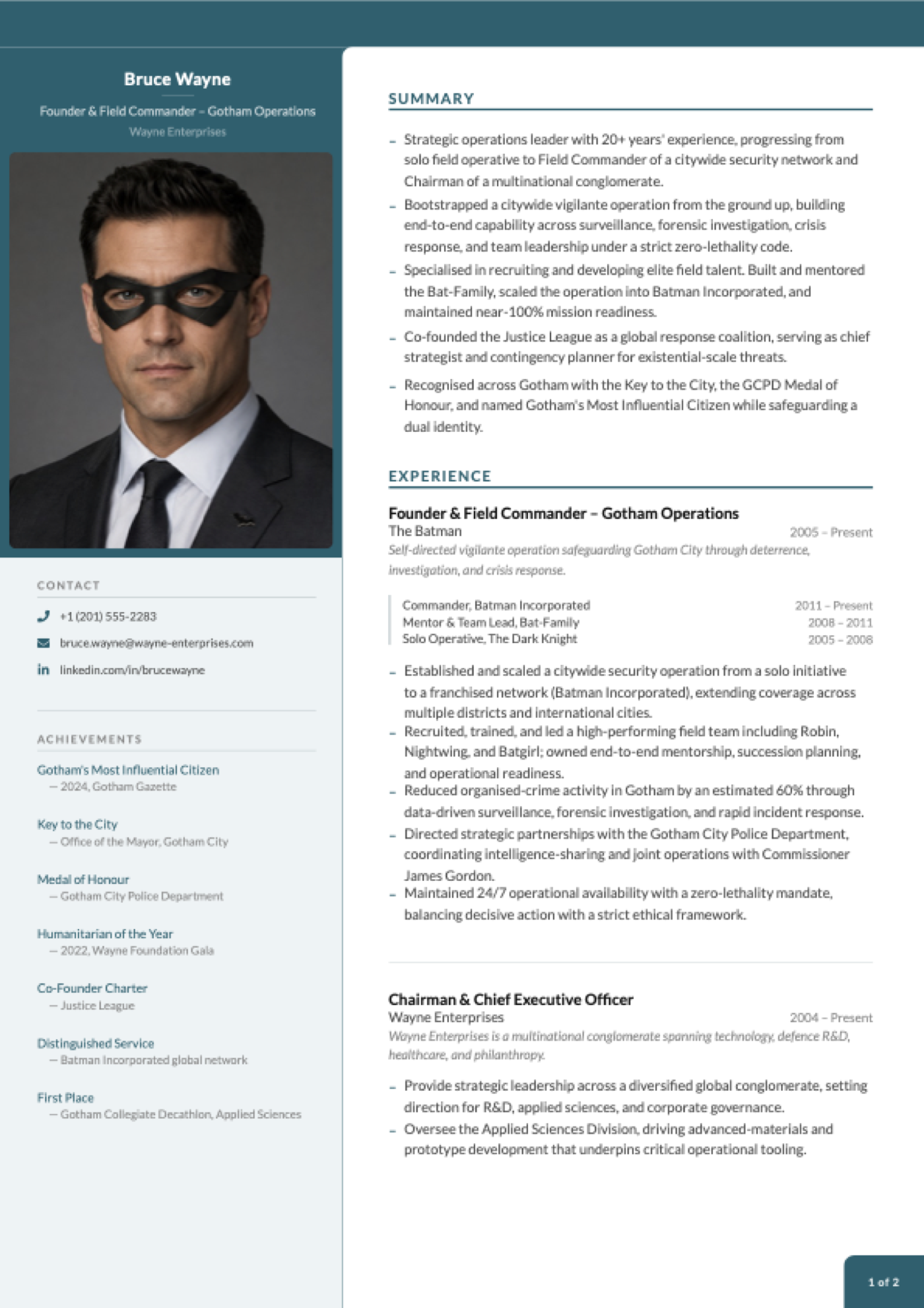
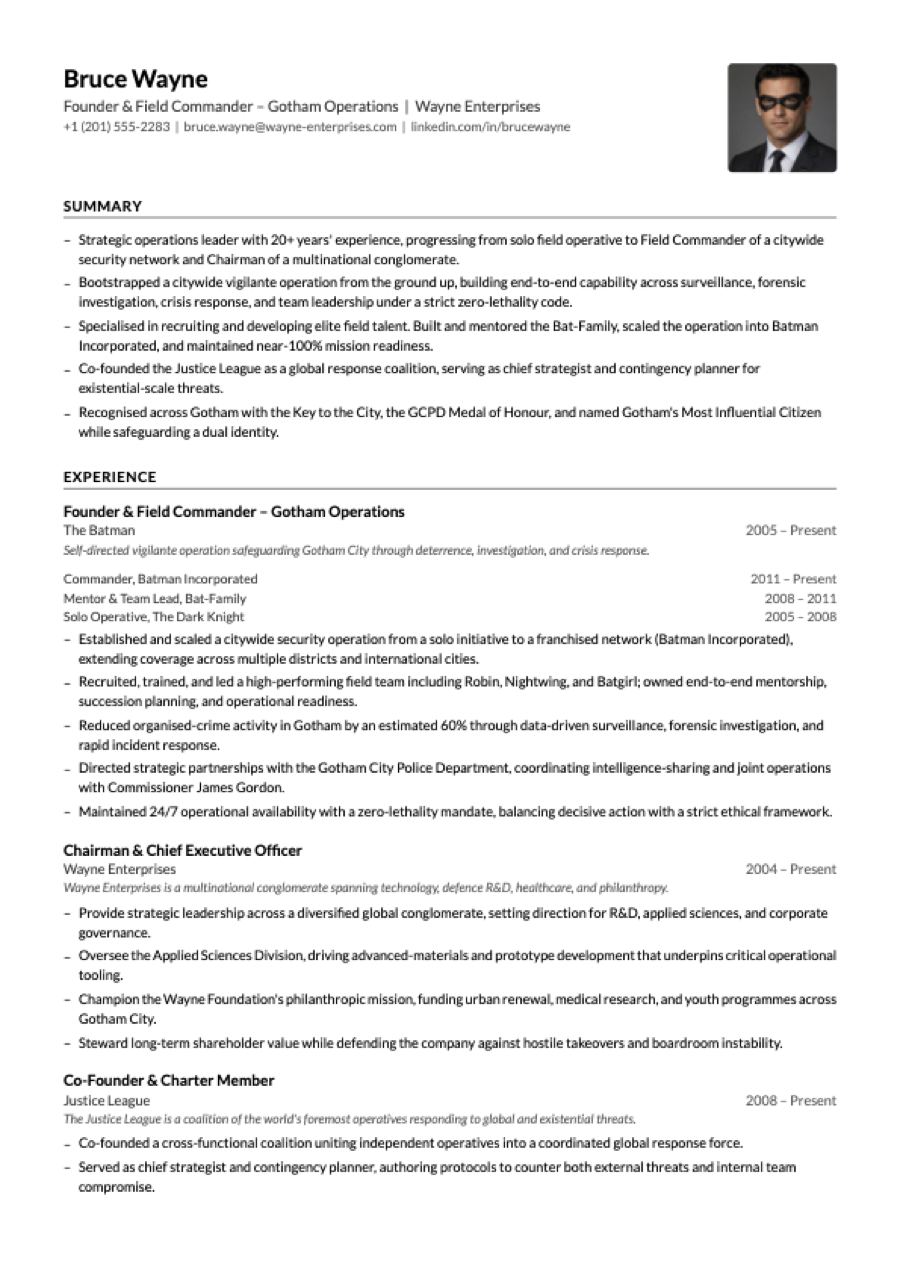
Page 1 of the scaffolded example CV — plus an ATS-safe single-column variant via --ats. Pagination has improved since these were captured; your build may split pages differently.
---
## Create your CV in two minutes
```bash
npx @hrtips/cvx init # scaffold cv-content/ with a complete example CV
npx @hrtips/cvx build # render it to a PDF
```
`init` gives you a finished, working CV — **Bruce Wayne's**, and yes, really. Open `bruce-wayne.pdf` and you're looking at a designed two-page CV: photo, sidebar, achievements, the lot.
Now make it yours. Open the `cv-content/` folder, and replace Bruce's details with your own, one file at a time:
```
cv-content/
personal.yaml ← start here: your name, title, contact details
summary.yaml ← the bullet points at the top of page 1
experience.yaml ← your work history (the bulk of the CV)
education.yaml ← degrees, institutions, years
competencies.yaml ← skill pills in the sidebar
achievements.yaml ← awards and recognitions
referees.yaml ← referees, or [] for "available upon request"
images/profile.jpg ← your photo (square, 400×400px or larger)
```
Re-run `npx @hrtips/cvx build` after each file and watch the PDF update — seeing Bruce's entry next to yours makes the format self-explanatory. The output file is named after you automatically (`jane-doe.pdf`).
Made a typo or unsure a file is right? `npx @hrtips/cvx validate` checks everything at once and tells you exactly what to fix:
```
cv-content/personal.yaml
⚠ unknown key "linkdin"
↳ did you mean "linkedin"?
```
Every scaffolded file also carries a `$schema` header, so editors with YAML support (VS Code + the YAML extension, JetBrains, …) autocomplete keys and flag mistakes as you type.
Applying through a job portal? Generate the ATS-safe variant too — single column, no colours, machine-friendly:
```bash
npx @hrtips/cvx build --ats
```
### CLI reference
| Command | Does |
|---|---|
| `npx @hrtips/cvx init` | Scaffold `cv-content/` with the example CV (won't overwrite an existing one) |
| `npx @hrtips/cvx validate` | Check `cv-content/` — every problem at once, with file + field paths and fixes |
| `npx @hrtips/cvx validate --strict` | Also fail on warnings (unknown keys); recommended for agents/CI |
| `npx @hrtips/cvx build` | Render `cv-content/` to `.pdf` |
| `npx @hrtips/cvx build --ats` | Render the ATS-safe single-column variant |
| `npx @hrtips/cvx list` | Show available themes and layouts |
| `npx @hrtips/cvx --help` / `--version` | Help / version |
All commands accept `--json` for machine-readable output (one JSON object on stdout, logs on stderr) and use semantic exit codes: `0` ok, `2` validation failed, `3` render failed, `64` usage error. `init` is a convenience, not a prerequisite — `build` renders any `cv-content/` folder with valid YAML (built-in themes and layouts need no extra files).
**Content schema:** content files are versioned by `schemaVersion` in `config.yaml` (currently `1`) and validated against the [canonical JSON Schema](schema/v1/cvx.schema.json). New keys may appear within a schema major. Keys can also be **removed** when they are measured to do nothing — `page1ExperienceCount` and `page1SplitBullets` were, in 1.8.0 — in which case builds keep working and `validate` names the removal, while `validate --strict` treats the now-unknown key as an error. The CHANGELOG says so at the release that does it.
---
## What goes in each file
These are excerpts from the scaffolded example — build it once and you can see exactly where each snippet lands on the page.
**personal.yaml** — the header and contact block:
```yaml
name: Bruce Wayne
title: Founder & Field Commander – Gotham Operations
company: Wayne Enterprises
phone: "+1 (201) 555-2283"
phoneHref: "tel:+12015552283"
email: bruce.wayne@wayne-enterprises.com
linkedin: linkedin.com/in/brucewayne
linkedinHref: "https://www.linkedin.com/in/brucewayne"
```
**experience.yaml** — one entry per role; `progression` (optional) renders a title history inside the entry:
```yaml
- role: Founder & Field Commander – Gotham Operations
company: The Batman
period: 2005 – Present
description: Self-directed vigilante operation safeguarding Gotham City through deterrence, investigation, and crisis response.
progression:
- title: Commander, Batman Incorporated
period: 2011 – Present
- title: Solo Operative, The Dark Knight
period: 2005 – 2008
bullets:
- Established and scaled a citywide security operation from a solo initiative to a franchised network (Batman Incorporated).
- Recruited, trained, and led a high-performing field team including Robin, Nightwing, and Batgirl.
- Reduced organised-crime activity in Gotham by an estimated 60% through data-driven surveillance and rapid incident response.
```
**summary.yaml** — the bullet list at the top of page 1:
```yaml
- "Strategic operations leader with 20+ years' experience, progressing from solo field operative to Field Commander of a citywide security network."
- "Co-founded the Justice League as a global response coalition, serving as chief strategist and contingency planner for existential-scale threats."
```
**education.yaml**
```yaml
- degree: "Applied Sciences & Criminology (self-directed)"
institution: League of Shadows
period: 1998 – 2004
- degree: BSc, Criminology & Chemistry
institution: Gotham University
period: 1994 – 1998
```
**competencies.yaml** — rendered as skill pills in the sidebar:
```yaml
- Strategic Planning
- Criminal Investigation
- Crisis Response
- Surveillance & Intelligence
```
**achievements.yaml**
```yaml
- year: Gotham's Most Influential Citizen
text: "— 2024, Gotham Gazette"
- year: Key to the City
text: "— Office of the Mayor, Gotham City"
```
**referees.yaml** (use `[]` to print "available upon request"):
```yaml
- name: Diana Prince
title: Founding Member, Justice League
company: Themysciran Embassy
email: d.prince@justiceleague.org
phone: "+1 (202) 555-0177"
```
Delete what you don't need — an empty file (or `[]`) simply drops that section from the CV. Any new `.yaml` file you drop into `cv-content/` is auto-discovered as a content key.
The complete field-by-field schema for every file lives in [docs/cv-schema.md](docs/cv-schema.md).
### Let an AI write the YAML for you
The formats are deliberately LLM-friendly, and the schema is published for machines ([llms.txt](llms.txt), [docs/cv-schema.md](docs/cv-schema.md)). **[The AI guide](docs/ai-guide.md)** has copy-paste prompts for every route; the short version:
**Coding agent** (Claude Code, Cursor, …) — lowest friction: run `npx @hrtips/cvx init`, then ask the agent to replace the example content with your details and build. The scaffolded `cv-content/README.md` documents the schema, so the agent edits, runs `npx @hrtips/cvx build`, and fixes errors itself.
**Chat assistant** (Claude, ChatGPT, …) — paste your existing CV or LinkedIn profile text along with this prompt:
> Read the CVX content schema at https://raw.githubusercontent.com/hrtips/cvx/main/docs/cv-schema.md then convert my CV below into CVX cv-content/ YAML files. Output each file in its own fenced code block titled with the filename. Keep every fact truthful to my input — don't invent anything.
Save the generated files into `cv-content/`, drop in your photo, run `npx @hrtips/cvx build`. No web access in your assistant? Use the [self-contained prompt](docs/ai-guide.md#route-c--chat-assistant-self-contained-prompt).
### Plug it into your agent (MCP)
CVX ships an MCP server — any MCP client (Claude Desktop, Claude Code, Cursor, VS Code, …) can drive the whole loop with five tools: `get_schema`, `init_cv`, `validate_cv`, `build_pdf`, and `plan_layout` (a dry run that reports how the CV paginates — page count, per-page column fills, what landed where — without writing a PDF). No API keys, fully offline.
CVX renders 100% of your YAML and never drops, clips, or hides text to fit a page — so an assistant driving it can't quietly cut a section to hit a page count either. If the CV runs longer than you want, it surfaces the trade-off and you decide what goes.
```bash
npx @hrtips/cvx mcp init --client claude # Claude Code (.mcp.json, project)
npx @hrtips/cvx mcp init --client claude-desktop # Claude Desktop (global config)
npx @hrtips/cvx mcp init --client cursor # Cursor (.cursor/mcp.json)
npx @hrtips/cvx mcp init --client vscode # VS Code (.vscode/mcp.json)
```
Then restart the client and ask it to make your CV — it fetches the schema, scaffolds, fills in your details, validates after every edit, and renders the PDF. The config writer merges into existing files; it never clobbers other servers. There's also a ready-made [Agent Skill](skills/cvx/SKILL.md) with the same loop for skill-capable agents.
### Build it into a ChatGPT GPT
ChatGPT's sandbox has a Node runtime but usually cannot reach the npm registry, so `npx` does not work there. CVX therefore also ships as **one self-contained file** — schema, template, fonts and all — attached to [every release](https://github.com/hrtips/cvx/releases/latest) as `cvx.bundle.min.js`. It needs nothing but Node 20+: no install, no `node_modules`, no further downloads.
**In most ChatGPT sandboxes it can fetch the file itself**, so you upload nothing — the [Route D prompt](docs/ai-guide.md#route-d--agent-mode-assistant-zero-local-setup) gives it the four setup commands verbatim, which matters because an assistant left to work it out will try `npx` first and waste your turn. If the download is blocked, download the 0.92 MB zip and upload it instead; everything after that is identical.
The GPT does what a chat assistant otherwise cannot: it renders the PDF, **opens it and looks at the pages**, then fixes the layout before you ever see it.
### Your photo
Drop it into `cv-content/images/` as `profile.` — `jpg`, `jpeg`, `png`, or `webp` are auto-detected (that order wins if several exist). Square crop, at least 400×400px.
---
## Themes, layouts, and page flow
Everything visual is controlled by `cv-content/config.yaml`:
```yaml
theme: teal # teal | coral | mono
layout: two-column # two-column | single-column
```
Change a value, re-run `npx @hrtips/cvx build`, done.
**Themes** control colour and styling:
| Theme | Accent | Description |
|---|---|---|
| `teal` | `#1a6070` | Professional teal (default) |
| `coral` | `#c0534a` | Warm coral red |
| `mono` | `#000000` | Black and white, ATS-optimised |
**Layouts** control page structure:
| Layout | Structure | Description |
|---|---|---|
| `two-column` | Sidebar + main column | Designed CV with photo, identity block, achievements |
| `single-column` | Full width | ATS-safe, no sidebar, no decorative elements |
**Pagination** — experience entries are distributed across pages automatically (greedy bin-packing), never overflowing a page, and an entry too tall for the remaining room is split at a bullet boundary and continued overleaf. There are no pagination settings: the layout follows the content. (The old `page1ExperienceCount` / `page1SplitBullets` keys were removed — measured, they never reduced the page count, and forcing them pushed content onto an unnumbered extra sheet. A config that still has them gets a validation message saying exactly that.)
### Script support
**CV rendering is English/Western-European Latin only.** CVX bundles [Lato](https://fonts.google.com/specimen/Lato) and registers no fallback font, so scripts Lato doesn't cover — Cyrillic, Greek, Vietnamese, Turkish `ş`/`ğ`, Czech/Romanian diacritics, and all non-Latin scripts (Devanagari, Tamil, Sinhala, CJK, Arabic, …) — render invisibly. `cvx validate` and `cvx build` warn loudly when your content contains characters the bundled font cannot draw, so this fails visibly rather than silently.
This is a deliberate scope decision, not an oversight: shipping fallback fonts for those scripts would blow the package-size budget many times over. (The project website is multilingual; the renderer is not — the two are independent.)
### Custom layouts
You can define your own page structure — drop a `.yaml` file into `cv-content/layouts/` and reference it by filename:
```yaml
# cv-content/layouts/compact.yaml
template: two-column
pages:
first:
sidebar:
- identity-photo
- contact
main:
- summary
- spacer: 27
- experience
continuation:
sidebar:
- identity-compact
- education
- competencies
- achievements
main:
- experience:continued
last:
sidebar:
- identity-compact
- referees
main:
- experience:continued
```
Then set `layout: compact` in `config.yaml`.
**The sidebar's three lists are one ordered flow, not three page assignments.**
`first.sidebar` + `continuation.sidebar` + `last.sidebar` are concatenated in
that order, and CVX measures the result to decide which page each section lands
on. `last.sidebar: [referees]` therefore means *"referees comes last in the
sidebar"*, not *"referees renders on the last page"*. Use the buckets to express
**order**; let pagination be measured. (`identity-photo`/`identity-compact` are
the exception — they are injected at the top of every page's sidebar rather than
packed.) The **main** lists remain per-page-kind: `first.main` on page 1,
`last.main` on the final page, `continuation.main` in between.
Available section keys:
| Key | Renders |
|---|---|
| `identity-photo` | Name, title, company + profile photo (sidebar) |
| `identity-compact` | Name, title, company without photo (sidebar) |
| `contact` | Phone, email, LinkedIn, location with icons (sidebar) |
| `achievements` | Year + description list (sidebar) |
| `education` | Degree, institution, period (sidebar) |
| `competencies` | Skill tags as pills (sidebar) |
| `referees` | Referee contact details (sidebar) |
| `summary` | Bullet point list (main column) |
| `experience` | Experience entries for page 1 (main column) |
| `experience:continued` | Continuation experience entries (main column) |
| `header-ats` | Full-width name/title/contact header (single-column) |
| `spacer: N` | Vertical spacer of N points |
---
## ATS & AI-parser keywords
Both PDFs embed a keyword list into the standard **`Keywords` metadata field** — the field some applicant tracking systems (ATS) and AI CV parsers read. Keywords live in metadata, **not** as hidden text on the page.
> **Reality check:** most mainstream ATS rank on text extracted from the CV *body*, and support for the PDF `Keywords`/XMP field is inconsistent. Treat this as a best-effort supplement to a keyword-rich body — not a substitute, and not a reliable ranking lever on its own. Keep every keyword **truthful**; stuffing false or irrelevant terms causes a metadata/body mismatch that gets a CV auto-rejected.
Keywords come from two sources, merged and de-duplicated (body-derived terms first):
1. **Auto-derived** from your `competencies.yaml` and job titles (company names are deliberately excluded as low-signal).
2. **Curated** in `cv-content/keywords.yaml` — a flat list, or grouped under headings:
```yaml
# cv-content/keywords.yaml
- Operations Management
- Risk Management
# …or grouped:
Leadership: [Executive Leadership, Team Building]
```
Configure in `config.yaml`:
```yaml
atsKeywords:
enabled: true # master switch (default: true)
autoDerive: true # also derive from competencies + job titles (default: true)
max: 40 # optional cap; body-derived terms are kept first (default: all)
```
---
---
# For developers
Everything below is about hacking on CVX itself — custom themes, the rendering pipeline, and contributing. You don't need any of it to create a CV.
## Working from a clone
```bash
git clone git@github.com:hrtips/cvx.git
cd cvx
npm install
npm run dev # live browser preview at http://localhost:5173
npm run pdf # generate PDF (same pipeline as `cvx build`)
npm run pdf:ats # generate the ATS variant
npm test # unit tests
npm run build:lib # build the publishable lib/ (what the CLI runs)
```
The repo's `cv-content/` carries the same Bruce Wayne example, so a clone builds out of the box. A photo crop helper is included: `python3 scripts/crop-profile.py path/to/photo.jpg`.
## Custom themes
> Themes ship inside the package, so custom themes currently require working from a clone — the `npx` CLI offers the three built-ins.
Drop a `.js` file in `src/pdf/themes/` — it's auto-discovered, no registration needed:
```js
// src/pdf/themes/navy.js
import { tealTheme } from './teal.js'
export const navyTheme = {
...tealTheme,
name: 'navy',
palette: {
...tealTheme.palette,
accent: '#1e3a5f',
sidebarBg: '#eef1f5',
tagBg: '#d0d8e8',
tagText: '#1e3a5f',
divider: '#b8c4d4',
},
}
```
Set `theme: navy` in `config.yaml`. The theme object has five namespaces you can override:
| Namespace | Controls |
|---|---|
| `palette` | All colours — accent, backgrounds, text, tags, dividers, semantic opacity colours |
| `typography` | Font sizes, weights, letter spacing, line heights per element |
| `spacing` | Gaps, margins, padding values used by all components |
| `chrome` | Decorative dimensions — border radii, divider widths, photo size, corner badge |
| `geometry` | Page dimensions, column fractions, padding objects |
## Auto-discovery
Convention over registration — drop a file in the right folder and it's picked up:
| What | Where to drop it | How it's found |
|---|---|---|
| **Content** | `cv-content/*.yaml` | Any `.yaml` file (except `config.yaml`) becomes a content key matching its filename |
| **Themes** | `src/pdf/themes/*.js` | Any `.js` file exporting an object with a `name` property |
| **Layouts** | `cv-content/layouts/*.yaml` | Any `.yaml` file with a `template` and `pages` structure |
| **Profile photo** | `cv-content/images/profile.*` | First match of `.jpg`, `.jpeg`, `.png`, `.webp` |
To add a whole new content section (e.g. publications): create `cv-content/publications.yaml` (auto-available as `content.publications`), build a section component in `src/pdf/sections/`, register it in `registry.js`, then reference it from a layout.
## Architecture
Three concerns, independently swappable:
```
Content (YAML) × Theme (JS) × Layout (YAML)
↓ ↓ ↓
what to say how it looks where it goes
```
The rendering pipeline:
```
config.yaml → resolves theme + layout
↓
cv-content/*.yaml → auto-loaded into data bag
↓
layout.js → packs experience entries across pages (using theme metrics)
↓
CVDocument → picks template (TwoColumn or SingleColumn)
↓
template → renders slots from layout config via section registry
↓
sections → read theme from React context, render content
↓
@react-pdf/renderer → PDF buffer → file
```
## Project structure
```
cv-content/ ← content (the repo carries the example CV)
*.yaml ← auto-discovered content files
config.yaml ← theme, layout, pagination
layouts/ ← auto-discovered layout definitions
images/profile. ← photo (jpg/jpeg/png/webp)
src/pdf/ ← framework
CVDocument.jsx ← unified config-driven document
ATSDocument.jsx ← standalone ATS document
ThemeContext.jsx ← React context + useStyles hook
render.js ← shared render pipeline (CLI + scripts)
layout.js ← theme-aware page-packing + sidebar resolution
keywords.js ← ATS/AI-parser keyword metadata
reproducible.js ← SOURCE_DATE_EPOCH support (see below)
profilePhoto.js ← shared profile-image extension precedence
loadContent.js ← auto-discovers cv-content/*.yaml
loadLayout.js ← normalizes layout YAML → slot config
fonts.js ← Lato font registration
*.test.js ← Vitest unit tests (co-located)
themes/ ← auto-discovered themes (teal, coral, mono)
templates/ ← page shells (TwoColumn, SingleColumn)
sections/ ← content sections + registry
components/ ← shared leaf components
scripts/
export-pdf.js ← npm run pdf
export-pdf-ats.js ← npm run pdf:ats
build-lib.js ← npm run build:lib (publishing build)
crop-profile.py ← photo crop helper
bin/cvx.js ← npx CLI (init / build)
template/cv-content/ ← starter content scaffolded by `cvx init`
lib/ ← generated: published transform of src/pdf (gitignored)
```
## Testing
```bash
npm test
```
Unit tests cover the pure logic modules — keyword building, page packing, sidebar resolution, reproducibility helpers, and the profile-photo picker. Tests live next to the code they cover (`src/pdf/*.test.js`) plus `test/` for cross-cutting checks. CI runs the suite on Linux and macOS across Node 20/22/24 (plus Windows on Node 22), then packs the tarball and exercises the installed CLI end-to-end, including a byte-identical reproducibility gate.
## Quality gates
The build is deliberately hostile — a change lands only if it clears every gate below with **zero warnings**. Run them all locally with `npm run check` (lint + types + coverage + dead-code); CI enforces them in the `quality` and `security` jobs.
| Gate | Command | Enforces |
|---|---|---|
| Lint + format | `npm run lint` | [Oxlint](https://oxc.rs) (fast correctness/`suspicious`, incl. `rules-of-hooks`, `no-focused-tests`) **+** [Biome](https://biomejs.dev) (format, imports, deeper lint) — zero warnings |
| Types | `npm run typecheck` | `tsc --noEmit` with `checkJs` + full `strict` over the JS/JSX sources (types via JSDoc + `src/pdf/types.d.ts`, derived from the JSON schema) |
| Coverage | `npm run test:cov` | [Vitest](https://vitest.dev) v8, **per-file ≥ 90%** lines/functions/statements, ≥ 85% branches — no global averaging, no per-file waivers |
| Dead code | `npm run knip` | no unused files, exports, or dependencies |
| Package | `npm run publint` · `npm run attw` | [publint](https://publint.dev) packaging + [arethetypeswrong](https://arethetypeswrong.github.io) resolution |
| Supply chain | `security` CI job | [actionlint](https://github.com/rhysd/actionlint) · [zizmor](https://docs.zizmor.sh) (SHA-pinned actions, least-privilege) · [gitleaks](https://gitleaks.io) · [osv-scanner](https://google.github.io/osv-scanner/) |
Formatting/lint autofix: `npm run lint:fix`. GitHub Actions are pinned to commit SHAs and kept current by Dependabot.
## Reproducible builds
Set [`SOURCE_DATE_EPOCH`](https://reproducible-builds.org/docs/source-date-epoch/) (seconds since the Unix epoch) to make PDF output byte-identical run after run — useful for CI checks and for verifying that a content change is the *only* thing that changed:
```bash
SOURCE_DATE_EPOCH=$(git log -1 --format=%ct) npx @hrtips/cvx build # or npm run pdf
```
This pins the PDF's `CreationDate` (and with it the trailer file ID), the font-subset names, and the object write order — the things that otherwise vary per run. Unset, builds behave normally and stamp the current time.
Byte-identical output is guaranteed for the same platform and Node version. Builds from different OSes or Node majors are visually identical but not byte-identical (font subsets embed in a platform-dependent order, and zlib output varies across Node versions).
## Tech stack
- **[@react-pdf/renderer](https://react-pdf.org/)** — renders React to PDF (no headless browser)
- **[Vite](https://vitejs.dev/) + React** — live browser preview
- **[js-yaml](https://github.com/nodeca/js-yaml)** — YAML parsing (pinned to 4.x to match `@rollup/plugin-yaml`)
- **[esbuild](https://esbuild.github.io/)** — transform-only build of `lib/` for publishing
- **[tsx](https://github.com/privatenumber/tsx)** — runs the repo export scripts
- **[Vitest](https://vitest.dev/)** — unit tests
- **[Lato](https://fonts.google.com/specimen/Lato)** — embedded font (Light 300, Regular 400, Bold 700)
---
## License
[Apache-2.0](LICENSE) © ramith.
The bundled [Lato](https://fonts.google.com/specimen/Lato) fonts are licensed separately under the [SIL Open Font License 1.1](https://openfontlicense.org/open-font-license-official-text/).