# PCLBlurEffectAlert
Swift AlertController, use UIVisualeffectview
[](http://cocoadocs.org/docsets/PCLBlurEffectAlert)
[](https://developer.apple.com/swift/)
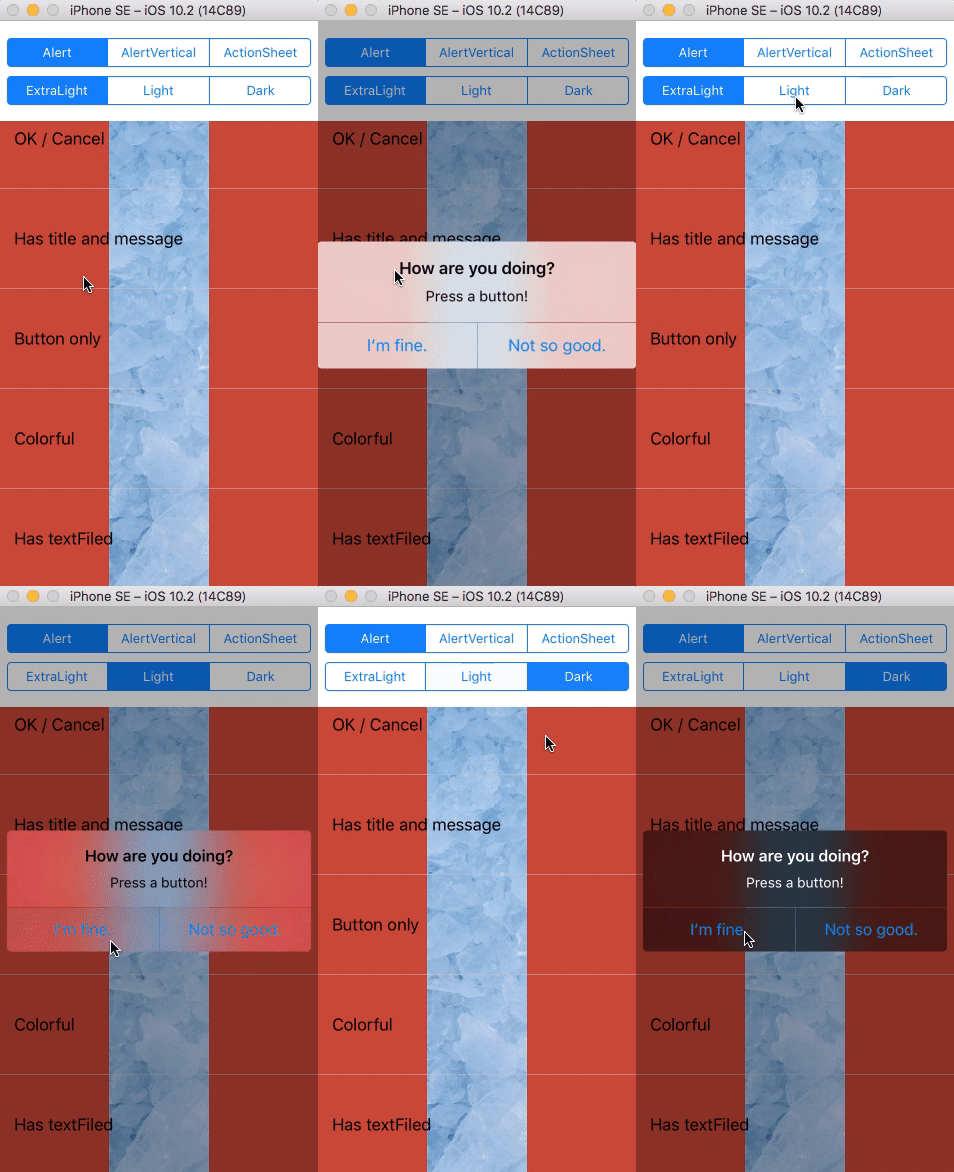
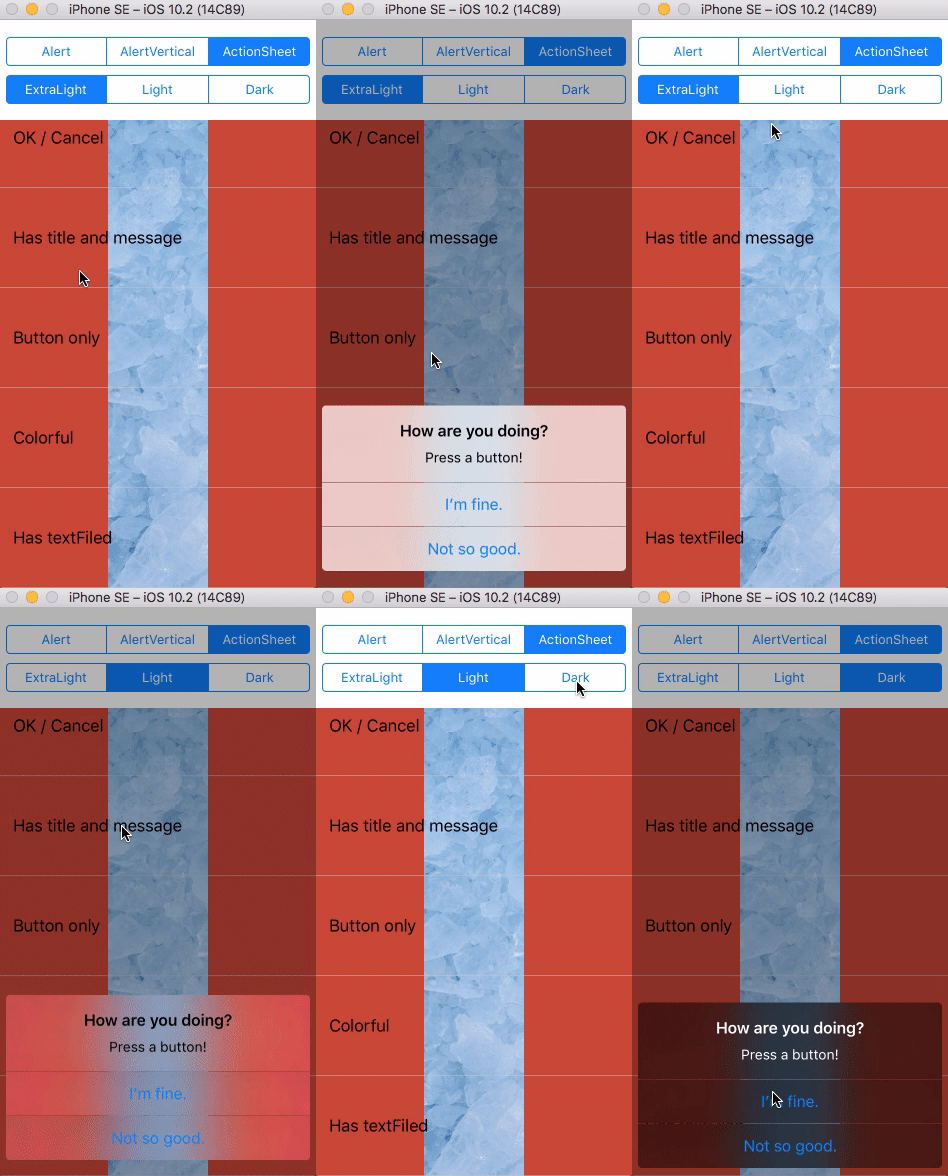

 ## Requirements
- iOS 8.0+
- Swift 3.0+
- ARC
## Feature
- [x] Change color
- [x] Change effect
- [x] Change font
- [x] Use UITextField
- [x] Use UIImageView
## install
#### Cocoapods
Adding the following to your `Podfile` and running `pod install`:
```Ruby
use_frameworks!
pod "PCLBlurEffectAlert"
```
### import
```Swift
import PCLBlurEffectAlert
```
## Initialize
#### UIBlurEffect
```Swift
// Default effect: UIBlurEffect(style: .extraLight)
convenience init(title: String?, message: String?, effect: UIBlurEffect, style: PCLBlurEffectAlert.ControllerStyle)
```
`style` => `alert`, `alertVertical`, `actionSheet`
When `actions` count becomes more than 3, `alert` and `alertVertical` is the same as.
## Usage
#### Example
```Swift
let alertController = PCLBlurEffectAlertController(title: "How are you doing?",
message: "Press a button!",
effect: UIBlurEffect(style: .lightdark)
style: .alert)'
// Customize if needed
alertController.configure(titleColor: .white)
alertController.configure(buttonFont: [.default: UIFont.systemFont(ofSize: 24),
.destructive: UIFont.boldSystemFont(ofSize: 20),
.cancel: UIFont.systemFont(ofSize: 14)])
// Adds ImageView
alertController.addImageView(with: )
// Adds TextField
alertController.addTextField()
// Adds actions
let action = PCLBlurEffectAlertAction(title: "I’m fine.", style: .default) { _ in }
let cancelAction = PCLBlurEffectAlertAction(title: "Not so good.", style: .cancel) { _ in }
alertController.addAction(action)
alertController.addAction(cancelAction)
// Presented
alertController.show() // or present(alertController, animated: true, completion: nil)
```
#### Sources
```Swift
// Adds Actions
open func addAction(_ action: PCLBlurEffectAlertAction)
// Adds ImageView
open func addImageView(with image: UIImage, configurationHandler: ((UIImageView?) -> Void)? = nil)
// Adds TextFields
open func addTextField(with configurationHandler: ((UITextField?) -> Void)? = nil)
// Presented
open func show()
```
## Customize
```Swift
// Default ActionSheet: UIScreen.main.bounds.width - (margin * 2)
// Default Alert: 320 - (margin * 2)
func configure(alertViewWidth: CGFloat)
// Default: 4
func configure(cornerRadius: CGFloat)
// Default: 1 / UIScreen.main.scale
func configure(thin: CGFloat)
// Default: 8
func configure(margin: CGFloat)
/// Color
// Default: UIColor.black.withAlphaComponent(0.3)
func configure(overlayBackgroundColor: UIColor)
// Default: .clear
func configure(backgroundColor: UIColor)
/// Text
// Default: .boldSystemFont(ofSize: 16)
// Default: .black
func configure(titleFont: UIFont, titleColor: UIColor)
// Default: .systemFont(ofSize: 14)
// Default: .black
func configure(messageFont: UIFont, messageColor: UIColor)
// Default:
// .default: UIFont.systemFont(ofSize: 16),
// .cancel: UIFont.systemFont(ofSize: 16),
// .destructive: UIFont.systemFont(ofSize: 16)
func configure(buttonFont: [PCLBlurEffectAlert.ActionStyle : UIFont])
// Default:
// .default: .black,
// .cancel: .black,
// .destructive: .red
func configure(buttonTextColor: [PCLBlurEffectAlert.ActionStyle : UIColor])
// Default:
// .default: .gray,
// .cancel: .gray,
// .destructive: .gray
func configure(buttonDisableTextColor: [PCLBlurEffectAlert.ActionStyle : UIColor])
/// Button
// Default: 44
func configure(buttonHeight: CGFloat)
// Default: .clear
func configure(buttonBackgroundColor: UIColor)
// Default: 32
func configure(textFieldHeight: CGFloat)
// Default: UIColor.white.withAlphaComponent(0.1)
func configure(textFieldsViewBackgroundColor: UIColor)
// Default: UIColor.black.withAlphaComponent(0.15)
func configure(textFieldBorderColor: UIColor)
```
## More Examples
```Swift
let alertController = PCLBlurEffectAlertController(title: "How are you doing?",
message: "Press a button!",
style: .alert)
let action1 = PCLBlurEffectAlertAction(title: "I’m fine.", style: .default) { _ in }
let action2 = PCLBlurEffectAlertAction(title: "Not so good.", style: .default) { _ in }
alertController.addAction(action1)
alertController.addAction(action2)
alertController.show()
```
## Requirements
- iOS 8.0+
- Swift 3.0+
- ARC
## Feature
- [x] Change color
- [x] Change effect
- [x] Change font
- [x] Use UITextField
- [x] Use UIImageView
## install
#### Cocoapods
Adding the following to your `Podfile` and running `pod install`:
```Ruby
use_frameworks!
pod "PCLBlurEffectAlert"
```
### import
```Swift
import PCLBlurEffectAlert
```
## Initialize
#### UIBlurEffect
```Swift
// Default effect: UIBlurEffect(style: .extraLight)
convenience init(title: String?, message: String?, effect: UIBlurEffect, style: PCLBlurEffectAlert.ControllerStyle)
```
`style` => `alert`, `alertVertical`, `actionSheet`
When `actions` count becomes more than 3, `alert` and `alertVertical` is the same as.
## Usage
#### Example
```Swift
let alertController = PCLBlurEffectAlertController(title: "How are you doing?",
message: "Press a button!",
effect: UIBlurEffect(style: .lightdark)
style: .alert)'
// Customize if needed
alertController.configure(titleColor: .white)
alertController.configure(buttonFont: [.default: UIFont.systemFont(ofSize: 24),
.destructive: UIFont.boldSystemFont(ofSize: 20),
.cancel: UIFont.systemFont(ofSize: 14)])
// Adds ImageView
alertController.addImageView(with: )
// Adds TextField
alertController.addTextField()
// Adds actions
let action = PCLBlurEffectAlertAction(title: "I’m fine.", style: .default) { _ in }
let cancelAction = PCLBlurEffectAlertAction(title: "Not so good.", style: .cancel) { _ in }
alertController.addAction(action)
alertController.addAction(cancelAction)
// Presented
alertController.show() // or present(alertController, animated: true, completion: nil)
```
#### Sources
```Swift
// Adds Actions
open func addAction(_ action: PCLBlurEffectAlertAction)
// Adds ImageView
open func addImageView(with image: UIImage, configurationHandler: ((UIImageView?) -> Void)? = nil)
// Adds TextFields
open func addTextField(with configurationHandler: ((UITextField?) -> Void)? = nil)
// Presented
open func show()
```
## Customize
```Swift
// Default ActionSheet: UIScreen.main.bounds.width - (margin * 2)
// Default Alert: 320 - (margin * 2)
func configure(alertViewWidth: CGFloat)
// Default: 4
func configure(cornerRadius: CGFloat)
// Default: 1 / UIScreen.main.scale
func configure(thin: CGFloat)
// Default: 8
func configure(margin: CGFloat)
/// Color
// Default: UIColor.black.withAlphaComponent(0.3)
func configure(overlayBackgroundColor: UIColor)
// Default: .clear
func configure(backgroundColor: UIColor)
/// Text
// Default: .boldSystemFont(ofSize: 16)
// Default: .black
func configure(titleFont: UIFont, titleColor: UIColor)
// Default: .systemFont(ofSize: 14)
// Default: .black
func configure(messageFont: UIFont, messageColor: UIColor)
// Default:
// .default: UIFont.systemFont(ofSize: 16),
// .cancel: UIFont.systemFont(ofSize: 16),
// .destructive: UIFont.systemFont(ofSize: 16)
func configure(buttonFont: [PCLBlurEffectAlert.ActionStyle : UIFont])
// Default:
// .default: .black,
// .cancel: .black,
// .destructive: .red
func configure(buttonTextColor: [PCLBlurEffectAlert.ActionStyle : UIColor])
// Default:
// .default: .gray,
// .cancel: .gray,
// .destructive: .gray
func configure(buttonDisableTextColor: [PCLBlurEffectAlert.ActionStyle : UIColor])
/// Button
// Default: 44
func configure(buttonHeight: CGFloat)
// Default: .clear
func configure(buttonBackgroundColor: UIColor)
// Default: 32
func configure(textFieldHeight: CGFloat)
// Default: UIColor.white.withAlphaComponent(0.1)
func configure(textFieldsViewBackgroundColor: UIColor)
// Default: UIColor.black.withAlphaComponent(0.15)
func configure(textFieldBorderColor: UIColor)
```
## More Examples
```Swift
let alertController = PCLBlurEffectAlertController(title: "How are you doing?",
message: "Press a button!",
style: .alert)
let action1 = PCLBlurEffectAlertAction(title: "I’m fine.", style: .default) { _ in }
let action2 = PCLBlurEffectAlertAction(title: "Not so good.", style: .default) { _ in }
alertController.addAction(action1)
alertController.addAction(action2)
alertController.show()
```
 ```Swift
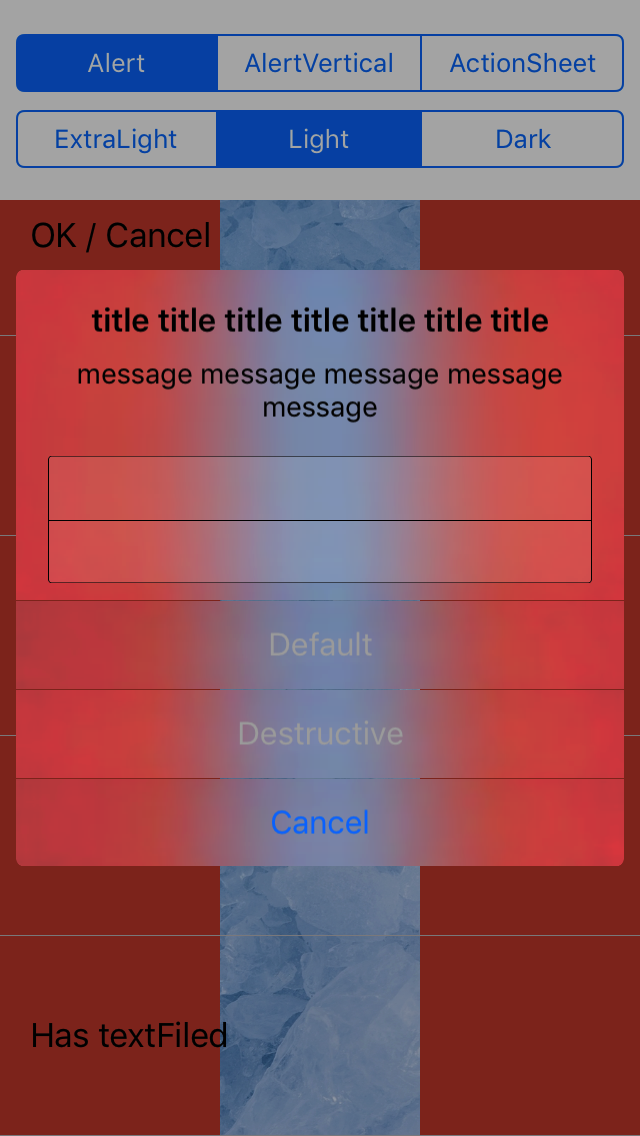
let alertController = PCLBlurEffectAlertController(title: "title title title title title title title",
message: "message message message message message",
effect: UIBlurEffect(style: .light),
style: .alert)
alertController.addTextField { _ in }
alertController.addTextField { _ in }
alertController.configure(textFieldsViewBackgroundColor: UIColor.white.withAlphaComponent(0.1))
alertController.configure(textFieldBorderColor: .black)
alertController.configure(buttonDisableTextColor: [.default: .lightGray, .destructive: .lightGray])
let action1 = PCLBlurEffectAlertAction(title: "Default", style: .default) { _ in }
let action2 = PCLBlurEffectAlertAction(title: "Destructive", style: .destructive) { _ in }
let cancelAction = PCLBlurEffectAlertAction(title: "Cancel", style: .cancel) { _ in }
alertController.addAction(action1)
alertController.addAction(action2)
alertController.addAction(cancelAction)
alertController.show()
```
```Swift
let alertController = PCLBlurEffectAlertController(title: "title title title title title title title",
message: "message message message message message",
effect: UIBlurEffect(style: .light),
style: .alert)
alertController.addTextField { _ in }
alertController.addTextField { _ in }
alertController.configure(textFieldsViewBackgroundColor: UIColor.white.withAlphaComponent(0.1))
alertController.configure(textFieldBorderColor: .black)
alertController.configure(buttonDisableTextColor: [.default: .lightGray, .destructive: .lightGray])
let action1 = PCLBlurEffectAlertAction(title: "Default", style: .default) { _ in }
let action2 = PCLBlurEffectAlertAction(title: "Destructive", style: .destructive) { _ in }
let cancelAction = PCLBlurEffectAlertAction(title: "Cancel", style: .cancel) { _ in }
alertController.addAction(action1)
alertController.addAction(action2)
alertController.addAction(cancelAction)
alertController.show()
```
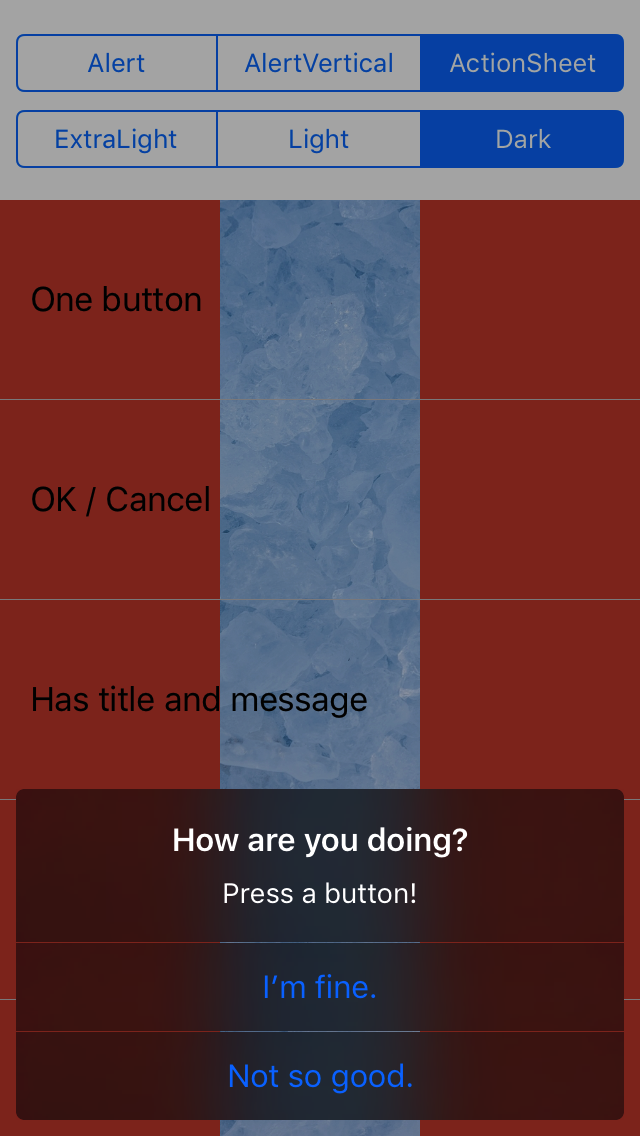
 ```Swift
let alertController = PCLBlurEffectAlertController(title: "How are you doing?",
message: "Press a button!",
effect: UIBlurEffect(style: .dark),
style: .actionSheet)
let action1 = PCLBlurEffectAlertAction(title: "I’m fine.", style: .default) { _ in }
let action2 = PCLBlurEffectAlertAction(title: "Not so good.", style: .default) { _ in }
alertController.addAction(action1)
alertController.addAction(action2)
alertController.show()
```
```Swift
let alertController = PCLBlurEffectAlertController(title: "How are you doing?",
message: "Press a button!",
effect: UIBlurEffect(style: .dark),
style: .actionSheet)
let action1 = PCLBlurEffectAlertAction(title: "I’m fine.", style: .default) { _ in }
let action2 = PCLBlurEffectAlertAction(title: "Not so good.", style: .default) { _ in }
alertController.addAction(action1)
alertController.addAction(action2)
alertController.show()
```
 ```Swift
let alertController = PCLBlurEffectAlertController(title: "title title title title title title title",
message: "message message message message message",
style: .actionSheet)
alertController.addTextField()
alertController.addTextField()
alertController.configure(textFieldsViewBackgroundColor: UIColor.white.withAlphaComponent(0.1))
alertController.configure(textFieldBorderColor: .black)
alertController.configure(buttonDisableTextColor: [.default: .lightGray, .destructive: .lightGray])
let action1 = PCLBlurEffectAlertAction(title: "Default", style: .default) { _ in }
let action2 = PCLBlurEffectAlertAction(title: "Destructive", style: .destructive) { _ in }
let cancelAction = PCLBlurEffectAlertAction(title: "Cancel", style: .cancel) { _ in }
alertController.addAction(action1)
alertController.addAction(action2)
alertController.addAction(cancelAction)
alertController.show()
```
```Swift
let alertController = PCLBlurEffectAlertController(title: "title title title title title title title",
message: "message message message message message",
style: .actionSheet)
alertController.addTextField()
alertController.addTextField()
alertController.configure(textFieldsViewBackgroundColor: UIColor.white.withAlphaComponent(0.1))
alertController.configure(textFieldBorderColor: .black)
alertController.configure(buttonDisableTextColor: [.default: .lightGray, .destructive: .lightGray])
let action1 = PCLBlurEffectAlertAction(title: "Default", style: .default) { _ in }
let action2 = PCLBlurEffectAlertAction(title: "Destructive", style: .destructive) { _ in }
let cancelAction = PCLBlurEffectAlertAction(title: "Cancel", style: .cancel) { _ in }
alertController.addAction(action1)
alertController.addAction(action2)
alertController.addAction(cancelAction)
alertController.show()
```
 ```Swift
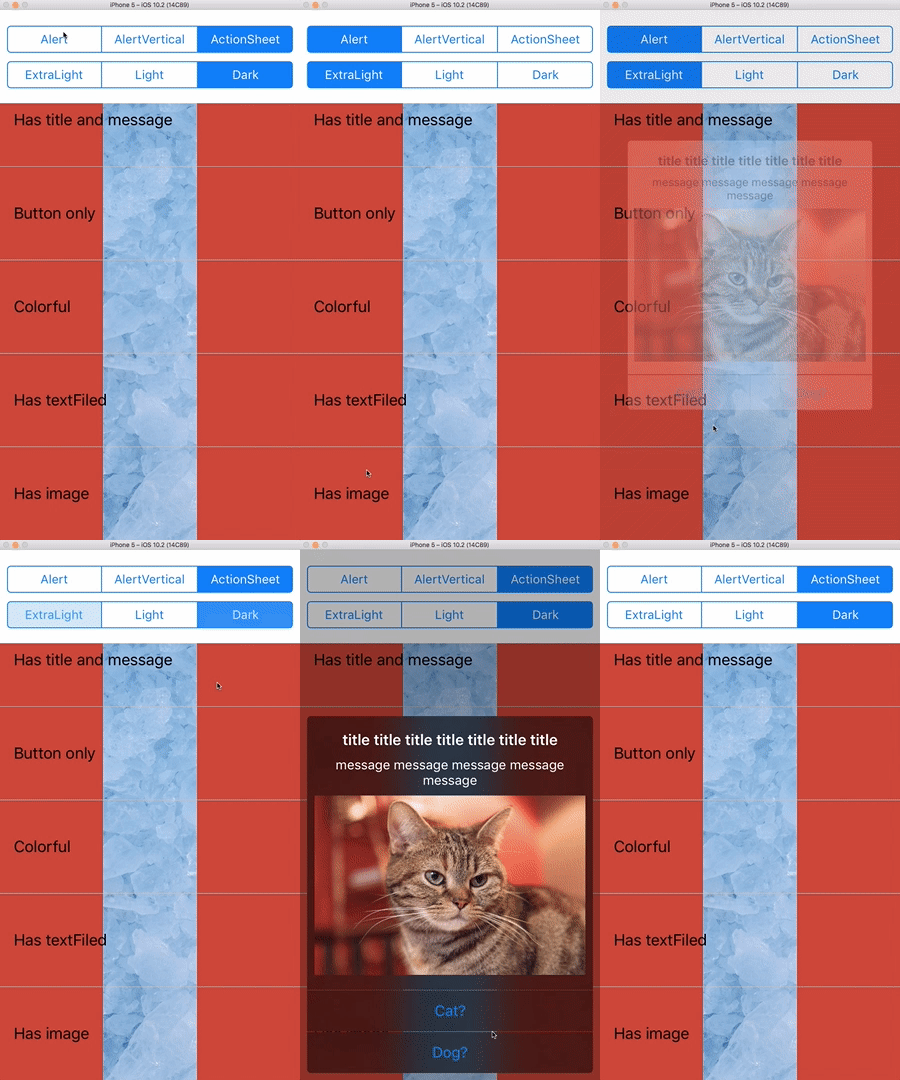
let alertController = PCLBlurEffectAlertController(title: "title title title title title title title",
message: "message message message message message",
style: .alert)
alertController.addImageView(with: UIImage(named: "cat")!)
let catAction = PCLBlurEffectAlertAction(title: "Cat?", style: .default) { _ in
print("You pressed Cat?")
}
let dogAction = PCLBlurEffectAlertAction(title: "Dog?", style: .default) { _ in
print("You pressed Dog?")
}
alertController.addAction(catAction)
alertController.addAction(dogAction)
alertController.show()
```
```Swift
let alertController = PCLBlurEffectAlertController(title: "title title title title title title title",
message: "message message message message message",
style: .alert)
alertController.addImageView(with: UIImage(named: "cat")!)
let catAction = PCLBlurEffectAlertAction(title: "Cat?", style: .default) { _ in
print("You pressed Cat?")
}
let dogAction = PCLBlurEffectAlertAction(title: "Dog?", style: .default) { _ in
print("You pressed Dog?")
}
alertController.addAction(catAction)
alertController.addAction(dogAction)
alertController.show()
```
 ## Photos from
* by [pakutaso.com](https://www.pakutaso.com/)
* by [FLATICON](http://www.flaticon.com/)
## Acknowledgements
* Inspired by [DOAlertController](https://github.com/okmr-d/DOAlertController) in [okmr-d](https://github.com/okmr-d).
## License
This project is made available under the MIT license. See LICENSE file for details.
## Photos from
* by [pakutaso.com](https://www.pakutaso.com/)
* by [FLATICON](http://www.flaticon.com/)
## Acknowledgements
* Inspired by [DOAlertController](https://github.com/okmr-d/DOAlertController) in [okmr-d](https://github.com/okmr-d).
## License
This project is made available under the MIT license. See LICENSE file for details.