### Git
* [Pro Git](https://git-scm.com/book/en/v2)
* [MIT 6.NULL - git](https://missing.csail.mit.edu/2020/version-control/)
* [Learn Git Branching](https://learngitbranching.js.org/?locale=en_US)
#### VCS(version control system)
##### Git的理念
* distributed version control system (DVCS)
* VCS: 简单的管理,例如RCS
* CVCS(centralized VCS)
* DVCS: 每个clone都是一个backup,能处理不同的remote
* 操作模式
* 本地操作、集中下载和上传
* The Platonic ideal is that each commit should compile and should move steadily towards more and more tests passing.
* ugly interface and beautiful design -> bottom-up地理解git
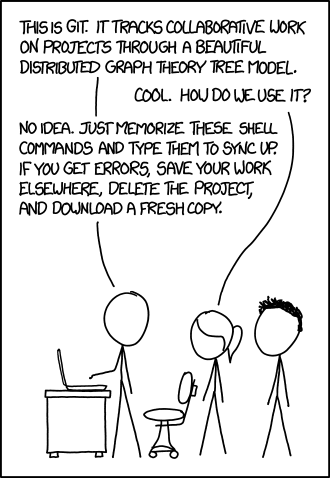
This [XKCD comic](https://xkcd.com/1597/) captures Git’s reputation:
 ##### Git's data model
* Snapshots: 文件是blob,文件夹是tree,snapshot是top-level tree
* Modeling history: relating snapshots
* a history is a directed acyclic graph (DAG) of snapshots
* 一个snapshot可能有多个parent,比如merge
* snapshot被称作commit,是Git的精髓所在,不像其它VCS针对每个文件储存changes
* Data model, as pseudocode
* Objects and content-addressing
* id由SHA-1 hash生成,40个十六进制字符
* `git cat-file -p` 显示对象信息
* References:照顾可读性,和对象不同,它是mutable的
* `master`表示主分支的最近commit
* `HEAD`表示“where we currently are”
* repositories = objects + references
```python
// a file is a bunch of bytes
type blob = array
// a directory contains named files and directories
type tree = map
// a commit has parents, metadata, and the top-level tree
type commit = struct {
parent: array
author: string
message: string
snapshot: tree
}
type object = blob | tree | commit
objects = map
def store(object):
id = sha1(object)
objects[id] = object
def load(id):
return objects[id]
references = map
def update_reference(name, id):
references[name] = id
def read_reference(name):
return references[name]
def load_reference(name_or_id):
if name_or_id in references:
return load(references[name_or_id])
else:
return load(name_or_id)
```
##### Staging area
##### Git's data model
* Snapshots: 文件是blob,文件夹是tree,snapshot是top-level tree
* Modeling history: relating snapshots
* a history is a directed acyclic graph (DAG) of snapshots
* 一个snapshot可能有多个parent,比如merge
* snapshot被称作commit,是Git的精髓所在,不像其它VCS针对每个文件储存changes
* Data model, as pseudocode
* Objects and content-addressing
* id由SHA-1 hash生成,40个十六进制字符
* `git cat-file -p` 显示对象信息
* References:照顾可读性,和对象不同,它是mutable的
* `master`表示主分支的最近commit
* `HEAD`表示“where we currently are”
* repositories = objects + references
```python
// a file is a bunch of bytes
type blob = array
// a directory contains named files and directories
type tree = map
// a commit has parents, metadata, and the top-level tree
type commit = struct {
parent: array
author: string
message: string
snapshot: tree
}
type object = blob | tree | commit
objects = map
def store(object):
id = sha1(object)
objects[id] = object
def load(id):
return objects[id]
references = map
def update_reference(name, id):
references[name] = id
def read_reference(name):
return references[name]
def load_reference(name_or_id):
if name_or_id in references:
return load(references[name_or_id])
else:
return load(name_or_id)
```
##### Staging area
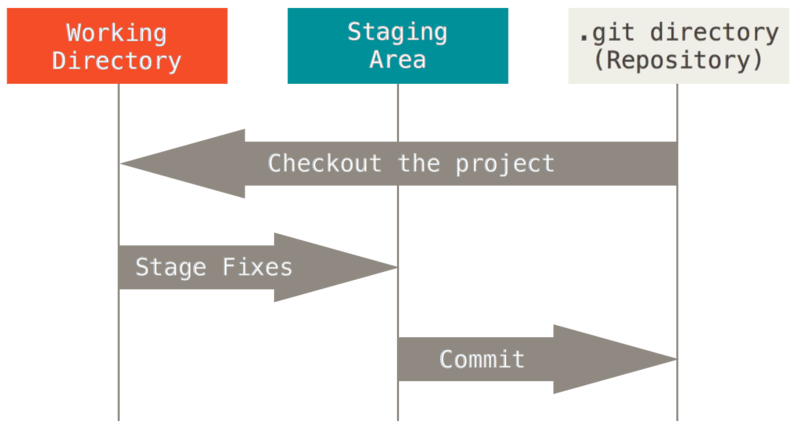 * staging area也称作index
* 和`git add`相关
* Git tracks changes to a developer’s codebase, but it’s necessary to stage and take a snapshot of the changes to include them in the project’s history. `git add` performs staging, the first part of that two-step process. Any changes that are staged will become a part of the next snapshot and a part of the project’s history. Staging and committing separately gives developers complete control over the history of their project without changing how they code and work.
* 意义在于摆脱snapshot和当前状态的绝对联系,使commit操作更灵活
* checkout在working directory之间切换;reset从staging area回复到working directory
#### Git command-line interface
##### Basics
- `git help `: get help for a git command
- `git command -h`: concise help
- [freenode](https://freenode.net/) 的`#git`和`#github`频道寻求帮助
- `git init`: creates a new git repo, with data stored in the `.git` directory
- `git status`: tells you what's going on
- `git status -s`: 左列是staging area,右列是working tree
- `git add `: adds files to staging area
- 对于同一文件,add之后有新改动要重新add
- `-p` 添加每个变化前,都会要求确认。对于同一个文件的多处变化,可以实现分次提交
- `git commit`: creates a new commit
- Write [good commit messages](https://tbaggery.com/2008/04/19/a-note-about-git-commit-messages.html) and Even more reasons to write [good commit messages](https://chris.beams.io/posts/git-commit/): 大写开头,祈使句,简短
- saves the snapshot to the project history and completes the change-tracking process. In short, a commit functions like taking a photo. Anything that’s been staged with `git add` will become a part of the snapshot with `git commit`.
- `git commit -am "m"`可以先add再commit,**commit的文件都是tracked状态**
- `-v`显示diff信息
- `git log`: shows a flattened log of history
- `git log --pretty=format:"%h %s" --all --graph --decorate --no-merges`: visualizes history as a DAG
- `git shortlog/ git log --oneline`: 只显示标题
- `-p`显示全部信息,`-3`显示三条
- `--stat`显示统计信息
- `-S function_name --since=2.weeks --before="2008-11-01" --grep --author --committer --no-merges`
- `--all`显示所有branch信息, 或者指定特定的branch
- `git diff`: 比较working directory和staging area
- `git diff --staged':比较staging area和last commit
- `git diff `: show differences since the last commit
- `git diff `: shows differences in a file between snapshots
- `git difftool`,图形界面
- Diff without dots / with two dots / with three dots: https://matthew-brett.github.io/pydagogue/git_diff_dots.html
- `git diff > tmp.diff` 编辑器可显示syntax
- `git checkout `: updates HEAD and current branch
- `gco $file_path ` 用于回退特定文件
- `git revert`
- `-m 1或2` 对于有多个上游commit的commit,用来指定具体revert到哪一个commit
- `git rm file`
- `git rm --cached`,只删除index,不删除working tree
- `git rm log/\*.log` ,通配符,注意要加`\`,Git有自己的文件名拓展
- `git tag -l "v1.8.5*"`: `-l`是为了通配符匹配
- Annotated Tags: `git tag -a v1.4 () -m "my version 1.4"`
- Lightweight Tags: `git tag v1.4-lw`
- `git push origin /--tags`,需要单独push, `--follow-tags`只push annotated tags
```shell
git tag -d v1.4-lw
git push origin :refs/tags/v1.4-lw
git push origin --delete
```
- `git show /`
* `git mv file_from file_to`
```shell
mv README.md README
git rm README.md
git add README
```
##### Branching and merging
思考git的原理,commit的组成
branch的使用方式:1.Long-Running Branches 2.Topic Branches
branch的成本极低,instantaneous
- `git branch`: shows branches
- `-v -r` verbose,显示远程分支, `-a`显示所有本地和远程
- `--merged` 和`--no-merged`
- `git branch `: creates a branch
- `git branch `
- `git branch -d` 删除branch
- `git checkout -b `: creates a branch and switches to it
- same as `git branch ; git checkout `
- `git checkout --` 切换到上一个分支
- checkout需要所有changes已经commit,或者参考[Stashing and Cleaning](https://git-scm.com/book/en/v2/ch00/_git_stashing)
- `git checkout `会进入detached HEAD状态,做的commit只属于这一个commit
- `git checkout large-mr-branch -- path/to/your/file.ext`
- 拆MR
- `git checkout --track origin/serverfix`: 创建本地分支并track远程分支
- `git merge `: merges into current branch, merge的不同策略如下:
* Fast-forward,直接在当前commit上遍历即可
* recursive strategy: three-way merge
* 如果发生冲突,手动修改unmerged files然后add ,或者用mergetool
- `git mergetool`: use a fancy tool to help resolve merge conflicts
- `git rebase`: rebase set of patches onto a new base
- `git rebase `
rebase命令找到共同的祖先节点,然后按顺序replay commits
```shell
git checkout experiment
git rebase master # <=> git rebase master experiment
git checkout master
git merge experiment
```
`git rebase --onto master server client`
This basically says, “Take the `client` branch, figure out the patches since it diverged from the `server` branch, and replay these patches in the `client` branch as if it was based directly off the `master` branch instead.” It’s a bit complex, but the result is pretty cool.
Do not rebase commits that exist outside your repository and that people may have based work on. 会发生混淆,尤其是别人能重新把已经被rebase消除掉的commits push上来的时候,可能会fetch到存在冲突的experiment分支
* 如果遇到了这种问题,可以`git fetch & git rebase experiment`或直接`git pull --rebase`
总结:`rebase`和`filter-branch`本质上是在tell storys,呈现给读者可读性更强的历史记录
##### Remotes
tracking branch的缩写:`@{u}或@{upstream}`
- `git remote`: list remotes
- `-v`
- `git remote add `: add a remote
- name本质上是reference
- `git remote show/rename/rm `
- `git ls-remote `
- 如何更新fork仓库的代码
- ```shell
git remote -v
git remote add upstream git@github.com:xxx/yyy.git
git fetch upstream
git merge upstream/master
```
- `git push :`: send objects to remote, and update remote reference
* `git push origin lab1:lab1`
* `git push --set-upstream origin my-branch`,本地关联远程分支,用来省略上面一行的分支标注
* `git push origin --delete my-branch` 删除远程分支
- `git branch --set-upstream-to=/`: set up correspondence between local and remote branch
- 相当于 `-u`
- `git fetch `: retrieve objects/references from a remote
- `git fetch origin`
```shell
git fetch origin master:tmp
git diff tmp
git merge tmp
git branch -d tmp
```
```shell
git fetch --all
git branch -vv
git push origin --delete serverfix
```
- `git pull`: same as `git fetch; git merge`
`git pull --rebase` and `git rebase --continue` [实用的冲突处理策略](https://juejin.im/post/5d3685146fb9a07ed064f11b)
- `git clone`: download repository from remote
- 在最后可加文件夹名参数
- `-o` 修改origin name
fetch只能得到远程新分支的引用,如果想得到实体:
* `git merge origin/serverfix`
* `git checkout -b serverfix origin/serverfix`
##### Undo
- `git commit --amend`: edit a commit's contents/message, 可把staging area加到上一次commit里
- 可指定文件
- `git reset HEAD `: unstage a file
* `git reset HEAD~ `或 `git reset HEAD~1` 撤销上次的commit(会回复到modified状态)
* `git reset --hard`
* 回到上次commit的版本,配合`git pull/push`(如果file是working directory内的,会很危险)
* [Github如何回退敏感信息](https://help.github.com/en/github/authenticating-to-github/removing-sensitive-data-from-a-repository)
```shell
# 切到被别人push --force过的分支版本
git fetch --all
git reset --hard origin/dev
# 回退remote敏感信息
git log
git reset --hard XXXXXXXX
git push origin HEAD --force
```
- `git checkout -- `: discard changes (很危险的指令)
- `git clean -fd` 删掉unstaged文件
##### Advanced Git
* `git diff > patch && git apply patch`
- `git cat-file -p`: 显示对象信息
* 40位Hash值,前2位是文件夹,后38位是文件名
* 存在`.git/objects/`中
* [理解git常用命令原理](http://www.cppblog.com/kevinlynx/archive/2014/09/09/208257.html)
- `git config`: Git is [highly customizable](https://git-scm.com/docs/git-config)
- `/etc/gitconfig`对应`--system`
- `~/.gitconfig`或`~/.config/git/config`对应 `--global`
- `path/.git/config`对应`--local`
- `git config --list (--show-origin)`显示所有config
- 设置Identity,见下面Github部分
- `git clone --depth=1`: shallow clone, without entire version history
- `git add -p`: interactive staging
- `git rebase -i`: interactive rebasing
- `git blame`: show who last edited which line
- `git blame -L :collection _config.yml`
- `git stash`: temporarily remove modifications to working directory
- `git stash pop [--index][stash@{id}]`
- `git stash pop` 恢复最新的进度到工作区
- `git stash pop --index` 恢复最新的进度到工作区和暂存区
- `git stash pop stash@{1}` 恢复指定的进度到工作区。stash_id是通过git stash list命令得到的。通过git stash pop命令恢复进度后,会删除当前进度
- `git stash save --include-untracked`
- `git stash apply stash@{n}`
- `git stash list`
- `git stash show -p | git apply -R`
- `git cherry-pick `: 将指定的提交(的变更)应用到当前分支。
- [利用它只pull request一个特定的commit](https://www.iteye.com/blog/bucketli-2442195)
- `git cherry-pick commit1..commit2`:应用从 commit1 (不含) 到 commit2 (含) 的所有提交。
- **处理合并提交 (Merge Commit)**: 直接 `cherry-pick` 一个合并提交会失败,因为 Git 不知道应该采用哪个父分支的变更。
- **解决方案**: 使用 `-m` (mainline) 选项指定“主线”。
1. **查看父提交**: `git show `,输出中会包含 `Merge: `。
2. **确定主线**: 父提交1通常是**被合并的目标分支** (如 `master`),父提交2是**来源分支**。我们通常想应用来源分支的变更。
3. **执行命令**: `git cherry-pick -m 1 `。此命令意为“将该合并提交与它的第一个父提交进行比较,然后将差异应用到当前分支”。
- **注意**: 操作前最好确保不在“分离头指针”(`detached HEAD`)状态,可以先 `git checkout -b ` 创建一个新分支,否则 `cherry-pick` 产生的新提交可能会丢失。
- `git bisect`: binary search history (e.g. for regressions)
- [`git ls-files`](https://git-scm.com/docs/git-ls-files)
- `git submodule add /path`: 添加子模块。
- `git submodule update`: 更新子模块,使其与主项目的记录匹配。
* `--init`: 初始化尚未克隆的子模块。
* `--recursive`: 递归更新所有嵌套的子模块。
* **常用组合**: `git submodule update --init --recursive` 是克隆一个带子模块的仓库后,最常用的初始化命令。
* `--remote`: **拉取最新代码**。此选项会忽略主项目记录的 commit SHA-1,转而检出子模块远程跟踪分支的最新 commit。这对于始终希望使用子模块最新版本的场景非常有用。
* `--force`: **强制覆盖**。此选项会强制检出子模块,丢弃所有本地的修改。这在需要将子模块重置为干净状态时非常有用,但操作具有破坏性,需谨慎使用。例如:`git submodule update --force --recursive`。
- `git submodule deinit -f .`: 反初始化子模块。
- **其他技巧与注意事项**:
* 移除submodule:https://stackoverflow.com/questions/1260748/how-do-i-remove-a-submodule/36593218#36593218
* 如果报错 `already exists in the index`,用 `git rm -r --cached /path` 解决此问题。
* `submodule` 很适合和[dotfiles](https://github.com/huangrt01/dotfiles)搭配,但如果用在项目里可能[出现问题](https://codingkilledthecat.wordpress.com/2012/04/28/why-your-company-shouldnt-use-git-submodules/),尤其是需要 commit 模块代码的时候。
* [使用时可能遇到的坑的集合](https://blog.csdn.net/a13271785989/article/details/42777793)
* commit 时有坑,需要先 commit 子模块,再 commit 主体,参考:https://stackoverflow.com/questions/8488887/git-error-changes-not-staged-for-commit
- `.gitignore`: [specify](https://git-scm.com/docs/gitignore) intentionally untracked files to ignore
- `.gitignore_global`,[我的设定](https://github.com/huangrt01/dotfiles/blob/master/gitignore_global)
```
# ignore all .a files
*.a
# but do track lib.a, even though you're ignoring .a files above
!lib.a
# only ignore the TODO file in the current directory, not subdir/TODO
# /TODO
# ignore all files in any directory named build
# build/
# ignore doc/notes.txt, but not doc/server/arch.txt
# doc/*.txt
# ignore all .pdf files in the doc/ directory and any of its subdirectories
# doc/**/*.pdf
```
- Git and GPG: my security [notes](https://github.com/huangrt01/CS-Notes/blob/master/Notes/Output/Security-Privacy-Cryptography.md)
#### Miscellaneous
- **GUIs**: there are many [GUI clients](https://git-scm.com/downloads/guis)
out there for Git. We personally don't use them and use the command-line
interface instead.
- **Shell integration**: it's super handy to have a Git status as part of your
shell prompt ([zsh](https://github.com/olivierverdier/zsh-git-prompt),
[bash](https://github.com/magicmonty/bash-git-prompt)). Often included in
frameworks like [Oh My Zsh](https://github.com/ohmyzsh/ohmyzsh).
- **Editor integration**: similarly to the above, handy integrations with many
features. [fugitive.vim](https://github.com/tpope/vim-fugitive) is the standard
one for Vim.
- `:Gblame`, `:Gbrowse`很方便,需要装[rhubarb.vim](https://github.com/tpope/vim-rhubarb)
- `:Git`直接打开`hub`
- **Workflows**: we taught you the data model, plus some basic commands; we
didn't tell you what practices to follow when working on big projects (and
there are [many](https://nvie.com/posts/a-successful-git-branching-model/)
[different](https://www.endoflineblog.com/gitflow-considered-harmful)
[approaches](https://www.atlassian.com/git/tutorials/comparing-workflows/gitflow-workflow)).
- **GitHub**: Git is not GitHub. GitHub has a specific way of contributing code
to other projects, called [pull
requests](https://help.github.com/en/github/collaborating-with-issues-and-pull-requests/about-pull-requests).
- **Other Git providers**: GitHub is not special: there are many Git repository
hosts, like [GitLab](https://about.gitlab.com/) and
[BitBucket](https://bitbucket.org/).
- 自建 / 内网场景的选项与对比(Gitea、Forgejo、GitLab)见 [Software-Engineering:开发协作工具链](./Software-Engineering.md#开发协作工具链github--gitlab--gitea--sonarcloud--1password--confluence--jira--netlify)。
#### 和Github联动
* GitHub is a Git hosting repository that provides developers with tools to ship better code through command line features, issues (threaded discussions), pull requests, code review, or the use of a collection of free and for-purchase apps in the GitHub Marketplace.
* [用SSH连GitHub](https://help.github.com/en/github/authenticating-to-github/connecting-to-github-with-ssh)
```shell
git config --global user.name "huangrt01"
git config --global user.email huangrt01@163.com
# MacOs
ssh-keygen -t rsa -b 4096 -C "huangrt01@163.com" # 如果rsa已占用,可用ssh-keygen -t ed25519 -C "huangruiteng@xxx.com"
eval "$(ssh-agent -s)"
ssh-add ~/.ssh/id_rsa --apple-use-keychain # MacOS带
pbcopy < ~/.ssh/id_rsa.pub # MacOS , Linux用xclip
上github添加SSH Key
ssh -T git@github.com
# ssh-keygen -y -f ~/.ssh/id_rsa
# Linux
```
Github被墙
* `sudo vim /etc/hosts`
```
# GitHub Start
192.30.253.112 github.com
192.30.253.119 gist.github.com
151.101.184.133 assets-cdn.github.com
151.101.184.133 raw.githubusercontent.com
151.101.184.133 gist.githubusercontent.com
151.101.184.133 cloud.githubusercontent.com
151.101.184.133 camo.githubusercontent.com
151.101.184.133 avatars0.githubusercontent.com
151.101.184.133 avatars1.githubusercontent.com
151.101.184.133 avatars2.githubusercontent.com
151.101.184.133 avatars3.githubusercontent.com
151.101.184.133 avatars4.githubusercontent.com
151.101.184.133 avatars5.githubusercontent.com
151.101.184.133 avatars6.githubusercontent.com
151.101.184.133 avatars7.githubusercontent.com
151.101.184.133 avatars8.githubusercontent.com
# GitHub End
```
* 改电信DNS: `101.226.4.6`, ` 218.30.118.6`
#### 坑!
* 如果设置ssh key后,git push仍然要求输入邮箱密码
* `git remote -v`查看origin使用的是https还是ssh
* 如果是https,替换成ssh即可 `git remote set-url origin git@github.com:huangrt01/XXX.git`
* `Failed to connect to github 443`这一问题的解决方案
1. `git remote set-url origin git@github.com:huangrt01/XXX.git`, 先把连接方式由https改成ssh
2. 再在`~/.ssh/config`中把ssh的端口22改成https端口443
```shell
Host github.com
User huangrt01@163.com
Hostname ssh.github.com
PreferredAuthentications publickey
IdentityFile ~/.ssh/id_rsa
Port 443
```
* 建立仓库
```
git init
git remote add origin git@github.com:huangrt01/dotfiles.git
git pull --rebase origin master
git push --set-upstream origin master
```
#### Git Worktree
Git Worktree 允许在同一仓库的多个分支上同时工作,无需多次克隆仓库。
* 核心概念:
* 一个 `.git` 目录可以关联多个工作目录(worktree)
* 每个 worktree 对应一个不同的分支或 commit
* 避免频繁切换分支的麻烦
* 常用命令:
```shell
# 创建新的 worktree,关联到特定分支
git worktree add ../feature-branch feature
# 查看所有 worktree
git worktree list
# 删除 worktree
git worktree remove ../feature-branch
git worktree prune # 清理已删除的 worktree
```
* 适用场景:
* 同时开发多个功能分支
* 紧急修复 bug 不打断当前开发
* 对比不同分支的代码
#### Other Resources
- [Oh Shit, Git!?!](https://ohshitgit.com/) is a short guide on how to recover
from some common Git mistakes.
- [Git for Computer
Scientists](https://eagain.net/articles/git-for-computer-scientists/) is a
short explanation of Git's data model, with less pseudocode and more fancy
diagrams than these lecture notes.
- [Git from the Bottom Up](https://jwiegley.github.io/git-from-the-bottom-up/)
is a detailed explanation of Git's implementation details beyond just the data
model, for the curious.
- [How to explain git in simple
words](https://smusamashah.github.io/blog/2017/10/14/explain-git-in-simple-words)
* [git handbook](https://guides.github.com/introduction/git-handbook/),里面有一些资源
* [完整doc文档](https://git-scm.com/docs)
* [resources to learn Git](https://try.github.io/)
* [如何fork一个私库](https://stackoverflow.com/questions/10065526/github-how-to-make-a-fork-of-public-repository-private)
* [tig](https://jonas.github.io/tig/doc/manual.html):图形化git历史
* >Tig是一个基于ncurses的git文本模式接口。它的功能主要是作为一个Git存储库浏览器,但也可以帮助在块级别上分段提交更改,并充当各种Git命令输出的分页器。
* 先[安装ncurses](https://blog.csdn.net/weixin_40123831/article/details/82490687)
* [使用指南](https://www.jianshu.com/p/d9f60c0abbf7)
* staging area也称作index
* 和`git add`相关
* Git tracks changes to a developer’s codebase, but it’s necessary to stage and take a snapshot of the changes to include them in the project’s history. `git add` performs staging, the first part of that two-step process. Any changes that are staged will become a part of the next snapshot and a part of the project’s history. Staging and committing separately gives developers complete control over the history of their project without changing how they code and work.
* 意义在于摆脱snapshot和当前状态的绝对联系,使commit操作更灵活
* checkout在working directory之间切换;reset从staging area回复到working directory
#### Git command-line interface
##### Basics
- `git help `: get help for a git command
- `git command -h`: concise help
- [freenode](https://freenode.net/) 的`#git`和`#github`频道寻求帮助
- `git init`: creates a new git repo, with data stored in the `.git` directory
- `git status`: tells you what's going on
- `git status -s`: 左列是staging area,右列是working tree
- `git add `: adds files to staging area
- 对于同一文件,add之后有新改动要重新add
- `-p` 添加每个变化前,都会要求确认。对于同一个文件的多处变化,可以实现分次提交
- `git commit`: creates a new commit
- Write [good commit messages](https://tbaggery.com/2008/04/19/a-note-about-git-commit-messages.html) and Even more reasons to write [good commit messages](https://chris.beams.io/posts/git-commit/): 大写开头,祈使句,简短
- saves the snapshot to the project history and completes the change-tracking process. In short, a commit functions like taking a photo. Anything that’s been staged with `git add` will become a part of the snapshot with `git commit`.
- `git commit -am "m"`可以先add再commit,**commit的文件都是tracked状态**
- `-v`显示diff信息
- `git log`: shows a flattened log of history
- `git log --pretty=format:"%h %s" --all --graph --decorate --no-merges`: visualizes history as a DAG
- `git shortlog/ git log --oneline`: 只显示标题
- `-p`显示全部信息,`-3`显示三条
- `--stat`显示统计信息
- `-S function_name --since=2.weeks --before="2008-11-01" --grep --author --committer --no-merges`
- `--all`显示所有branch信息, 或者指定特定的branch
- `git diff`: 比较working directory和staging area
- `git diff --staged':比较staging area和last commit
- `git diff `: show differences since the last commit
- `git diff `: shows differences in a file between snapshots
- `git difftool`,图形界面
- Diff without dots / with two dots / with three dots: https://matthew-brett.github.io/pydagogue/git_diff_dots.html
- `git diff > tmp.diff` 编辑器可显示syntax
- `git checkout `: updates HEAD and current branch
- `gco $file_path ` 用于回退特定文件
- `git revert`
- `-m 1或2` 对于有多个上游commit的commit,用来指定具体revert到哪一个commit
- `git rm file`
- `git rm --cached`,只删除index,不删除working tree
- `git rm log/\*.log` ,通配符,注意要加`\`,Git有自己的文件名拓展
- `git tag -l "v1.8.5*"`: `-l`是为了通配符匹配
- Annotated Tags: `git tag -a v1.4 () -m "my version 1.4"`
- Lightweight Tags: `git tag v1.4-lw`
- `git push origin /--tags`,需要单独push, `--follow-tags`只push annotated tags
```shell
git tag -d v1.4-lw
git push origin :refs/tags/v1.4-lw
git push origin --delete
```
- `git show /`
* `git mv file_from file_to`
```shell
mv README.md README
git rm README.md
git add README
```
##### Branching and merging
思考git的原理,commit的组成
branch的使用方式:1.Long-Running Branches 2.Topic Branches
branch的成本极低,instantaneous
- `git branch`: shows branches
- `-v -r` verbose,显示远程分支, `-a`显示所有本地和远程
- `--merged` 和`--no-merged`
- `git branch `: creates a branch
- `git branch `
- `git branch -d` 删除branch
- `git checkout -b `: creates a branch and switches to it
- same as `git branch ; git checkout `
- `git checkout --` 切换到上一个分支
- checkout需要所有changes已经commit,或者参考[Stashing and Cleaning](https://git-scm.com/book/en/v2/ch00/_git_stashing)
- `git checkout `会进入detached HEAD状态,做的commit只属于这一个commit
- `git checkout large-mr-branch -- path/to/your/file.ext`
- 拆MR
- `git checkout --track origin/serverfix`: 创建本地分支并track远程分支
- `git merge `: merges into current branch, merge的不同策略如下:
* Fast-forward,直接在当前commit上遍历即可
* recursive strategy: three-way merge
* 如果发生冲突,手动修改unmerged files然后add ,或者用mergetool
- `git mergetool`: use a fancy tool to help resolve merge conflicts
- `git rebase`: rebase set of patches onto a new base
- `git rebase `
rebase命令找到共同的祖先节点,然后按顺序replay commits
```shell
git checkout experiment
git rebase master # <=> git rebase master experiment
git checkout master
git merge experiment
```
`git rebase --onto master server client`
This basically says, “Take the `client` branch, figure out the patches since it diverged from the `server` branch, and replay these patches in the `client` branch as if it was based directly off the `master` branch instead.” It’s a bit complex, but the result is pretty cool.
Do not rebase commits that exist outside your repository and that people may have based work on. 会发生混淆,尤其是别人能重新把已经被rebase消除掉的commits push上来的时候,可能会fetch到存在冲突的experiment分支
* 如果遇到了这种问题,可以`git fetch & git rebase experiment`或直接`git pull --rebase`
总结:`rebase`和`filter-branch`本质上是在tell storys,呈现给读者可读性更强的历史记录
##### Remotes
tracking branch的缩写:`@{u}或@{upstream}`
- `git remote`: list remotes
- `-v`
- `git remote add `: add a remote
- name本质上是reference
- `git remote show/rename/rm `
- `git ls-remote `
- 如何更新fork仓库的代码
- ```shell
git remote -v
git remote add upstream git@github.com:xxx/yyy.git
git fetch upstream
git merge upstream/master
```
- `git push :`: send objects to remote, and update remote reference
* `git push origin lab1:lab1`
* `git push --set-upstream origin my-branch`,本地关联远程分支,用来省略上面一行的分支标注
* `git push origin --delete my-branch` 删除远程分支
- `git branch --set-upstream-to=/`: set up correspondence between local and remote branch
- 相当于 `-u`
- `git fetch `: retrieve objects/references from a remote
- `git fetch origin`
```shell
git fetch origin master:tmp
git diff tmp
git merge tmp
git branch -d tmp
```
```shell
git fetch --all
git branch -vv
git push origin --delete serverfix
```
- `git pull`: same as `git fetch; git merge`
`git pull --rebase` and `git rebase --continue` [实用的冲突处理策略](https://juejin.im/post/5d3685146fb9a07ed064f11b)
- `git clone`: download repository from remote
- 在最后可加文件夹名参数
- `-o` 修改origin name
fetch只能得到远程新分支的引用,如果想得到实体:
* `git merge origin/serverfix`
* `git checkout -b serverfix origin/serverfix`
##### Undo
- `git commit --amend`: edit a commit's contents/message, 可把staging area加到上一次commit里
- 可指定文件
- `git reset HEAD `: unstage a file
* `git reset HEAD~ `或 `git reset HEAD~1` 撤销上次的commit(会回复到modified状态)
* `git reset --hard`
* 回到上次commit的版本,配合`git pull/push`(如果file是working directory内的,会很危险)
* [Github如何回退敏感信息](https://help.github.com/en/github/authenticating-to-github/removing-sensitive-data-from-a-repository)
```shell
# 切到被别人push --force过的分支版本
git fetch --all
git reset --hard origin/dev
# 回退remote敏感信息
git log
git reset --hard XXXXXXXX
git push origin HEAD --force
```
- `git checkout -- `: discard changes (很危险的指令)
- `git clean -fd` 删掉unstaged文件
##### Advanced Git
* `git diff > patch && git apply patch`
- `git cat-file -p`: 显示对象信息
* 40位Hash值,前2位是文件夹,后38位是文件名
* 存在`.git/objects/`中
* [理解git常用命令原理](http://www.cppblog.com/kevinlynx/archive/2014/09/09/208257.html)
- `git config`: Git is [highly customizable](https://git-scm.com/docs/git-config)
- `/etc/gitconfig`对应`--system`
- `~/.gitconfig`或`~/.config/git/config`对应 `--global`
- `path/.git/config`对应`--local`
- `git config --list (--show-origin)`显示所有config
- 设置Identity,见下面Github部分
- `git clone --depth=1`: shallow clone, without entire version history
- `git add -p`: interactive staging
- `git rebase -i`: interactive rebasing
- `git blame`: show who last edited which line
- `git blame -L :collection _config.yml`
- `git stash`: temporarily remove modifications to working directory
- `git stash pop [--index][stash@{id}]`
- `git stash pop` 恢复最新的进度到工作区
- `git stash pop --index` 恢复最新的进度到工作区和暂存区
- `git stash pop stash@{1}` 恢复指定的进度到工作区。stash_id是通过git stash list命令得到的。通过git stash pop命令恢复进度后,会删除当前进度
- `git stash save --include-untracked`
- `git stash apply stash@{n}`
- `git stash list`
- `git stash show -p | git apply -R`
- `git cherry-pick `: 将指定的提交(的变更)应用到当前分支。
- [利用它只pull request一个特定的commit](https://www.iteye.com/blog/bucketli-2442195)
- `git cherry-pick commit1..commit2`:应用从 commit1 (不含) 到 commit2 (含) 的所有提交。
- **处理合并提交 (Merge Commit)**: 直接 `cherry-pick` 一个合并提交会失败,因为 Git 不知道应该采用哪个父分支的变更。
- **解决方案**: 使用 `-m` (mainline) 选项指定“主线”。
1. **查看父提交**: `git show `,输出中会包含 `Merge: `。
2. **确定主线**: 父提交1通常是**被合并的目标分支** (如 `master`),父提交2是**来源分支**。我们通常想应用来源分支的变更。
3. **执行命令**: `git cherry-pick -m 1 `。此命令意为“将该合并提交与它的第一个父提交进行比较,然后将差异应用到当前分支”。
- **注意**: 操作前最好确保不在“分离头指针”(`detached HEAD`)状态,可以先 `git checkout -b ` 创建一个新分支,否则 `cherry-pick` 产生的新提交可能会丢失。
- `git bisect`: binary search history (e.g. for regressions)
- [`git ls-files`](https://git-scm.com/docs/git-ls-files)
- `git submodule add /path`: 添加子模块。
- `git submodule update`: 更新子模块,使其与主项目的记录匹配。
* `--init`: 初始化尚未克隆的子模块。
* `--recursive`: 递归更新所有嵌套的子模块。
* **常用组合**: `git submodule update --init --recursive` 是克隆一个带子模块的仓库后,最常用的初始化命令。
* `--remote`: **拉取最新代码**。此选项会忽略主项目记录的 commit SHA-1,转而检出子模块远程跟踪分支的最新 commit。这对于始终希望使用子模块最新版本的场景非常有用。
* `--force`: **强制覆盖**。此选项会强制检出子模块,丢弃所有本地的修改。这在需要将子模块重置为干净状态时非常有用,但操作具有破坏性,需谨慎使用。例如:`git submodule update --force --recursive`。
- `git submodule deinit -f .`: 反初始化子模块。
- **其他技巧与注意事项**:
* 移除submodule:https://stackoverflow.com/questions/1260748/how-do-i-remove-a-submodule/36593218#36593218
* 如果报错 `already exists in the index`,用 `git rm -r --cached /path` 解决此问题。
* `submodule` 很适合和[dotfiles](https://github.com/huangrt01/dotfiles)搭配,但如果用在项目里可能[出现问题](https://codingkilledthecat.wordpress.com/2012/04/28/why-your-company-shouldnt-use-git-submodules/),尤其是需要 commit 模块代码的时候。
* [使用时可能遇到的坑的集合](https://blog.csdn.net/a13271785989/article/details/42777793)
* commit 时有坑,需要先 commit 子模块,再 commit 主体,参考:https://stackoverflow.com/questions/8488887/git-error-changes-not-staged-for-commit
- `.gitignore`: [specify](https://git-scm.com/docs/gitignore) intentionally untracked files to ignore
- `.gitignore_global`,[我的设定](https://github.com/huangrt01/dotfiles/blob/master/gitignore_global)
```
# ignore all .a files
*.a
# but do track lib.a, even though you're ignoring .a files above
!lib.a
# only ignore the TODO file in the current directory, not subdir/TODO
# /TODO
# ignore all files in any directory named build
# build/
# ignore doc/notes.txt, but not doc/server/arch.txt
# doc/*.txt
# ignore all .pdf files in the doc/ directory and any of its subdirectories
# doc/**/*.pdf
```
- Git and GPG: my security [notes](https://github.com/huangrt01/CS-Notes/blob/master/Notes/Output/Security-Privacy-Cryptography.md)
#### Miscellaneous
- **GUIs**: there are many [GUI clients](https://git-scm.com/downloads/guis)
out there for Git. We personally don't use them and use the command-line
interface instead.
- **Shell integration**: it's super handy to have a Git status as part of your
shell prompt ([zsh](https://github.com/olivierverdier/zsh-git-prompt),
[bash](https://github.com/magicmonty/bash-git-prompt)). Often included in
frameworks like [Oh My Zsh](https://github.com/ohmyzsh/ohmyzsh).
- **Editor integration**: similarly to the above, handy integrations with many
features. [fugitive.vim](https://github.com/tpope/vim-fugitive) is the standard
one for Vim.
- `:Gblame`, `:Gbrowse`很方便,需要装[rhubarb.vim](https://github.com/tpope/vim-rhubarb)
- `:Git`直接打开`hub`
- **Workflows**: we taught you the data model, plus some basic commands; we
didn't tell you what practices to follow when working on big projects (and
there are [many](https://nvie.com/posts/a-successful-git-branching-model/)
[different](https://www.endoflineblog.com/gitflow-considered-harmful)
[approaches](https://www.atlassian.com/git/tutorials/comparing-workflows/gitflow-workflow)).
- **GitHub**: Git is not GitHub. GitHub has a specific way of contributing code
to other projects, called [pull
requests](https://help.github.com/en/github/collaborating-with-issues-and-pull-requests/about-pull-requests).
- **Other Git providers**: GitHub is not special: there are many Git repository
hosts, like [GitLab](https://about.gitlab.com/) and
[BitBucket](https://bitbucket.org/).
- 自建 / 内网场景的选项与对比(Gitea、Forgejo、GitLab)见 [Software-Engineering:开发协作工具链](./Software-Engineering.md#开发协作工具链github--gitlab--gitea--sonarcloud--1password--confluence--jira--netlify)。
#### 和Github联动
* GitHub is a Git hosting repository that provides developers with tools to ship better code through command line features, issues (threaded discussions), pull requests, code review, or the use of a collection of free and for-purchase apps in the GitHub Marketplace.
* [用SSH连GitHub](https://help.github.com/en/github/authenticating-to-github/connecting-to-github-with-ssh)
```shell
git config --global user.name "huangrt01"
git config --global user.email huangrt01@163.com
# MacOs
ssh-keygen -t rsa -b 4096 -C "huangrt01@163.com" # 如果rsa已占用,可用ssh-keygen -t ed25519 -C "huangruiteng@xxx.com"
eval "$(ssh-agent -s)"
ssh-add ~/.ssh/id_rsa --apple-use-keychain # MacOS带
pbcopy < ~/.ssh/id_rsa.pub # MacOS , Linux用xclip
上github添加SSH Key
ssh -T git@github.com
# ssh-keygen -y -f ~/.ssh/id_rsa
# Linux
```
Github被墙
* `sudo vim /etc/hosts`
```
# GitHub Start
192.30.253.112 github.com
192.30.253.119 gist.github.com
151.101.184.133 assets-cdn.github.com
151.101.184.133 raw.githubusercontent.com
151.101.184.133 gist.githubusercontent.com
151.101.184.133 cloud.githubusercontent.com
151.101.184.133 camo.githubusercontent.com
151.101.184.133 avatars0.githubusercontent.com
151.101.184.133 avatars1.githubusercontent.com
151.101.184.133 avatars2.githubusercontent.com
151.101.184.133 avatars3.githubusercontent.com
151.101.184.133 avatars4.githubusercontent.com
151.101.184.133 avatars5.githubusercontent.com
151.101.184.133 avatars6.githubusercontent.com
151.101.184.133 avatars7.githubusercontent.com
151.101.184.133 avatars8.githubusercontent.com
# GitHub End
```
* 改电信DNS: `101.226.4.6`, ` 218.30.118.6`
#### 坑!
* 如果设置ssh key后,git push仍然要求输入邮箱密码
* `git remote -v`查看origin使用的是https还是ssh
* 如果是https,替换成ssh即可 `git remote set-url origin git@github.com:huangrt01/XXX.git`
* `Failed to connect to github 443`这一问题的解决方案
1. `git remote set-url origin git@github.com:huangrt01/XXX.git`, 先把连接方式由https改成ssh
2. 再在`~/.ssh/config`中把ssh的端口22改成https端口443
```shell
Host github.com
User huangrt01@163.com
Hostname ssh.github.com
PreferredAuthentications publickey
IdentityFile ~/.ssh/id_rsa
Port 443
```
* 建立仓库
```
git init
git remote add origin git@github.com:huangrt01/dotfiles.git
git pull --rebase origin master
git push --set-upstream origin master
```
#### Git Worktree
Git Worktree 允许在同一仓库的多个分支上同时工作,无需多次克隆仓库。
* 核心概念:
* 一个 `.git` 目录可以关联多个工作目录(worktree)
* 每个 worktree 对应一个不同的分支或 commit
* 避免频繁切换分支的麻烦
* 常用命令:
```shell
# 创建新的 worktree,关联到特定分支
git worktree add ../feature-branch feature
# 查看所有 worktree
git worktree list
# 删除 worktree
git worktree remove ../feature-branch
git worktree prune # 清理已删除的 worktree
```
* 适用场景:
* 同时开发多个功能分支
* 紧急修复 bug 不打断当前开发
* 对比不同分支的代码
#### Other Resources
- [Oh Shit, Git!?!](https://ohshitgit.com/) is a short guide on how to recover
from some common Git mistakes.
- [Git for Computer
Scientists](https://eagain.net/articles/git-for-computer-scientists/) is a
short explanation of Git's data model, with less pseudocode and more fancy
diagrams than these lecture notes.
- [Git from the Bottom Up](https://jwiegley.github.io/git-from-the-bottom-up/)
is a detailed explanation of Git's implementation details beyond just the data
model, for the curious.
- [How to explain git in simple
words](https://smusamashah.github.io/blog/2017/10/14/explain-git-in-simple-words)
* [git handbook](https://guides.github.com/introduction/git-handbook/),里面有一些资源
* [完整doc文档](https://git-scm.com/docs)
* [resources to learn Git](https://try.github.io/)
* [如何fork一个私库](https://stackoverflow.com/questions/10065526/github-how-to-make-a-fork-of-public-repository-private)
* [tig](https://jonas.github.io/tig/doc/manual.html):图形化git历史
* >Tig是一个基于ncurses的git文本模式接口。它的功能主要是作为一个Git存储库浏览器,但也可以帮助在块级别上分段提交更改,并充当各种Git命令输出的分页器。
* 先[安装ncurses](https://blog.csdn.net/weixin_40123831/article/details/82490687)
* [使用指南](https://www.jianshu.com/p/d9f60c0abbf7)