
VideoNote-Mcp
Video link → multi-format notes
One link → one note · end-to-end or decoupled, any combination
中文 | English
Quick Start •
Docs •
Real-world Examples •
Pipeline Map •
Task Management •
Best Practices •
Contribute
---
VideoNote-Mcp packages the whole "video link → multi-format notes" pipeline into an **MCP Server**: give it a link and it automatically runs download → transcription → frame understanding → danmaku/comments, then produces a transcript or note.
Repository: [HuangYincan/VideoNote-MCP](https://github.com/HuangYincan/VideoNote-MCP).
It works **end-to-end (one link → one note)** and is **also decoupled**: pick and choose among generation, material, task and media-processing tools. No backend required.





---
## Quick Start
Windows / Linux / macOS: install [uv](https://docs.astral.sh/uv/getting-started/installation/) and [FFmpeg](docs/04-使用手册.md#前提), then run the installer:
```bash
uvx videonote@latest install
```
Choose your client and transcription setup, then restart the client or reconnect MCP and send a video link to create notes. The default workflow needs no LLM API key.
[Full installation guide (Chinese)](docs/04-使用手册.md#安装) · [Configuration and platform login (Chinese)](docs/04-使用手册.md#配置装完必做)
## Export Formats
- **Subtitles:** SRT, VTT and JSON for preserving timestamps or importing into other tools.
- **Markdown notes:** organize the transcript, frames and comments into notes that are easy to read and edit.
- **LaTeX / Typst:** the package includes Math Note, English Article and zju-lab templates. An MCP client can list, read and copy them to a new directory.
- Template copies never overwrite an existing directory. Install the required LaTeX / Typst compiler, fonts and packages locally; MCP provides the materials and templates but does not compile PDFs automatically.
See the [user manual](docs/04-使用手册.md) for the complete export guide.
## Docs
Full installation / configuration / usage / env vars / updating / security docs now live in `docs/` (this README keeps just the overview):
- [Document Index](docs/00-文档索引.md)
- [Architecture](docs/02-架构设计.md)
- [User Manual](docs/04-使用手册.md) — install (4 methods) · config (setup wizard + CLI) · env vars · updating · security
- [Changelog](docs/CHANGELOG.md)
- [Editable architecture diagram](docs/videonote-mcp-architecture.excalidraw)
---
## Real-world Examples
Two end-to-end examples: one uses direct conversation-assisted generation to produce a **LaTeX mathnote PDF**; the other runs **fully automatic LLM generation** and produces portable Markdown.
### Example 1 · agent_direct + LaTeX mathnote (DeepSeek-V4 video)
> Source: [【闪客】深入解读 DeepSeek V1~V4!男女老少都听得懂~](https://www.bilibili.com/video/BV1rpovBCEGH/?vd_source=2a93b97e35c51587de18c73fcf753191)
One video + four kinds of external sources (paper / tech report / WeChat announcement / open-source collections) → **conversation-assisted generation** of a refined note, output as a **LaTeX mathnote PDF** (Chinese KaiTi template):
| Page1 | Page2 | Page3 |
| :---: | :---: | :---: |
| 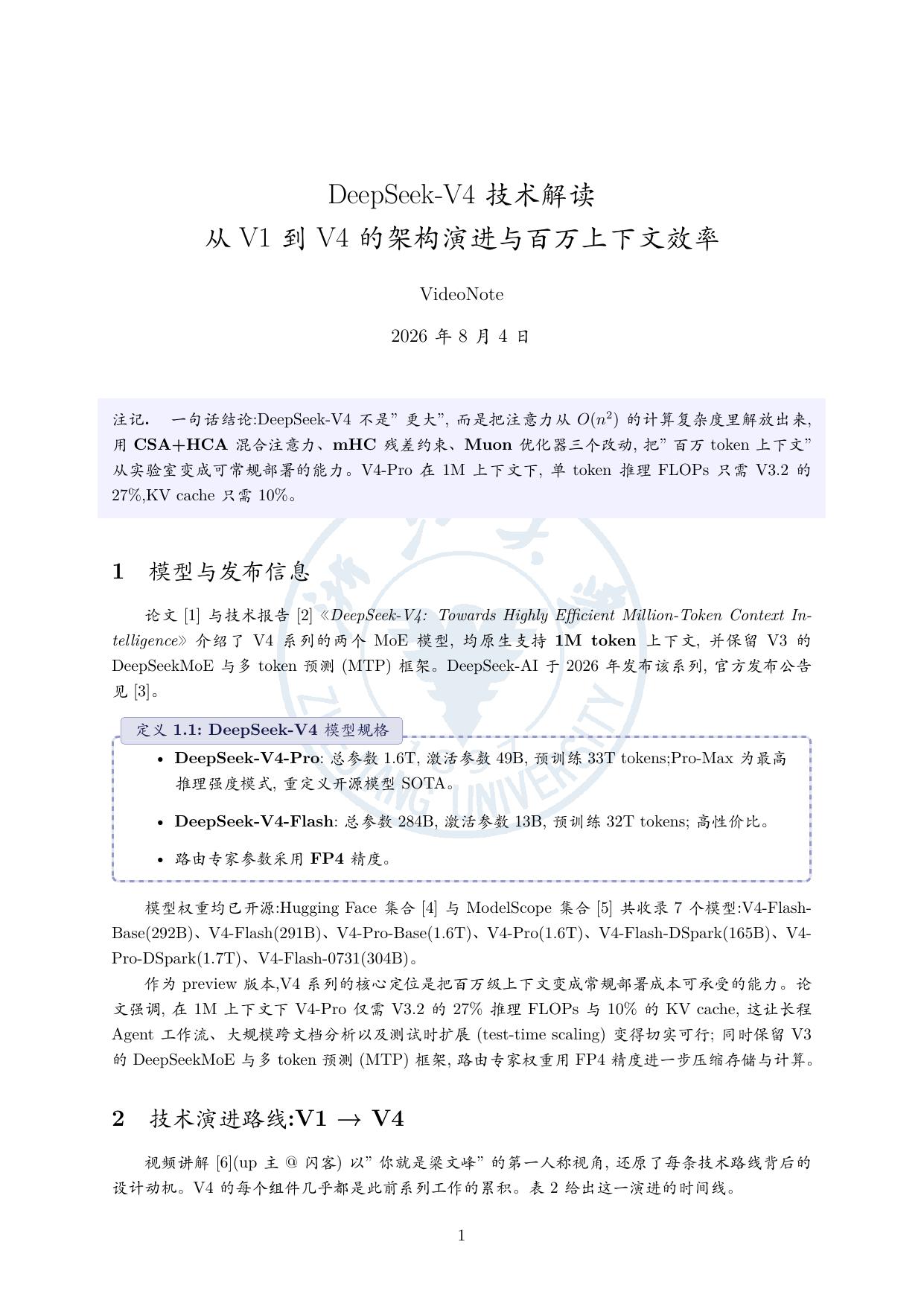 |
| 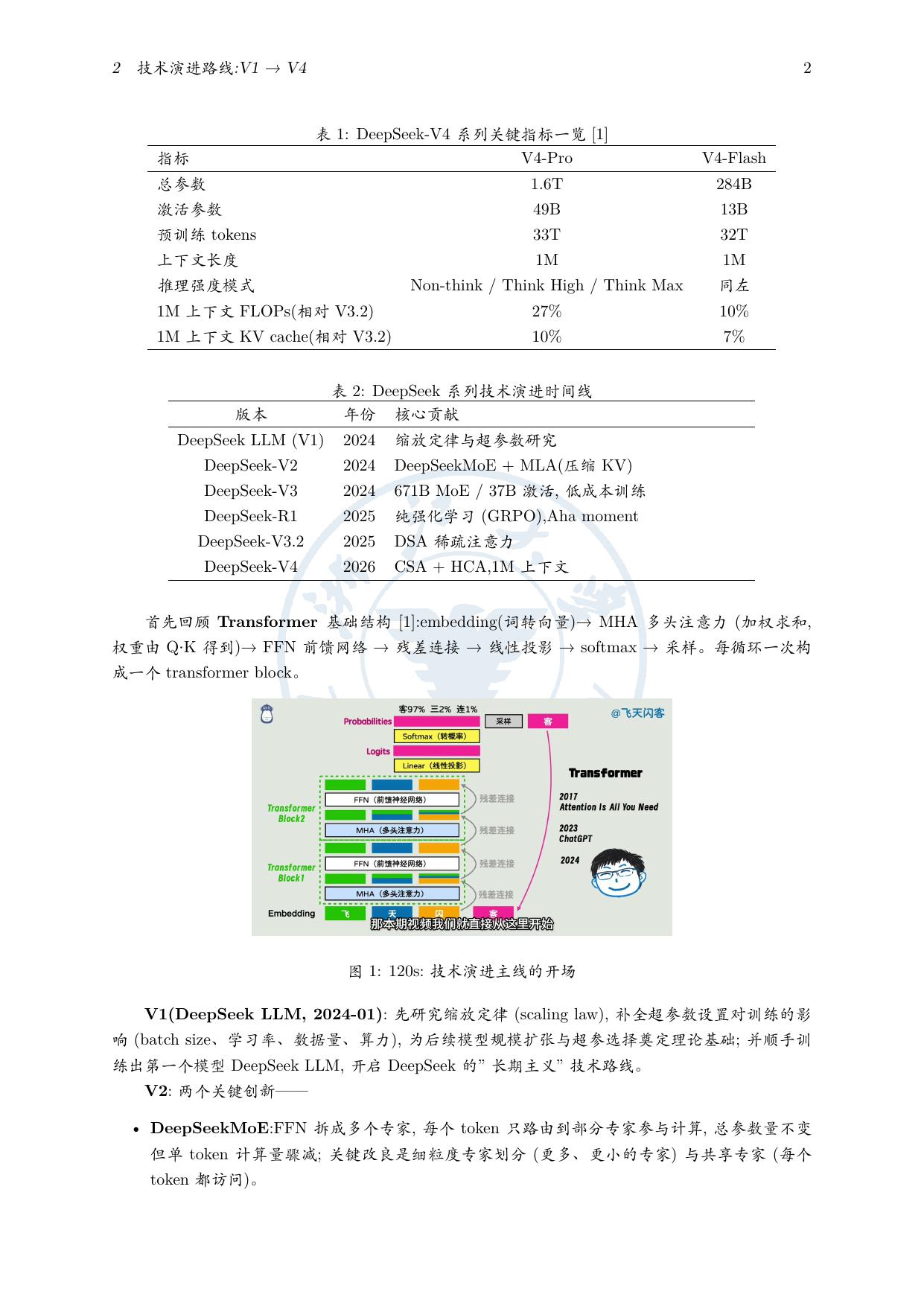 |
| 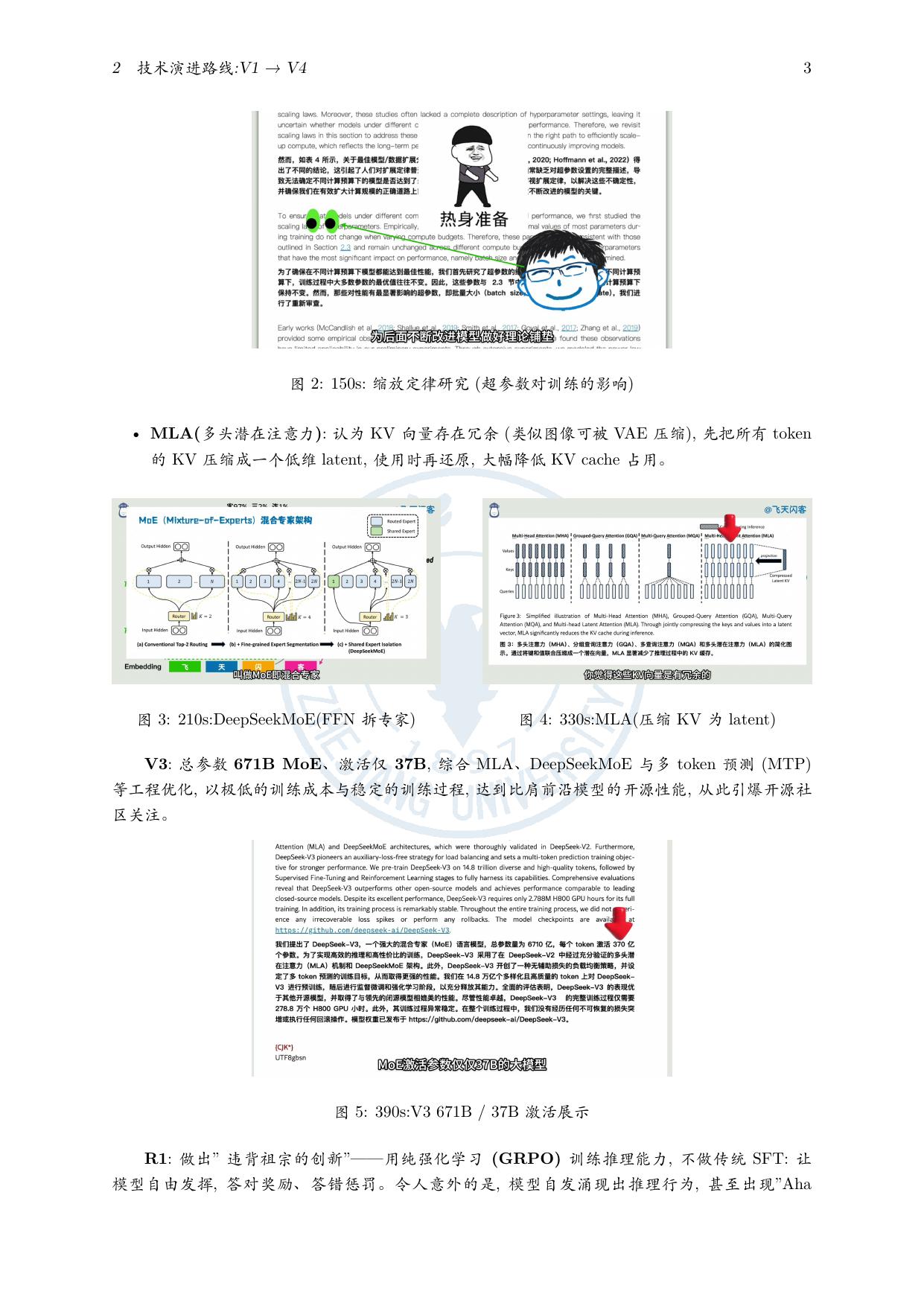 |
- No LLM key: the note is organized from the transcript, frames and comments
- Multi-source cross-integration: video × paper × tech report × open-source list
- Refined copy keeps the original: `note.md` / `note_original.md` pair
- LaTeX mathnote PDF: auto-fixes missing fonts / line-overflow / citation dedup
Full run record: [`examples/agent-direct-deepseek-v4-mathnote/README.md`](examples/agent-direct-deepseek-v4-mathnote/README.md).
### Example 2 · Fully automatic LLM generation + portable Markdown (multi-video parallel)
A minimal prompt (3 Bilibili links + an output dir, not a single parameter given) → **fully automatic** run of env check → link detection → provider/model discovery → parameter confirmation → multi-video parallel → post-generation refinement from the transcript, producing 3 **portable refined notes** (`note.md` + `Assets/` screenshots + a "Viewer Opinions" section, keeping `note_original.md` for comparison).
- [**IELTS**](https://www.bilibili.com/video/BV1c54y187SH/): myth-busting + listening/reading/writing/speaking breakdown + 179 high-frequency exam words + 15-sentence logic framework
- [**Forensics**](https://www.bilibili.com/video/BV1QEgZ6rEGj/): a 43-year forensic pathologist "reacts" to film vs. reality; refined into 12 sections
- [**Transformer**](https://www.bilibili.com/video/BV1r8nMz4EAj/): self-attention deep dive, 18 screenshots distributed along the lecture timeline
Full run record: [`examples/note-generation-example/README.md`](examples/note-generation-example/README.md).
---
## Pipeline Map
```mermaid
flowchart TB
SOURCE(["Video link / local file"])
subgraph COLLECT["01 · Material preparation"]
FETCH["Platform detection & download"]
TRANSCRIPT["Subtitles / transcription
|
- No LLM key: the note is organized from the transcript, frames and comments
- Multi-source cross-integration: video × paper × tech report × open-source list
- Refined copy keeps the original: `note.md` / `note_original.md` pair
- LaTeX mathnote PDF: auto-fixes missing fonts / line-overflow / citation dedup
Full run record: [`examples/agent-direct-deepseek-v4-mathnote/README.md`](examples/agent-direct-deepseek-v4-mathnote/README.md).
### Example 2 · Fully automatic LLM generation + portable Markdown (multi-video parallel)
A minimal prompt (3 Bilibili links + an output dir, not a single parameter given) → **fully automatic** run of env check → link detection → provider/model discovery → parameter confirmation → multi-video parallel → post-generation refinement from the transcript, producing 3 **portable refined notes** (`note.md` + `Assets/` screenshots + a "Viewer Opinions" section, keeping `note_original.md` for comparison).
- [**IELTS**](https://www.bilibili.com/video/BV1c54y187SH/): myth-busting + listening/reading/writing/speaking breakdown + 179 high-frequency exam words + 15-sentence logic framework
- [**Forensics**](https://www.bilibili.com/video/BV1QEgZ6rEGj/): a 43-year forensic pathologist "reacts" to film vs. reality; refined into 12 sections
- [**Transformer**](https://www.bilibili.com/video/BV1r8nMz4EAj/): self-attention deep dive, 18 screenshots distributed along the lecture timeline
Full run record: [`examples/note-generation-example/README.md`](examples/note-generation-example/README.md).
---
## Pipeline Map
```mermaid
flowchart TB
SOURCE(["Video link / local file"])
subgraph COLLECT["01 · Material preparation"]
FETCH["Platform detection & download"]
TRANSCRIPT["Subtitles / transcription
Subtitles first; ASR otherwise"]
VISION["Visual understanding
Keyframes / multimodal analysis"]
COMMENTS["Danmaku & comments"]
FETCH --> TRANSCRIPT
FETCH -.-> VISION
FETCH -.-> COMMENTS
end
subgraph WRITE["02 · Note generation"]
MATERIAL["Material pack
Transcript · frames · optional comments"]
AGENT["Conversation assistant
Direct writing · no LLM key"]
LLM["Configured LLM
generate_note · fallback"]
MATERIAL -->|prepare_note_material| AGENT
MATERIAL -.-> LLM
end
subgraph OUTPUT["03 · Outputs"]
NOTE["Portable note
note.md + Assets/ screenshots"]
DOCUMENT["Assistant-created formats
LaTeX / Typst / mind map"]
SUBTITLE["Subtitle export
SRT / VTT / JSON"]
NOTE -.-> DOCUMENT
end
SOURCE --> FETCH
TRANSCRIPT --> MATERIAL
VISION -.-> MATERIAL
COMMENTS -.-> MATERIAL
AGENT --> NOTE
LLM -.-> NOTE
TRANSCRIPT -.->|process_media · export| SUBTITLE
classDef entry fill:#4f46e5,stroke:#4338ca,color:#fff
classDef primary fill:#eef2ff,stroke:#818cf8,color:#312e81
classDef optional fill:#f8fafc,stroke:#94a3b8,color:#334155,stroke-dasharray:5 4
classDef result fill:#ecfdf5,stroke:#6ee7b7,color:#064e3b
class SOURCE entry
class MATERIAL,AGENT primary
class VISION,COMMENTS,LLM,DOCUMENT,SUBTITLE optional
class NOTE result
style COLLECT fill:transparent,stroke:#cbd5e1,rx:12,ry:12
style WRITE fill:transparent,stroke:#cbd5e1,rx:12,ry:12
style OUTPUT fill:transparent,stroke:#cbd5e1,rx:12,ry:12
```
Solid lines show the default flow: `prepare_note_material` prepares the pack, and the conversation assistant organizes the note. Dashed lines show optional capabilities or fallback paths: use `generate_note` with the configured LLM when the assistant cannot view images or the user requests it. Subtitles can be exported independently; the assistant creates other formats on demand. Stage details live in [docs/02-架构设计.md](docs/02-架构设计.md).
## Task Management
One folder per task `note_results/{task_id}/`: `raw/` (downloaded media) + `gen/` (transcript/note/frames/exports) + control files; a **global task index** lives in the SQLite `video_tasks` table (with semantic titles). `list_tasks` enumerates all tasks (identify by semantic title), `cleanup(task_id, dry_run=True)` inspects a task before cleanup, `cleanup` does per-task / global cleanup (config & models kept by default), and `health_check` verifies FFmpeg / database / whisper readiness.
```mermaid
flowchart TB
DATA["data/ root"] --> R["note_results/ tasks"]
DATA --> DB[("video_note.db
SQLite global task index")]
R --> T1["Task A
note_results/{task_id}/"]
R --> T2["Task B
…"]
R --> T3["Task C
…"]
T1 --> RAW["raw/ original material
audio/video · cover"]
T1 --> GEN["gen/ generated material"]
T1 --> CTRL["status.json · result.json · manifest.json"]
GEN --> T1A["transcript.json full transcript"]
GEN --> T1B["note.md finished note"]
GEN --> T1C["Assets/ screenshots in the note"]
GEN --> T1D["frames/ keyframe originals"]
GEN --> T1E["srt / vtt / json subtitle exports"]
DB -. index .-> T1
```
| Tool | Description | Type |
|------|------|------|
| `list_tasks` | List all tasks (global index, with semantic titles) | MCP tool |
| `cleanup` | Per-task cleanup (with `task_id`) / global cleanup (factory reset, without) | MCP tool |
| `health_check` | FFmpeg / database / whisper readiness | MCP tool |
---
## Best Practices
- **Study & exam prep**: end-to-end + video understanding + transcript-based follow-up refinement.
- **Meeting minutes**: `process_media(action="merge")` to join recorded segments → `process_media(action="diarize")` for speakers → `meeting_minutes` style.
- **Deep-reading a lecture**: after end-to-end generation, refine from the full transcript, filling in section by section.
- **Video appreciation**: enable danmaku + comment integration for an "Audience viewpoints" section.
- **Default path**: one link uses `prepare_note_material`, and the conversation assistant organizes the note; use `generate_note` when image understanding requires the configured LLM or the user asks for it. Use `process_media` for media operations (merge / diarize / export).
- **Real example**: full run records for both cases live in [`examples`](examples).
## How to Contribute
Issues, improvement ideas and pull requests are welcome. See [CONTRIBUTING.md](CONTRIBUTING.md) for the development environment, tests, branch policy and code navigation.
## Acknowledgements
Thanks to the community and all contributors, to [Glama](https://glama.ai) for listing this MCP server, and to all open-source dependencies and the upstream pipeline project that inspired this work.