MemSlides
Hierarchical Memory for Personalized Slide Generation
Multi-turn Local Revision with User-profile, Working, and Tool Memory
Official code repository for the MemSlides paper.





This repository contains the **official implementation** of [**MemSlides: A Hierarchical Memory-Driven Agent Framework for Personalized Slide Generation with Multi-turn Local Revision**](https://arxiv.org/abs/2606.17162).
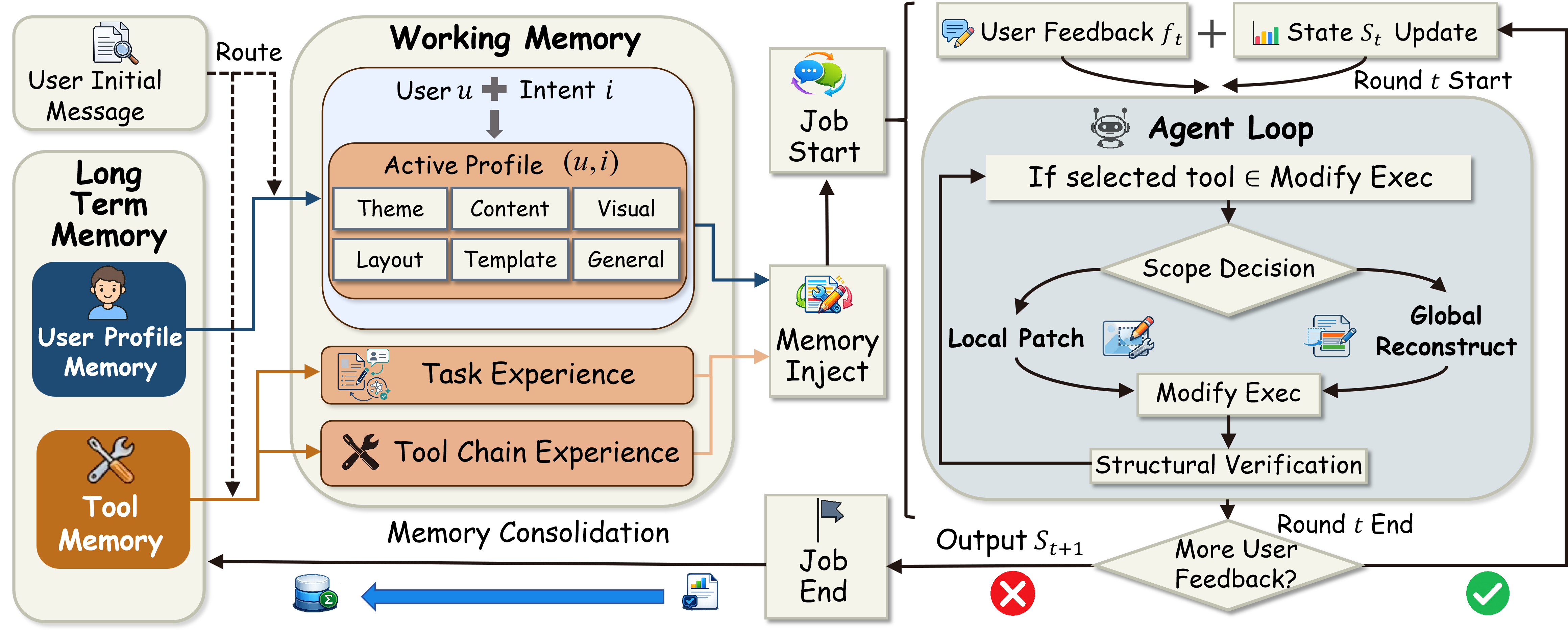
MemSlides integrates user-profile memory, working memory, and tool memory to support persistent personalization, revision-context retention, and the reuse of tool-execution experience. The implementation includes slide-generation and revision pipelines, template induction, artifact export, and experiment utilities for studying these mechanisms.
> **Official website:** [memslides.com](https://memslides.com/). The domain `memslides.org` is not operated by this project and is not affiliated with this repository.
## Demo
The following demonstration illustrates slide generation, multi-turn revision, explicit preference saving, preference reuse, and export through the web interface.
https://github.com/user-attachments/assets/51abee82-14bf-4b34-adf8-6f630086bb87
60-second website walkthrough using a four-slide research example. Waiting time is shortened; previews and downloads use a previously generated public example. Saving a preference is an explicit choice.
## News
- **Web interface:** the updated [online demonstration](https://memslides.com/) provides access to slide generation, revision, preference management, and export.
- **Demonstration video:** the [new walkthrough](#demo) illustrates the workflow and the reuse of saved preferences across presentations.
- **Research materials:** the [paper](https://arxiv.org/abs/2606.17162) and [project page](https://memslides.github.io/) describe the framework and present qualitative examples.
## Key Capabilities
| Capability | Implementation |
| --- | --- |
| Personalized generation | Generate slides from instructions and source materials, conditioned on presentation intent and stored user preferences. |
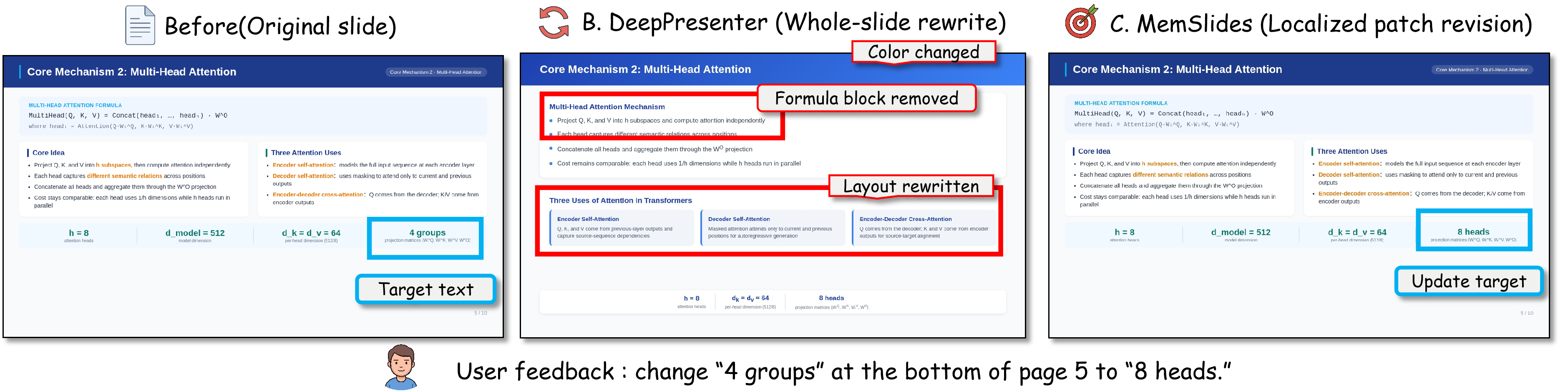
| Multi-turn local revision | Interpret natural-language feedback and apply edits to the affected slide or region while retaining revision context. |
| Template induction | Derive reusable template profiles from existing PPTX files. |
| Artifact export | Produce slide HTML and PPTX artifacts, with PDF export when available. |
| Experiment execution | Run packaged or custom experiment suites and produce reports for analysis. |
## Getting Started
### Online Demonstration
The hosted demonstration is available at **[memslides.com](https://memslides.com/)**. Sign-in or registration is required to access the interface.
The interface supports specifying the topic, audience, language, and slide count, followed by preview and natural-language revision. Preference persistence is explicit: users save selected preferences and activate them for subsequent presentations.
This repository provides the Python implementation and experiment environment associated with the paper. The Docker image supports CLI execution and experiment reproduction.
### Local Installation and Inference
Recommended environment: **Python 3.11, Node.js 20**, LibreOffice, Poppler, CJK fonts, and Playwright Chromium. See the [installation guide](docs/INSTALL.md) for Windows, private configuration, and export setup.
On Linux, with Conda installed:
```bash
git clone https://github.com/huohua325/Memslides.git
cd Memslides
sudo apt-get update
sudo apt-get install -y libreoffice fontconfig fonts-noto-cjk poppler-utils
conda env create -f environment.yml
conda activate memslides
pip install -e ".[research]"
python -m playwright install chromium ffmpeg
```
**Configure your models before generating.** Copy the public configuration to a local file:
```bash
cp src/memslides/memslides.yaml memslides.yaml
```
Configure the root-level `memslides.yaml` with your model endpoints, model names, and credentials for the agents and enabled services. This local file is ignored by git; the packaged [public configuration](src/memslides/memslides.yaml) contains environment-variable placeholders. Credentials can also be supplied through those environment variables. See [configuration details](docs/INSTALL.md#configuration).
Generate a deck, then revise it in the **same workspace**:
```bash
python -m memslides --config memslides.yaml --workspace .memslides/demo generate \
--instruction "Create a four-slide research overview" --num-pages 4
python -m memslides --config memslides.yaml --workspace .memslides/demo revise \
--feedback "Shorten the title on slide 2"
```
The commands print a JSON result with the workspace and available artifact paths. Global options such as `--config`, `--workspace`, and `--language` go **before** the subcommand.
Docker, templates, and experiment reproduction
The [published Docker image](https://hub.docker.com/r/huohua325/memslides) includes the experiment environment. It runs a CLI job; see the [Docker guide](docker/README.md) for image tags, credentials, and persistent volumes.
```bash
docker run --rm huohua325/memslides:v2.0.1 python -m memslides.experiment --help
```
Induct a PPTX template:
```bash
python -m memslides template induct --template-file template.pptx
```
After configuring credentials, run the packaged one-slide verification suite:
```bash
python -m memslides.experiment run smoke_minimal \
--output-base .memslides/experiments --parallel 1
python -m memslides.experiment report .memslides/experiments/smoke_minimal
python -m memslides.experiment personas
```
`smoke_minimal` performs real generation and PPTX export; it requires model credentials. Pass another packaged suite name or a local suite YAML path to run a different experiment. See the [experiment guide](docs/INSTALL.md#run-experiments).
## Method Overview
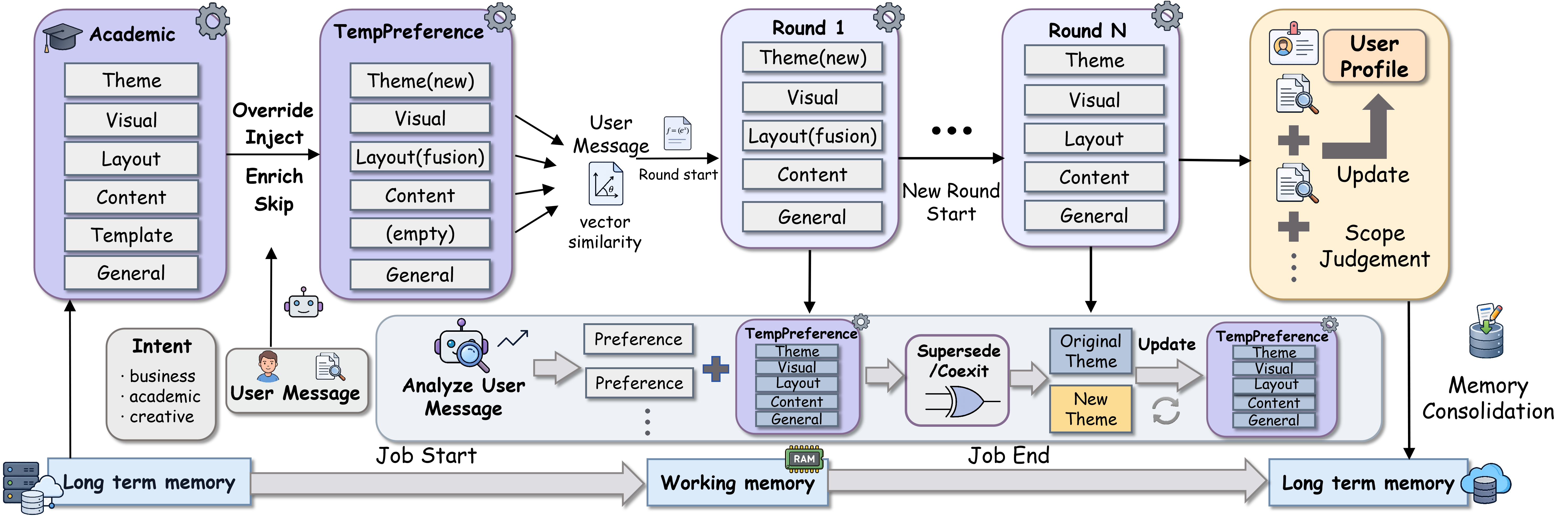
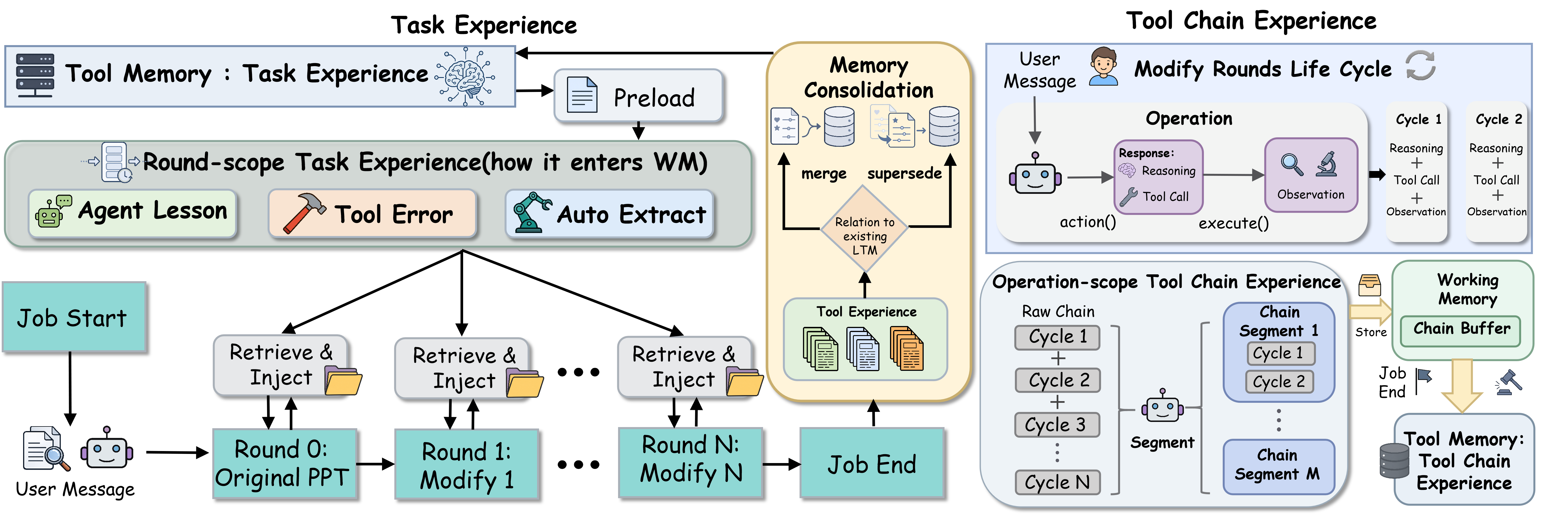
The framework organizes generation and revision around three complementary memory components:
- **User-profile memory** stores persistent preferences and retrieves them according to presentation intent for subsequent generation tasks.
- **Working memory** maintains task-specific constraints, temporary preferences, and editing state across revision turns.
- **Tool memory** stores and retrieves prior tool-execution experience to inform related editing operations.
During local revision, the runtime interprets user feedback to identify the affected slide region and constrain the scope of the update. See the paper for the method and experimental evaluation.
**Research resources:** [Paper](https://arxiv.org/abs/2606.17162) · [Project page](https://memslides.github.io/) · [Hugging Face Space](https://huggingface.co/spaces/huohua325/MemSlides).
A closer look at memory and local revision
Repository map and developer checks
```text
src/memslides/ Python runtime, contracts, and public CLI
src/memslides/pipelines/ Generation, revision, and export
src/memslides/memory/ Profile, working, and tool memory
src/memslides/experiment/ Experiment suites and reports
src/memslides/tools/ MCP tools and services
tests/ Regression and contract tests
docs/INSTALL.md Installation and configuration
docker/README.md Docker environment and image tags
.memslides/ Ignored local workspaces and outputs
```
Install the development tools and run the Python checks used by continuous integration:
```bash
pip install -e ".[dev,research]"
python -m compileall -q src tests
python scripts/check_source_hygiene.py
python -m pytest -q
ruff check src tests
```
To check the Node export runtime, install dependencies from the root `package.json`:
```bash
npm ci
npm run check:pptx-export
```
## Contributing
Implementation questions, reproducibility reports, and proposed extensions are welcome in [Issues](https://github.com/huohua325/Memslides/issues).
- **Report a bug:** [open an issue](https://github.com/huohua325/Memslides/issues/new) with reproduction steps, your environment, and sanitized logs. Mention whether it concerns the website or the local runtime.
- **Report an experimental issue:** provide the suite or configuration used, relevant environment details, and the observed result.
- **Propose an extension:** describe the research or implementation motivation and the intended behavior.
- **Contribute code or documentation:** browse [open issues](https://github.com/huohua325/Memslides/issues), discuss substantial changes first, and include relevant checks in your pull request. Corrections and reproducible examples are welcome.
To follow implementation releases, choose **Watch → Custom → Releases** on GitHub.
### Privacy and configuration
Keep API keys in environment variables, `.env`, or private YAML files. Do not commit credentials, generated workspaces, or memory databases. Remove private content from examples and logs before sharing them. External acquisition depends on the services you configure; review downloaded assets before presenting.
## Citation
If you use MemSlides in your research, please cite:
```bibtex
@misc{jin2026memslides,
title={MemSlides: A Hierarchical Memory Driven Agent Framework for Personalized Slide Generation with Multi-turn Local Revision},
author={Ye Jin and Yangyang Xu and Jun Zhu and Yibo Yang},
year={2026},
eprint={2606.17162},
archivePrefix={arXiv},
primaryClass={cs.CL},
doi={10.48550/arXiv.2606.17162},
url={https://arxiv.org/abs/2606.17162},
}
```
## License
Released under the [Apache License 2.0](LICENSE). See [third-party notices](THIRD_PARTY_NOTICES.md) for included components.