
简体中文 · English

Oh-DSH whale

Oh-DSH

One DSH runtime. Desktop, Web, and TUI development experiences.

Bring AI agents, workspaces, local tools, and the plugin ecosystem to the interface you prefer.

GitHub release GitHub stars Desktop, Web and TUI macOS, Linux and Windows MIT License

Download · Usage guide · Design guide
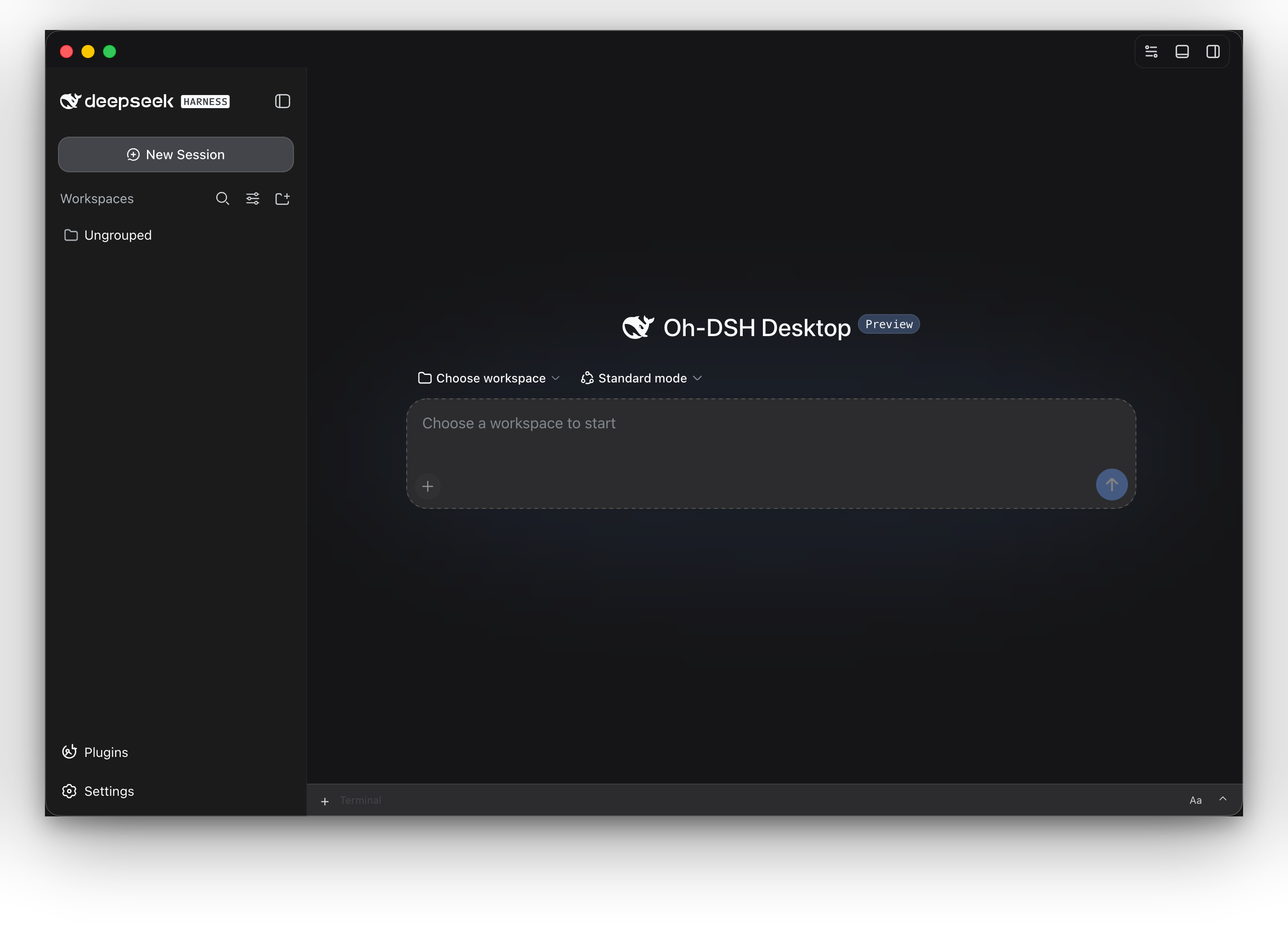
Oh-DSH Desktop interface

Oh-DSH packages DeepSeek Harness, Node.js, local development tools, and bundled plugins as installable Desktop, Web, and TUI distributions. Model services can still run in the cloud; the local workbench organizes workspaces, terminals, Git review, browser, files, sessions, and plugin state. ## Features

🖥️ Three interaction surfaces

Use the same ohdsh command to start Desktop, Web, or TUI. All surfaces share sessions, credentials, skins, and plugin caches while keeping separate Profiles.

🧰 Local development workbench

Workspace, PTY terminal, browser, file explorer, side chat, and trajectory are built in. Panels can collapse, pin, split, or expand over the workspace.

🔍 Git review

Inspect workspace changes and commit diffs, add review comments to code lines, and manage branches, commits, and pushes from the same side panel.

🧩 Plugin marketplace

Desktop, Web, and TUI can all search, preview, and install plugins through one shared transaction and recovery state. The catalog labels where a plugin actually takes effect: installation may succeed on every surface, but some plugins only work on Web or Desktop — not in TUI — and that distinction is shown explicitly.

🎨 Cross-surface skins

@oh-dsh/skins provides shared themes for Desktop, Web, and TUI, with layout and readability adaptations for each surface.

📦 Split distributions

Install the full, Web-only, or TUI-only distribution. Each includes pinned DSH and Node runtimes, so no separate runtime installation is required.

## Download and install Choose a distribution from the [latest GitHub Release](https://github.com/hust-open-atom-club/oh-dsh/releases/latest): | Distribution | Includes | Best for | | --- | --- | --- | | Full | **Oh-DSH Desktop**, Web, TUI, Node runtime, and bundled plugins | Local development workbench | | Web-only | **Oh-DSH Web**, Node runtime, and bundled Web plugins; no Electron | Browser, server, or small installs | | TUI-only | **Oh-DSH TUI**, Node runtime, and terminal plugins; no Electron | SSH and terminal-only environments | - **macOS:** open the DMG and drag **Oh-DSH Desktop** into Applications. - **Windows:** run the installer, or extract and launch the portable package. - **Linux:** run the AppImage, or install the deb with `apt`. Web-only and TUI-only packages are ready after extraction: ```sh # Web UI, listening on http://127.0.0.1:3080 by default ./bin/ohdsh web # Terminal UI ./bin/ohdsh tui ``` On Windows, use `bin\ohdsh.cmd web` or `bin\ohdsh.cmd tui`. ### Install the unified command The macOS full distribution contains a launcher that can be added to `PATH`: ```sh sudo ln -sf \ "/Applications/Oh-DSH Desktop.app/Contents/Resources/bin/ohdsh" \ /usr/local/bin/ohdsh ``` Run `./bin/ohdsh` from Web-only and TUI-only packages, or add it to `PATH`. ## Usage ```sh ohdsh desktop # Start Oh-DSH Desktop ohdsh gui # Alias for Oh-DSH Desktop ohdsh web # Start Oh-DSH Web ohdsh web --port 3080 # Choose the Web port ohdsh tui # Start Oh-DSH TUI ``` All three surfaces use `~/.ohdsh` for caches, configuration, sessions, credentials, and plugin state by default. Set `OH_DSH_HOME` to move the shared data root. Run `ohdsh web --help` or `ohdsh tui --help` for surface-specific options. The bundled `@oh-dsh/vision` plugin exposes one `view_image` tool on every surface, allowing users to perform OCR, image inspection, and UI diagnosis on workspace-local files, HTTP(S) images, or image data URLs. DSH's native attachment rail continues to own image copy, paste, thumbnails, and submission; the plugin admits DeepSeek V4 at the Host's final image-capability check and describes its native attachments through the configured vision backend before the pinned text-only adapter serializes the same turn. It does not add a second composer bubble or reference protocol. TUI uses the same capability through workspace image paths or URLs. See the [image recognition guide](./docs/usage.md#image-recognition) for credentials and backend configuration. The cloud/local keys and Vision settings are also available in the native Settings → Plugins → Plugin configuration → Vision card.
Run from source Node.js, pnpm, and the platform build tools are required: ```sh git submodule update --init --recursive pnpm install pnpm run build:dsh pnpm run build pnpm run stage:dsh export PATH="$PWD/bin:$PATH" ohdsh desktop ohdsh web ohdsh tui ``` Build the full distribution with the platform-specific `dist:mac`, `dist:linux`, or `dist:win` script. Build only Web with `pnpm run dist:web`, or only TUI with `pnpm run dist:tui`.
More interfaces ### Plugin marketplace ![Oh-DSH plugin marketplace](./assets/oh-dsh-plugin-marketplace.png) ### Oh-DSH skins ![Oh-DSH cross-surface skins](./assets/oh-dsh-desktop-skins.png)
## Documentation - [Installation, operations, and troubleshooting](./docs/usage.md) - [Architecture, design, and plugin boundaries](./docs/design.md) ## Plugin recommendations | Recommended project | Description | | --- | --- | | [DeepSeek Harness](https://github.com/deepseek-harness/deepseek-harness) | DSH runtime, sessions, and plugin loader | | [dsh-TUI](https://github.com/ccch1mneyyy/dsh-TUI) | **Direct upstream plugin for Oh-DSH TUI**, providing terminal rendering, interaction, and commands | | [DSH-better-sidebar](https://github.com/omdsh-dev/DSH-better-sidebar) | Git review, files, and PTY host capabilities | | [dsh-vision](https://github.com/william-jin-cmu/dsh-vision) | Reference for the cross-surface `view_image` vision tool | | [dshfind](https://dshfind.com/) | DSH plugin marketplace and learning community with plugin, ecosystem, and DeepSeek Harness peripheral recommendations | Oh-DSH preserves upstream implementations and attribution, then provides the unified launcher, Profiles, data root, cross-surface skins, interface adaptations, and distribution packaging. See the [design guide](./docs/design.md) for the exact boundaries. ## License [MIT](./LICENSE)

