
dsh-mcp-tools
The most minimal, elegant MCP tool manager for DeepSeek Harness.
Cursor-style global MCP control: add, disable and remove MCP servers and tools freely — for MCP testing, on-demand requests and context expansion.





GitHub ·
npm ·
Issues ·
简体中文
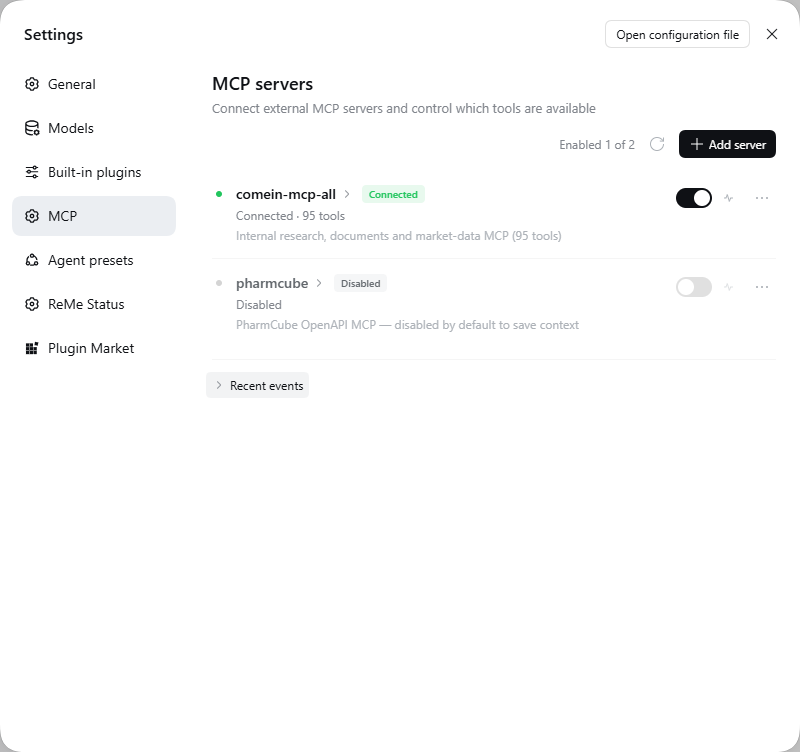
> All-in-one MCP server management with per-tool switches. Disabled tools **never reach the model**: no context cost, no accidental calls.
## ✨ Features
| Capability | Details |
| --- | --- |
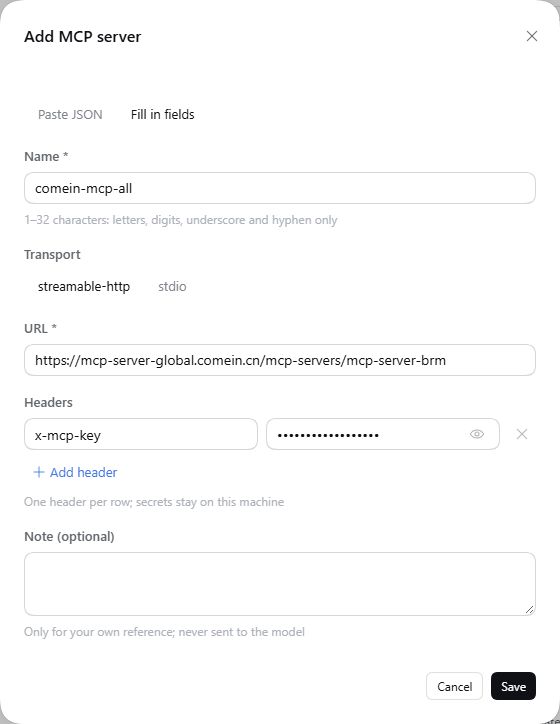
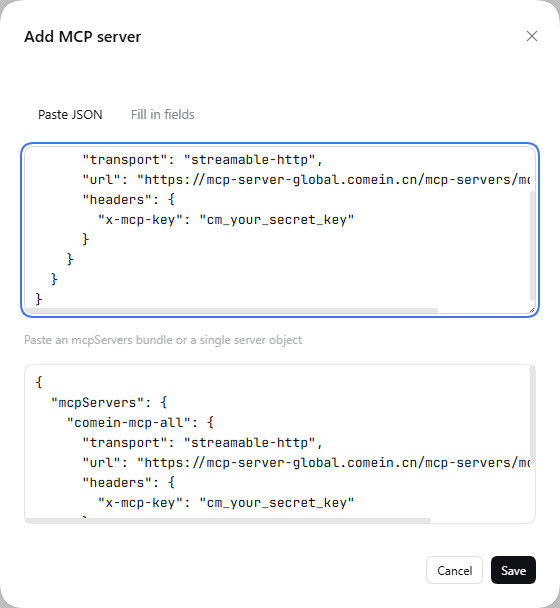
| **Server management** | Two transports: `streamable-http` (URL + headers) and `stdio` (command / args / env / cwd); fill fields or paste `{"mcpServers": { ... }}` to import many at once. |
| **Postman-style secrets** | Headers are key/value rows, not a JSON textarea; a default `x-mcp-key` row is provided, values are masked and can be revealed per row, duplicate names error inline. |
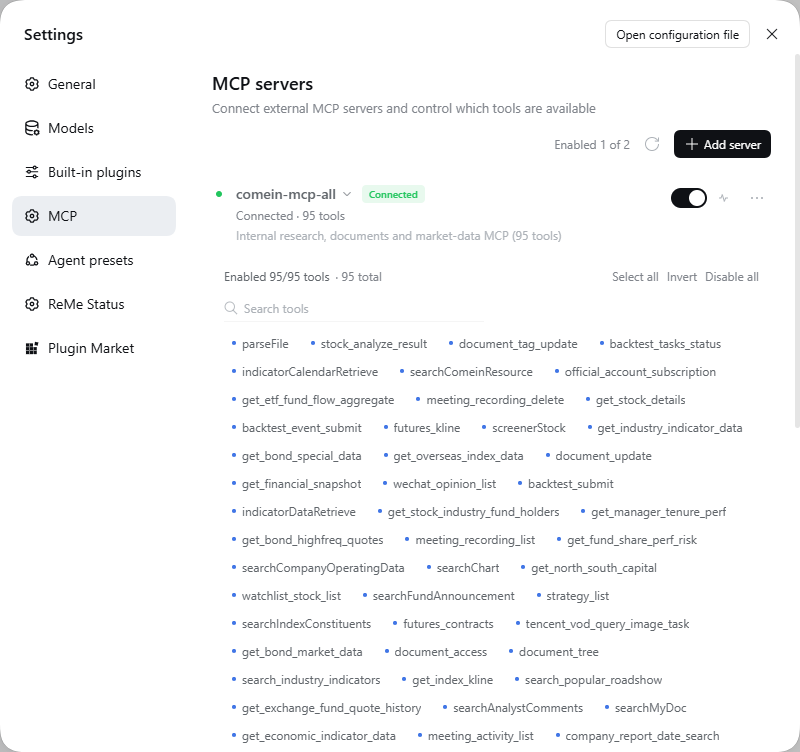
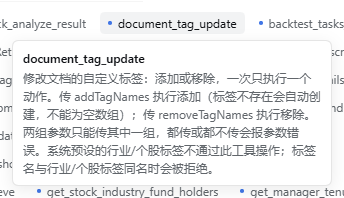
| **Real per-tool control** | Every tool is a chip; disable it and it disappears from the model's tool list entirely (not "registered then errors"). Search, select all, invert, disable all — hover for the full description. |
| **Connectivity test & event log** | Temporary connection: `initialize → tools/list → close`, reporting latency / protocol version / tool count without touching the live server. The "Recent events" log records connects, reloads, tests and failures. |
| **Server toggle & config copy** | Turning a server off disconnects it and unregisters all its tools (config kept); one click copies that server's `mcpServers` snippet. |
| **Native DSH look** | Reuses `--dsw-*` design tokens, flat rows and 32px inputs; light/dark and zh/en adapt automatically. The client is a classic script — no build step. |
## 🚀 Install
Requires **DeepSeek Harness 0.2.x** (Web GUI `dsh web` or DSH Desktop) and **Node.js ≥ 22.13**. Available on npm: [dsh-mcp-tools](https://www.npmjs.com/package/dsh-mcp-tools).
> ⚠️ This is a **DeepSeek Harness plugin**, not a plain npm library: `npm i dsh-mcp-tools` only downloads the package — it still has to be installed into a DSH profile as below.
**From the Plugins page (recommended)**
1. Open DSH Web (or DSH Desktop) → **Plugins** in the sidebar (Desktop: **Settings → Plugins**).
2. Choose **Install**, enter `dsh-mcp-tools`, and confirm.
3. Enable the new bundle, refresh the page, then open **Settings → MCP**.
**From the CLI**
```bash
dsh plugin --profile web add dsh-mcp-tools # Web
dsh plugin --profile desktop add dsh-mcp-tools # Desktop
```
> Upgrading the package requires a restart of `dsh web` / reopening DSH Desktop.
## ⚡ Quick start
1. **Settings → MCP → Add server**: for remote servers enter the URL and paste the secret into the header row (default `x-mcp-key`).
2. Hit **Test connection** — expect something like `connected · 95 tools · 478 ms` — then save and flip the server switch on.
3. Let the model call the tools; DSH registers them as `mcp____`. Disable unused tools to shrink the tool schema in every request.
## 🖼 More screenshots
| Dark mode | Some tools disabled |
| --- | --- |
|  |
|  |
| Paste `mcpServers` JSON | Tool tooltip |
| --- | --- |
|
|
| Paste `mcpServers` JSON | Tool tooltip |
| --- | --- |
|  |
|  |
## 🧩 How it works
```
DeepSeek Harness Web (dsh web)
├── Host plugin (lib/) ← cordis bundle patch, reuses the native MCP client
│ ├── manager.js connect, register tools, enable/disable
│ ├── store.js ~/.dsh/dsh-mcp-tools/state.json (atomic writes, watches external edits)
│ └── routes.js /mcp-tools/api/*
└── Client bundle (client/client.js)
└── Settings section "MCP" (id: mcp, order: 18) — classic script, no build
```
- Enable/disable happens at **registration** time, not call time: disabled tools never appear in the model's tool list.
- State lives in `~/.dsh/dsh-mcp-tools/state.json`, written atomically; external edits are watched and hot-applied.
- REST API: `GET /mcp-tools/api/state`, `POST /servers/{test,save,delete,toggle,refresh}`, `POST /tools/{toggle,bulk}`, `POST /import`, `POST /reload`, `GET /logs`. See [docs/API.md](docs/API.md).
## 🔒 Security
- Headers are stored **in plain text** in the local state file — local only; never commit or sync it to a public location.
- Use a dedicated, least-privilege key for every MCP server.
- No network requests beyond the MCP servers you configure, and no telemetry; deleting a server removes its tools from subsequent requests.
## 🛠 Development
```bash
git clone https://github.com/hxlog/dsh-mcp-tools.git
cd dsh-mcp-tools
node --check client/client.js
npm run selftest
```
Link the source tree into a profile instead of installing a copy (Windows example):
```bat
rmdir "C:\Users\\.dsh\profiles\web\node_modules\dsh-mcp-tools"
mklink /J "C:\Users\\.dsh\profiles\web\node_modules\dsh-mcp-tools" "D:\path\to\dsh-mcp-tools"
```
- **Client changes**: just refresh the page; the bundle is served from disk, no build.
- **Host changes**: touch the profile's `cordis.patch.yml` (e.g. append a comment) to trigger HMR; once the log shows `MCP 管理器已启动` it is active.
- The panel is a single classic script and may only `require` `react` and `@deepseek-ai/dsh-client-ui-primitives`.
## ❓ FAQ
| Question | Answer |
| --- | --- |
| No MCP section in Settings | The bundle is probably not enabled — confirm on the Plugins page, refresh, restart `dsh web` if needed. |
| Tools missing in a session | Make sure the server switch is on and the tool chips are enabled; disabled tools are never registered. |
| Connection test fails | Check the URL, that the server speaks `streamable-http` (not plain SSE), and the header names; network/proxy problems surface here too. |
| Where is the state file? | `~/.dsh/dsh-mcp-tools/state.json`; delete it to reset to empty — it is recreated on next start. |
## 📄 License
[MIT](LICENSE) · Powered by [DeepSeek Harness](https://github.com/deepseek-ai/deepseek-harness)
[](https://github.com/deepseek-ai/deepseek-harness)
|
## 🧩 How it works
```
DeepSeek Harness Web (dsh web)
├── Host plugin (lib/) ← cordis bundle patch, reuses the native MCP client
│ ├── manager.js connect, register tools, enable/disable
│ ├── store.js ~/.dsh/dsh-mcp-tools/state.json (atomic writes, watches external edits)
│ └── routes.js /mcp-tools/api/*
└── Client bundle (client/client.js)
└── Settings section "MCP" (id: mcp, order: 18) — classic script, no build
```
- Enable/disable happens at **registration** time, not call time: disabled tools never appear in the model's tool list.
- State lives in `~/.dsh/dsh-mcp-tools/state.json`, written atomically; external edits are watched and hot-applied.
- REST API: `GET /mcp-tools/api/state`, `POST /servers/{test,save,delete,toggle,refresh}`, `POST /tools/{toggle,bulk}`, `POST /import`, `POST /reload`, `GET /logs`. See [docs/API.md](docs/API.md).
## 🔒 Security
- Headers are stored **in plain text** in the local state file — local only; never commit or sync it to a public location.
- Use a dedicated, least-privilege key for every MCP server.
- No network requests beyond the MCP servers you configure, and no telemetry; deleting a server removes its tools from subsequent requests.
## 🛠 Development
```bash
git clone https://github.com/hxlog/dsh-mcp-tools.git
cd dsh-mcp-tools
node --check client/client.js
npm run selftest
```
Link the source tree into a profile instead of installing a copy (Windows example):
```bat
rmdir "C:\Users\\.dsh\profiles\web\node_modules\dsh-mcp-tools"
mklink /J "C:\Users\\.dsh\profiles\web\node_modules\dsh-mcp-tools" "D:\path\to\dsh-mcp-tools"
```
- **Client changes**: just refresh the page; the bundle is served from disk, no build.
- **Host changes**: touch the profile's `cordis.patch.yml` (e.g. append a comment) to trigger HMR; once the log shows `MCP 管理器已启动` it is active.
- The panel is a single classic script and may only `require` `react` and `@deepseek-ai/dsh-client-ui-primitives`.
## ❓ FAQ
| Question | Answer |
| --- | --- |
| No MCP section in Settings | The bundle is probably not enabled — confirm on the Plugins page, refresh, restart `dsh web` if needed. |
| Tools missing in a session | Make sure the server switch is on and the tool chips are enabled; disabled tools are never registered. |
| Connection test fails | Check the URL, that the server speaks `streamable-http` (not plain SSE), and the header names; network/proxy problems surface here too. |
| Where is the state file? | `~/.dsh/dsh-mcp-tools/state.json`; delete it to reset to empty — it is recreated on next start. |
## 📄 License
[MIT](LICENSE) · Powered by [DeepSeek Harness](https://github.com/deepseek-ai/deepseek-harness)
[](https://github.com/deepseek-ai/deepseek-harness)