
dsh-skills-tools
Skills manager for DeepSeek Harness.
Import Agent Skills from Git repositories or local folders, manage them by repository, and enable, disable, complete or inspect them at any time.



GitHub ·
npm ·
Issues ·
中文

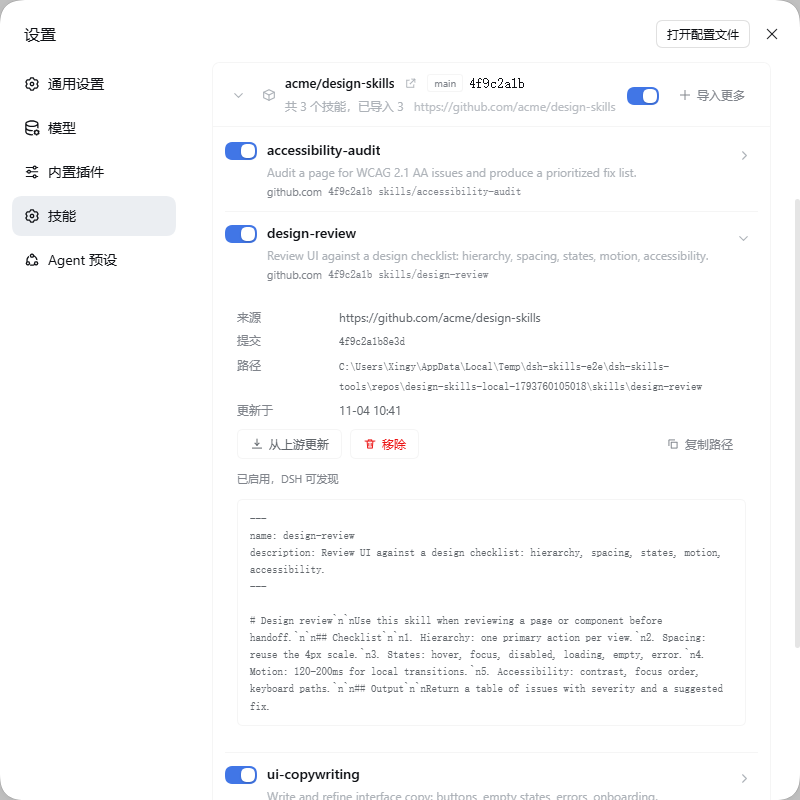
> Disabled skills are not registered with the model: no context cost, no accidental calls.
## ✨ Features
| Capability | Details |
| --- | --- |
| **Grouped by repository** | Skills are grouped into collapsible repository cards. Repositories with enabled skills come first; inside a repository, enabled skills come first. |
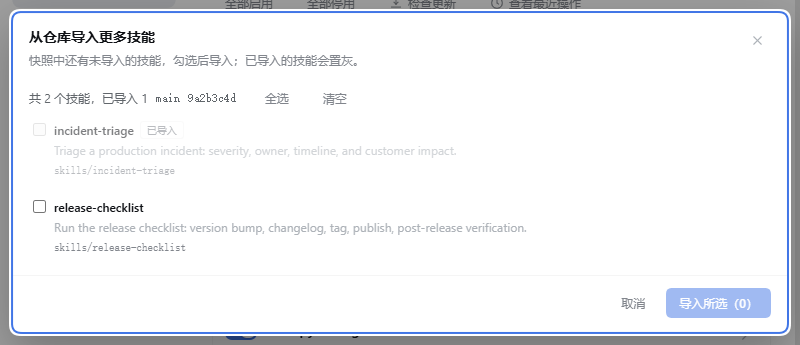
| **Import the rest later** | A partially imported repository shows "N available". Click **Import more** to pick the remaining skills from the existing snapshot — no re-clone. |
| **Repository switch** | Enable or disable every skill in a repository at once; the switch shows a mixed state when only some skills are enabled. |
| **Inline content** | The chevron on each row expands the SKILL.md text, source repository, commit, path and update time, with update and remove actions. |
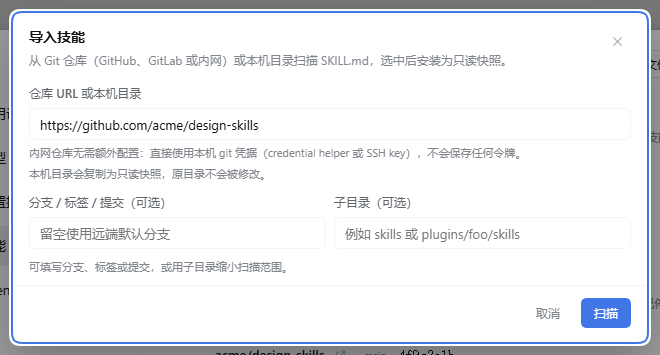
| **Git import and snapshots** | https / ssh / intranet repositories, branches, tags, commits and subdirectories. Imports are read-only snapshots; source repositories are never modified. |
| **Update checks** | Compare the remote head and switch snapshots only after a successful clone. |
## 🚀 Install
Requires **DeepSeek Harness 0.2.x** (Web GUI `dsh web` or DSH Desktop) and **Node.js ≥ 22.13**. Published on npm: [dsh-skills-tools](https://www.npmjs.com/package/dsh-skills-tools).
> ⚠️ This is a **DeepSeek Harness plugin**, not a normal npm library: `npm i dsh-skills-tools` only downloads the package, it still has to be installed into a DSH profile.
**Install from the plugin page (recommended)**
1. Open DSH Web (or DSH Desktop) → **Plugins** (Desktop: **Settings → Plugins**).
2. Click install, enter `dsh-skills-tools`, confirm.
3. Enable the new bundle, refresh, then open **Settings → Skills**.
**Install from the CLI**
```bash
dsh plugin add dsh-skills-tools # default profile
dsh plugin --profile web add dsh-skills-tools # Web
dsh plugin --profile desktop add dsh-skills-tools # Desktop
```
Current version **1.1.1**: grouped by repository, repository switch, and completing skills from an existing snapshot.
> Restart `dsh web` / DSH Desktop after upgrading.
>
> `dsh plugin add` only installs the package; it does not enable the bundle. Enable it once in the plugin page, or make sure `dsh-skills-tools` is in `dsh.profile.bundles`.
## ⚡ Quick start
1. **Settings → Skills → Import skills**: paste a Git URL (`https://`, `git@`, `file://` or a local absolute path). Intranet repositories use your local git credentials.
2. Optionally set a **branch / tag / commit** and **subdirectory**, click **Scan**, select skills (duplicate names get an editable suggestion) and click **Install selected**. Installed skills are enabled.
3. Manage by repository: the repository switch toggles all its skills, row switches toggle one, **Import more** completes partially imported repositories, and the chevron shows the content.
## 🧩 How it works
```
~/.dsh/dsh-skills-tools/
├── state.json repositories, skills, enabled state
└── repos/-/ read-only snapshot
```
- **Snapshot isolation**: every import or update copies the repository into the data folder. Removing a skill only changes state.
- **Registration-time toggles**: enabled state decides whether a skill is registered with the DSH skill catalog; disabled skills never reach the model.
- **REST API**: `GET /skills-tools/api/state`, `POST /import/scan|commit`, `POST /repos/inspect|import|toggle|check-updates`, `POST /skills/toggle|bulk|remove|update`, `POST /refresh`, `GET /logs`. See [docs/API.md](docs/API.md).
## 🔒 Security
- **No tokens stored**: git authentication stays with your credential helper or SSH key.
- **Read-only snapshots**: imports and updates never modify your repositories.
- **No telemetry**: no network requests besides the Git repositories you configure.
## 📋 Requirements and limits
- **Runtime**: DeepSeek Harness 0.2.x (Web or Desktop), **Node.js ≥ 22.13**
- **Platforms**: DSH Web (`--profile web`) and DSH Desktop (`--profile desktop`)
- **Files**: reads and writes `~/.dsh/dsh-skills-tools/`; reads the local folder only when you import one
- **Network**: only the Git repositories you configure, during import and update checks
- **Processes**: invokes local `git` for import and update checks
**Known limits**
- Manages the skills of the current DSH profile only
- Git sources require local `git`; intranet repositories need working credentials
- Content preview is capped at 64 KiB
## ❓ FAQ
| Question | Answer |
| --- | --- |
| No Skills section in Settings | The bundle is probably not enabled. Enable it in the plugin page, refresh, then restart `dsh web` if needed. |
| Import fails | Complete git authentication first; verify the branch / subdirectory and that the repository contains SKILL.md files. |
| Can the model still call a disabled skill? | No. Disabled skills are not registered. |
| Where is the data? | `~/.dsh/dsh-skills-tools/state.json`; delete it to reset. |
## 📄 License
[MIT](LICENSE) · Powered by [DeepSeek Harness](https://github.com/deepseek-ai/deepseek-harness)
[](https://github.com/deepseek-ai/deepseek-harness)