# Lightbox
[](https://circleci.com/gh/hyperoslo/Lightbox)
[](https://github.com/Carthage/Carthage)
[](http://cocoadocs.org/docsets/Lightbox)
[](http://cocoadocs.org/docsets/Lightbox)

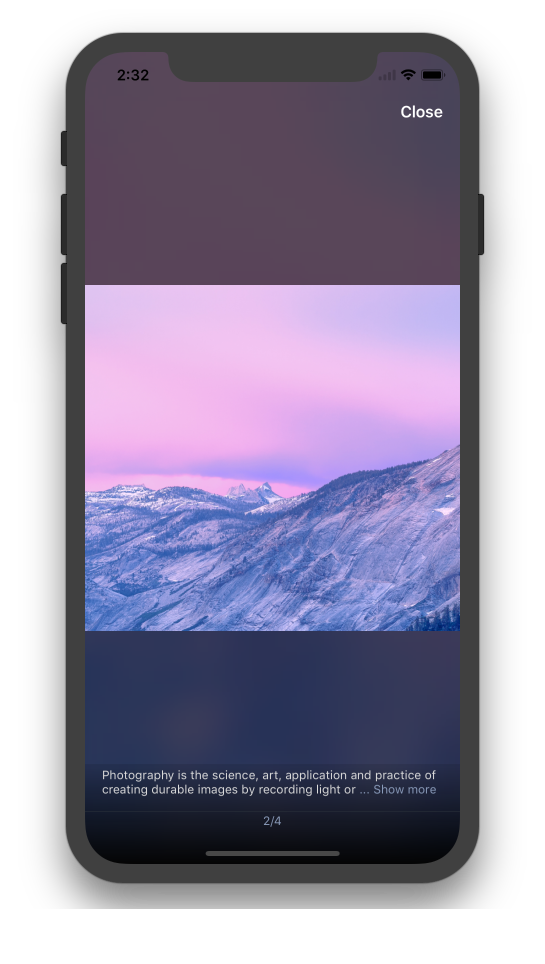
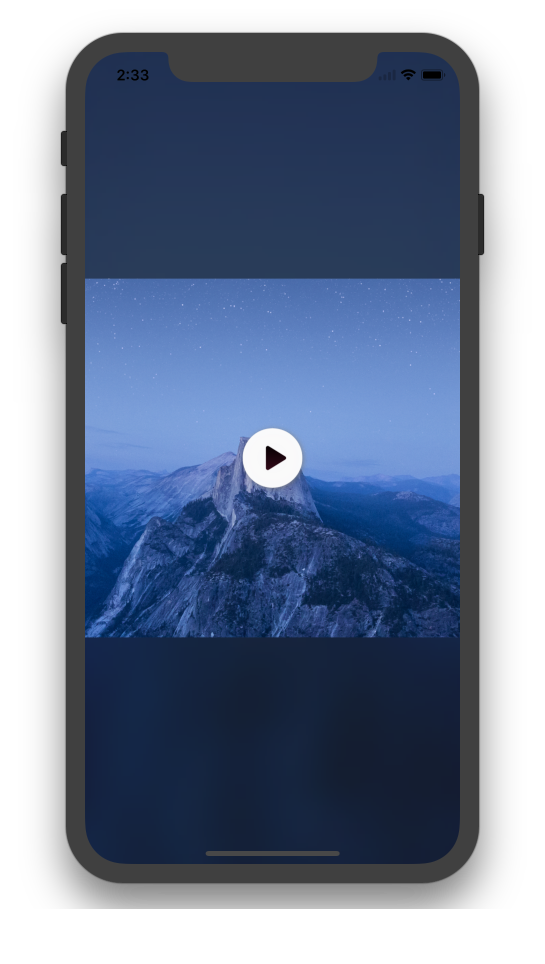
 **Lightbox** is a convenient and easy to use image viewer for your iOS app,
packed with all the features you expect:
- [x] Paginated image slideshow.
- [x] Video support.
- [x] Double-tap to zoom.
- [x] Image caption.
- [x] Dynamic background based on [Hue](https://github.com/hyperoslo/Hue)
- [x] Remote image loading and caching based on [Imaginary](https://github.com/hyperoslo/Imaginary)
- [x] Interactive transition animations.
- [x] Powerful configuration.
- [x] [Live Demo](https://appetize.io/app/wfgwc2uvg82m9pzbt17p4rrgh4?device=iphone5s&scale=75&orientation=portrait&osVersion=9.3)
## Table of Contents
* [Usage](#usage)
* [Controller](#controller)
* [Delegates](#delegates)
* [Image loading](#image-loading)
* [Video](#video)
* [Configuration](#configuration)
* [Installation](#installation)
* [Author](#author)
* [Contributing](#contributing)
* [License](#license)
## Usage
### Controller
To start your slideshow just instantiate `LightboxController`, set needed
delegates and present it:
```swift
// Create an array of images.
let images = [
LightboxImage(imageURL: URL(string: "https://cdn.arstechnica.net/2011/10/05/iphone4s_sample_apple-4e8c706-intro.jpg")!),
LightboxImage(
image: UIImage(named: "photo1")!,
text: "This is an example of a remote image loaded from URL"
),
LightboxImage(
image: UIImage(named: "photo2")!,
text: "",
videoURL: URL(string: "https://clips.vorwaerts-gmbh.de/big_buck_bunny.mp4")
),
LightboxImage(
image: UIImage(named: "photo3")!,
text: "This is an example of a local image."
)
]
// Create an instance of LightboxController.
let controller = LightboxController(images: images)
// Set delegates.
controller.pageDelegate = self
controller.dismissalDelegate = self
// Use dynamic background.
controller.dynamicBackground = true
// Present your controller.
present(controller, animated: true, completion: nil)
```
### Delegates
Use `LightboxControllerPageDelegate` if you want to be notified about page
navigation changes.
```swift
extension ViewController: LightboxControllerPageDelegate {
func lightboxController(_ controller: LightboxController, didMoveToPage page: Int) {
print(page)
}
}
```
Use `LightboxControllerDismissalDelegate` to be notified when controller is
about to be dismissed. Please note that `LightboxController` dismisses itself
if it was presented initially.
```swift
extension ViewController: LightboxControllerDismissalDelegate: class {
func lightboxControllerWillDismiss(_ controller: LightboxController) {
// ...
}
}
```
### Image loading
By default images are loaded using [Imaginary](https://github.com/hyperoslo/Imaginary) for reliable loading and caching. But it's easy to change this behavior using **LightboxConfig**
```swift
LightboxConfig.loadImage = {
imageView, URL, completion in
// Custom image loading
}
```
### Video
**Lightbox** can show and plays video using default `AVPlayerViewController`. Showning video by using `videoURL`:
```swift
LightboxImage(
image: UIImage(named: "photo2")!,
text: "",
videoURL: NSURL(string: "https://clips.vorwaerts-gmbh.de/big_buck_bunny.mp4")
)
```
Override video handling if needed:
```swift
LightboxConfig.handleVideo = { from, videoURL in
// Custom video handling
let videoController = AVPlayerViewController()
videoController.player = AVPlayer(url: videoURL)
from.present(videoController, animated: true) {
videoController.player?.play()
}
}
```
### Configuration
Configure text, colors, fonts of UI elements by overriding the static
variables in the **Lightbox** [configuration](https://github.com/hyperoslo/Lightbox/blob/master/Source/LightboxConfig.swift) struct. As an example:
```swift
LightboxConfig.CloseButton.image = UIImage(named: ImageList.Lightbox.closeButton)
LightboxConfig.CloseButton.textAttributes = TextAttributes.Lightbox.closeButton
LightboxConfig.CloseButton.text = "Finish"
LightboxConfig.DeleteButton.image = UIImage(named: ImageList.Lightbox.deleteButton)
LightboxConfig.DeleteButton.textAttributes = TextAttributes.Lightbox.deleteButton
LightboxConfig.DeleteButton.text = "Delete"
LightboxConfig.InfoLabel.ellipsisText = "Show more"
```
## Installation
**Lightbox** is available through [CocoaPods](http://cocoapods.org). To install
it, simply add the following line to your Podfile:
```ruby
pod 'Lightbox'
```
In order to quickly try the demo project of a **Lightbox** just run
`pod try Lightbox` in your terminal.
**Lightbox** is also available through [Carthage](https://github.com/Carthage/Carthage).
To install just write into your Cartfile:
```ruby
github "hyperoslo/Lightbox"
```
To install **Lightbox** manually just download and drop `Sources` and
`Images` folders in your project.
## Author
Hyper Interaktiv AS, ios@hyper.no
## Contributing
We would love you to contribute to **Lightbox**, check the [CONTRIBUTING](https://github.com/hyperoslo/Lightbox/blob/master/CONTRIBUTING.md) file for more info.
## License
**Lightbox** is available under the MIT license. See the [LICENSE](https://github.com/hyperoslo/Lightbox/blob/master/LICENSE.md) file for more info.
**Lightbox** is a convenient and easy to use image viewer for your iOS app,
packed with all the features you expect:
- [x] Paginated image slideshow.
- [x] Video support.
- [x] Double-tap to zoom.
- [x] Image caption.
- [x] Dynamic background based on [Hue](https://github.com/hyperoslo/Hue)
- [x] Remote image loading and caching based on [Imaginary](https://github.com/hyperoslo/Imaginary)
- [x] Interactive transition animations.
- [x] Powerful configuration.
- [x] [Live Demo](https://appetize.io/app/wfgwc2uvg82m9pzbt17p4rrgh4?device=iphone5s&scale=75&orientation=portrait&osVersion=9.3)
## Table of Contents
* [Usage](#usage)
* [Controller](#controller)
* [Delegates](#delegates)
* [Image loading](#image-loading)
* [Video](#video)
* [Configuration](#configuration)
* [Installation](#installation)
* [Author](#author)
* [Contributing](#contributing)
* [License](#license)
## Usage
### Controller
To start your slideshow just instantiate `LightboxController`, set needed
delegates and present it:
```swift
// Create an array of images.
let images = [
LightboxImage(imageURL: URL(string: "https://cdn.arstechnica.net/2011/10/05/iphone4s_sample_apple-4e8c706-intro.jpg")!),
LightboxImage(
image: UIImage(named: "photo1")!,
text: "This is an example of a remote image loaded from URL"
),
LightboxImage(
image: UIImage(named: "photo2")!,
text: "",
videoURL: URL(string: "https://clips.vorwaerts-gmbh.de/big_buck_bunny.mp4")
),
LightboxImage(
image: UIImage(named: "photo3")!,
text: "This is an example of a local image."
)
]
// Create an instance of LightboxController.
let controller = LightboxController(images: images)
// Set delegates.
controller.pageDelegate = self
controller.dismissalDelegate = self
// Use dynamic background.
controller.dynamicBackground = true
// Present your controller.
present(controller, animated: true, completion: nil)
```
### Delegates
Use `LightboxControllerPageDelegate` if you want to be notified about page
navigation changes.
```swift
extension ViewController: LightboxControllerPageDelegate {
func lightboxController(_ controller: LightboxController, didMoveToPage page: Int) {
print(page)
}
}
```
Use `LightboxControllerDismissalDelegate` to be notified when controller is
about to be dismissed. Please note that `LightboxController` dismisses itself
if it was presented initially.
```swift
extension ViewController: LightboxControllerDismissalDelegate: class {
func lightboxControllerWillDismiss(_ controller: LightboxController) {
// ...
}
}
```
### Image loading
By default images are loaded using [Imaginary](https://github.com/hyperoslo/Imaginary) for reliable loading and caching. But it's easy to change this behavior using **LightboxConfig**
```swift
LightboxConfig.loadImage = {
imageView, URL, completion in
// Custom image loading
}
```
### Video
**Lightbox** can show and plays video using default `AVPlayerViewController`. Showning video by using `videoURL`:
```swift
LightboxImage(
image: UIImage(named: "photo2")!,
text: "",
videoURL: NSURL(string: "https://clips.vorwaerts-gmbh.de/big_buck_bunny.mp4")
)
```
Override video handling if needed:
```swift
LightboxConfig.handleVideo = { from, videoURL in
// Custom video handling
let videoController = AVPlayerViewController()
videoController.player = AVPlayer(url: videoURL)
from.present(videoController, animated: true) {
videoController.player?.play()
}
}
```
### Configuration
Configure text, colors, fonts of UI elements by overriding the static
variables in the **Lightbox** [configuration](https://github.com/hyperoslo/Lightbox/blob/master/Source/LightboxConfig.swift) struct. As an example:
```swift
LightboxConfig.CloseButton.image = UIImage(named: ImageList.Lightbox.closeButton)
LightboxConfig.CloseButton.textAttributes = TextAttributes.Lightbox.closeButton
LightboxConfig.CloseButton.text = "Finish"
LightboxConfig.DeleteButton.image = UIImage(named: ImageList.Lightbox.deleteButton)
LightboxConfig.DeleteButton.textAttributes = TextAttributes.Lightbox.deleteButton
LightboxConfig.DeleteButton.text = "Delete"
LightboxConfig.InfoLabel.ellipsisText = "Show more"
```
## Installation
**Lightbox** is available through [CocoaPods](http://cocoapods.org). To install
it, simply add the following line to your Podfile:
```ruby
pod 'Lightbox'
```
In order to quickly try the demo project of a **Lightbox** just run
`pod try Lightbox` in your terminal.
**Lightbox** is also available through [Carthage](https://github.com/Carthage/Carthage).
To install just write into your Cartfile:
```ruby
github "hyperoslo/Lightbox"
```
To install **Lightbox** manually just download and drop `Sources` and
`Images` folders in your project.
## Author
Hyper Interaktiv AS, ios@hyper.no
## Contributing
We would love you to contribute to **Lightbox**, check the [CONTRIBUTING](https://github.com/hyperoslo/Lightbox/blob/master/CONTRIBUTING.md) file for more info.
## License
**Lightbox** is available under the MIT license. See the [LICENSE](https://github.com/hyperoslo/Lightbox/blob/master/LICENSE.md) file for more info.