# Hyara


> Hyara is plugin that provides convenience when writing yararule.
>
> The plugin is currently undergoing a major revision!
- [Demo video](https://youtu.be/zgL4BkQJZ-w)
- [IDA Plugin Contest 2018](https://hex-rays.com/contests_details/contest2018/#Hyara)
- [Hyara - Generator for YARA Rules (KOR)](https://github.com/hyuunnn/slides/blob/main/Hyara%20-%20Generator%20for%20YARA%20Rules.pdf) - 2018. 09. 16
## Instructions
### Start Screen and Options
- When you run Hyara, it docks itself to the right and docks the output window to the left.
- After specifying the address, press the `Make` button to show the specified hexadecimal or strings as a result.
- The results are saved in the table below when you click `Save`.
- If you double-click the table, you can clear the rule.
- You can modify the values to wildcards by right clicking after dragging.

- `Export Yara Rule`
- Exports the previously created yara rules.

- `Right Click`
- You can select either start address or end address. (IDA Pro, Cutter)

- `Comment Option`
- Annotates the instructions next to the condition rule(s).
- `Rich Header` and `imphash`
- Adds rich header and imphash matching to the rule.
- `String option`
- This option extracts strings within the range specified.


## Installation
### IDA Pro & BinaryNinja
- IDA Pro
```bash
pip install -r requirements.txt
```
- copy ``Hyara_IDA.py and hyara_lib folder`` to $ida_dir/plugins
- Activate via Edit -> Plugins -> Hyara (or CTRL+SHIFT+Y)
- BinaryNinja
- Just use the plugin manager!
- Activate via View -> Other Docks -> Show Hyara
### Cutter
- Windows
Check the python version installed in the cutter and install it.
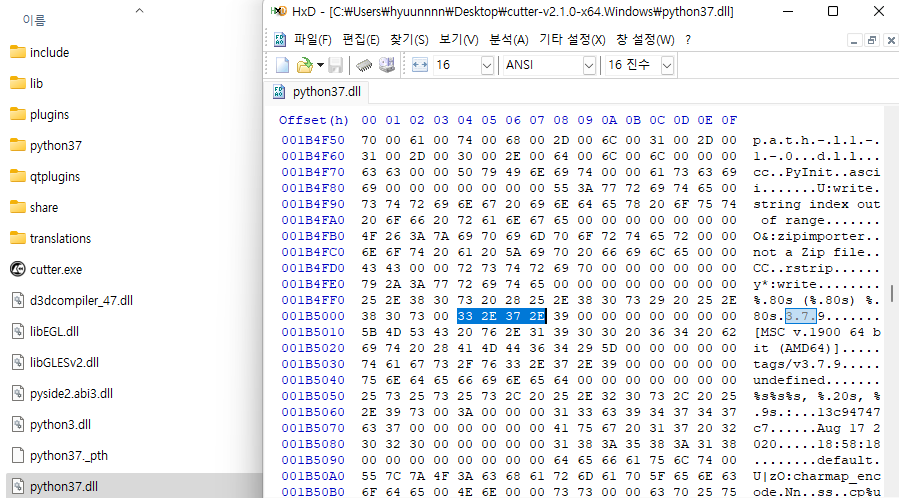
```bash
C:\\Users\\User\\AppData\\Local\\Programs\\Python\\Python3X\\python.exe -m pip install -I -t $cutter_dir/python3X/site-packages -r requirements.txt
```
copy ``__init__.py, Hyara_Cutter.py and hyara_lib folder`` to $cutter_dir/plugins/python/Hyara
- Linux

```bash
cp -r /tmp/.mount_Cutter5o3a5G/usr /root
```
Check the python version installed in the cutter and install it.
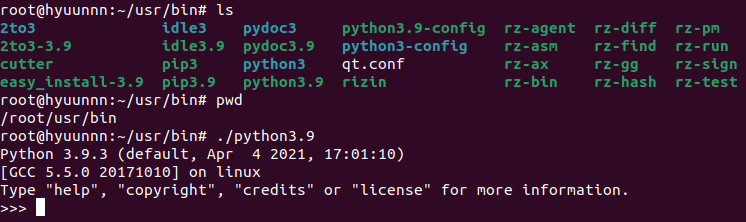
```bash
pip3.X install -I -t /root/usr/lib/python3.X/site-packages -r /root/Hyara/requirements.txt
./Cutter-v2.0.3-x64.Linux.AppImage --pythonhome /root/usr
```
copy ``__init__.py, Hyara_Cutter.py and hyara_lib folder`` to /root/.local/share/rizin/cutter/plugins/python/Hyara
Activate via Windows -> Plugins -> Hyara

### Ghidra (WIP)
Install Ghidrathon (Installation Guide) to use Hyara Plugin.
```bash
pip install PySide2 or pip install PySide6
```
- Windows
copy ``Hyara_Ghidra.py and hyara_lib folder`` to ``C:\\Users\\User\\.ghidra\\.ghidra.X.X.X\\Extensions\\Ghidrathon-X.X.X\\data\\python\\``
```python
# Window -> Ghidrathon
import Hyara_Ghidra
Hyara_Ghidra.run()
```

## Features
- GUI-based
- Supports IDA, BinaryNinja, Cutter and Ghidra.
- YaraChecker
- Tests the yararule on the fly.
- 
- YaraDetector
- Shows which part is detected in the sample loaded to disassembler, and when "Address" is clicked, it moves to the corresponding address on the disassembler view.
- 
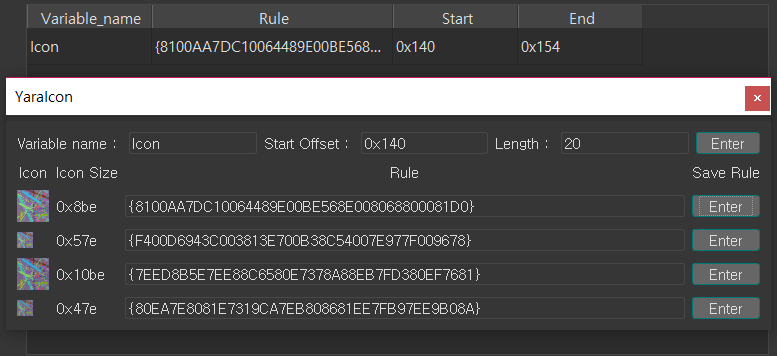
- YaraIcon
- Creates yara rules for icon resources embedded in the PE.
- 
## Author
👤 **hyuunnn**
* Github: [@hyuunnn](https://github.com/hyuunnn)
### Special Thanks
* Twitter: kjkwak12
* Github: gaasedelen - Link
* Github: ITAYC0HEN - Link
* Github: psifertex - Link
## Link
* Florian Roth's Twitter
* MalpediaFLOSSed - Twitter
* Automatic Generation of code-based YARA-Signatures
* Improving YARA-Signator for effective Generation of code-based YARA-Signatures