[](https://github.com/i-dot-ai/minute/actions/workflows/checks.yml?query=branch%3Amain)
# Minute
> [!IMPORTANT]
> Incubation Project: This project is in active development and a work in progress.
Minute is an application that is designed to simplify the transcription and minuting of meetings in the public sector. Built with modern web technologies and AI-powered transcription and summarisation services, Minute transforms how government organisations handle meeting documentation by automating the conversion of audio recordings into structured, professional minutes.
## Key Features
**AI-Powered Transcription**: Minute integrates with multiple transcription services including Azure Speech-to-Text and AWS Transcribe, automatically selecting the most appropriate service based on audio duration and quality. The system handles various audio formats and automatically converts them to optimize transcription accuracy.
**Professional Meeting Templates**: The application includes specialized templates tailored for different types of government meetings, including Cabinet meetings, planning committees, care assessments, and general-purpose meetings. Each template follows specific formatting standards and style guides required for official documentation.
**Intelligent Minute Generation**: Beyond simple transcription, Minute uses AI to structure conversations into professional minute formats, applying proper grammar, tense conversion, and formatting rules specific to government documentation standards.
**Multi-Format Audio Support**: Upload recordings in various formats - the system automatically handles conversion and optimization for the best transcription results. Support for mono and multi-channel audio ensures compatibility with different recording setups.
**Data Retention**: Configurable data retention policies ensure compliance with government data handling requirements, with special provisions for different departments' retention policies.
**Real-Time Processing**: Asynchronous processing architecture ensures efficient handling of large audio files, with job status tracking and progress monitoring throughout the transcription and minute generation process.
Minute streamlines the traditionally time-intensive process of creating meeting minutes, allowing public sector organizations to focus on decision-making rather than documentation overhead.
## Development
#### Run the app locally
1. copy `.env.example` to a file called `.env`, and fill in the required values
2. Run `docker compose up --build`
This will build and run 5 containers:
1. Frontend app hosted at http://localhost:3000
2. Backend api available at http://localhost:8080
3. Worker service, which process transcriptions and does not have a public facing url
4. Postgres database hosted at http:localhost:5432
5. MiniStack to simulate AWS SQS
#### Set up your development environment:
We use dev containers to emulate the cloud environment in which Minute is usually deployed.
` docker compose up --watch`
...will sync local file changes to the docker containers and restart them as appropriate. Note that `docker compose down` will revert the containers to their base state. See [this issue](https://github.com/docker/compose/issues/11102)
#### Networks that inspect HTTPS traffic
If your network intercepts outbound HTTPS (TLS inspection), the containers may fail to verify certificates and log `CERTIFICATE_VERIFY_FAILED` errors. To fix this, provide the containers with a CA bundle that includes your network's root certificate via a local, untracked `docker-compose.override.yaml` (Compose merges it automatically):
```yaml
services:
backend: &ca
volumes:
- ./certs/host-ca-bundle.pem:/etc/ssl/certs/host-ca-bundle.pem:ro
environment:
- REQUESTS_CA_BUNDLE=/etc/ssl/certs/host-ca-bundle.pem
- SSL_CERT_FILE=/etc/ssl/certs/host-ca-bundle.pem
- AWS_CA_BUNDLE=/etc/ssl/certs/host-ca-bundle.pem
- GRPC_DEFAULT_SSL_ROOTS_FILE_PATH=/etc/ssl/certs/host-ca-bundle.pem
worker: *ca
frontend:
volumes:
- ./certs/host-ca-bundle.pem:/etc/ssl/certs/host-ca-bundle.pem:ro
environment:
- NODE_EXTRA_CA_CERTS=/etc/ssl/certs/host-ca-bundle.pem
```
Place your CA bundle at `certs/host-ca-bundle.pem`. On macOS you can export your machine's trusted roots with:
```sh
security find-certificate -a -p /System/Library/Keychains/SystemRootCertificates.keychain > certs/host-ca-bundle.pem
security find-certificate -a -p /Library/Keychains/System.keychain >> certs/host-ca-bundle.pem
```
`docker-compose.override.yaml` and `certs/` are gitignored, so this stays local to your machine.
## Project structure
#### `frontend/`
The frontend uses Next.js. Calls to the API are made from the client-side and proxied api using Next's middleware. All API calling code is auto-generated by [Hey API](https://heyapi.dev/), the config for this can be found in `frontend/openapi-ts.config.ts`. It uses the api running locally to get the openapi.json, so to regenerate the types run the docker compose, and then run `npm run openapi-ts` in `frontend/`.
#### `backend/`
The backend uses FastAPI to manage meeting data and start processing workflows in Temporal.
#### `worker/`
The worker runs the tasks coordinated by Temporal: audio conversion, transcription and AI-generated minutes. Results are saved in the database.
## Deployment
PRs and pushes to `main` run lint, tests and local Compose image builds without publishing images.
`make release env=dev pr=2673` selects the latest head commit of open Minute PR #2673;
`env=preprod` works the same way. Without `pr`, it selects your current committed local revision,
which must already exist on GitHub. Python 3.12+ and authenticated GitHub CLI (`gh auth login`) are
required. A confirmation table compares the proposed branch/SHA/PR with the last successful
GitHub-recorded release for that component/environment, including the deployer, UTC timestamp and
relative age. This is release history, not a live AWS inventory. Only `y`/`yes` creates a lightweight
release tag at the confirmed SHA; Enter, EOF or Ctrl-C cancels. Later PR pushes do not change that tag.
Fork and closed PRs are rejected. Tags are created remotely; your local checkout is not changed.
The existing release-tag flow builds and pushes missing commit-SHA images before deployment. Existing images are reused on
repeat releases and promotions; do not overwrite or delete those tags. `make release-temporal-server`
builds only the Temporal server/admin images. Production still uses the manual release workflow
on `main`. Frontend telemetry settings are baked into the first image built for a commit.
```sh
make release env=dev pr=2673
make release env=preprod pr=2673
make release-temporal-server env=dev pr=2673
make release env=dev # explicitly confirm the current committed local revision
```
The selected revision supplies its release workflow and Terraform, so review the PR and wait for
its checks before confirming. Historical records can have no PR association; the table shows `—`
rather than guessing between multiple PRs. Production remains main-only through Actions.
Application and Temporal server releases use separate Terraform configurations and state. See [Temporal releases](https://github.com/i-dot-ai/minute-infra/blob/main/runbooks/temporal/releases.md) for the release commands and the required migration of existing deployments.
Operational runbooks are maintained in [minute-infra](https://github.com/i-dot-ai/minute-infra/blob/main/runbooks/README.md) (repository access required). Builds, releases, Terraform, load-testing scripts and local development remain here.
#### Architecture diagram
Minute runs on AWS. Internal Access is managed separately and signs users in before they use Minute. Audio uploads use a time-limited link authorised by the backend. Temporal coordinates processing, S3 stores audio, and Aurora PostgreSQL stores meetings and minutes. Azure Speech transcribes the audio, and Gemini generates the summaries.
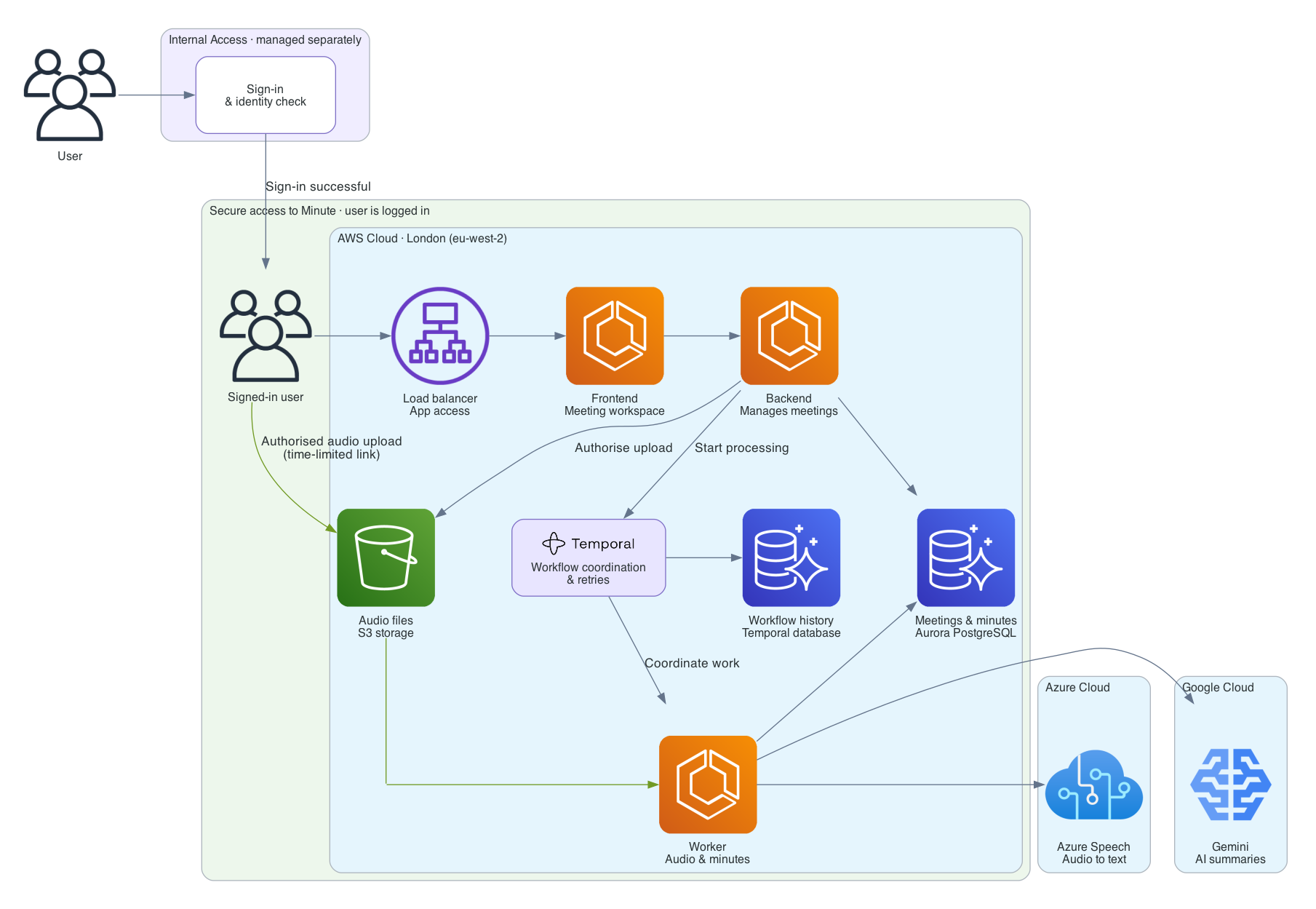 Regenerate the diagram with `uv run python terraform/diagram_script.py` (requires Graphviz).
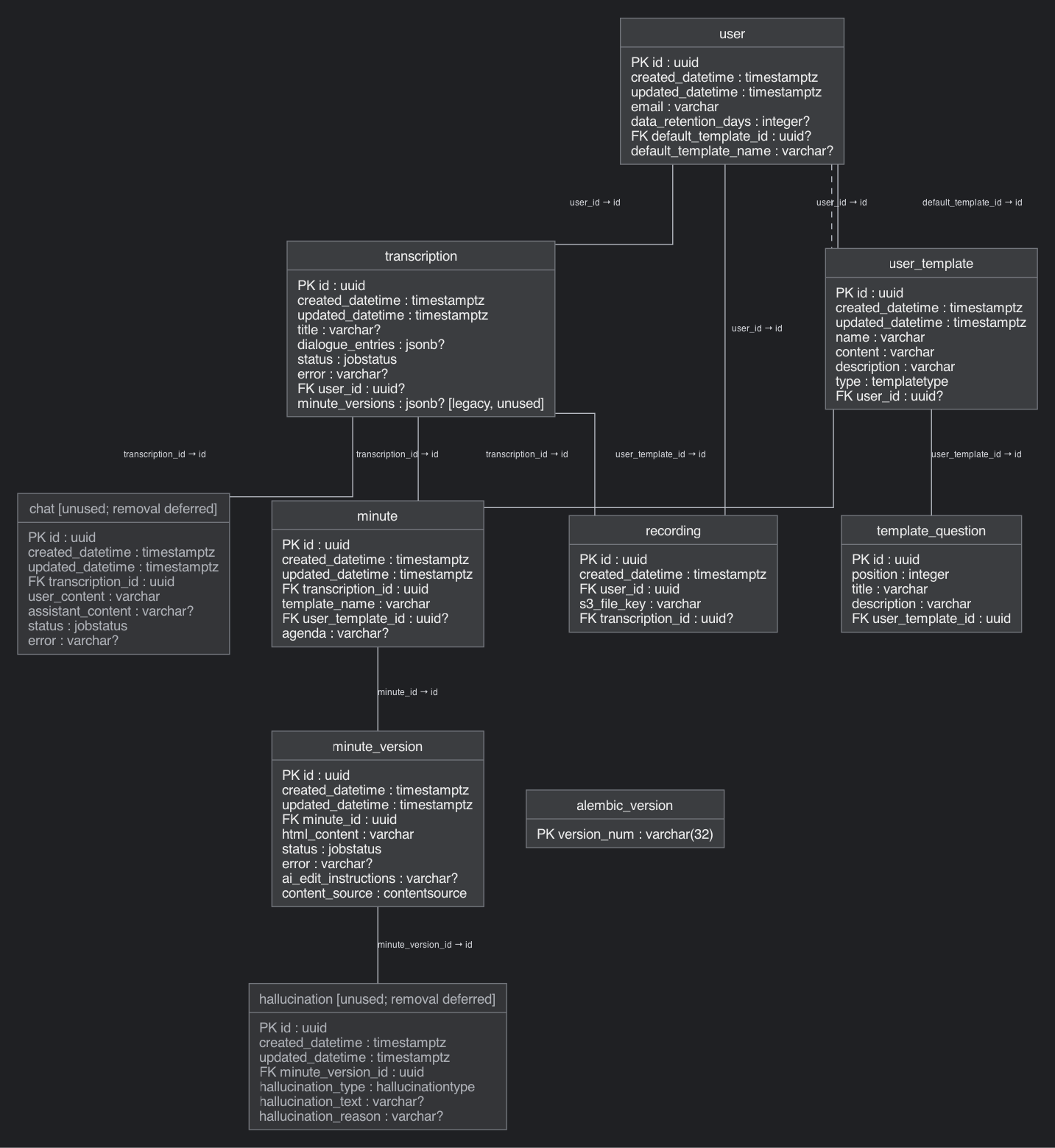
#### Database schema
 #### Sentry setup (optional)
To set up sentry for telemetry, create an account at [sentry.io](sentry.io).
- Navigate to the `projects` page
- Click `Create project`
- Select `FASTAPI` as project type
- Click create
- On the following page, in the `Configure SDK`, copy the value for `dsn=` **KEEP THIS SECRET**
- Navigate to the SSM parameter store entry for your deployed application
- Replace `SENTRY_DSN` value with the value you copied
#### Posthog setup (optional)
To set up posthog for UX tracking, feature flags etc, create an account at [eu.posthog.com](https://eu.posthog.com/).
- create a project and obtain an API key (it should start `phc_`)
- set the key `POSTHOG_API_KEY` value in your `.env`
## Testing
To run unit tests:
```bash
make test
```
The real-file duration test skips when `ffprobe` is unavailable; mocked duration tests still run.
Install FFmpeg locally to include the real-file check and optional audio-fixture tests.
### Testing paid APIs and LLM prompt evaluations
A special set of tests are available to evaluate paid calls to LLM providers. Since we don't want to run this all the
time, we enable these with:
```bash
ALLOW_TESTS_TO_ACCESS_PAID_APIS=1
```
is in your `.env` file.
In order to run some tests, you will need some preprocessed transcript `.json` files. These should be located in
the top level `.data` dir in the repo. Within this directory, different subdirectories are routed to
different tests (see [test_queues_e2e.py](tests/test_queues_e2e.py) for an example).
## Adding custom templates
You can add your own templates by implementing either the `SimpleTemplate` or `SectionTemplate` protocols (see [here](common/templates/types.py)).
Add them under [common/templates](common/templates) and register them in `TemplateManager`.