# Contributing to iTwin.js
Welcome, and thank you for your interest in contributing to iTwin.js!
There are many ways to contribute.
The goal of this document is to provide a high-level overview of how you can get involved.
- [Contributing to iTwin.js](#contributing-to-itwinjs)
- [Repo Setup](#repo-setup)
- [Source Code Edit Workflow](#source-code-edit-workflow)
- [Other NPM Scripts](#other-npm-scripts)
- [Documentation Code Snippets](#documentation-code-snippets)
- [Debugging](#debugging)
- [Filtering Test Suites](#filtering-test-suites)
- [Asking Questions](#asking-questions)
- [Providing Feedback](#providing-feedback)
- [Submitting an Issue](#submitting-an-issue)
- [Look For an Existing Issue](#look-for-an-existing-issue)
- [Bug Reports](#bug-reports)
- [Feature Requests](#feature-requests)
- [Follow Your Issue](#follow-your-issue)
- [Contributing Guidelines](#contributing-guidelines)
- [Branch Naming Policy](#branch-naming-policy)
- [Contributor License Agreement (CLA)](#contributor-license-agreement-cla)
- [Pull Requests](#pull-requests)
- [Backporting to Release Branches](#backporting-to-release-branches)
- [Types of Contributions](#types-of-contributions)
- [Frequently Asked Questions](#frequently-asked-questions)
- [Rush commands take too long, is there a way to speed up my contribution workflow?](#rush-commands-take-too-long-is-there-a-way-to-speed-up-my-contribution-workflow)
- [Do I have to rebuild all packages in the repo, even those I didn't work on?](#do-i-have-to-rebuild-all-packages-in-the-repo-even-those-i-didnt-work-on)
- [A subdirectory can not find a node\_modules file or directory](#a-subdirectory-can-not-find-a-node_modules-file-or-directory)
- [Updating dependencies/devDependencies on packages within the monorepo](#updating-dependenciesdevdependencies-on-packages-within-the-monorepo)
- [Updating dependencies/devDependencies on packages external to monorepo](#updating-dependenciesdevdependencies-on-packages-external-to-monorepo)
## Repo Setup
This repository is a [monorepo](https://monorepo.tools/) that holds the source code for multiple [iTwin.js npm packages](https://www.npmjs.com/search?q=%40itwin). It is built using [Rush](http://rushjs.io/).
Each package has its own **node_modules** directory that contains symbolic links to *common* dependencies managed by Rush.
1. Install dependencies: `rush install`
2. Build source: `rush build`
3. Run tests: `rush cover`
The above commands iterate and perform their action against each package in the monorepo.
## Source Code Edit Workflow
Once you've set up the repo, you can move on to making changes to the source code by following the steps within:
1. Create your own branch by running `git checkout -b ""`. See [Branch Naming Policy](#branch-naming-policy)
2. Make source code changes.
3. Rebuild the repo by running `rush build`.
4. Ensure unit tests pass when run locally: `rush cover`.
5. Ensure linting passes when run locally: `rush lint`.
6. Locally commit changes: `git commit` (or use the Visual Studio Code user interface).
7. Repeat steps 1-4 until ready to push changes.
8. Check for API signature changes: `rush extract-api`. This will update the signature files, located in `common/api`. **Note:** before doing this, first do the following:
- Be sure that your branch is up to date with the target branch (i.e. `git merge origin/master`).
- Clean up your build output: `rush clean`.
- Rebuild the project: `rush build`.
9. Review any diffs to the API signature files in the `common/api` directory to ensure they are compatible with the intended release of the package.
- If any differences are in packages not modified on this branch, revert the changes before committing.
10. Add changelog entry (which could potentially cover several commits): `rush change`.
11. Follow prompts to enter a change description or press ENTER if the change does not warrant a changelog entry. If multiple packages have changed, multiple sets of prompts will be presented. If the changes are only to non-published packages (like **display-test-app**), then `rush change` will indicate that a changelog entry is not needed.
12. Completing the `rush change` prompts will cause new changelog entry JSON files to be created.
13. Add and commit the changelog JSON files and any API signature updates.
14. Publish changes on the branch and open a pull request.
> If executing scripts from `package.json` files in any of the subdirectories, we recommend using [`rushx`](https://rushjs.io/pages/commands/rushx/) over `npm`.
> The CI build will break if changes are pushed without running `rush change` and `rush extract-api` (if the API was changed). The fix will be to complete steps 6 through 11.
Here is a sample [changelog](https://github.com/microsoft/rushstack/blob/master/apps/rush/CHANGELOG.md) to demonstrate the level of detail expected. Changelogs are user facing, so less verbosity is encouraged, and should avoid unnecessary details.
### Other NPM Scripts
1. Build TypeDoc documentation for all packages: `rush docs`
2. Build TypeDoc documentation for a single package: `cd core\backend` and then `rushx docs`
### Documentation Code Snippets
Documentation code snippets are extracted from actively tested code to ensure they stay up-to-date and working. To add documentation snippets to a package:
1. **Create the test file**: Place testable documentation snippets in `src/test/example-code/` directory within the package
2. **Mark extraction regions**: Wrap code to be extracted with comment markers:
```typescript
// __PUBLISH_EXTRACT_START__ SnippetName
// Your code here that will be extracted
// __PUBLISH_EXTRACT_END__
```
3. **Add extraction script**: In `package.json`, add:
```json
"extract": "betools extract --fileExt=ts --extractFrom=./src/test/example-code --recursive --out=../../generated-docs/extract"
```
4. **Update docs script**: Chain extraction with documentation generation:
```json
"docs": "betools docs --json=../../generated-docs/{package}/file.json --tsIndexFile=./{package}.ts --onlyJson && npm run -s extract"
```
5. **Reference in documentation**: In markdown files, reference the snippets using:
```ts
   [[include:SnippetName]]
   ```
This pattern separates documentation examples from unit tests, emphasizing code that a user should adopt, and keeps documentation synchronized with working code.
### Debugging
Custom VSCode tasks are found in [launch.json](/.vscode/launch.json) to make debugging easier for contributors. Navigate to the `Run and Debug` panel in VSCode and you can select one of many custom tasks to run, which will attach a debugger to the process, and stop at a breakpoint you've set up.
#### Filtering Test Suites
The custom scripts above run all tests found in their respective package. This monorepo contains packages using either mocha or vitest. Below is guidance for running specific tests using filters in either test library.
Filtering Mocha tests
Add a `.only` to a `describe()` or `it()` test function. Afterwards, run the custom VSCode task for the package through the `Run and Debug` panel, and mocha will run only that test suite. Example:
```ts
// Both Car and Plane test suites are found in the same test file. Mocha detects the use of `.only()` and will ignore all other test files.
describe.only("Car", () => { // Mocha will only run the Car test suite.
it("should drive", () => ...);
it.only("should stop", () => ...); // Mocha will only run this test case and not the first one.
});
describe("Plane", () => {
it("should fly", () => ...)
});
```
Filtering Vitest tests
There are 2 ways to filter Vitest tests:
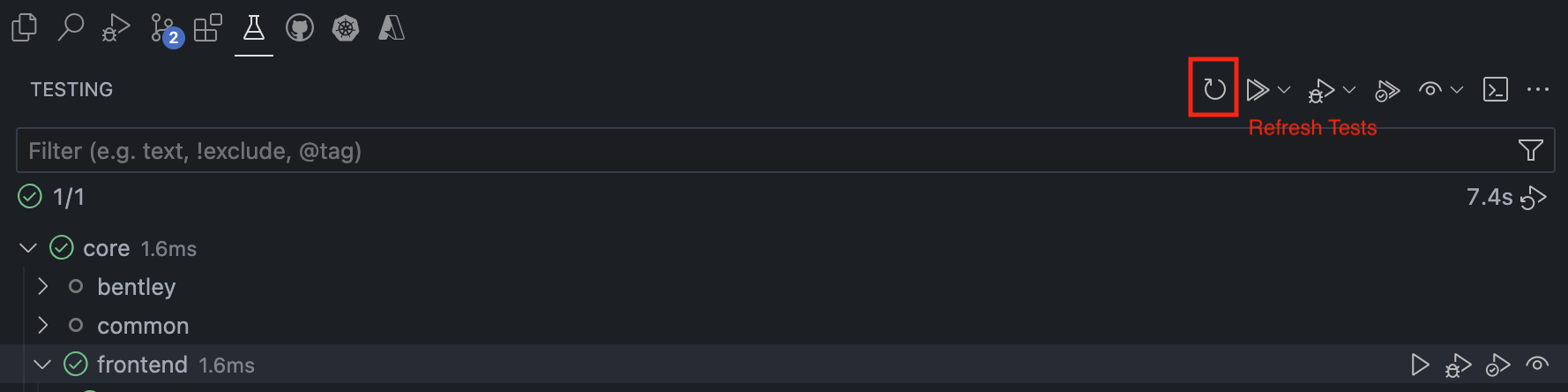
1. The [Vitest Explorer](https://marketplace.visualstudio.com/items?itemName=vitest.explorer) is a Visual Studio Code extension that enables running and debugging individual test cases. If unexpected behavior occurs after editing a test or source code, click the "Refresh Tests" button in the Testing view to reload your test suite and reflect any changes.
> The Vitest Explorer is not compatible with tests running in a browser environment. The method below is the only viable way to debug browser-based tests.
2. Edit the `vitest.config.mts` found in a package's root folder and add an [include](https://vitest.dev/config/#include) property to filter out tests. Afterwards, run the custom VSCode task for the package through the `Run and Debug` panel. For example, to test the `ViewRect` class in core-frontend (corresponding to the `ViewRect.test.ts` test), one would edit the `vitest.config.mts` for core-frontend as demonstrated below. By adding `.only` to a `describe()` or `it()` test function in `ViewRect.test.ts`, you can filter out tests in more detail.
```typescript
export default defineConfig({
esbuild: {
target: "es2022",
},
test: {
dir: "src",
setupFiles: "./src/test/setupTests.ts",
include: ["**/ViewRect.test.ts"], // Added here - the include property accepts a regex pattern.
browser: {
...
},
...
}
...
})
```
To distinguish whether a package is using vitest or mocha, look at the `package.json` `devDependencies`.
## Asking Questions
Have a question? Rather than opening an issue, please use [GitHub Discussions](https://github.com/iTwin/itwinjs-core/discussions). This applies to all questions — how-tos, best practices, troubleshooting, architecture guidance, migration help, and anything else related to iTwin.js.
A few tips for a useful discussion post:
- Search existing discussions first — your question may already be answered.
- Include relevant context: iTwin.js version, runtime environment, and code snippets.
- Keep it focused — one topic per post makes answers easier to find later.
The core team monitors discussions and your well-worded question will serve as a resource to others searching for help.
## Providing Feedback
Your comments and feedback are welcome. For general comments or discussion please [click here](https://github.com/iTwin/itwinjs-core/labels/discussion) to contribute via GitHub issues using the `discussion` label.
## Submitting an Issue
Have you identified a reproducible problem in iTwin.js?
Have a feature request?
We want to hear about it!
Here's how you can make reporting your issue as effective as possible.
### Look For an Existing Issue
Before you create a new issue, please do a search in [open issues](https://github.com/iTwin/itwinjs-core/issues) to see if the issue or feature request has already been filed.
If you find that your issue already exists, please add relevant comments and your [reaction](https://github.com/blog/2119-add-reactions-to-pull-requests-issues-and-comments).
Use a reaction in place of a "+1" comment:
- 👍 - upvote
- 👎 - downvote
If you cannot find an existing issue that describes your bug or feature, create a new issue using the guidelines below.
### Bug Reports
When reporting a bug, include:
- **Clear title:** State the problem concisely (e.g., "Crash in v2.0 when passing null to `user.update()`").
- **Context:** iTwin.js version, runtime environment (e.g., Node.js 24, Electron 42, core-backend 5.11.0), platform/browser/OS.
- **Expected vs. actual behavior:** Contrast what should have happened with what actually happened.
- **Minimal Reproducible Example (MRE):**
- A self-contained code snippet or link to a repo/CodeSandbox that isolates the bug.
- Repro steps in Display Test App (in a branch if needed) or standalone tests.
- **Stack traces and logs:** Paste full error logs in markdown code blocks, not screenshots.
- **Priority/urgency:** Describe if the bug is blocking, its severity, and earliest date a fix can be consumed
### Feature Requests
When suggesting a new feature, include:
- **Use case:** Explain the real-world problem and how this benefits the wider community, not just your project.
- **Proposed solution:** Suggest how it should work (e.g., API design ideas, new configuration flags).
- **Alternatives considered:** Explain why current workarounds or existing features don't solve your problem.
- **Willingness to contribute:** State if you're willing to write the code or documentation yourself.
### Follow Your Issue
You may be asked to clarify things or try different approaches, so please follow your issue and be responsive.
## Contributing Guidelines
We'd love to accept your contributions to iTwin.js.
There are just a few guidelines you need to follow.
### Branch Naming Policy
We recommend putting your github username, followed by a succinct branch name that reflects the changes you want to make. Eg. `git checkout -b "/cleanup-docs"`
Branch names should be all lowercase to avoid potential issues with non-case-sensitive systems and words should be separated by a dash. Eg: `my-itwin-changes`
### Contributor License Agreement (CLA)
A [Contribution License Agreement with Bentley](https://gist.github.com/imodeljs-admin/9a071844d3a8d420092b5cf360e978ca) must be signed before your contributions will be accepted. Upon opening a pull request, you will be prompted to use [cla-assistant](https://cla-assistant.io/) for a one-time acceptance applicable for all Bentley projects.
You can read more about [Contributor License Agreements](https://en.wikipedia.org/wiki/Contributor_License_Agreement) on Wikipedia.
### Pull Requests
All submissions go through a review process.
We use GitHub pull requests for this purpose.
Consult [GitHub Help](https://help.github.com/articles/about-pull-requests/) for more information on using pull requests.
#### Backporting to Release Branches
When bug fixes or critical changes need to be applied to release branches (e.g., `release/5.1.x`), follow these best practices for backporting:
**Best Practices:**
- **Master First Approach**: Changes should always go into `master` first, then be backported to release branches if required for future releases. Avoid backporting from release branches to `master` whenever possible to maintain clean commit history and reduce conflicts
- **PR Naming Convention**: Always wrap the target branch name in square brackets in your PR title
- Example: `[release/5.1.x] Fix critical bug in geometry calculations`
- **Use @Mergifyio**: For backporting PRs from `master` to release branches, we recommend using `@Mergifyio` to automate the process
- Comment `@Mergifyio backport release/X.X.x` on the original PR to create an automatic backport. Use the release branch you want to target
- Note: `@Mergifyio` automatically cherry-picks commits, but may encounter merge conflicts. If conflicts occur, you must resolve them manually and then remove the `conflicts` label from your PR to proceed
- **Cherry-pick Carefully**: When manually backporting, ensure all dependencies and related changes are included
- **Minimal Changes**: Keep backports focused and avoid unnecessary refactoring or feature additions
**Example Workflow:**
1. Identify the commits that need to be backported from `master`
2. Create a new branch from the target release branch (e.g., `release/5.1.x`)
3. Cherry-pick or manually apply the necessary changes
4. Create a PR with the branch name in square brackets in the title
5. Ensure all tests pass and the change is compatible with the release version
### Types of Contributions
We welcome contributions, large or small, including:
- Bug fixes
- New features
- Documentation corrections or additions
- Example code snippets
- Sample data
If you would like to contribute new APIs, create a new [issue](https://github.com/iTwin/itwinjs-core/issues) and explain what these new APIs aim to accomplish. If possible check the [CODEOWNERS](https://github.com/iTwin/itwinjs-core/blob/master/.github/CODEOWNERS) file and tag the owners of the package you plan on introducing the new APIs into.
Thank you for taking the time to contribute to open source and making great projects like iTwin.js possible!
## Frequently Asked Questions
### Rush commands take too long, is there a way to speed up my contribution workflow?
If your source code change only impacts the subdirectory you are working on, you can use `rushx` to run local commands, without affecting other packages.
Eg. I add a new method within `core/frontend`, also adding a relevant unit test in that folder's `src/test`. I can navigate to the root of that subdirectory, and run `rushx build`, followed by `rushx test` or `rushx cover`.
### Do I have to rebuild all packages in the repo, even those I didn't work on?
No. For incremental builds, the `rush build` command can be used to only build packages that have changes versus `rush rebuild` which always rebuilds all packages.
> It is a good idea to `rush install` after each `git pull` as dependencies may have changed.
### A subdirectory can not find a node_modules file or directory
If you get an error similar to the following:
```bash
[Error: ENOENT: no such file or directory, stat '/.../itwinjs-core/test-apps/display-test-app/node_modules/@bentley/react-scripts']
```
This means that the repo has stopped making use of an npm package that was used in the past:
To fix this build error, you should completely remove the node_modules directory and reinstall your dependencies. `rush update --purge` is a one-line solution for the above.
### Updating dependencies/devDependencies on packages within the monorepo
The version numbers of internal dependencies (see [example](https://github.com/iTwin/itwinjs-core/blob/e17654e4eca60c66bd1888f032aa03ef39d4c8a3/core/bentley/package.json#L3)) should not be manually edited.
These will be automatically updated by our internal CI pipelines.
Note that the packages are published by CI builds only.
### Updating dependencies/devDependencies on packages external to monorepo
Use these instructions to update dependencies and devDependencies on external packages (ones that live outside of this monorepo).
1. Go into the appropriate `package.json` file and update the semantic version range of the dependency you want to update.
2. Run `rush check` to make sure that you are specifying consistent versions across the repository
3. Run `rush update` to make sure the newer version of the module specified in #1 is installed