# SmoothBottomBar
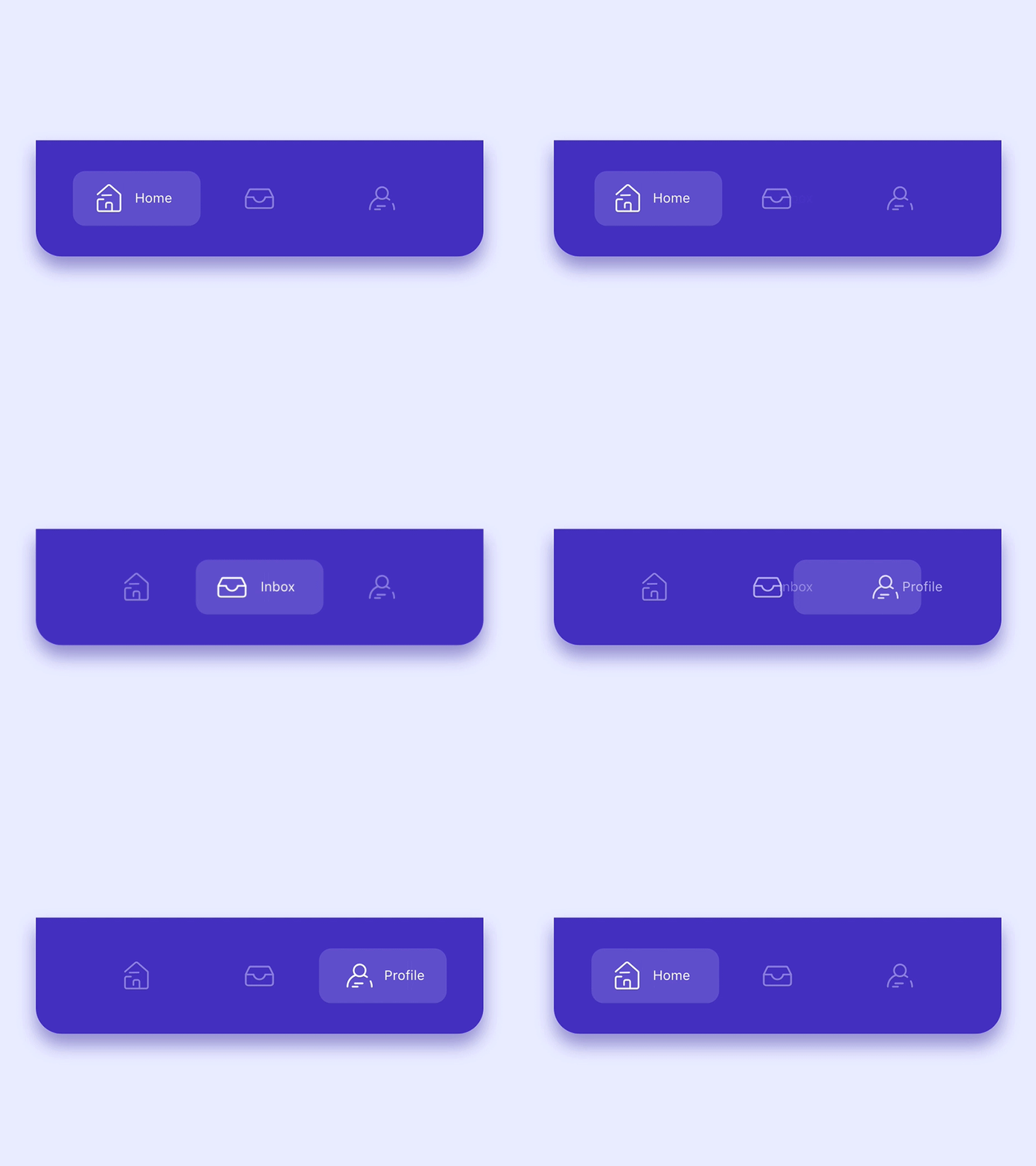
A lightweight Android material bottom navigation bar library, available as a classic View and as a fully native Jetpack Compose composable.
[](https://reports.qualflare.com/p/smoothbottombar/launches)
[](https://jitpack.io/#ibrahimsn98/SmoothBottomBar)
[](https://github.com/ibrahimsn98/SmoothBottomBar/actions/workflows/build.yml)
[](https://reports.qualflare.com/p/smoothbottombar/launches)
[](https://android-arsenal.com/api?level=32)
[]( https://android-arsenal.com/details/1/7932 )
[](https://androidweekly.net/issues/issue-385)
## GIF
 ## Design Credits
All design and inspiration credits belong to [Alejandro Ausejo](https://dribbble.com/shots/6251784-Navigation-Menu-Animation).
## Jetpack Compose
A fully Compose-native `SmoothBottomBar` composable, functionally equivalent to the View version below. It's a controlled component — the caller owns `selectedIndex` and reacts to `onItemSelected`/`onItemReselected`.
```kotlin
val items = listOf(
SmoothBarItem(icon = painterResource(R.drawable.ic_dashboard_white_24dp), label = "Dashboard"),
SmoothBarItem(icon = painterResource(R.drawable.ic_multiline_chart_white_24dp), label = "Leaderboard"),
SmoothBarItem(icon = painterResource(R.drawable.ic_store_white_24dp), label = "Store", hasBadge = true),
SmoothBarItem(icon = painterResource(R.drawable.ic_person_outline_white_24dp), label = "Profile"),
)
var selectedIndex by remember { mutableStateOf(0) }
SmoothBottomBar(
items = items,
selectedIndex = selectedIndex,
onItemSelected = { selectedIndex = it },
modifier = Modifier.fillMaxWidth().height(76.dp),
backgroundColor = Color(0xFF432FBF),
)
```
See `app/src/main/java/me/ibrahimsn/app/ComposeMainActivity.kt` for a full example wired up to `navigation-compose`.
### Parameters
| Parameter | Default | Description |
|---|---|---|
| `items` | — | `List` (`icon`, `label`, `contentDescription`, `hasBadge`) |
| `selectedIndex` | — | Index of the currently active item |
| `onItemSelected` | — | Called when a different item is tapped |
| `modifier` | `Modifier` | Standard Compose modifier |
| `onItemReselected` | `{}` | Called when the already-selected item is tapped again |
| `backgroundColor` | `Color.White` | Bar background color |
| `shape` | `RectangleShape` | Bar background shape |
| `indicatorColor` | `Color(0x2DFFFFFF)` | Active-item pill color |
| `indicatorRadius` | `12.dp` | Active-item pill corner radius |
| `sideMargins` | `10.dp` | Left/right margin before the first/last item |
| `itemPadding` | `10.dp` | Padding inside each item |
| `itemSpacing` | `8.dp` | Minimum spacing between items |
| `itemTextColor` | `Color.White` | Label text color |
| `itemTextSize` | `11.sp` | Label text size |
| `itemFontFamily` | `null` | Label font family |
| `itemBadgeColor` | `Color.Red` | Badge dot color |
| `itemBadgeRadius` | `4.dp` | Badge dot radius |
| `itemIconSize` | `18.dp` | Icon size |
| `itemIconMargin` | `4.dp` | Space between icon and label when active |
| `itemIconTint` | `Color(0xC8FFFFFF)` | Icon tint when inactive |
| `itemIconTintActive` | `Color.White` | Icon tint when active |
| `itemAnimDurationMillis` | `200` | Selection transition duration |
| `iconBackgroundColor` | `Color.Transparent` | Icon background circle color, inactive items only |
| `iconBackgroundPadding` | `6.dp` | Icon background circle padding |
## View
- Create menu.xml under your res/menu/ folder
```xml
```
- Add view into your layout file
```xml
```
- Use SmoothBottomBar callbacks in your activity
```kotlin
bottomBar.onItemSelected = {
status.text = "Item $it selected"
}
bottomBar.onItemReselected = {
status.text = "Item $it re-selected"
}
```
OR
```kotlin
bottomBar.setOnItemSelectedListener(object: OnItemSelectedListener {
override fun onItemSelect(pos: Int): Boolean {
status.text = "Item $pos selected"
return true
}
})
bottomBar.setOnItemReselectedListener(object: OnItemReselectedListener {
override fun onItemReselect(pos: Int) {
status.text = "Item $pos re-selected"
}
})
```
>**Note:** For projects without kotlin, you may need to add `org.jetbrains.kotlin:kotlin-stdlib:$kotlinVersion` to your dependencies since this is a Kotlin library.
## **Use SmoothBottomBar with [Navigation Components](https://developer.android.com/guide/navigation/).**
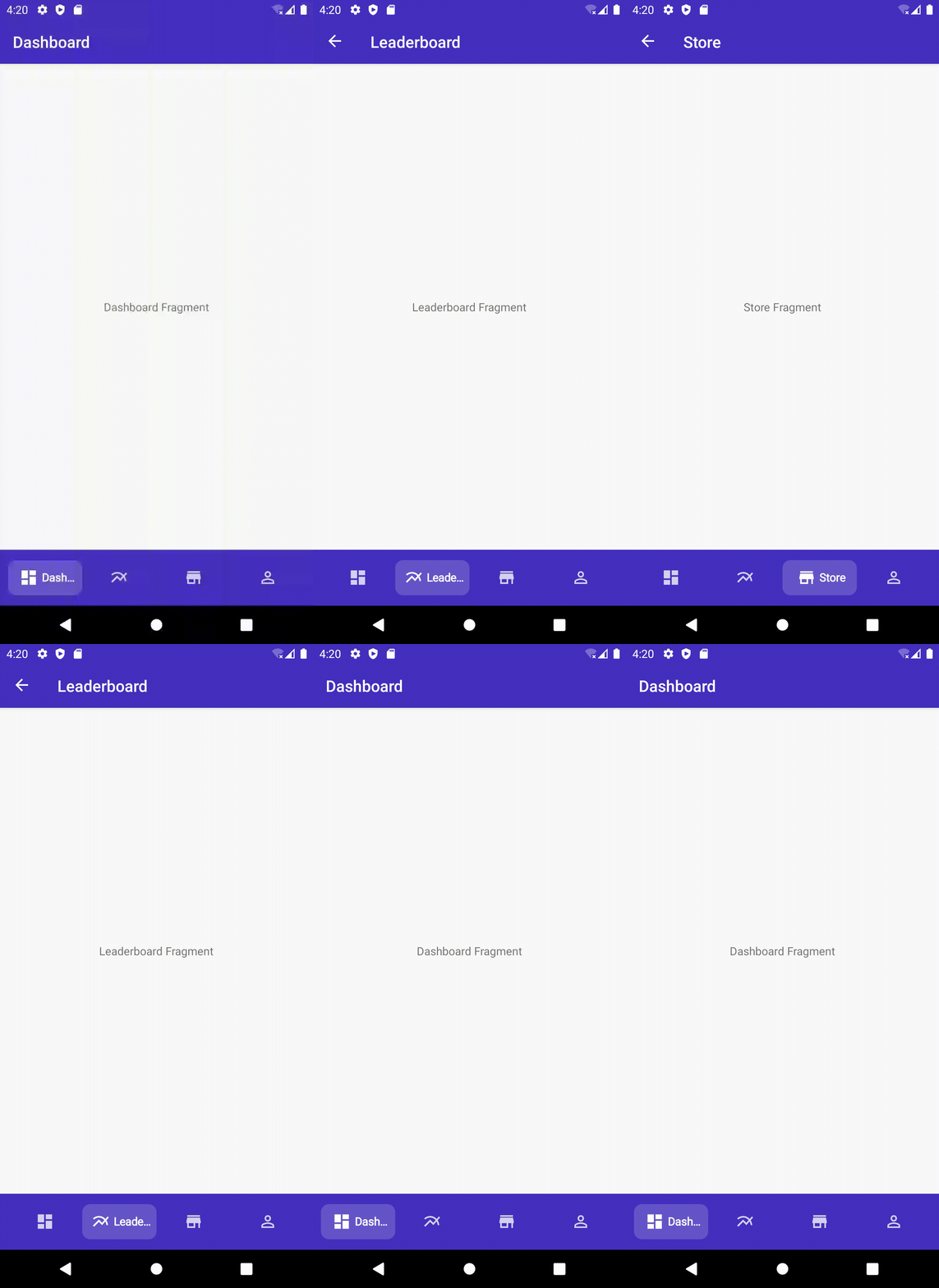
Coupled with the Navigation Component from the [Android Jetpack](https://developer.android.com/jetpack), SmoothBottomBar offers easier navigation within your application by designating navigation to the Navigation Component. This works best when using fragments, as the Navigation component helps to handle your fragment transactions.
- Setup Navigation Component i.e. Add dependenccy to your project, create a Navigation Graph etc.
- For each Fragment in your Navigation Graph, ensure that the Fragment's `id` is the same as the MenuItems in your Menu i.e res/menu/ folder
```xml
```
Navigation Graph i.e res/navigation/ folder
```xml
```
- In your activity i.e `MainActivity`, create an instance of `PopupMenu` which takes a `context` and an `anchor`(pass in null) and then inflate this `PopupMenu` with the layout menu for the `SmoothBottomBar`.
- Get a reference to your `SmoothBottomBar` and call `setupWithNavController()` which takes in a `Menu` and `NavController`, pass in the menu of the previously instantiated `PopupMenu` i.e.(`popUpMenu.menu`) and your `NavController`.
- Preferably set this up in a function as shown below and call this function i.e. (`setupSmoothBottomMenu()`) in the `onCreate` method of your activity.
**N.B:** Sample app makes use of [ViewBinding](https://developer.android.com/topic/libraries/view-binding) to get reference to views in the layout.
```kotlin
private fun setupSmoothBottomMenu() {
binding.bottomBar.setupWithNavController(navController)
}
```
### ActionBar
You can also setup your `ActionBar` with the Navigation Component by calling `setupActionBarWithNavController` and pass in your `NavController`.
**N.B:** Your app needs to have a `Toolbar` for `setupActionBarWithNavController` to work. If your app theme doesn't have a `Toolbar` i.e. (Theme.AppCompat.Light.NoActionBar) you would need to:
- Add one to your layout i.e.
```xml
```
- Set the support action bar to your `Toolbar` using `setSupportActionBar(your_toolbar_id)` in this case `setSupportActionBar(binding.toolBar)`
We now have something like this:
```kotlin
private lateinit var navController: NavController
private lateinit var binding: ActivityMainBinding
override fun onCreate(savedInstanceState: Bundle?) {
super.onCreate(savedInstanceState)
binding = ActivityMainBinding.inflate(layoutInflater)
setContentView(binding.root)
navController = findNavController(R.id.main_fragment)
setupActionBarWithNavController(navController)
setupSmoothBottomMenu()
}
private fun setupSmoothBottomMenu() {
binding.bottomBar.setupWithNavController(navController)
}
//set an active fragment programmatically
fun setSelectedItem(pos:Int){
binding.bottomBar.setSelectedItem(pos)
}
//set badge indicator
fun setBadge(pos:Int){
binding.bottomBar.setBadge(pos)
}
//remove badge indicator
fun removeBadge(pos:Int){
binding.bottomBar.removeBadge(pos)
}
override fun onSupportNavigateUp(): Boolean {
return navController.navigateUp() || super.onSupportNavigateUp()
}
```
### Result Demo:
## Design Credits
All design and inspiration credits belong to [Alejandro Ausejo](https://dribbble.com/shots/6251784-Navigation-Menu-Animation).
## Jetpack Compose
A fully Compose-native `SmoothBottomBar` composable, functionally equivalent to the View version below. It's a controlled component — the caller owns `selectedIndex` and reacts to `onItemSelected`/`onItemReselected`.
```kotlin
val items = listOf(
SmoothBarItem(icon = painterResource(R.drawable.ic_dashboard_white_24dp), label = "Dashboard"),
SmoothBarItem(icon = painterResource(R.drawable.ic_multiline_chart_white_24dp), label = "Leaderboard"),
SmoothBarItem(icon = painterResource(R.drawable.ic_store_white_24dp), label = "Store", hasBadge = true),
SmoothBarItem(icon = painterResource(R.drawable.ic_person_outline_white_24dp), label = "Profile"),
)
var selectedIndex by remember { mutableStateOf(0) }
SmoothBottomBar(
items = items,
selectedIndex = selectedIndex,
onItemSelected = { selectedIndex = it },
modifier = Modifier.fillMaxWidth().height(76.dp),
backgroundColor = Color(0xFF432FBF),
)
```
See `app/src/main/java/me/ibrahimsn/app/ComposeMainActivity.kt` for a full example wired up to `navigation-compose`.
### Parameters
| Parameter | Default | Description |
|---|---|---|
| `items` | — | `List` (`icon`, `label`, `contentDescription`, `hasBadge`) |
| `selectedIndex` | — | Index of the currently active item |
| `onItemSelected` | — | Called when a different item is tapped |
| `modifier` | `Modifier` | Standard Compose modifier |
| `onItemReselected` | `{}` | Called when the already-selected item is tapped again |
| `backgroundColor` | `Color.White` | Bar background color |
| `shape` | `RectangleShape` | Bar background shape |
| `indicatorColor` | `Color(0x2DFFFFFF)` | Active-item pill color |
| `indicatorRadius` | `12.dp` | Active-item pill corner radius |
| `sideMargins` | `10.dp` | Left/right margin before the first/last item |
| `itemPadding` | `10.dp` | Padding inside each item |
| `itemSpacing` | `8.dp` | Minimum spacing between items |
| `itemTextColor` | `Color.White` | Label text color |
| `itemTextSize` | `11.sp` | Label text size |
| `itemFontFamily` | `null` | Label font family |
| `itemBadgeColor` | `Color.Red` | Badge dot color |
| `itemBadgeRadius` | `4.dp` | Badge dot radius |
| `itemIconSize` | `18.dp` | Icon size |
| `itemIconMargin` | `4.dp` | Space between icon and label when active |
| `itemIconTint` | `Color(0xC8FFFFFF)` | Icon tint when inactive |
| `itemIconTintActive` | `Color.White` | Icon tint when active |
| `itemAnimDurationMillis` | `200` | Selection transition duration |
| `iconBackgroundColor` | `Color.Transparent` | Icon background circle color, inactive items only |
| `iconBackgroundPadding` | `6.dp` | Icon background circle padding |
## View
- Create menu.xml under your res/menu/ folder
```xml
```
- Add view into your layout file
```xml
```
- Use SmoothBottomBar callbacks in your activity
```kotlin
bottomBar.onItemSelected = {
status.text = "Item $it selected"
}
bottomBar.onItemReselected = {
status.text = "Item $it re-selected"
}
```
OR
```kotlin
bottomBar.setOnItemSelectedListener(object: OnItemSelectedListener {
override fun onItemSelect(pos: Int): Boolean {
status.text = "Item $pos selected"
return true
}
})
bottomBar.setOnItemReselectedListener(object: OnItemReselectedListener {
override fun onItemReselect(pos: Int) {
status.text = "Item $pos re-selected"
}
})
```
>**Note:** For projects without kotlin, you may need to add `org.jetbrains.kotlin:kotlin-stdlib:$kotlinVersion` to your dependencies since this is a Kotlin library.
## **Use SmoothBottomBar with [Navigation Components](https://developer.android.com/guide/navigation/).**
Coupled with the Navigation Component from the [Android Jetpack](https://developer.android.com/jetpack), SmoothBottomBar offers easier navigation within your application by designating navigation to the Navigation Component. This works best when using fragments, as the Navigation component helps to handle your fragment transactions.
- Setup Navigation Component i.e. Add dependenccy to your project, create a Navigation Graph etc.
- For each Fragment in your Navigation Graph, ensure that the Fragment's `id` is the same as the MenuItems in your Menu i.e res/menu/ folder
```xml
```
Navigation Graph i.e res/navigation/ folder
```xml
```
- In your activity i.e `MainActivity`, create an instance of `PopupMenu` which takes a `context` and an `anchor`(pass in null) and then inflate this `PopupMenu` with the layout menu for the `SmoothBottomBar`.
- Get a reference to your `SmoothBottomBar` and call `setupWithNavController()` which takes in a `Menu` and `NavController`, pass in the menu of the previously instantiated `PopupMenu` i.e.(`popUpMenu.menu`) and your `NavController`.
- Preferably set this up in a function as shown below and call this function i.e. (`setupSmoothBottomMenu()`) in the `onCreate` method of your activity.
**N.B:** Sample app makes use of [ViewBinding](https://developer.android.com/topic/libraries/view-binding) to get reference to views in the layout.
```kotlin
private fun setupSmoothBottomMenu() {
binding.bottomBar.setupWithNavController(navController)
}
```
### ActionBar
You can also setup your `ActionBar` with the Navigation Component by calling `setupActionBarWithNavController` and pass in your `NavController`.
**N.B:** Your app needs to have a `Toolbar` for `setupActionBarWithNavController` to work. If your app theme doesn't have a `Toolbar` i.e. (Theme.AppCompat.Light.NoActionBar) you would need to:
- Add one to your layout i.e.
```xml
```
- Set the support action bar to your `Toolbar` using `setSupportActionBar(your_toolbar_id)` in this case `setSupportActionBar(binding.toolBar)`
We now have something like this:
```kotlin
private lateinit var navController: NavController
private lateinit var binding: ActivityMainBinding
override fun onCreate(savedInstanceState: Bundle?) {
super.onCreate(savedInstanceState)
binding = ActivityMainBinding.inflate(layoutInflater)
setContentView(binding.root)
navController = findNavController(R.id.main_fragment)
setupActionBarWithNavController(navController)
setupSmoothBottomMenu()
}
private fun setupSmoothBottomMenu() {
binding.bottomBar.setupWithNavController(navController)
}
//set an active fragment programmatically
fun setSelectedItem(pos:Int){
binding.bottomBar.setSelectedItem(pos)
}
//set badge indicator
fun setBadge(pos:Int){
binding.bottomBar.setBadge(pos)
}
//remove badge indicator
fun removeBadge(pos:Int){
binding.bottomBar.removeBadge(pos)
}
override fun onSupportNavigateUp(): Boolean {
return navController.navigateUp() || super.onSupportNavigateUp()
}
```
### Result Demo:
### Update [8th May, 2021]
Prior to the [initial addition of this feature](https://github.com/ibrahimsn98/SmoothBottomBar/pull/33), you can now inflate separate menu items for the `SmoothBottomBar` and your `Toolbar`.
- Create the menu item you want to inflate in the `Toolbar` i.e.
```xml
```
- Override `OnCreateOptionsMenu` and `onOptionsItemSelected` (ensure it returns `super.onOptionsItemSelected(item)`). Now we have:
```kotlin
class MainActivity : AppCompatActivity() {
private lateinit var navController: NavController
private lateinit var binding: ActivityMainBinding
override fun onCreate(savedInstanceState: Bundle?) {
super.onCreate(savedInstanceState)
binding = ActivityMainBinding.inflate(layoutInflater)
setContentView(binding.root)
navController = findNavController(R.id.main_fragment)
setupActionBarWithNavController(navController)
setupSmoothBottomMenu()
}
override fun onCreateOptionsMenu(menu: Menu?): Boolean {
menuInflater.inflate(R.menu.another_menu, menu)
return true
}
override fun onOptionsItemSelected(item: MenuItem): Boolean {
when (item.itemId) {
R.id.another_item_1 -> {
showToast("Another Menu Item 1 Selected")
}
R.id.another_item_2 -> {
showToast("Another Menu Item 2 Selected")
}
R.id.another_item_3 -> {
showToast("Another Menu Item 3 Selected")
}
}
return super.onOptionsItemSelected(item)
}
private fun showToast(msg: String) {
Toast.makeText(this, msg, Toast.LENGTH_SHORT).show()
}
private fun setupSmoothBottomMenu() {
binding.bottomBar.setupWithNavController(navController)
}
//set an active fragment programmatically
fun setSelectedItem(pos:Int){
binding.bottomBar.setSelectedItem(pos)
}
//set badge indicator
fun setBadge(pos:Int){
binding.bottomBar.setBadge(pos)
}
//remove badge indicator
fun removeBadge(pos:Int){
binding.bottomBar.removeBadge(pos)
}
override fun onSupportNavigateUp(): Boolean {
return navController.navigateUp() || super.onSupportNavigateUp()
}
}
```
### Select Bottom Item from any fragment
```kotlin
buttonId.setOnClickListener {
(requireActivity() as MainActivity).setSelectedItem(2)
}
```
### Result Demo:

### Customization
```xml
```
### Setup
> Follow me on Twitter [@ibrahimsn98](https://twitter.com/ibrahimsn98)
Requires minSdk 32, compileSdk 37, Kotlin 2.2+, Java 21.
```gradle
//project label build.gradle
buildscript {
repositories {
....
maven { url 'https://jitpack.io' }
}
}
allprojects {
repositories {
.......
maven { url 'https://www.jitpack.io' }
}
}
//app label build.gradle
dependencies {
implementation 'com.github.ibrahimsn98:SmoothBottomBar:'
}
```
> **Note:** The latest tagged release predates the `me.ibrahimsn.smoothbottombar` package rename and the Compose module — a new tag needs to be cut before those changes are available via JitPack. Until then, build from source (`git clone` + `include ':lib'`/`include ':compose'`) to use the code documented on this page.
## Demo App
The sample `app` module has two entry points: `ComposeMainActivity` (the Jetpack Compose demo above) is the default launcher activity; the classic View-based `MainActivity` is reachable from its overflow menu.
## Contributors ✨
## License
```
MIT License
Copyright (c) 2019 İbrahim Süren
Permission is hereby granted, free of charge, to any person obtaining a copy
of this software and associated documentation files (the "Software"), to deal
in the Software without restriction, including without limitation the rights
to use, copy, modify, merge, publish, distribute, sublicense, and/or sell
copies of the Software, and to permit persons to whom the Software is
furnished to do so, subject to the following conditions:
The above copyright notice and this permission notice shall be included in all
copies or substantial portions of the Software.
THE SOFTWARE IS PROVIDED "AS IS", WITHOUT WARRANTY OF ANY KIND, EXPRESS OR
IMPLIED, INCLUDING BUT NOT LIMITED TO THE WARRANTIES OF MERCHANTABILITY,
FITNESS FOR A PARTICULAR PURPOSE AND NONINFRINGEMENT. IN NO EVENT SHALL THE
AUTHORS OR COPYRIGHT HOLDERS BE LIABLE FOR ANY CLAIM, DAMAGES OR OTHER
LIABILITY, WHETHER IN AN ACTION OF CONTRACT, TORT OR OTHERWISE, ARISING FROM,
OUT OF OR IN CONNECTION WITH THE SOFTWARE OR THE USE OR OTHER DEALINGS IN THE
SOFTWARE.
```


