# paperless-gpt
[](LICENSE)
[](https://discord.gg/fJQppDH2J7)
[](https://hub.docker.com/r/icereed/paperless-gpt)
[](https://github.com/icereed/paperless-gpt/pkgs/container/paperless-gpt)
[](CODE_OF_CONDUCT.md)
[](https://github.com/sponsors/icereed)
💡 Maintained by [Icereed](https://github.com/icereed). Proudly supported by [BubbleTax.de](https://bubbletax.de/?utm_source=github&utm_medium=readme&utm_campaign=paperless) – automated, BMF-compliant tax reports for Interactive Brokers traders in Germany.
---
**paperless-gpt** seamlessly pairs with [paperless-ngx][paperless-ngx] to generate **AI-powered document titles** and **tags**, saving you hours of manual sorting. While other tools may offer AI chat features, **paperless-gpt** stands out by **supercharging OCR with LLMs**-ensuring high accuracy, even with tricky scans. If you're craving next-level text extraction and effortless document organization, this is your solution.
https://github.com/user-attachments/assets/bd5d38b9-9309-40b9-93ca-918dfa4f3fd4
> **❤️ Support This Project**
> If paperless-gpt is helping you organize your documents and saving you time, please consider [sponsoring its development](https://github.com/sponsors/icereed). Your support helps ensure continued improvements and maintenance!
---
## Key Highlights
1. **LLM-Enhanced OCR**
Harness Large Language Models (OpenAI or Ollama) for **better-than-traditional** OCR—turn messy or low-quality scans into context-aware, high-fidelity text.
2. **Use specialized AI OCR services**
- **LLM OCR**: Use OpenAI or Ollama to extract text from images.
- **Google Document AI**: Leverage Google's powerful Document AI for OCR tasks.
- **Azure Document Intelligence**: Use Microsoft's enterprise OCR solution.
- **Docling Server**: Self-hosted OCR and document conversion service
3. **Automatic Title, Tag & Created Date Generation**
No more guesswork. Let the AI do the naming and categorizing. You can easily review suggestions and refine them if needed.
4. **Supports reasoning models in Ollama**
Greatly enhance accuracy by using a reasoning model like `qwen3:8b`. The perfect tradeoff between privacy and performance! Of course, if you got enough GPUs or NPUs, a bigger model will enhance the experience.
5. **Automatic Correspondent Generation**
Automatically identify and generate correspondents from your documents, making it easier to track and organize your communications.
6. **Automatic Custom Field Generation**
Extract and populate custom fields from your documents. Configure which fields to target and how they should be filled. This feature must be enabled in the settings, and you must select at least one custom field for it to function. Three write modes are available:
- **Append**: This is the safest option: It only adds new fields that do not already exist on the document. It will never overwrite an existing field, even if it's empty.
- **Update**: Adds new fields and overwrites existing fields with new suggestions. Fields on the document that don't have a new suggestion are left untouched.
- **Replace**: Deletes all existing custom fields on the document and replaces them entirely with the suggested fields.
7. **Searchable & Selectable PDFs**
Generate PDFs with transparent text layers positioned accurately over each word, making your documents both searchable and selectable while preserving the original appearance.
7. **Extensive Customization**
- **Customizable Prompts via Web UI**: Tweak and manage all AI prompts for titles, tags, correspondents, and more directly within the web interface under the "Settings" menu. The application uses a safe `default_prompts` and `prompts` directory structure, ensuring your customizations are persistent.
- **Tagging**: Decide how documents get tagged—manually, automatically, or via OCR-based flows.
- **PDF Processing**: Configure how OCR-enhanced PDFs are handled, with options to save locally or upload to paperless-ngx.
8. **Simple Docker Deployment**
A few environment variables, and you're off! Compose it alongside paperless-ngx with minimal fuss.
9. **Unified Web UI**
- **Manual Review**: Approve or tweak AI's suggestions.
- **Auto Processing**: Focus only on edge cases while the rest is sorted for you.
9. **Ad-hoc Document Analysis**
Perform ad-hoc analysis on a selection of documents using a custom prompt. Gain quick insights, summaries, or extract specific information from multiple documents at once.
---
## Table of Contents
- [paperless-gpt](#paperless-gpt)
- [Key Highlights](#key-highlights)
- [Table of Contents](#table-of-contents)
- [Getting Started](#getting-started)
- [Prerequisites](#prerequisites)
- [Installation](#installation)
- [Docker Compose](#docker-compose)
- [Manual Setup](#manual-setup)
- [OCR Providers](#ocr-providers)
- [1. LLM-based OCR (Default)](#1-llm-based-ocr-default)
- [2. Azure Document Intelligence](#2-azure-document-intelligence)
- [3. Google Document AI](#3-google-document-ai)
- [4. Docling Server](#4-docling-server)
- [OCR Processing Modes](#ocr-processing-modes)
- [Image Mode (Default)](#image-mode-default)
- [PDF Mode](#pdf-mode)
- [Whole PDF Mode](#whole-pdf-mode)
- [Provider Compatibility](#provider-compatibility)
- [Existing OCR Detection](#existing-ocr-detection)
- [Enhanced OCR Features](#enhanced-ocr-features)
- [PDF Text Layer Generation](#pdf-text-layer-generation)
- [Local File Saving](#local-file-saving)
- [PDF Upload to paperless-ngx](#pdf-upload-to-paperless-ngx)
- [Metadata Copying Limitations](#metadata-copying-limitations)
- [Safety Features](#safety-features)
- [Usage Recommendations](#usage-recommendations)
- [Configuration](#configuration)
- [Environment Variables](#environment-variables)
- [Custom Prompt Templates](#custom-prompt-templates)
- [Template Variables](#template-variables)
- [LLM-Based OCR: Compare for Yourself](#llm-based-ocr-compare-for-yourself)
- [Example 1](#example-1)
- [Example 2](#example-2)
- [How It Works](#how-it-works)
- [Usage](#usage)
- [Troubleshooting](#troubleshooting)
- [Working with Local LLMs](#working-with-local-llms)
- [Token Management](#token-management)
- [PDF Processing Issues](#pdf-processing-issues)
- [Custom Field Generation Issues](#custom-field-generation-issues)
- [Contributing](#contributing)
- [Support the Project](#support-the-project)
- [License](#license)
- [Star History](#star-history)
- [Disclaimer](#disclaimer)
---
## Getting Started
### Prerequisites
- [Docker][docker-install] installed.
- A running instance of [paperless-ngx][paperless-ngx].
- Access to an LLM provider:
- **OpenAI**: An API key with models like `gpt-4o` or `gpt-3.5-turbo`.
- **Ollama**: A running Ollama server with models like `qwen3:8b`.
### Installation
#### Docker Compose
Here's an example `docker-compose.yml` to spin up **paperless-gpt** alongside paperless-ngx:
```yaml
services:
paperless-ngx:
image: ghcr.io/paperless-ngx/paperless-ngx:latest
# ... (your existing paperless-ngx config)
paperless-gpt:
# Use one of these image sources:
image: icereed/paperless-gpt:latest # Docker Hub
# image: ghcr.io/icereed/paperless-gpt:latest # GitHub Container Registry
environment:
PAPERLESS_BASE_URL: "http://paperless-ngx:8000"
PAPERLESS_API_TOKEN: "your_paperless_api_token"
PAPERLESS_PUBLIC_URL: "http://paperless.mydomain.com" # Optional
MANUAL_TAG: "paperless-gpt" # Optional, default: paperless-gpt
AUTO_TAG: "paperless-gpt-auto" # Optional, default: paperless-gpt-auto
# LLM Configuration - Choose one:
# Option 1: Standard OpenAI
LLM_PROVIDER: "openai"
LLM_MODEL: "gpt-4o"
OPENAI_API_KEY: "your_openai_api_key"
# Option 2: Mistral
# LLM_PROVIDER: "mistral"
# LLM_MODEL: "mistral-large-latest"
# MISTRAL_API_KEY: "your_mistral_api_key"
# Option 3: Azure OpenAI
# LLM_PROVIDER: "openai"
# LLM_MODEL: "your-deployment-name"
# OPENAI_API_KEY: "your_azure_api_key"
# OPENAI_API_TYPE: "azure"
# OPENAI_BASE_URL: "https://your-resource.openai.azure.com"
# Option 4: Ollama (Local)
# LLM_PROVIDER: "ollama"
# LLM_MODEL: "qwen3:8b"
# OLLAMA_HOST: "http://host.docker.internal:11434"
# OLLAMA_CONTEXT_LENGTH: "8192" # Sets Ollama NumCtx (context window)
# TOKEN_LIMIT: 1000 # Recommended for smaller models
# Option 5: Anthropic/Claude
# LLM_PROVIDER: "anthropic"
# LLM_MODEL: "claude-sonnet-4-5"
# ANTHROPIC_API_KEY: "your_anthropic_api_key"
# Optional LLM Settings
# LLM_LANGUAGE: "English" # Optional, default: English
# OCR Configuration - Choose one:
# Option 1: LLM-based OCR
OCR_PROVIDER: "llm" # Default OCR provider
VISION_LLM_PROVIDER: "ollama" # openai, ollama, mistral, or anthropic
VISION_LLM_MODEL: "minicpm-v" # minicpm-v (ollama) or gpt-4o (openai) or claude-sonnet-4-5 (anthropic/claude)
OLLAMA_HOST: "http://host.docker.internal:11434" # If using Ollama
# OCR Processing Mode
OCR_PROCESS_MODE: "image" # Optional, default: image, other options: pdf, whole_pdf
PDF_SKIP_EXISTING_OCR: "false" # Optional, skip OCR for PDFs with existing OCR
# Option 2: Google Document AI
# OCR_PROVIDER: 'google_docai' # Use Google Document AI
# GOOGLE_PROJECT_ID: 'your-project' # Your GCP project ID
# GOOGLE_LOCATION: 'us' # Document AI region
# GOOGLE_PROCESSOR_ID: 'processor-id' # Your processor ID
# GOOGLE_APPLICATION_CREDENTIALS: '/app/credentials.json' # Path to service account key
# Option 3: Azure Document Intelligence
# OCR_PROVIDER: 'azure' # Use Azure Document Intelligence
# AZURE_DOCAI_ENDPOINT: 'your-endpoint' # Your Azure endpoint URL
# AZURE_DOCAI_KEY: 'your-key' # Your Azure API key
# AZURE_DOCAI_MODEL_ID: 'prebuilt-read' # Optional, defaults to prebuilt-read
# AZURE_DOCAI_TIMEOUT_SECONDS: '120' # Optional, defaults to 120 seconds
# AZURE_DOCAI_OUTPUT_CONTENT_FORMAT: 'text' # Optional, defaults to 'text', other valid option is 'markdown'
# 'markdown' requires the 'prebuilt-layout' model
# Enhanced OCR Features
CREATE_LOCAL_HOCR: "false" # Optional, save hOCR files locally
LOCAL_HOCR_PATH: "/app/hocr" # Optional, path for hOCR files
CREATE_LOCAL_PDF: "false" # Optional, save enhanced PDFs locally
LOCAL_PDF_PATH: "/app/pdf" # Optional, path for PDF files
PDF_UPLOAD: "false" # Optional, upload enhanced PDFs to paperless-ngx
PDF_REPLACE: "false" # Optional and DANGEROUS, delete original after upload
PDF_COPY_METADATA: "true" # Optional, copy metadata from original document
PDF_OCR_TAGGING: "true" # Optional, add tag to processed documents
PDF_OCR_COMPLETE_TAG: "paperless-gpt-ocr-complete" # Optional, tag name
# Option 4: Docling Server
# OCR_PROVIDER: 'docling' # Use a Docling server
# DOCLING_URL: 'http://your-docling-server:port' # URL of your Docling instance
# DOCLING_IMAGE_EXPORT_MODE: "placeholder" # Optional, defaults to "embedded"
# DOCLING_OCR_PIPELINE: "standard" # Optional, defaults to "vlm"
# DOCLING_OCR_ENGINE: "easyocr" # Optional, defaults to "easyocr" (only used when `DOCLING_OCR_PIPELINE is set to 'standard')
AUTO_OCR_TAG: "paperless-gpt-ocr-auto" # Optional, default: paperless-gpt-ocr-auto
OCR_LIMIT_PAGES: "5" # Optional, default: 5. Set to 0 for no limit.
LOG_LEVEL: "info" # Optional: debug, warn, error
volumes:
- ./prompts:/app/prompts # Mount the prompts directory
# For Google Document AI:
- ${HOME}/.config/gcloud/application_default_credentials.json:/app/credentials.json
# For local hOCR and PDF saving:
- ./hocr:/app/hocr # Only if CREATE_LOCAL_HOCR is true
- ./pdf:/app/pdf # Only if CREATE_LOCAL_PDF is true
ports:
- "8080:8080"
depends_on:
- paperless-ngx
```
**Pro Tip**: Replace placeholders with real values and read the logs if something looks off.
#### Manual Setup
1. **Clone the Repository**
```bash
git clone https://github.com/icereed/paperless-gpt.git
cd paperless-gpt
```
2. **Create a `prompts` Directory**
```bash
mkdir prompts
```
3. **Build the Docker Image**
```bash
docker build -t paperless-gpt .
```
4. **Run the Container**
```bash
docker run -d \
-e PAPERLESS_BASE_URL='http://your_paperless_ngx_url' \
-e PAPERLESS_API_TOKEN='your_paperless_api_token' \
-e LLM_PROVIDER='openai' \
-e LLM_MODEL='gpt-4o' \
-e OPENAI_API_KEY='your_openai_api_key' \
-e LLM_LANGUAGE='English' \
-e VISION_LLM_PROVIDER='ollama' \
-e VISION_LLM_MODEL='minicpm-v' \
-e LOG_LEVEL='info' \
-v $(pwd)/prompts:/app/prompts \
-p 8080:8080 \
paperless-gpt
```
---
## OCR Providers
For detailed provider-specific documentation:
- [Mistral AI Integration](docs/mistral_llm.md)
paperless-gpt supports four different OCR providers, each with unique strengths and capabilities:
### 1. LLM-based OCR (Default)
- **Key Features**:
- Uses vision-capable LLMs like gpt-4o or MiniCPM-V
- High accuracy with complex layouts and difficult scans
- Context-aware text recognition
- Self-correcting capabilities for OCR errors
- **Best For**:
- Complex or unusual document layouts
- Poor quality scans
- Documents with mixed languages
- **Configuration**:
```yaml
OCR_PROVIDER: "llm"
VISION_LLM_PROVIDER: "openai" # or "ollama"
VISION_LLM_MODEL: "gpt-4o" # or "minicpm-v"
```
### 2. Azure Document Intelligence
- **Key Features**:
- Enterprise-grade OCR solution
- Prebuilt models for common document types
- Layout preservation and table detection
- Fast processing speeds
- **Best For**:
- Business documents and forms
- High-volume processing
- Documents requiring layout analysis
- **Configuration**:
```yaml
OCR_PROVIDER: "azure"
AZURE_DOCAI_ENDPOINT: "https://your-endpoint.cognitiveservices.azure.com/"
AZURE_DOCAI_KEY: "your-key"
AZURE_DOCAI_MODEL_ID: "prebuilt-read" # optional
AZURE_DOCAI_TIMEOUT_SECONDS: "120" # optional
AZURE_DOCAI_OUTPUT_CONTENT_FORMAT:
"text" # optional, defaults to text, other valid option is 'markdown'
# 'markdown' requires the 'prebuilt-layout' model
```
### 3. Google Document AI
- **Key Features**:
- Enterprise-grade OCR/HTR solution
- Specialized document processors
- Strong form field detection
- Multi-language support
- High accuracy on structured documents
- **Exclusive hOCR generation** for creating searchable PDFs with text layers
- **Only provider that supports** enhanced PDF generation features
- **Best For**:
- Forms and structured documents
- Documents with tables
- Multi-language documents
- Handwritten text (HTR)
- **Configuration**:
```yaml
OCR_PROVIDER: "google_docai"
GOOGLE_PROJECT_ID: "your-project"
GOOGLE_LOCATION: "us"
GOOGLE_PROCESSOR_ID: "processor-id"
CREATE_LOCAL_HOCR: "true" # Optional, for hOCR generation
LOCAL_HOCR_PATH: "/app/hocr" # Optional, default path
CREATE_LOCAL_PDF: "true" # Optional, for applying OCR to PDF
LOCAL_PDF_PATH: "/app/pdf" # Optional, default path
```
### 4. Docling Server
- **Key Features**:
- Self-hosted OCR and document conversion service
- Supports various input and output formats (including text)
- Utilizes multiple OCR engines (EasyOCR, Tesseract, etc.)
- Can be run locally or in a private network
- **Best For**:
- Users who prefer a self-hosted solution
- Environments where data privacy is paramount
- Processing a wide variety of document types
- **Configuration**:
```yaml
OCR_PROVIDER: "docling"
DOCLING_URL: "http://your-docling-server:port"
DOCLING_IMAGE_EXPORT_MODE: "placeholder" # Optional, defaults to "embedded"
DOCLING_OCR_PIPELINE: "standard" # Optional, defaults to "vlm"
DOCLING_OCR_ENGINE: "macocr" # Optional, defaults to "easyocr" (only used when `DOCLING_OCR_PIPELINE is set to 'standard')
```
## OCR Processing Modes
paperless-gpt offers different methods for processing documents, giving you flexibility based on your needs and OCR provider capabilities:
### Image Mode (Default)
- **How it works**: Converts PDF pages to images before processing
- **Best for**: Compatibility with all OCR providers.
- **Configuration**: `OCR_PROCESS_MODE: "image"`
### PDF Mode
- **How it works**: Processes PDF pages directly without image conversion
- **Best for**: Preserving PDF features, potentially faster processing and improved accuracy with some providers
- **Configuration**: `OCR_PROCESS_MODE: "pdf"`
### Whole PDF Mode
- **How it works**: Processes the entire PDF document in a single operation
- **Best for**: Providers that handle multi-page documents efficiently, reduced API calls
- **Configuration**: `OCR_PROCESS_MODE: "whole_pdf"`
- **Note**: Processing large PDFs may cause you to hit the API limit of your OCR provider. If you encounter problems with large documents, consider switching to `pdf` mode, which processes pages individually.
### Provider Compatibility
Different OCR providers support different processing modes:
| Provider | Image Mode | PDF Mode | Whole PDF Mode |
|----------|------------|----------|----------------|
| **LLM-based OCR** (OpenAI/Ollama) | ✅ | ❌ | ❌ |
| **Azure Document Intelligence** | ✅ | ❌ | ❌ |
| **Google Document AI** | ✅ | ✅ | ✅ |
| **Mistral OCR** | ✅ | ✅ | ✅ |
| **Docling Server** | ✅ | ✅ | ✅ |
> **Important**: paperless-gpt will validate your configuration at startup and prevent unsupported mode/provider combinations. If you specify an unsupported mode for your provider, the application will fail to start with a clear error message.
### Existing OCR Detection
When using PDF or whole PDF modes, you can enable automatic detection of existing OCR:
```yaml
environment:
OCR_PROCESS_MODE: "pdf" # or "whole_pdf"
PDF_SKIP_EXISTING_OCR: "true" # Skip processing if existing OCR is detected in the PDF
```
> **Note**: Not all OCR providers support all processing modes. Some may work better with certain modes than others. Processing as PDF might use more or fewer API tokens than processing as images, depending on the provider. Results may vary based on document complexity and provider capabilities. It's recommended to experiment with different modes to find what works best for your specific documents and OCR provider.
## Enhanced OCR Features
paperless-gpt includes powerful OCR enhancements that go beyond basic text extraction:
> **Important Note**: The PDF text layer generation and hOCR features are currently **only supported with Google Document AI** as the OCR provider. These features are not available when using LLM-based OCR or Azure Document Intelligence.
### PDF Text Layer Generation
- **Searchable & Selectable PDFs**: Creates PDFs with transparent text overlays accurately positioned over each word in the document
- **hOCR Integration**: Utilizes hOCR format (HTML-based OCR representation) to maintain precise text positioning
- **Document Quality Improvement**: Makes documents both searchable and selectable while preserving the original appearance
- **Google Document AI Required**: These features rely on Google Document AI's ability to generate hOCR data with accurate word positions
### Local File Saving
paperless-gpt can save both the hOCR files and enhanced PDFs locally:
```yaml
environment:
# Enable local file saving
CREATE_LOCAL_HOCR: "true" # Save hOCR files locally
CREATE_LOCAL_PDF: "true" # Save generated PDFs locally
LOCAL_HOCR_PATH: "/app/hocr" # Path to save hOCR files
LOCAL_PDF_PATH: "/app/pdf" # Path to save PDF files
volumes:
# Mount volumes to access the files from your host
- ./hocr_files:/app/hocr
- ./pdf_files:/app/pdf
```
> **Note**: You must mount these directories as volumes in your Docker configuration to access the generated files from your host system.
### PDF Upload to paperless-ngx
Due to limitations in paperless-ngx's API, it's not possible to directly update existing documents with their OCR-enhanced versions. As a workaround, paperless-gpt can:
1. Upload the enhanced PDF as a new document
2. Copy metadata from the original document to the new one
3. Optionally delete the original document
```yaml
environment:
# PDF upload configuration
PDF_UPLOAD: "true" # Upload processed PDFs to paperless-ngx
PDF_COPY_METADATA: "true" # Copy metadata from original to new document
PDF_REPLACE: "false" # Whether to delete the original document (use with caution!)
PDF_OCR_TAGGING: "true" # Add a tag to mark documents as OCR-processed
PDF_OCR_COMPLETE_TAG: "paperless-gpt-ocr-complete" # Tag used to mark OCR-processed documents
```
> **⚠️ WARNING ⚠️**
> Setting `PDF_REPLACE: "true"` will delete the original document after uploading the enhanced version. This process cannot be undone and may result in data loss if something goes wrong during the upload or metadata copying process. Use with extreme caution!
### Metadata Copying Limitations
When copying metadata from the original document to the new one, paperless-gpt attempts to copy:
- Document title
- Tags (including adding the OCR complete tag)
- Correspondent information
- Created date
However, some metadata **cannot** be copied due to paperless-ngx API limitations:
- Document ID (new document always gets a new ID)
- Added date (will reflect the current upload date)
- Modified date
- Custom fields that might be added by other paperless-ngx plugins
- Notes and annotations
### Safety Features
To prevent accidental creation of incomplete documents, paperless-gpt includes several safety features:
1. **Page Count Check**: If using `OCR_LIMIT_PAGES` to process only a subset of pages (for speed or resource reasons), PDF generation will be skipped entirely if fewer pages would be processed than exist in the original document.
```yaml
environment:
OCR_LIMIT_PAGES: "5" # Limit OCR to first 5 pages, set to 0 for no limit
```
2. **OCR Complete Tagging**: Documents that have been fully processed with OCR can be automatically tagged with a special tag, preventing duplicate processing.
3. **Processing Skip**: If a document already has the OCR complete tag, processing will be skipped automatically.
### Usage Recommendations
For best results with the enhanced OCR features:
1. **Initial Testing**: Start with `PDF_REPLACE: "false"` until you've confirmed the process works well with your documents.
2. **Regular Backups**: Ensure you have backups of your paperless-ngx database and documents before enabling document replacement.
3. **Process Management**: For large documents, consider using `OCR_LIMIT_PAGES: "0"` to ensure all pages are processed, even though this will take longer.
4. **Local Copies**: Enable local file saving (`CREATE_LOCAL_HOCR` and `CREATE_LOCAL_PDF`) to keep copies of the enhanced files as an extra precaution.
5. **Tagging Strategy**: Use the OCR complete tag (`PDF_OCR_COMPLETE_TAG`) to track which documents have already been processed.
## Configuration
### Environment Variables
> **Note:** When using Ollama, ensure that the Ollama server is running and accessible from the paperless-gpt container.
| Variable | Description | Required | Default |
| ----------------------------------- | --------------------------------------------------------------------------------------------------------------------------------------------------------------------------------------------- | -------- | -------------------------- |
| `PAPERLESS_BASE_URL` | URL of your paperless-ngx instance (e.g. `http://paperless-ngx:8000`). | Yes | |
| `PAPERLESS_API_TOKEN` | API token for paperless-ngx. Generate one in paperless-ngx admin. | Yes | |
| `PAPERLESS_PUBLIC_URL` | Public URL for Paperless (if different from `PAPERLESS_BASE_URL`). | No | |
| `MANUAL_TAG` | Tag for manual processing. | No | paperless-gpt |
| `AUTO_TAG` | Tag for auto processing. | No | paperless-gpt-auto |
| `LLM_PROVIDER` | AI backend (`openai`, `ollama`, `googleai`, `mistral`, or `anthropic`). | Yes | |
| `LLM_MODEL` | AI model name (e.g., `gpt-4o`, `mistral-large-latest`, `qwen3:8b`, `claude-sonnet-4-5`). | Yes | |
| `OPENAI_API_KEY` | OpenAI API key (required if using OpenAI). | Cond. | |
| `MISTRAL_API_KEY` | Mistral API key (required if using Mistral). | Cond. | |
| `ANTHROPIC_API_KEY` | Anthropic API key (required if using Anthropic/Claude). | Cond. | |
| `OPENAI_API_TYPE` | Set to `azure` to use Azure OpenAI Service. | No | |
| `OPENAI_BASE_URL` | Base URL for OpenAI API. For Azure OpenAI, set to your deployment URL (e.g., `https://your-resource.openai.azure.com`). | No | |
| `LLM_LANGUAGE` | Likely language for documents (e.g. `English`). Appears in the prompt to help the LLM. | No | English |
| `GOOGLEAI_API_KEY` | Google Gemini API key (required if using `LLM_PROVIDER=googleai`). | Cond. | |
| `GOOGLEAI_THINKING_BUDGET` | (Optional, googleai only) Integer. Controls Gemini "thinking" budget. If unset, model default is used (thinking enabled if supported). Set to `0` to disable thinking (if model supports it). | No | |
| `OLLAMA_HOST` | Ollama server URL (e.g. `http://host.docker.internal:11434`). | No | |
| `LLM_REQUESTS_PER_MINUTE` | Maximum requests per minute for the main LLM. Useful for managing API costs or local LLM load. | No | 120 |
| `LLM_MAX_RETRIES` | Maximum retry attempts for failed main LLM requests. | No | 3 |
| `LLM_BACKOFF_MAX_WAIT` | Maximum wait time between retries for the main LLM (e.g., `30s`). | No | 30s |
| `OCR_PROVIDER` | OCR provider to use (`llm`, `azure`, or `google_docai`). | No | llm |
| `OCR_PROCESS_MODE` | Method for processing documents: `image` (convert to images first), `pdf` (process PDF pages directly), or `whole_pdf` (entire PDF at once). | No | image |
| `VISION_LLM_PROVIDER` | AI backend for LLM OCR (`openai`, `ollama`, `mistral`, or `anthropic`). Required if OCR_PROVIDER is `llm`. | Cond. | |
| `VISION_LLM_MODEL` | Model name for LLM OCR (e.g. `minicpm-v`). Required if OCR_PROVIDER is `llm`. | Cond. | |
| `VISION_LLM_REQUESTS_PER_MINUTE` | Maximum requests per minute for the Vision LLM. Useful for managing API costs or local LLM load. | No | 120 |
| `VISION_LLM_MAX_RETRIES` | Maximum retry attempts for failed Vision LLM requests. | No | 3 |
| `VISION_LLM_BACKOFF_MAX_WAIT` | Maximum wait time between retries for the Vision LLM (e.g., `30s`). | No | 30s |
| `VISION_LLM_MAX_TOKENS` | Maximum tokens for Vision LLM OCR output. | No | |
| `VISION_LLM_TEMPERATURE` | Sampling temperature for Vision OCR generation. Lower is more deterministic. Important: For OpenAI GPT-5 it must be explicitly set to `1.0`. | No | |
| `OLLAMA_CONTEXT_LENGTH` | (Ollama only) Integer. Sets NumCtx (context window) for the Ollama runner. If unset or 0, the model default is used. | No | |
| `OLLAMA_OCR_TOP_K` | (Ollama only) Top-k token sampling for Vision OCR. Lower favors more likely tokens; higher increases diversity. | No | |
| `AZURE_DOCAI_ENDPOINT` | Azure Document Intelligence endpoint. Required if OCR_PROVIDER is `azure`. | Cond. | |
| `AZURE_DOCAI_KEY` | Azure Document Intelligence API key. Required if OCR_PROVIDER is `azure`. | Cond. | |
| `AZURE_DOCAI_MODEL_ID` | Azure Document Intelligence model ID. Optional if using `azure` provider. | No | prebuilt-read |
| `AZURE_DOCAI_TIMEOUT_SECONDS` | Azure Document Intelligence timeout in seconds. | No | 120 |
| `AZURE_DOCAI_OUTPUT_CONTENT_FORMAT` | Azure Document Intelligence output content format. Optional if using `azure` provider. Defaults to `text`. 'markdown' is the other option and it requires the 'prebuild-layout' model ID. | No | text |
| `GOOGLE_PROJECT_ID` | Google Cloud project ID. Required if OCR_PROVIDER is `google_docai`. | Cond. | |
| `GOOGLE_LOCATION` | Google Cloud region (e.g. `us`, `eu`). Required if OCR_PROVIDER is `google_docai`. | Cond. | |
| `GOOGLE_PROCESSOR_ID` | Document AI processor ID. Required if OCR_PROVIDER is `google_docai`. | Cond. | |
| `GOOGLE_APPLICATION_CREDENTIALS` | Path to the mounted Google service account key. Required if OCR_PROVIDER is `google_docai`. | Cond. | |
| `DOCLING_URL` | URL of the Docling server instance. Required if OCR_PROVIDER is `docling`. | Cond. | |
| `DOCLING_IMAGE_EXPORT_MODE` | Mode for image export. Optional; defaults to `embedded` if unset. | No | embedded |
| `DOCLING_OCR_PIPELINE` | Sets the pipeline type. Optional; defaults to `vlm` if unset. | No | vlm |
| `DOCLING_OCR_ENGINE` | Sets the ocr engine, if `DOCLING_OCR_PIPELINE` is set to `standard`. Optional; defaults to `easyocr` | No | easyocr |
| `CREATE_LOCAL_HOCR` | Whether to save hOCR files locally. | No | false |
| `LOCAL_HOCR_PATH` | Path where hOCR files will be saved when hOCR generation is enabled. | No | /app/hocr |
| `CREATE_LOCAL_PDF` | Whether to save enhanced PDFs locally. | No | false |
| `LOCAL_PDF_PATH` | Path where PDF files will be saved when PDF generation is enabled. | No | /app/pdf |
| `PDF_UPLOAD` | Whether to upload enhanced PDFs to paperless-ngx. | No | false |
| `PDF_REPLACE` | Whether to delete the original document after uploading the enhanced version (DANGEROUS). | No | false |
| `PDF_COPY_METADATA` | Whether to copy metadata from the original document to the uploaded PDF. Only applicable when using PDF_UPLOAD. | No | true |
| `PDF_OCR_TAGGING` | Whether to add a tag to mark documents as OCR-processed. | No | true |
| `PDF_OCR_COMPLETE_TAG` | Tag used to mark documents as OCR-processed. | No | paperless-gpt-ocr-complete |
| `PDF_SKIP_EXISTING_OCR` | Whether to skip OCR processing for PDFs that already have OCR. Works with `pdf` and `whole_pdf` processing modes (`OCR_PROCESS_MODE`). | No | false |
| `AUTO_OCR_TAG` | Tag for automatically processing docs with OCR. | No | paperless-gpt-ocr-auto |
| `OCR_LIMIT_PAGES` | Limit the number of pages for OCR. Set to `0` for no limit. | No | 5 |
| `LOG_LEVEL` | Application log level (`info`, `debug`, `warn`, `error`). | No | info |
| `LISTEN_INTERFACE` | Network interface to listen on. | No | 8080 |
| `AUTO_GENERATE_TITLE` | Generate titles automatically if `paperless-gpt-auto` is used. | No | true |
| `AUTO_GENERATE_TAGS` | Generate tags automatically if `paperless-gpt-auto` is used. | No | true |
| `CREATE_NEW_TAGS` | Allow the LLM to suggest new tags that don't exist in paperless-ngx yet. When enabled, new tags will be created automatically in paperless-ngx. | No | false |
| `AUTO_GENERATE_CORRESPONDENTS` | Generate correspondents automatically if `paperless-gpt-auto` is used. | No | true |
| `AUTO_GENERATE_DOCUMENT_TYPE` | Generate document types automatically if `paperless-gpt-auto` is used. Only existing document types from paperless-ngx will be used. | No | true |
| `AUTO_GENERATE_CREATED_DATE` | Generate the created dates automatically if `paperless-gpt-auto` is used. | No | true |
| `TOKEN_LIMIT` | Maximum tokens allowed for prompts/content. Set to `0` to disable limit. Useful for smaller LLMs. | No | |
| `IMAGE_MAX_PIXEL_DIMENSION` | Maximum pixels along any side when rendering document pages to images. | No | 10000 |
| `IMAGE_MAX_TOTAL_PIXELS` | Maximum total pixel count (width × height) when rendering document pages to images. | No | 40000000 |
| `IMAGE_MAX_RENDER_DPI` | Maximum DPI used when rendering document pages to images. | No | 600 |
| `IMAGE_MAX_FILE_BYTES` | Maximum JPEG file size in bytes for rendered page images. Images exceeding this are compressed or resized. | No | 10485760 |
| `CORRESPONDENT_BLACK_LIST` | A comma-separated list of names to exclude from the correspondents suggestions. Example: `John Doe, Jane Smith`. | No | |
### Custom Prompt Templates
paperless-gpt's flexible **prompt templates** let you shape how AI responds. While you can still manually manage files, the recommended way to customize prompts is through the **Settings** page in the web UI.
The application uses two directories for management:
- **`default_prompts/`**: Contains the built-in, default templates. These should not be modified.
- **`prompts/`**: Your working directory. On first run, the default templates are copied here. All edits made in the UI are saved to the files in this directory.
To ensure your custom prompts persist across container restarts, you must mount the `prompts` directory as a volume in your `docker-compose.yml`:
```yaml
volumes:
# This is crucial to save your custom prompts!
- ./prompts:/app/prompts
```
The application reloads the templates instantly after you save them in the UI and also on startup, so no restart is needed to apply changes.
#### Template Variables
Each template has access to specific variables:
**title_prompt.tmpl**:
- `{{.Language}}` - Target language (e.g., "English")
- `{{.Content}}` - Document content text
- `{{.Title}}` - Original document title
**tag_prompt.tmpl**:
- `{{.Language}}` - Target language
- `{{.AvailableTags}}` - List of existing tags in paperless-ngx
- `{{.OriginalTags}}` - Document's current tags
- `{{.Title}}` - Document title
- `{{.Content}}` - Document content text
**ocr_prompt.tmpl**:
- `{{.Language}}` - Target language
**correspondent_prompt.tmpl**:
- `{{.Language}}` - Target language
- `{{.AvailableCorrespondents}}` - List of existing correspondents
- `{{.BlackList}}` - List of blacklisted correspondent names
- `{{.Title}}` - Document title
- `{{.Content}}` - Document content text
**created_date_prompt.tmpl**:
- `{{.Language}}` - Target language
- `{{.Content}}` - Document content text
**custom_field_prompt.tmpl**:
- `{{.DocumentType}}` - The name of the document's type in paperless-ngx.
- `{{.CustomFieldsXML}}` - An XML string listing the custom fields selected in the settings for processing.
- `{{.Title}}` - Document title
- `{{.CreatedDate}}` - Document's created date
- `{{.Content}}` - Document content text
The templates use Go's text/template syntax. paperless-gpt automatically reloads template changes after UI saves and on startup.
---
## LLM-Based OCR: Compare for Yourself

💡 Maintained by [Icereed](https://github.com/icereed). Proudly supported by [BubbleTax.de](https://bubbletax.de/?utm_source=github&utm_medium=readme&utm_campaign=paperless) – automated, BMF-compliant tax reports for Interactive Brokers traders in Germany.
---
**paperless-gpt** seamlessly pairs with [paperless-ngx][paperless-ngx] to generate **AI-powered document titles** and **tags**, saving you hours of manual sorting. While other tools may offer AI chat features, **paperless-gpt** stands out by **supercharging OCR with LLMs**-ensuring high accuracy, even with tricky scans. If you're craving next-level text extraction and effortless document organization, this is your solution.
https://github.com/user-attachments/assets/bd5d38b9-9309-40b9-93ca-918dfa4f3fd4
> **❤️ Support This Project**
> If paperless-gpt is helping you organize your documents and saving you time, please consider [sponsoring its development](https://github.com/sponsors/icereed). Your support helps ensure continued improvements and maintenance!
---
## Key Highlights
1. **LLM-Enhanced OCR**
Harness Large Language Models (OpenAI or Ollama) for **better-than-traditional** OCR—turn messy or low-quality scans into context-aware, high-fidelity text.
2. **Use specialized AI OCR services**
- **LLM OCR**: Use OpenAI or Ollama to extract text from images.
- **Google Document AI**: Leverage Google's powerful Document AI for OCR tasks.
- **Azure Document Intelligence**: Use Microsoft's enterprise OCR solution.
- **Docling Server**: Self-hosted OCR and document conversion service
3. **Automatic Title, Tag & Created Date Generation**
No more guesswork. Let the AI do the naming and categorizing. You can easily review suggestions and refine them if needed.
4. **Supports reasoning models in Ollama**
Greatly enhance accuracy by using a reasoning model like `qwen3:8b`. The perfect tradeoff between privacy and performance! Of course, if you got enough GPUs or NPUs, a bigger model will enhance the experience.
5. **Automatic Correspondent Generation**
Automatically identify and generate correspondents from your documents, making it easier to track and organize your communications.
6. **Automatic Custom Field Generation**
Extract and populate custom fields from your documents. Configure which fields to target and how they should be filled. This feature must be enabled in the settings, and you must select at least one custom field for it to function. Three write modes are available:
- **Append**: This is the safest option: It only adds new fields that do not already exist on the document. It will never overwrite an existing field, even if it's empty.
- **Update**: Adds new fields and overwrites existing fields with new suggestions. Fields on the document that don't have a new suggestion are left untouched.
- **Replace**: Deletes all existing custom fields on the document and replaces them entirely with the suggested fields.
7. **Searchable & Selectable PDFs**
Generate PDFs with transparent text layers positioned accurately over each word, making your documents both searchable and selectable while preserving the original appearance.
7. **Extensive Customization**
- **Customizable Prompts via Web UI**: Tweak and manage all AI prompts for titles, tags, correspondents, and more directly within the web interface under the "Settings" menu. The application uses a safe `default_prompts` and `prompts` directory structure, ensuring your customizations are persistent.
- **Tagging**: Decide how documents get tagged—manually, automatically, or via OCR-based flows.
- **PDF Processing**: Configure how OCR-enhanced PDFs are handled, with options to save locally or upload to paperless-ngx.
8. **Simple Docker Deployment**
A few environment variables, and you're off! Compose it alongside paperless-ngx with minimal fuss.
9. **Unified Web UI**
- **Manual Review**: Approve or tweak AI's suggestions.
- **Auto Processing**: Focus only on edge cases while the rest is sorted for you.
9. **Ad-hoc Document Analysis**
Perform ad-hoc analysis on a selection of documents using a custom prompt. Gain quick insights, summaries, or extract specific information from multiple documents at once.
---
## Table of Contents
- [paperless-gpt](#paperless-gpt)
- [Key Highlights](#key-highlights)
- [Table of Contents](#table-of-contents)
- [Getting Started](#getting-started)
- [Prerequisites](#prerequisites)
- [Installation](#installation)
- [Docker Compose](#docker-compose)
- [Manual Setup](#manual-setup)
- [OCR Providers](#ocr-providers)
- [1. LLM-based OCR (Default)](#1-llm-based-ocr-default)
- [2. Azure Document Intelligence](#2-azure-document-intelligence)
- [3. Google Document AI](#3-google-document-ai)
- [4. Docling Server](#4-docling-server)
- [OCR Processing Modes](#ocr-processing-modes)
- [Image Mode (Default)](#image-mode-default)
- [PDF Mode](#pdf-mode)
- [Whole PDF Mode](#whole-pdf-mode)
- [Provider Compatibility](#provider-compatibility)
- [Existing OCR Detection](#existing-ocr-detection)
- [Enhanced OCR Features](#enhanced-ocr-features)
- [PDF Text Layer Generation](#pdf-text-layer-generation)
- [Local File Saving](#local-file-saving)
- [PDF Upload to paperless-ngx](#pdf-upload-to-paperless-ngx)
- [Metadata Copying Limitations](#metadata-copying-limitations)
- [Safety Features](#safety-features)
- [Usage Recommendations](#usage-recommendations)
- [Configuration](#configuration)
- [Environment Variables](#environment-variables)
- [Custom Prompt Templates](#custom-prompt-templates)
- [Template Variables](#template-variables)
- [LLM-Based OCR: Compare for Yourself](#llm-based-ocr-compare-for-yourself)
- [Example 1](#example-1)
- [Example 2](#example-2)
- [How It Works](#how-it-works)
- [Usage](#usage)
- [Troubleshooting](#troubleshooting)
- [Working with Local LLMs](#working-with-local-llms)
- [Token Management](#token-management)
- [PDF Processing Issues](#pdf-processing-issues)
- [Custom Field Generation Issues](#custom-field-generation-issues)
- [Contributing](#contributing)
- [Support the Project](#support-the-project)
- [License](#license)
- [Star History](#star-history)
- [Disclaimer](#disclaimer)
---
## Getting Started
### Prerequisites
- [Docker][docker-install] installed.
- A running instance of [paperless-ngx][paperless-ngx].
- Access to an LLM provider:
- **OpenAI**: An API key with models like `gpt-4o` or `gpt-3.5-turbo`.
- **Ollama**: A running Ollama server with models like `qwen3:8b`.
### Installation
#### Docker Compose
Here's an example `docker-compose.yml` to spin up **paperless-gpt** alongside paperless-ngx:
```yaml
services:
paperless-ngx:
image: ghcr.io/paperless-ngx/paperless-ngx:latest
# ... (your existing paperless-ngx config)
paperless-gpt:
# Use one of these image sources:
image: icereed/paperless-gpt:latest # Docker Hub
# image: ghcr.io/icereed/paperless-gpt:latest # GitHub Container Registry
environment:
PAPERLESS_BASE_URL: "http://paperless-ngx:8000"
PAPERLESS_API_TOKEN: "your_paperless_api_token"
PAPERLESS_PUBLIC_URL: "http://paperless.mydomain.com" # Optional
MANUAL_TAG: "paperless-gpt" # Optional, default: paperless-gpt
AUTO_TAG: "paperless-gpt-auto" # Optional, default: paperless-gpt-auto
# LLM Configuration - Choose one:
# Option 1: Standard OpenAI
LLM_PROVIDER: "openai"
LLM_MODEL: "gpt-4o"
OPENAI_API_KEY: "your_openai_api_key"
# Option 2: Mistral
# LLM_PROVIDER: "mistral"
# LLM_MODEL: "mistral-large-latest"
# MISTRAL_API_KEY: "your_mistral_api_key"
# Option 3: Azure OpenAI
# LLM_PROVIDER: "openai"
# LLM_MODEL: "your-deployment-name"
# OPENAI_API_KEY: "your_azure_api_key"
# OPENAI_API_TYPE: "azure"
# OPENAI_BASE_URL: "https://your-resource.openai.azure.com"
# Option 4: Ollama (Local)
# LLM_PROVIDER: "ollama"
# LLM_MODEL: "qwen3:8b"
# OLLAMA_HOST: "http://host.docker.internal:11434"
# OLLAMA_CONTEXT_LENGTH: "8192" # Sets Ollama NumCtx (context window)
# TOKEN_LIMIT: 1000 # Recommended for smaller models
# Option 5: Anthropic/Claude
# LLM_PROVIDER: "anthropic"
# LLM_MODEL: "claude-sonnet-4-5"
# ANTHROPIC_API_KEY: "your_anthropic_api_key"
# Optional LLM Settings
# LLM_LANGUAGE: "English" # Optional, default: English
# OCR Configuration - Choose one:
# Option 1: LLM-based OCR
OCR_PROVIDER: "llm" # Default OCR provider
VISION_LLM_PROVIDER: "ollama" # openai, ollama, mistral, or anthropic
VISION_LLM_MODEL: "minicpm-v" # minicpm-v (ollama) or gpt-4o (openai) or claude-sonnet-4-5 (anthropic/claude)
OLLAMA_HOST: "http://host.docker.internal:11434" # If using Ollama
# OCR Processing Mode
OCR_PROCESS_MODE: "image" # Optional, default: image, other options: pdf, whole_pdf
PDF_SKIP_EXISTING_OCR: "false" # Optional, skip OCR for PDFs with existing OCR
# Option 2: Google Document AI
# OCR_PROVIDER: 'google_docai' # Use Google Document AI
# GOOGLE_PROJECT_ID: 'your-project' # Your GCP project ID
# GOOGLE_LOCATION: 'us' # Document AI region
# GOOGLE_PROCESSOR_ID: 'processor-id' # Your processor ID
# GOOGLE_APPLICATION_CREDENTIALS: '/app/credentials.json' # Path to service account key
# Option 3: Azure Document Intelligence
# OCR_PROVIDER: 'azure' # Use Azure Document Intelligence
# AZURE_DOCAI_ENDPOINT: 'your-endpoint' # Your Azure endpoint URL
# AZURE_DOCAI_KEY: 'your-key' # Your Azure API key
# AZURE_DOCAI_MODEL_ID: 'prebuilt-read' # Optional, defaults to prebuilt-read
# AZURE_DOCAI_TIMEOUT_SECONDS: '120' # Optional, defaults to 120 seconds
# AZURE_DOCAI_OUTPUT_CONTENT_FORMAT: 'text' # Optional, defaults to 'text', other valid option is 'markdown'
# 'markdown' requires the 'prebuilt-layout' model
# Enhanced OCR Features
CREATE_LOCAL_HOCR: "false" # Optional, save hOCR files locally
LOCAL_HOCR_PATH: "/app/hocr" # Optional, path for hOCR files
CREATE_LOCAL_PDF: "false" # Optional, save enhanced PDFs locally
LOCAL_PDF_PATH: "/app/pdf" # Optional, path for PDF files
PDF_UPLOAD: "false" # Optional, upload enhanced PDFs to paperless-ngx
PDF_REPLACE: "false" # Optional and DANGEROUS, delete original after upload
PDF_COPY_METADATA: "true" # Optional, copy metadata from original document
PDF_OCR_TAGGING: "true" # Optional, add tag to processed documents
PDF_OCR_COMPLETE_TAG: "paperless-gpt-ocr-complete" # Optional, tag name
# Option 4: Docling Server
# OCR_PROVIDER: 'docling' # Use a Docling server
# DOCLING_URL: 'http://your-docling-server:port' # URL of your Docling instance
# DOCLING_IMAGE_EXPORT_MODE: "placeholder" # Optional, defaults to "embedded"
# DOCLING_OCR_PIPELINE: "standard" # Optional, defaults to "vlm"
# DOCLING_OCR_ENGINE: "easyocr" # Optional, defaults to "easyocr" (only used when `DOCLING_OCR_PIPELINE is set to 'standard')
AUTO_OCR_TAG: "paperless-gpt-ocr-auto" # Optional, default: paperless-gpt-ocr-auto
OCR_LIMIT_PAGES: "5" # Optional, default: 5. Set to 0 for no limit.
LOG_LEVEL: "info" # Optional: debug, warn, error
volumes:
- ./prompts:/app/prompts # Mount the prompts directory
# For Google Document AI:
- ${HOME}/.config/gcloud/application_default_credentials.json:/app/credentials.json
# For local hOCR and PDF saving:
- ./hocr:/app/hocr # Only if CREATE_LOCAL_HOCR is true
- ./pdf:/app/pdf # Only if CREATE_LOCAL_PDF is true
ports:
- "8080:8080"
depends_on:
- paperless-ngx
```
**Pro Tip**: Replace placeholders with real values and read the logs if something looks off.
#### Manual Setup
1. **Clone the Repository**
```bash
git clone https://github.com/icereed/paperless-gpt.git
cd paperless-gpt
```
2. **Create a `prompts` Directory**
```bash
mkdir prompts
```
3. **Build the Docker Image**
```bash
docker build -t paperless-gpt .
```
4. **Run the Container**
```bash
docker run -d \
-e PAPERLESS_BASE_URL='http://your_paperless_ngx_url' \
-e PAPERLESS_API_TOKEN='your_paperless_api_token' \
-e LLM_PROVIDER='openai' \
-e LLM_MODEL='gpt-4o' \
-e OPENAI_API_KEY='your_openai_api_key' \
-e LLM_LANGUAGE='English' \
-e VISION_LLM_PROVIDER='ollama' \
-e VISION_LLM_MODEL='minicpm-v' \
-e LOG_LEVEL='info' \
-v $(pwd)/prompts:/app/prompts \
-p 8080:8080 \
paperless-gpt
```
---
## OCR Providers
For detailed provider-specific documentation:
- [Mistral AI Integration](docs/mistral_llm.md)
paperless-gpt supports four different OCR providers, each with unique strengths and capabilities:
### 1. LLM-based OCR (Default)
- **Key Features**:
- Uses vision-capable LLMs like gpt-4o or MiniCPM-V
- High accuracy with complex layouts and difficult scans
- Context-aware text recognition
- Self-correcting capabilities for OCR errors
- **Best For**:
- Complex or unusual document layouts
- Poor quality scans
- Documents with mixed languages
- **Configuration**:
```yaml
OCR_PROVIDER: "llm"
VISION_LLM_PROVIDER: "openai" # or "ollama"
VISION_LLM_MODEL: "gpt-4o" # or "minicpm-v"
```
### 2. Azure Document Intelligence
- **Key Features**:
- Enterprise-grade OCR solution
- Prebuilt models for common document types
- Layout preservation and table detection
- Fast processing speeds
- **Best For**:
- Business documents and forms
- High-volume processing
- Documents requiring layout analysis
- **Configuration**:
```yaml
OCR_PROVIDER: "azure"
AZURE_DOCAI_ENDPOINT: "https://your-endpoint.cognitiveservices.azure.com/"
AZURE_DOCAI_KEY: "your-key"
AZURE_DOCAI_MODEL_ID: "prebuilt-read" # optional
AZURE_DOCAI_TIMEOUT_SECONDS: "120" # optional
AZURE_DOCAI_OUTPUT_CONTENT_FORMAT:
"text" # optional, defaults to text, other valid option is 'markdown'
# 'markdown' requires the 'prebuilt-layout' model
```
### 3. Google Document AI
- **Key Features**:
- Enterprise-grade OCR/HTR solution
- Specialized document processors
- Strong form field detection
- Multi-language support
- High accuracy on structured documents
- **Exclusive hOCR generation** for creating searchable PDFs with text layers
- **Only provider that supports** enhanced PDF generation features
- **Best For**:
- Forms and structured documents
- Documents with tables
- Multi-language documents
- Handwritten text (HTR)
- **Configuration**:
```yaml
OCR_PROVIDER: "google_docai"
GOOGLE_PROJECT_ID: "your-project"
GOOGLE_LOCATION: "us"
GOOGLE_PROCESSOR_ID: "processor-id"
CREATE_LOCAL_HOCR: "true" # Optional, for hOCR generation
LOCAL_HOCR_PATH: "/app/hocr" # Optional, default path
CREATE_LOCAL_PDF: "true" # Optional, for applying OCR to PDF
LOCAL_PDF_PATH: "/app/pdf" # Optional, default path
```
### 4. Docling Server
- **Key Features**:
- Self-hosted OCR and document conversion service
- Supports various input and output formats (including text)
- Utilizes multiple OCR engines (EasyOCR, Tesseract, etc.)
- Can be run locally or in a private network
- **Best For**:
- Users who prefer a self-hosted solution
- Environments where data privacy is paramount
- Processing a wide variety of document types
- **Configuration**:
```yaml
OCR_PROVIDER: "docling"
DOCLING_URL: "http://your-docling-server:port"
DOCLING_IMAGE_EXPORT_MODE: "placeholder" # Optional, defaults to "embedded"
DOCLING_OCR_PIPELINE: "standard" # Optional, defaults to "vlm"
DOCLING_OCR_ENGINE: "macocr" # Optional, defaults to "easyocr" (only used when `DOCLING_OCR_PIPELINE is set to 'standard')
```
## OCR Processing Modes
paperless-gpt offers different methods for processing documents, giving you flexibility based on your needs and OCR provider capabilities:
### Image Mode (Default)
- **How it works**: Converts PDF pages to images before processing
- **Best for**: Compatibility with all OCR providers.
- **Configuration**: `OCR_PROCESS_MODE: "image"`
### PDF Mode
- **How it works**: Processes PDF pages directly without image conversion
- **Best for**: Preserving PDF features, potentially faster processing and improved accuracy with some providers
- **Configuration**: `OCR_PROCESS_MODE: "pdf"`
### Whole PDF Mode
- **How it works**: Processes the entire PDF document in a single operation
- **Best for**: Providers that handle multi-page documents efficiently, reduced API calls
- **Configuration**: `OCR_PROCESS_MODE: "whole_pdf"`
- **Note**: Processing large PDFs may cause you to hit the API limit of your OCR provider. If you encounter problems with large documents, consider switching to `pdf` mode, which processes pages individually.
### Provider Compatibility
Different OCR providers support different processing modes:
| Provider | Image Mode | PDF Mode | Whole PDF Mode |
|----------|------------|----------|----------------|
| **LLM-based OCR** (OpenAI/Ollama) | ✅ | ❌ | ❌ |
| **Azure Document Intelligence** | ✅ | ❌ | ❌ |
| **Google Document AI** | ✅ | ✅ | ✅ |
| **Mistral OCR** | ✅ | ✅ | ✅ |
| **Docling Server** | ✅ | ✅ | ✅ |
> **Important**: paperless-gpt will validate your configuration at startup and prevent unsupported mode/provider combinations. If you specify an unsupported mode for your provider, the application will fail to start with a clear error message.
### Existing OCR Detection
When using PDF or whole PDF modes, you can enable automatic detection of existing OCR:
```yaml
environment:
OCR_PROCESS_MODE: "pdf" # or "whole_pdf"
PDF_SKIP_EXISTING_OCR: "true" # Skip processing if existing OCR is detected in the PDF
```
> **Note**: Not all OCR providers support all processing modes. Some may work better with certain modes than others. Processing as PDF might use more or fewer API tokens than processing as images, depending on the provider. Results may vary based on document complexity and provider capabilities. It's recommended to experiment with different modes to find what works best for your specific documents and OCR provider.
## Enhanced OCR Features
paperless-gpt includes powerful OCR enhancements that go beyond basic text extraction:
> **Important Note**: The PDF text layer generation and hOCR features are currently **only supported with Google Document AI** as the OCR provider. These features are not available when using LLM-based OCR or Azure Document Intelligence.
### PDF Text Layer Generation
- **Searchable & Selectable PDFs**: Creates PDFs with transparent text overlays accurately positioned over each word in the document
- **hOCR Integration**: Utilizes hOCR format (HTML-based OCR representation) to maintain precise text positioning
- **Document Quality Improvement**: Makes documents both searchable and selectable while preserving the original appearance
- **Google Document AI Required**: These features rely on Google Document AI's ability to generate hOCR data with accurate word positions
### Local File Saving
paperless-gpt can save both the hOCR files and enhanced PDFs locally:
```yaml
environment:
# Enable local file saving
CREATE_LOCAL_HOCR: "true" # Save hOCR files locally
CREATE_LOCAL_PDF: "true" # Save generated PDFs locally
LOCAL_HOCR_PATH: "/app/hocr" # Path to save hOCR files
LOCAL_PDF_PATH: "/app/pdf" # Path to save PDF files
volumes:
# Mount volumes to access the files from your host
- ./hocr_files:/app/hocr
- ./pdf_files:/app/pdf
```
> **Note**: You must mount these directories as volumes in your Docker configuration to access the generated files from your host system.
### PDF Upload to paperless-ngx
Due to limitations in paperless-ngx's API, it's not possible to directly update existing documents with their OCR-enhanced versions. As a workaround, paperless-gpt can:
1. Upload the enhanced PDF as a new document
2. Copy metadata from the original document to the new one
3. Optionally delete the original document
```yaml
environment:
# PDF upload configuration
PDF_UPLOAD: "true" # Upload processed PDFs to paperless-ngx
PDF_COPY_METADATA: "true" # Copy metadata from original to new document
PDF_REPLACE: "false" # Whether to delete the original document (use with caution!)
PDF_OCR_TAGGING: "true" # Add a tag to mark documents as OCR-processed
PDF_OCR_COMPLETE_TAG: "paperless-gpt-ocr-complete" # Tag used to mark OCR-processed documents
```
> **⚠️ WARNING ⚠️**
> Setting `PDF_REPLACE: "true"` will delete the original document after uploading the enhanced version. This process cannot be undone and may result in data loss if something goes wrong during the upload or metadata copying process. Use with extreme caution!
### Metadata Copying Limitations
When copying metadata from the original document to the new one, paperless-gpt attempts to copy:
- Document title
- Tags (including adding the OCR complete tag)
- Correspondent information
- Created date
However, some metadata **cannot** be copied due to paperless-ngx API limitations:
- Document ID (new document always gets a new ID)
- Added date (will reflect the current upload date)
- Modified date
- Custom fields that might be added by other paperless-ngx plugins
- Notes and annotations
### Safety Features
To prevent accidental creation of incomplete documents, paperless-gpt includes several safety features:
1. **Page Count Check**: If using `OCR_LIMIT_PAGES` to process only a subset of pages (for speed or resource reasons), PDF generation will be skipped entirely if fewer pages would be processed than exist in the original document.
```yaml
environment:
OCR_LIMIT_PAGES: "5" # Limit OCR to first 5 pages, set to 0 for no limit
```
2. **OCR Complete Tagging**: Documents that have been fully processed with OCR can be automatically tagged with a special tag, preventing duplicate processing.
3. **Processing Skip**: If a document already has the OCR complete tag, processing will be skipped automatically.
### Usage Recommendations
For best results with the enhanced OCR features:
1. **Initial Testing**: Start with `PDF_REPLACE: "false"` until you've confirmed the process works well with your documents.
2. **Regular Backups**: Ensure you have backups of your paperless-ngx database and documents before enabling document replacement.
3. **Process Management**: For large documents, consider using `OCR_LIMIT_PAGES: "0"` to ensure all pages are processed, even though this will take longer.
4. **Local Copies**: Enable local file saving (`CREATE_LOCAL_HOCR` and `CREATE_LOCAL_PDF`) to keep copies of the enhanced files as an extra precaution.
5. **Tagging Strategy**: Use the OCR complete tag (`PDF_OCR_COMPLETE_TAG`) to track which documents have already been processed.
## Configuration
### Environment Variables
> **Note:** When using Ollama, ensure that the Ollama server is running and accessible from the paperless-gpt container.
| Variable | Description | Required | Default |
| ----------------------------------- | --------------------------------------------------------------------------------------------------------------------------------------------------------------------------------------------- | -------- | -------------------------- |
| `PAPERLESS_BASE_URL` | URL of your paperless-ngx instance (e.g. `http://paperless-ngx:8000`). | Yes | |
| `PAPERLESS_API_TOKEN` | API token for paperless-ngx. Generate one in paperless-ngx admin. | Yes | |
| `PAPERLESS_PUBLIC_URL` | Public URL for Paperless (if different from `PAPERLESS_BASE_URL`). | No | |
| `MANUAL_TAG` | Tag for manual processing. | No | paperless-gpt |
| `AUTO_TAG` | Tag for auto processing. | No | paperless-gpt-auto |
| `LLM_PROVIDER` | AI backend (`openai`, `ollama`, `googleai`, `mistral`, or `anthropic`). | Yes | |
| `LLM_MODEL` | AI model name (e.g., `gpt-4o`, `mistral-large-latest`, `qwen3:8b`, `claude-sonnet-4-5`). | Yes | |
| `OPENAI_API_KEY` | OpenAI API key (required if using OpenAI). | Cond. | |
| `MISTRAL_API_KEY` | Mistral API key (required if using Mistral). | Cond. | |
| `ANTHROPIC_API_KEY` | Anthropic API key (required if using Anthropic/Claude). | Cond. | |
| `OPENAI_API_TYPE` | Set to `azure` to use Azure OpenAI Service. | No | |
| `OPENAI_BASE_URL` | Base URL for OpenAI API. For Azure OpenAI, set to your deployment URL (e.g., `https://your-resource.openai.azure.com`). | No | |
| `LLM_LANGUAGE` | Likely language for documents (e.g. `English`). Appears in the prompt to help the LLM. | No | English |
| `GOOGLEAI_API_KEY` | Google Gemini API key (required if using `LLM_PROVIDER=googleai`). | Cond. | |
| `GOOGLEAI_THINKING_BUDGET` | (Optional, googleai only) Integer. Controls Gemini "thinking" budget. If unset, model default is used (thinking enabled if supported). Set to `0` to disable thinking (if model supports it). | No | |
| `OLLAMA_HOST` | Ollama server URL (e.g. `http://host.docker.internal:11434`). | No | |
| `LLM_REQUESTS_PER_MINUTE` | Maximum requests per minute for the main LLM. Useful for managing API costs or local LLM load. | No | 120 |
| `LLM_MAX_RETRIES` | Maximum retry attempts for failed main LLM requests. | No | 3 |
| `LLM_BACKOFF_MAX_WAIT` | Maximum wait time between retries for the main LLM (e.g., `30s`). | No | 30s |
| `OCR_PROVIDER` | OCR provider to use (`llm`, `azure`, or `google_docai`). | No | llm |
| `OCR_PROCESS_MODE` | Method for processing documents: `image` (convert to images first), `pdf` (process PDF pages directly), or `whole_pdf` (entire PDF at once). | No | image |
| `VISION_LLM_PROVIDER` | AI backend for LLM OCR (`openai`, `ollama`, `mistral`, or `anthropic`). Required if OCR_PROVIDER is `llm`. | Cond. | |
| `VISION_LLM_MODEL` | Model name for LLM OCR (e.g. `minicpm-v`). Required if OCR_PROVIDER is `llm`. | Cond. | |
| `VISION_LLM_REQUESTS_PER_MINUTE` | Maximum requests per minute for the Vision LLM. Useful for managing API costs or local LLM load. | No | 120 |
| `VISION_LLM_MAX_RETRIES` | Maximum retry attempts for failed Vision LLM requests. | No | 3 |
| `VISION_LLM_BACKOFF_MAX_WAIT` | Maximum wait time between retries for the Vision LLM (e.g., `30s`). | No | 30s |
| `VISION_LLM_MAX_TOKENS` | Maximum tokens for Vision LLM OCR output. | No | |
| `VISION_LLM_TEMPERATURE` | Sampling temperature for Vision OCR generation. Lower is more deterministic. Important: For OpenAI GPT-5 it must be explicitly set to `1.0`. | No | |
| `OLLAMA_CONTEXT_LENGTH` | (Ollama only) Integer. Sets NumCtx (context window) for the Ollama runner. If unset or 0, the model default is used. | No | |
| `OLLAMA_OCR_TOP_K` | (Ollama only) Top-k token sampling for Vision OCR. Lower favors more likely tokens; higher increases diversity. | No | |
| `AZURE_DOCAI_ENDPOINT` | Azure Document Intelligence endpoint. Required if OCR_PROVIDER is `azure`. | Cond. | |
| `AZURE_DOCAI_KEY` | Azure Document Intelligence API key. Required if OCR_PROVIDER is `azure`. | Cond. | |
| `AZURE_DOCAI_MODEL_ID` | Azure Document Intelligence model ID. Optional if using `azure` provider. | No | prebuilt-read |
| `AZURE_DOCAI_TIMEOUT_SECONDS` | Azure Document Intelligence timeout in seconds. | No | 120 |
| `AZURE_DOCAI_OUTPUT_CONTENT_FORMAT` | Azure Document Intelligence output content format. Optional if using `azure` provider. Defaults to `text`. 'markdown' is the other option and it requires the 'prebuild-layout' model ID. | No | text |
| `GOOGLE_PROJECT_ID` | Google Cloud project ID. Required if OCR_PROVIDER is `google_docai`. | Cond. | |
| `GOOGLE_LOCATION` | Google Cloud region (e.g. `us`, `eu`). Required if OCR_PROVIDER is `google_docai`. | Cond. | |
| `GOOGLE_PROCESSOR_ID` | Document AI processor ID. Required if OCR_PROVIDER is `google_docai`. | Cond. | |
| `GOOGLE_APPLICATION_CREDENTIALS` | Path to the mounted Google service account key. Required if OCR_PROVIDER is `google_docai`. | Cond. | |
| `DOCLING_URL` | URL of the Docling server instance. Required if OCR_PROVIDER is `docling`. | Cond. | |
| `DOCLING_IMAGE_EXPORT_MODE` | Mode for image export. Optional; defaults to `embedded` if unset. | No | embedded |
| `DOCLING_OCR_PIPELINE` | Sets the pipeline type. Optional; defaults to `vlm` if unset. | No | vlm |
| `DOCLING_OCR_ENGINE` | Sets the ocr engine, if `DOCLING_OCR_PIPELINE` is set to `standard`. Optional; defaults to `easyocr` | No | easyocr |
| `CREATE_LOCAL_HOCR` | Whether to save hOCR files locally. | No | false |
| `LOCAL_HOCR_PATH` | Path where hOCR files will be saved when hOCR generation is enabled. | No | /app/hocr |
| `CREATE_LOCAL_PDF` | Whether to save enhanced PDFs locally. | No | false |
| `LOCAL_PDF_PATH` | Path where PDF files will be saved when PDF generation is enabled. | No | /app/pdf |
| `PDF_UPLOAD` | Whether to upload enhanced PDFs to paperless-ngx. | No | false |
| `PDF_REPLACE` | Whether to delete the original document after uploading the enhanced version (DANGEROUS). | No | false |
| `PDF_COPY_METADATA` | Whether to copy metadata from the original document to the uploaded PDF. Only applicable when using PDF_UPLOAD. | No | true |
| `PDF_OCR_TAGGING` | Whether to add a tag to mark documents as OCR-processed. | No | true |
| `PDF_OCR_COMPLETE_TAG` | Tag used to mark documents as OCR-processed. | No | paperless-gpt-ocr-complete |
| `PDF_SKIP_EXISTING_OCR` | Whether to skip OCR processing for PDFs that already have OCR. Works with `pdf` and `whole_pdf` processing modes (`OCR_PROCESS_MODE`). | No | false |
| `AUTO_OCR_TAG` | Tag for automatically processing docs with OCR. | No | paperless-gpt-ocr-auto |
| `OCR_LIMIT_PAGES` | Limit the number of pages for OCR. Set to `0` for no limit. | No | 5 |
| `LOG_LEVEL` | Application log level (`info`, `debug`, `warn`, `error`). | No | info |
| `LISTEN_INTERFACE` | Network interface to listen on. | No | 8080 |
| `AUTO_GENERATE_TITLE` | Generate titles automatically if `paperless-gpt-auto` is used. | No | true |
| `AUTO_GENERATE_TAGS` | Generate tags automatically if `paperless-gpt-auto` is used. | No | true |
| `CREATE_NEW_TAGS` | Allow the LLM to suggest new tags that don't exist in paperless-ngx yet. When enabled, new tags will be created automatically in paperless-ngx. | No | false |
| `AUTO_GENERATE_CORRESPONDENTS` | Generate correspondents automatically if `paperless-gpt-auto` is used. | No | true |
| `AUTO_GENERATE_DOCUMENT_TYPE` | Generate document types automatically if `paperless-gpt-auto` is used. Only existing document types from paperless-ngx will be used. | No | true |
| `AUTO_GENERATE_CREATED_DATE` | Generate the created dates automatically if `paperless-gpt-auto` is used. | No | true |
| `TOKEN_LIMIT` | Maximum tokens allowed for prompts/content. Set to `0` to disable limit. Useful for smaller LLMs. | No | |
| `IMAGE_MAX_PIXEL_DIMENSION` | Maximum pixels along any side when rendering document pages to images. | No | 10000 |
| `IMAGE_MAX_TOTAL_PIXELS` | Maximum total pixel count (width × height) when rendering document pages to images. | No | 40000000 |
| `IMAGE_MAX_RENDER_DPI` | Maximum DPI used when rendering document pages to images. | No | 600 |
| `IMAGE_MAX_FILE_BYTES` | Maximum JPEG file size in bytes for rendered page images. Images exceeding this are compressed or resized. | No | 10485760 |
| `CORRESPONDENT_BLACK_LIST` | A comma-separated list of names to exclude from the correspondents suggestions. Example: `John Doe, Jane Smith`. | No | |
### Custom Prompt Templates
paperless-gpt's flexible **prompt templates** let you shape how AI responds. While you can still manually manage files, the recommended way to customize prompts is through the **Settings** page in the web UI.
The application uses two directories for management:
- **`default_prompts/`**: Contains the built-in, default templates. These should not be modified.
- **`prompts/`**: Your working directory. On first run, the default templates are copied here. All edits made in the UI are saved to the files in this directory.
To ensure your custom prompts persist across container restarts, you must mount the `prompts` directory as a volume in your `docker-compose.yml`:
```yaml
volumes:
# This is crucial to save your custom prompts!
- ./prompts:/app/prompts
```
The application reloads the templates instantly after you save them in the UI and also on startup, so no restart is needed to apply changes.
#### Template Variables
Each template has access to specific variables:
**title_prompt.tmpl**:
- `{{.Language}}` - Target language (e.g., "English")
- `{{.Content}}` - Document content text
- `{{.Title}}` - Original document title
**tag_prompt.tmpl**:
- `{{.Language}}` - Target language
- `{{.AvailableTags}}` - List of existing tags in paperless-ngx
- `{{.OriginalTags}}` - Document's current tags
- `{{.Title}}` - Document title
- `{{.Content}}` - Document content text
**ocr_prompt.tmpl**:
- `{{.Language}}` - Target language
**correspondent_prompt.tmpl**:
- `{{.Language}}` - Target language
- `{{.AvailableCorrespondents}}` - List of existing correspondents
- `{{.BlackList}}` - List of blacklisted correspondent names
- `{{.Title}}` - Document title
- `{{.Content}}` - Document content text
**created_date_prompt.tmpl**:
- `{{.Language}}` - Target language
- `{{.Content}}` - Document content text
**custom_field_prompt.tmpl**:
- `{{.DocumentType}}` - The name of the document's type in paperless-ngx.
- `{{.CustomFieldsXML}}` - An XML string listing the custom fields selected in the settings for processing.
- `{{.Title}}` - Document title
- `{{.CreatedDate}}` - Document's created date
- `{{.Content}}` - Document content text
The templates use Go's text/template syntax. paperless-gpt automatically reloads template changes after UI saves and on startup.
---
## LLM-Based OCR: Compare for Yourself
Click to expand the vanilla OCR vs. AI-powered OCR comparison
### Example 1
**Image**:
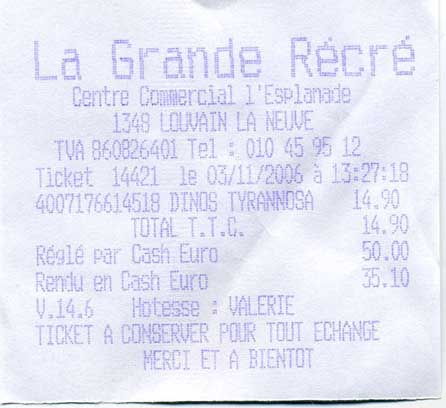
**Vanilla Paperless-ngx OCR**:
```
La Grande Recre
Gentre Gommercial 1'Esplanade
1349 LOLNAIN LA NEWWE
TA BERBOGAAL Tel =. 010 45,96 12
Ticket 1440112 03/11/2006 a 13597:
4007176614518. DINOS. TYRAMNESA
TOTAET.T.LES
ReslE par Lask-Euron
Rencu en Cash Euro
V.14.6 -Hotgese = VALERTE
TICKET A-GONGERVER PORR TONT. EEHANGE
HERET ET A BIENTOT
```
**LLM-Powered OCR (OpenAI gpt-4o)**:
```
La Grande Récré
Centre Commercial l'Esplanade
1348 LOUVAIN LA NEUVE
TVA 860826401 Tel : 010 45 95 12
Ticket 14421 le 03/11/2006 à 15:27:18
4007176614518 DINOS TYRANNOSA 14.90
TOTAL T.T.C. 14.90
Réglé par Cash Euro 50.00
Rendu en Cash Euro 35.10
V.14.6 Hôtesse : VALERIE
TICKET A CONSERVER POUR TOUT ECHANGE
MERCI ET A BIENTOT
```
---
### Example 2
**Image**:
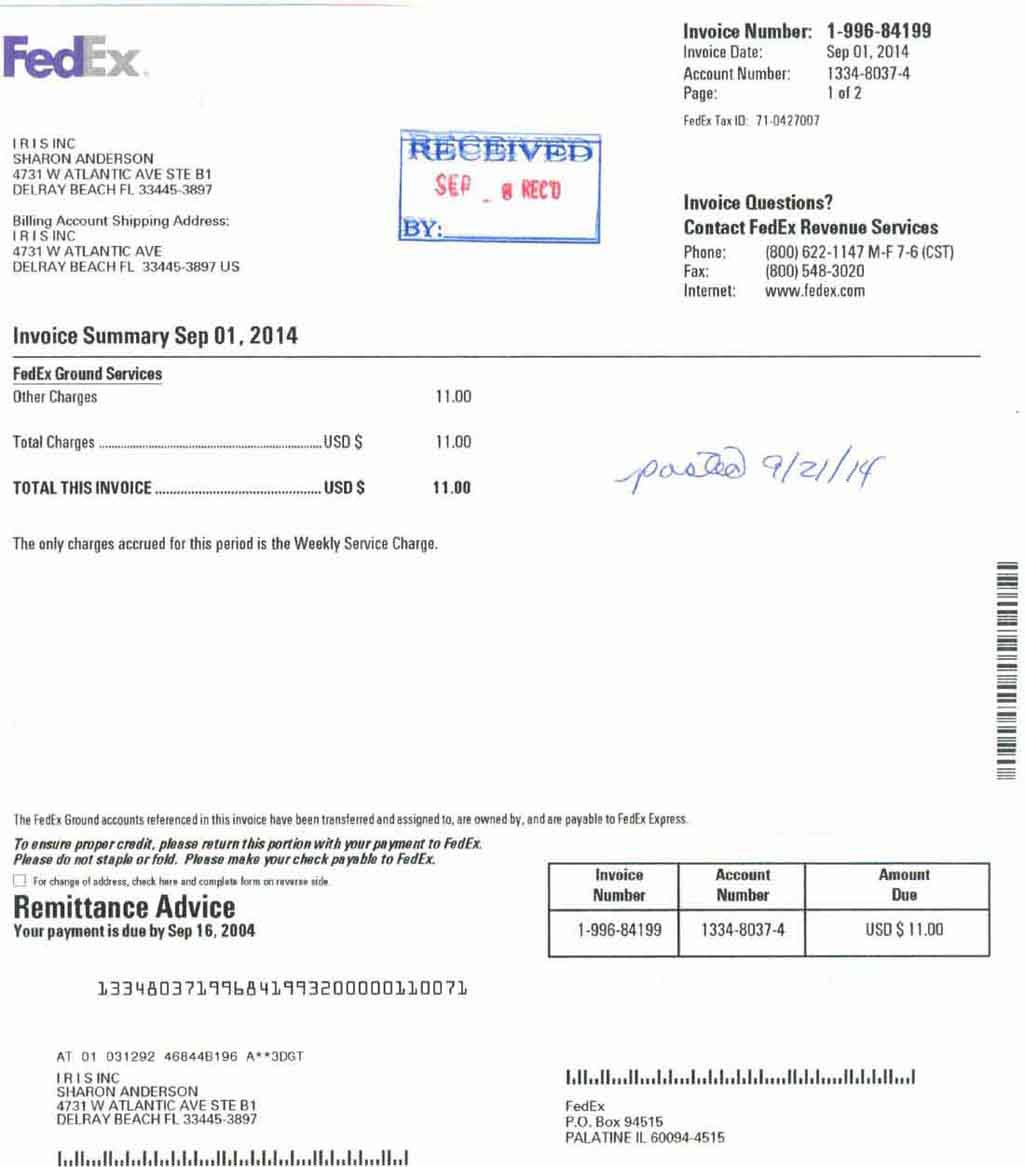
**Vanilla Paperless-ngx OCR**:
```
Invoice Number: 1-996-84199
Fed: Invoica Date: Sep01, 2014
Accaunt Number: 1334-8037-4
Page: 1012
Fod£x Tax ID 71.0427007
IRISINC
SHARON ANDERSON
4731 W ATLANTIC AVE STE BI
DELRAY BEACH FL 33445-3897 ’ a
Invoice Questions?
Bing, ‚Account Shipping Address: Contact FedEx Reı
ISINC
4731 W ATLANTIC AVE Phone: (800) 622-1147 M-F 7-6 (CST)
DELRAY BEACH FL 33445-3897 US Fax: (800) 548-3020
Internet: www.fedex.com
Invoice Summary Sep 01, 2014
FodEx Ground Services
Other Charges 11.00
Total Charges 11.00 Da £
>
polo) Fz// /G
TOTAL THIS INVOICE .... usps 11.00 P 2/1 f
‘The only charges accrued for this period is the Weekly Service Charge.
The Fedix Ground aceounts teferencedin his involce have been transteired and assigned 10, are owned by,andare payable to FedEx Express:
To onsurs propor credit, plasa raturn this portion wirh your payment 10 FodEx
‚Please do not staple or fold. Ploase make your chack payablı to FedEx.
[TI For change ol address, hc har and camphat lrm or never ide
Remittance Advice
Your payment is due by Sep 16, 2004
Number Number Dus
1334803719968 41993200000110071
AT 01 0391292 468448196 A**aDGT
IRISINC Illallun elalalssollallansdHilalellund
SHARON ANDERSON
4731 W ATLANTIC AVE STEBI FedEx
DELRAY BEACH FL 334453897 PO. Box 94516
PALATINE IL 60094-4515
```
**LLM-Powered OCR (OpenAI gpt-4o)**:
```
FedEx. Invoice Number: 1-996-84199
Invoice Date: Sep 01, 2014
Account Number: 1334-8037-4
Page: 1 of 2
FedEx Tax ID: 71-0427007
I R I S INC
SHARON ANDERSON
4731 W ATLANTIC AVE STE B1
DELRAY BEACH FL 33445-3897
Invoice Questions?
Billing Account Shipping Address: Contact FedEx Revenue Services
I R I S INC Phone: (800) 622-1147 M-F 7-6 (CST)
4731 W ATLANTIC AVE Fax: (800) 548-3020
DELRAY BEACH FL 33445-3897 US Internet: www.fedex.com
Invoice Summary Sep 01, 2014
FedEx Ground Services
Other Charges 11.00
Total Charges .......................................................... USD $ 11.00
TOTAL THIS INVOICE .............................................. USD $ 11.00
The only charges accrued for this period is the Weekly Service Charge.
RECEIVED
SEP _ 8 REC'D
BY: _
posted 9/21/14
The FedEx Ground accounts referenced in this invoice have been transferred and assigned to, are owned by, and are payable to FedEx Express.
To ensure proper credit, please return this portion with your payment to FedEx.
Please do not staple or fold. Please make your check payable to FedEx.
❑ For change of address, check here and complete form on reverse side.
Remittance Advice
Your payment is due by Sep 16, 2004
Invoice
Number
1-996-84199
Account
Number
1334-8037-4
Amount
Due
USD $ 11.00
133480371996841993200000110071
AT 01 031292 468448196 A**3DGT
I R I S INC
SHARON ANDERSON
4731 W ATLANTIC AVE STE B1
DELRAY BEACH FL 33445-3897
FedEx
P.O. Box 94515
```
---
**Why Does It Matter?**
- Traditional OCR often jumbles text from complex or low-quality scans.
- Large Language Models interpret context and correct likely errors, producing results that are more precise and readable.
- You can integrate these cleaned-up texts into your **paperless-ngx** pipeline for better tagging, searching, and archiving.
### How It Works
- **Vanilla OCR** typically uses classical methods or Tesseract-like engines to extract text, which can result in garbled outputs for complex fonts or poor-quality scans.
- **LLM-Powered OCR** uses your chosen AI backend—OpenAI or Ollama—to interpret the image's text in a more context-aware manner. This leads to fewer errors and more coherent text.
- **Google Document AI and Azure Document Intelligence** provide high-accuracy OCR with advanced layout analysis.
- **Enhanced PDF Generation** combines OCR results with the original document to create searchable PDFs with properly positioned text layers.
---
## Usage
1. **Tag Documents**
- Add `paperless-gpt` tag to documents for manual processing
- Add `paperless-gpt-auto` for automatic processing
- Add `paperless-gpt-ocr-auto` for automatic OCR processing
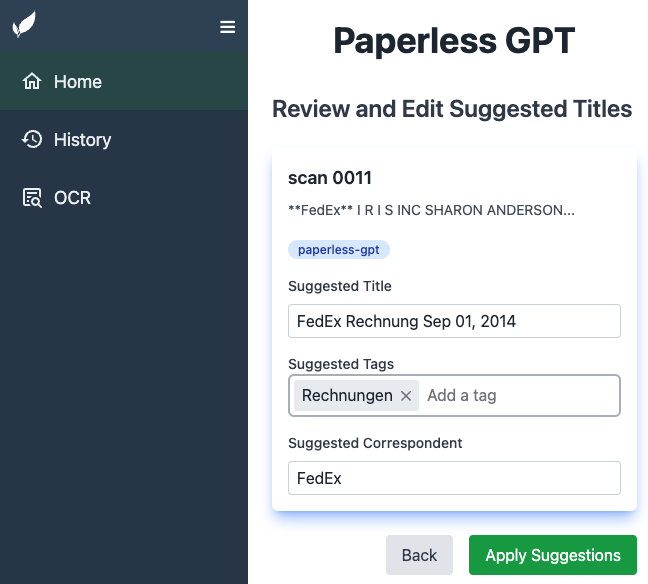
2. **Visit Web UI**
- Go to `http://localhost:8080` (or your host) in your browser
- Review documents tagged for processing
3. **Generate & Apply Suggestions**
- Click "Generate Suggestions" to see AI-proposed titles/tags/correspondents
- Review and approve or edit suggestions
- Click "Apply" to save changes to paperless-ngx
4. **OCR Processing**
- Tag documents with appropriate OCR tag to process them
- If enhanced PDF features are enabled, documents will be processed accordingly:
- For local file saving, check the configured directories for output files
- For PDF uploads, new documents will appear in paperless-ngx with copied metadata
- Monitor progress in the Web UI
- Review results and apply changes
## Troubleshooting
### Working with Local LLMs
When using local LLMs (like those through Ollama), you might need to adjust certain settings to optimize performance:
#### Token Management
- Use `TOKEN_LIMIT` environment variable to control the maximum number of tokens sent to the LLM
- For Ollama, set `OLLAMA_CONTEXT_LENGTH` to control the model's context window (NumCtx). This is independent of `TOKEN_LIMIT` and configures the server-side KV cache size. If unset or 0, the model default is used. Choose a value within the model's supported window (e.g., 8192).
- Smaller models might truncate content unexpectedly if given too much text
- Start with a conservative limit (e.g., 1000 tokens) and adjust based on your model's capabilities
- Set to `0` to disable the limit (use with caution)
Example configuration for smaller models:
```yaml
environment:
TOKEN_LIMIT: "2000" # Adjust based on your model's context window
OLLAMA_CONTEXT_LENGTH: "4096" # Controls Ollama NumCtx (context window); if unset, model default is used
LLM_PROVIDER: "ollama"
LLM_MODEL: "qwen3:8b" # Or other local model
```
Common issues and solutions:
- If you see truncated or incomplete responses, try lowering the `TOKEN_LIMIT`
- On Ollama, if you hit "context length exceeded" or memory issues, reduce `OLLAMA_CONTEXT_LENGTH` or choose a smaller model/context size.
- If processing is too limited, gradually increase the limit while monitoring performance
- For models with larger context windows, you can increase the limit or disable it entirely
### PDF Processing Issues
- If PDFs aren't being generated, check that `OCR_LIMIT_PAGES` isn't set too low compared to your document page count
- Ensure volumes are properly mounted if using `CREATE_LOCAL_PDF` or `CREATE_LOCAL_HOCR`
- When using `PDF_REPLACE: "true"`, verify you have recent backups of your paperless-ngx data
### Custom Field Generation Issues
- **Feature Not Working**: If custom field suggestions are not being generated even though the feature is enabled, ensure you have selected at least one custom field in the settings. The feature requires at least one field to be selected to know what to process.
---
## Contributing
**Pull requests** and **issues** are welcome!
1. Fork the repo
2. Create a branch (`feature/my-awesome-update`)
3. Commit changes (`git commit -m "Improve X"`)
4. Open a PR
Check out our [contributing guidelines](CONTRIBUTING.md) for details.
---
## Support the Project
If paperless-gpt is saving you time and making your document management easier, please consider supporting its continued development:
- **[GitHub Sponsors](https://github.com/sponsors/icereed)**: Help fund ongoing development and maintenance
- **Share** your success stories and use cases
- **Star** the project on GitHub
- **Contribute** code, documentation, or bug reports
Your support helps ensure paperless-gpt remains actively maintained and continues to improve!
---
## Maintainer Note
This project is fully open-source and will remain free to use.
It's maintained by [Icereed](https://github.com/icereed), with partial support from my other project:
👉 [BubbleTax.de](https://bubbletax.de/?utm_source=github&utm_medium=footer&utm_campaign=paperless) — automated tax reports for IBKR traders in Germany.
If you're a developer who also trades, check it out. If not – no worries 😊
---
## License
paperless-gpt is licensed under the [MIT License](LICENSE). Feel free to adapt and share!
---
## Star History
[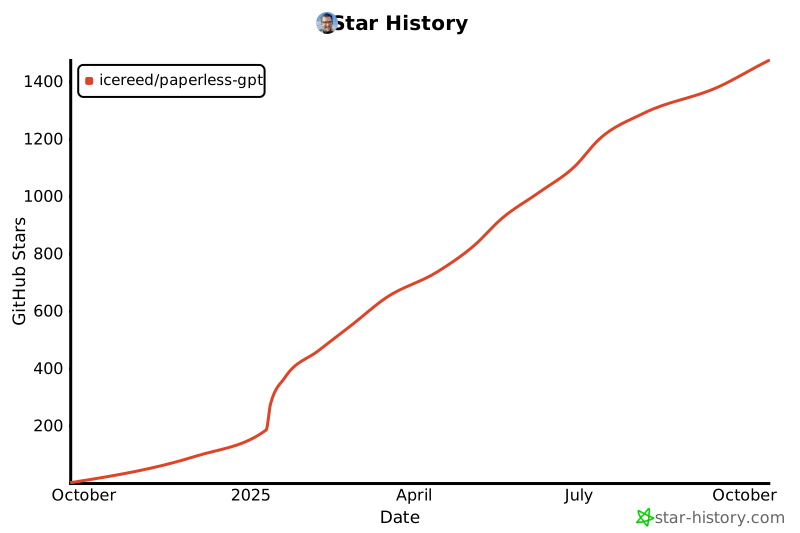](https://www.star-history.com/#icereed/paperless-gpt&Date)
---
## Disclaimer
This project is **not** officially affiliated with [paperless-ngx][paperless-ngx]. Use at your own risk.
---
**paperless-gpt**: The **LLM-based** companion your doc management has been waiting for. Enjoy effortless, intelligent document titles, tags, and next-level OCR.
[paperless-ngx]: https://github.com/paperless-ngx/paperless-ngx
[docker-install]: https://docs.docker.com/get-docker/