Line Awesome: line icons for your code

npm version npm downloads per month CI status TypeScript types included License: MIT or Good Boy

Vue 3 React 18+ unplugin-icons for Vite, webpack, Rollup and Nuxt CSS web font

Browse icons · Quick start · SVG icons · Upgrading from 1.x · Changelog

# Icons8 Line Awesome Line Awesome is a free set of more than 1,500 line icons from [Icons8](https://icons8.com) in regular, solid and brand styles. It is based on the [Icons8 Windows 10 style](https://icons8.com/icons/windows), and its class names follow Font Awesome 5, so it works as a drop-in replacement for it. Use it as a web font with CSS classes, import icons one by one as SVG for Vue, React or plain JavaScript, or get them as components through [unplugin-icons](#bundler-plugins) in Vite, webpack, Rollup and Nuxt.

More than 1,500 icons in 3 styles: 616 B for the first imported icon, 16 KB of CSS for the font

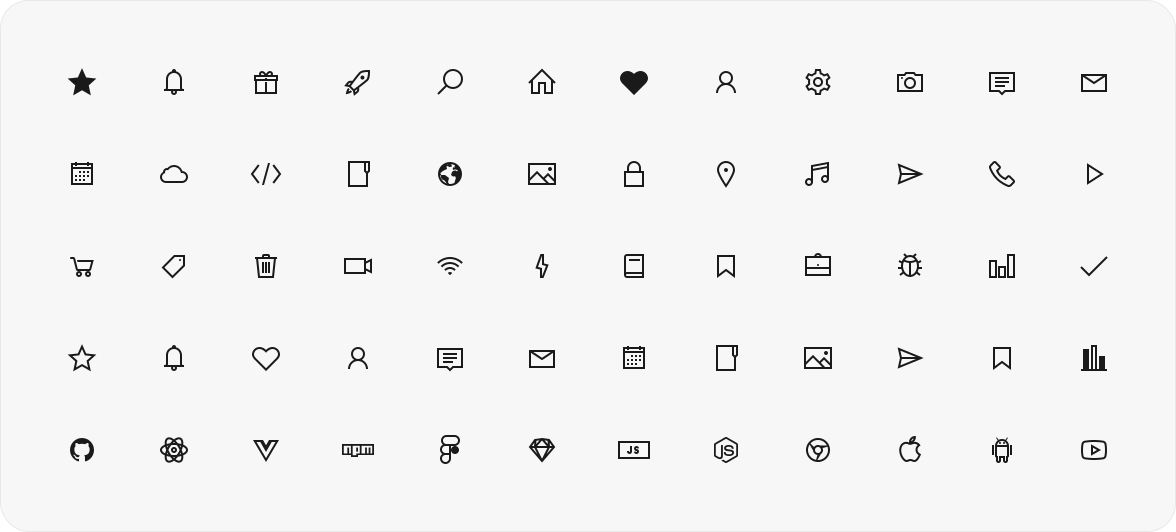
A grid of Line Awesome icons in solid, regular and brand styles

## Quick start ```shell npm install line-awesome ``` **Web font.** Import the CSS once, then put classes on an element: `las` for solid, `lar` for regular, `lab` for brands. ```js import 'line-awesome/dist/line-awesome/css/line-awesome.min.css'; ``` ```html ``` **SVG, tree-shakeable.** Import an icon by name; icons you don't import stay out of the bundle. ```jsx import { lasStar } from 'line-awesome'; import { LaIcon } from 'line-awesome/react'; // or 'line-awesome/vue' export const Favorite = () => ; ``` No bundler? Load the CSS [from a CDN](#cdn). ## Choose how to use it Every icon comes two ways: as a web font with CSS classes, as in 1.x, and since 2.0 as a tree-shakeable SVG module. | You want | Use | What the page loads | |---|---|---| | Icons by CSS class, no build step | [The font](#the-font), from a CDN or npm | the CSS (16 KB gzip) and the font files of the styles in use (13–97 KB each) | | Only the icons you use, in a Vue or React app | [SVG icons](#svg-icons) with `LaIcon` | each imported icon, inlined in your JavaScript | | Icon components without imports | [Bundler plugins](#bundler-plugins) through unplugin-icons | each used icon, inlined in your JavaScript | In the Rollup example, one icon with `toSvgString` is 616 B gzip, and every further icon adds about 200 B. ## The font ### CDN Add the stylesheet to your page: ```html ``` Keep the version in the URL. Without it the CDN serves whatever version is latest. A zip archive with the font is on the [how-to page](https://icons8.com/line-awesome/howto). ### npm ```shell npm install line-awesome ``` Import the CSS by its path: ```js import 'line-awesome/dist/line-awesome/css/line-awesome.min.css'; ``` Sass users can load the SCSS with Sass's `NodePackageImporter`. Point `$la-font-path` at the package, so the bundler finds the fonts and copies them into the build: ```scss @use 'pkg:line-awesome' with ( $la-font-path: 'line-awesome/dist/line-awesome/fonts' ); ``` `pkg:` URLs need the importer in your Sass options. In Vite: ```js // vite.config.js import { NodePackageImporter } from 'sass'; export default { css: { preprocessorOptions: { scss: { importers: [new NodePackageImporter()], silenceDeprecations: ['import', 'global-builtin'], }, }, }, }; ``` `silenceDeprecations` is optional. The SCSS predates the Sass module system, and without it Dart Sass prints `import` and `global-builtin` deprecation warnings for it. ### Classes An icon has one of three styles, each with its class: `las` for solid, `lar` for regular and `lab` for brands. Put the style class and the icon class on an element: ```html ``` Size classes: `la-xs`, `la-sm`, `la-lg`, `la-1x` to `la-10x`, and `la-fw` for fixed width. Search icons and copy their classes on the [Line Awesome page](https://icons8.com/line-awesome). ### Replacing Font Awesome If your markup already uses Font Awesome 5 classes (`fas fa-star`, `fab fa-github`), swap the Font Awesome stylesheet for this one and keep the markup: ```html ``` It is the Font Awesome 5.11.2 stylesheet with Line Awesome fonts in place of the Font Awesome ones. ## SVG icons Each icon is a plain data object exported by name. Import only what you use; everything else is left out of the bundle. Names follow the font classes: the style prefix plus the icon name in camel case. | Font class | Import | |---|---| | `las la-star` | `lasStar` (solid) | | `lar la-star` | `larStar` (regular) | | `lab la-github` | `labGithub` (brands) | ### Vue ```vue ``` ### React ```jsx import { lasStar } from 'line-awesome'; import { LaIcon } from 'line-awesome/react'; export function Rating() { return ; } ``` ### Without a framework ```js import { lasStar } from 'line-awesome'; import { toSvgString } from 'line-awesome/core'; element.innerHTML = toSvgString(lasStar, { size: 24 }); ``` ### `LaIcon` props | Prop | Default | Description | |---|---|---| | `icon` | — | An icon object, e.g. `lasStar`. | | `size` | `1em` | Height; width follows the icon's aspect ratio. A number means pixels. | | `title` | — | Accessible name. Without it the icon is decorative and hidden from screen readers (`aria-hidden`). | Other attributes (`class`, `style`, event handlers) go to the ``. Monochrome icons use `currentColor`, so they take the text color. To align an icon with text like the font does, give it a class such as `.icon { vertical-align: -0.125em; }`. `LaIcon` renders the same markup on the server and in the browser, and sets no inline styles, so it works under a strict Content Security Policy. TypeScript types ship with the package. A single icon can also be imported from its own path: `import lasStar from 'line-awesome/icons/las-star'`. ## Bundler plugins Line Awesome ships `icons.json` in the [Iconify](https://iconify.design) format, so [unplugin-icons](https://github.com/unplugin/unplugin-icons) (Vite, webpack, Rollup, Rspack, esbuild) takes icons straight from this package, with no per-icon registration. ### Vite + Vue, with auto-import Install the plugins: ```shell npm install -D unplugin-icons unplugin-vue-components ``` Add them to `vite.config.js`: ```js import vue from '@vitejs/plugin-vue'; import Icons from 'unplugin-icons/vite'; import IconsResolver from 'unplugin-icons/resolver'; import { ExternalPackageIconLoader } from 'unplugin-icons/loaders'; import Components from 'unplugin-vue-components/vite'; export default { plugins: [ vue(), Components({ resolvers: [ IconsResolver({ customCollections: ['line-awesome'], alias: { la: 'line-awesome' }, }), ], }), Icons({ compiler: 'vue3', customCollections: ExternalPackageIconLoader('line-awesome'), }), ], }; ``` Use icons in templates, no imports needed: ```vue ``` With pnpm, list `vue` in your own `dependencies`. The icon components unplugin-icons generates import `vue` from the project root, and pnpm puts only direct dependencies there. ### Nuxt Install the same plugins: ```shell npm install -D unplugin-icons unplugin-vue-components ``` Add their Nuxt modules to `nuxt.config.ts`: ```ts import IconsResolver from 'unplugin-icons/resolver'; import { ExternalPackageIconLoader } from 'unplugin-icons/loaders'; export default defineNuxtConfig({ modules: [ [ 'unplugin-icons/nuxt', { customCollections: ExternalPackageIconLoader('line-awesome') }, ], [ 'unplugin-vue-components/nuxt', { dts: false, resolvers: [ IconsResolver({ customCollections: ['line-awesome'], alias: { la: 'line-awesome' }, }), ], }, ], ], build: { transpile: ['line-awesome'] }, }); ``` `build.transpile` matters once your code imports from `line-awesome`, for icons or for `LaIcon`. Without it, the server build copies the whole package into `.output/server/node_modules` (7.3 MB) instead of bundling the icons in use. Templates use the same `` tags, and `LaIcon` works as in any Vue app. The pnpm note above applies here too. ### webpack + React Install the plugin and the JSX compiler it uses: ```shell npm install -D unplugin-icons @svgr/core @svgr/plugin-jsx ``` Add it to `webpack.config.js`: ```js import Icons from 'unplugin-icons/webpack'; import { ExternalPackageIconLoader } from 'unplugin-icons/loaders'; export default { plugins: [ Icons({ compiler: 'jsx', jsx: 'react', customCollections: ExternalPackageIconLoader('line-awesome'), }), ], }; ``` Import icons as components: ```jsx import LaHeart from '~icons/line-awesome/heart-solid'; export function Like() { return ; } ``` ### Rollup Install the plugin: ```shell npm install -D unplugin-icons ``` Add it to `rollup.config.js`: ```js import Icons from 'unplugin-icons/rollup'; import { ExternalPackageIconLoader } from 'unplugin-icons/loaders'; export default { plugins: [ Icons({ compiler: 'raw', customCollections: ExternalPackageIconLoader('line-awesome'), }), ], }; ``` With the `raw` compiler an import is an SVG string: ```js import heart from '~icons/line-awesome/heart-solid'; document.body.innerHTML = heart; ``` ### Icon names in Iconify Iconify names match the [`la` set](https://icon-sets.iconify.design/la/). An icon drawn in both styles has the regular one unsuffixed and the solid one ending in `-solid` (`heart`, `heart-solid`). Solid-only and brand icons have no suffix (`times`, `github`), and `-solid` works for them as an alias (`times-solid`). The same `icons.json` works with UnoCSS `preset-icons` and Tailwind Iconify plugins. Working setups for each recipe live in [`examples/`](examples), and CI builds them all. ## Upgrading from 1.x Nothing changes for the font: the same CSS and font files at the same paths, the same `la-*`, `lar`, `las`, `lab` classes. Pinned CDN URLs such as `line-awesome@1.3.0` keep serving 1.3.0; unversioned ones serve 2.x with identical CSS and fonts. **The package has a JavaScript entry now.** Published 1.x had none, so `import 'line-awesome'` did not resolve; in 2.x it gives the icons and loads no styles. Keep importing the CSS by its path, [as shown above](#npm). A CSS `@import 'line-awesome';` resolves to the stylesheet through the `style` export condition. **Sass:** use `@use 'pkg:line-awesome'` with `$la-font-path`, [as shown above](#npm). **Font Awesome 4 names** from the font's compatibility section (`la la-close`, `la la-star-o`) are exported too, marked deprecated: `lasClose` points to `lasTimes`, `larStarO` to `larStar`. **The JavaScript is ESM only.** Node 20.19+ and all current bundlers load it. `require('line-awesome')` works on Node 20.19+; on Node 18 use `import` instead. Jest with babel-jest needs to be told to transform the package: ```js // jest.config.js export default { transformIgnorePatterns: ['node_modules/(?!line-awesome)'], }; ``` **Vue and React are optional peer dependencies.** Install the one whose `LaIcon` you import; the font and `line-awesome/core` need neither. ## Using in Figma, Sketch, Photoshop, etc. To use Line Awesome in a design tool, install the font files. There are three, one per style (regular, solid, brands); install all three to get every icon. The files are in `dist/line-awesome/fonts/` (`.ttf` for design tools), and every icon is also a separate file in `svg/`. ## Contributing Bug reports and ideas are welcome in [issues](https://github.com/icons8/line-awesome/issues). To change the code, see [CONTRIBUTING.md](CONTRIBUTING.md). ## License Line Awesome is released under either the [MIT License](LICENSE.md) or the [Good Boy License](https://icons8.com/good-boy-license/), at your choice. See [LICENSE.md](LICENSE.md) for both texts. ## Beyond the font Line Awesome is a free slice of [Icons8](https://icons8.com). For more: - **[Line Awesome](https://icons8.com/line-awesome)**: browse and search all the icons in the font - **[Icons](https://icons8.com/icons)**: many more styles, including the [Windows 10 set](https://icons8.com/icons/windows) this font is built from - **[Illustrations](https://icons8.com/illustrations)**: when line icons aren't enough, illustrations from flat to 3D ## Credits Based on the [Icons8 Windows 10 icon pack](https://icons8.com/download-huge-windows8-set/); the original set is larger than a single font can reasonably carry, so Line Awesome ships a selection. Questions or ideas about the icons? [Open an issue](https://github.com/icons8/line-awesome/issues).