# ID5 ID
The ID5 ID is a next-generation universal identifier that publishers, advertisers and ad tech platforms can use to recognise users and deliver campaign objectives across different types of devices without relying on traditional identification methods (e.g. third-party cookies and MAIDs). By leveraging a variety of signals such as hashed email addresses, page URL, IP addresses, timestamps etc., as well as a machine learning algorithm, the ID5 ID improves addressability without compromising privacy and data protection. The ID5 ID is built on top of privacy-by-design and encryption mechanisms, ensuring that users' privacy preferences are respected and enforced in the advertising value chain.
# ID5 API Overview
The ID5 API is designed to make accessing the ID5 ID simple for publishers, advertisers, and their ad tech partners. The lightweight source code handles retrieving users’ consent preferences, retrieving, caching, and storing the ID locally, and making it available to other code on the page. A flow diagram of how the ID5 API interacts with your CMP and other vendor tags can be [found below](#api-process-flow).
# Table of Contents
- [ID5 ID](#id5-id)
- [ID5 API Overview](#id5-api-overview)
- [Table of Contents](#table-of-contents)
- [Setup and Installation](#setup-and-installation)
- [ID5 Partner Creation](#id5-partner-creation)
- [Quick Start](#quick-start)
- [Integration options](#integration-options)
- [ID5 CDN](#id5-cdn)
- [Pre-built and Minified for Download](#pre-built-and-minified-for-download)
- [Embed into a larger bundle](#embed-into-a-larger-bundle)
- [index.js](#indexjs)
- [package.json](#packagejson)
- [rollup.config.js](#rollupconfigjs)
- [steps to create your own bundle](#steps-to-create-your-own-bundle)
- [Building from Source](#building-from-source)
- [Usage](#usage)
- [Load the API javascript file](#load-the-api-javascript-file)
- [Initialize the API](#initialize-the-api)
- [Access the ID5 ID](#access-the-id5-id)
- [Available Configuration Options](#available-configuration-options)
- [consentData Object](#consentdata-object)
- [Static Consent Example](#static-consent-example)
- [Allowed Vendors Example](#allowed-vendors-example)
- [PD Example](#pd-example)
- [A/B Testing](#ab-testing)
- [Segments](#segments)
- [Available Methods and Variables](#available-methods-and-variables)
- [EIDs Object Output](#eids-object-output)
- [Consents Object](#consents-object)
- [Examples](#examples)
- [Enabling Debug Output](#enabling-debug-output)
- [Test locally](#test-locally)
- [Prebid.js](#prebidjs)
- [API Process Flow](#api-process-flow)
- [Benefits of Using the ID5 API](#benefits-of-using-the-id5-api)
- [The GDPR and Privacy](#the-gdpr-and-privacy)
- [GDPR](#gdpr)
- [Bots](#bots)
- [Privacy Policy](#privacy-policy)
# Setup and Installation
## ID5 Partner Creation
The first step to work with the ID5 API and ID5 ID is to apply for an ID5 Partner account. If you are not already integrated with ID5, simply go to [our website](https://id5.io/solutions) and register for an account.
## Quick Start
Install the ID5 API after your CMP (if applicable), but as high in the `` as possible.
```html
```
## Integration options
### ID5 CDN
To use the ID5 CDN version of the API, you may source the library as follows:
```html
```
Using our CDN has the advantage of patch updates being automatically deployed without any intervention your end.
### Pre-built and Minified for Download
You may also choose to download the latest release (and host on your own CDN) in a pre-built, minified version from Github:
* [https://github.com/id5io/id5-api.js/releases/download/v1.0.83/id5-api.js](https://github.com/id5io/id5-api.js/releases/download/v1.0.83/id5-api.js)
Alternatively, we also publish the minified bundle to NPM:
```json
"dependencies": {
"@id5io/id5-api.js": "^1.0.83"
},
```
After running `npm install` you can find the bundle at
`node_modules/@id5io/id5-api.js/build/dist/id5-api.js`.
As a publisher or advertiser, the advantage to hosting the code in your website domain is that the API will have "1st party" privileges with the browser, improving the value of the ID5 ID delivered. If you choose to self-host, we recommend having a process to update the code regularly, to ensure you're using the latest version of the library.
### Embed into a larger bundle
You have the option to embed the library as is into a larger bundle by either:
- Concatenate the minified Javascript with some other javascript code into a larger file
- Import the ES6 module and use it directly in your code
If you choose to import the ES6 module you most probably need to
transpile the javascript depending on which browsers you want to support.
Additionally please note that the ID5 object doesn't get published
automatically to the `window` object when you import the ES6 module in your code.
You can just add `window.ID5 = ID5;` in the example below if you need so.
Here is an example of how integrating the ES6 module might look like:
#### index.js
```javascript
import ID5 from '@id5io/id5-api.js'
const id5Instance = ID5.init({ partnerId: 173 });
id5Instance.onUpdate((status) => {
console.log(status.getUserId());
});
```
#### package.json
```json
{
"name": "id5-api-dummy",
"version": "0.0.1",
"description": "Dummy project for showing how to use the id5-api.js module",
"main": "index.js",
"scripts": {
"rollup": "rollup --config rollup.config.js"
},
"author": "",
"license": "Apache-2.0",
"dependencies": {
"@id5io/id5-api.js": "^1.0.83"
},
"devDependencies": {
"@babel/core": "^7.14.3",
"@rollup/plugin-babel": "^5.3.0",
"@rollup/plugin-json": "^4.1.0",
"@rollup/plugin-node-resolve": "^13.0.0",
"rollup": "^2.50.5"
}
}
```
#### rollup.config.js
```javascript
import resolve from '@rollup/plugin-node-resolve';
import json from '@rollup/plugin-json';
import babel from '@rollup/plugin-babel';
export default {
input: 'index.js',
output: {
file: 'bundle.js',
format: 'iife',
},
plugins: [ resolve(), json(), babel({ babelHelpers: 'bundled' }) ]
};
```
#### steps to create your own bundle
```bash
$ npm install
```
```bash
$ npm run rollup
```
then the bundle is created into `bundle.js`.
Please note that this is a very minimal example. You may want,
for example, to use a different bundler like
[Webpack](https://webpack.js.org/) or [Browserify](https://browserify.org/).
## Building from Source
To build a production-ready version of the API from source yourself, follow these steps:
Clone the repository and install dependencies
```bash
$ git clone https://github.com/id5io/id5-api.js id5-api.js
$ cd id5-api
$ npm install
```
*Note*: You need to have the following software installed
- `NodeJS 14.17.x` or greater
- `gulp-cli 2.3.x` or greater; install using `npm install --global gulp-cli`
- `Google chrome 90` or greater
Build for production and/or development
```bash
$ npm run build:all
```
The resulting minified javascript file will be available in `build/dist/id5-api.js`
while the non minified version can be found in `build/dev/id5-api.js`
## Usage
There are three main parts to using the ID5 API:
1. Load the javascript file
1. Initialize the API with the partner ID you received from ID5, as well as any other configuration options you’d like to set
2. Access the ID5 ID
### Load the API javascript file
The ID5 API script should be placed as high in the page as possible, but should be *after* your CMP is loaded & initialized (if applicable). By placing this script early in the page, all subsequent scripts on page (including Prebid.js, ad tags, attribution or segment pixels, etc.) can leverage the ID5 ID. You should load the script *synchronously* to ensure that the API is loaded before attempting to call it.
```html
```
### Initialize the API
After loading the script, you must initialize the API with the `ID5.init()` method. You may pass configuration options directly into the init method. The result of the `init()` method is a variable that you will use to access the ID5 ID or perform other actions. This variable must be unique to the page (or scoped appropriately) in order not avoid collisions with other instances of the API on the same page.
```javascript
// TODO modify with your own partnerId
// beware to scope the id5Instance variable or uniquely name it to avoid collisions
var id5Instance = ID5.init({partnerId: 173});
```
### Access the ID5 ID
Once the API has been loaded and initialized, the ID5 ID can be accessed by any javascript on the page (provided your variable is scoped appropriately) including Prebid.js, your ad tags, or pixels and scripts from third party vendors, with the `getUserId()` method on your status variable.
```javascript
var id5Id = id5Instance.getUserId();
```
The `getUserId()` method always answers (once the API is loaded) and will return immediately with a value. If there is no ID available yet, the `getUserId()` will return a value of `undefined`.
There are a few cases in which `getUserId()` may not be ready or have a value yet:
* There is no locally cached version of the ID and no response has been received yet from the ID5 servers (where the ID is generated)
* The CMP has not finished loading or gathering consent from the user, so no ID can be retrieved
* The user has not consented to allowing local storage
### Available Configuration Options
| Option Name | Scope | Type | Default Value | Description |
|---------------------------------------|----------------------------------------------|---------|------------------------------------------|--------------------------------------------------------------------------------------------------------------------------------------------------------------------------------------------------------------------------|
| partnerId | Required | integer | | ID5 Partner ID, received after registration with ID5 |
| debugBypassConsent | Optional | boolean | `false` | Bypass consent API and Local Storage access; *for debugging purpose only* |
| allowLocalStorageWithoutConsentApi | Optional | boolean | `false` | Tell ID5 that consent has been given to read local storage |
| cmpApi | Optional | string | `iab` | API to use CMP. As of today, either `'iab'` or `'static'` |
| consentData | Optional, Required if `cmpApi` is `'static'` | object | | Consent data if `cmpApi` is `'static'`. Content is described below. |
| partnerUserId | Optional | string | | User ID of the platform if they are deploying this API on behalf of a publisher/advertiser, to be used for user syncing with ID5 |
| pd | Optional | string | | Partner-supplied data used for linking ID5 IDs across domains. See [Passing Partner Data to ID5](https://wiki.id5.io/en/identitycloud/retrieve-id5-ids/passing-partner-data-to-id5) for details on generating the string |
| refreshInSeconds | Optional | integer | `7200`
(2 hours) | Refresh period of first-party local storage |
| abTesting | Optional | object | `{ enabled: false, controlGroupPct: 0 }` | Enables A/B testing of the ID5 ID. See [A/B Testing](#ab-testing) below for more details |
| provider | Optional | string | `pubmatic-identity-hub` | An identifier provided by ID5 to technology partners who manage API deployments on behalf of their clients. Reach out to [ID5](mailto:support@id5.io) if you have questions about this parameter |
| maxCascades | Optional | number | `8` | Defines the maximum number of cookie syncs that can occur when usersyncing for the user is required. A value of `-1` will disable cookie syncing altogether. Defaults to `8` if not specified |
| storageExpirationDays | Optional | number | `90` | Number of days that the ID5 ID and associated metadata will be stored in local storage before expiring |
| segments | Optional | array | | Used with platforms that don't support ingesting ID5 IDs in their client-side segment pixels. See below for details |
| att | Optional | number | `0` | Indication of whether the event came from an Apple ATT event (value of 1 is yes) |
| applyCreativeRestrictions (alias acr) | Optional | boolean | false | Applies some restrictions for the case where the API is dropped alongside a creative. |
#### consentData Object
This object can contain one of the following properties:
- getTCData - an object which is parsed as the return value of a call to the IAB TCFv2 API
- getUSPData - an object which is parsed as the return value of a call to the IAB USPv1 API
- allowedVendors - an array of strings which represents ID5 partners which are consented for all GDPR purposes. The strings can be:
- the [IAB GVL](https://iabeurope.eu/vendor-list-tcf-v2-0/) ID of the partner. Eg. "131" indicates consent for ID5 itself
- the ID5 partner ID in the form "ID5-xxx" with xxx being the ID. Eg. "ID5-478" (ask your ID5 representative if you'd like to use this method)
Note that in case `cmpApi` is `'static'` and the `consentData` object is either undefined or empty, the request is treated as not restricted by any privacy law until the ID5 server determines that the request is subject to restrictions. In such a case, not having received any consent information, the request will be treated as non-consented.
#### Static Consent Example
Here's an example of using a static `tcString` to share the consent preferences. We will use the static `tcString` the same way we would use one collected from the `cmpApi`.
Both purpose.consent.1 and vendor.consents.131 (ID5) should reflect the values defined in the tcString. For ID5 to be returned, both must be set to true.
```javascript
var id5Instance = ID5.init({
partnerId: 173, // modify with your own partnerId
refreshInSeconds: 15,
cmpApi: 'static',
consentData: {
getTCData: {
gdprApplies: true,
tcString: "CPBZjR9PBZjR9AKAZAENBMCsAP_AAH_AAAqIHWtf_X_fb39j-_59_9t0eY1f9_7_v-0zjhfds-8Nyf_X_L8X42M7vF36pq4KuR4Eu3LBIQFlHOHUTUmw6okVrTPsak2Mr7NKJ7LEinMbe2dYGHtfn9VTuZKYr97s___z__-__v__79f_r-3_3_vp9X---_e_V3dgdYASYal8BFmJY4Ek0aVQogQhXEh0AoAKKEYWiawgJXBTsrgI9QQMAEBqAjAiBBiCjFgEAAAAASURASAHggEQBEAgABACpAQgAIkAQWAFgYBAAKAaFgBFAEIEhBkcFRymBARItFBPJWAJRd7GGEIZRYAUCj-iowEAAAAA.cAAAAAAAAAAA",
purpose: {
consents: {
'1': true
}
},
vendor: {
consents: {
'131': true
}
}
}
}
});
```
#### Allowed Vendors Example
Here's an example of using Allowed Vendors to share that consent was received for ID5 (GVL ID `131`), a platform with GVL ID `3`, and a provider with ID5 partner number `5`:
```javascript
var id5Instance = ID5.init({
partnerId: 173, // modify with your own partnerId
cmpApi: 'static',
consentData: {
allowedVendors: [ '131', '3', 'ID5-5' ]
}
});
```
#### PD Example
To maximise addressability and produce the highest quality ID5 ID, publishers and advertisers must send additional signals such as Hashed Email, First Party user IDs in the Partner Data (pd) parameter when available.
To ensure this information is shared in a secure way, please review the guidance [here](https://wiki.id5.io/en/identitycloud/retrieve-id5-ids/passing-partner-data-to-id5).
Here's how your configuration could look when initializing the API:
```javascript
var id5Instance = ID5.init({
partnerId: 173, // modify with your own partnerId
pd: "MT1iNTBjYTA4MjcxNzk1YThlN2U0MDEyODEzZjIzZDUwNTE5M2Q3NWMwZjJlMmJiOTliYWE2M2FhODIyZjY2ZWQzJjU9bSVDMyVCNmxsZXIlMjZmcmFuJUMzJUE3b2lz"
});
```
#### A/B Testing
You may want to test the value of the ID5 ID with their downstream partners. While there are various ways to do this, A/B testing is a standard approach. Instead of manually enabling or disabling the ID5 API based on their control group settings (which leads to fewer calls to ID5, reducing our ability to recognize the user), we have baked this in to the API itself.
To turn on A/B Testing, simply edit the configuration (see below) to enable it and set what percentage of users you would like to set for the control group. The control group is the set of users where an ID5 ID will not be exposed in `id5Instance.getUserId()` - this method will return `0` for the control group. It's important to note that the control group is user based, and not request based. In other words, from one page view to another, a given user may will *always* be in or out of the control group.
The configuration object for `abTesting` contains two variables:
| Name | Type | Default | Description |
|-----------------|---------|---------|---------------------------------------------------------------------------------------------------------------------------------------------------------------------------------------------------------------------------------------------------------------------|
| enabled | boolean | `false` | Set this to `true` to turn on this feature |
| controlGroupPct | number | `0` | Must be a number between 0 and 1 (inclusive) and is used to determine the percentage of users that fall into the control group (and thus not exposing the ID5 ID). For example, a value of `0.20` will result in 20% of users without an ID5 ID and 80% with an ID. |
#### Segments
> **Note:** ID5 does not build segments or profile users. This feature enables brands or publishers to put users into segments they have already created in their platform of choice, when that platform does not support ingesting ID5 IDs in standard segment pixels yet.
The Segments feature facilitates (re)targeting use cases for brands and publishers until their platforms complete their integration with ID5. Only certain destination platforms are supported and there are backend configurations that need to be made on both ID5's and the destination platform's systems before this feature can be used. Please reach out to your ID5 representative for more information and to get started.
The `segments` array is a list of objects containing a `destination` and list of segment `ids` to add the user to.
| Option Name | Scope | Type | Description |
|-------------|----------|------------------|-----------------------------------------------------------------------------------------------------------------------------------|
| destination | Required | string | The [IAB GVL](https://iabeurope.eu/vendor-list-tcf/) ID of the destination platform where the segments should be uploaded to |
| ids | Required | array of strings | A list of segment ids/codes to add the user to in the destination platform |
```javascript
var id5Instance = ID5.init({
partnerId: 173, // modify with your own partnerId
segments: [{
destination: '999',
ids: [ '12345', '67890' ]
}]
});
```
### Available Methods and Variables
The ID5 API provides several methods and variables for you to use. See below for a complete list.
| Name | Type | Return Type | Description |
|------------------------------------------------------|-----------|---------------------------------------------------------------------------------------------------------------------------------|-------------------------------------------------------------------------------------------------------------------------------------------------------------------------------------------------------------------------------------------------------------------------------------------------------------------------------------------------------------------------------------------------------------------------------------------------------------------------------------------------------------------------------------------------------------------------------------------------------------------------------------------------------------------------------------------------------------------------------|
| ID5.init({}) | method | n/a | Takes a config object as the only parameter and initializes the API with these configuration options, returns an `Id5Instance` object |
| ID5.refreshId(id5Instance, boolean, config) | method | n/a | A method to refresh the ID without reloading the page. Must come _after_ the `init()` method is called. First parameter is the `id5Instance` returned from `init()`, the second (optional) param is a boolean, set to `true` to force a fetch call to ID5, set to `false` to only call ID5 if necessary. The third (optional) parameter is a valid config object to add/change options prior to refreshing the ID. |
| ID5.loaded | variable | boolean | This variable will be set to `true` once the API is loaded and ready for use |
| id5Instance.getUserId() | method | string | The ID5 ID value. If not set yet, returns `undefined` | |
| id5Instance.getConsents() | method | Consents object [see](#consents-object) | Collected user consents used during id generation |
| id5Instance.getLinkType() | method | number | Indicates the type of connection ID5 has made with this ID across domains. If `userId` is not set yet, returns `undefined` |
| id5Instance.isFromCache() | method | boolean | Indicates whether the `userId` value is from cache (when set to `true`) or from a server response (when set to `false`). If `userId` is not set yet, returns `undefined` |
| id5Instance.exposeUserId() | method | boolean | Applicable when [A/B Testing](#ab-testing) is turned on; when this method returns `true`, the user is not in the control group and `id5Instance.getUserId()` is populated with the ID5 ID; when `false`, the user is considered as part of the control group and `id5Instance.getUserId()` will be `0`. This method can be used to inform your reporting systems that an ID was available or not, instead of relying on the value of `id5Instance.getUserId()` directly. |
| ~~id5Instance.getUserIdAsEid()~~ (***Deprecated***) | method | [Open RTB EID](https://github.com/InteractiveAdvertisingBureau/openrtb2.x/blob/main/2.6.md#3227---object-eid-) object | Retrieve the ID5 ID as an object that can be directly added to an `eids` array in an OpenRTB bid request. See [below](#eids-object-output) for a example output |
| id5Instance.getUserIdsAsEids() | method | array of [Open RTB EID](https://github.com/InteractiveAdvertisingBureau/openrtb2.x/blob/main/2.6.md#3227---object-eid-) objects | Retrieve available User Ids, including the ID5 ID and TrueLinkId, as an [Open RTB EID](https://github.com/InteractiveAdvertisingBureau/openrtb2.x/blob/main/2.6.md#3227---object-eid-) array [Open RTB EID](https://github.com/InteractiveAdvertisingBureau/openrtb2.x/blob/main/2.6.md#3227---object-eid-) objects that can be directly added to an `eids` array in an OpenRTB bid request. See [below](#eids-object-output) for a example output |
| id5Instance.getGpId() | method | string | [The Guarded Publisher ID (GPID)](https://wiki.id5.io/identitycloud/retrieve-id5-ids/google-ppid-integration) value. If not set yet, returns `undefined` | |
| id5Instance.getExt() | method | object | The `ext` object that is a part of OpenRTB request, see [below](#eids-object-output). If not set yet, returns `undefined` |
| id5Instance.onAvailable(fn, timeout) | method | id5Instance | Set an event to be called when the ID5 ID is available. Will be called only once per `ID5.init()`. The first parameter is a function to call, which will receive as its only parameter the `id5Instance` object. The second, optional, parameter, is a timeout in ms; if the `fn` has not been called when the timeout is hit, then it will force a call to `fn` even if the ID5 ID is not available yet. If not provided, then it will wait indefinitely until the ID5 ID is available to call `fn`. |
| id5Instance.onUpdate(fn) | method | id5Instance | Set an event listener to be called any time the ID5 ID is updated. For example, if the ID was found in cache, then the `onAvailable` event would immediately fire; but there may be a need to call the ID5 servers for an updated ID. When the call to ID5 returns, the `onUpdate` event will fire. If `refreshId` is called, when the ID is refreshed, the `onUpdate` event will also fire. The first and only parameter is a function to call, which will receive as its only parameter the `id5Instance` object. |
| id5Instance.onRefresh(fn, timeout) | method | id5Instance | Set an event listener to be called any time the `refreshId` method has returned with an ID. The first parameter is a function to call, which will receive as its only parameter the `id5Instance` object. The second, optional, parameter, is a timeout in ms; if the `fn` has not been called when the timeout is hit, then it will force a call to `fn` even if the `refreshId` has not returned with an ID. If not provided, then it will wait indefinitely until the ID5 ID is returned from `refreshId` to call `fn` |
| id5Instance.unregister() | method | void | Unregisters id5Instance |
| id5Instance.collectEvent(eventType, metadata) | method | void | Sends an event to the ID5 server alongside with the specified `eventType` (string), `metadata` (string-to-string key-value map passed as a json object) as well as the fetched ID5 ID and Partner ID passed at `init()` time. The metadata should be a flat map and must not contain nested properties. For example like { "id":"123", "test":"off" } but not like {"id":{"nested":"3"}}. All the values must be strings. The collection of the event is, if necessary, deferred to the point in time where the ID5 ID is provisioned to the page. The event is sent only once per `collectEvent()` invocation. The method can be used for example inside a `onRefresh()` callback to record events with the most fresh ID5 ID if desired. |
#### EIDs Object Output
When passing the ID5 ID in a bid request, the common practice is to include it in the `user.ext.eids[]` array. To make it easy to retrieve the ID5 ID in a format that can be added to the `eids` array the `id5Instance.getUserIdsAsEids()` method can be used. Output looks like:
```javascript
[{
"source": "id5-sync.com",
"uids": [
{
"id": "ID5-ABCDEFG12345",
"ext": {
"linkType": 2,
"abTestingControlGroup": false
}
}
]
}, {
"source": "true-link-id5-sync.com",
"uids": [{
atype: 1,
"id": "true-link-id"
}
]
}
]
```
#### Consents Object
| Property name | Type | Description |
|---------------|---------------------|-------------------------------------------------------------------------------------------------------------------------------------------------------------------------------------------------------------------------------------------------------------------------------------------------------------------------------------------------------------------------------------------------------------------------------------------------------------------------------------------------------------------------------|
| gdpr | boolean (Optional) | Whether or not GDPR applies to this request. |
| gdpr_consent | string (Optional) | A valid [IAB TCF](https://iabtechlab.com/standards/gdpr-transparency-and-consent-framework/) consent string. If the string is missing, misconstructed, or otherwise invalid, we will treat the request as if it has no consent string and process accordingly. |
| gpp | string (Optional) | A valid [IAB Global Privacy Platform](https://dev.iabtechlab.com/global-privacy-platform/) consent string. If the string is missing, misconstructed, or otherwise invalid, we will treat the request as if it has no consent string and process accordingly. |
| gpp_sid | string (Optional) | The GPP section ID(s) (integers) in force for the current transaction. In most cases, this field should have a single section ID. In rare occasions where such a single section ID can not be determined, the field may contain up to 2 values, separated by a comma. More information in [GPP documentation](https://github.com/InteractiveAdvertisingBureau/Global-Privacy-Platform/blob/main/Core/Consent%20String%20Specification.md#how-does-a-url-based-service-process-the-gpp-string-when-it-cant-execute-javascript) |
| us_privacy | string (Optional) | A valid [IAB US Privacy](https://github.com/InteractiveAdvertisingBureau/USPrivacy/blob/master/CCPA/US%20Privacy%20String.md) string. If the string is missing, misconstructed, or otherwise invalid, we will treat the request as if it has no US Privacy string and process accordingly. |
### Examples
Default configuration options
```html
```
Setting some configuration options at initialization
```html
```
Setting an `onUpdate` event listener to retrieve the ID5 ID
```html
```
Setting an `onAvailable` event listener to retrieve the ID5 ID with timeout
```html
```
Setting an `onAvailable` and `onUpdate` event listeners to retrieve the ID5 ID using a call chain
```html
```
**Note:** setting an event listener from within another event listener onto the ID5 API Instance can lead to unpredictable results.
#### Enabling Debug Output
To enable debug output in the browser console, set `ID5.debug` to true before any call, or add a `id5_debug=true` to the query string of the page url.
```javascript
ID5.debug = true;
var id5Instance = ID5.init({ ... });
```
### Test locally
We currently run test with chrome 102 version. If you don't have this version as a default browser, you need to install it
in a custom directory and point CHROME_BIN environment variable to allow for tests to run.
```bash
$ export CHROME_BIN="/your/custom location/to chrome 102"
```
To lint the code
```bash
$ gulp lint
```
To run the unit tests
```bash
$ gulp test
```
Test all including dependencies
```bash
$ npm run test:all
```
Run integrations tests
```bash
$ gulp inttest
```
you can run a single integration test by passing -g option
```bash
$ gulp inttest -g 'can succesfully retrieve an ID, store in browser and fire callbacks'
```
You can debug test in intellij by creating a debug configuration:
`Run->Edit Configurations-> Add new configuration (+ icon) -> Gulp.js`
Then populate fields like below:
- Tasks: inttest
- Arguments: -g "can succesfully retrieve an ID, store in browser and fire callbacks"
(note double quotes)
- Environment DEBUG=true - this will start browser in a non headless config
To generate and view the code coverage reports
```bash
$ gulp test-coverage
$ gulp view-coverage
```
Build and run the project locally with
```bash
$ gulp serve
```
This runs `lint` and `test`, then starts a web server at `http://localhost:9999` serving from the project root. Navigate to your example implementation to test, and if your `id5-api.js` file is sourced from the `./build/dev` directory you will have sourcemaps available in your browser's developer tools.
As you make code changes, the bundles will be rebuilt and the page reloaded automatically.
Build all dependencies only
```bash
$ npm run build -ws
```
Test all dependencies only
```bash
$ npm test -ws
```
Test dependency libray only (i.e packages/mutiplexing)
```bash
$ cd packages/multiplexing
$ npm test
```
or
```bash
$ npm test -w=packages/multiplexing
```
## Prebid.js
The ID5 API can be used alongside the [User ID module in Prebid.js](http://prebid.org/dev-docs/modules/userId.html#id5-id), allowing publishers to centrally manage the ID5 ID while still leveraging Prebid to push the ID5 ID to its demand partners.
When deploying the ID5 API alongside Prebid on a webpage, ensure that the following order is maintained when including the code:
1. CMP
1. ID5 API
1. Prebid.js
Within the [Prebid.js configuration for the ID5 ID](http://prebid.org/dev-docs/modules/userId.html#id5-id-configuration), ensure the Prebid storage name (set in `storage.name`) is `id5id`, the storage type (set in `storage.type`) is `html5`, and the two codebases will work together seamlessly.
```javascript
pbjs.setConfig({
usersync: {
userIds: [{
name: "id5Id",
params: {
partner: 173, // same value as in the API config
externalModuleUrl: 'https://cdn.id5-sync.com/api/1.0/id5PrebidModule.js', // highly recommended to enable the external module
},
storage: {
type: "html5",
name: "id5id",
expires: 90,
refreshInSeconds: 2*3600
}
}]
}
});
```
Note that both the User ID module and ID5 submodule must still be included in the Prebid build, even when using the ID5 API to manage the ID5 ID. For more detailed instructions on how to use the ID5 ID in Prebid, refer to [our documentation](https://console.id5.io/docs/public/prebid).
# API Process Flow
Below is an example flow diagram of how the ID5 API interacts with your CMP and other vendor tags.
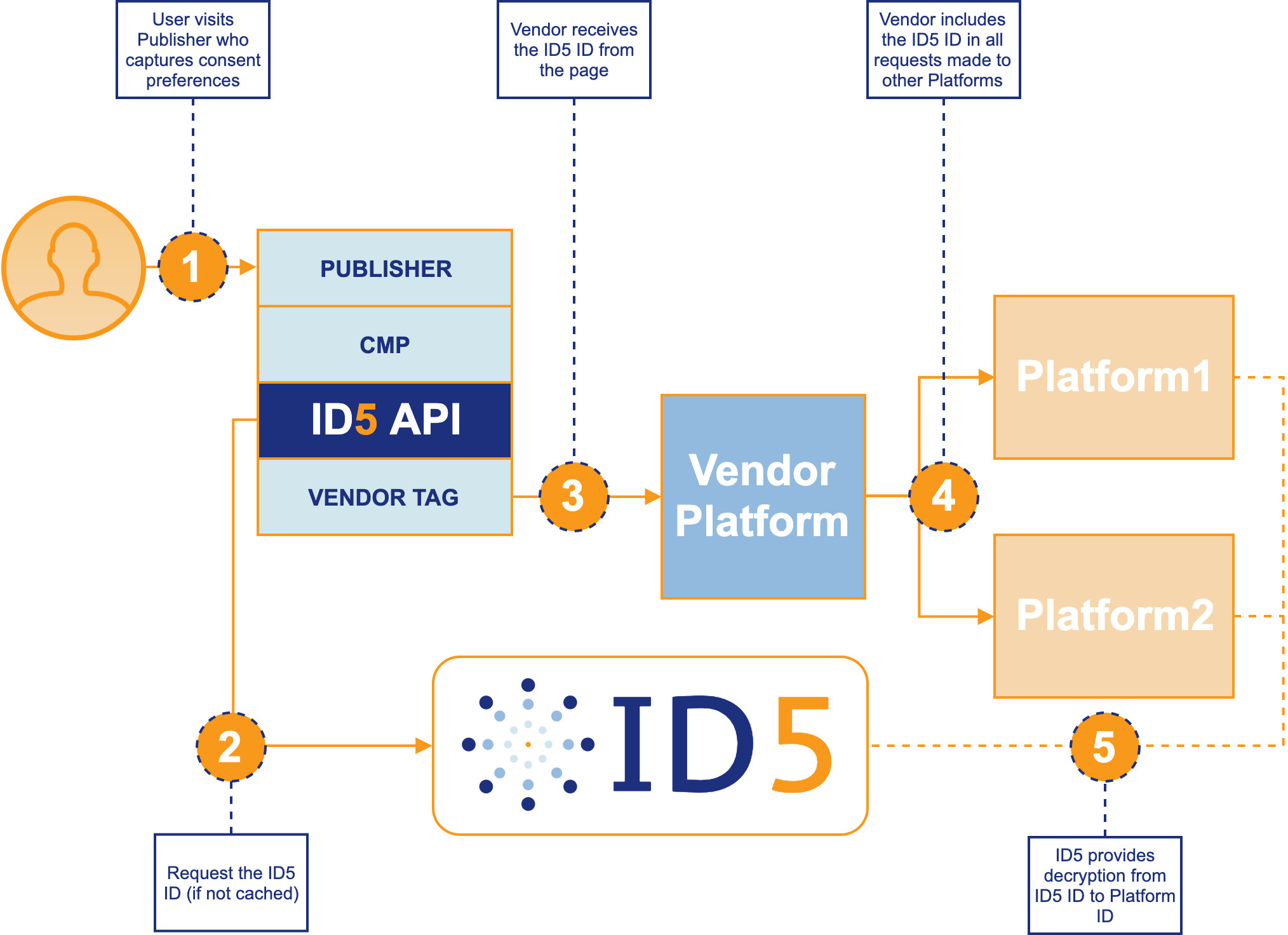
1. Publisher first loads its CMP and captures the user’s consent preferences (where applicable). This is essential before any IDs or ads are requested or delivered
2. The ID5 API checks in cache for an ID5 ID and ensures it is still fresh. If necessary, a request to ID5 is made for a new/refreshed ID, which is then placed in cache to avoid unnecessary http requests on future page views.
3. The Vendor’s tag on the publisher’s page retrieves the ID5 ID via the API and passes it, along with any other information they normally send, to their servers for processing. Examples of Vendor Tags are Prebid.js (or other header bidding solutions), ad tags, attribution or segment pixels, etc.
4. The Vendor’s servers makes requests to other platforms, including the ID5 ID in addition to, or instead of, the normal user IDs they pass
# Benefits of Using the ID5 API
There are a number of reasons for publishers to use the ID5 API.
* Any platform with tags on the publisher’s page can access the ID5 ID directly without calling ID5’s servers, which reduces the number of HTTP requests required to retrieve the ID5 ID for all platforms, ultimately decreasing page loading time
* The API centrally manages user consent, caching, and ID storage for any platform that needs access to the ID on the page
* Allows for 1st Party storage of the user ID, enabling user identification in browsers that block 3rd Party cookies (like Safari or Firefox) without the need for workarounds that could be blocked with a new release
* With the ID5 ID being consistent and persistent, publishers will earn more revenue from their ad tech platforms through near 100% match rates and advertisers will be able to reach more of their audiences
* A shared ID eliminates the need for cookie syncing on publisher pages, decreasing page latency
* The API’s code is open-source and available for your review (and contribution) here on Github: [https://github.com/id5io/id5-api.js](https://github.com/id5io/id5-api.js) - this means we don’t have any sneaky code doing something you don’t know about
# The GDPR and Privacy
## GDPR
ID5 has built a privacy-by-design and GDPR-compliant universal ID service for publishers, advertisers, and ad tech vendors. The service leverages the IAB’s Transparency and Consent Framework (TCF) to capture user consent signals.
As an identity provider, ID5 acts as a controller of the ID5 ID, and thus, we must receive consent to process requests. When we receive a request for the ID5 ID, we check that we have consent to store our user ID in a user's browser before proceeding; if we don’t have consent we inform the calling page (through our API) that consent was not received and we do not write a 3rd party cookie as part of the HTTP response.
## Bots
If ID5 detects that a request is coming from a declared bot (e.g. search engine crawlers), we will not return an ID5 ID.
## Privacy Policy
For our Platform Privacy Policy, please visit [https://id5.io/platform-privacy-policy](https://id5.io/platform-privacy-policy).