DSH Session Colors
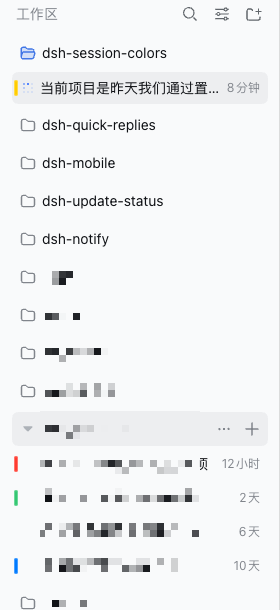
Give any Session a colour and spot it at a glance in the sidebar.


English | 中文
Features ·
Install ·
Usage ·
Compatibility ·
Cross-device ·
Configuration ·
Troubleshooting ·
Security ·
Limitations ·
Uninstall ·
Development
> **✅ Supports DSH `0.1.7-rc.2` — the latest `0.1.7` release candidate.** Verified on the running release candidate as well as on `0.1.7-rc.1` and `0.1.7-alpha.2`; see [Compatibility](#compatibility).
> DSH Session Colors is a DeepSeek Harness community plugin. It does not modify
> DSH core and does not rewrite any Session or Workspace data: a mark is only
> "Session id → one colour".
Work is spread across several workspaces, and the workspace list is a wall of
look-alike titles. Once a task finishes, the Session you were just in is hard to
find again — the status dot is idle and the title is one of twenty. **A colour you
chose yourself is the cheapest way to make one row recognisable.**
## Features
- **A colour mark on the Session row** — a short bar in the row's left padding
that **deliberately avoids the status dot**, so "which one finished" is never
covered up.
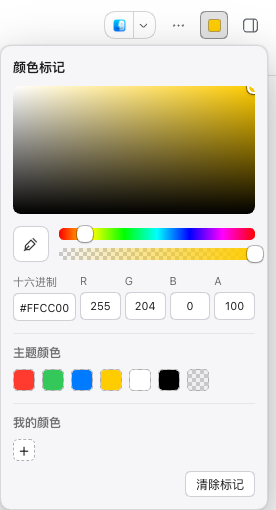
- **A system-style colour picker** — a large saturation/value field, hue and alpha
sliders, hex and RGBA fields, seven theme swatches, your saved colours, and
screen eyedropper where the browser supports `EyeDropper`. It sits in the
Session header's utilities, not next to the title.
- **Marked once, visible everywhere.** Marks live on the **Host**, not in the
browser, so a colour chosen on your computer is also there on your phone —
over a LAN address or a tunnel alike.
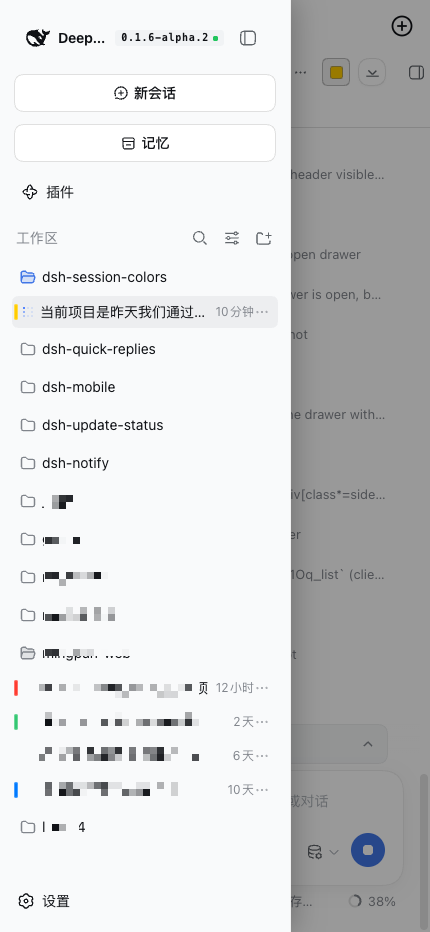
- **Visible on a phone too.** A phone turns the sidebar into a drawer, and the
chips follow it: they travel with the drawer as it slides in, and they are
painted above it.
- **Changes arrive on their own.** The page re-reads marks when it becomes
visible again and every 20 seconds, so a colour set on another device shows up
without a refresh.
- **Never blocks the UI.** The chip layer is click-through and clipped to the
sidebar's scroll container; the worst case is that a chip does not appear.
- **A failure says so.** When the store cannot be reached, the header control
shows ⚠ with a reason instead of looking like a Session with no colour.
## Install
Requirements:
- DeepSeek Harness with a Web profile
- Node.js 20 or newer
- **Verified DSH version: `0.1.7-rc.2`** (the latest release candidate),
`0.1.7-rc.1` and `0.1.7-alpha.2` — plugin `0.1.5`
(see [Compatibility](#compatibility))
```sh
dsh plugin --profile add @idoall/dsh-session-colors@latest
```
The [compatibility table](#compatibility) lists the exact versions, if you need to
pin one to a specific DSH release.
Working on the plugin itself? Install the directory instead:
```sh
dsh plugin --profile add link:/path/to/dsh-session-colors
```
Then give it a data directory in the profile's `cordis.patch.yml` — the same
shape other plugins that need durability use, because **the plugin never guesses
the profile path**:
```yaml
- id: dsh-session-colors
config:
dataDir: /absolute/path/to/profiles//data/dsh-session-colors
```
Finally **restart `dsh web`** (the Host half loads only at boot), then refresh the
Web GUI. It also works without `dataDir`, but then marks live only for the life of
the Host process.
## Usage
1. Open the Session you want to mark.
2. Click the colour control in the Session header (🎨 when the Session has no
colour, the colour itself once it has one).
3. Pick a colour, or paste a hex value. The bar appears on that Session's sidebar
row immediately.
4. To clear it, open the picker again and click **Clear mark**, or choose the
transparent swatch among the theme colours.
Opening the picker on a marked Session starts from its current colour. Colours are
stored as HSVA, so alpha round-trips exactly.
## Compatibility
Current release: plugin **`0.1.5`** is verified against DeepSeek Harness
**`0.1.7-rc.2`** — the latest `0.1.7` release candidate — as well as against
**`0.1.7-rc.1`** and **`0.1.7-alpha.2`**.
| Plugin version | Verified DeepSeek Harness | npm status | What it is |
| --- | --- | --- | --- |
| **`0.1.5`** | **`0.1.7-rc.2`** (latest RC), `0.1.7-rc.1`, `0.1.7-alpha.2` | `latest` | Confirms the same code runs unchanged on the second release candidate and declares it. No code change over `0.1.4`; upgrading needs no migration. |
| `0.1.4` | `0.1.7-rc.1` (RC), `0.1.7-alpha.2` | published | Confirms the `0.1.7` adaptation runs unchanged on the first release candidate and declares it. No code change over `0.1.3`. |
| `0.1.3` | `0.1.7-alpha.2` | published | Adapts to DSH 0.1.7: the Session id comes from the row's own `data-row-key` (fiber fallback kept), chips follow the Web-Animations row gliding `0.1.7` introduced, and the Host dependency is declared the way `0.1.7` resolves a linked plugin. |
| `0.1.2` | `0.1.6-alpha.2` | published | Fixes chips staying at their old coordinates for ~20s when a workspace is collapsed or expanded: a second `MutationObserver.observe()` on the same target had silently replaced the `childList` watch. |
| `0.1.1` | `0.1.6-alpha.2` | published | Documentation only: the packaged README no longer says "not published", and the market screenshots are declared. |
| `0.1.0` | `0.1.6-alpha.2` | published | First release: Session colour marks, Host-side storage, visible inside a phone's sidebar drawer |
**`0.1.5` supports DSH `0.1.7-rc.2`, the latest release candidate.** Between
`rc.1` and `rc.2` every contract this plugin depends on is unchanged — the
client-modules loader and the slot registration API are byte-identical, the
sidebar row keeps its `data-row-key`/`role`/`aria-selected` markup and its exact
geometry, and `shell.overlay` still renders the same layer — so **`0.1.5`
confirms the same code runs unchanged on the second RC and records it.**
**Upgrading from `0.1.4` needs no migration.** On an older DSH — including
`0.1.6-alpha.2` — keep plugin **`0.1.2`**. Newer DSH releases are not
auto-declared compatible.
- **Verified DeepSeek Harness** is the exact DSH version this plugin was actually
run against. That list has one home — `dsh.compatibility.dshReleases` in
[`package.json`](package.json) — and a test keeps both READMEs' compatibility
sections word-for-word with it and inside the range `peerDependencies`
declares. A DSH version that is not listed is **never claimed as compatible**.
- `peerDependencies` declares `>=0.1.7-alpha.2 <0.2.0` for `dsh-client-ui-layout`
and `dsh-client-ui-conversation`, and `dsh.engines.dsh` declares the same range
as the Host requirement: that is the range allowed to **load**, which is not the
same as verified. The range admits **all three** of `0.1.7-alpha.2`,
`0.1.7-rc.1` and `0.1.7-rc.2` (a prerelease is admitted when some comparator
names the same `major.minor.patch`), so it was deliberately **not** widened for
the RCs — doing so would admit versions nobody tested. The lower bound names the
alpha on purpose: a range like `>=0.1.6-0 <0.2.0` admits none of them.
- DSH 0.1.7 evaluates those peers at boot and **disables** a plugin row whose
range is not satisfied, so a correct range is now load-bearing rather than
cosmetic. The evaluation code is identical in `rc.1` and `rc.2`.
- DSH 0.1.7-rc.2 added a real Session-row seat,
`sidebar.session.row.leading` — a 16px cell before the title. The chip
deliberately **stays on its own click-through layer**: that seat shares its cell
with the status dot and is mounted **only while the row is idle** (a running,
waiting or archived row renders no occupant), so a chip placed there would
vanish exactly when it is most useful. See
[Limitations](#limitations) and the design record.
- `@deepseek-ai/schemastery` is a **peer**, not a plain dependency: DSH 0.1.7
resolves only a linked plugin's peer dependencies from the running
installation, so a `link:` install of this directory would otherwise fail to
import the Host half.
- DSH moving faster than this plugin does not break it: chips depend on DSH's row
DOM (see [Limitations](#limitations)), so a large change to the row structure
can at worst stop chips from appearing — it cannot block clicking.
## Cross-device and LAN
Storage goes through the plugin's **own** HTTP route
(`GET`/`POST /plugins/dsh-session-colors/marks`), persisted to one JSON file in
the profile's data directory. That is deliberate:
DSH's own user-settings service host-backs settings **only for loopback pages** —
```js
persistence = $host.isLoopback ? "host" : "memory"
```
— so a page opened over a LAN address or a tunnel gets a permanently unavailable
scope: it can neither read nor write. An own route is not subject to that rule,
which is exactly what makes a mark visible on every device. LAN forwarders
(`dsh-bridge`, `dsh-lan-proxy`, and friends) rewrite `Host`/`Origin` to loopback
and inject the auth cookie, so a request that arrives over the LAN still looks
like loopback to DSH and the route answers normally.
## Configuration
| Field | Type | Meaning |
| --- | --- | --- |
| `dataDir` | absolute path | Where `session-colors.json` is written. Without it, marks live in process memory only. |
A mark is one JSON document:
```json
{
"version": 1,
"marks": {
"session-0698599a-…": { "h": 211.3, "s": 1, "v": 1, "a": 1 }
}
}
```
Writes are **atomic** (temporary file, then rename). To drop a mark, use **Clear
mark** in the picker, or remove that line from the file.
## Troubleshooting
**The colour still is not visible on my phone.**
First check which build the device runs:
```js
document.querySelector('.dsh-sc-layer').dataset
// { dshScBuild, dshScStatus, dshScWritable, dshScMarks, dshScError }
```
If `dshScBuild` is not `host-routes+animated-rows`, the device is running a
**cached client**: refresh the page (the browser half reloads on a refresh, no DSH
restart needed). If `dshScStatus` is not `ready`, the store cannot be read — see
the next item.
**The header control shows ⚠.**
That means the store cannot be reached: `dshScError` carries the reason and
`dshScWritable` says whether writes are possible. This happens when the Host route
was never registered (the profile did not load the plugin) or the data directory
is not writable. It is **not** the same as "this Session has no colour".
**A LAN page behaves differently.**
Since `0.1.0` this plugin behaves identically on LAN/tunnel pages and loopback
pages, because storage uses its own route. If you see the old "settings
unavailable" behaviour, check which version is installed.
**Chips are in the wrong place, or gone.**
The layer finds rows by ARIA role and reads the Session id from the row's
`data-row-key` (falling back to React internals). A large change to DSH's sidebar
structure can make it find nothing; chips then disappear, but **clicking is
unaffected** because the layer is click-through.
## Security boundaries
- A mark stores **only a Session id and a colour**. It never writes Session logs,
titles, history, status, archive records, or Workspace membership.
- It **never creates, copies, moves, or reorders a Session**; a mark is not part
of Session data.
- The chip layer **never accepts pointer events** and is clipped to the sidebar's
scroll container: the worst case is a chip that does not appear.
- The Host route reuses DSH's own auth fence (`connection.requestRejection`), and
writes add a same-origin check on top.
- The plugin registers no model Tool, spawns no subprocess, and makes no network
requests.
## Limitations
- **The chip depends on DSH's row DOM.** It reads rows by ARIA role and the
Session id from the row's `data-row-key`, falling back to React internals. A
future DSH release can stop chips from appearing; it cannot break clicking.
- **The chip is not a row occupant.** DSH 0.1.7-rc.2 declares a real
`sidebar.session.row.leading` seat in the row's status-dot cell, and this plugin
deliberately does **not** use it: that seat is mounted only while a row is idle,
so a chip placed there would disappear for running, waiting and archived
Sessions. The chip stays on its own click-through layer, which keeps it visible
in every state and never covers the dot.
- **Marks are per DSH instance.** They live in one profile's data directory, so
two independent DSH servers do not share them.
- **No permission model.** Anyone who can reach the Host's authenticated routes
for this profile can read and write marks.
- **Colour only.** No labels, icons, or emoji.
## Uninstall
```sh
dsh plugin --profile remove @idoall/dsh-session-colors
```
Restart DSH and refresh the Web GUI. `session-colors.json` in the data directory
is not deleted for you; remove it yourself if you do not want it.
## Development
```sh
npm test # 38 tests: bundle shape, store, route, cross-device, geometry, docs
```
The browser half is a hand-authored `__ModuleLoader__` bundle, which is the only
format the DSH client loader accepts for a package client half. It is written by
hand on purpose: there is no build step, so nothing can drift from the DSH
version it targets.
```
src/index.js Host half: routes, the JSON store, auth fence
src/client.js Browser half: picker, chip layer, the fetch-backed store
tests/ Unit tests for both halves, plus the doc-consistency checks
docs/ The design record (Chinese) and the README screenshots
demos/ A standalone HTML demo of the picker
```
Design decisions and measurements live in
[docs/plugin-design.zh.md](docs/plugin-design.zh.md) (the current part starts at
the 「会话颜色标记版」 section).
## License
[MIT](LICENSE)