
Kuali
Open-source, local meeting transcription for Discord and Google Meet with real speaker attribution.



English · Español
Features ·
Quick start ·
Privacy ·
Development ·
Community ·
Website
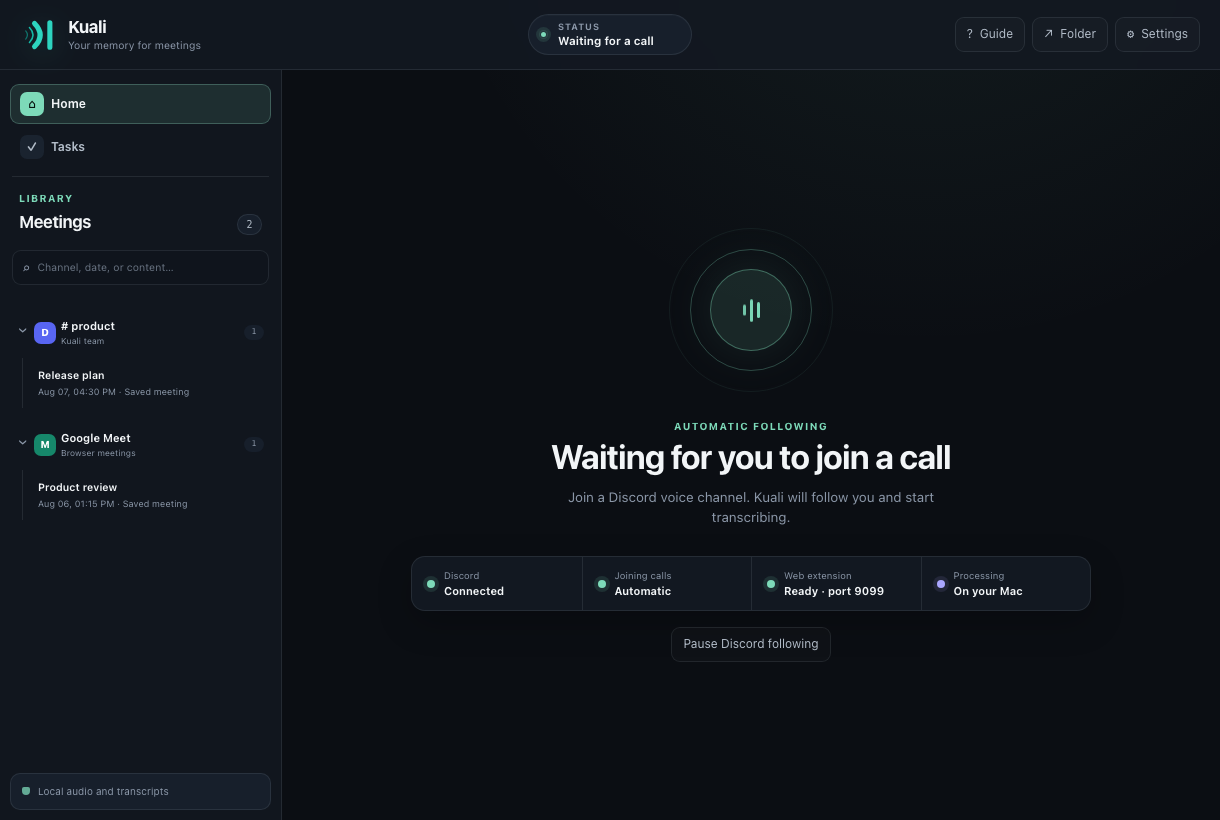
Kuali listens to live calls, transcribes them on your computer, and keeps every
speaker attached to their words. Meetings become a searchable library with live
transcripts, summaries, decisions, questions, and participant-owned tasks.
Raw audio is processed in memory by Whisper and Silero. It is never retained as
an audio recording and never sent to a Kuali-operated service.
## Why Kuali
Kuali is built around participants, not around one mixed system-audio file:
- **Speaker identity exists before transcription.** Discord supplies a stream
and stable identity per user, while the Meet integration transports
participant context with live audio. Kuali does not need to guess afterward
with post-recording diarization.
- **Discord and Google Meet setup is deliberately simple: three short steps.**
The bilingual guide shows the real controls, saves progress, and avoids
manual OAuth URLs, configuration files, and browser developer mode.
- **Your existing AI setup can generate the insights.** Kuali can reuse an
authenticated Claude Code, Codex, or Gemini CLI session. It also supports
Anthropic, OpenAI, and Gemini API keys plus OpenAI-compatible endpoints such
as Ollama and LM Studio.
- **Results return to Discord as an interface, not a text wall.** One card is
updated in place with tasks and private, paginated views for the summary, key
points, decisions, open questions, and full transcript. Complete text files
remain downloadable.
- **Automatic Discord following makes capture hard to forget.** Kuali can join
after the configured user, can be paused without losing the configuration,
and still accepts manual `/record` or `/grabar` invitations.
- **The onboarding is meant for anyone who can install an app.** Model
selection, integrations, consent, live status, and later edits all have
guided UI instead of requiring hand-written configuration.
The native desktop core is written in Rust. The Discord bot and gateway run
from your Mac, while browser meetings use a loopback connection to the same
machine. Kuali loads Whisper only when an active meeting needs it and releases
the model from RAM after the final active meeting ends. The project is free and
open source; no Kuali subscription or hosted account is required.
Learn about the dedicated
[Discord transcription](https://kuali.garrux.dev/discord-meeting-transcription/)
and
[Google Meet transcription](https://kuali.garrux.dev/google-meet-transcription/)
workflows on the official website.
## Features
- Live transcription with participant identity established before decoding,
without post-recording diarization for Discord and supported Meet capture.
- Three-step interactive setup for both Discord and Google Meet.
- Optional insights through Claude Code, Codex, Gemini CLI, direct API keys, or
OpenAI-compatible providers.
- Interactive Discord delivery with summaries, key points, decisions,
questions, tasks, paginated transcripts, and complete downloads.
- Automatic Discord following with an immediate pause control.
- Experimental browser capture for Microsoft Teams and Zoom, with partial
support while their integrations are validated and improved.
- Separate concurrent meetings without shared participants, clocks, or state.
- Native Rust desktop core with about 40 MB of observed memory use while idle.
- On-demand Whisper lifecycle: one model is shared by active meetings and
released from RAM after the final meeting ends.
- Local Whisper inference with Metal acceleration and Silero voice detection.
- Searchable meeting library with transcript excerpts, channel folders, and
Markdown or JSON export.
- Questions answered across past meetings from Discord or the desktop app, with
citations, and scoped in Discord to the calls the asker was actually in.
- Optional summaries, key points, decisions, questions, and tasks by participant.
- Task filters by person, meeting, status, and date range.
- Signed webhooks containing the completed meeting and full transcript.
- English and Spanish interface, guided setup, menu-bar controls, and launch at
login.
## Quick start
Install the current macOS release with Homebrew:
```sh
brew install --cask igarrux/kuali/kuali
xattr -dr com.apple.quarantine /Applications/Kuali.app
```
To build from source, install Rust 1.89+, CMake, and a C/C++ toolchain. Node.js
22+ is needed only for extension development and tests.
```sh
git clone https://github.com/igarrux/kuali.git
cd kuali
cargo run -p kuali-app
```
Kuali opens its guided setup on first launch. The guide walks through creating
the Discord bot, installing the browser extension, and downloading a Whisper
model without requiring manual configuration-file edits.
### Discord
Create a bot in the [Discord Developer Portal](https://discord.com/developers/applications),
copy its token and your `@username` into Kuali, then choose a server in the
Discord authorization window Kuali opens. Kuali derives the application ID
from the token and prepares the required scopes and minimum permissions
automatically; you do not need to configure an OAuth link by hand.
Kuali can follow one configured Discord account automatically. Automatic
following can be paused at any time without forgetting the account. A person in
a voice channel can also invite the bot with `/grabar` or `/record`.
When Kuali joins, it plays and posts the consent notice. It repeats the notice
for participants who arrive later and keeps an append-only consent audit log.
Kuali never captures its own announcement.
After a meeting, Kuali can publish a compact Discord card with its action items,
duration, participant count, and private shortcuts to the summary, key points,
decisions, open questions, and full transcript. The summary and transcript also
include downloadable text files, keeping the channel readable without hiding
the full meeting record. The card appears while the summary is being prepared
and then updates in place. Long private views are paginated inside the same card
without splitting the meeting across multiple Discord messages.
Meetings can also be restricted to the people who were in the call. With
*Settings → Discord → Only the people who were in the call can read the meeting*
enabled, the channel card keeps its title, duration, participant count, and
pending-task count but carries no excerpt, and Kuali answers only participants —
privately, with an ephemeral message — through the card buttons or `/resumen`
and `/summary`. Anyone else in the channel, however permissive their Discord
role, reads nothing.
### Asking about past meetings
`/pregunta` and `/ask` answer questions across everything Kuali has recorded —
"what did we decide about the rollout?", "what is still pending for me?" —
instead of requiring the right meeting to be found first.
**The search is limited to meetings you were actually in.** Kuali resolves the
account Discord authenticated and searches only calls that recorded it as
present, inside the server where the command was used. This is not a filter
applied to results: meetings outside that set are never retrieved, so the model
never sees them and cannot quote them. Attending silently still counts, and
browser meetings are excluded because a Discord account cannot be matched
against a Google Meet, Teams, or Zoom participant. Answers are always ephemeral
and cite the meetings they rest on, so a claim about what the team decided can
be checked.
The desktop application has the same feature under **Ask**, without the
participant restriction: it runs on the machine that recorded the meetings, for
the person who owns them.
Questions are **off until you turn them on**, under **Ask** in the desktop
application. Answering well needs a 128 MB embedding model that understands what
was meant rather than which words were used — it is what finds *cortafuegos*
when you ask about *firewall* — and nothing that size is downloaded without
asking. Turning it on states the download size, counts the passages in your
existing library, and estimates the time before starting; indexing then reports
a real estimate measured on your own machine.
Until that finishes, questions are refused rather than answered by word matching
alone. A feature that answers well sometimes and misses obvious things other
times teaches people not to trust it, so it is all or nothing.
Answering also sends transcript excerpts to your configured provider, so it
obeys the same *Settings → summaries and tasks* switch. With that switch off,
questions are unavailable along with summaries. The embedding model itself runs
entirely on your computer and sends nothing anywhere.
### Browser meetings
Install the extension from its official
[Chrome Web Store listing](https://chromewebstore.google.com/detail/kuali/cgojkmdggflcggedmapamcmkelgaahhp)
in Chrome, Edge, Brave, or Arc. Its source and unpacked development instructions
live in [`browser-extension/`](browser-extension/README.md).
The extension connects only to Kuali's loopback listener. It preserves separate
speaker tracks and participant identity when the meeting service exposes them,
and labels mixed audio honestly instead of inventing an attribution.
### Platform support
| Platform | Status |
|---|---|
| Discord | Stable |
| Google Meet | Stable |
| Microsoft Teams | Experimental · partial support |
| Zoom | Experimental · partial support |
Teams and Zoom have not yet received the same depth of real-world testing as
Discord and Google Meet. Their capture, participant identity, or speaker
separation may be incomplete in some meeting modes while support improves.
## Resource use
| State | Whisper in RAM | Observed app memory |
|---|---|---:|
| Waiting for a meeting | No | About 40 MB |
| Active meeting with the recommended Q5 model | Yes | Up to about 600 MB |
| After the final active meeting ends | No | Returns toward the idle footprint |
These are approximate observations on Apple Silicon; actual memory use varies
by meeting and system. Concurrent meetings share one loaded model. Downloaded
weights remain on disk when the model is released from RAM.
## Transcription models
Model weights are downloaded separately and are not embedded in the app. The
default directory is `~/.kuali`; it can be changed from Settings, including to
external storage. Kuali verifies model integrity when weights are downloaded or
moved, and each installed weight can be removed individually.
| Level | Technical model | Download | Best for |
|---|---|---:|---|
| **Light** | **Large v3 Turbo Q5** | **574 MB** | **Recommended for fast, accurate live transcription** |
| Balanced | Large v3 Turbo | 1.6 GB | Higher fidelity while prioritizing real-time speed |
| Precise | Large v3 Q5 | 1.1 GB | Difficult audio, accents, and mixed vocabulary |
| Highest accuracy | Large v3 Q8 | 1.7 GB | Kuali's highest local fidelity with conservative quantization |
## Summaries and tasks
Summaries are optional. Turn off **Settings → Summaries and tasks** and Kuali
will not send any transcript to an LLM. The switch blocks both automatic and
manual summary generation.
When enabled, Kuali can use an authenticated Claude Code, Codex, or Gemini CLI;
a direct Anthropic, OpenAI, or Gemini API key; or an OpenAI-compatible endpoint
such as Ollama or LM Studio. Provider credentials are stored with `0600`
permissions in Kuali's configuration file.
## Privacy
| Data | Handling |
|---|---|
| Raw audio | Processed in memory; not saved as an audio file |
| Transcripts and meeting metadata | Stored locally in Kuali's application-data directory |
| Whisper model weights | Stored in the directory selected by the user |
| LLM requests | Disabled by the **Summaries and tasks** switch; otherwise sent only to the configured provider |
| A local CLI as the provider | Runs with no tools, an emptied environment, and a kernel sandbox: it cannot see your home folder or write to disk |
| Webhooks | Disabled until the user creates and enables a subscription |
Recording and consent requirements vary by location. Kuali provides audible,
written, and logged disclosure mechanisms, but the person operating it remains
responsible for using them appropriately. See the full [privacy policy](PRIVACY.md).
### Data locations
```text
~/.kuali/ Whisper and Silero weights
~/Library/Application Support/com.onwev.Kuali/
└── meetings//
├── meta.json
└── meeting.json
~/Library/Preferences/com.onwev.Kuali/config.toml
```
**Settings → Data → Reset Kuali** removes Kuali-owned configuration, meetings,
logs, and Whisper weights after typed confirmation. It preserves the bundled
runtime, Silero, the browser extension, and unrelated files in external model
directories.
## Integrations
Kuali can deliver a `meeting.completed` webhook for every meeting or for one
specific Discord channel. The payload contains participants, the timestamped
transcript, summary status, and—when enabled—the generated insights and tasks.
Deliveries follow [Standard Webhooks 1.0](https://www.standardwebhooks.com/):
the JSON envelope contains `type`, `timestamp`, and `data`, while each request
includes `webhook-id`, `webhook-timestamp`, and `webhook-signature`.
Endpoint secrets use the `whsec_` format. Verify the Base64 HMAC-SHA256
signature over the exact bytes of
`webhook-id + "." + webhook-timestamp + "." + body`. Transient failures use the
recommended multi-day retry schedule while preserving the delivery ID and
refreshing the attempt timestamp.
## Development
Install [`just`](https://just.systems/) and [`fzf`](https://junegunn.github.io/fzf/)
to use the versioned project command menu:
```sh
brew install just fzf
just
```
Choose a recipe and press Enter, or run one directly—for example,
`just dev`, `just test`, or `just check`. Use `just --list` to inspect every
available recipe and its description. The underlying commands remain:
```sh
cargo fmt --all --check
cargo clippy --workspace --all-targets -- -D warnings
cargo test --workspace
(cd browser-extension && npm test)
node --test src/i18n.test.mjs
```
The interactive Google Meet end-to-end test opens a real meeting and verifies
the capture wire, speaker attribution, live Whisper output, clean shutdown, and
model unload:
```sh
cd browser-extension
npm run test:e2e:meet
```
### Project structure
| Path | Responsibility |
|---|---|
| `crates/kuali-core` | Shared types and configuration |
| `crates/kuali-discord` | Discord lifecycle, consent, and per-speaker audio |
| `crates/kuali-meet` | Local browser-meeting ingest and wire protocol |
| `crates/kuali-stt` | Segmentation, Silero VAD, Whisper, and model storage |
| `crates/kuali-llm` | LLM providers and structured meeting insights |
| `crates/kuali-store` | Persistence, search, and export |
| `crates/kuali-engine` | Concurrent meeting orchestration |
| `src-tauri` / `src` | Desktop backend and bilingual interface |
| `browser-extension` | Browser capture extension |
## Community
Kuali is built in the open and contributions are welcome:
- Read the [roadmap](ROADMAP.md) for active project areas.
- Pick a [`good first issue`](https://github.com/igarrux/kuali/labels/good%20first%20issue)
or [`help wanted`](https://github.com/igarrux/kuali/labels/help%20wanted) task.
- Ask questions and propose broad ideas in
[GitHub Discussions](https://github.com/igarrux/kuali/discussions).
- Follow [CONTRIBUTING.md](CONTRIBUTING.md) for setup, architecture, tests, and
the `sandbox` pull-request workflow.
- Use [private vulnerability reporting](SECURITY.md) for security issues or
accidental sensitive-data exposure.
Bug reports, controlled platform tests, documentation, translations,
accessibility work, and focused code changes are all valuable.
## License
The desktop workspace is available under the [MIT License](LICENSE). The
browser extension is distributed separately under the
[Apache License 2.0](browser-extension/LICENSE); third-party notices are in
[`browser-extension/NOTICE`](browser-extension/NOTICE).