# 💎 Android Showcase 2.0
[](https://kotlinlang.org)
[](https://developer.android.com/studio/releases/gradle-plugin)
[](https://gradle.org)
[](https://www.codefactor.io/repository/github/igorwojda/android-showcase)
A production-ready Android application demonstrating modern development practices and architectural patterns. This project showcases how to build scalable, maintainable, and testable Android applications using industry-standard tools and libraries.
Built with **Clean Architecture** principles, this app serves as a comprehensive example of modular design, advanced Gradle configuration, and robust CI/CD practices. Perfect for teams looking to establish solid architectural foundations for large-scale Android projects.
- [💎 Android Showcase 2.0](#-android-showcase-20)
- [Application Scope](#application-scope)
- [Tech-Stack](#tech-stack)
- [Architecture](#architecture)
- [Module Types and Dependencies](#module-types-and-dependencies)
- [Feature Module Structure](#feature-module-structure)
- [Presentation Layer](#presentation-layer)
- [Domain Layer](#domain-layer)
- [Data Layer](#data-layer)
- [Common Module Components](#common-module-components)
- [Data Flow](#data-flow)
- [Project Features](#project-features)
- [Development \& Debugging](#development--debugging)
- [Custom Icons For Each Variant](#custom-icons-for-each-variant)
- [Themed Icons](#themed-icons)
- [Gradle Config](#gradle-config)
- [Dependency Management](#dependency-management)
- [Convention Plugins](#convention-plugins)
- [Type Safe Project Accessors](#type-safe-project-accessors)
- [Unified Version Configuration](#unified-version-configuration)
- [Java/JVM Version Configuration](#javajvm-version-configuration)
- [Generated type-safe version catalogs accessors in `build-logic` module](#generated-type-safe-version-catalogs-accessors-in-build-logic-module)
- [Gradle Configuration Cache](#gradle-configuration-cache)
- [Code Verification](#code-verification)
- [CI Pipeline](#ci-pipeline)
- [Pre-push Hooks](#pre-push-hooks)
- [Project Scope \& Limitations](#project-scope--limitations)
- [Getting Started](#getting-started)
- [Roadmap](#roadmap)
- [Resources](#resources)
- [Contributing](#contributing)
- [Author](#author)
- [License](#license)
- [Animations License](#animations-license)
## Application Scope
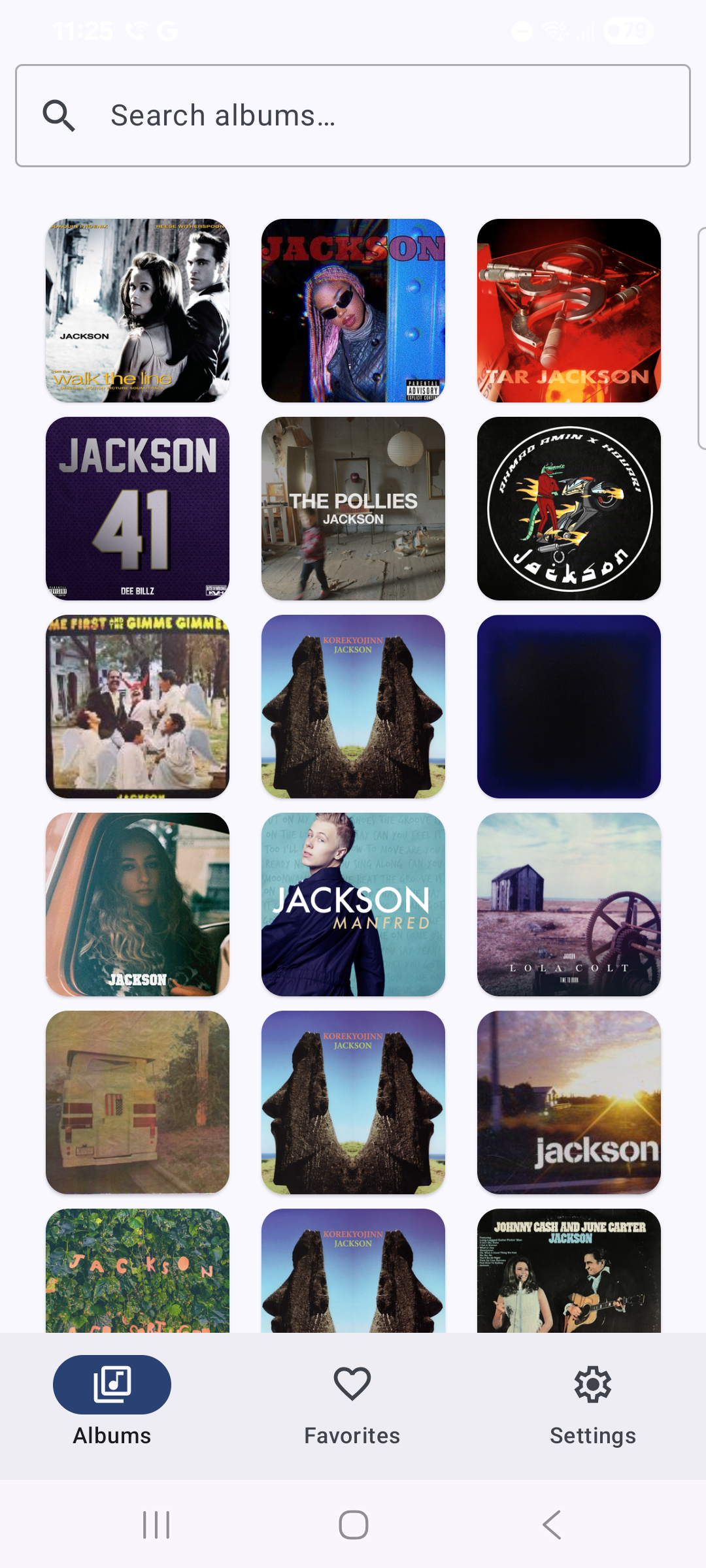
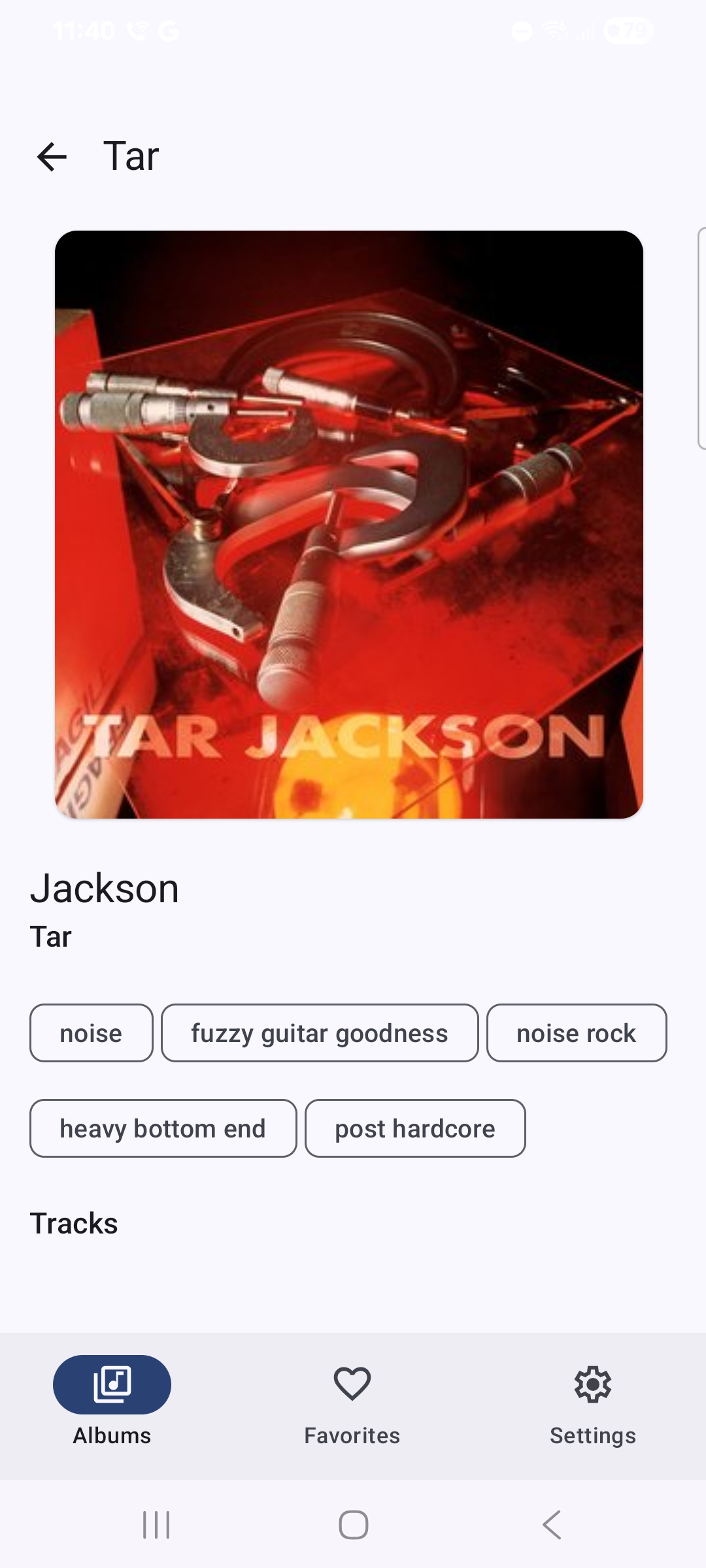
A music discovery app built with Jetpack Compose that displays album information sourced from the [Last.fm API](https://www.last.fm/api). The application demonstrates real-world scenarios including network requests, local caching, navigation, and state management.
**Features:**
- **Album List** - Browse albums with search functionality
- **Album Details** - View detailed album information and track listings
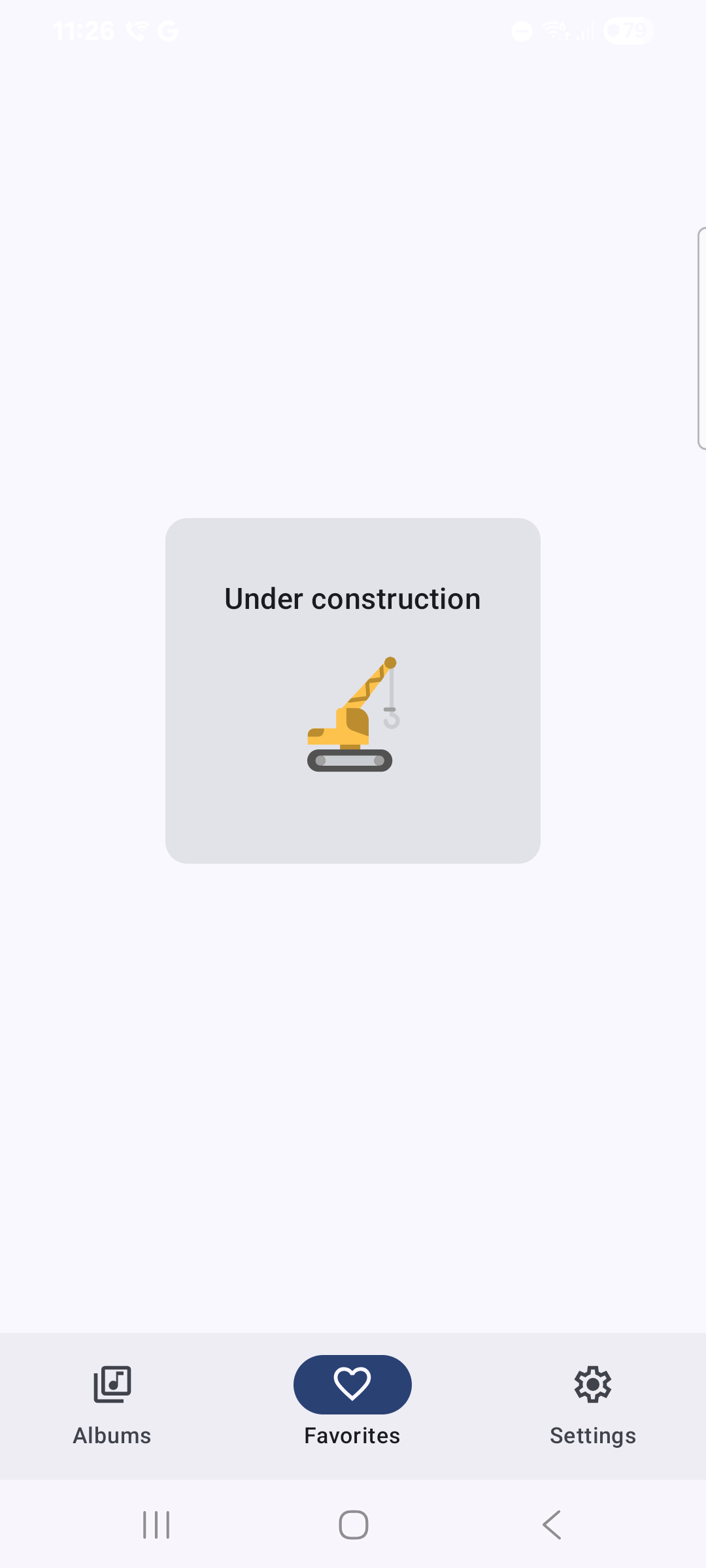
- **Favorites** - Save preferred albums (WIP)
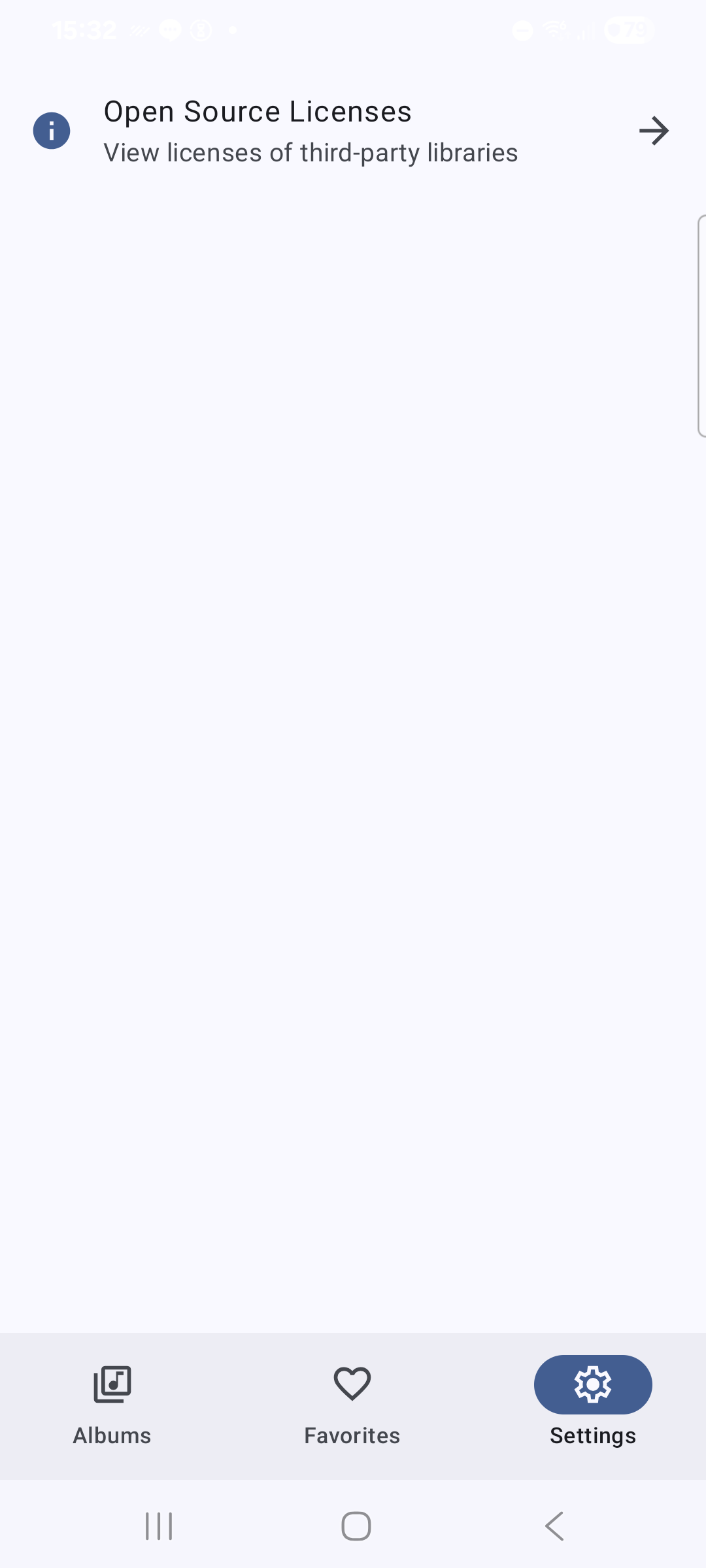
- **Profile** - User preferences and settings (WIP)
## Tech-Stack
Built with modern Android development tools and libraries, prioritizing, project structure stability and production-readiness.
**Core Technologies:**
- **[Kotlin 2.2+](https://kotlinlang.org/)** - Modern, expressive programming language
- **[Coroutines](https://kotlinlang.org/docs/coroutines-overview.html)** - Asynchronous programming
- **[Flow](https://kotlinlang.org/docs/flow.html)** - Reactive data streams
- **[KSP (Kotlin Symbol Processing)](https://kotlinlang.org/docs/ksp-overview.html)** - Kotlin Symbol Processing
- **[Serialization](https://kotlinlang.org/docs/serialization.html)** - JSON parsing
**Android Jetpack:**
- **[Compose](https://developer.android.com/jetpack/compose)** - Declarative UI framework
- **[Navigation Compose](https://developer.android.com/jetpack/compose/navigation)** - Type-safe navigation
- **[ViewModel](https://developer.android.com/topic/libraries/architecture/viewmodel)** - UI-related data management
- **[Room](https://developer.android.com/jetpack/androidx/releases/room)** - Local database with SQLite
- **[Core Splashscreen](https://developer.android.com/jetpack/androidx/releases/core#core_splashscreen_version_12_2)** - app Splashscreen
**Networking & Images:**
- **[Retrofit](https://square.github.io/retrofit/)** - HTTP client for API communication
- **[Coil](https://github.com/coil-kt/coil)** - Image loading optimized for Compose
**Dependency Injection:**
- **[Koin](https://insert-koin.io/)** - Lightweight dependency injection framework
**Architecture:**
- **[Clean Architecture](https://blog.cleancoder.com/uncle-bob/2012/08/13/the-clean-architecture.html)** - Separation of concerns with defined layers
- **Single Activity Architecture** - Modern navigation approach
- **MVVM + MVI** - Reactive presentation layer pattern providing common UI state.
- **Modular Design** - Feature-based modules for scalability
**UI & Design:**
- **[Material Design 3](https://m3.material.io/)** - Latest design system
- **[Dynamic Theming](https://m3.material.io/styles/color/dynamic-color/overview)** - Wallpaper-based themes (Android 12+)
- **[Dark Theme](https://material.io/develop/android/theming/dark)** - System-aware dark mode
- **[Lottie](http://airbnb.io/lottie)** - Vector animations
**Testing:**
- **[JUnit 6](https://junit.org/)** - Modern testing framework
- **[Mockk](https://mockk.io/)** - Kotlin-first mocking library
- **[Kluent](https://github.com/MarkusAmshove/Kluent)** - Fluent assertion library
- **[Espresso](https://developer.android.com/training/testing/espresso)** - UI testing (WIP)
**Code Quality:**
- **[Konsist](https://docs.konsist.lemonappdev.com/)** - Architecture and code structure convention tests
- **[Ktlint](https://github.com/pinterest/ktlint)** - Kotlin code formatting and issue detection
- **[Ktlint Standard Rules](https://pinterest.github.io/ktlint/0.49.1/rules/standard/)** - set of custom rules for Jetpack Compose
- **[Nlopez Jetpack Compose Rules](https://mrmans0n.github.io/compose-rules/)** - set of custom rules for Jetpack Compose
- **[Twitter's Jetpack Compose Rules](https://twitter.github.io/compose-rules/)** - set of custom rules for Jetpack Compose
- **[Detekt](https://github.com/arturbosch/detekt)** - Static analysis and complexity checks
- **[Android Lint](http://tools.android.com/tips/lint)** - Android-specific code analysis
- **[Spotless](https://github.com/diffplug/spotless)** - Code formatting enforcement
**Build & CI:**
- **[Gradle Kotlin DSL](https://docs.gradle.org/current/userguide/kotlin_dsl.html)** - Type-safe build scripts
- **[Version Catalogs](https://docs.gradle.org/current/userguide/platforms.html#sub:version-catalog)** - Centralized dependency management
- **[Convention Plugins](https://docs.gradle.org/current/samples/sample_convention_plugins.html)** - Shared build logic
- **[Renovate](https://github.com/renovatebot/renovate)** - Automated dependency updates
**GitHub Actions:**
- **[Check](.github/workflows/check.yml)** - CI pipeline with build, lint, test, and code quality checks
- **[Auto Approve](.github/workflows/auto-approve.yml)** - Auto-approval for trusted bot and maintainer PRs
- **[Claude Code](.github/workflows/claude.yml)** - AI-powered code assistance and review
- **[Claude Code Review](.github/workflows/claude-code-review.yml)** - Automated PR reviews using Claude
**Gradle Plugins:**
- **[Android Application](https://developer.android.com/build/releases/gradle-plugin)** (`com.android.application`) - Android app module configuration
- **[Android Library](https://developer.android.com/build/releases/gradle-plugin)** (`com.android.library`) - Android library module configuration
- **[Kotlin Android](https://kotlinlang.org/docs/gradle.html)** (`org.jetbrains.kotlin.android`) - Kotlin compilation for Android
- **[Kotlin Serialization](https://kotlinlang.org/docs/serialization.html)** (`org.jetbrains.kotlin.plugin.serialization`) - JSON serialization support
- **[Kotlin Compose Compiler](https://developer.android.com/jetpack/androidx/releases/compose-kotlin)** (`org.jetbrains.kotlin.plugin.compose`) - Compose compiler plugin
- **[KSP](https://kotlinlang.org/docs/ksp-overview.html)** - Kotlin Symbol Processing
- **[Detekt](https://detekt.dev/)** - Static code analysis
- **[Spotless](https://github.com/diffplug/spotless)** - Code formatting
- **[Test Logger](https://github.com/radarsh/gradle-test-logger-plugin)** - Enhanced test log output
- **[Easylauncher](https://github.com/usefulness/easylauncher-gradle-plugin)** - Modify the launcher icon of each of your app-variants
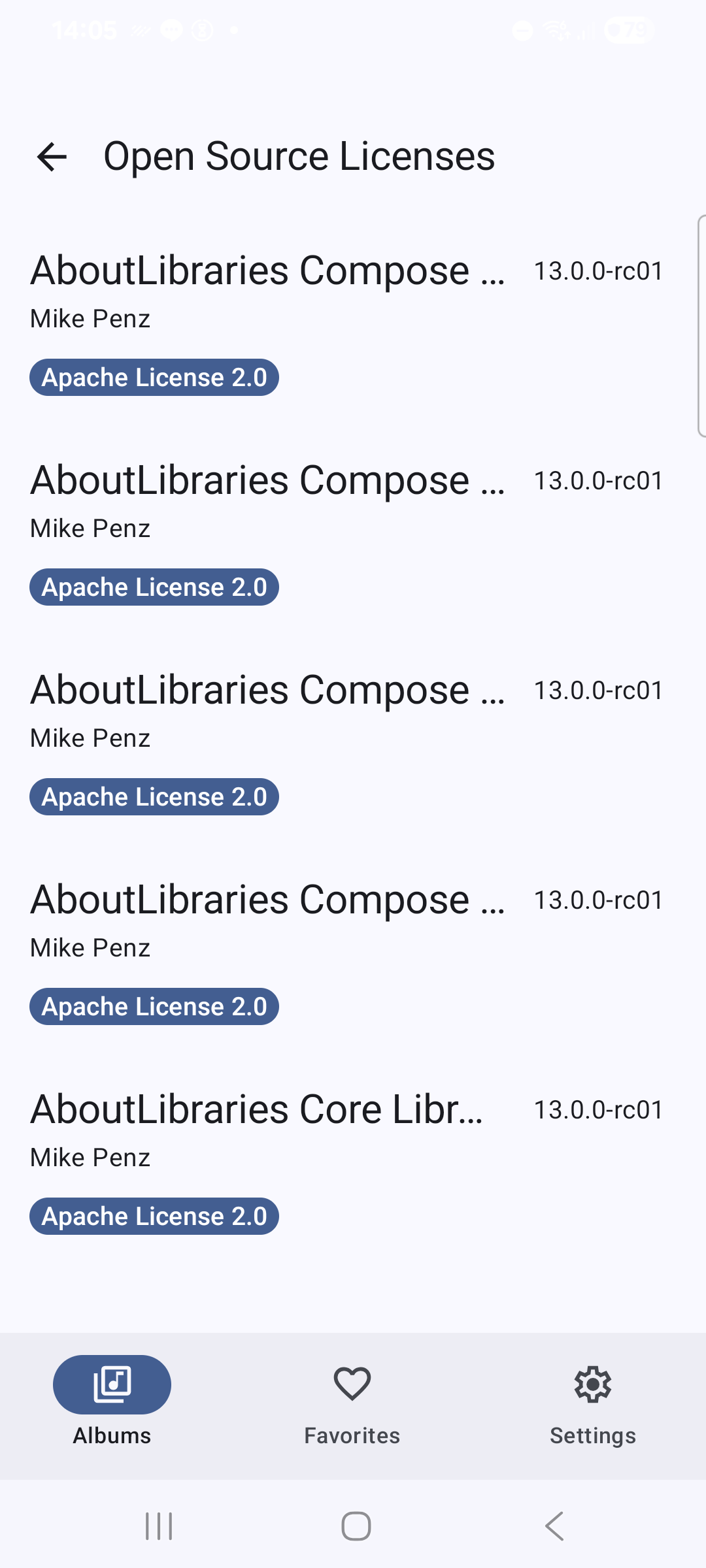
- **[AboutLibraries](https://github.com/mikepenz/AboutLibraries)** - collects dependency details, including licenses and visualize these in the app
## Architecture
The project implements **Clean Architecture** with a modular approach, treating each feature as an independent, reusable component similar to a microservice. This design enables maintainability and scalability for large development teams.
**Benefits of Modular Architecture:**
- **Reusability** - Shared code across multiple app variants
- **Separation of Concerns** - Clear module boundaries with explicit dependencies
- **Parallel Development** - Teams can work on features independently
- **Faster Build Times** - Incremental compilation and build caching
- **Testability** - Isolated testing of individual components
### Module Types and Dependencies
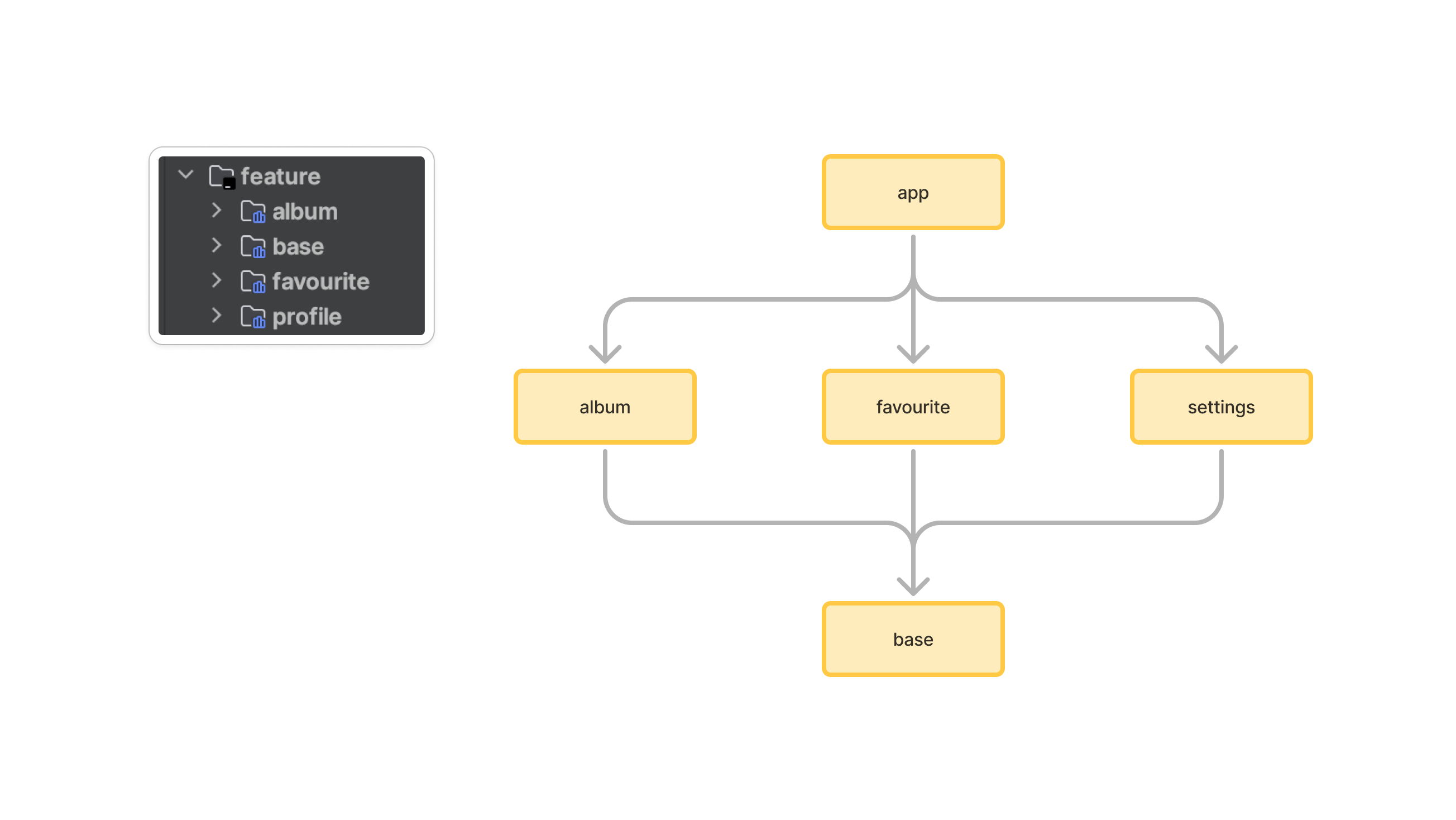
**Module Types:**
- **`app`** - Main application module containing navigation setup, DI configuration, and app-level components
- **`feature-*`** - Feature modules (album, profile, favourite) containing feature-specific business logic
- **`feature-base`** - Shared foundation module providing common utilities and base classes
- **`library-*`** - Utility modules for testing and shared functionality
### Feature Module Structure
`Clean Architecture` is implemented at the module level - each module contains its own set of Clean Architecture layers:
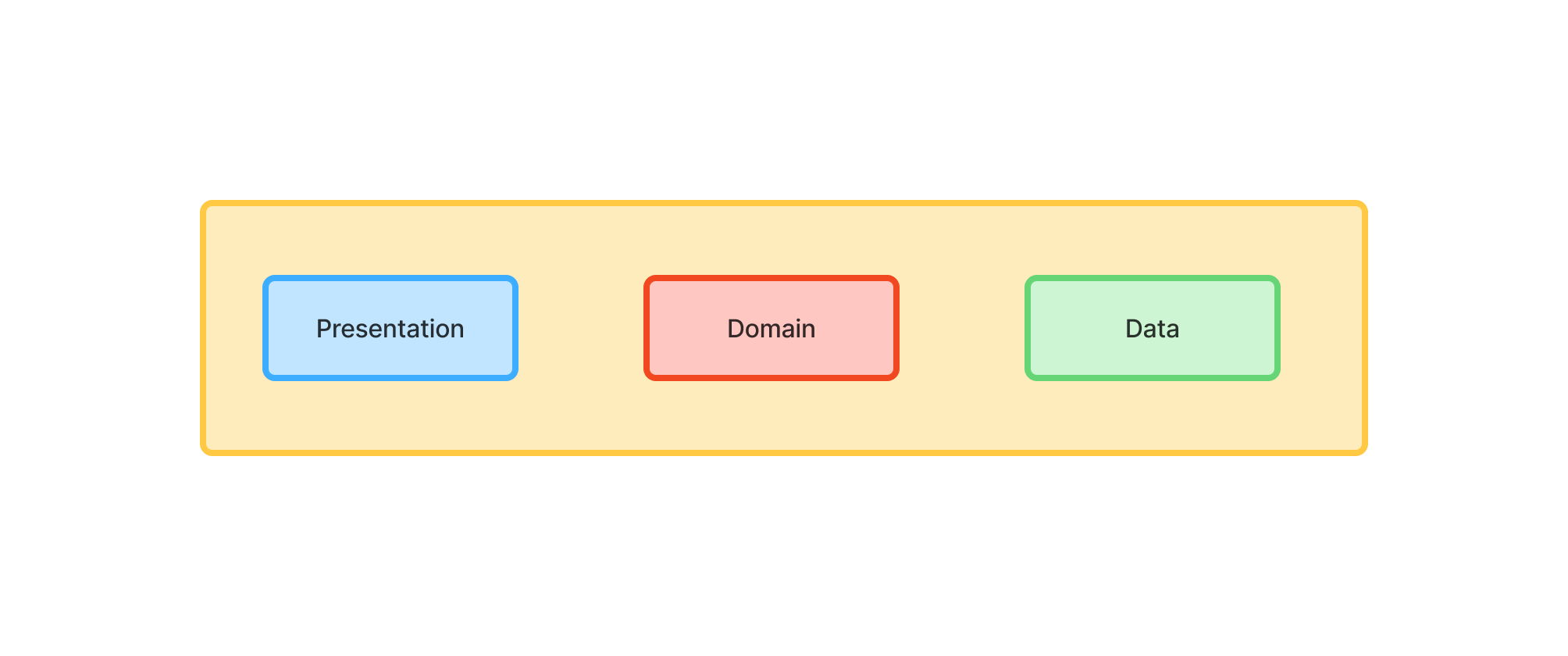
> Notice that the `app` module and `library_x` modules structure differs a bit from the feature module structure.
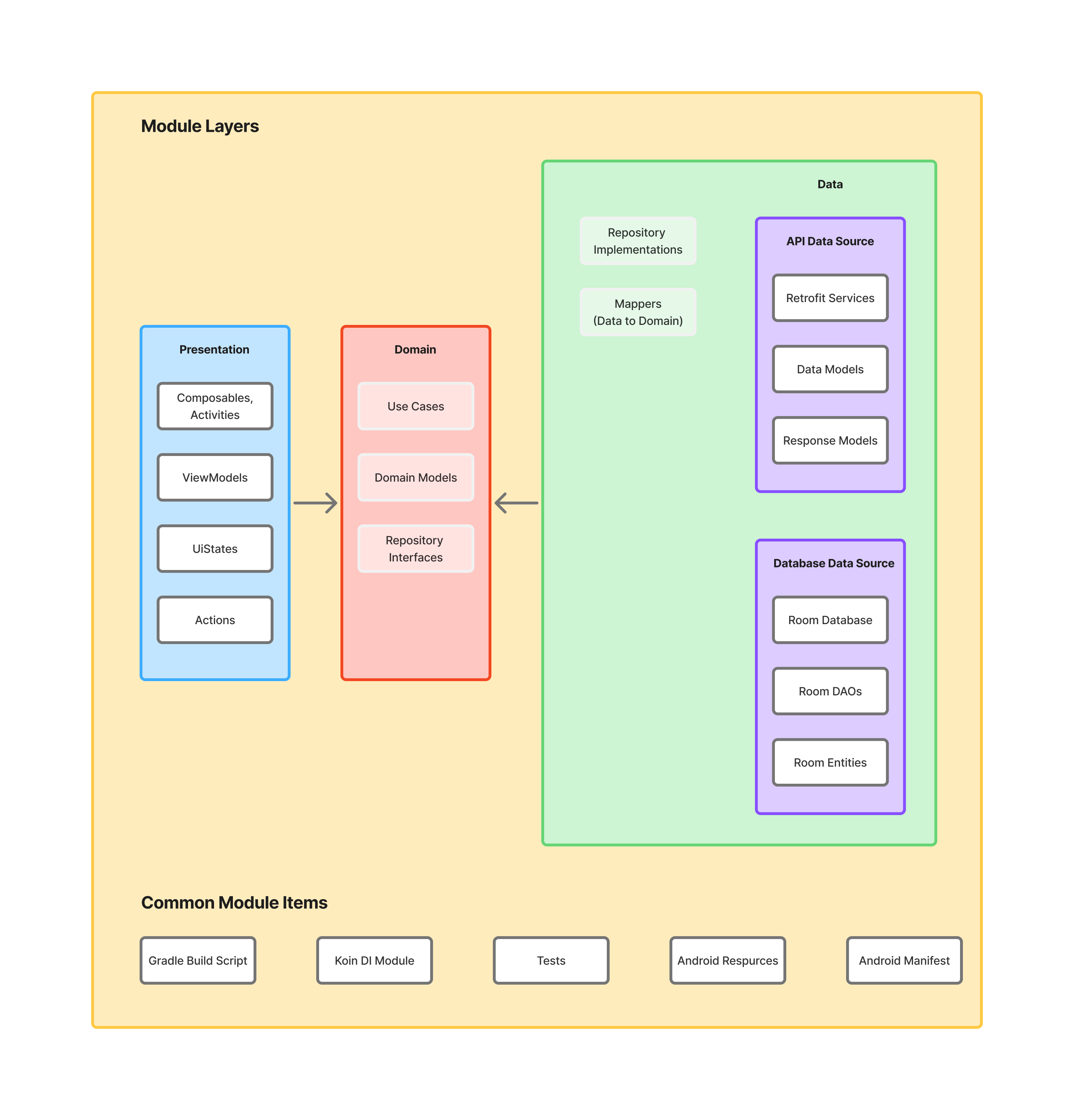
Each feature module contains 3 layers with a distinct set of responsibilities and common module components.
#### Presentation Layer
This layer is closest to what the user sees on the screen.
The `presentation` layer mixes `MVVM` and `MVI` patterns:
- `MVVM` - Jetpack `ViewModel` is used to encapsulate a `common UI state`. It exposes the `state` via observable state
holder (`Kotlin Flow`)
- `MVI` - `action` modifies the `common UI state` and emits a new state to a view via `Kotlin Flow`
> The `common state` is a single source of truth for each view. This solution derives from
> [Unidirectional Data Flow](https://en.wikipedia.org/wiki/Unidirectional_Data_Flow_(computer_science)) and [Redux
> principles](https://redux.js.org/introduction/three-principles).
This approach facilitates the creation of consistent states. The state is collected via `collectAsUiStateWithLifecycle`
method. Flows collection happens in a lifecycle-aware manner, so
[no resources are wasted](https://medium.com/androiddevelopers/consuming-flows-safely-in-jetpack-compose-cde014d0d5a3).
Stated is annotated with [Immutable](https://developer.android.com/reference/kotlin/androidx/compose/runtime/Immutable)
annotation that is used by Jetpack compose to enable composition optimizations.
Components:
- **Screen (Composable)** - observes common view state (through `Kotlin Flow`). Compose transform state (emitted by Kotlin
Flow) into application UI Consumes the state and transforms it into application UI (via `Jetpack Compose`). Pass user
interactions to `ViewModel`. Views are hard to test, so they should be as simple as possible.
- **ViewModel** - emits (through `Kotlin Flow`) view state changes to the view and deals with user interactions (these
view models are not simply [POJO classes](https://en.wikipedia.org/wiki/Plain_old_Java_object)).
- **ViewState** - common state for a single view
- **StateTimeTravelDebugger** - logs actions and view state transitions to facilitate debugging.
- **NavManager** - singleton that facilitates handling all navigation events inside `NavHostActivity` (instead of
separately, inside each view)
#### Domain Layer
This is the core layer of the application. Notice that the `domain` layer is independent of any other layers. This
allows making domain models and business logic independent from other layers. In other words, changes in other layers
will not affect the `domain` layer eg. changing the database (`data` layer) or screen UI (`presentation` layer) ideally will
not result in any code change within the `domain` layer.
Components:
- **UseCase** - contains business logic
- **DomainModel** - defines the core structure of the data that will be used within the application. This is the source
of truth for application data.
- **Repository interface** - required to keep the `domain` layer independent from
the `data layer` ([Dependency inversion](https://en.wikipedia.org/wiki/Dependency_inversion_principle)).
#### Data Layer
Encapsulates application data. Provides the data to the `domain` layer eg. retrieves data from the internet and cache the
data in disk cache (when the device is offline).
Components:
- **Repository** is exposing data to the `domain` layer. Depending on the application structure and quality of the
external API repository can also merge, filter, and transform the data. These operations intend to create
a high-quality data source for the `domain` layer. It is the responsibility of the Repository (one or more) to construct
Domain models by reading from the `Data Source` and accepting Domain models to be written to the `Data Source`
- **Mapper** - maps `data model` to `domain model` (to keep `domain` layer independent from the `data` layer).
This application has two `Data Sources` - `Retrofit` (used for network access) and `Room` (local storage used to access
device persistent memory). These data sources can be treated as an implicit sub-layer. Each data source consists of
multiple classes:
- **Retrofit Service** - defines a set of API endpoints
- **Retrofit Response Model** - definition of the network objects for a given endpoint (top-level model for the data
consists of `ApiModels`)
- **Retrofit Api Data Model** - defines the network objects (sub-objects of the `Response Model`)
- **Room Database** - persistence database to store app data
- **Room DAO** - interact with the stored data
- **Room Entity** - definition of the stored objects
Both `Retrofit API Data Models` and `Room Entities` contain annotations, so the given framework understands how to parse the
data into objects.
#### Common Module Components
Each module in the Android project contains several standard items that provide essential functionality and configuration:
Components:
- **Gradle Build Script** - `build.gradle.kts` defining dependencies, build configurations, and plugins.
- **Koin DI Module** - Dependency injection configuration
- **Tests** - Unit tests (`test/`) and integration tests (`androidTest/`)
- **Android Resources** - resources (`res/`) including strings, drawables, and assets.
- **Android Manifest** - The `AndroidManifest.xml` file declaring module metadata.
### Data Flow
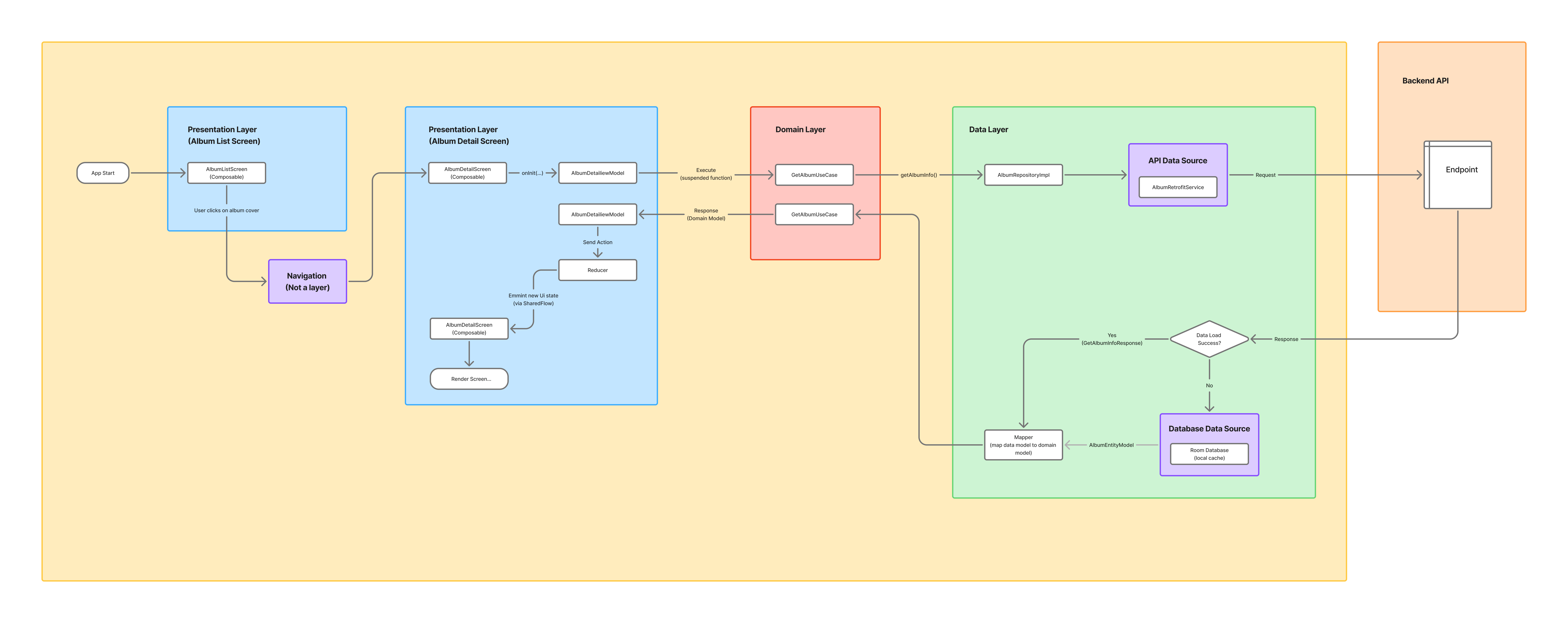
The below diagram presents application data flow when a user interacts with the `album list screen`:
## Project Features
### Development & Debugging
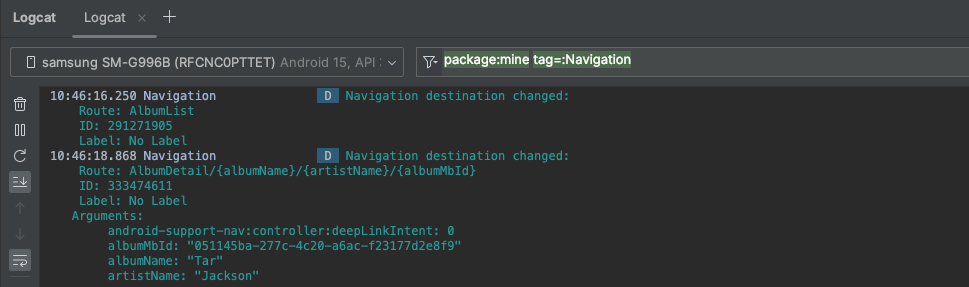
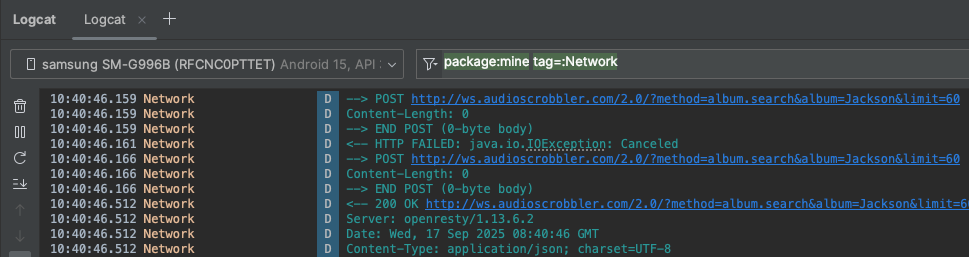
Tags ([LogTags](feature/base/src/main/kotlin/com/igorwojda/showcase/feature/base/util/LogTags.kt)) help filter and identify different types of logs during development and debugging.
The app provides detailed logging for development and debugging, with each log easily filterable by its tag:
- `Navigation` - Navigation events and route changes
- `Action` - User actions and UI state modifications

- `Network` - Network requests, responses, and HTTP-related logs
### Custom Icons For Each Variant
Thanks to [Easylauncher Gradle plugin](https://github.com/usefulness/easylauncher-gradle-plugin) the `debug` build has custom icon label:
 ### Themed Icons
App supports [Themed Icons](https://medium.com/@enikebraimoh/android-themed-icons-a-comprehensive-guide-3abb33ab51a7).
Left (classic icon), Right (themed icon):
### Themed Icons
App supports [Themed Icons](https://medium.com/@enikebraimoh/android-themed-icons-a-comprehensive-guide-3abb33ab51a7).
Left (classic icon), Right (themed icon):
 ## Gradle Config
### Dependency Management
Gradle [versions catalog](https://docs.gradle.org/current/userguide/platforms.html#sub:version-catalog) is used as a centralized dependency management third-party dependency coordinates (group, artifact, version) are shared across all modules (Gradle projects and subprojects).
Gradle versions catalog consists of a few major sections:
- `[versions]` - declare versions that can be referenced by all dependencies
- `[libraries]` - declare the aliases to library coordinates
- `[bundles]` - declare dependency bundles (groups)
- `[plugins]` - declare Gradle plugin dependencies
Each module uses convention a plugin, so common dependencies are shared without the need to add them explicitly in each module.
### Convention Plugins
[Convention plugins](https://docs.gradle.org/current/samples/sample_convention_plugins.html) standardize build configuration across modules by encapsulating common build logic into reusable plugins:
- **[`Application Convention`](./build-logic/src/main/kotlin/com/igorwojda/showcase/buildlogic/ApplicationConventionPlugin.kt)** - Main application module configuration with Android app setup
- **[`Feature Convention`](./build-logic/src/main/kotlin/com/igorwojda/showcase/buildlogic/FeatureConventionPlugin.kt)** - Feature module configuration combining library and Kotlin conventions
- **[`Library Convention`](./build-logic/src/main/kotlin/com/igorwojda/showcase/buildlogic/LibraryConventionPlugin.kt)** - Android library module setup with common Android configuration
- **[`Lotlin Convention`](./build-logic/src/main/kotlin/com/igorwojda/showcase/buildlogic/KotlinConventionPlugin.kt)** - Kotlin compilation settings, toolchain, and compiler options
- **[`Test Convention`](./build-logic/src/main/kotlin/com/igorwojda/showcase/buildlogic/TestConventionPlugin.kt)** - Testing framework setup (JUnit, test logging, and test configurations)
- **[`Test Library Convention`](./build-logic/src/main/kotlin/com/igorwojda/showcase/buildlogic/TestConventionLibraryPlugin.kt)** - Testing setup specifically for library modules
- **[`Detekt Convention`](./build-logic/src/main/kotlin/com/igorwojda/showcase/buildlogic/DetektConventionPlugin.kt)** - Static code analysis configuration with Detekt
- **[`Spotless Convention`](./build-logic/src/main/kotlin/com/igorwojda/showcase/buildlogic/SpotlessConventionPlugin.kt)** - Code formatting and style enforcement with Spotless
- **[`Easylauncher Convention`](./build-logic/src/main/kotlin/com/igorwojda/showcase/buildlogic/EasyLauncherConventionPlugin.kt)** - App icon customization for different build variants
- **[`AboutLibraries Convention`](./build-logic/src/main/kotlin/com/igorwojda/showcase/buildlogic/AboutLibrariesConventionPlugin.kt)** - About libraries configuration
### Type Safe Project Accessors
Enables type-safe project references instead of error-prone string-based module paths:
```kotlin
// Before
implementation(project(":feature:album"))
// After
implementation(projects.feature.album)
```
### Unified Version Configuration
All dependency and Gradle plugin versions are defined in the TOML version catalog file ([libs.versions.toml](gradle/libs.versions.toml)).
#### Java/JVM Version Configuration
The Java/JVM version is centralized across the project.
It is defined once in [`libs.versions.toml`](gradle/libs.versions.toml) file under the java entry.
The `generateJavaBuildConfig` task reads this value and generates a `JavaBuildConfig.kt` file with constants.
These constants are then used in Gradle convention plugins to configure both Java and Kotlin consistently:
```kotlin
compileOptions {
sourceCompatibility = JavaBuildConfig.JAVA_VERSION
targetCompatibility = JavaBuildConfig.JAVA_VERSION
}
kotlin {
compilerOptions {
jvmTarget = JavaBuildConfig.jvmTarget
}
jvmToolchain(JavaBuildConfig.jvmToolchainVersion)
}
```
### Generated type-safe version catalogs accessors in `build-logic` module
The `build-logic` module provides type-safe access to version catalogs from within precompiled script plugins.
This is enabled via the `versionCatalogs` block in `build-logic/settings.gradle.kts`, which references the main version catalog file and `implementation(files(libs.javaClass.superclass.protectionDomain.codeSource.location))` dependency in `build-logic/build.gradle.kts` file.
This setup allows you to use catalog dependencies in plugins, for example:
```kotlin
add("implementation", libs.timber)
```
Additionally, extensions defined in [DependencyHandlerScope](build-logic/src/main/kotlin/com/igorwojda/showcase/buildlogic/ext/DependencyHandlerExt.kt) make the syntax more natural and equivalent to standard Gradle usage:
```kotlin
implementation(libs.timber)
```
### Gradle Configuration Cache
Enabled [Gradle Configuration Cache](https://docs.gradle.org/9.0.0/userguide/configuration_cache_enabling.html).
## Code Verification
**Quality Checks:**
```bash
./gradlew konsist-test:test --rerun-tasks # Architecture & convention validation
./gradlew lintDebug # Android lint analysis
./gradlew detektCheck # Code complexity & style analysis
./gradlew spotlessCheck # Code formatting verification
./gradlew testDebugUnitTest -x konsist-test:test # Unit test execution (without Konsist tests)
./gradlew connectedCheck # UI test execution (WIP)
./gradlew :app:bundleDebug # Production build verification
```
**Auto-fix Commands:**
```bash
./gradlew detektApply # Apply Detekt formatting fixes
./gradlew spotlessApply # Apply code formatting fixes
./gradlew lintDebug # Update lint baseline
```
### CI Pipeline
[GitHub Actions](https://github.com/features/actions) workflows execute quality checks automatically:
- **PR Validation** - All checks run in parallel on pull requests
- **Main Branch Protection** - Post-merge validation ensures code quality
- **Automated Dependency Updates** - Renovate bot creates PRs for dependency updates
Configuration: [`.github/workflows`](.github/workflows)
### Pre-push Hooks
Optional [Git hooks](https://git-scm.com/docs/githooks#_pre_push) can execute quality checks before pushing code, providing fast feedback during development.
## Project Scope & Limitations
This showcase prioritizes **architecture, tooling, and development practices** over complex UI design. The interface uses Material Design 3 components but remains intentionally straightforward to focus on the underlying technical implementation.
## Getting Started
**Prerequisites:**
- Android Studio Giraffe | 2022.3.1+
- JDK 17+
- Android SDK 34+
**Setup:**
```bash
# Clone the repository
git clone https://github.com/igorwojda/android-showcase.git
# Open in Android Studio
# File -> Open -> Select cloned directory
```
**Recommended IDE Plugins:**
- [Detekt](https://plugins.jetbrains.com/plugin/10761-detekt) - Configure with [detekt.yml](detekt.yml)
- [Kotlin](https://plugins.jetbrains.com/plugin/6954-kotlin) - Usually pre-installed
- [Android](https://developer.android.com/studio) - Usually pre-installed
## Roadmap
Active development continues with focus on modern Android practices. View planned [enhancements](https://github.com/igorwojda/android-showcase/issues?q=is%3Aissue+is%3Aopen+sort%3Aupdated-desc+label%3Aenhancement) and contribute ideas.
## Resources
**Development Tools:**
- [Material Theme Builder](https://m3.material.io/theme-builder#/dynamic) - Generate Material 3 dynamic themes
- [Compose Material 3 Components](https://developer.android.com/reference/kotlin/androidx/compose/material3/package-summary) - Component reference
- [Android Ecosystem Cheat Sheet](https://github.com/igorwojda/android-ecosystem-cheat-sheet) - 200+ essential Android tools
- [Kotlin Coroutines Use Cases](https://github.com/LukasLechnerDev/Kotlin-Coroutine-Use-Cases-on-Android) - Practical coroutine examples
**Recommended Projects:**
- [Now in Android](https://github.com/android/nowinandroid) - Google's official modern Android showcase
- [Android Architecture Blueprints](https://github.com/googlesamples/android-architecture) - Architecture pattern examples
- [Compose Samples](https://github.com/android/compose-samples) - Official Jetpack Compose examples
- [Kotlin Android Template](https://github.com/cortinico/kotlin-android-template) - Pre-configured project template
- [Androidify](https://github.com/android/androidify) - Android's official character customization app
- [WeatherXM Android](https://github.com/WeatherXM/wxm-android) - Weather data collection and rewards platform
- [Songify](https://github.com/JamesBuhanan/Songify) - Spotify-inspired music streaming app
- [Alkaa](https://github.com/igorescodro/alkaa) - Task management app with modern architecture
- [KotlinConf App](https://github.com/JetBrains/kotlinconf-app) - JetBrains' official conference app
- [Tivi](https://github.com/chrisbanes/tivi) - TV show tracking app by Chris Banes
- [CatchUp](https://github.com/ZacSweers/CatchUp) - News aggregation app with modular architecture
- [Heron](https://github.com/tunjid/heron) - Social media client showcasing modern Android development
## Contributing
Contributions are welcome! Please check the [CONTRIBUTING.md](CONTRIBUTING.md) guidelines before submitting PRs.
**Areas for Contribution:**
- Feature implementations (Profile, Favorites screens)
- UI/UX improvements and animations
- Performance optimizations
- Testing coverage expansion
- Documentation improvements
## Author
**Igor Wojda** - Senior Android Engineer
[](https://twitter.com/igorwojda)
[](https://github.com/igorwojda)
## Animations License
Flowing animations are distributed under `Creative Commons License 2.0`:
- [Error screen](https://lottiefiles.com/8049-error-screen) by Chetan Potnuru
- [Building Screen](https://lottiefiles.com/1271-building-screen) by Carolina Cajazeira
## Gradle Config
### Dependency Management
Gradle [versions catalog](https://docs.gradle.org/current/userguide/platforms.html#sub:version-catalog) is used as a centralized dependency management third-party dependency coordinates (group, artifact, version) are shared across all modules (Gradle projects and subprojects).
Gradle versions catalog consists of a few major sections:
- `[versions]` - declare versions that can be referenced by all dependencies
- `[libraries]` - declare the aliases to library coordinates
- `[bundles]` - declare dependency bundles (groups)
- `[plugins]` - declare Gradle plugin dependencies
Each module uses convention a plugin, so common dependencies are shared without the need to add them explicitly in each module.
### Convention Plugins
[Convention plugins](https://docs.gradle.org/current/samples/sample_convention_plugins.html) standardize build configuration across modules by encapsulating common build logic into reusable plugins:
- **[`Application Convention`](./build-logic/src/main/kotlin/com/igorwojda/showcase/buildlogic/ApplicationConventionPlugin.kt)** - Main application module configuration with Android app setup
- **[`Feature Convention`](./build-logic/src/main/kotlin/com/igorwojda/showcase/buildlogic/FeatureConventionPlugin.kt)** - Feature module configuration combining library and Kotlin conventions
- **[`Library Convention`](./build-logic/src/main/kotlin/com/igorwojda/showcase/buildlogic/LibraryConventionPlugin.kt)** - Android library module setup with common Android configuration
- **[`Lotlin Convention`](./build-logic/src/main/kotlin/com/igorwojda/showcase/buildlogic/KotlinConventionPlugin.kt)** - Kotlin compilation settings, toolchain, and compiler options
- **[`Test Convention`](./build-logic/src/main/kotlin/com/igorwojda/showcase/buildlogic/TestConventionPlugin.kt)** - Testing framework setup (JUnit, test logging, and test configurations)
- **[`Test Library Convention`](./build-logic/src/main/kotlin/com/igorwojda/showcase/buildlogic/TestConventionLibraryPlugin.kt)** - Testing setup specifically for library modules
- **[`Detekt Convention`](./build-logic/src/main/kotlin/com/igorwojda/showcase/buildlogic/DetektConventionPlugin.kt)** - Static code analysis configuration with Detekt
- **[`Spotless Convention`](./build-logic/src/main/kotlin/com/igorwojda/showcase/buildlogic/SpotlessConventionPlugin.kt)** - Code formatting and style enforcement with Spotless
- **[`Easylauncher Convention`](./build-logic/src/main/kotlin/com/igorwojda/showcase/buildlogic/EasyLauncherConventionPlugin.kt)** - App icon customization for different build variants
- **[`AboutLibraries Convention`](./build-logic/src/main/kotlin/com/igorwojda/showcase/buildlogic/AboutLibrariesConventionPlugin.kt)** - About libraries configuration
### Type Safe Project Accessors
Enables type-safe project references instead of error-prone string-based module paths:
```kotlin
// Before
implementation(project(":feature:album"))
// After
implementation(projects.feature.album)
```
### Unified Version Configuration
All dependency and Gradle plugin versions are defined in the TOML version catalog file ([libs.versions.toml](gradle/libs.versions.toml)).
#### Java/JVM Version Configuration
The Java/JVM version is centralized across the project.
It is defined once in [`libs.versions.toml`](gradle/libs.versions.toml) file under the java entry.
The `generateJavaBuildConfig` task reads this value and generates a `JavaBuildConfig.kt` file with constants.
These constants are then used in Gradle convention plugins to configure both Java and Kotlin consistently:
```kotlin
compileOptions {
sourceCompatibility = JavaBuildConfig.JAVA_VERSION
targetCompatibility = JavaBuildConfig.JAVA_VERSION
}
kotlin {
compilerOptions {
jvmTarget = JavaBuildConfig.jvmTarget
}
jvmToolchain(JavaBuildConfig.jvmToolchainVersion)
}
```
### Generated type-safe version catalogs accessors in `build-logic` module
The `build-logic` module provides type-safe access to version catalogs from within precompiled script plugins.
This is enabled via the `versionCatalogs` block in `build-logic/settings.gradle.kts`, which references the main version catalog file and `implementation(files(libs.javaClass.superclass.protectionDomain.codeSource.location))` dependency in `build-logic/build.gradle.kts` file.
This setup allows you to use catalog dependencies in plugins, for example:
```kotlin
add("implementation", libs.timber)
```
Additionally, extensions defined in [DependencyHandlerScope](build-logic/src/main/kotlin/com/igorwojda/showcase/buildlogic/ext/DependencyHandlerExt.kt) make the syntax more natural and equivalent to standard Gradle usage:
```kotlin
implementation(libs.timber)
```
### Gradle Configuration Cache
Enabled [Gradle Configuration Cache](https://docs.gradle.org/9.0.0/userguide/configuration_cache_enabling.html).
## Code Verification
**Quality Checks:**
```bash
./gradlew konsist-test:test --rerun-tasks # Architecture & convention validation
./gradlew lintDebug # Android lint analysis
./gradlew detektCheck # Code complexity & style analysis
./gradlew spotlessCheck # Code formatting verification
./gradlew testDebugUnitTest -x konsist-test:test # Unit test execution (without Konsist tests)
./gradlew connectedCheck # UI test execution (WIP)
./gradlew :app:bundleDebug # Production build verification
```
**Auto-fix Commands:**
```bash
./gradlew detektApply # Apply Detekt formatting fixes
./gradlew spotlessApply # Apply code formatting fixes
./gradlew lintDebug # Update lint baseline
```
### CI Pipeline
[GitHub Actions](https://github.com/features/actions) workflows execute quality checks automatically:
- **PR Validation** - All checks run in parallel on pull requests
- **Main Branch Protection** - Post-merge validation ensures code quality
- **Automated Dependency Updates** - Renovate bot creates PRs for dependency updates
Configuration: [`.github/workflows`](.github/workflows)
### Pre-push Hooks
Optional [Git hooks](https://git-scm.com/docs/githooks#_pre_push) can execute quality checks before pushing code, providing fast feedback during development.
## Project Scope & Limitations
This showcase prioritizes **architecture, tooling, and development practices** over complex UI design. The interface uses Material Design 3 components but remains intentionally straightforward to focus on the underlying technical implementation.
## Getting Started
**Prerequisites:**
- Android Studio Giraffe | 2022.3.1+
- JDK 17+
- Android SDK 34+
**Setup:**
```bash
# Clone the repository
git clone https://github.com/igorwojda/android-showcase.git
# Open in Android Studio
# File -> Open -> Select cloned directory
```
**Recommended IDE Plugins:**
- [Detekt](https://plugins.jetbrains.com/plugin/10761-detekt) - Configure with [detekt.yml](detekt.yml)
- [Kotlin](https://plugins.jetbrains.com/plugin/6954-kotlin) - Usually pre-installed
- [Android](https://developer.android.com/studio) - Usually pre-installed
## Roadmap
Active development continues with focus on modern Android practices. View planned [enhancements](https://github.com/igorwojda/android-showcase/issues?q=is%3Aissue+is%3Aopen+sort%3Aupdated-desc+label%3Aenhancement) and contribute ideas.
## Resources
**Development Tools:**
- [Material Theme Builder](https://m3.material.io/theme-builder#/dynamic) - Generate Material 3 dynamic themes
- [Compose Material 3 Components](https://developer.android.com/reference/kotlin/androidx/compose/material3/package-summary) - Component reference
- [Android Ecosystem Cheat Sheet](https://github.com/igorwojda/android-ecosystem-cheat-sheet) - 200+ essential Android tools
- [Kotlin Coroutines Use Cases](https://github.com/LukasLechnerDev/Kotlin-Coroutine-Use-Cases-on-Android) - Practical coroutine examples
**Recommended Projects:**
- [Now in Android](https://github.com/android/nowinandroid) - Google's official modern Android showcase
- [Android Architecture Blueprints](https://github.com/googlesamples/android-architecture) - Architecture pattern examples
- [Compose Samples](https://github.com/android/compose-samples) - Official Jetpack Compose examples
- [Kotlin Android Template](https://github.com/cortinico/kotlin-android-template) - Pre-configured project template
- [Androidify](https://github.com/android/androidify) - Android's official character customization app
- [WeatherXM Android](https://github.com/WeatherXM/wxm-android) - Weather data collection and rewards platform
- [Songify](https://github.com/JamesBuhanan/Songify) - Spotify-inspired music streaming app
- [Alkaa](https://github.com/igorescodro/alkaa) - Task management app with modern architecture
- [KotlinConf App](https://github.com/JetBrains/kotlinconf-app) - JetBrains' official conference app
- [Tivi](https://github.com/chrisbanes/tivi) - TV show tracking app by Chris Banes
- [CatchUp](https://github.com/ZacSweers/CatchUp) - News aggregation app with modular architecture
- [Heron](https://github.com/tunjid/heron) - Social media client showcasing modern Android development
## Contributing
Contributions are welcome! Please check the [CONTRIBUTING.md](CONTRIBUTING.md) guidelines before submitting PRs.
**Areas for Contribution:**
- Feature implementations (Profile, Favorites screens)
- UI/UX improvements and animations
- Performance optimizations
- Testing coverage expansion
- Documentation improvements
## Author
**Igor Wojda** - Senior Android Engineer
[](https://twitter.com/igorwojda)
[](https://github.com/igorwojda)
## Animations License
Flowing animations are distributed under `Creative Commons License 2.0`:
- [Error screen](https://lottiefiles.com/8049-error-screen) by Chetan Potnuru
- [Building Screen](https://lottiefiles.com/1271-building-screen) by Carolina Cajazeira