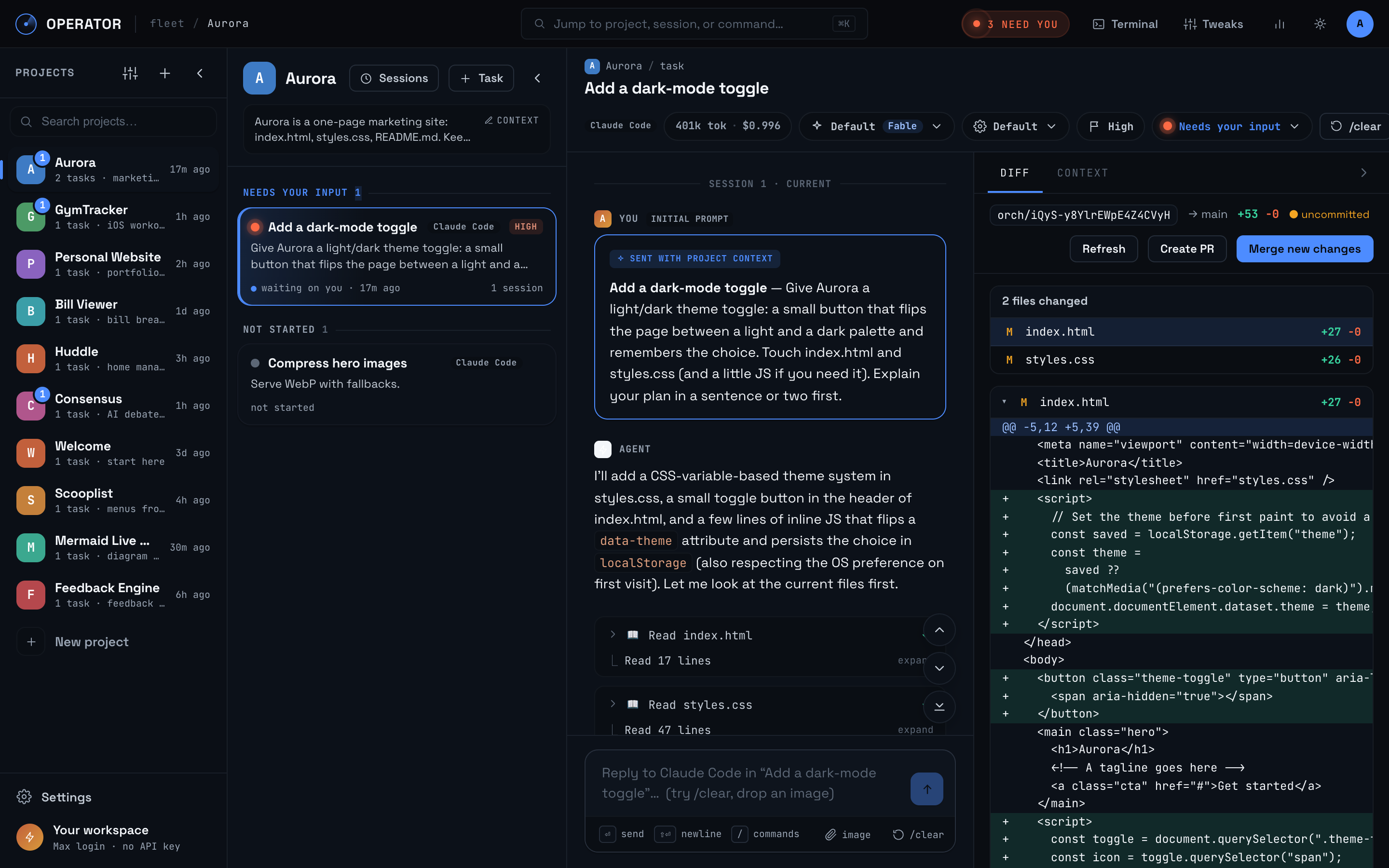
Operator logo # Operator ### Run Claude Code and Codex in parallel from any browser. Operator is a web-based control room for coding agents. Every task gets a persistent agent session in an isolated git worktree, so you can delegate across projects without juggling terminals or mixing branches. Run Operator on your own computer, self-host it on a server, or use the hosted version. A deployed workspace is available from your computer, tablet, or phone. [**Try hosted**](https://getoperator.dev) · [**Run locally**](#quick-start) · [**Self-host**](docs/SELF_HOSTING.md) · [**Docs**](#documentation) · [**Join Discord**](https://discord.gg/p4aaXvzJq2) [![Discord](https://img.shields.io/badge/Discord-Join%20the%20community-5865F2?logo=discord&logoColor=white)](https://discord.gg/p4aaXvzJq2) [![GitHub stars](https://img.shields.io/github/stars/iishyfishyy/operator-oss?style=flat&logo=github)](https://github.com/iishyfishyy/operator-oss/stargazers) [![GitHub release](https://img.shields.io/github/v/release/iishyfishyy/operator-oss?display_name=tag)](https://github.com/iishyfishyy/operator-oss/releases/latest) [![License: Apache-2.0](https://img.shields.io/badge/license-Apache--2.0-blue.svg)](LICENSE) ![Operator workspace showing projects and parallel agent tasks](docs/images/workspace.png)

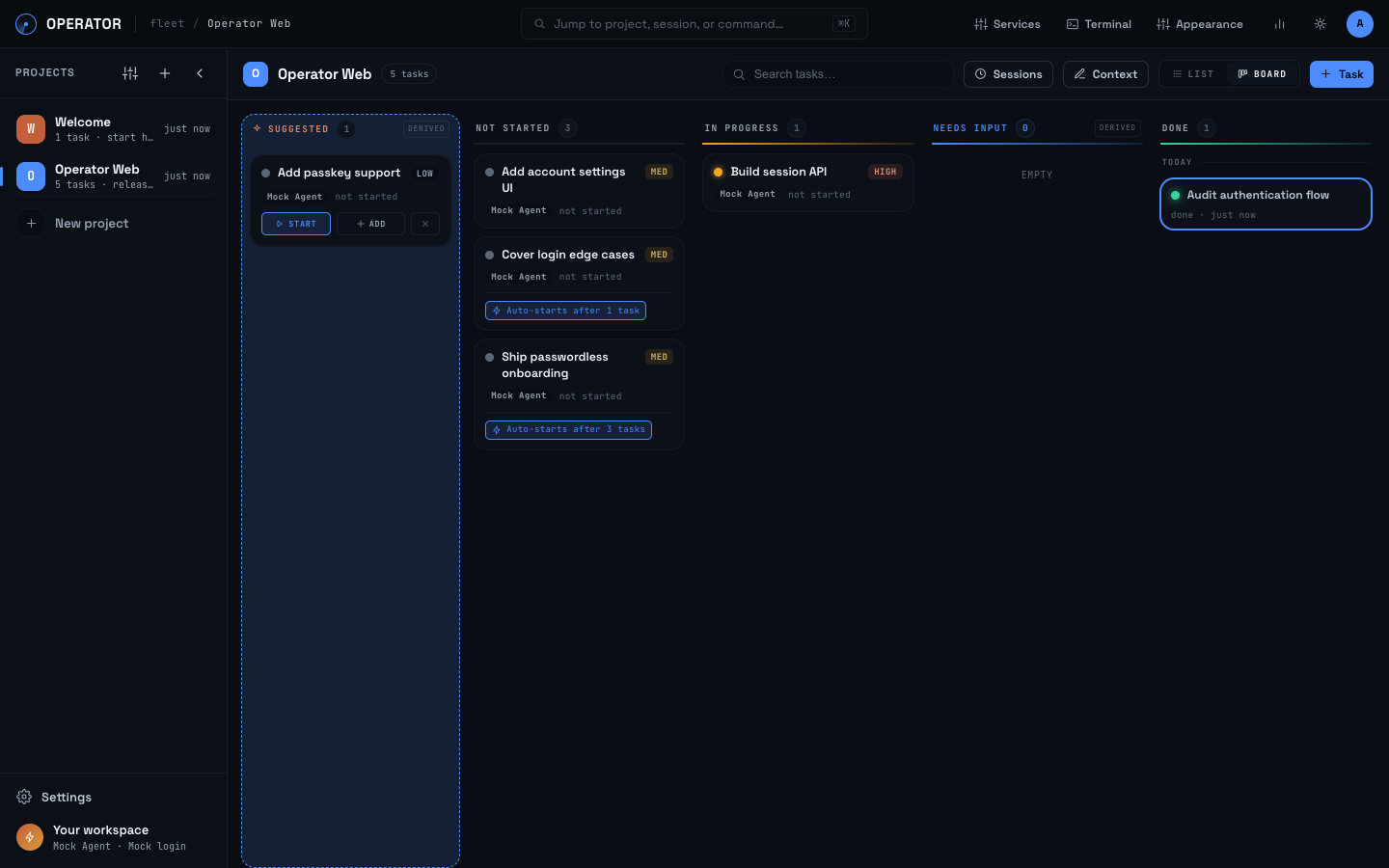
## One web workspace for every agent - **Run tasks in parallel.** Each task has its own worktree, branch, transcript, and Claude Code or Codex session. - **Know where you are needed.** One cross-project inbox surfaces every session waiting for your input while other agents keep working. - **Keep context alive.** Save project knowledge once, persist transcripts across reloads, and use `/clear` to start a fresh context window without losing the task lineage. - **Review before you ship.** Inspect the diff beside the conversation, sync the branch, resolve conflicts, merge, or open a pull request. Conflict banners track the live resolution and disappear when no conflicts remain; accepting the merge stays explicit. ## Chain tasks into pipelines Make a task depend on one or several earlier tasks. Work can branch into parallel paths, then join again for final integration. Enable **Start when unblocked** and Operator launches each task as soon as its last dependency finishes. **Create tasks → connect dependencies → agents work in isolated branches → review and merge** Suggested groups offer **Accept all** and **Start chain** in both list and board views, with a numbered dependency preview. Start chain launches ready roots and arms blocked tasks to start when their blockers are done. ![Operator board showing branching tasks and automatic starts](docs/images/pipeline.png) ## Run it your way | | Best for | Access | |---|---|---| | **Local** | Using Operator on one machine with the least setup | `localhost` in your browser | | **Self-hosted** | An always-on workspace on infrastructure you control | Any authorized browser or device | | **Hosted** | An always-on workspace without managing a server | [getoperator.dev](https://getoperator.dev) from any browser or device | Operator is a web app in all three modes. Running locally keeps the app and its data on your machine. Deploying it makes the same control room reachable wherever you are, including on mobile.
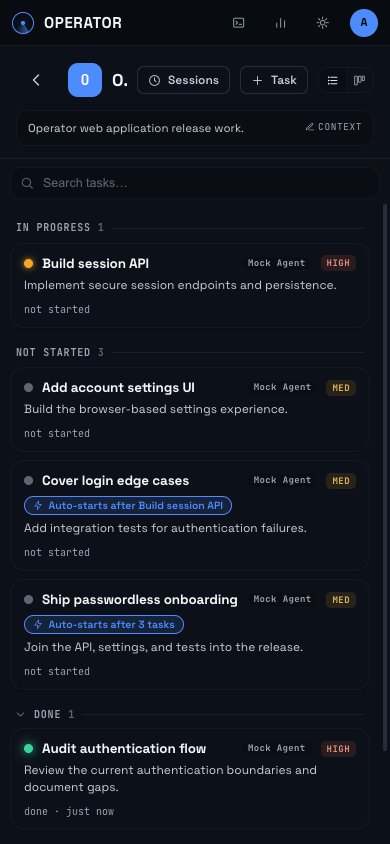
Operator task pipeline in a mobile browser

## Quick start You need Node 20.9 or newer, macOS or Linux, and at least one supported agent CLI. ```bash git clone https://github.com/iishyfishyy/operator-oss.git cd operator-oss npm install npm run build npm start ``` Open . The first-run wizard connects Claude Code or Codex and guides you through a small real task. Both agents support subscription login, so an API key is not required. API keys remain an explicit option. For Docker, authentication, TLS, and secure access from outside your machine, follow the [self-hosting guide](docs/SELF_HOSTING.md). Do not expose an unauthenticated Operator origin to a network. ## More than chat Operator also includes list and kanban views, agent-suggested follow-up tasks, per-project and per-task terminals, managed services with live logs, project recaps, and transparent token and usage insights. Reusable [custom slash commands](docs/COMMANDS.md) let you save app-wide or project prompts, insert them from the composer or command palette, and expand task details and arguments before sending. [Explore all features](docs/FEATURES.md) · [Compare agent support](docs/AGENTS.md) · [Read the architecture](docs/ARCHITECTURE.md) ## Community [Join Discord](https://discord.gg/p4aaXvzJq2) to meet users and contributors, show what you are building, and discuss Operator. Use [GitHub Discussions](https://github.com/iishyfishyy/operator-oss/discussions/categories/ideas) for feature requests, [GitHub Issues](https://github.com/iishyfishyy/operator-oss/issues/new?template=bug_report.yml) for reproducible bugs, and [CONTRIBUTING.md](CONTRIBUTING.md) for pull requests. ## Documentation [Install and develop](docs/INSTALLATION.md) · [Self-host](docs/SELF_HOSTING.md) · [Features](docs/FEATURES.md) · [Agents](docs/AGENTS.md) · [Changelog](CHANGELOG.md) · [Releasing](docs/RELEASING.md) · [Security](SECURITY.md) · [Community](docs/COMMUNITY.md) ## License [Apache-2.0](LICENSE) ### Inspecting prompts Start with `ORCH_DEBUG_PROMPTS=1 npm start` (or `ORCH_DEBUG_PROMPTS=1 npm run dev`), then open a task's **PROMPTS** tab beside DIFF and CONTEXT. Run a turn and refresh captures to inspect the exact text Operator handed to Claude Code or Codex. The inspector shows context sections, repeated lines within a submission, run options, raw inputs, JSON download, and comparison with the previous submission for the same agent and job. It also includes the task's `/clear` summaries and project-level recap/context-refresh jobs, labeled separately. These are SDK input snapshots, not complete model requests: agent-managed system instructions, restored history, tool results, and compaction are outside this capture boundary. Claude's context append and user prompt are separate inputs; Codex's fresh-session input combines context and user text. A resumed Codex submission contains only the new user text. Model overrides of `null` mean the runtime chooses its default. Debugging is off by default and takes effect at server startup without rebuilding. Captures contain verbatim prompt content, including any secrets in that text; environment credentials and MCP bridge tokens are excluded from recorded options. They live in `ORCH_DB_DIR/orchestrator.db`, bounded globally to the newest 200 captures / 32 MiB. Captures larger than 8 MiB are skipped with a server-log notice. Captures expire after seven days and are purged on the next capture or inspector read; task/project deletion also deletes associated captures. Disabling the flag hides the panel and endpoint and stops recording; it does not erase retained data. Downloaded copies are not managed by Operator. Earlier turns cannot be recovered retroactively. Captures record attempted SDK submissions, not confirmation of provider receipt. ### Model selection The task's model picker shows versioned Claude and Codex models and their exact routing IDs, including **Opus 5.5** (`claude-opus-5-5`), **GPT-6 Sol** (`gpt-6-sol`), and **GPT-6 Luna** (`gpt-6-luna`). Selecting a version pins that ID for subsequent turns, including resumed sessions. **Provider default** instead inherits the CLI/account configuration; the session badge shows the last resolved model. Existing alias selections keep their behavior and are marked custom / legacy until you choose a version. Both agents accept custom model IDs. For Claude on Bedrock, choices use the exact configured inference-profile IDs or ARNs. Availability still depends on your provider and account. Opus 5.5 requires **Claude Code 2.1.280 or newer**. Local installations should run `claude update` (or update the executable set by `CLAUDE_CLI_PATH`); Docker builds include a compatible version. See [Claude model configuration](https://code.claude.com/docs/en/model-config). Model choices are discovered from the connected agents: Claude's SDK supplies resolved model IDs and Codex supplies its live `model/list` catalog. Operator refreshes the catalog hourly while the app is open; **Refresh models** in the picker checks immediately. Discovery only reads metadata and does not send a prompt or create a task session. The last successful catalog is cached under `ORCH_DB_DIR` and survives restarts. If discovery fails, the picker shows the saved catalog (or the bundled list on first use) with a retry message. Account changes clear the cache; configuration changes invalidate it. Bedrock continues to use the exact IDs from AWS configuration. Refreshes never change an existing task's pinned model. An older Claude CLI that returns only aliases cannot supply exact versions; Operator retains its fallback list until the CLI is updated. Model availability is account- and provider-dependent. The catalog describes the instance's user configuration; project or organization restrictions can still reject a choice. Unknown models use a conservative context-window estimate. Pricing is maintained separately; automatic discovery does not supply new pricing rates. Dependabot checks the agent packages weekly and groups Codex CLI/SDK upgrades in one PR. Dependency PRs run unit tests, TypeScript checks, and a production build. Updates require review; local Claude installations and any `CODEX_CLI_PATH` override still need their own CLI updates. ### Codex permission modes In **Settings → Run defaults**, select **Codex** and choose a default permission mode. **Auto-run** remains the default: `workspace-write`. **Plan** stays `read-only` with network access disabled. **Full access** is an explicit opt-in that requests `danger-full-access` and `approvalPolicy: never`: commands may access files and execute outside the task worktree with your account permissions, without command approvals. Enable it only for tasks you trust. The task's gear menu provides the same permission choices. **Default** inherits the saved per-agent setting; an explicit task choice takes priority. Preferences persist across restarts and apply on the next turn, including resumed sessions. A running turn keeps the mode it started with. Internal utility jobs remain read-only. Full access explicitly requests `never` even when `CODEX_APPROVAL_POLICY` or Auto-run's remembered approval negotiation selects another policy. Codex still enforces managed requirements; Operator does not alter them or retry with bypass flags. Rejections appear in the transcript with guidance to select Auto-run/Plan or contact your administrator. Auto-run and Plan retain their existing approval negotiation. See [Codex sandbox documentation](https://learn.chatgpt.com/docs/sandboxing). On macOS, Full access can remove Codex sandbox restrictions that prevent Chrome from launching (for example, `MachPortRendezvousServer permission denied`). It cannot remove an outer process sandbox, managed policy, or macOS privacy and application permissions; browser automation must be verified on your machine.